
Wifi Adapter Disconnecting - wlan0 not detected
-
I just disconnected/reconnected the USB to 4-pin JST cable from the microhard carrier board and rebooted the vehicle. Now the wlan0 interface has been up the entire time the vehicle's on, but none of the other devices on the vLAN the wifi adapter is connected to can ping the vehicle over wifi.
Output from dmesg looks the same except the following output after the microhard interface is found:
[ 26.460342] usb 1-1.2: new high-speed USB device number 4 using xhci-hcd [ 26.550901] usb 1-1.2: New USB device found, idVendor=1f94, idProduct=3002, bcdDevice= 4.14 [ 26.550915] usb 1-1.2: New USB device strings: Mfr=1, Product=2, SerialNumber=3 [ 26.550922] usb 1-1.2: Product: pMDDL2450AES256 [ 26.550929] usb 1-1.2: Manufacturer: Microhard [ 26.550935] usb 1-1.2: SerialNumber: 1592348 [ 26.639101] rndis_host 1-1.2:1.0 usb0: register 'rndis_host' at usb-xhci-hcd.0.auto-1.2, RNDIS device, 16:4f:08:e4:e1:09 [ 26.643401] cdc_acm 1-1.2:1.2: ttyACM0: USB ACM device [ 33.765387] vdd_tof: disabling [ 33.765393] vdd_hap_boost: disabling [ 37.240138] hrtimer: interrupt took 112083 ns [ 101.412343] boot log copy done [ 114.937520] qcom_rpmh DRV:apps_rsc TCS Busy, retrying RPMH message send: addr=0x41b08 [ 233.747906] perf: interrupt took too long (2778 > 2500), lowering kernel.perf_event_max_sample_rate to 72000 [ 339.990578] perf: interrupt took too long (3473 > 3472), lowering kernel.perf_event_max_sample_rate to 57500 [ 386.060248] perf: interrupt took too long (4425 > 4341), lowering kernel.perf_event_max_sample_rate to 45000 -
I just disconnected/reconnected the USB to 4-pin JST cable from the microhard carrier board and rebooted the vehicle. Now the wlan0 interface has been up the entire time the vehicle's on, but none of the other devices on the vLAN the wifi adapter is connected to can ping the vehicle over wifi.
Output from dmesg looks the same except the following output after the microhard interface is found:
[ 26.460342] usb 1-1.2: new high-speed USB device number 4 using xhci-hcd [ 26.550901] usb 1-1.2: New USB device found, idVendor=1f94, idProduct=3002, bcdDevice= 4.14 [ 26.550915] usb 1-1.2: New USB device strings: Mfr=1, Product=2, SerialNumber=3 [ 26.550922] usb 1-1.2: Product: pMDDL2450AES256 [ 26.550929] usb 1-1.2: Manufacturer: Microhard [ 26.550935] usb 1-1.2: SerialNumber: 1592348 [ 26.639101] rndis_host 1-1.2:1.0 usb0: register 'rndis_host' at usb-xhci-hcd.0.auto-1.2, RNDIS device, 16:4f:08:e4:e1:09 [ 26.643401] cdc_acm 1-1.2:1.2: ttyACM0: USB ACM device [ 33.765387] vdd_tof: disabling [ 33.765393] vdd_hap_boost: disabling [ 37.240138] hrtimer: interrupt took 112083 ns [ 101.412343] boot log copy done [ 114.937520] qcom_rpmh DRV:apps_rsc TCS Busy, retrying RPMH message send: addr=0x41b08 [ 233.747906] perf: interrupt took too long (2778 > 2500), lowering kernel.perf_event_max_sample_rate to 72000 [ 339.990578] perf: interrupt took too long (3473 > 3472), lowering kernel.perf_event_max_sample_rate to 57500 [ 386.060248] perf: interrupt took too long (4425 > 4341), lowering kernel.perf_event_max_sample_rate to 45000@jmltt This is still a problem. I reverted the changes for static IP set-up and am just using DHCP so the settings are the same as how the quad was shipped. Still getting cannot enable, usb cable bad? messages after the wifi adapter if recognized on start-up. I'm hoping the the wifi adapter or cabling is just bad and not the port on the carrier board.
[    2.361738] usbcore: registered new interface driver 8188eu
[    2.447119] usbcore: registered new interface driver rtl8821cu
[    2.499469] usbcore: registered new interface driver rtl88XXau
[    2.912052] usb 1-1: new high-speed USB device number 2 using xhci-hcd
[    3.048404] usb 1-1: New USB device found, idVendor=0424, idProduct=2514, bcdDevice= b.b3
[    3.048410] usb 1-1: New USB device strings: Mfr=0, Product=0, SerialNumber=0
[    4.220352] usb 1-1-port4: Cannot enable. Maybe the USB cable is bad?
[    5.022237] f_cdev_alloc: port_name:at_usb0 (ffffffe44efe8000) portno:(0)
[    5.024793] f_cdev_alloc: port_name:at_usb1 (ffffffe44c25f400) portno:(1)
[    5.068782] usb 1-1-port4: Cannot enable. Maybe the USB cable is bad?
[    5.069166] usb 1-1-port4: attempt power cycle
[    6.208341] usb 1-1-port4: Cannot enable. Maybe the USB cable is bad?
[    6.280130] usb 1-1.4: new high-speed USB device number 6 using xhci-hcd
[    6.280207] usb 1-1.4: Device not responding to setup address.
[    6.484149] usb 1-1.4: Device not responding to setup address.
[    6.688146] usb 1-1.4: device not accepting address 6, error -71
[    6.688417] usb 1-1-port4: unable to enumerate USB device
[    7.673010] usb 1-1-port4: Cannot enable. Maybe the USB cable is bad?
[    8.520477] usb 1-1-port4: Cannot enable. Maybe the USB cable is bad?
[    8.520664] usb 1-1-port4: attempt power cycle
[    9.660805] usb 1-1-port4: Cannot enable. Maybe the USB cable is bad?
[   10.500523] usb 1-1-port4: Cannot enable. Maybe the USB cable is bad?
[   10.500714] usb 1-1-port4: unable to enumerate USB device
When I take the lid off the and reseat the JST connector it starts working again. Maybe the problem is the lid clamping down on the wires and slowly pulling the connector out or maybe it's just bad wires.
Is there any way to order a replacement assembly? Like the way it's shipped, 4-pin JST to to USB to wifi adapter with the shrink wrap and everything? I know Sentinels EOL but I'm assuming you might have the same wifi adapter set-up for another platform
If this is more of a customer support question can someone point me to an email address to direct this to? Thanks
-
@jmltt This is still a problem. I reverted the changes for static IP set-up and am just using DHCP so the settings are the same as how the quad was shipped. Still getting cannot enable, usb cable bad? messages after the wifi adapter if recognized on start-up. I'm hoping the the wifi adapter or cabling is just bad and not the port on the carrier board.
[    2.361738] usbcore: registered new interface driver 8188eu
[    2.447119] usbcore: registered new interface driver rtl8821cu
[    2.499469] usbcore: registered new interface driver rtl88XXau
[    2.912052] usb 1-1: new high-speed USB device number 2 using xhci-hcd
[    3.048404] usb 1-1: New USB device found, idVendor=0424, idProduct=2514, bcdDevice= b.b3
[    3.048410] usb 1-1: New USB device strings: Mfr=0, Product=0, SerialNumber=0
[    4.220352] usb 1-1-port4: Cannot enable. Maybe the USB cable is bad?
[    5.022237] f_cdev_alloc: port_name:at_usb0 (ffffffe44efe8000) portno:(0)
[    5.024793] f_cdev_alloc: port_name:at_usb1 (ffffffe44c25f400) portno:(1)
[    5.068782] usb 1-1-port4: Cannot enable. Maybe the USB cable is bad?
[    5.069166] usb 1-1-port4: attempt power cycle
[    6.208341] usb 1-1-port4: Cannot enable. Maybe the USB cable is bad?
[    6.280130] usb 1-1.4: new high-speed USB device number 6 using xhci-hcd
[    6.280207] usb 1-1.4: Device not responding to setup address.
[    6.484149] usb 1-1.4: Device not responding to setup address.
[    6.688146] usb 1-1.4: device not accepting address 6, error -71
[    6.688417] usb 1-1-port4: unable to enumerate USB device
[    7.673010] usb 1-1-port4: Cannot enable. Maybe the USB cable is bad?
[    8.520477] usb 1-1-port4: Cannot enable. Maybe the USB cable is bad?
[    8.520664] usb 1-1-port4: attempt power cycle
[    9.660805] usb 1-1-port4: Cannot enable. Maybe the USB cable is bad?
[   10.500523] usb 1-1-port4: Cannot enable. Maybe the USB cable is bad?
[   10.500714] usb 1-1-port4: unable to enumerate USB device
When I take the lid off the and reseat the JST connector it starts working again. Maybe the problem is the lid clamping down on the wires and slowly pulling the connector out or maybe it's just bad wires.
Is there any way to order a replacement assembly? Like the way it's shipped, 4-pin JST to to USB to wifi adapter with the shrink wrap and everything? I know Sentinels EOL but I'm assuming you might have the same wifi adapter set-up for another platform
If this is more of a customer support question can someone point me to an email address to direct this to? Thanks
@jmltt , are you looking for an adapter like this? https://www.modalai.com/products/mcbl-00009 . If not, please attache a picture of what you need.
Definitely worth trying another adapter cable.
Alex
-
@jmltt , are you looking for an adapter like this? https://www.modalai.com/products/mcbl-00009 . If not, please attache a picture of what you need.
Definitely worth trying another adapter cable.
Alex
@Alex-Kushleyev That is the type of cable I'd need but I've actually ordered that one (MCBL-00009-1) before for a separate application and just eyeballing it it's about half the length I'd need. Here's a picture of the set-up
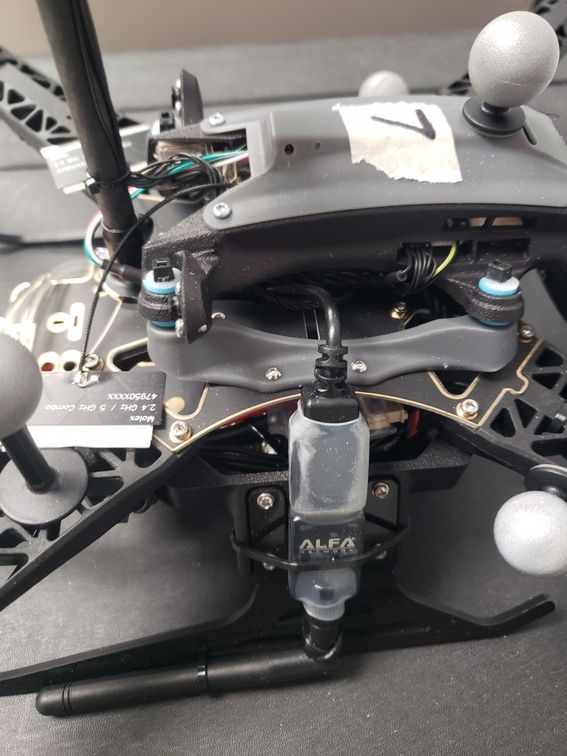
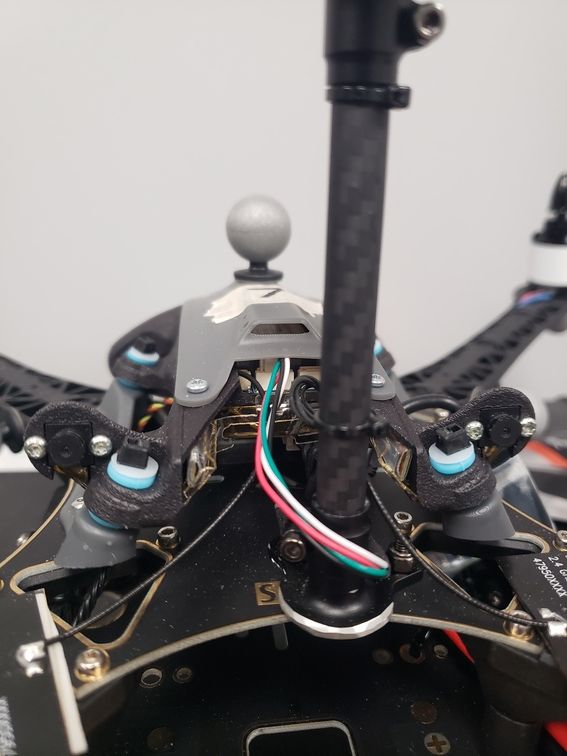
Also, in addition to trying to troubleshoot this adapter/cable I need to retrofit four older Sentinel models (were only shipped with the microhard carrier board, no wifi adapter) with wifi adapters so if it's possible I'd like to just purchase five assemblies (usb to jst and wifi adapter shrink wrapped together). If you guys don't have any of that cabling already made or there's no mechanism for me to order them as a set that's totally fine. We can order the piece parts and make the cabling ourselves, it'd just be easier for us to order them if that's possible.
-
@Alex-Kushleyev That is the type of cable I'd need but I've actually ordered that one (MCBL-00009-1) before for a separate application and just eyeballing it it's about half the length I'd need. Here's a picture of the set-up
Also, in addition to trying to troubleshoot this adapter/cable I need to retrofit four older Sentinel models (were only shipped with the microhard carrier board, no wifi adapter) with wifi adapters so if it's possible I'd like to just purchase five assemblies (usb to jst and wifi adapter shrink wrapped together). If you guys don't have any of that cabling already made or there's no mechanism for me to order them as a set that's totally fine. We can order the piece parts and make the cabling ourselves, it'd just be easier for us to order them if that's possible.
@jmltt , ok, thanks for the details. I will check if we have any of those assemblies in stock, or what the best course of action in your case.
Meanwhile, if you already have the shorter cable, are you able to use it for checking if the USB issues are resolved by switching the USB cable?
Alex
-
@jmltt , ok, thanks for the details. I will check if we have any of those assemblies in stock, or what the best course of action in your case.
Meanwhile, if you already have the shorter cable, are you able to use it for checking if the USB issues are resolved by switching the USB cable?
Alex
@Alex-Kushleyev I just wanted to check back and see if you guys still have any of the longer cables or the entire assemblies that I could purchase. I haven't had a chance to troubleshoot the potentially bad cable, but we're just looking to replace it since we need to retrofit the older models anyways.
Again, if not no worries we make our own cables and buy the adapters it'd just be easier to buy ready-made sets.
-
@Alex-Kushleyev I just wanted to check back and see if you guys still have any of the longer cables or the entire assemblies that I could purchase. I haven't had a chance to troubleshoot the potentially bad cable, but we're just looking to replace it since we need to retrofit the older models anyways.
Again, if not no worries we make our own cables and buy the adapters it'd just be easier to buy ready-made sets.
-
@Vinny That's it! I don't know how I missed it.
I couldn't find the wifi adapters that shipped with the sentinels in your store so I'm assuming you don't sell them individually.
Does it matter what kind of adapter I get, are there any specs that I need to looks for or can I pretty much use anything?
Thanks!
-
@Vinny That's it! I don't know how I missed it.
I couldn't find the wifi adapters that shipped with the sentinels in your store so I'm assuming you don't sell them individually.
Does it matter what kind of adapter I get, are there any specs that I need to looks for or can I pretty much use anything?
Thanks!
@jmltt
Yes, that looks correct.
https://docs.modalai.com/voxl-2-wifi-setup/#overviewThe dongle is expected to have the specific Realtek RTL8812/8818 part in there. You'll see the RTL part number in the serial console or ifconfig (I think, I'm not SW).
-
@jmltt
Yes, that looks correct.
https://docs.modalai.com/voxl-2-wifi-setup/#overviewThe dongle is expected to have the specific Realtek RTL8812/8818 part in there. You'll see the RTL part number in the serial console or ifconfig (I think, I'm not SW).


Reading along? Create a free ModalAI Forum account to join in.
With an account you can reply, ask your own question, get an email when a ModalAI engineer answers, and mark the reply that solved it. Your place in each thread is saved between visits.
Questions about VOXL, Flight Core, ESCs and ModalAI drones are answered here by the engineers who build them.
Register Login