
Calibrate Tracking Cameras Starling 2
-
@tom Can you also run
voxl-configure-camerasand post the output so I can see the available options it gives you?I don't really get any options when I try the configure camera command:
voxl2:~$ voxl-calibrate-camera tracking -f
Waiting for valid pipe...It just says waiting for valid pipe.
I will double check the stickers and provide the serial number once I find it.
-
I don't really get any options when I try the configure camera command:
voxl2:~$ voxl-calibrate-camera tracking -f
Waiting for valid pipe...It just says waiting for valid pipe.
I will double check the stickers and provide the serial number once I find it.
-
@tom The output is as follows:
**voxl2:~$ voxl-configure-cameras
Available camera config IDs are as follows:
01 - ov7251 tracking ov7251 stereo
02 - ov7251 tracking
03 - ov7251 tracking ov7251 stereo imx214 hires
04 - ov7251 tracking imx214 hires
05 - pmd-tof ov7251 tracking
06 - D0005 Starling pmd-tof imx214 hires ov7251 tracking
08 - imx214
09 - pmd-tof
10 - ov7251 stereo
11 - D0006 Sentinel
12 - ov9782 stereo
13 - ov9782 stereo imx214 hires
14 - ov9782 stereo pmd-tof ov7251 tracking (copy)
15 - D0008 dual 9782 tracking
16 - pmd-tof ov7251 dual tracking imx214 hires
17 - D0010 pmd-tof imx412 hires ov7251 tracking ov9782 stereo
18 - D0008 triple ov9782
19 - D0005 without tof imx214 hires ov7251 tracking
20 - D0011 imx412 hires ar0144 tracking
21 - old C6
23 - D0010 without stereo
24 - pmd-tof LIOW2 (new TOF)
25 - dual ar0144
31 - D0013 Prototype M0135 dual ar0144
32 - D0008 triple ov9782 rotated
C - use user-defined custom camera config in
(/data/modalai/custom_camera_config.txt)
q - Quit The Wizard**I don't see the option that I saw when using the sku wizard:
**Available camera config IDs are as follows:
Welcome to the voxl-configure-sku Wizard!VOXL currently thinks it is in the following hardware:
family code: MRB-D0011 (px4-autonomy-dev-kit)
compute board: 4 (voxl2)
hw version: 1
cam config: 20
modem config: 0 (none)
tx config: 7 (elrs_beta_fpv)
extras config: 0 (none)
SKU: MRB-D0011-4-V1-C20-T7-M0-X0If this is what you want, select 1 (accept and continue) to
leave it as-is. Otherwise, select the desired product family:- accept and continue 14) voxlcam
- starling-2 15) seeker-legacy
- starling-2-max 16) rb5-flight
- seeker-vision 17) flight-deck
- stinger 18) voxl-deck
- sparrow 19) voxl2-flight-deck
- seeker-max 20) voxl2-test-fixture
- starling-1-discontinued 21) voxl2-mini-test-fixture
- px4-autonomy-dev-kit 22) voxl2-board-only
- sentinel 23) voxl2-mini-board-only
- D0010 24) MVX-T0001
- D0015 25) MVX-R0001
- m500 26) quit
#? 2
selected starling-2
If you would like to select a special camera config that differs
from the default for your product family, please select an option.
Simply hit ENTER to use the default01 - ov7251 tracking ov7251 stereo
02 - ov7251 tracking
03 - ov7251 tracking ov7251 stereo imx214 hires
04 - ov7251 tracking imx214 hires
05 - pmd-tof ov7251 tracking
06 - D0005 Starling pmd-tof imx214 hires ov7251 tracking
08 - imx214
09 - pmd-tof
10 - ov7251 stereo
11 - D0006 Sentinel
12 - ov9782 stereo
13 - ov9782 stereo imx214 hires
14 - ov9782 stereo pmd-tof ov7251 tracking (copy)
15 - D0008 dual 9782 tracking
16 - pmd-tof ov7251 dual tracking imx214 hires
17 - D0010 pmd-tof imx412 hires ov7251 tracking ov9782 stereo
18 - D0008 triple ov9782
19 - D0005 without tof imx214 hires ov7251 tracking
20 - D0011 imx412 hires ar0144 tracking
21 - old C6
23 - D0010 without stereo
24 - pmd-tof LIOW2 (new TOF)
25 - dual ar0144
31 - D0013 Prototype M0135 dual ar0144
32 - D0008 triple ov9782 rotated
C - use user-defined custom camera config in
(/data/modalai/custom_camera_config.txt)
q - Quit The WizardThe default camera configs for Starling 2 are
26 (imx412 hires, dual ar0144 tracking)
27 (imx412 hires, triple ar0144 tracking)Simply hit ENTER to use the default
selection: 27
Selected numerical camera configFor VOXL 2 and VOXL 2 Mini based drones, there are several transmitter options.
Please select the appropriate one.Select a numeric option:
0) none- Spektrum
- TBS Crossfire
- ELRS (Beta FPV Default)
- ELRS (ModalAI M0184)
- Ghost
- ELRS (ModalAI M0193)
#? 8
For Starling 2 and Starling 2 Max drones, there is an optional lepton sensor.
Is a lepton sensor installed on your drone? (-X8).- yes
- no
#? 2
Select the modem hardware.
Simply hit ENTER if none0 - none
1 - unknown
3 - Microhard v2, No Radio (M0048-3)
4 - LTE v2, 7610 NA (M0030)
5 - LTE v2, 7607 EMEA EOL (M0030)
6 - LTE v2, No Modem (M0030)
7 - VOXL 2 5G Quectel (M0067/M0090-3-01)
8 - LTE v2, 7611 NA (M0030)
9 - VOXL 2 5G Telit (M0090-1-03)
10 - Microhard v2, pMDDL2350 (M0048)
11 - Microhard v2, pMDDL2450(M0048)
12 - LTE v2, 7620 EMEA (M0030)
13 - M0078-2 w/ Alpha WiFi Dongle, AC600
14 - VOXL 5G Telit (M0090-1-03)
15 - VOXL 2 5G Quectel (M0090-3-01)
16 - M0078-2 w/ Alfa Networks WiFi Dongle, AC1200
17 - M0078-2 w/ Alfa Networks WiFi Dongle, AC600 (modified)
18 - Doodle RM-2450, 2.4GHz
19 - Doodle RM-2025, Hex Band
20 - M0130 RC7611 (Americas)
21 - M0130 RC7620 (EMEA)
22 - M0141 w/ Alfa Networks WiFi Dongle AWUS036EACS
23 - Doodle Mini-OEM, RM-1700-22M3 (915MHz, 2.4GHz)
24 - M0090-3-2 Sierra EM9291)
25 - VTX (M0176 + M0175)
26 - VTX (M0185)
27 - Microhard, pMDDL1621 (M0059-1)
28 - M0151 w/ Alfa Networks WiFi Dongle AWUS036EACS
29 - Microhard v2, pMDDL 1800 (M0048)
30 - VRX (M0206, Mini Pini)
31 - VRX (M0206, SparkLAN)
32 - WaveMux
2026 - M0130 RC7611 (Americas) + VTX (M0185)
2126 - M0130 RC7620 (EMEA) + VTX (M0185)q - Quit The Wizard
Simply hit ENTER if none
selection: 22
Selected numerical modem configYour answers would construct the following SKU:
family code: MRB-D0014 (starling-2)
compute board: 4 (voxl2)
hw version: 1
cam config: 27
modem config: 22 (M0141 w/ Alfa Networks WiFi Dongle AWUS036EACS)
tx config: 8 (elrs_m0184)
extras config: 0 (none)
SKU: MRB-D0014-4-V1-C27-T8-M22-X0This sku will be saved to persistent memory so VOXL
will remember what it is installed in, even between
system image flashes.Press enter to accept and continue.**
The SKU wizard did throw an error for configuration 27
available camera configurations are as follows:
01 - ov7251 tracking ov7251 stereo
02 - ov7251 tracking
03 - ov7251 tracking ov7251 stereo imx214 hires
04 - ov7251 tracking imx214 hires
05 - pmd-tof ov7251 tracking
06 - D0005 Starling pmd-tof imx214 hires ov7251 tracking
08 - imx214
09 - pmd-tof
10 - ov7251 stereo
11 - D0006 Sentinel
12 - ov9782 stereo
13 - ov9782 stereo imx214 hires
14 - ov9782 stereo pmd-tof ov7251 tracking (copy)
15 - D0008 dual 9782 tracking
16 - pmd-tof ov7251 dual tracking imx214 hires
17 - D0010 pmd-tof imx412 hires ov7251 tracking ov9782 stereo
18 - D0008 triple ov9782
19 - D0005 without tof imx214 hires ov7251 tracking
20 - D0011 imx412 hires ar0144 tracking
21 - old C6
23 - D0010 without stereo
24 - pmd-tof LIOW2 (new TOF)
25 - dual ar0144
31 - D0013 Prototype M0135 dual ar0144
32 - D0008 triple ov9782 rotated
FAILED TO EXECUTE: voxl-configure-cameras 27The serial number is M23000003CZ.
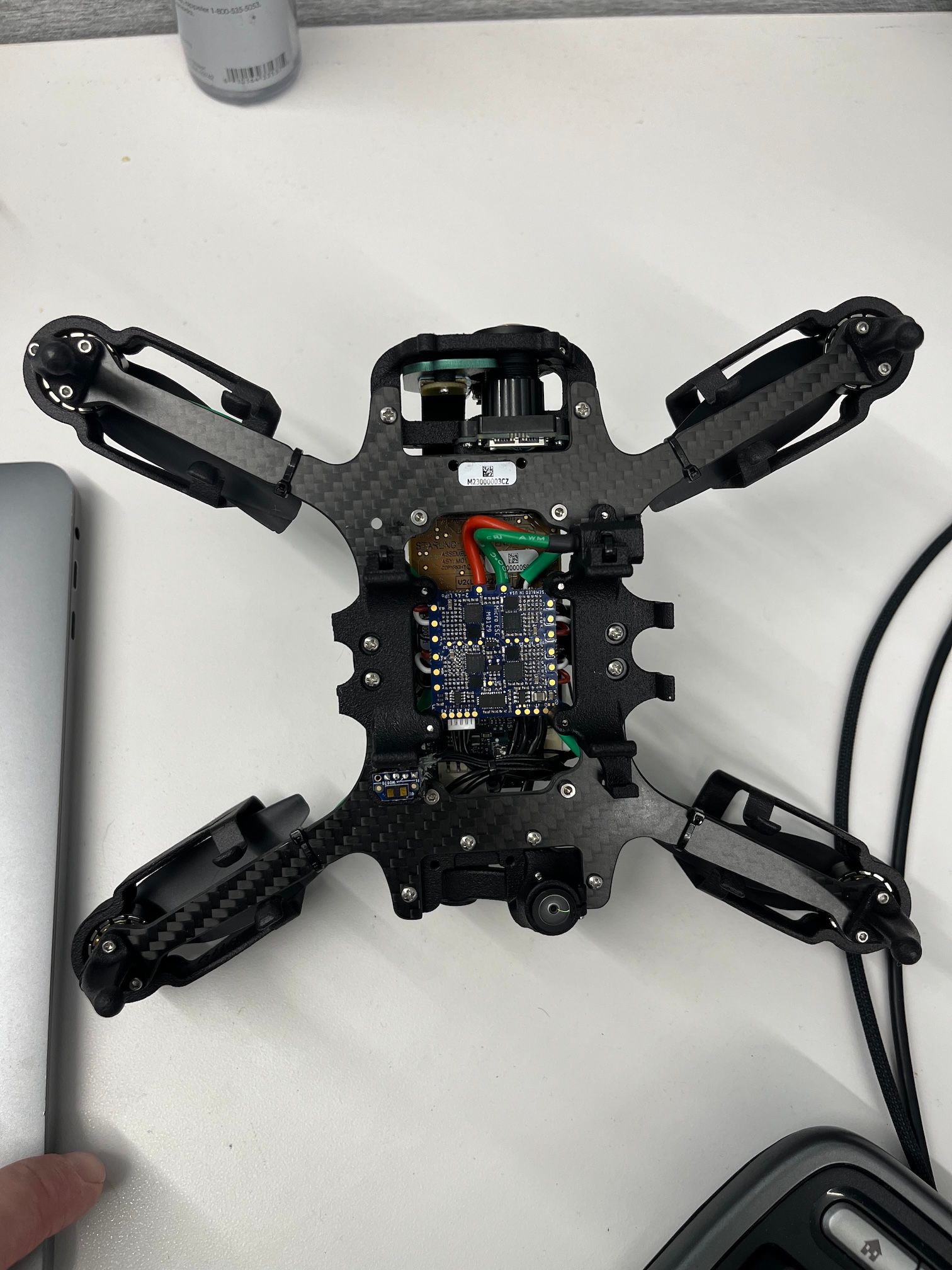
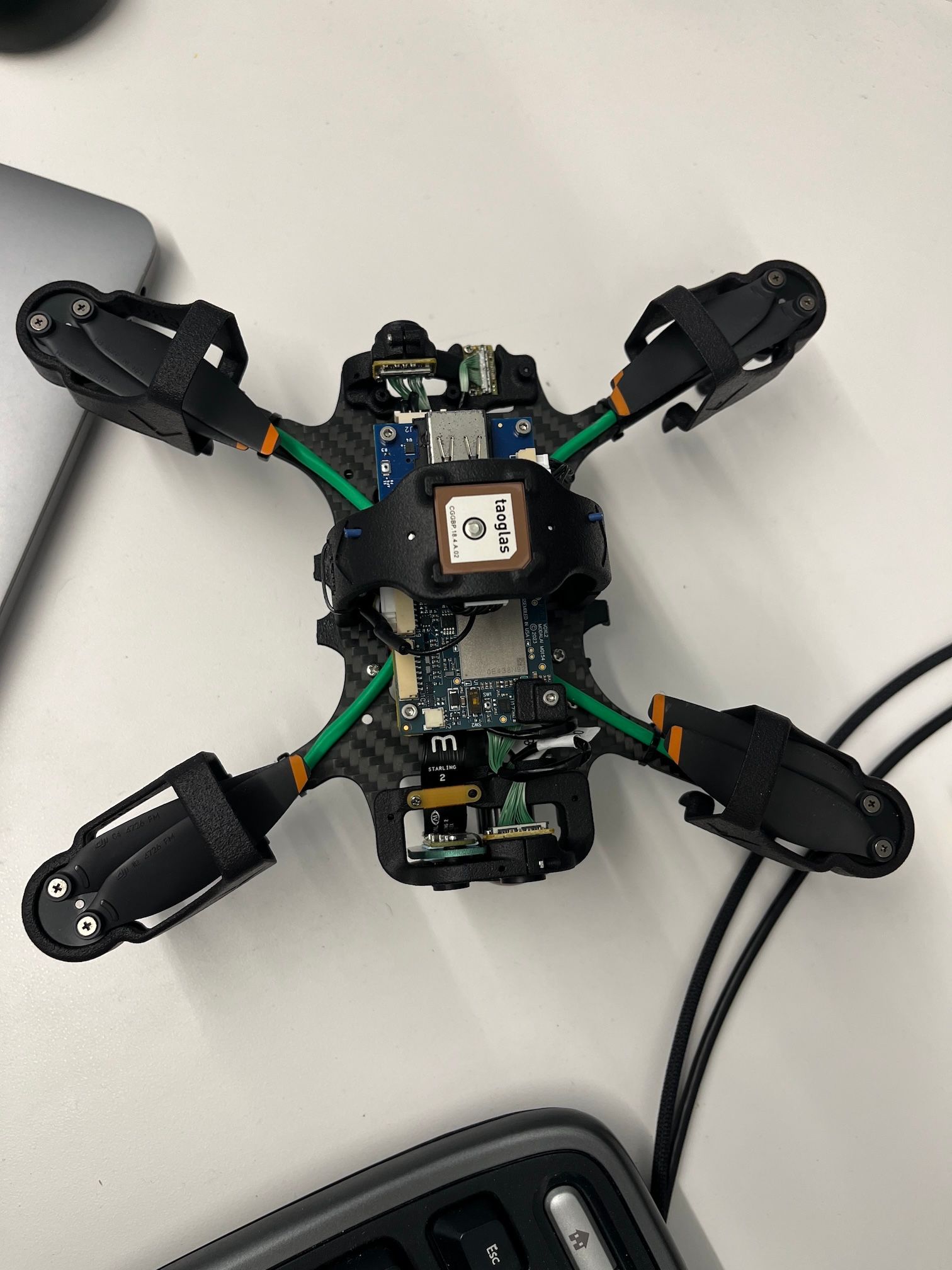
The drone was originally a PX4 Dev Kit. But, it has been upgraded with the parts for a Starling 2 with 3 tracking sensors. Support helped provide the necessary parts and brackets. The main addition is the:
MDK-M0187-1-01 Dev Kit, VOXL 2 Lepton Plus TOF V2 Adapter Board & MCBL-00105-2
The Lepton adapter board isn't connect as there currently isn't a sensor attached. I have attached pictures of the drone fully assembled.
-
@tom The output is as follows:
**voxl2:~$ voxl-configure-cameras
Available camera config IDs are as follows:
01 - ov7251 tracking ov7251 stereo
02 - ov7251 tracking
03 - ov7251 tracking ov7251 stereo imx214 hires
04 - ov7251 tracking imx214 hires
05 - pmd-tof ov7251 tracking
06 - D0005 Starling pmd-tof imx214 hires ov7251 tracking
08 - imx214
09 - pmd-tof
10 - ov7251 stereo
11 - D0006 Sentinel
12 - ov9782 stereo
13 - ov9782 stereo imx214 hires
14 - ov9782 stereo pmd-tof ov7251 tracking (copy)
15 - D0008 dual 9782 tracking
16 - pmd-tof ov7251 dual tracking imx214 hires
17 - D0010 pmd-tof imx412 hires ov7251 tracking ov9782 stereo
18 - D0008 triple ov9782
19 - D0005 without tof imx214 hires ov7251 tracking
20 - D0011 imx412 hires ar0144 tracking
21 - old C6
23 - D0010 without stereo
24 - pmd-tof LIOW2 (new TOF)
25 - dual ar0144
31 - D0013 Prototype M0135 dual ar0144
32 - D0008 triple ov9782 rotated
C - use user-defined custom camera config in
(/data/modalai/custom_camera_config.txt)
q - Quit The Wizard**I don't see the option that I saw when using the sku wizard:
**Available camera config IDs are as follows:
Welcome to the voxl-configure-sku Wizard!VOXL currently thinks it is in the following hardware:
family code: MRB-D0011 (px4-autonomy-dev-kit)
compute board: 4 (voxl2)
hw version: 1
cam config: 20
modem config: 0 (none)
tx config: 7 (elrs_beta_fpv)
extras config: 0 (none)
SKU: MRB-D0011-4-V1-C20-T7-M0-X0If this is what you want, select 1 (accept and continue) to
leave it as-is. Otherwise, select the desired product family:- accept and continue 14) voxlcam
- starling-2 15) seeker-legacy
- starling-2-max 16) rb5-flight
- seeker-vision 17) flight-deck
- stinger 18) voxl-deck
- sparrow 19) voxl2-flight-deck
- seeker-max 20) voxl2-test-fixture
- starling-1-discontinued 21) voxl2-mini-test-fixture
- px4-autonomy-dev-kit 22) voxl2-board-only
- sentinel 23) voxl2-mini-board-only
- D0010 24) MVX-T0001
- D0015 25) MVX-R0001
- m500 26) quit
#? 2
selected starling-2
If you would like to select a special camera config that differs
from the default for your product family, please select an option.
Simply hit ENTER to use the default01 - ov7251 tracking ov7251 stereo
02 - ov7251 tracking
03 - ov7251 tracking ov7251 stereo imx214 hires
04 - ov7251 tracking imx214 hires
05 - pmd-tof ov7251 tracking
06 - D0005 Starling pmd-tof imx214 hires ov7251 tracking
08 - imx214
09 - pmd-tof
10 - ov7251 stereo
11 - D0006 Sentinel
12 - ov9782 stereo
13 - ov9782 stereo imx214 hires
14 - ov9782 stereo pmd-tof ov7251 tracking (copy)
15 - D0008 dual 9782 tracking
16 - pmd-tof ov7251 dual tracking imx214 hires
17 - D0010 pmd-tof imx412 hires ov7251 tracking ov9782 stereo
18 - D0008 triple ov9782
19 - D0005 without tof imx214 hires ov7251 tracking
20 - D0011 imx412 hires ar0144 tracking
21 - old C6
23 - D0010 without stereo
24 - pmd-tof LIOW2 (new TOF)
25 - dual ar0144
31 - D0013 Prototype M0135 dual ar0144
32 - D0008 triple ov9782 rotated
C - use user-defined custom camera config in
(/data/modalai/custom_camera_config.txt)
q - Quit The WizardThe default camera configs for Starling 2 are
26 (imx412 hires, dual ar0144 tracking)
27 (imx412 hires, triple ar0144 tracking)Simply hit ENTER to use the default
selection: 27
Selected numerical camera configFor VOXL 2 and VOXL 2 Mini based drones, there are several transmitter options.
Please select the appropriate one.Select a numeric option:
0) none- Spektrum
- TBS Crossfire
- ELRS (Beta FPV Default)
- ELRS (ModalAI M0184)
- Ghost
- ELRS (ModalAI M0193)
#? 8
For Starling 2 and Starling 2 Max drones, there is an optional lepton sensor.
Is a lepton sensor installed on your drone? (-X8).- yes
- no
#? 2
Select the modem hardware.
Simply hit ENTER if none0 - none
1 - unknown
3 - Microhard v2, No Radio (M0048-3)
4 - LTE v2, 7610 NA (M0030)
5 - LTE v2, 7607 EMEA EOL (M0030)
6 - LTE v2, No Modem (M0030)
7 - VOXL 2 5G Quectel (M0067/M0090-3-01)
8 - LTE v2, 7611 NA (M0030)
9 - VOXL 2 5G Telit (M0090-1-03)
10 - Microhard v2, pMDDL2350 (M0048)
11 - Microhard v2, pMDDL2450(M0048)
12 - LTE v2, 7620 EMEA (M0030)
13 - M0078-2 w/ Alpha WiFi Dongle, AC600
14 - VOXL 5G Telit (M0090-1-03)
15 - VOXL 2 5G Quectel (M0090-3-01)
16 - M0078-2 w/ Alfa Networks WiFi Dongle, AC1200
17 - M0078-2 w/ Alfa Networks WiFi Dongle, AC600 (modified)
18 - Doodle RM-2450, 2.4GHz
19 - Doodle RM-2025, Hex Band
20 - M0130 RC7611 (Americas)
21 - M0130 RC7620 (EMEA)
22 - M0141 w/ Alfa Networks WiFi Dongle AWUS036EACS
23 - Doodle Mini-OEM, RM-1700-22M3 (915MHz, 2.4GHz)
24 - M0090-3-2 Sierra EM9291)
25 - VTX (M0176 + M0175)
26 - VTX (M0185)
27 - Microhard, pMDDL1621 (M0059-1)
28 - M0151 w/ Alfa Networks WiFi Dongle AWUS036EACS
29 - Microhard v2, pMDDL 1800 (M0048)
30 - VRX (M0206, Mini Pini)
31 - VRX (M0206, SparkLAN)
32 - WaveMux
2026 - M0130 RC7611 (Americas) + VTX (M0185)
2126 - M0130 RC7620 (EMEA) + VTX (M0185)q - Quit The Wizard
Simply hit ENTER if none
selection: 22
Selected numerical modem configYour answers would construct the following SKU:
family code: MRB-D0014 (starling-2)
compute board: 4 (voxl2)
hw version: 1
cam config: 27
modem config: 22 (M0141 w/ Alfa Networks WiFi Dongle AWUS036EACS)
tx config: 8 (elrs_m0184)
extras config: 0 (none)
SKU: MRB-D0014-4-V1-C27-T8-M22-X0This sku will be saved to persistent memory so VOXL
will remember what it is installed in, even between
system image flashes.Press enter to accept and continue.**
The SKU wizard did throw an error for configuration 27
available camera configurations are as follows:
01 - ov7251 tracking ov7251 stereo
02 - ov7251 tracking
03 - ov7251 tracking ov7251 stereo imx214 hires
04 - ov7251 tracking imx214 hires
05 - pmd-tof ov7251 tracking
06 - D0005 Starling pmd-tof imx214 hires ov7251 tracking
08 - imx214
09 - pmd-tof
10 - ov7251 stereo
11 - D0006 Sentinel
12 - ov9782 stereo
13 - ov9782 stereo imx214 hires
14 - ov9782 stereo pmd-tof ov7251 tracking (copy)
15 - D0008 dual 9782 tracking
16 - pmd-tof ov7251 dual tracking imx214 hires
17 - D0010 pmd-tof imx412 hires ov7251 tracking ov9782 stereo
18 - D0008 triple ov9782
19 - D0005 without tof imx214 hires ov7251 tracking
20 - D0011 imx412 hires ar0144 tracking
21 - old C6
23 - D0010 without stereo
24 - pmd-tof LIOW2 (new TOF)
25 - dual ar0144
31 - D0013 Prototype M0135 dual ar0144
32 - D0008 triple ov9782 rotated
FAILED TO EXECUTE: voxl-configure-cameras 27The serial number is M23000003CZ.
The drone was originally a PX4 Dev Kit. But, it has been upgraded with the parts for a Starling 2 with 3 tracking sensors. Support helped provide the necessary parts and brackets. The main addition is the:
MDK-M0187-1-01 Dev Kit, VOXL 2 Lepton Plus TOF V2 Adapter Board & MCBL-00105-2
The Lepton adapter board isn't connect as there currently isn't a sensor attached. I have attached pictures of the drone fully assembled.
@greg_s Okay you'll need to load a different kernel on your drone in order to support that camera configuration. (27) That is why it is not showing up in the list of supported configs.
You can do the following:
cd voxl2_SDK_1.4.5.tar.gz
cd system-image
adb reboot bootloader
fastboot flash boot_a m0054-1-var00.1-kernel.img
fastboot flash boot_b m0054-1-var00.1-kernel.img
fastboot reboot
Once rebooted, you can now run
voxl-configure-cameras 27 -
@greg_s Okay you'll need to load a different kernel on your drone in order to support that camera configuration. (27) That is why it is not showing up in the list of supported configs.
You can do the following:
cd voxl2_SDK_1.4.5.tar.gz
cd system-image
adb reboot bootloader
fastboot flash boot_a m0054-1-var00.1-kernel.img
fastboot flash boot_b m0054-1-var00.1-kernel.img
fastboot reboot
Once rebooted, you can now run
voxl-configure-cameras 27@tom Thanks for the help. I followed your instructions and rebooted. When I inspect the services, I get the output:
voxl2:~$ voxl-inspect-services
Scanning services...Service Name | Enabled | Running | CPU Usage
docker-autorun | Disabled | Not Running |
modallink-relink | Disabled | Not Running |
voxl-camera-server | Enabled | Running | 66.7%
voxl-cpu-monitor | Enabled | Running | 0.0%
voxl-dfs-server | Disabled | Not Running |
voxl-elrs-startup | Disabled | Not Running |
voxl-feature-tracker | Disabled | Not Running |
voxl-flow-server | Disabled | Not Running |
voxl-imu-server | Enabled | Running | 3.5%
voxl-io-server | Disabled | Not Running |
voxl-lepton-server | Disabled | Not Running |
voxl-lepton-tracker | Disabled | Not Running |
voxl-logger | Disabled | Not Running |
voxl-mapper | Enabled | Running | 1.8%
voxl-mavcam-manager | Enabled | Running | 0.0%
voxl-mavlink-server | Enabled | Running | 3.5%
voxl-modem | Disabled | Not Running |
voxl-open-vins-server | Enabled | Not Running |
voxl-osd | Disabled | Not Running |
voxl-portal | Enabled | Running | 0.0%
voxl-px4-imu-server | Disabled | Not Running |
voxl-px4 | Enabled | Running | 24.6%
voxl-qvio-server | Disabled | Not Running |
voxl-rangefinder-server | Enabled | Not Running |
voxl-remote-id | Disabled | Not Running |
voxl-seek-server | Disabled | Not Running |
voxl-softap | Disabled | Not Running |
voxl-state-estimator | Disabled | Not Running |
voxl-static-ip | Disabled | Not Running |
voxl-streamer | Enabled | Running | 0.0%
voxl-tag-detector | Disabled | Not Running |
voxl-tflite-server | Disabled | Not Running |
voxl-time-sync | Disabled | Not Running |
voxl-uvc-server | Disabled | Not Running |
voxl-vision-hub | Enabled | Running | 3.5%
voxl-vrx | Disabled | Not Running |
voxl-vtx | Disabled | Not Running |
voxl-wait-for-fs | Enabled | Completed |Is there anything else I should check/configure before attempting to fly and use the mapper service?
-
@tom Thanks for the help. I followed your instructions and rebooted. When I inspect the services, I get the output:
voxl2:~$ voxl-inspect-services
Scanning services...Service Name | Enabled | Running | CPU Usage
docker-autorun | Disabled | Not Running |
modallink-relink | Disabled | Not Running |
voxl-camera-server | Enabled | Running | 66.7%
voxl-cpu-monitor | Enabled | Running | 0.0%
voxl-dfs-server | Disabled | Not Running |
voxl-elrs-startup | Disabled | Not Running |
voxl-feature-tracker | Disabled | Not Running |
voxl-flow-server | Disabled | Not Running |
voxl-imu-server | Enabled | Running | 3.5%
voxl-io-server | Disabled | Not Running |
voxl-lepton-server | Disabled | Not Running |
voxl-lepton-tracker | Disabled | Not Running |
voxl-logger | Disabled | Not Running |
voxl-mapper | Enabled | Running | 1.8%
voxl-mavcam-manager | Enabled | Running | 0.0%
voxl-mavlink-server | Enabled | Running | 3.5%
voxl-modem | Disabled | Not Running |
voxl-open-vins-server | Enabled | Not Running |
voxl-osd | Disabled | Not Running |
voxl-portal | Enabled | Running | 0.0%
voxl-px4-imu-server | Disabled | Not Running |
voxl-px4 | Enabled | Running | 24.6%
voxl-qvio-server | Disabled | Not Running |
voxl-rangefinder-server | Enabled | Not Running |
voxl-remote-id | Disabled | Not Running |
voxl-seek-server | Disabled | Not Running |
voxl-softap | Disabled | Not Running |
voxl-state-estimator | Disabled | Not Running |
voxl-static-ip | Disabled | Not Running |
voxl-streamer | Enabled | Running | 0.0%
voxl-tag-detector | Disabled | Not Running |
voxl-tflite-server | Disabled | Not Running |
voxl-time-sync | Disabled | Not Running |
voxl-uvc-server | Disabled | Not Running |
voxl-vision-hub | Enabled | Running | 3.5%
voxl-vrx | Disabled | Not Running |
voxl-vtx | Disabled | Not Running |
voxl-wait-for-fs | Enabled | Completed |Is there anything else I should check/configure before attempting to fly and use the mapper service?
-
@greg_s That looks normal to me. I would start by attempting a manual flight before doing any cv-based flights:
@tom Thanks. I ran the check calibration:
voxl-check-calibration
Calibration File Status:
Present /data/modalai/voxl-imu-server.cal
Missing /data/modalai/opencv_tracking_front_intrinsics.yml
Missing /data/modalai/opencv_tracking_down_intrinsics.yml
Missing /data/modalai/opencv_tracking_rear_intrinsics.yml
Present /data/px4/param/parameters_gyro.cal
Present /data/px4/param/parameters_acc.cal
Present /data/px4/param/parameters_level.cal
Present /data/px4/param/parameters_baro_tc.cal
Present /data/px4/param/parameters_mag.calI assume I should calibrate the tracking cameras still.
-
@tom Thanks. I ran the check calibration:
voxl-check-calibration
Calibration File Status:
Present /data/modalai/voxl-imu-server.cal
Missing /data/modalai/opencv_tracking_front_intrinsics.yml
Missing /data/modalai/opencv_tracking_down_intrinsics.yml
Missing /data/modalai/opencv_tracking_rear_intrinsics.yml
Present /data/px4/param/parameters_gyro.cal
Present /data/px4/param/parameters_acc.cal
Present /data/px4/param/parameters_level.cal
Present /data/px4/param/parameters_baro_tc.cal
Present /data/px4/param/parameters_mag.calI assume I should calibrate the tracking cameras still.
-
@greg_s Was this originally a starling 1 that was upgraded to a starling 2?
If so, you will need to re-calibrate the tracking cameras for this new drone.
@tom It was a PX 4 Dev Kit. But, thanks for the help. I was able to get the cameras calibrated. I will testing the manual and hold position fly-modes before trying any cv-based flight/navigation. I'll start a new thread for any future questions.
-
@tom It was a PX 4 Dev Kit. But, thanks for the help. I was able to get the cameras calibrated. I will testing the manual and hold position fly-modes before trying any cv-based flight/navigation. I'll start a new thread for any future questions.

Reading along? Create a free ModalAI Forum account to join in.
With an account you can reply, ask your own question, get an email when a ModalAI engineer answers, and mark the reply that solved it. Your place in each thread is saved between visits.
Questions about VOXL, Flight Core, ESCs and ModalAI drones are answered here by the engineers who build them.
Register Login