
VOXL2 mini J3 connector (USB3) not working well with external storage for data logging
-
I am trying to log camera data to an external SSD using the voxl-logger utility, with the SSD hooked up to the J3 port of the VOXL2 mini. According to voxl-inspect-cam, the frames I'm trying to save are ~3.11MB, so at 30FPS would require around 93MBps write speed. The external ssd we have hooked up (temporarily) is a 2TB samsung T7 shield, which has an advertised write speed of up to 1000MBps, well over what we need.
The main problem is voxl-logger's output:
voxl-logger -c hires_small_color -d /mnt/ssd
Welcome to voxl-logger
1906214 MB left in /mnt/ssd/
starting new log: /mnt/ssd/log0001/

connected to ch 0 /run/mpa/hires_small_color/
flushing backed up pipe ch 0 /run/mpa/hires_small_color/
flushing backed up pipe ch 0 /run/mpa/hires_small_color/
flushing backed up pipe ch 0 /run/mpa/hires_small_color/
flushing backed up pipe ch 0 /run/mpa/hires_small_color/
flushing backed up pipe ch 0 /run/mpa/hires_small_color/
flushing backed up pipe ch 0 /run/mpa/hires_small_color/
flushing backed up pipe ch 0 /run/mpa/hires_small_color/
flushing backed up pipe ch 0 /run/mpa/hires_small_color/
flushing backed up pipe ch 0 /run/mpa/hires_small_color/
flushing backed up pipe ch 0 /run/mpa/hires_small_color/
flushing backed up pipe ch 0 /run/mpa/hires_small_color/
flushing backed up pipe ch 0 /run/mpa/hires_small_color/
flushing backed up pipe ch 0 /run/mpa/hires_small_color/
flushing backed up pipe ch 0 /run/mpa/hires_small_color/
flushing backed up pipe ch 0 /run/mpa/hires_small_color/

ERROR: invalid metadata, magic number=-2055633543, expected 1448040524
most likely client fell behind and pipe overflowed
flushing backed up pipe ch 0 /run/mpa/hires_small_color/
flushing backed up pipe ch 0 /run/mpa/hires_small_color/
It works for a while, then eventually something backs up and the logger prints this debug message infinitely. It becomes unresponsive and I can't kill it with Ctrl+C. It seems like there's some bottleneck preventing the client (voxl-logger?) from receiving frames at the correct rate from the mpa pipe.
I am aware of the potential issues with the superspeed lines of the connector, but I get this output when taking the diagnostic steps that page details:
voxl2:/$ lsusb -t
/:  Bus 02.Port 1: Dev 1, Class=root_hub, Driver=xhci-hcd/1p, 10000M
    |__ Port 1: Dev 23, If 0, Class=Mass Storage, Driver=usb-storage, 10000M
/:  Bus 01.Port 1: Dev 1, Class=root_hub, Driver=xhci-hcd/1p, 480M
So I don't think datarates on the port/cable are the issue, and unless samsung is lying on their documentation by over 10x, I dont know how the ssd itself could be the issue either.
I was also able to test the data rate to this SSD with dd (linux utility) and saw some weird stuff. When trying to push lumps of data ~2GB, it would push the first 80% extremely fast (like 900MBps) and then lock up on the remaining data and take over 40s to transfer the rest. Seeing that made me think it could also be browning out.
Is there anything I am doing wrong / falsely expecting the VOXL2 to be able to perform? I can try a regular VOXL2 with the USB3 expansion and see if that works better for now, but in the end we need to use the mini anyway so I would like to get this issue figured out.
Thank you!
-
I am trying to log camera data to an external SSD using the voxl-logger utility, with the SSD hooked up to the J3 port of the VOXL2 mini. According to voxl-inspect-cam, the frames I'm trying to save are ~3.11MB, so at 30FPS would require around 93MBps write speed. The external ssd we have hooked up (temporarily) is a 2TB samsung T7 shield, which has an advertised write speed of up to 1000MBps, well over what we need.
The main problem is voxl-logger's output:
voxl-logger -c hires_small_color -d /mnt/ssd
Welcome to voxl-logger
1906214 MB left in /mnt/ssd/
starting new log: /mnt/ssd/log0001/

connected to ch 0 /run/mpa/hires_small_color/
flushing backed up pipe ch 0 /run/mpa/hires_small_color/
flushing backed up pipe ch 0 /run/mpa/hires_small_color/
flushing backed up pipe ch 0 /run/mpa/hires_small_color/
flushing backed up pipe ch 0 /run/mpa/hires_small_color/
flushing backed up pipe ch 0 /run/mpa/hires_small_color/
flushing backed up pipe ch 0 /run/mpa/hires_small_color/
flushing backed up pipe ch 0 /run/mpa/hires_small_color/
flushing backed up pipe ch 0 /run/mpa/hires_small_color/
flushing backed up pipe ch 0 /run/mpa/hires_small_color/
flushing backed up pipe ch 0 /run/mpa/hires_small_color/
flushing backed up pipe ch 0 /run/mpa/hires_small_color/
flushing backed up pipe ch 0 /run/mpa/hires_small_color/
flushing backed up pipe ch 0 /run/mpa/hires_small_color/
flushing backed up pipe ch 0 /run/mpa/hires_small_color/
flushing backed up pipe ch 0 /run/mpa/hires_small_color/

ERROR: invalid metadata, magic number=-2055633543, expected 1448040524
most likely client fell behind and pipe overflowed
flushing backed up pipe ch 0 /run/mpa/hires_small_color/
flushing backed up pipe ch 0 /run/mpa/hires_small_color/
It works for a while, then eventually something backs up and the logger prints this debug message infinitely. It becomes unresponsive and I can't kill it with Ctrl+C. It seems like there's some bottleneck preventing the client (voxl-logger?) from receiving frames at the correct rate from the mpa pipe.
I am aware of the potential issues with the superspeed lines of the connector, but I get this output when taking the diagnostic steps that page details:
voxl2:/$ lsusb -t
/:  Bus 02.Port 1: Dev 1, Class=root_hub, Driver=xhci-hcd/1p, 10000M
    |__ Port 1: Dev 23, If 0, Class=Mass Storage, Driver=usb-storage, 10000M
/:  Bus 01.Port 1: Dev 1, Class=root_hub, Driver=xhci-hcd/1p, 480M
So I don't think datarates on the port/cable are the issue, and unless samsung is lying on their documentation by over 10x, I dont know how the ssd itself could be the issue either.
I was also able to test the data rate to this SSD with dd (linux utility) and saw some weird stuff. When trying to push lumps of data ~2GB, it would push the first 80% extremely fast (like 900MBps) and then lock up on the remaining data and take over 40s to transfer the rest. Seeing that made me think it could also be browning out.
Is there anything I am doing wrong / falsely expecting the VOXL2 to be able to perform? I can try a regular VOXL2 with the USB3 expansion and see if that works better for now, but in the end we need to use the mini anyway so I would like to get this issue figured out.
Thank you!
@jonathankampia Oh yeah, also, we tried modding the cable like the documentation I linked said to. All we had on hand were some tiny 220nF caps, not the caps linked in the docs. The modded cable wouldn't even allow the USB slave device to show up on lsusb.
-
@jonathankampia Oh yeah, also, we tried modding the cable like the documentation I linked said to. All we had on hand were some tiny 220nF caps, not the caps linked in the docs. The modded cable wouldn't even allow the USB slave device to show up on lsusb.
@jonathankampia Another strange issue! On a standard VOXL2 with the USB3 expansion board, same SDK version (1.5.0), the VOXL is unable to detect the external SSD's partitions so I can't even mount it. Same SSD plugs into a VOXL2 mini and partitions are detected.
-
@jonathankampia Another strange issue! On a standard VOXL2 with the USB3 expansion board, same SDK version (1.5.0), the VOXL is unable to detect the external SSD's partitions so I can't even mount it. Same SSD plugs into a VOXL2 mini and partitions are detected.
Hi @jonathankampia
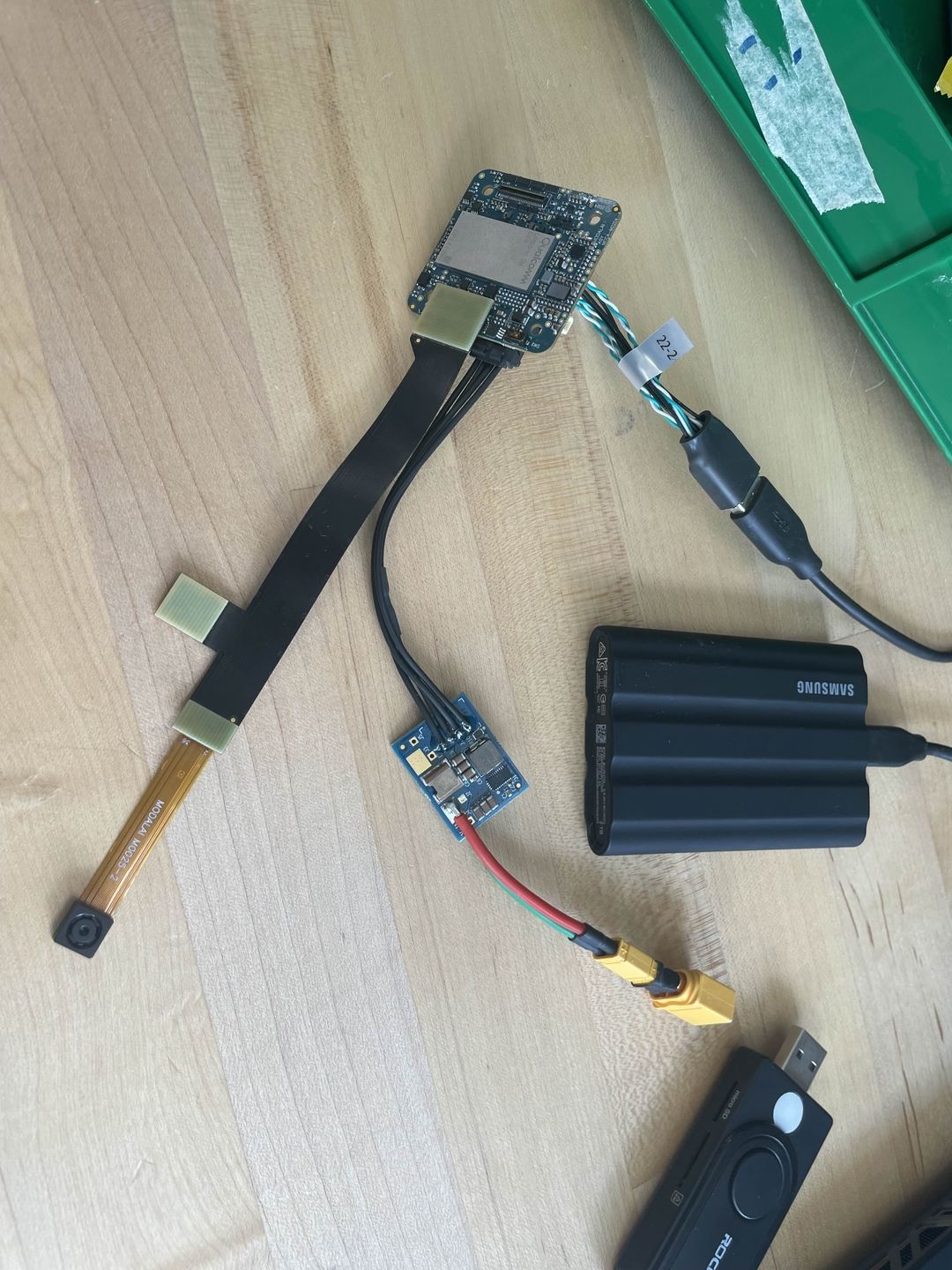
Can you please post some pics of your setups?
I cannot tell exactly how you are using J3, and which version of VOXL 2 Mini do you have? M0104 or the new rounded corner M0204 with fixed SS lines?Do you have a spec of the SSD you are trying to use? What other 5V peripherals are you using. We could be pulling too much current, since V2 Mini only has 900mA TOTAL 5V support so other 5V peripherals will eat into that budget.
Thanks!
Vinny -
Hi @jonathankampia
Can you please post some pics of your setups?
I cannot tell exactly how you are using J3, and which version of VOXL 2 Mini do you have? M0104 or the new rounded corner M0204 with fixed SS lines?Do you have a spec of the SSD you are trying to use? What other 5V peripherals are you using. We could be pulling too much current, since V2 Mini only has 900mA TOTAL 5V support so other 5V peripherals will eat into that budget.
Thanks!
Vinny@Vinny We have the M0204, good to know that the usb3 SS lines are fixed. As I am just doing bench testing, the only other device I have plugged in is the IMX214 hires camera (which I am trying to log frames of).
Spec wise I have been testing with a Samsung T7 shield connected over USBC, their docs weren't super clear but it seems like it consumes maximum 7.5W at 5V, so that could be the issue. With USB3.2 connection they claim it can reach 1GBps writespeed, and we are under 1/10th of that in requirement (we require about 93MBps).
I could splice in auxiliary 5V power to see if that helps.
-
@Vinny We have the M0204, good to know that the usb3 SS lines are fixed. As I am just doing bench testing, the only other device I have plugged in is the IMX214 hires camera (which I am trying to log frames of).
Spec wise I have been testing with a Samsung T7 shield connected over USBC, their docs weren't super clear but it seems like it consumes maximum 7.5W at 5V, so that could be the issue. With USB3.2 connection they claim it can reach 1GBps writespeed, and we are under 1/10th of that in requirement (we require about 93MBps).
I could splice in auxiliary 5V power to see if that helps.
Hi @jonathankampia
Yes, 7.5W will certainly brown out the 5V.
An external splice is a great way to go/try.By chance, to rule out SW concerns, do you have a normal VOXL 2 ("classic") M0154 board and USB expansion with M0130? That M0130 design will supply 2A of VBUS on the 10-pin USB connector.
Keep us posted.
Thanks! -
Hi @jonathankampia
Yes, 7.5W will certainly brown out the 5V.
An external splice is a great way to go/try.By chance, to rule out SW concerns, do you have a normal VOXL 2 ("classic") M0154 board and USB expansion with M0130? That M0130 design will supply 2A of VBUS on the 10-pin USB connector.
Keep us posted.
Thanks!@Vinny Powering the drive externally didn't change anything, seems like it's a data rate issue.
I am having super weird IO problems with the ssd, like sometimes the partition doesn't show up when running 'lsblk' so I can't mount it. Data rate tests using dd are not consistent at all, and sometimes mid write the drive will become read only and dd will hang infinitely, following which I have to reformat the drive. I had the same partition issues trying a microsd card in the ethernet hub addon microsd slot - the sdcard showed up as mmcblk0 with no partitions available to mount.
I've had much more consistent performance using a microsd + reader over usb3. This post was helpful for setting some standards: https://forum.modalai.com/topic/3855/question-about-the-usb3-uart-add-on-versus-the-voxl-2-ethernet-and-usb-hub-add-on/2. With my setup (UHS-1 microssd + reader) I'm getting about 50MBps write to ext4 and ~75MBps write to exFAT formatted microsd card.
However, those tests with dd seem to be really unreliable and not representative of the rate I'll get using voxl-logger. I'm guessing I need a benchmark data rate of much higher than what we actually need (93MBps) in order to consistently write frames.
-
@Vinny Powering the drive externally didn't change anything, seems like it's a data rate issue.
I am having super weird IO problems with the ssd, like sometimes the partition doesn't show up when running 'lsblk' so I can't mount it. Data rate tests using dd are not consistent at all, and sometimes mid write the drive will become read only and dd will hang infinitely, following which I have to reformat the drive. I had the same partition issues trying a microsd card in the ethernet hub addon microsd slot - the sdcard showed up as mmcblk0 with no partitions available to mount.
I've had much more consistent performance using a microsd + reader over usb3. This post was helpful for setting some standards: https://forum.modalai.com/topic/3855/question-about-the-usb3-uart-add-on-versus-the-voxl-2-ethernet-and-usb-hub-add-on/2. With my setup (UHS-1 microssd + reader) I'm getting about 50MBps write to ext4 and ~75MBps write to exFAT formatted microsd card.
However, those tests with dd seem to be really unreliable and not representative of the rate I'll get using voxl-logger. I'm guessing I need a benchmark data rate of much higher than what we actually need (93MBps) in order to consistently write frames.

Reading along? Create a free ModalAI Forum account to join in.
With an account you can reply, ask your own question, get an email when a ModalAI engineer answers, and mark the reply that solved it. Your place in each thread is saved between visits.
Questions about VOXL, Flight Core, ESCs and ModalAI drones are answered here by the engineers who build them.
Register Login