
Flight Core 2 Firmware update through QGC
-
I am trying to setup my new Flight Core 2, but when I connect it to a USB port on my Windows 11 laptop with QGC 5.0.6 I get a message pop up saying "Power surge on the USB port".


The Flight Core 2 also got pretty hot -- I hope it didn't get fried!
Also, I am not clear from the rather brief documentation what file I need to download and use for the firmware update.
Do I need to use SDK 1.1 specifically or should I use the latest (1.5)? That directory contains
modalai_fc-v2_1.14.0-2.0.105.bin 05-Jun-2025 22:24 1867164
modalai_fc-v2_1.14.0-2.0.105.px4 05-Jun-2025 22:24 1758094
modalai_fc-v2_1.14.0-8.104.3.bin 05-Jun-2025 22:37 1896744
modalai_fc-v2_1.14.0-8.104.3.px4 05-Jun-2025 22:37 1786598but the doc mentions voxl_SDK_*1.1.0.tar.g.
-
Hi, any word on this? At this point I am not able to use this product and wonder whether it is defective and needs to be replaced. Please advise.
@VictorG have you looked at the instructions here? https://docs.modalai.com/flight-core-v2-usb-to-qgc/
-
@VictorG have you looked at the instructions here? https://docs.modalai.com/flight-core-v2-usb-to-qgc/
@Moderator yes, or at least I tried to. In this step:
confirm the “Serial Port” is correctly listedQGC listed COM3 - COM6 but I couldn't determine easily how those map to my USB ports. At that point I noticed that the device is getting VERY hot, so decided to stop.
Is it normal for it to get so hot? Combined with the "power surge" warning I thought it was safer to stop before smoke.
I was able to use QGC to flash my Pixhawk 2.4.8 with PX4 with no problems, so I am pretty sure there is nothing wrong with the port or with QGC.
-
@VictorG have you looked at the instructions here? https://docs.modalai.com/flight-core-v2-usb-to-qgc/
@Moderator
I am having a similar issue. I purchased 3 of the Flight Core 2 boards. And, I tried 3 different micro USB cables. I am not getting any power to any of the Flight Core 2 boards from my PC laptop. I am using Windows 11 as well. I am unable to connect to any port on the laptop. I did try to connect one of the boards to a Mac computer through the Micro USB to USB connection. The board started to heat up and I had to disconnect. Is there a specific Windows driver needed for the Flight Core 2? I am at a loss at this point. -
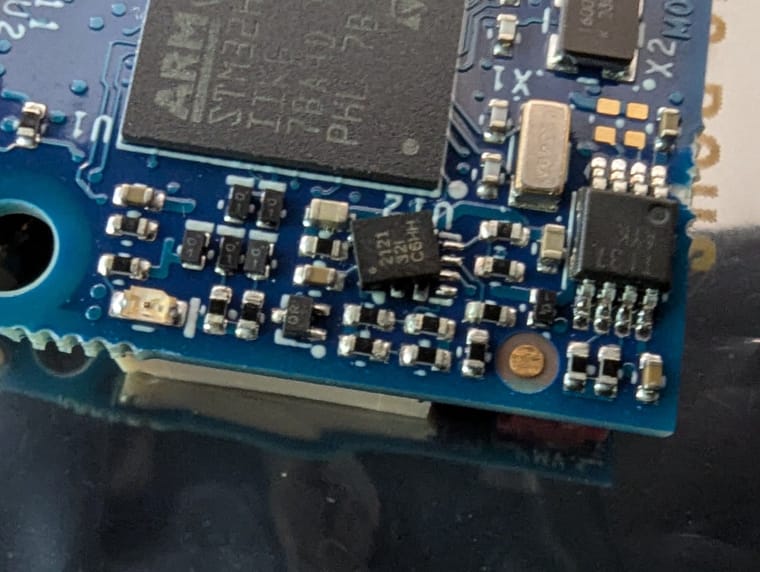
I've had almost the exact same thing happen but I think ours got hot enough to desolder a part (see pictures). Feels like a manufacturing issue. Is there a way to send it in for an RMA/replacement/etc?
Here is more info:
We have a FC2.
The FC2 is brand new (purchased within the last couple months).
We did the following:
- connected the USB cable '10' to J3.
- connect a known working micro-usb cable to my laptop running QGC.
- didn't here the usual windows 'new usb device sound'
This was the first time we connected this board. We didn't see any LED's turn on within a second or two so we picked it up by the corners and noticed it was VERY hot.
We quickly disconnected everything.
We inspected the board and found a component on the bottom looks like it shifted off it's solder pads. See attached picture. We didn't inspect the board before hadn
What could have caused this? Especially given a few others have had this.
Thanks!
-
I am trying to setup my new Flight Core 2, but when I connect it to a USB port on my Windows 11 laptop with QGC 5.0.6 I get a message pop up saying "Power surge on the USB port".
The Flight Core 2 also got pretty hot -- I hope it didn't get fried!
Also, I am not clear from the rather brief documentation what file I need to download and use for the firmware update.
Do I need to use SDK 1.1 specifically or should I use the latest (1.5)? That directory contains
modalai_fc-v2_1.14.0-2.0.105.bin 05-Jun-2025 22:24 1867164
modalai_fc-v2_1.14.0-2.0.105.px4 05-Jun-2025 22:24 1758094
modalai_fc-v2_1.14.0-8.104.3.bin 05-Jun-2025 22:37 1896744
modalai_fc-v2_1.14.0-8.104.3.px4 05-Jun-2025 22:37 1786598but the doc mentions voxl_SDK_*1.1.0.tar.g.
Hi @VictorG
It is not unexpected to see some windows machines complain.
Our MCU does not enumerate as a normal USB device with current requirements reporting. So, some PCs will correctly complain.Our goal with USB based powering is for ease of use with configuration. However, if this is posing a problem in your specific system, connect it as it would be required for a sUAS by using our power module and using an MCBL-00062 into the power port.
https://docs.modalai.com/flight-core-v2-power/#j13---voxl-power-module-v3-input
https://docs.modalai.com/cable-datasheets/#mcbl-00062
This will prevent pretty much all current draw on the USB port: https://docs.modalai.com/flight-core-datasheets-v2-functional-description/#power-supply-and-power-source-mux-detailsNow as for the heating, we do know the MCU can get hot. It has no sleep modes or throttling in it when running PX4/etc, so it is not uncommon, but it will still work and is within specs. Some folks have used heatsinks or small fans with success to minimize the effect, such as: https://www.modalai.com/products/voxl-cooling-fan?_pos=1&_psq=fan&_ss=e&_v=1.0
Hope this helps explain things a bit.
-
I've had almost the exact same thing happen but I think ours got hot enough to desolder a part (see pictures). Feels like a manufacturing issue. Is there a way to send it in for an RMA/replacement/etc?
Here is more info:
We have a FC2.
The FC2 is brand new (purchased within the last couple months).
We did the following:
- connected the USB cable '10' to J3.
- connect a known working micro-usb cable to my laptop running QGC.
- didn't here the usual windows 'new usb device sound'
This was the first time we connected this board. We didn't see any LED's turn on within a second or two so we picked it up by the corners and noticed it was VERY hot.
We quickly disconnected everything.
We inspected the board and found a component on the bottom looks like it shifted off it's solder pads. See attached picture. We didn't inspect the board before hadn
What could have caused this? Especially given a few others have had this.
Thanks!
Hi @Martin-Lukac
Well that's not good. Your board will not work with that chip busted off like that.
Please use our RMA process and we'll get this assessed for for you:
https://www.modalai.com/pages/rma -
@Moderator
I am having a similar issue. I purchased 3 of the Flight Core 2 boards. And, I tried 3 different micro USB cables. I am not getting any power to any of the Flight Core 2 boards from my PC laptop. I am using Windows 11 as well. I am unable to connect to any port on the laptop. I did try to connect one of the boards to a Mac computer through the Micro USB to USB connection. The board started to heat up and I had to disconnect. Is there a specific Windows driver needed for the Flight Core 2? I am at a loss at this point.Hi @Michael-Mortensen
Please see the post to Victor about using the power module instead of just USB.
Let us know if that helps.
Thanks! -
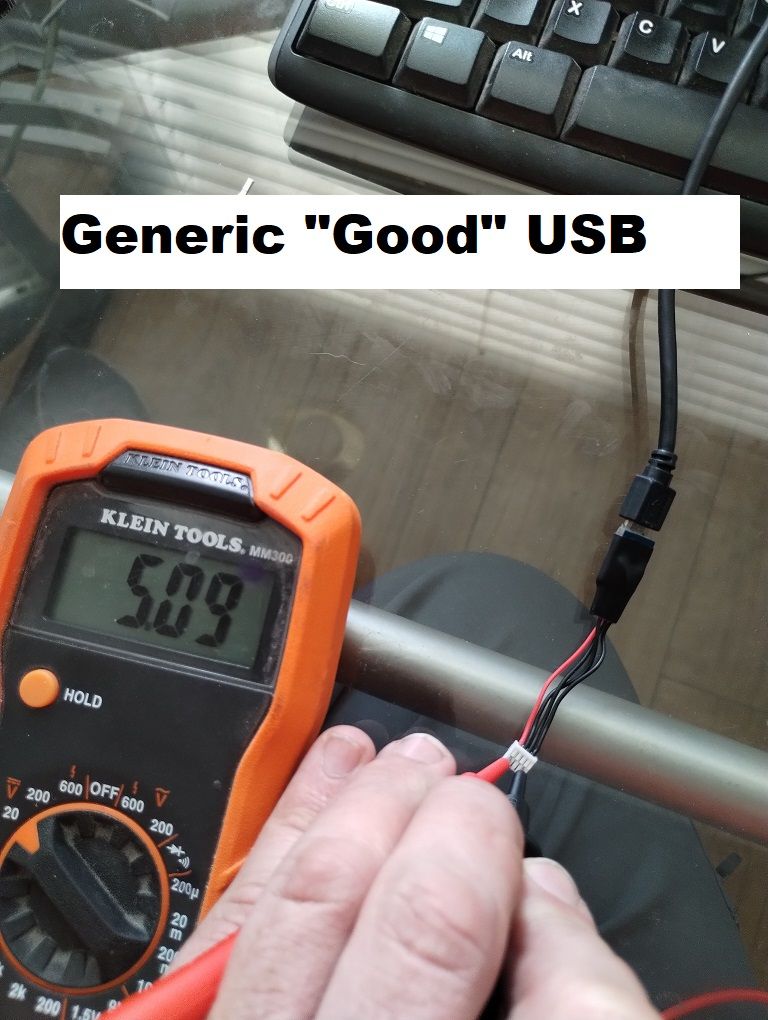
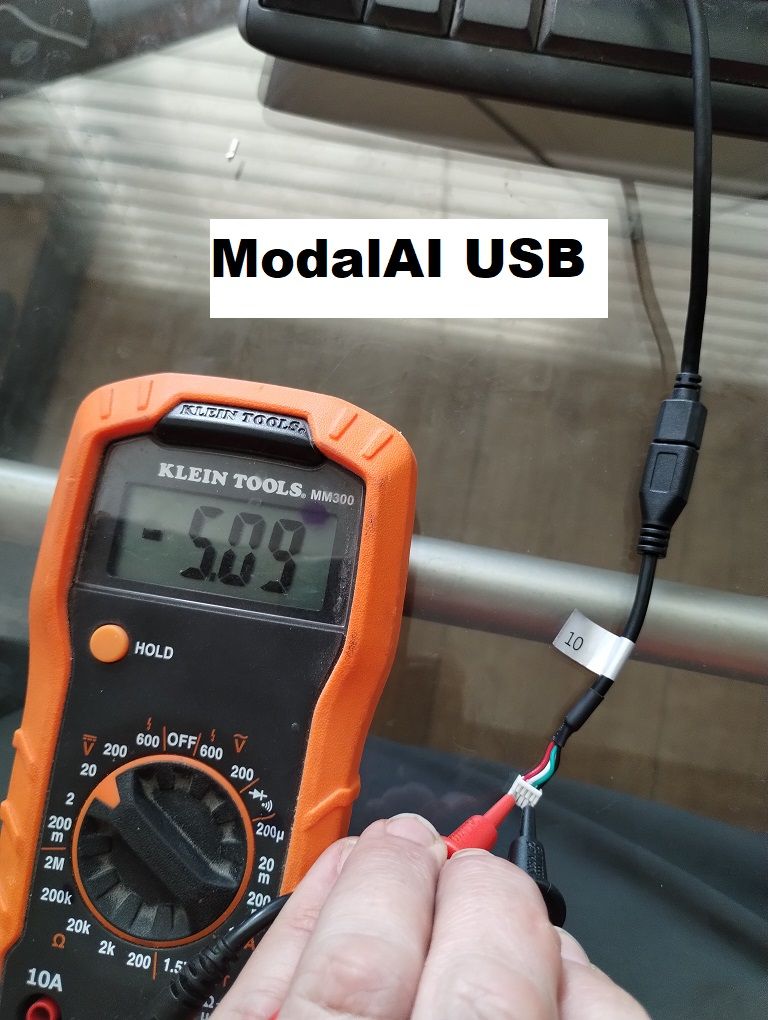
@Vinny I hate to say this, but I believe you have a batch of defective USB cables. I was running into the same issue as @VictorG and @Michael-Mortensen , so I broke out the multimeter and confirmed that 5V and GND are swapped (note the negative 5V instead of +5V). I grabbed another generic USB cable that I had on-hand and the FCv2 powered up and connected to QGC fine.
ModalAI Support was kind enough to send me 3x replacement USBs...but unfortunately they are all mis-wired as well.
-
@Vinny I hate to say this, but I believe you have a batch of defective USB cables. I was running into the same issue as @VictorG and @Michael-Mortensen , so I broke out the multimeter and confirmed that 5V and GND are swapped (note the negative 5V instead of +5V). I grabbed another generic USB cable that I had on-hand and the FCv2 powered up and connected to QGC fine.
ModalAI Support was kind enough to send me 3x replacement USBs...but unfortunately they are all mis-wired as well.
Hi @hula
Interesting. I will investigate. The cable appears as it should according to our tech docs and every batch is sample tested but I will inspect further and respond tomorrow.
https://docs.modalai.com/cable-datasheets/#mcbl-00010
Thanks
Vinny -
Hi @hula
Interesting. I will investigate. The cable appears as it should according to our tech docs and every batch is sample tested but I will inspect further and respond tomorrow.
https://docs.modalai.com/cable-datasheets/#mcbl-00010
Thanks
VinnyHi @hula
YOU ARE CORRECT!
I found a whole bag of mis-wired MCBL-00010's in our inventory.
I'll work with our @Moderator to figure out a plan.
We will likely need to setup an email where any customer can let us know if they have offending cables and we will send replacements promptly. -
Hi @hula
YOU ARE CORRECT!
I found a whole bag of mis-wired MCBL-00010's in our inventory.
I'll work with our @Moderator to figure out a plan.
We will likely need to setup an email where any customer can let us know if they have offending cables and we will send replacements promptly. -
Hi @hula
YOU ARE CORRECT!
I found a whole bag of mis-wired MCBL-00010's in our inventory.
I'll work with our @Moderator to figure out a plan.
We will likely need to setup an email where any customer can let us know if they have offending cables and we will send replacements promptly. -
I just tested my cable and it is the same issue that caused mine to melt. I sent my board for RMA so I'll respond to that email thread.
FYI it is possible to pull the pins out and swap them, but it weakens the little plastic retaining piece so it is not as solid anymore ... and it makes it confusing since the red is now ground.
-
I just tested my cable and it is the same issue that caused mine to melt. I sent my board for RMA so I'll respond to that email thread.
FYI it is possible to pull the pins out and swap them, but it weakens the little plastic retaining piece so it is not as solid anymore ... and it makes it confusing since the red is now ground.
When you all are testing, can you also confirm that the two USB wires are not swapped. Thanks!
-
When you all are testing, can you also confirm that the two USB wires are not swapped. Thanks!
@Martin-Lukac , @VictorG
Yes, we are working a replacement solution.
Exactly what @Martin-Lukac said is a temporary solution by swapping the conductors until we can source replacement cables. We might need a few weeks honestly.
Any HW that was compromised by this issue is an no-brainer replacement by my standards, and I will help ensure our production and operations team replaces any HW at jeopardy of this issue promptly. We have the HW in stock to replace, just not the USB cables as of yet.We apologize for this issue. We actually had that batch of cables in stock for over 2 years and our sample lot from a different sealed bag in the same shipment that was tested did not experience this issue, so we were caught flat footed and we will put in better inspection processes to ensure this does not happen again.
Thanks!
Vinny -
@Martin-Lukac , @VictorG
Yes, we are working a replacement solution.
Exactly what @Martin-Lukac said is a temporary solution by swapping the conductors until we can source replacement cables. We might need a few weeks honestly.
Any HW that was compromised by this issue is an no-brainer replacement by my standards, and I will help ensure our production and operations team replaces any HW at jeopardy of this issue promptly. We have the HW in stock to replace, just not the USB cables as of yet.We apologize for this issue. We actually had that batch of cables in stock for over 2 years and our sample lot from a different sealed bag in the same shipment that was tested did not experience this issue, so we were caught flat footed and we will put in better inspection processes to ensure this does not happen again.
Thanks!
VinnyHi @Vinny, given my Flight Core 2 got extremely hot, do you think there is a good chance it is now fried? Or should I wait for the new cable to see if it will work? My preference is to not waste time and just get a replacement for both items if that is OK with you.
Thanks,
Victor -
Hi @Vinny, given my Flight Core 2 got extremely hot, do you think there is a good chance it is now fried? Or should I wait for the new cable to see if it will work? My preference is to not waste time and just get a replacement for both items if that is OK with you.
Thanks,
VictorHi @VictorG
You should RMA the FlightCore and we should replace it. Just mention this thread or place a link to it in the form:
https://www.modalai.com/pages/rma?_pos=1&_sid=190e46152&_ss=rWe do not yet have a replacement set of cables, under normal circumstances, it takes us 6-8 weeks to get more, so we are trying to see if we have any small batch in our inventory to hold us over and replace every bad cable that we shipped.
If you want to try to re-pin your cable for the interim (you will not need to send it back, we can just replace it when we get more), try this link:
https://docs.modalai.com/cable-userguides/ and at the bottom are tips for re-pinning
or you can just search youtube for s JST GH re-pin tutorial and I'm sure you'll find plenty of good techniques. All that is needed is tweezers. -
Hi @VictorG
You should RMA the FlightCore and we should replace it. Just mention this thread or place a link to it in the form:
https://www.modalai.com/pages/rma?_pos=1&_sid=190e46152&_ss=rWe do not yet have a replacement set of cables, under normal circumstances, it takes us 6-8 weeks to get more, so we are trying to see if we have any small batch in our inventory to hold us over and replace every bad cable that we shipped.
If you want to try to re-pin your cable for the interim (you will not need to send it back, we can just replace it when we get more), try this link:
https://docs.modalai.com/cable-userguides/ and at the bottom are tips for re-pinning
or you can just search youtube for s JST GH re-pin tutorial and I'm sure you'll find plenty of good techniques. All that is needed is tweezers.Hi @Vinny,
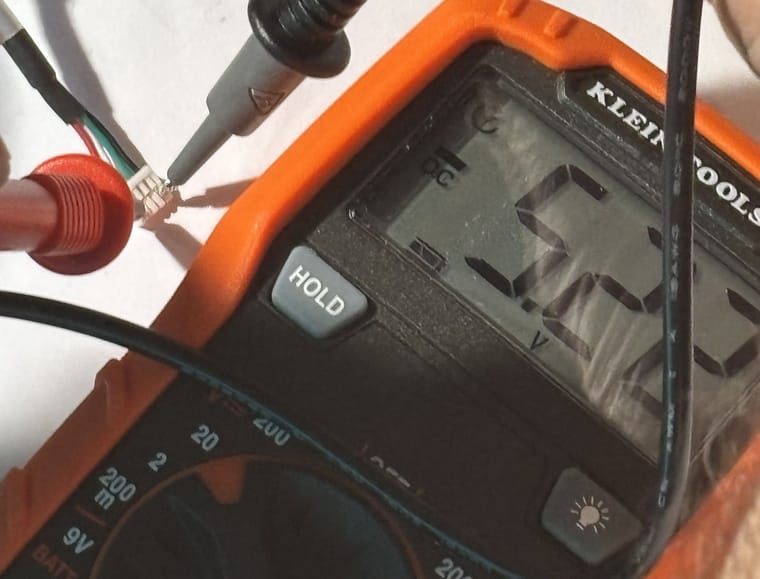
I submitted the RMA, sent back the FC2 and got a replacement, along with two MCBL-10 cables. Before attempting to flash it with QGC I checked the voltage as lo and behold both cables showed -5.22 volts. Picture attached. Glad I did the test first or I would have fried the replacement FC2

-
Hi @Vinny,
I submitted the RMA, sent back the FC2 and got a replacement, along with two MCBL-10 cables. Before attempting to flash it with QGC I checked the voltage as lo and behold both cables showed -5.22 volts. Picture attached. Glad I did the test first or I would have fried the replacement FC2
Hi @VictorG ,
That is unacceptable of us. I worked directly with operations to screen 100% of these units so I need to dig in and find out what happened.
So sorry and we'll get this sorted out.
FYI @Moderator




Reading along? Create a free ModalAI Forum account to join in.
With an account you can reply, ask your own question, get an email when a ModalAI engineer answers, and mark the reply that solved it. Your place in each thread is saved between visits.
Questions about VOXL, Flight Core, ESCs and ModalAI drones are answered here by the engineers who build them.
Register Login