Skip to content
  • Categories
  • Recent
  • Tags
  • Popular
  • Users
  • Groups
Collapse
Brand Logo

ModalAI Forum

  1. ModalAI Support Forum
  2. Ask your questions right here!
  3. Teledyne FLIR Lepton 3.5 Integration

Teledyne FLIR Lepton 3.5 Integration

Scheduled Pinned Locked Moved Ask your questions right here!
18 Posts 2 Posters 2.7k Views 1 Watching
  • Oldest to Newest
  • Newest to Oldest
  • Most Votes
Reply
  • Reply as topic
Log in to reply
This topic has been deleted. Only users with topic management privileges can see it.
  • george kollamkulamG Offline
    george kollamkulamG Offline
    george kollamkulam
    Contributor
    wrote on last edited by
    #1

    Hi,

    I was looking to integrate the Teledyne FLIR Lepton 3.5 onto the Starling 2 UAV (running PX4) using SPI/I2C. Could you advise on the steps involved? Would this need any driver level modifications or is sufficient to configure certain pre-defined parameters?

    Thanks!

    Alex KushleyevA 1 Reply Last reply
    0
    • george kollamkulamG george kollamkulam

      Hi,

      I was looking to integrate the Teledyne FLIR Lepton 3.5 onto the Starling 2 UAV (running PX4) using SPI/I2C. Could you advise on the steps involved? Would this need any driver level modifications or is sufficient to configure certain pre-defined parameters?

      Thanks!

      Alex KushleyevA Offline
      Alex KushleyevA Offline
      Alex Kushleyev
      ModalAI Team
      wrote on last edited by Alex Kushleyev
      #2

      @george-kollamkulam ,

      Please take a look at this document : https://docs.modalai.com/voxl2-d0014/#downward-range-finder-and-flir-lepton

      You will need M0157 adapter + actual Lepton sensor. The M0157 adapter will plug into the M0173 camera front end. Then it will be pretty much plug and play.

      Let me check how to get M0157 - it does not appear to be in the shop.

      Alex

      Alex KushleyevA 1 Reply Last reply
      0
      • Alex KushleyevA Alex Kushleyev

        @george-kollamkulam ,

        Please take a look at this document : https://docs.modalai.com/voxl2-d0014/#downward-range-finder-and-flir-lepton

        You will need M0157 adapter + actual Lepton sensor. The M0157 adapter will plug into the M0173 camera front end. Then it will be pretty much plug and play.

        Let me check how to get M0157 - it does not appear to be in the shop.

        Alex

        Alex KushleyevA Offline
        Alex KushleyevA Offline
        Alex Kushleyev
        ModalAI Team
        wrote on last edited by
        #3

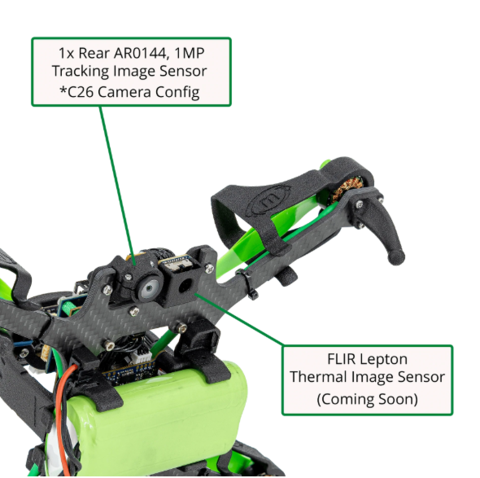
        @george-kollamkulam , can you please check if you already have the M0157 adapter installed in your Starling 2?
        ea276a7b-e519-4515-bf99-15abb66c7e24-image.png

        Just for completeness, we are updating M0157 to M0187 which has identical functionality but also has additional i2c-gpio circuit to perform a hardware reset of lepton and tof sensor if needed. Also a small change in dimensions.

        However, if you already have M0157, which you should, it should work just fine.

        Alex

        george kollamkulamG 2 Replies Last reply
        0
        • Alex KushleyevA Alex Kushleyev

          @george-kollamkulam , can you please check if you already have the M0157 adapter installed in your Starling 2?

          ea276a7b-e519-4515-bf99-15abb66c7e24-image.png

          Just for completeness, we are updating M0157 to M0187 which has identical functionality but also has additional i2c-gpio circuit to perform a hardware reset of lepton and tof sensor if needed. Also a small change in dimensions.

          However, if you already have M0157, which you should, it should work just fine.

          Alex

          george kollamkulamG Offline
          george kollamkulamG Offline
          george kollamkulam
          Contributor
          wrote on last edited by
          #4

          @Alex-Kushleyev thanks, I have the M0157 adapter installed on my Starling 2.

          1 Reply Last reply
          0
          • Alex KushleyevA Alex Kushleyev

            @george-kollamkulam , can you please check if you already have the M0157 adapter installed in your Starling 2?

            ea276a7b-e519-4515-bf99-15abb66c7e24-image.png

            Just for completeness, we are updating M0157 to M0187 which has identical functionality but also has additional i2c-gpio circuit to perform a hardware reset of lepton and tof sensor if needed. Also a small change in dimensions.

            However, if you already have M0157, which you should, it should work just fine.

            Alex

            george kollamkulamG Offline
            george kollamkulamG Offline
            george kollamkulam
            Contributor
            wrote on last edited by
            #5

            @Alex-Kushleyev It looks like our Starling 2 UAV has the M0157 adapter, the M0173 board (Yellow PCB that also connects to the 3 AR0144 sensors and the TOF sensor), and the 7pin cable that connects the M0157 adapter to the M0173 board. Just to clarify, this configuration is sufficient to integrate (plug-and-play) the Teledyne FLIR Lepton 3.5 without modifying the drivers? If not, do you have any recommended thermal sensors that can directly fit into this hardware and software architecture? I'd be happy to buy them.

            Alex KushleyevA 1 Reply Last reply
            0
            • george kollamkulamG george kollamkulam

              @Alex-Kushleyev It looks like our Starling 2 UAV has the M0157 adapter, the M0173 board (Yellow PCB that also connects to the 3 AR0144 sensors and the TOF sensor), and the 7pin cable that connects the M0157 adapter to the M0173 board. Just to clarify, this configuration is sufficient to integrate (plug-and-play) the Teledyne FLIR Lepton 3.5 without modifying the drivers? If not, do you have any recommended thermal sensors that can directly fit into this hardware and software architecture? I'd be happy to buy them.

              Alex KushleyevA Offline
              Alex KushleyevA Offline
              Alex Kushleyev
              ModalAI Team
              wrote on last edited by Alex Kushleyev
              #6

              @george-kollamkulam , yes FLIR Lepton 3.5 just inserts into M0157 board which has the socket for the bare Lepton sensor.

              Once you install the sensor into the docket, boot up voxl2 and run voxl-lepton-server. It will autogenerate a default config file /etc/modalai/voxl-lepton-server.conf that will look like this.

              {
              	"spi_bus":	14,
              	"spi_speed":	16000000,
              	"en_i2c":	false,
              	"i2c_bus":	0,
              	"shutter_mode":	"auto",
              	"flow_shutter_s":	20,
              	"closePeriodInFramesInAir":	1,
              	"openPeriodInFramesInAir":	0,
              	"desiredFfcPeriodMsInAir":	360000,
              	"desiredFfcTempDeltaCentiDegInAir":	600,
              	"en_rotate":	false
              }
              

              You will need to change the SPI bus to 0 and , set en_i2c to true and i2c_bus to 4 because this is the configuration for this Hardware arrangement (M0173 + M0157) per the following documentation : https://docs.modalai.com/voxl2-d0014/#downward-range-finder-and-flir-lepton

              Then you can run voxl-lepton-server again in foreground or enable the systemd server using systemctl enable voxl-lepton-server and systemctl start voxl-lepton-server . After that you shoud be able to see the Lepton output using voxl-portal.

              Alex

              george kollamkulamG 1 Reply Last reply
              0
              • Alex KushleyevA Alex Kushleyev

                @george-kollamkulam , yes FLIR Lepton 3.5 just inserts into M0157 board which has the socket for the bare Lepton sensor.

                Once you install the sensor into the docket, boot up voxl2 and run voxl-lepton-server. It will autogenerate a default config file /etc/modalai/voxl-lepton-server.conf that will look like this.

                {
                	"spi_bus":	14,
                	"spi_speed":	16000000,
                	"en_i2c":	false,
                	"i2c_bus":	0,
                	"shutter_mode":	"auto",
                	"flow_shutter_s":	20,
                	"closePeriodInFramesInAir":	1,
                	"openPeriodInFramesInAir":	0,
                	"desiredFfcPeriodMsInAir":	360000,
                	"desiredFfcTempDeltaCentiDegInAir":	600,
                	"en_rotate":	false
                }
                

                You will need to change the SPI bus to 0 and , set en_i2c to true and i2c_bus to 4 because this is the configuration for this Hardware arrangement (M0173 + M0157) per the following documentation : https://docs.modalai.com/voxl2-d0014/#downward-range-finder-and-flir-lepton

                Then you can run voxl-lepton-server again in foreground or enable the systemd server using systemctl enable voxl-lepton-server and systemctl start voxl-lepton-server . After that you shoud be able to see the Lepton output using voxl-portal.

                Alex

                george kollamkulamG Offline
                george kollamkulamG Offline
                george kollamkulam
                Contributor
                wrote on last edited by
                #7

                @Alex-Kushleyev thanks, this seems to be working well. Can you also share what voxl-lepton-tracker is used for?

                George

                Alex KushleyevA 1 Reply Last reply
                0
                • george kollamkulamG george kollamkulam

                  @Alex-Kushleyev thanks, this seems to be working well. Can you also share what voxl-lepton-tracker is used for?

                  George

                  Alex KushleyevA Offline
                  Alex KushleyevA Offline
                  Alex Kushleyev
                  ModalAI Team
                  wrote on last edited by
                  #8

                  @george-kollamkulam , the lepton tracker is an implementation of optic flow tracker for the lepton data, you can see the details here : https://gitlab.com/voxl-public/voxl-sdk/services/voxl-lepton-tracker/-/blob/master/src/feature_tracker.cpp

                  george kollamkulamG 1 Reply Last reply
                  0
                  • Alex KushleyevA Alex Kushleyev

                    @george-kollamkulam , the lepton tracker is an implementation of optic flow tracker for the lepton data, you can see the details here : https://gitlab.com/voxl-public/voxl-sdk/services/voxl-lepton-tracker/-/blob/master/src/feature_tracker.cpp

                    george kollamkulamG Offline
                    george kollamkulamG Offline
                    george kollamkulam
                    Contributor
                    wrote on last edited by
                    #9

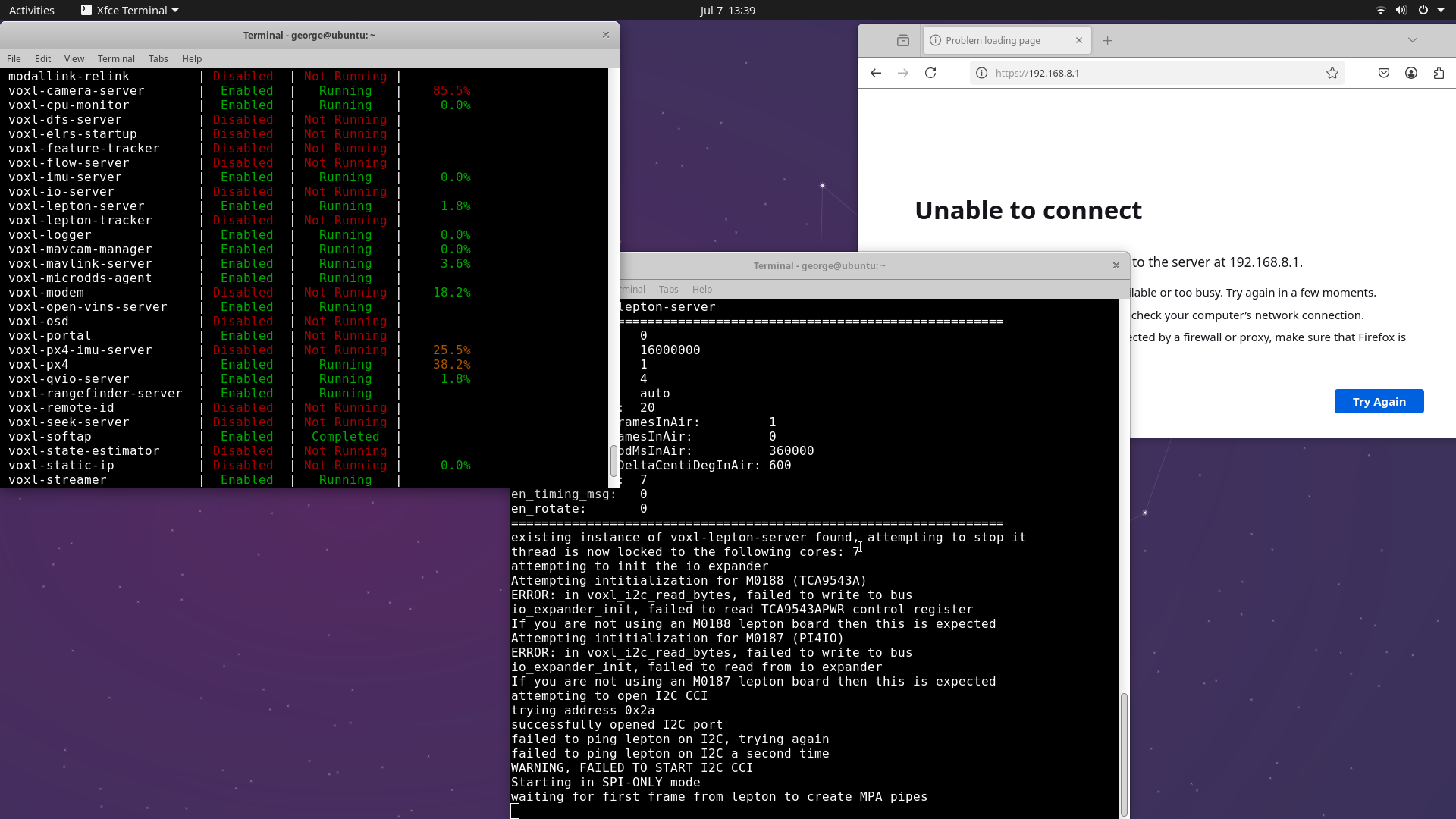
                    @Alex-Kushleyev I tried using the Lepton 3.5 sensor again, but this time I was unable to see the feed on the voxl portal, although voxl-lepton-server and voxl-camera-services were running. Additionally, I couldn't hear the clicking sound from the lepton sensor that was previously present. What could be the issue here? Is there anything I'm missing?

                    I also noticed that the rear tracking camera wasn't functional (I'm not sure if this is related to the functioning of the lepton camera). It was seen on the voxl system check page on the voxl portal.
                    Lepton.png

                    Alex KushleyevA 1 Reply Last reply
                    0
                    • george kollamkulamG george kollamkulam

                      @Alex-Kushleyev I tried using the Lepton 3.5 sensor again, but this time I was unable to see the feed on the voxl portal, although voxl-lepton-server and voxl-camera-services were running. Additionally, I couldn't hear the clicking sound from the lepton sensor that was previously present. What could be the issue here? Is there anything I'm missing?

                      I also noticed that the rear tracking camera wasn't functional (I'm not sure if this is related to the functioning of the lepton camera). It was seen on the voxl system check page on the voxl portal.

                      Lepton.png

                      Alex KushleyevA Offline
                      Alex KushleyevA Offline
                      Alex Kushleyev
                      ModalAI Team
                      wrote on last edited by
                      #10

                      @george-kollamkulam , are you saying that just the Lepton and the tracking cameras are not working now, but all the other cameras are working fine?

                      voxl-camera-server and voxl-lepton-server are completely independent and should not be interfering. However, Please try to unplug the lepton sensor from M0173 board and see if the tracking camera starts working again.

                      it seems like maybe there is some power issue, since lepton is not clicking, since it should be doing that as soon as it gets power.

                      Alex

                      george kollamkulamG 1 Reply Last reply
                      0
                      • Alex KushleyevA Alex Kushleyev

                        @george-kollamkulam , are you saying that just the Lepton and the tracking cameras are not working now, but all the other cameras are working fine?

                        voxl-camera-server and voxl-lepton-server are completely independent and should not be interfering. However, Please try to unplug the lepton sensor from M0173 board and see if the tracking camera starts working again.

                        it seems like maybe there is some power issue, since lepton is not clicking, since it should be doing that as soon as it gets power.

                        Alex

                        george kollamkulamG Offline
                        george kollamkulamG Offline
                        george kollamkulam
                        Contributor
                        wrote on last edited by
                        #11

                        @Alex-Kushleyev I did a power cycle on the lepton sensor and it seems to be working now (click sound and feed available). All cameras except the rear tracking camera seems to be working fine (screenshot attached below). It doesn't show up on the voxl portal. How can we resolve this?

                        Rear tracking camera.png

                        Alex KushleyevA 1 Reply Last reply
                        0
                        • george kollamkulamG george kollamkulam

                          @Alex-Kushleyev I did a power cycle on the lepton sensor and it seems to be working now (click sound and feed available). All cameras except the rear tracking camera seems to be working fine (screenshot attached below). It doesn't show up on the voxl portal. How can we resolve this?

                          Rear tracking camera.png

                          Alex KushleyevA Offline
                          Alex KushleyevA Offline
                          Alex Kushleyev
                          ModalAI Team
                          wrote on last edited by
                          #12

                          @george-kollamkulam , can you please provide output of “voxl-camera-server -l”? This will show us which cameras are detected (excluding lepton). Note that running this command will stop the camera server if it is running in the background.

                          george kollamkulamG 1 Reply Last reply
                          0
                          • Alex KushleyevA Alex Kushleyev

                            @george-kollamkulam , can you please provide output of “voxl-camera-server -l”? This will show us which cameras are detected (excluding lepton). Note that running this command will stop the camera server if it is running in the background.

                            george kollamkulamG Offline
                            george kollamkulamG Offline
                            george kollamkulam
                            Contributor
                            wrote on last edited by
                            #13

                            @Alex-Kushleyev
                            existing instance of voxl-camera-server found, attempting to stop it
                            Number of cameras detected: 4

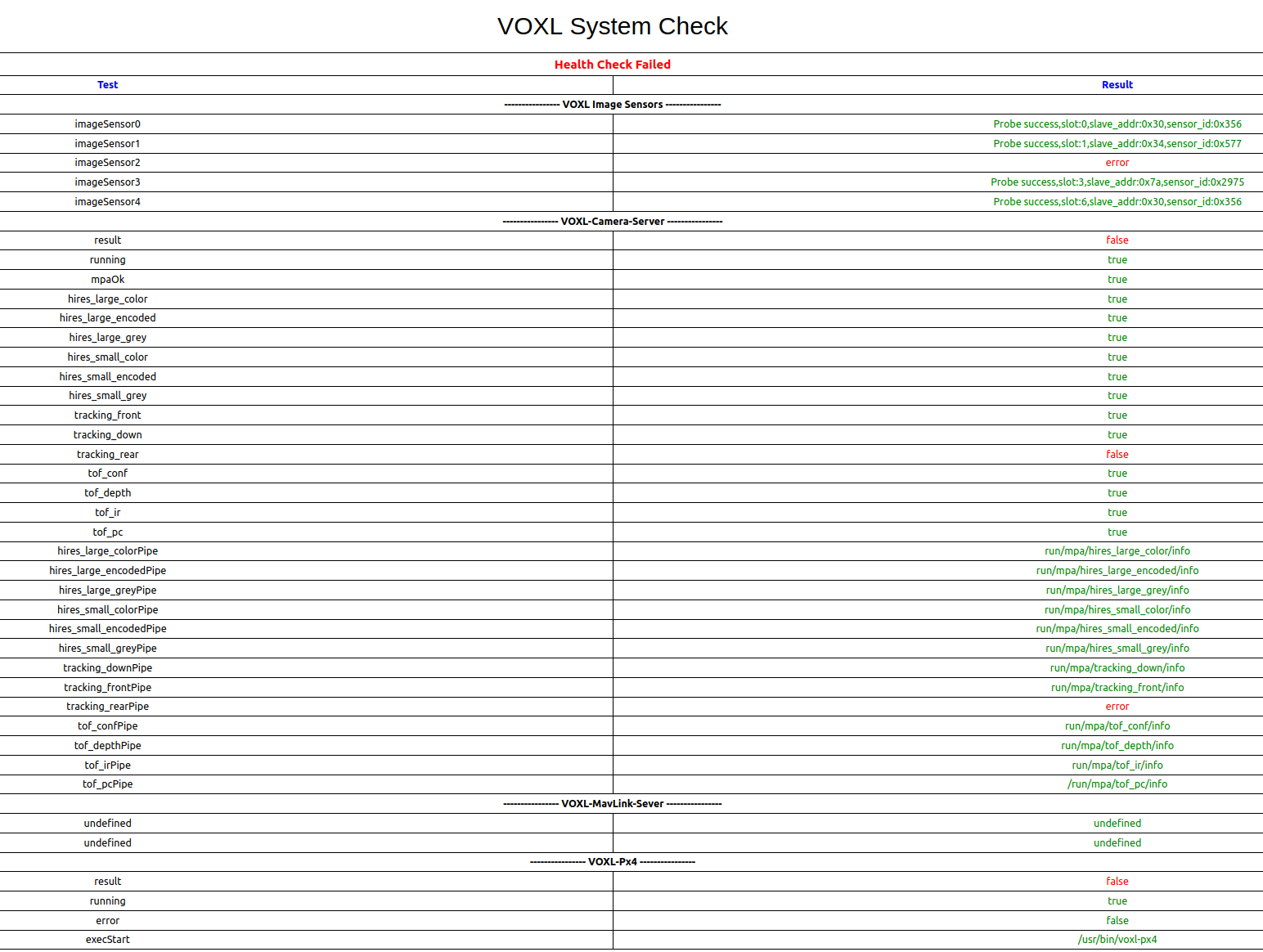
                            On the voxl portal system check, it returned false for tracking_rear (VOXL-Camera-Server) and error for imageSensor2 (VOXL Image Sensors).
                            ![Screenshot from 2025-07-09 10-43-06.png](Request Entity Too Large)

                            Alex KushleyevA 1 Reply Last reply
                            0
                            • george kollamkulamG george kollamkulam

                              @Alex-Kushleyev
                              existing instance of voxl-camera-server found, attempting to stop it
                              Number of cameras detected: 4

                              On the voxl portal system check, it returned false for tracking_rear (VOXL-Camera-Server) and error for imageSensor2 (VOXL Image Sensors).
                              ![Screenshot from 2025-07-09 10-43-06.png](Request Entity Too Large)

                              Alex KushleyevA Offline
                              Alex KushleyevA Offline
                              Alex Kushleyev
                              ModalAI Team
                              wrote on last edited by
                              #14

                              @george-kollamkulam ,

                              You are using a version of SDK which had a bug that was suppressing most of the prints, so voxl-camera-server -l is not reporting any information.

                              To fix this, please use the latest version of libmodal-journal package (you can get it from here : http://voxl-packages.modalai.com/dists/qrb5165/dev/binary-arm64//libmodal-journal_0.2.6-202505081055_arm64.deb

                              How many cameras do you actually have on your Starling 2? is it 4? Two tracking, one Hires camera and on TOF?

                              Alex

                              george kollamkulamG 1 Reply Last reply
                              0
                              • Alex KushleyevA Alex Kushleyev

                                @george-kollamkulam ,

                                You are using a version of SDK which had a bug that was suppressing most of the prints, so voxl-camera-server -l is not reporting any information.

                                To fix this, please use the latest version of libmodal-journal package (you can get it from here : http://voxl-packages.modalai.com/dists/qrb5165/dev/binary-arm64//libmodal-journal_0.2.6-202505081055_arm64.deb

                                How many cameras do you actually have on your Starling 2? is it 4? Two tracking, one Hires camera and on TOF?

                                Alex

                                george kollamkulamG Offline
                                george kollamkulamG Offline
                                george kollamkulam
                                Contributor
                                wrote on last edited by
                                #15

                                @Alex-Kushleyev apart from the lepton sensor, I have 5 (1 hires, 1 tof and 3 tracking).

                                Can you please point me to the resource that explains how to update the libmodal-journal package? Would I need to reinstall ROS2 Foxy or anything else?

                                Thanks,
                                George

                                Alex KushleyevA 1 Reply Last reply
                                0
                                • george kollamkulamG george kollamkulam

                                  @Alex-Kushleyev apart from the lepton sensor, I have 5 (1 hires, 1 tof and 3 tracking).

                                  Can you please point me to the resource that explains how to update the libmodal-journal package? Would I need to reinstall ROS2 Foxy or anything else?

                                  Thanks,
                                  George

                                  Alex KushleyevA Offline
                                  Alex KushleyevA Offline
                                  Alex Kushleyev
                                  ModalAI Team
                                  wrote on last edited by
                                  #16

                                  @george-kollamkulam , in order to install the updated libmodal-journal package, you just download the file that i linked to VOXL2, lets say you put it in /home/root/.

                                  Then, using adb you go to /home/root and execute:

                                  dpkg -i libmodal-journal_0.2.6-202505081055_arm64.deb
                                  

                                  Then you just run voxl-camera-server -l and you should see a lot more information being printed.

                                  Alex

                                  george kollamkulamG 1 Reply Last reply
                                  0
                                  • Alex KushleyevA Alex Kushleyev

                                    @george-kollamkulam , in order to install the updated libmodal-journal package, you just download the file that i linked to VOXL2, lets say you put it in /home/root/.

                                    Then, using adb you go to /home/root and execute:

                                    dpkg -i libmodal-journal_0.2.6-202505081055_arm64.deb
                                    

                                    Then you just run voxl-camera-server -l and you should see a lot more information being printed.

                                    Alex

                                    george kollamkulamG Offline
                                    george kollamkulamG Offline
                                    george kollamkulam
                                    Contributor
                                    wrote on last edited by
                                    #17

                                    @Alex-Kushleyev here's the system response.

                                    voxl2:/$ cd /home/root
                                    voxl2:~$ dpkg -i libmodal-journal_0.2.6-202505081055_arm64.deb
                                    (Reading database ... 137565 files and directories currently installed.)
                                    Preparing to unpack libmodal-journal_0.2.6-202505081055_arm64.deb ...
                                    Unpacking libmodal-journal (0.2.6-202505081055) over (0.2.5) ...
                                    Setting up libmodal-journal (0.2.6-202505081055) ...
                                    Processing triggers for libc-bin (2.27-3ubuntu1.6) ...
                                    voxl2:~$ dpkg -l | grep libmodal-journal
                                    ii libmodal-journal 0.2.6-202505081055 arm64 Journaling library
                                    voxl2:~$ voxl-camera-server -l
                                    existing instance of voxl-camera-server found, attempting to stop it
                                    DEBUG: Attempting to open the hal module
                                    DEBUG: SUCCESS: Camera module opened on attempt 0
                                    DEBUG: ----------- Number of cameras: 4

                                    DEBUG: Cam idx: 0, Cam slot: 0, Slave Address: 0x0030, Sensor Id: 0x0356
                                    DEBUG: Cam idx: 1, Cam slot: 1, Slave Address: 0x0034, Sensor Id: 0x0577
                                    DEBUG: Cam idx: 2, Cam slot: 3, Slave Address: 0x007A, Sensor Id: 0x2975
                                    DEBUG: Cam idx: 3, Cam slot: 6, Slave Address: 0x0030, Sensor Id: 0x0356
                                    DEBUG: Note: This list comes from the HAL module and may not be indicative
                                    DEBUG: of configurations that have full pipelines

                                    DEBUG: Number of cameras: 4

                                    ====================================
                                    Stats for camera: 0

                                    ANDROID_SCALER_AVAILABLE_RAW_SIZES:
                                    These are likely supported by the sensor
                                    1280 x 800
                                    1280 x 800

                                    ANDROID_SCALER_AVAILABLE_STREAM_CONFIGURATIONS:
                                    These are NOT necessarily supported by the sensor
                                    1280 x 800 HAL_PIXEL_FORMAT_YCbCr_420_888
                                    1280 x 800 HAL_PIXEL_FORMAT_BLOB
                                    1280 x 768 HAL_PIXEL_FORMAT_YCbCr_420_888
                                    1280 x 768 HAL_PIXEL_FORMAT_BLOB
                                    1280 x 720 HAL_PIXEL_FORMAT_YCbCr_420_888
                                    1280 x 720 HAL_PIXEL_FORMAT_BLOB
                                    1024 x 738 HAL_PIXEL_FORMAT_YCbCr_420_888
                                    1024 x 738 HAL_PIXEL_FORMAT_BLOB
                                    1024 x 768 HAL_PIXEL_FORMAT_YCbCr_420_888
                                    1024 x 768 HAL_PIXEL_FORMAT_BLOB
                                    864 x 480 HAL_PIXEL_FORMAT_YCbCr_420_888
                                    864 x 480 HAL_PIXEL_FORMAT_BLOB
                                    800 x 600 HAL_PIXEL_FORMAT_YCbCr_420_888
                                    800 x 600 HAL_PIXEL_FORMAT_BLOB
                                    800 x 480 HAL_PIXEL_FORMAT_YCbCr_420_888
                                    800 x 480 HAL_PIXEL_FORMAT_BLOB
                                    720 x 480 HAL_PIXEL_FORMAT_YCbCr_420_888
                                    720 x 480 HAL_PIXEL_FORMAT_BLOB
                                    640 x 512 HAL_PIXEL_FORMAT_YCbCr_420_888
                                    640 x 512 HAL_PIXEL_FORMAT_BLOB
                                    640 x 480 HAL_PIXEL_FORMAT_YCbCr_420_888
                                    640 x 480 HAL_PIXEL_FORMAT_BLOB
                                    640 x 400 HAL_PIXEL_FORMAT_YCbCr_420_888
                                    640 x 400 HAL_PIXEL_FORMAT_BLOB
                                    640 x 360 HAL_PIXEL_FORMAT_YCbCr_420_888
                                    640 x 360 HAL_PIXEL_FORMAT_BLOB
                                    352 x 288 HAL_PIXEL_FORMAT_YCbCr_420_888
                                    352 x 288 HAL_PIXEL_FORMAT_BLOB
                                    320 x 240 HAL_PIXEL_FORMAT_YCbCr_420_888
                                    320 x 240 HAL_PIXEL_FORMAT_BLOB
                                    240 x 320 HAL_PIXEL_FORMAT_YCbCr_420_888
                                    240 x 320 HAL_PIXEL_FORMAT_BLOB
                                    176 x 144 HAL_PIXEL_FORMAT_YCbCr_420_888
                                    176 x 144 HAL_PIXEL_FORMAT_BLOB
                                    1280 x 800 HAL_PIXEL_FORMAT_RAW10
                                    1280 x 800 HAL_PIXEL_FORMAT_RAW12
                                    1280 x 800 HAL_PIXEL_FORMAT_RAW16
                                    1280 x 800 HAL_PIXEL_FORMAT_RAW_OPAQUE

                                    ANDROID_SENSOR_INFO_SENSITIVITY_RANGE
                                    min = 54
                                    max = 1596

                                    ANDROID_SENSOR_MAX_ANALOG_SENSITIVITY
                                    1596

                                    ANDROID_SENSOR_INFO_EXPOSURE_TIME_RANGE
                                    min = 0ns
                                    max = 1318629735ns

                                    ====================================
                                    Stats for camera: 1

                                    ANDROID_SCALER_AVAILABLE_RAW_SIZES:
                                    These are likely supported by the sensor
                                    4056 x 3040
                                    3840 x 2160
                                    1920 x 1080
                                    1920 x 1080
                                    1920 x 1080
                                    1280 x 720
                                    1280 x 720

                                    ANDROID_SCALER_AVAILABLE_STREAM_CONFIGURATIONS:
                                    These are NOT necessarily supported by the sensor
                                    4056 x 3040 HAL_PIXEL_FORMAT_YCbCr_420_888
                                    4056 x 3040 HAL_PIXEL_FORMAT_BLOB
                                    4000 x 3000 HAL_PIXEL_FORMAT_YCbCr_420_888
                                    4000 x 3000 HAL_PIXEL_FORMAT_BLOB
                                    3840 x 2160 HAL_PIXEL_FORMAT_YCbCr_420_888
                                    3840 x 2160 HAL_PIXEL_FORMAT_BLOB
                                    3264 x 2448 HAL_PIXEL_FORMAT_YCbCr_420_888
                                    3264 x 2448 HAL_PIXEL_FORMAT_BLOB
                                    3200 x 2400 HAL_PIXEL_FORMAT_YCbCr_420_888
                                    3200 x 2400 HAL_PIXEL_FORMAT_BLOB
                                    2976 x 2976 HAL_PIXEL_FORMAT_YCbCr_420_888
                                    2976 x 2976 HAL_PIXEL_FORMAT_BLOB
                                    2688 x 1512 HAL_PIXEL_FORMAT_YCbCr_420_888
                                    2688 x 1512 HAL_PIXEL_FORMAT_BLOB
                                    2592 x 1944 HAL_PIXEL_FORMAT_YCbCr_420_888
                                    2592 x 1944 HAL_PIXEL_FORMAT_BLOB
                                    2048 x 1536 HAL_PIXEL_FORMAT_YCbCr_420_888
                                    2048 x 1536 HAL_PIXEL_FORMAT_BLOB
                                    1920 x 1440 HAL_PIXEL_FORMAT_YCbCr_420_888
                                    1920 x 1440 HAL_PIXEL_FORMAT_BLOB
                                    1928 x 1208 HAL_PIXEL_FORMAT_YCbCr_420_888
                                    1928 x 1208 HAL_PIXEL_FORMAT_BLOB
                                    1920 x 1080 HAL_PIXEL_FORMAT_YCbCr_420_888
                                    1920 x 1080 HAL_PIXEL_FORMAT_BLOB
                                    1600 x 1200 HAL_PIXEL_FORMAT_YCbCr_420_888
                                    1600 x 1200 HAL_PIXEL_FORMAT_BLOB
                                    1440 x 1080 HAL_PIXEL_FORMAT_YCbCr_420_888
                                    1440 x 1080 HAL_PIXEL_FORMAT_BLOB
                                    1280 x 960 HAL_PIXEL_FORMAT_YCbCr_420_888
                                    1280 x 960 HAL_PIXEL_FORMAT_BLOB
                                    1280 x 800 HAL_PIXEL_FORMAT_YCbCr_420_888
                                    1280 x 800 HAL_PIXEL_FORMAT_BLOB
                                    1280 x 768 HAL_PIXEL_FORMAT_YCbCr_420_888
                                    1280 x 768 HAL_PIXEL_FORMAT_BLOB
                                    1280 x 720 HAL_PIXEL_FORMAT_YCbCr_420_888
                                    1280 x 720 HAL_PIXEL_FORMAT_BLOB
                                    1080 x 1080 HAL_PIXEL_FORMAT_YCbCr_420_888
                                    1080 x 1080 HAL_PIXEL_FORMAT_BLOB
                                    1024 x 738 HAL_PIXEL_FORMAT_YCbCr_420_888
                                    1024 x 738 HAL_PIXEL_FORMAT_BLOB
                                    1024 x 768 HAL_PIXEL_FORMAT_YCbCr_420_888
                                    1024 x 768 HAL_PIXEL_FORMAT_BLOB
                                    864 x 480 HAL_PIXEL_FORMAT_YCbCr_420_888
                                    864 x 480 HAL_PIXEL_FORMAT_BLOB
                                    800 x 600 HAL_PIXEL_FORMAT_YCbCr_420_888
                                    800 x 600 HAL_PIXEL_FORMAT_BLOB
                                    800 x 480 HAL_PIXEL_FORMAT_YCbCr_420_888
                                    800 x 480 HAL_PIXEL_FORMAT_BLOB
                                    720 x 1280 HAL_PIXEL_FORMAT_YCbCr_420_888
                                    720 x 1280 HAL_PIXEL_FORMAT_BLOB
                                    720 x 480 HAL_PIXEL_FORMAT_YCbCr_420_888
                                    720 x 480 HAL_PIXEL_FORMAT_BLOB
                                    640 x 512 HAL_PIXEL_FORMAT_YCbCr_420_888
                                    640 x 512 HAL_PIXEL_FORMAT_BLOB
                                    640 x 480 HAL_PIXEL_FORMAT_YCbCr_420_888
                                    640 x 480 HAL_PIXEL_FORMAT_BLOB
                                    640 x 400 HAL_PIXEL_FORMAT_YCbCr_420_888
                                    640 x 400 HAL_PIXEL_FORMAT_BLOB
                                    640 x 360 HAL_PIXEL_FORMAT_YCbCr_420_888
                                    640 x 360 HAL_PIXEL_FORMAT_BLOB
                                    352 x 288 HAL_PIXEL_FORMAT_YCbCr_420_888
                                    352 x 288 HAL_PIXEL_FORMAT_BLOB
                                    320 x 240 HAL_PIXEL_FORMAT_YCbCr_420_888
                                    320 x 240 HAL_PIXEL_FORMAT_BLOB
                                    240 x 320 HAL_PIXEL_FORMAT_YCbCr_420_888
                                    240 x 320 HAL_PIXEL_FORMAT_BLOB
                                    176 x 144 HAL_PIXEL_FORMAT_YCbCr_420_888
                                    176 x 144 HAL_PIXEL_FORMAT_BLOB
                                    4056 x 3040 HAL_PIXEL_FORMAT_RAW10
                                    4056 x 3040 HAL_PIXEL_FORMAT_RAW12
                                    4056 x 3040 HAL_PIXEL_FORMAT_RAW16
                                    4056 x 3040 HAL_PIXEL_FORMAT_RAW_OPAQUE
                                    3840 x 2160 HAL_PIXEL_FORMAT_RAW10
                                    3840 x 2160 HAL_PIXEL_FORMAT_RAW12
                                    3840 x 2160 HAL_PIXEL_FORMAT_RAW16
                                    3840 x 2160 HAL_PIXEL_FORMAT_RAW_OPAQUE
                                    1920 x 1080 HAL_PIXEL_FORMAT_RAW10
                                    1920 x 1080 HAL_PIXEL_FORMAT_RAW12
                                    1920 x 1080 HAL_PIXEL_FORMAT_RAW16
                                    1920 x 1080 HAL_PIXEL_FORMAT_RAW_OPAQUE

                                    ANDROID_SENSOR_INFO_SENSITIVITY_RANGE
                                    min = 100
                                    max = 35200

                                    ANDROID_SENSOR_MAX_ANALOG_SENSITIVITY
                                    2200

                                    ANDROID_SENSOR_INFO_EXPOSURE_TIME_RANGE
                                    min = 0ns
                                    max = 243753000ns

                                    ====================================
                                    Stats for camera: 2

                                    ANDROID_SCALER_AVAILABLE_RAW_SIZES:
                                    These are likely supported by the sensor
                                    240 x 1629

                                    ANDROID_SCALER_AVAILABLE_STREAM_CONFIGURATIONS:
                                    These are NOT necessarily supported by the sensor
                                    240 x 320 HAL_PIXEL_FORMAT_YCbCr_420_888
                                    240 x 320 HAL_PIXEL_FORMAT_BLOB
                                    176 x 144 HAL_PIXEL_FORMAT_YCbCr_420_888
                                    176 x 144 HAL_PIXEL_FORMAT_BLOB
                                    240 x 1629 HAL_PIXEL_FORMAT_RAW10
                                    240 x 1629 HAL_PIXEL_FORMAT_RAW12
                                    240 x 1629 HAL_PIXEL_FORMAT_RAW16
                                    240 x 1629 HAL_PIXEL_FORMAT_RAW_OPAQUE

                                    ANDROID_SENSOR_INFO_SENSITIVITY_RANGE
                                    min = 54
                                    max = 0

                                    ANDROID_SENSOR_MAX_ANALOG_SENSITIVITY
                                    0

                                    ANDROID_SENSOR_INFO_EXPOSURE_TIME_RANGE
                                    min = 0ns
                                    max = 0ns

                                    ====================================
                                    Stats for camera: 3

                                    ANDROID_SCALER_AVAILABLE_RAW_SIZES:
                                    These are likely supported by the sensor
                                    1280 x 800
                                    1280 x 800

                                    ANDROID_SCALER_AVAILABLE_STREAM_CONFIGURATIONS:
                                    These are NOT necessarily supported by the sensor
                                    1280 x 800 HAL_PIXEL_FORMAT_YCbCr_420_888
                                    1280 x 800 HAL_PIXEL_FORMAT_BLOB
                                    1280 x 768 HAL_PIXEL_FORMAT_YCbCr_420_888
                                    1280 x 768 HAL_PIXEL_FORMAT_BLOB
                                    1280 x 720 HAL_PIXEL_FORMAT_YCbCr_420_888
                                    1280 x 720 HAL_PIXEL_FORMAT_BLOB
                                    1024 x 738 HAL_PIXEL_FORMAT_YCbCr_420_888
                                    1024 x 738 HAL_PIXEL_FORMAT_BLOB
                                    1024 x 768 HAL_PIXEL_FORMAT_YCbCr_420_888
                                    1024 x 768 HAL_PIXEL_FORMAT_BLOB
                                    864 x 480 HAL_PIXEL_FORMAT_YCbCr_420_888
                                    864 x 480 HAL_PIXEL_FORMAT_BLOB
                                    800 x 600 HAL_PIXEL_FORMAT_YCbCr_420_888
                                    800 x 600 HAL_PIXEL_FORMAT_BLOB
                                    800 x 480 HAL_PIXEL_FORMAT_YCbCr_420_888
                                    800 x 480 HAL_PIXEL_FORMAT_BLOB
                                    720 x 480 HAL_PIXEL_FORMAT_YCbCr_420_888
                                    720 x 480 HAL_PIXEL_FORMAT_BLOB
                                    640 x 512 HAL_PIXEL_FORMAT_YCbCr_420_888
                                    640 x 512 HAL_PIXEL_FORMAT_BLOB
                                    640 x 480 HAL_PIXEL_FORMAT_YCbCr_420_888
                                    640 x 480 HAL_PIXEL_FORMAT_BLOB
                                    640 x 400 HAL_PIXEL_FORMAT_YCbCr_420_888
                                    640 x 400 HAL_PIXEL_FORMAT_BLOB
                                    640 x 360 HAL_PIXEL_FORMAT_YCbCr_420_888
                                    640 x 360 HAL_PIXEL_FORMAT_BLOB
                                    352 x 288 HAL_PIXEL_FORMAT_YCbCr_420_888
                                    352 x 288 HAL_PIXEL_FORMAT_BLOB
                                    320 x 240 HAL_PIXEL_FORMAT_YCbCr_420_888
                                    320 x 240 HAL_PIXEL_FORMAT_BLOB
                                    240 x 320 HAL_PIXEL_FORMAT_YCbCr_420_888
                                    240 x 320 HAL_PIXEL_FORMAT_BLOB
                                    176 x 144 HAL_PIXEL_FORMAT_YCbCr_420_888
                                    176 x 144 HAL_PIXEL_FORMAT_BLOB
                                    1280 x 800 HAL_PIXEL_FORMAT_RAW10
                                    1280 x 800 HAL_PIXEL_FORMAT_RAW12
                                    1280 x 800 HAL_PIXEL_FORMAT_RAW16
                                    1280 x 800 HAL_PIXEL_FORMAT_RAW_OPAQUE

                                    ANDROID_SENSOR_INFO_SENSITIVITY_RANGE
                                    min = 54
                                    max = 1596

                                    ANDROID_SENSOR_MAX_ANALOG_SENSITIVITY
                                    1596

                                    ANDROID_SENSOR_INFO_EXPOSURE_TIME_RANGE
                                    min = 0ns
                                    max = 1318629735ns

                                    ====================================
                                    Number of cameras detected: 4
                                    ImageSensor2Error.png

                                    george kollamkulamG 1 Reply Last reply
                                    0
                                    • george kollamkulamG george kollamkulam

                                      @Alex-Kushleyev here's the system response.

                                      voxl2:/$ cd /home/root
                                      voxl2:~$ dpkg -i libmodal-journal_0.2.6-202505081055_arm64.deb
                                      (Reading database ... 137565 files and directories currently installed.)
                                      Preparing to unpack libmodal-journal_0.2.6-202505081055_arm64.deb ...
                                      Unpacking libmodal-journal (0.2.6-202505081055) over (0.2.5) ...
                                      Setting up libmodal-journal (0.2.6-202505081055) ...
                                      Processing triggers for libc-bin (2.27-3ubuntu1.6) ...
                                      voxl2:~$ dpkg -l | grep libmodal-journal
                                      ii libmodal-journal 0.2.6-202505081055 arm64 Journaling library
                                      voxl2:~$ voxl-camera-server -l
                                      existing instance of voxl-camera-server found, attempting to stop it
                                      DEBUG: Attempting to open the hal module
                                      DEBUG: SUCCESS: Camera module opened on attempt 0
                                      DEBUG: ----------- Number of cameras: 4

                                      DEBUG: Cam idx: 0, Cam slot: 0, Slave Address: 0x0030, Sensor Id: 0x0356
                                      DEBUG: Cam idx: 1, Cam slot: 1, Slave Address: 0x0034, Sensor Id: 0x0577
                                      DEBUG: Cam idx: 2, Cam slot: 3, Slave Address: 0x007A, Sensor Id: 0x2975
                                      DEBUG: Cam idx: 3, Cam slot: 6, Slave Address: 0x0030, Sensor Id: 0x0356
                                      DEBUG: Note: This list comes from the HAL module and may not be indicative
                                      DEBUG: of configurations that have full pipelines

                                      DEBUG: Number of cameras: 4

                                      ====================================
                                      Stats for camera: 0

                                      ANDROID_SCALER_AVAILABLE_RAW_SIZES:
                                      These are likely supported by the sensor
                                      1280 x 800
                                      1280 x 800

                                      ANDROID_SCALER_AVAILABLE_STREAM_CONFIGURATIONS:
                                      These are NOT necessarily supported by the sensor
                                      1280 x 800 HAL_PIXEL_FORMAT_YCbCr_420_888
                                      1280 x 800 HAL_PIXEL_FORMAT_BLOB
                                      1280 x 768 HAL_PIXEL_FORMAT_YCbCr_420_888
                                      1280 x 768 HAL_PIXEL_FORMAT_BLOB
                                      1280 x 720 HAL_PIXEL_FORMAT_YCbCr_420_888
                                      1280 x 720 HAL_PIXEL_FORMAT_BLOB
                                      1024 x 738 HAL_PIXEL_FORMAT_YCbCr_420_888
                                      1024 x 738 HAL_PIXEL_FORMAT_BLOB
                                      1024 x 768 HAL_PIXEL_FORMAT_YCbCr_420_888
                                      1024 x 768 HAL_PIXEL_FORMAT_BLOB
                                      864 x 480 HAL_PIXEL_FORMAT_YCbCr_420_888
                                      864 x 480 HAL_PIXEL_FORMAT_BLOB
                                      800 x 600 HAL_PIXEL_FORMAT_YCbCr_420_888
                                      800 x 600 HAL_PIXEL_FORMAT_BLOB
                                      800 x 480 HAL_PIXEL_FORMAT_YCbCr_420_888
                                      800 x 480 HAL_PIXEL_FORMAT_BLOB
                                      720 x 480 HAL_PIXEL_FORMAT_YCbCr_420_888
                                      720 x 480 HAL_PIXEL_FORMAT_BLOB
                                      640 x 512 HAL_PIXEL_FORMAT_YCbCr_420_888
                                      640 x 512 HAL_PIXEL_FORMAT_BLOB
                                      640 x 480 HAL_PIXEL_FORMAT_YCbCr_420_888
                                      640 x 480 HAL_PIXEL_FORMAT_BLOB
                                      640 x 400 HAL_PIXEL_FORMAT_YCbCr_420_888
                                      640 x 400 HAL_PIXEL_FORMAT_BLOB
                                      640 x 360 HAL_PIXEL_FORMAT_YCbCr_420_888
                                      640 x 360 HAL_PIXEL_FORMAT_BLOB
                                      352 x 288 HAL_PIXEL_FORMAT_YCbCr_420_888
                                      352 x 288 HAL_PIXEL_FORMAT_BLOB
                                      320 x 240 HAL_PIXEL_FORMAT_YCbCr_420_888
                                      320 x 240 HAL_PIXEL_FORMAT_BLOB
                                      240 x 320 HAL_PIXEL_FORMAT_YCbCr_420_888
                                      240 x 320 HAL_PIXEL_FORMAT_BLOB
                                      176 x 144 HAL_PIXEL_FORMAT_YCbCr_420_888
                                      176 x 144 HAL_PIXEL_FORMAT_BLOB
                                      1280 x 800 HAL_PIXEL_FORMAT_RAW10
                                      1280 x 800 HAL_PIXEL_FORMAT_RAW12
                                      1280 x 800 HAL_PIXEL_FORMAT_RAW16
                                      1280 x 800 HAL_PIXEL_FORMAT_RAW_OPAQUE

                                      ANDROID_SENSOR_INFO_SENSITIVITY_RANGE
                                      min = 54
                                      max = 1596

                                      ANDROID_SENSOR_MAX_ANALOG_SENSITIVITY
                                      1596

                                      ANDROID_SENSOR_INFO_EXPOSURE_TIME_RANGE
                                      min = 0ns
                                      max = 1318629735ns

                                      ====================================
                                      Stats for camera: 1

                                      ANDROID_SCALER_AVAILABLE_RAW_SIZES:
                                      These are likely supported by the sensor
                                      4056 x 3040
                                      3840 x 2160
                                      1920 x 1080
                                      1920 x 1080
                                      1920 x 1080
                                      1280 x 720
                                      1280 x 720

                                      ANDROID_SCALER_AVAILABLE_STREAM_CONFIGURATIONS:
                                      These are NOT necessarily supported by the sensor
                                      4056 x 3040 HAL_PIXEL_FORMAT_YCbCr_420_888
                                      4056 x 3040 HAL_PIXEL_FORMAT_BLOB
                                      4000 x 3000 HAL_PIXEL_FORMAT_YCbCr_420_888
                                      4000 x 3000 HAL_PIXEL_FORMAT_BLOB
                                      3840 x 2160 HAL_PIXEL_FORMAT_YCbCr_420_888
                                      3840 x 2160 HAL_PIXEL_FORMAT_BLOB
                                      3264 x 2448 HAL_PIXEL_FORMAT_YCbCr_420_888
                                      3264 x 2448 HAL_PIXEL_FORMAT_BLOB
                                      3200 x 2400 HAL_PIXEL_FORMAT_YCbCr_420_888
                                      3200 x 2400 HAL_PIXEL_FORMAT_BLOB
                                      2976 x 2976 HAL_PIXEL_FORMAT_YCbCr_420_888
                                      2976 x 2976 HAL_PIXEL_FORMAT_BLOB
                                      2688 x 1512 HAL_PIXEL_FORMAT_YCbCr_420_888
                                      2688 x 1512 HAL_PIXEL_FORMAT_BLOB
                                      2592 x 1944 HAL_PIXEL_FORMAT_YCbCr_420_888
                                      2592 x 1944 HAL_PIXEL_FORMAT_BLOB
                                      2048 x 1536 HAL_PIXEL_FORMAT_YCbCr_420_888
                                      2048 x 1536 HAL_PIXEL_FORMAT_BLOB
                                      1920 x 1440 HAL_PIXEL_FORMAT_YCbCr_420_888
                                      1920 x 1440 HAL_PIXEL_FORMAT_BLOB
                                      1928 x 1208 HAL_PIXEL_FORMAT_YCbCr_420_888
                                      1928 x 1208 HAL_PIXEL_FORMAT_BLOB
                                      1920 x 1080 HAL_PIXEL_FORMAT_YCbCr_420_888
                                      1920 x 1080 HAL_PIXEL_FORMAT_BLOB
                                      1600 x 1200 HAL_PIXEL_FORMAT_YCbCr_420_888
                                      1600 x 1200 HAL_PIXEL_FORMAT_BLOB
                                      1440 x 1080 HAL_PIXEL_FORMAT_YCbCr_420_888
                                      1440 x 1080 HAL_PIXEL_FORMAT_BLOB
                                      1280 x 960 HAL_PIXEL_FORMAT_YCbCr_420_888
                                      1280 x 960 HAL_PIXEL_FORMAT_BLOB
                                      1280 x 800 HAL_PIXEL_FORMAT_YCbCr_420_888
                                      1280 x 800 HAL_PIXEL_FORMAT_BLOB
                                      1280 x 768 HAL_PIXEL_FORMAT_YCbCr_420_888
                                      1280 x 768 HAL_PIXEL_FORMAT_BLOB
                                      1280 x 720 HAL_PIXEL_FORMAT_YCbCr_420_888
                                      1280 x 720 HAL_PIXEL_FORMAT_BLOB
                                      1080 x 1080 HAL_PIXEL_FORMAT_YCbCr_420_888
                                      1080 x 1080 HAL_PIXEL_FORMAT_BLOB
                                      1024 x 738 HAL_PIXEL_FORMAT_YCbCr_420_888
                                      1024 x 738 HAL_PIXEL_FORMAT_BLOB
                                      1024 x 768 HAL_PIXEL_FORMAT_YCbCr_420_888
                                      1024 x 768 HAL_PIXEL_FORMAT_BLOB
                                      864 x 480 HAL_PIXEL_FORMAT_YCbCr_420_888
                                      864 x 480 HAL_PIXEL_FORMAT_BLOB
                                      800 x 600 HAL_PIXEL_FORMAT_YCbCr_420_888
                                      800 x 600 HAL_PIXEL_FORMAT_BLOB
                                      800 x 480 HAL_PIXEL_FORMAT_YCbCr_420_888
                                      800 x 480 HAL_PIXEL_FORMAT_BLOB
                                      720 x 1280 HAL_PIXEL_FORMAT_YCbCr_420_888
                                      720 x 1280 HAL_PIXEL_FORMAT_BLOB
                                      720 x 480 HAL_PIXEL_FORMAT_YCbCr_420_888
                                      720 x 480 HAL_PIXEL_FORMAT_BLOB
                                      640 x 512 HAL_PIXEL_FORMAT_YCbCr_420_888
                                      640 x 512 HAL_PIXEL_FORMAT_BLOB
                                      640 x 480 HAL_PIXEL_FORMAT_YCbCr_420_888
                                      640 x 480 HAL_PIXEL_FORMAT_BLOB
                                      640 x 400 HAL_PIXEL_FORMAT_YCbCr_420_888
                                      640 x 400 HAL_PIXEL_FORMAT_BLOB
                                      640 x 360 HAL_PIXEL_FORMAT_YCbCr_420_888
                                      640 x 360 HAL_PIXEL_FORMAT_BLOB
                                      352 x 288 HAL_PIXEL_FORMAT_YCbCr_420_888
                                      352 x 288 HAL_PIXEL_FORMAT_BLOB
                                      320 x 240 HAL_PIXEL_FORMAT_YCbCr_420_888
                                      320 x 240 HAL_PIXEL_FORMAT_BLOB
                                      240 x 320 HAL_PIXEL_FORMAT_YCbCr_420_888
                                      240 x 320 HAL_PIXEL_FORMAT_BLOB
                                      176 x 144 HAL_PIXEL_FORMAT_YCbCr_420_888
                                      176 x 144 HAL_PIXEL_FORMAT_BLOB
                                      4056 x 3040 HAL_PIXEL_FORMAT_RAW10
                                      4056 x 3040 HAL_PIXEL_FORMAT_RAW12
                                      4056 x 3040 HAL_PIXEL_FORMAT_RAW16
                                      4056 x 3040 HAL_PIXEL_FORMAT_RAW_OPAQUE
                                      3840 x 2160 HAL_PIXEL_FORMAT_RAW10
                                      3840 x 2160 HAL_PIXEL_FORMAT_RAW12
                                      3840 x 2160 HAL_PIXEL_FORMAT_RAW16
                                      3840 x 2160 HAL_PIXEL_FORMAT_RAW_OPAQUE
                                      1920 x 1080 HAL_PIXEL_FORMAT_RAW10
                                      1920 x 1080 HAL_PIXEL_FORMAT_RAW12
                                      1920 x 1080 HAL_PIXEL_FORMAT_RAW16
                                      1920 x 1080 HAL_PIXEL_FORMAT_RAW_OPAQUE

                                      ANDROID_SENSOR_INFO_SENSITIVITY_RANGE
                                      min = 100
                                      max = 35200

                                      ANDROID_SENSOR_MAX_ANALOG_SENSITIVITY
                                      2200

                                      ANDROID_SENSOR_INFO_EXPOSURE_TIME_RANGE
                                      min = 0ns
                                      max = 243753000ns

                                      ====================================
                                      Stats for camera: 2

                                      ANDROID_SCALER_AVAILABLE_RAW_SIZES:
                                      These are likely supported by the sensor
                                      240 x 1629

                                      ANDROID_SCALER_AVAILABLE_STREAM_CONFIGURATIONS:
                                      These are NOT necessarily supported by the sensor
                                      240 x 320 HAL_PIXEL_FORMAT_YCbCr_420_888
                                      240 x 320 HAL_PIXEL_FORMAT_BLOB
                                      176 x 144 HAL_PIXEL_FORMAT_YCbCr_420_888
                                      176 x 144 HAL_PIXEL_FORMAT_BLOB
                                      240 x 1629 HAL_PIXEL_FORMAT_RAW10
                                      240 x 1629 HAL_PIXEL_FORMAT_RAW12
                                      240 x 1629 HAL_PIXEL_FORMAT_RAW16
                                      240 x 1629 HAL_PIXEL_FORMAT_RAW_OPAQUE

                                      ANDROID_SENSOR_INFO_SENSITIVITY_RANGE
                                      min = 54
                                      max = 0

                                      ANDROID_SENSOR_MAX_ANALOG_SENSITIVITY
                                      0

                                      ANDROID_SENSOR_INFO_EXPOSURE_TIME_RANGE
                                      min = 0ns
                                      max = 0ns

                                      ====================================
                                      Stats for camera: 3

                                      ANDROID_SCALER_AVAILABLE_RAW_SIZES:
                                      These are likely supported by the sensor
                                      1280 x 800
                                      1280 x 800

                                      ANDROID_SCALER_AVAILABLE_STREAM_CONFIGURATIONS:
                                      These are NOT necessarily supported by the sensor
                                      1280 x 800 HAL_PIXEL_FORMAT_YCbCr_420_888
                                      1280 x 800 HAL_PIXEL_FORMAT_BLOB
                                      1280 x 768 HAL_PIXEL_FORMAT_YCbCr_420_888
                                      1280 x 768 HAL_PIXEL_FORMAT_BLOB
                                      1280 x 720 HAL_PIXEL_FORMAT_YCbCr_420_888
                                      1280 x 720 HAL_PIXEL_FORMAT_BLOB
                                      1024 x 738 HAL_PIXEL_FORMAT_YCbCr_420_888
                                      1024 x 738 HAL_PIXEL_FORMAT_BLOB
                                      1024 x 768 HAL_PIXEL_FORMAT_YCbCr_420_888
                                      1024 x 768 HAL_PIXEL_FORMAT_BLOB
                                      864 x 480 HAL_PIXEL_FORMAT_YCbCr_420_888
                                      864 x 480 HAL_PIXEL_FORMAT_BLOB
                                      800 x 600 HAL_PIXEL_FORMAT_YCbCr_420_888
                                      800 x 600 HAL_PIXEL_FORMAT_BLOB
                                      800 x 480 HAL_PIXEL_FORMAT_YCbCr_420_888
                                      800 x 480 HAL_PIXEL_FORMAT_BLOB
                                      720 x 480 HAL_PIXEL_FORMAT_YCbCr_420_888
                                      720 x 480 HAL_PIXEL_FORMAT_BLOB
                                      640 x 512 HAL_PIXEL_FORMAT_YCbCr_420_888
                                      640 x 512 HAL_PIXEL_FORMAT_BLOB
                                      640 x 480 HAL_PIXEL_FORMAT_YCbCr_420_888
                                      640 x 480 HAL_PIXEL_FORMAT_BLOB
                                      640 x 400 HAL_PIXEL_FORMAT_YCbCr_420_888
                                      640 x 400 HAL_PIXEL_FORMAT_BLOB
                                      640 x 360 HAL_PIXEL_FORMAT_YCbCr_420_888
                                      640 x 360 HAL_PIXEL_FORMAT_BLOB
                                      352 x 288 HAL_PIXEL_FORMAT_YCbCr_420_888
                                      352 x 288 HAL_PIXEL_FORMAT_BLOB
                                      320 x 240 HAL_PIXEL_FORMAT_YCbCr_420_888
                                      320 x 240 HAL_PIXEL_FORMAT_BLOB
                                      240 x 320 HAL_PIXEL_FORMAT_YCbCr_420_888
                                      240 x 320 HAL_PIXEL_FORMAT_BLOB
                                      176 x 144 HAL_PIXEL_FORMAT_YCbCr_420_888
                                      176 x 144 HAL_PIXEL_FORMAT_BLOB
                                      1280 x 800 HAL_PIXEL_FORMAT_RAW10
                                      1280 x 800 HAL_PIXEL_FORMAT_RAW12
                                      1280 x 800 HAL_PIXEL_FORMAT_RAW16
                                      1280 x 800 HAL_PIXEL_FORMAT_RAW_OPAQUE

                                      ANDROID_SENSOR_INFO_SENSITIVITY_RANGE
                                      min = 54
                                      max = 1596

                                      ANDROID_SENSOR_MAX_ANALOG_SENSITIVITY
                                      1596

                                      ANDROID_SENSOR_INFO_EXPOSURE_TIME_RANGE
                                      min = 0ns
                                      max = 1318629735ns

                                      ====================================
                                      Number of cameras detected: 4

                                      ImageSensor2Error.png

                                      george kollamkulamG Offline
                                      george kollamkulamG Offline
                                      george kollamkulam
                                      Contributor
                                      wrote on last edited by
                                      #18

                                      @Alex-Kushleyev would you be able to help troubleshoot this error with the rear tracking camera?

                                      1 Reply Last reply
                                      0

                                      Hello! It looks like you're interested in this conversation, but you don't have an account yet.

                                      Getting fed up of having to scroll through the same posts each visit? When you register for an account, you'll always come back to exactly where you were before, and choose to be notified of new replies (either via email, or push notification). You'll also be able to save bookmarks and upvote posts to show your appreciation to other community members.

                                      With your input, this post could be even better 💗

                                      Register Login
                                      Reply
                                      • Reply as topic
                                      Log in to reply
                                      • Oldest to Newest
                                      • Newest to Oldest
                                      • Most Votes


                                      ModalAI
                                      Categories Recent Tags ModalAI.com Docs
                                      © 2026 ModalAI® · Accelerating autonomy for smaller, smarter, safer drones · Powered by NodeBB
                                      • Login

                                      • Don't have an account? Register

                                      • Login or register to search.
                                      • First post
                                        Last post
                                      0
                                      • Categories
                                      • Recent
                                      • Tags
                                      • Popular
                                      • Users
                                      • Groups
