
ESC Mini 4-in-1 M0129 is not controllable through QGC
-
To whom it may concern,
My VOXL2 Flight Deck is currently running the following SDK version:
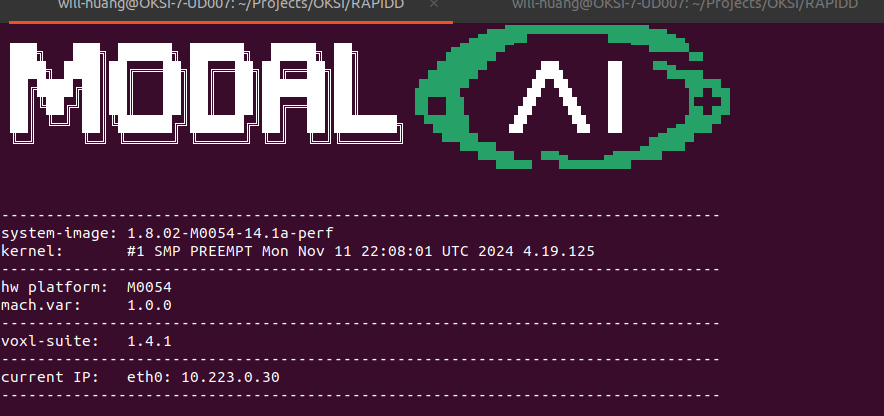
The ESC Mini 4-in-1 is using the following firmware version:
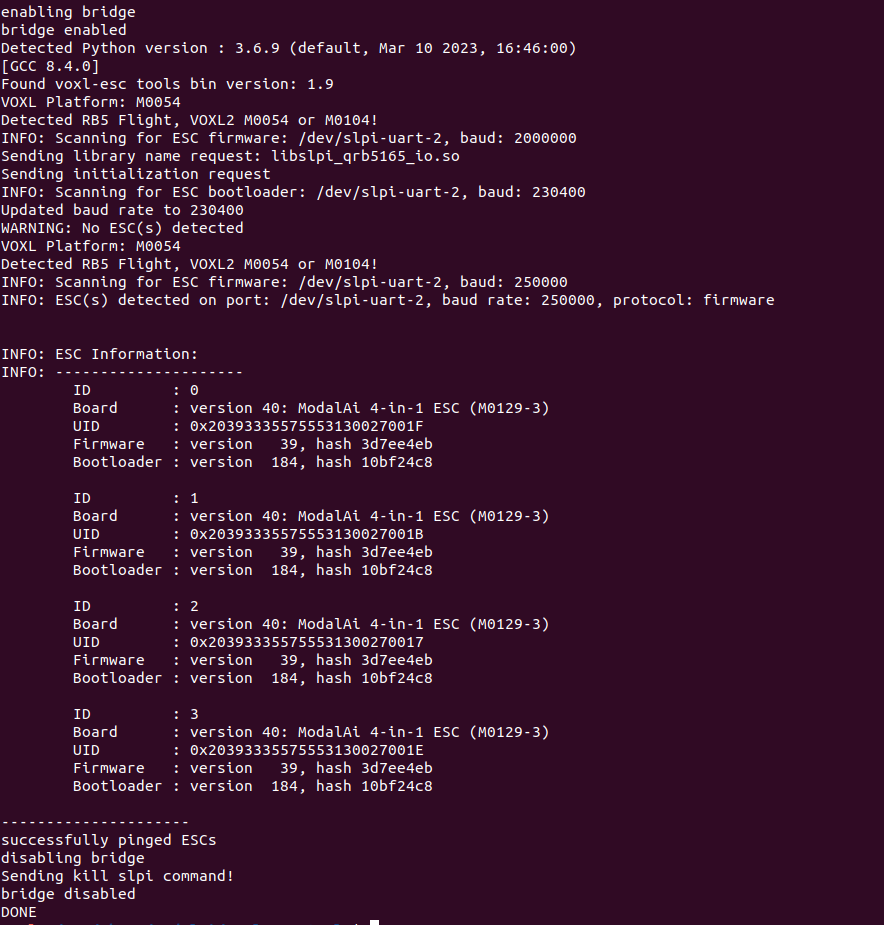
I am able to successfully spin the motors using the command:
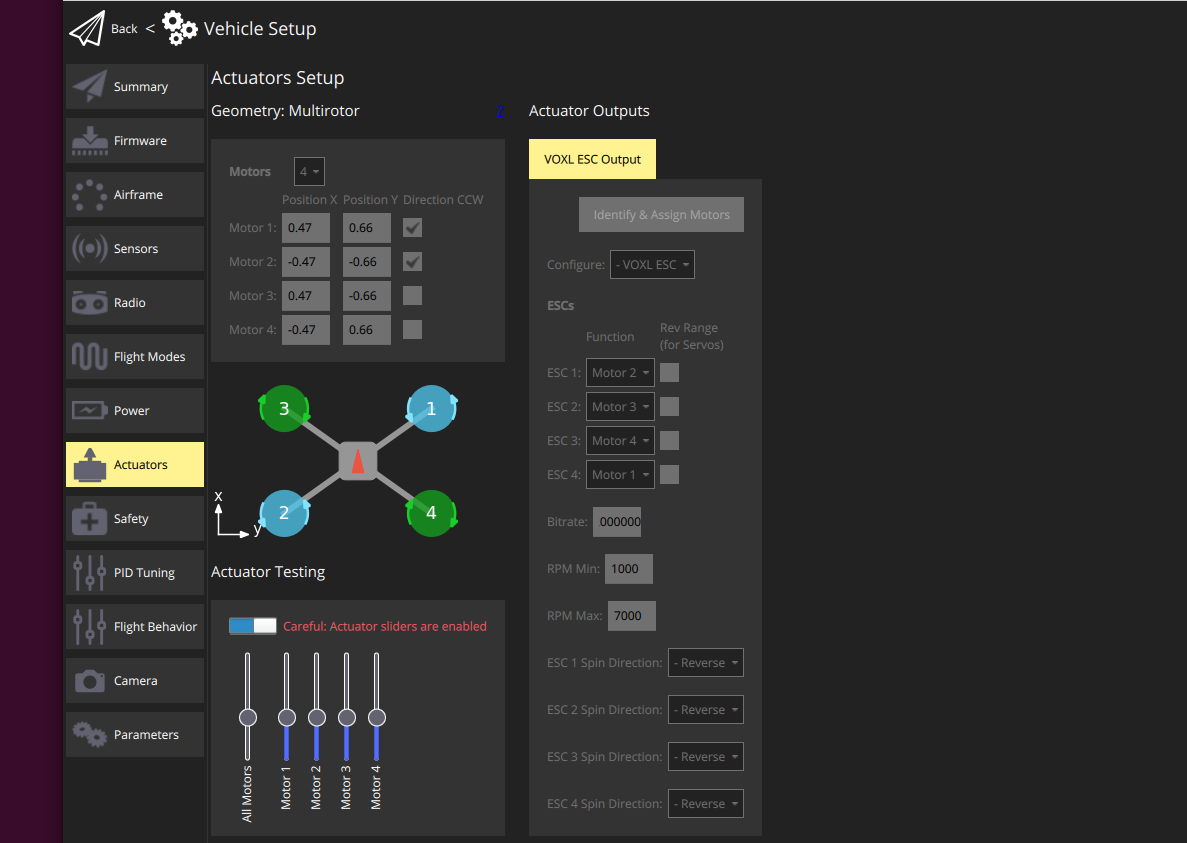
voxl-esc 3) spinHowever, I am unable to spin the motors in QGroundControl using the Actuator Testing feature.
Could you advise if there are any steps I might have missed?
====
Additionally, I have connected the VOXL2 to a QGC instance running on an Ubuntu machine within the same network.
I noticed that the ESC PWM Minimum and Maximum Calibration in QGC requires a USB connection.
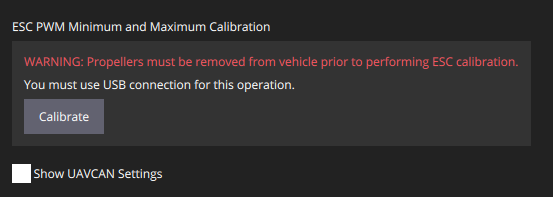
I attempted to connect the VOXL2 to the Ubuntu machine via the USB-C port labeled "U" in the VOXL2 datasheet, but it did not establish a connection.
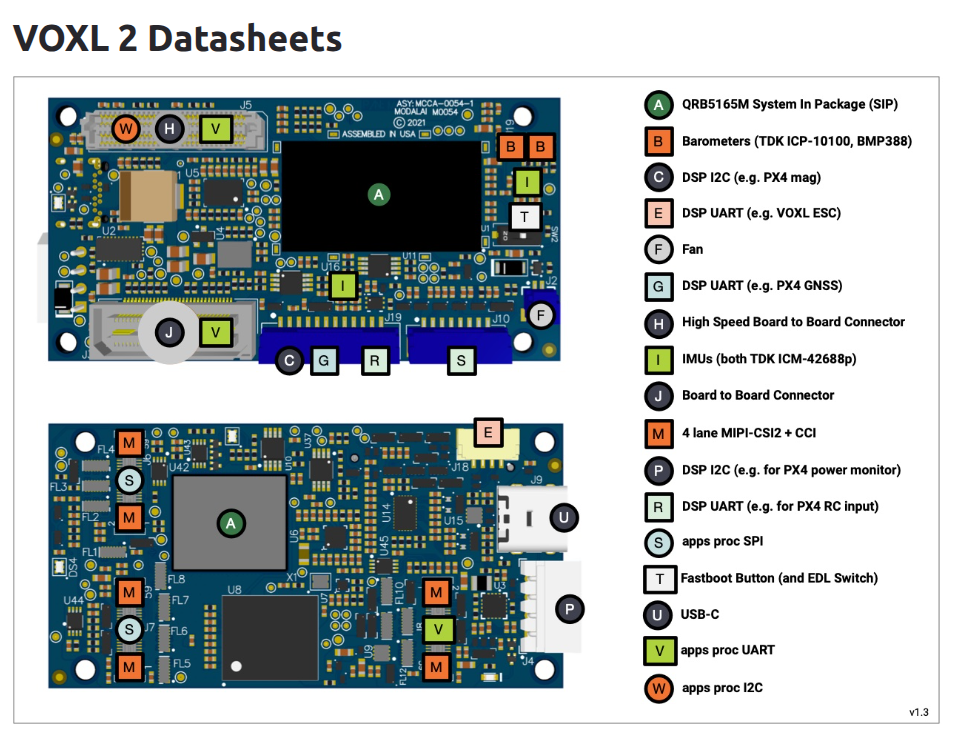
Could you clarify which port should be used for this USB connection to ensure proper calibration support in QGC?
Thank you for your assistance and please let me know if you need more details.
-
To whom it may concern,
My VOXL2 Flight Deck is currently running the following SDK version:
The ESC Mini 4-in-1 is using the following firmware version:
I am able to successfully spin the motors using the command:
voxl-esc 3) spinHowever, I am unable to spin the motors in QGroundControl using the Actuator Testing feature.
Could you advise if there are any steps I might have missed?
====
Additionally, I have connected the VOXL2 to a QGC instance running on an Ubuntu machine within the same network.
I noticed that the ESC PWM Minimum and Maximum Calibration in QGC requires a USB connection.
I attempted to connect the VOXL2 to the Ubuntu machine via the USB-C port labeled "U" in the VOXL2 datasheet, but it did not establish a connection.
Could you clarify which port should be used for this USB connection to ensure proper calibration support in QGC?
Thank you for your assistance and please let me know if you need more details.
@will-huang-oksi you should connect to QGC with a WiFi connection. The "U" USB-C port is for ADB, and not QGC
https://docs.modalai.com/qgc-wifi/
ETA: It looks like you're connected to QGC via the network already, so you can ignore the above. That message likely means that you can only perform the calibration via command line. Here are the calibration instructions
-
@will-huang-oksi you should connect to QGC with a WiFi connection. The "U" USB-C port is for ADB, and not QGC
https://docs.modalai.com/qgc-wifi/
ETA: It looks like you're connected to QGC via the network already, so you can ignore the above. That message likely means that you can only perform the calibration via command line. Here are the calibration instructions
@Moderator We will ask about QGC configuration of the ESCs.
-
@Moderator We will ask about QGC configuration of the ESCs.
You most likely have a mismatch in uart baud rate in esc params (250K) and px4 params for voxl esc (2mbit). You should update your ESC params on the ESC to 2mbit (2000000). We recommend using the higher baud rate.
Also, voxl esc does not require (or support) min and max pwm calibration.
Alex
-
You most likely have a mismatch in uart baud rate in esc params (250K) and px4 params for voxl esc (2mbit). You should update your ESC params on the ESC to 2mbit (2000000). We recommend using the higher baud rate.
Also, voxl esc does not require (or support) min and max pwm calibration.
Alex
Hello @Alex-Kushleyev and @Moderator ,
Thank you for the response!!!As Alex pointed out, the baud rate seems to be the issue preventing the motors from spinning through the Actuator Testing feature in QGC. I have another ESC configured with a 2M baud rate, and it works as expected with Actuator Testing.
My question now is: how can I update the baud rate on the ESC?
In QGC, the baud rate is already set to 2M.
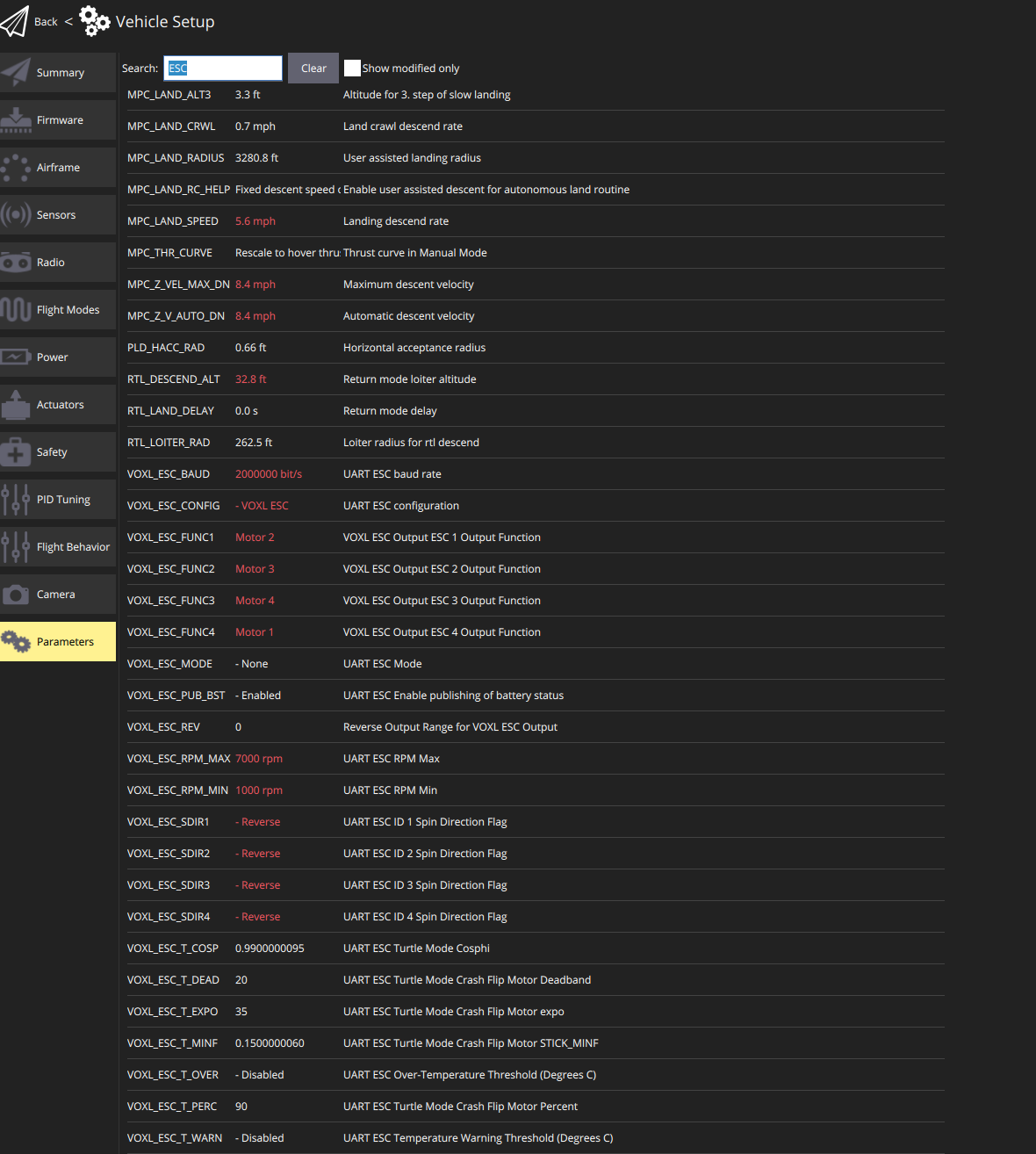
In https://gitlab.com/voxl-public/voxl-sdk/utilities/voxl-esc/-/tree/master/voxl-esc-tools,
I came across the command:./voxl-esc-upload-params.py --params-file ../params/esc_params_modalai_4_in_1.xmlHowever, I wasn’t able to locate this XML file on the VOXL.
Here's what I found in the VOXL: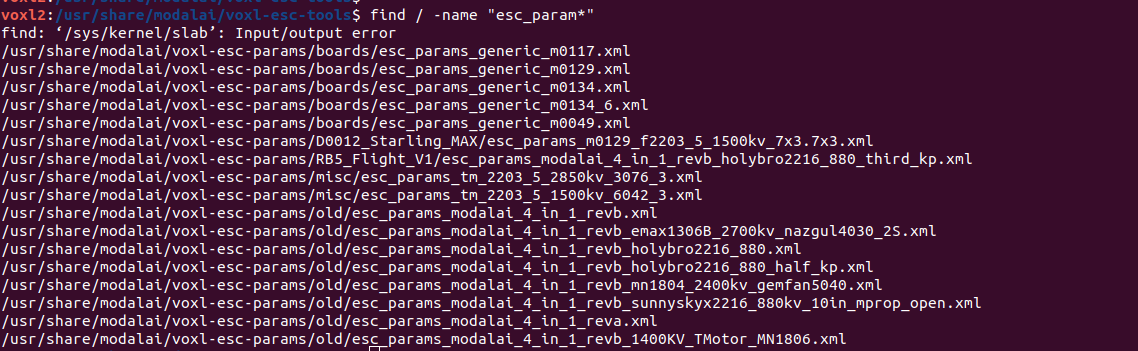
In the repo I found is esc_params_modalai_4_in_1_revb_mn1804_2400kv_gemfan5040.xml
Should I upload this xml to /usr/share/modalai/voxl-esc-params/boards/, rename it to esc_params_modalai_4_in_1.xml, and use the python command above?I also tried to manually change the baud rate to 2M in those XML files but it gets overwritten after a reboot.
Could you please provide more detailed instructions on how to properly update the ESC baud rate?
Thank you.
-
Hello @Alex-Kushleyev and @Moderator ,
Thank you for the response!!!As Alex pointed out, the baud rate seems to be the issue preventing the motors from spinning through the Actuator Testing feature in QGC. I have another ESC configured with a 2M baud rate, and it works as expected with Actuator Testing.
My question now is: how can I update the baud rate on the ESC?
In QGC, the baud rate is already set to 2M.
In https://gitlab.com/voxl-public/voxl-sdk/utilities/voxl-esc/-/tree/master/voxl-esc-tools,
I came across the command:./voxl-esc-upload-params.py --params-file ../params/esc_params_modalai_4_in_1.xmlHowever, I wasn’t able to locate this XML file on the VOXL.
Here's what I found in the VOXL:In the repo I found is esc_params_modalai_4_in_1_revb_mn1804_2400kv_gemfan5040.xml
Should I upload this xml to /usr/share/modalai/voxl-esc-params/boards/, rename it to esc_params_modalai_4_in_1.xml, and use the python command above?I also tried to manually change the baud rate to 2M in those XML files but it gets overwritten after a reboot.
Could you please provide more detailed instructions on how to properly update the ESC baud rate?
Thank you.
@will-huang-oksi ,
You should probably review our Frequently Asked Questions section for the ESCs : https://docs.modalai.com/voxl-escs/faq/
Additionally, you probably need to calibrate your ESC for the motor / propeller that you are using. Note this is different from the PWM range calibration for pwm-style ESCs. https://gitlab.com/voxl-public/voxl-sdk/utilities/voxl-esc/-/blob/master/voxl-esc-tools/calibration.md
The calibration document also tells you how to upload the params file. https://gitlab.com/voxl-public/voxl-sdk/utilities/voxl-esc/-/blob/master/voxl-esc-tools/calibration.md?ref_type=heads#update-and-upload-calibration-file (you just need to provide the full path to the param file, wherever on voxl it is stored).
You found the correct command for uploading params, however your original question is about which param file to use as the starting point before changing the baud rate (so let me answer that). Well, you should first figure out which ESC param file your other ESC is using (which has 2mbit as communication rate). You can check which param file is loaded to your ESC by running the following command from
/usr/share/modalai/voxl-esc-tools:./voxl-esc-verify-params.pyThis command will download the params from each of the 4 ESCs and will look for a parameter match in files located in
/usr/share/modalai/voxl-esc-params. The script will tell you which param file the ESC params are matching. Then you could simply create a copy of that param file, change the baud rate to 2mbit and upload it to the ESC. This will effectively only change the baud rate and leave the other ESC params the same.However, it seems that you may end up with different ESCs with different param files, because your other ESC is already running at 2mbit. It is important to make sure that you know which ESC params you are using, otherwise the ESC performance will not be the same across different ESC boards. If you never calibrated the ESC for your motor / propeller, it is strongly suggested, because PX4 uses RPM-based control with ModalAI ESCs and if the ESC is not calibration, it will not perform optimally.
Alex
-
@will-huang-oksi ,
You should probably review our Frequently Asked Questions section for the ESCs : https://docs.modalai.com/voxl-escs/faq/
Additionally, you probably need to calibrate your ESC for the motor / propeller that you are using. Note this is different from the PWM range calibration for pwm-style ESCs. https://gitlab.com/voxl-public/voxl-sdk/utilities/voxl-esc/-/blob/master/voxl-esc-tools/calibration.md
The calibration document also tells you how to upload the params file. https://gitlab.com/voxl-public/voxl-sdk/utilities/voxl-esc/-/blob/master/voxl-esc-tools/calibration.md?ref_type=heads#update-and-upload-calibration-file (you just need to provide the full path to the param file, wherever on voxl it is stored).
You found the correct command for uploading params, however your original question is about which param file to use as the starting point before changing the baud rate (so let me answer that). Well, you should first figure out which ESC param file your other ESC is using (which has 2mbit as communication rate). You can check which param file is loaded to your ESC by running the following command from
/usr/share/modalai/voxl-esc-tools:./voxl-esc-verify-params.pyThis command will download the params from each of the 4 ESCs and will look for a parameter match in files located in
/usr/share/modalai/voxl-esc-params. The script will tell you which param file the ESC params are matching. Then you could simply create a copy of that param file, change the baud rate to 2mbit and upload it to the ESC. This will effectively only change the baud rate and leave the other ESC params the same.However, it seems that you may end up with different ESCs with different param files, because your other ESC is already running at 2mbit. It is important to make sure that you know which ESC params you are using, otherwise the ESC performance will not be the same across different ESC boards. If you never calibrated the ESC for your motor / propeller, it is strongly suggested, because PX4 uses RPM-based control with ModalAI ESCs and if the ESC is not calibration, it will not perform optimally.
Alex
@Alex-Kushleyev
Thank you so much for the detailed explanation!
I will keep you posted with the update shortly.


Reading along? Create a free ModalAI Forum account to join in.
With an account you can reply, ask your own question, get an email when a ModalAI engineer answers, and mark the reply that solved it. Your place in each thread is saved between visits.
Questions about VOXL, Flight Core, ESCs and ModalAI drones are answered here by the engineers who build them.
Register Login