
Starling 2 Thermal Camera Suggestions
-
@wifa799 I think we're going to have to set this up and run some tests to see if we can recreate the issue. Probably won't happen until next week though.
Thanks @Eric-Katzfey!
Let me know if I can provide anything from my side. -
@wifa799 I think we're going to have to set this up and run some tests to see if we can recreate the issue. Probably won't happen until next week though.
@Eric-Katzfey Have you had any chance looking into the issue?
-
@Eric-Katzfey Have you had any chance looking into the issue?
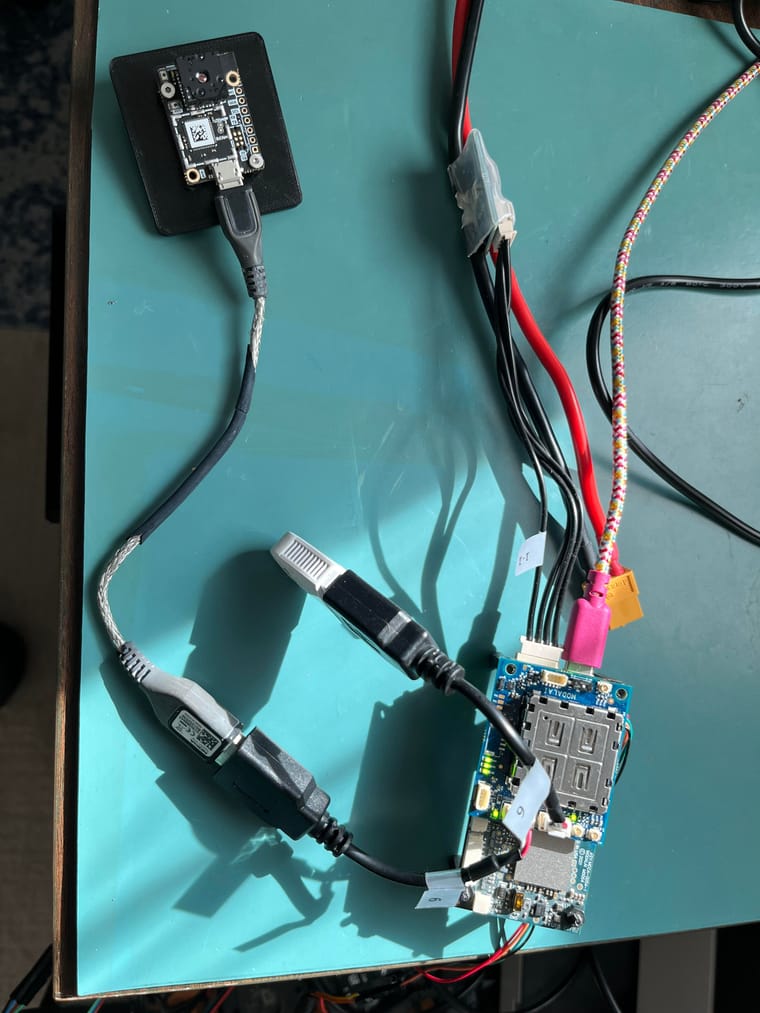
@wifa799 Yes, I was finally able to gather some hardware together this morning and it all works as expected, but I have a Pure Thermal 2, not Pure Thermal mini. I know I have a Pure Thermal mini somewhere since that is what I originally tested with so I'll have to try to find it and test that. But it's possible that it isn't the hardware that's the issue. I am using SDK 1.4.0. Which one are you using? What is the output of
voxl-version? I stopped voxl-uvc-server from running automatically withsystemctl disable voxl-uvc-serverand voxl-streamer withsystemctl disable voxl-streamerand then rebooted. Then, from the command line, I started voxl-uvc-server withvoxl-uvc-server -d -r 160x120 -f 9and in another terminal started voxl-streamer withvoxl-streamer -v 0 -i uvc. I then looked at the stream with both QGroundControl 4.3.0 and VLC 3.0.20. What is the output when you usevoxl-uvc-server -d -l? -
@Eric-Katzfey Have you had any chance looking into the issue?
-
@Eric-Katzfey Have you had any chance looking into the issue?
@wifa799 Are you still having troubles? I got a new PureThermal mini and it also works fine.
-
@wifa799 Are you still having troubles? I got a new PureThermal mini and it also works fine.
Hi @Eric-Katzfey, I'm a new student helping out in @wifa799 's project which is why it took a few days for me to respond, sorry for that.
I'll try it out today in the afternoon to be able to also send you the errors I get. So far we haven't gotten it to work. -
Hi @Eric-Katzfey, I'm a new student helping out in @wifa799 's project which is why it took a few days for me to respond, sorry for that.
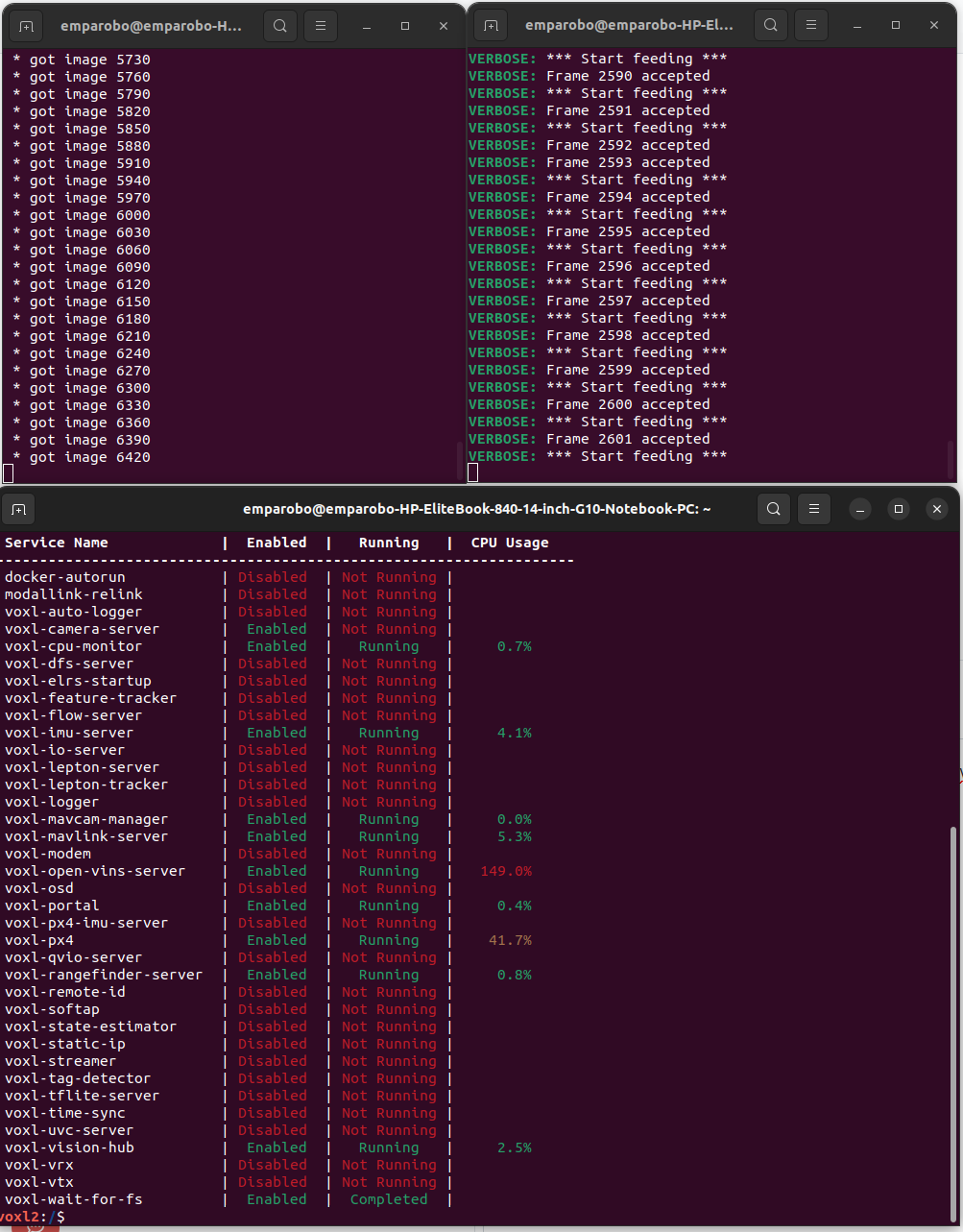
I'll try it out today in the afternoon to be able to also send you the errors I get. So far we haven't gotten it to work.Alright I got it running through QGroundControl now. Thank you very much for your help. I still have some open questions though.
In VLC I still cannot connect to it through the rtsp link and also in the VOXL portal I cannot follow the stream (in fact i don't even receive any of the other channels anymore). Do you have any ideas why this might occur and/or how to fix it?Also if I open a third terminal window to check voxl-inspect-services it doesn't show the voxl-uvc-server and the voxl-streamer to be running, even though I can see them working in the other windows and the video also arrives at the QGroundControl. Could this still be an issue?
And lastly I'm curious if it's possible to postprocess the video stream in QGroundControl in real-time for e.g. upscaling or object detection or if you would recommend doing this via gstreamer or something different?
-
Alright I got it running through QGroundControl now. Thank you very much for your help. I still have some open questions though.
In VLC I still cannot connect to it through the rtsp link and also in the VOXL portal I cannot follow the stream (in fact i don't even receive any of the other channels anymore). Do you have any ideas why this might occur and/or how to fix it?Also if I open a third terminal window to check voxl-inspect-services it doesn't show the voxl-uvc-server and the voxl-streamer to be running, even though I can see them working in the other windows and the video also arrives at the QGroundControl. Could this still be an issue?
And lastly I'm curious if it's possible to postprocess the video stream in QGroundControl in real-time for e.g. upscaling or object detection or if you would recommend doing this via gstreamer or something different?
@buem799 Glad to hear it is working now. voxl-portal has custom support for various cameras coming through our voxl-camera-server. It does not yet have any support for UVC cameras. Not sure why VLC cannot connect. What version of VLC are you using? voxl-inspect-services only shows the status of services started via systemd. It doesn't show you things that you start on the command line. QGC just shows the video so I don't think you can add those features there. Would you rather do upscaling / object detection directly on VOXL 2 or on a connected computer?
-
@buem799 Glad to hear it is working now. voxl-portal has custom support for various cameras coming through our voxl-camera-server. It does not yet have any support for UVC cameras. Not sure why VLC cannot connect. What version of VLC are you using? voxl-inspect-services only shows the status of services started via systemd. It doesn't show you things that you start on the command line. QGC just shows the video so I don't think you can add those features there. Would you rather do upscaling / object detection directly on VOXL 2 or on a connected computer?
@buem799 I had some RTSP VLC struggles a while back. Check out the link I posted at the bottom of this post here
-
@buem799 Glad to hear it is working now. voxl-portal has custom support for various cameras coming through our voxl-camera-server. It does not yet have any support for UVC cameras. Not sure why VLC cannot connect. What version of VLC are you using? voxl-inspect-services only shows the status of services started via systemd. It doesn't show you things that you start on the command line. QGC just shows the video so I don't think you can add those features there. Would you rather do upscaling / object detection directly on VOXL 2 or on a connected computer?
@Eric-Katzfey
I'm using VLC 3.0.16.
Okay, thanks for the clarification.
Not 100% sure but ideally we would do the upscaling/object detection on VOXL2 because I would assume we cannot guarantee constant connection to a connected computer. -
@buem799 I had some RTSP VLC struggles a while back. Check out the link I posted at the bottom of this post here
@groupo
Thanks for the advice. Not sure if I'm missing something but I cannot find the setting mentioned in the post.
Additionally, i don't really understand the ffplay part, is that still in VLC or would that be in the terminal or something else still?
Sorry, if this doesn't make too much sense I'm still quite new to linux and drones. -
@groupo
Thanks for the advice. Not sure if I'm missing something but I cannot find the setting mentioned in the post.
Additionally, i don't really understand the ffplay part, is that still in VLC or would that be in the terminal or something else still?
Sorry, if this doesn't make too much sense I'm still quite new to linux and drones.@buem799 Hi, no worries, I am also very new to this space. ffplay is separate thing, part of the ffmpeg program, not something inside VLC. This is the reddit link that I posted in the thread I listed above
If you read through it, the fix was for a windows machine, which I was using at the time. It states further down in the reddit post that live555 support was removed in newer versions of ubuntu (linux operating system). From your screenshots, it looks like you are using ubuntu, so it could make sense that VLC may not work. I believe it is more a ubuntu issue rather than VLC. Don't try to dig into that, especially if you are new to linux. I would install ffmpeg on your system and try to access the RTSP stream using that. I just asked ChatGPT for the commands to do that and will paste below:
sudo apt install ffmpegId recommend asking Chat how to access an RTSP stream using ffplay, or read the documentation

The other thing you could do, if you had a windows laptop, you could connect the windows laptop to the drone wifi and try to access the RTSP stream via VLC on windows and do the fix included in the reddit link



Reading along? Create a free ModalAI Forum account to join in.
With an account you can reply, ask your own question, get an email when a ModalAI engineer answers, and mark the reply that solved it. Your place in each thread is saved between visits.
Questions about VOXL, Flight Core, ESCs and ModalAI drones are answered here by the engineers who build them.
Register Login