
streamer default h265
-
@Alex-Kushleyev This is great, much appreciated! Also regarding that squished stream in QGC, seems to only be a linux thing so probably not much to do about it right now.
@bendraper You can also set the aspect ratio of the video in QGroundControls application settings.
-
@bendraper You can also set the aspect ratio of the video in QGroundControls application settings.
-
@Eric-Katzfey Yea I think that functionality may be broken though. If I try to do the inverse aspect ratio, it just kinda shrinks the stream as opposed to stretching it back out
@bendraper said in streamer default h265:
@Eric-Katzfey Yea I think that functionality may be broken though. If I try to do the inverse aspect ratio, it just kinda shrinks the stream as opposed to stretching it back out
It's also seemingly fixed in the daily builds of QGC... Oh well
-
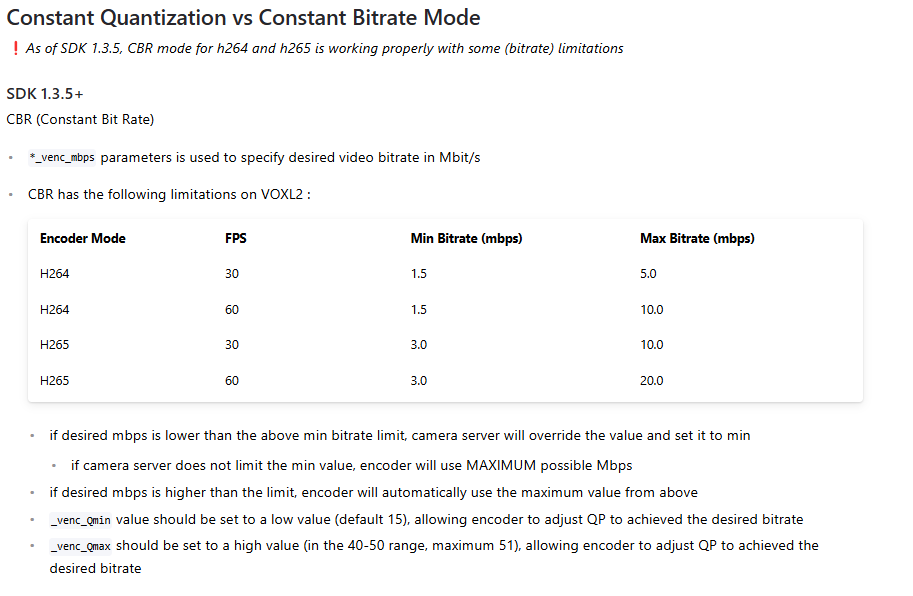
I'm looking at the camera server documentation and this is saying that H265 essentially requires twice the bandwidth that H264 does. Isn't that backwards? Isn't H265 more efficient at the cost of latency? @Alex-Kushleyev
This is not a requirement but a current limitation of voxl-camera-server configuration of the encoder. Yes, h265 is generally 2x more efficient and having the minimum bitrate 2x compared to h264 does not make sense. This is a limitation due to some unknown mis-configuration of the encoder by the camera server. We will try to fix this, but it is not high priority, so not sure when this will happen.
The gstreamer (voxl-streamer) does not have this limitation, please double check it. I have tested voxl-streamer with bitrate down to 0.25 mbps in h265 mode and video looks surprisingly good. Such configuration can be good for streaming over very low bandwidth link.
By the way, voxl-camera-server supports dynamic bitrate updates by sending a command to camera server (within the mentioned limits), for example:
voxl-send-command hires_front_large_encoded set_large_venc_mbps 4.0Alex
-
This is not a requirement but a current limitation of voxl-camera-server configuration of the encoder. Yes, h265 is generally 2x more efficient and having the minimum bitrate 2x compared to h264 does not make sense. This is a limitation due to some unknown mis-configuration of the encoder by the camera server. We will try to fix this, but it is not high priority, so not sure when this will happen.
The gstreamer (voxl-streamer) does not have this limitation, please double check it. I have tested voxl-streamer with bitrate down to 0.25 mbps in h265 mode and video looks surprisingly good. Such configuration can be good for streaming over very low bandwidth link.
By the way, voxl-camera-server supports dynamic bitrate updates by sending a command to camera server (within the mentioned limits), for example:
voxl-send-command hires_front_large_encoded set_large_venc_mbps 4.0Alex
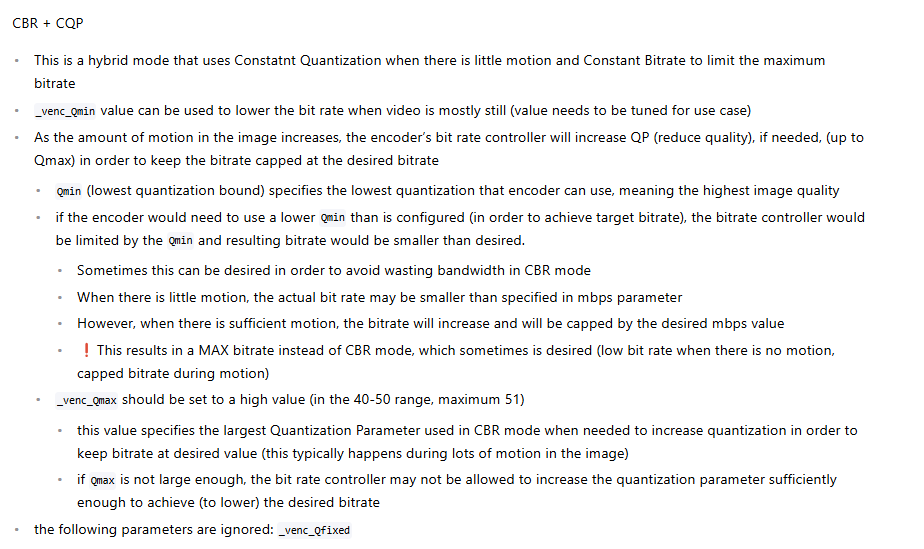
@Alex-Kushleyev Sounds good thanks for clarifying. Also, it looks like you can use a hybrid CQP and CBR mode per the documentation, but when I use "cbr+cqp" in the camera server conf file, it does not seem to like it. Is this feature not available yet?
-
@Alex-Kushleyev Sounds good thanks for clarifying. Also, it looks like you can use a hybrid CQP and CBR mode per the documentation, but when I use "cbr+cqp" in the camera server conf file, it does not seem to like it. Is this feature not available yet?
@bendraper , ah, yes the feature is available and I can see how the naming is misleading.
In order to achieve the CBR + CQP functionality, you do the following:
- select
cbrmode just like normal CBR - specify maximum bit rate, lets say
1.5 mbit, which is the lowest we can currently do with h264 - now if you want to achieve lower bitrate when there is not much motion (instead of always forcing the desired bit rate), set
_venc_Qminto a larger number (than the default 15 or so).
Basically by default
_venc_Qminis very low, which means the encoder is allowed to increase the image quality (decrease quantization level) if there is not much motion, so that you meet the target constant bit rate.By increasing this Qmin, you will not allow the encoder to keep increasing the quality under low motion condition, so it will cap the maximum quality level (Qmin) and reduce bandwidth. You can start with values of Qmin at 20, 25, 30 and see how low your bandwidth will get when not moving. When you start moving the camera, the bitrate should jump up to the CBR value, if needed. Please note that the quantization factor Qmin is not linear, i don't have the exact formula.
In general what happens in the encoder, if you want to maintain some CBR, the Quantization level is dynamically changed (within allowed range) depending on how much image is changing, so lots of motion in image will result in lowering overall quality (increasing quantization) in order to still be able to fit within the allowed CBR bitrate budget.
Please try it out and let me know how that works for you..
Alex
- select
-
@bendraper , ah, yes the feature is available and I can see how the naming is misleading.
In order to achieve the CBR + CQP functionality, you do the following:
- select
cbrmode just like normal CBR - specify maximum bit rate, lets say
1.5 mbit, which is the lowest we can currently do with h264 - now if you want to achieve lower bitrate when there is not much motion (instead of always forcing the desired bit rate), set
_venc_Qminto a larger number (than the default 15 or so).
Basically by default
_venc_Qminis very low, which means the encoder is allowed to increase the image quality (decrease quantization level) if there is not much motion, so that you meet the target constant bit rate.By increasing this Qmin, you will not allow the encoder to keep increasing the quality under low motion condition, so it will cap the maximum quality level (Qmin) and reduce bandwidth. You can start with values of Qmin at 20, 25, 30 and see how low your bandwidth will get when not moving. When you start moving the camera, the bitrate should jump up to the CBR value, if needed. Please note that the quantization factor Qmin is not linear, i don't have the exact formula.
In general what happens in the encoder, if you want to maintain some CBR, the Quantization level is dynamically changed (within allowed range) depending on how much image is changing, so lots of motion in image will result in lowering overall quality (increasing quantization) in order to still be able to fit within the allowed CBR bitrate budget.
Please try it out and let me know how that works for you..
Alex
I have updated the docs to clarify the setting for CBR + CQP mode:
https://docs.modalai.com/voxl-camera-server/#constant-quantization-vs-constant-bitrate-mode
CBR + CQP This is a hybrid mode that uses Constatnt Quantization when there is little motion and Constant Bitrate to limit the maximum bitrate In order to use this mode, select cbr as the bitrate control, however also adjust the Qmin parameter, as described below - select
-
I have updated the docs to clarify the setting for CBR + CQP mode:
https://docs.modalai.com/voxl-camera-server/#constant-quantization-vs-constant-bitrate-mode
CBR + CQP This is a hybrid mode that uses Constatnt Quantization when there is little motion and Constant Bitrate to limit the maximum bitrate In order to use this mode, select cbr as the bitrate control, however also adjust the Qmin parameter, as described below@bendraper, in case you need to set lower CBR bitrates than previously stated, we have a workaround for the 1.5 and 3.0 mbps limits. Camera server in dev branch supports lower bitrates and we have tested h265 as low as 0.25Mbps works pretty well.
The workaround tells the encoder that fps is higher than actual, allowing us to achieve effective lowering of the bitrate. You can just set your bitrate in camera server config to the desired bitrate and if bitrate is below the “limit”, the encoder fps setting is adjusted accordingly to achieve the low bitrate. This does not have any adverse effect on output quality and the fps value is not actually sent with the encoded stream.
If you want to adjust the bitrate dynamically below that “limit”, you may want to hardcode the value of
m_fpsHackScaleto a certain value like 12. Value of 12 would allow you to set h265 to 3.0/12 = 0.25Mbps or higher.Let me know if you need any more details. We will work towards improving this workaround in the future.
Alex
-
@bendraper, in case you need to set lower CBR bitrates than previously stated, we have a workaround for the 1.5 and 3.0 mbps limits. Camera server in dev branch supports lower bitrates and we have tested h265 as low as 0.25Mbps works pretty well.
The workaround tells the encoder that fps is higher than actual, allowing us to achieve effective lowering of the bitrate. You can just set your bitrate in camera server config to the desired bitrate and if bitrate is below the “limit”, the encoder fps setting is adjusted accordingly to achieve the low bitrate. This does not have any adverse effect on output quality and the fps value is not actually sent with the encoded stream.
If you want to adjust the bitrate dynamically below that “limit”, you may want to hardcode the value of
m_fpsHackScaleto a certain value like 12. Value of 12 would allow you to set h265 to 3.0/12 = 0.25Mbps or higher.Let me know if you need any more details. We will work towards improving this workaround in the future.
Alex


Reading along? Create a free ModalAI Forum account to join in.
With an account you can reply, ask your own question, get an email when a ModalAI engineer answers, and mark the reply that solved it. Your place in each thread is saved between visits.
Questions about VOXL, Flight Core, ESCs and ModalAI drones are answered here by the engineers who build them.
Register Login