
VOXL 2 IO Board troubleshooting - Driver will not start
-
Hello,
I just received my new VOXL IO board with the updated bootloader and I'm working to integrate it now. Here is an explanation of my setup and the programming steps I've taken so far.
Goal:
Manipulate a servo using the VOXL IO board's PWM output.Setup:
VOXL2 running SDK 1.1.2, VOXL IO board with latest bootloader, plugged into port J19, VOXL_ESC for ESC and EXTERNAL for RC command.Programming Steps:
Flashed the updated firmware with the UART 7 edit made for J19 utilization, flashed the voxl_io parameters using the px4-configure wizard. Everything during this process seems to have worked fine.Issue:
Whenever I try to start the voxl2_io driver, I receive the following: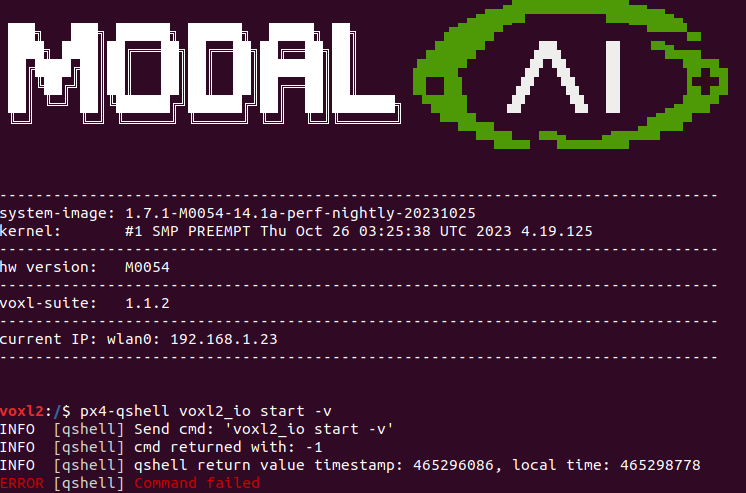
can you start px4 in foreground mode using
systemctl stop voxl-px4 #stop the voxl-px4 service

voxl-px4 -d
#wait for px4 to start and finish printing messages
qshell voxl2_io start
You should get the printout from the voxl2_io module. when running commands using
px4-qshellthe messages from the DSP (SLPI) are not printed. -
Hello,
I just received my new VOXL IO board with the updated bootloader and I'm working to integrate it now. Here is an explanation of my setup and the programming steps I've taken so far.
Goal:
Manipulate a servo using the VOXL IO board's PWM output.Setup:
VOXL2 running SDK 1.1.2, VOXL IO board with latest bootloader, plugged into port J19, VOXL_ESC for ESC and EXTERNAL for RC command.Programming Steps:
Flashed the updated firmware with the UART 7 edit made for J19 utilization, flashed the voxl_io parameters using the px4-configure wizard. Everything during this process seems to have worked fine.Issue:
Whenever I try to start the voxl2_io driver, I receive the following:@Jeremy-Frederick Alex, thanks for the quick response. It looks like PX4 is still expecting to find the IO board on port 2, where do I need to update the uart number? Originally I thought updating the UART number in the flashing bash script was all that is necessary but now I see why that was an incorrect assumption.

-
@Jeremy-Frederick Alex, thanks for the quick response. It looks like PX4 is still expecting to find the IO board on port 2, where do I need to update the uart number? Originally I thought updating the UART number in the flashing bash script was all that is necessary but now I see why that was an incorrect assumption.
@Jeremy-Frederick All of the start commands are in the file
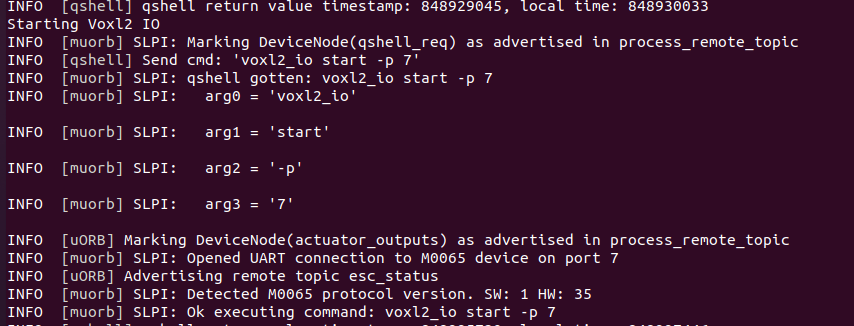
/usr/bin/voxl-px4-start. The/etc/modalai/voxl-px4.conffile provides the configuration for how those start commands are called. In your case, if you want to use M0065 for RC input only, then set RC to M0065_SBUS and it will callqshell voxl2_io start -d -p 7 -
@Jeremy-Frederick All of the start commands are in the file
/usr/bin/voxl-px4-start. The/etc/modalai/voxl-px4.conffile provides the configuration for how those start commands are called. In your case, if you want to use M0065 for RC input only, then set RC to M0065_SBUS and it will callqshell voxl2_io start -d -p 7@Eric-Katzfey I'm not looking to run RC through the IO board, I'm using external RC commands for control. I'm looking to utilize the PWM outputs on the board to control a servo for a dropper mechanism. I made the change and am commanding the start of the voxl2_io driver successfully. As of now I am still unable to drive a servo through the QGC actuators tab, all the correct parameters have been loaded.
-
@Eric-Katzfey I'm not looking to run RC through the IO board, I'm using external RC commands for control. I'm looking to utilize the PWM outputs on the board to control a servo for a dropper mechanism. I made the change and am commanding the start of the voxl2_io driver successfully. As of now I am still unable to drive a servo through the QGC actuators tab, all the correct parameters have been loaded.
Hi @Jeremy-Frederick , we are moving towards using updated M0065 firmware and PX4 driver which has some improvements as well as easier to debug. Can you please check out this thread : https://forum.modalai.com/topic/3265/additional-voxl-2-pwm-ouputs
You will need to update M0065 firmware and use px4 build from a branch (either build it yourself or i provided a link to deb in that thread).
When you update the M0065 firmware, if you also have the ESC plugged in, just unplug the ESC UART connection in order to avoid any confusion, because the M0065 and ESC use the same tools / protocol to update the firmware. You will not be able to upload wrong firmware to any of these boards, but unplugging the ESC uart will just make things simpler, so that the update tools can autodetect the port.
After you install the updates, please check output of
voxl-px4 -d | grep VOXL2_IO, which will print a bunch of voxl2 io driver initialization info. then make sure your channel mapping is set up correctly (specifically,VOXL2_IO_FUNC*params and then you can test using QGC.You should see output that looks something like this, which is set up to map motors 1-4 to pwm, but you may need to change it for your aux functionality. There is no change in how you start the driver (you can still provide the port number, etc)
INFO [muorb] SLPI: VOXL2_IO: Driver starting INFO [muorb] SLPI: VOXL2_IO: Params: VOXL2_IO_BAUD : 921600 INFO [muorb] SLPI: VOXL2_IO: Params: VOXL2_IO_FUNC1 : 101 INFO [muorb] SLPI: VOXL2_IO: Params: VOXL2_IO_FUNC2 : 102 INFO [muorb] SLPI: VOXL2_IO: Params: VOXL2_IO_FUNC3 : 103 INFO [muorb] SLPI: VOXL2_IO: Params: VOXL2_IO_FUNC4 : 104 INFO [muorb] SLPI: VOXL2_IO: Params: VOXL2_IO_FUNC5 : 0 INFO [muorb] SLPI: VOXL2_IO: Params: VOXL2_IO_FUNC6 : 0 INFO [muorb] SLPI: VOXL2_IO: Params: VOXL2_IO_FUNC7 : 0 INFO [muorb] SLPI: VOXL2_IO: Params: VOXL2_IO_FUNC8 : 0 INFO [muorb] SLPI: VOXL2_IO: Params: VOXL2_IO_DIS : 1000 INFO [muorb] SLPI: VOXL2_IO: Params: VOXL2_IO_MIN : 1100 INFO [muorb] SLPI: VOXL2_IO: Params: VOXL2_IO_MAX : 2000 INFO [muorb] SLPI: VOXL2_IO: Params: VOXL2_IO_CMIN : 1050 INFO [muorb] SLPI: VOXL2_IO: Params: VOXL2_IO_CMAX : 2000 INFO [muorb] SLPI: VOXL2_IO: INFO [muorb] SLPI: VOXL2_IO: Opening UART device 2, baud rate 921600 INFO [muorb] SLPI: VOXL2_IO: Successfully opened UART device INFO [muorb] SLPI: VOXL2_IO: Detecting M0065 board... INFO [muorb] SLPI: VOXL2_IO: VOXL2_IO ID: 0 INFO [muorb] SLPI: VOXL2_IO: Board Type : 35: ModalAi I/O Expander (M0065) INFO [muorb] SLPI: VOXL2_IO: Unique ID : 0x4304296039364B560671FF36 INFO [muorb] SLPI: VOXL2_IO: Firmware : version 2, hash f94baad1 INFO [muorb] SLPI: VOXL2_IO: Bootloader : version 0, hash 17147346* INFO [muorb] SLPI: VOXL2_IO: Reply time : 2584us INFO [muorb] SLPI: VOXL2_IO: Driver initialization succeeded -
Hi @Jeremy-Frederick , we are moving towards using updated M0065 firmware and PX4 driver which has some improvements as well as easier to debug. Can you please check out this thread : https://forum.modalai.com/topic/3265/additional-voxl-2-pwm-ouputs
You will need to update M0065 firmware and use px4 build from a branch (either build it yourself or i provided a link to deb in that thread).
When you update the M0065 firmware, if you also have the ESC plugged in, just unplug the ESC UART connection in order to avoid any confusion, because the M0065 and ESC use the same tools / protocol to update the firmware. You will not be able to upload wrong firmware to any of these boards, but unplugging the ESC uart will just make things simpler, so that the update tools can autodetect the port.
After you install the updates, please check output of
voxl-px4 -d | grep VOXL2_IO, which will print a bunch of voxl2 io driver initialization info. then make sure your channel mapping is set up correctly (specifically,VOXL2_IO_FUNC*params and then you can test using QGC.You should see output that looks something like this, which is set up to map motors 1-4 to pwm, but you may need to change it for your aux functionality. There is no change in how you start the driver (you can still provide the port number, etc)
INFO [muorb] SLPI: VOXL2_IO: Driver starting INFO [muorb] SLPI: VOXL2_IO: Params: VOXL2_IO_BAUD : 921600 INFO [muorb] SLPI: VOXL2_IO: Params: VOXL2_IO_FUNC1 : 101 INFO [muorb] SLPI: VOXL2_IO: Params: VOXL2_IO_FUNC2 : 102 INFO [muorb] SLPI: VOXL2_IO: Params: VOXL2_IO_FUNC3 : 103 INFO [muorb] SLPI: VOXL2_IO: Params: VOXL2_IO_FUNC4 : 104 INFO [muorb] SLPI: VOXL2_IO: Params: VOXL2_IO_FUNC5 : 0 INFO [muorb] SLPI: VOXL2_IO: Params: VOXL2_IO_FUNC6 : 0 INFO [muorb] SLPI: VOXL2_IO: Params: VOXL2_IO_FUNC7 : 0 INFO [muorb] SLPI: VOXL2_IO: Params: VOXL2_IO_FUNC8 : 0 INFO [muorb] SLPI: VOXL2_IO: Params: VOXL2_IO_DIS : 1000 INFO [muorb] SLPI: VOXL2_IO: Params: VOXL2_IO_MIN : 1100 INFO [muorb] SLPI: VOXL2_IO: Params: VOXL2_IO_MAX : 2000 INFO [muorb] SLPI: VOXL2_IO: Params: VOXL2_IO_CMIN : 1050 INFO [muorb] SLPI: VOXL2_IO: Params: VOXL2_IO_CMAX : 2000 INFO [muorb] SLPI: VOXL2_IO: INFO [muorb] SLPI: VOXL2_IO: Opening UART device 2, baud rate 921600 INFO [muorb] SLPI: VOXL2_IO: Successfully opened UART device INFO [muorb] SLPI: VOXL2_IO: Detecting M0065 board... INFO [muorb] SLPI: VOXL2_IO: VOXL2_IO ID: 0 INFO [muorb] SLPI: VOXL2_IO: Board Type : 35: ModalAi I/O Expander (M0065) INFO [muorb] SLPI: VOXL2_IO: Unique ID : 0x4304296039364B560671FF36 INFO [muorb] SLPI: VOXL2_IO: Firmware : version 2, hash f94baad1 INFO [muorb] SLPI: VOXL2_IO: Bootloader : version 0, hash 17147346* INFO [muorb] SLPI: VOXL2_IO: Reply time : 2584us INFO [muorb] SLPI: VOXL2_IO: Driver initialization succeeded@Alex-Kushleyev I appreciate it, all is working now
-
Hello @Jeremy-Frederick
I'm just trying to perform the same operation. What servo have you used? How did you make the connection? I have doubts about the 5V power supply for the servos and the 3.3V signal from the IO board.Thank you!
-
Hello @Jeremy-Frederick
I'm just trying to perform the same operation. What servo have you used? How did you make the connection? I have doubts about the 5V power supply for the servos and the 3.3V signal from the IO board.Thank you!
@valvarez Any PWM based servo should work, we're using 5g servos with very little torque capability and haven't seen any issues with the power supply capabilities of the IO board in this regard. I connected the PWM Signal to output 1 on the IO board and the 5V and G of the same port. Has been working consistently through QGC.
-
@valvarez Any PWM based servo should work, we're using 5g servos with very little torque capability and haven't seen any issues with the power supply capabilities of the IO board in this regard. I connected the PWM Signal to output 1 on the IO board and the 5V and G of the same port. Has been working consistently through QGC.
Hi @Jeremy-Frederick @valvarez
ModalAI has not designed any power supply reference voltages on JST connectors as a REF or Power Tap Off as capable of powering servos.
If you wish to power micro-servos then please do so at your own risk. However, you may likely damage your ModalAI hardware since we do not have any back EMF/Stall/Load dump protection on any of our JST connectors.Servos need to have their independent supply from your system battery.
Apologies we have not made that clearer in our Tech Docs.Thanks!
-
Hi @Jeremy-Frederick @valvarez
ModalAI has not designed any power supply reference voltages on JST connectors as a REF or Power Tap Off as capable of powering servos.
If you wish to power micro-servos then please do so at your own risk. However, you may likely damage your ModalAI hardware since we do not have any back EMF/Stall/Load dump protection on any of our JST connectors.Servos need to have their independent supply from your system battery.
Apologies we have not made that clearer in our Tech Docs.Thanks!
-
D Denver Hopkins referenced this topic on
-
@Eric-Katzfey I'm not looking to run RC through the IO board, I'm using external RC commands for control. I'm looking to utilize the PWM outputs on the board to control a servo for a dropper mechanism. I made the change and am commanding the start of the voxl2_io driver successfully. As of now I am still unable to drive a servo through the QGC actuators tab, all the correct parameters have been loaded.
@Jeremy-Frederick said in VOXL 2 IO Board troubleshooting - Driver will not start:
@Eric-Katzfey I'm not looking to run RC through the IO board, I'm using external RC commands for control. I'm looking to utilize the PWM outputs on the board to control a servo for a dropper mechanism. I made the change and am commanding the start of the voxl2_io driver successfully. As of now I am still unable to drive a servo through the QGC actuators tab, all the correct parameters have been loaded.
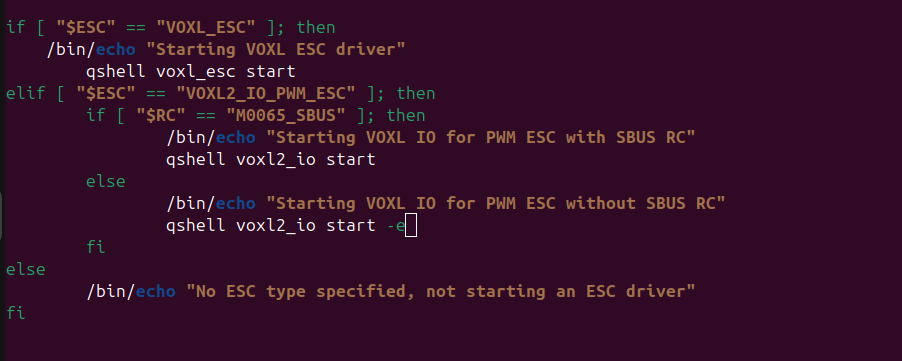
Hello @Jeremy-Frederick
Do you remember how you made that change? I can't find a way to change the port
-
@Jeremy-Frederick said in VOXL 2 IO Board troubleshooting - Driver will not start:
@Eric-Katzfey I'm not looking to run RC through the IO board, I'm using external RC commands for control. I'm looking to utilize the PWM outputs on the board to control a servo for a dropper mechanism. I made the change and am commanding the start of the voxl2_io driver successfully. As of now I am still unable to drive a servo through the QGC actuators tab, all the correct parameters have been loaded.
Hello @Jeremy-Frederick
Do you remember how you made that change? I can't find a way to change the port
@valvarez It's the
-poption as shown in the screenshot above. -
@valvarez It's the
-poption as shown in the screenshot above.@Eric-Katzfey Replaced it with -p 7
-
@Eric-Katzfey Replaced it with -p 7
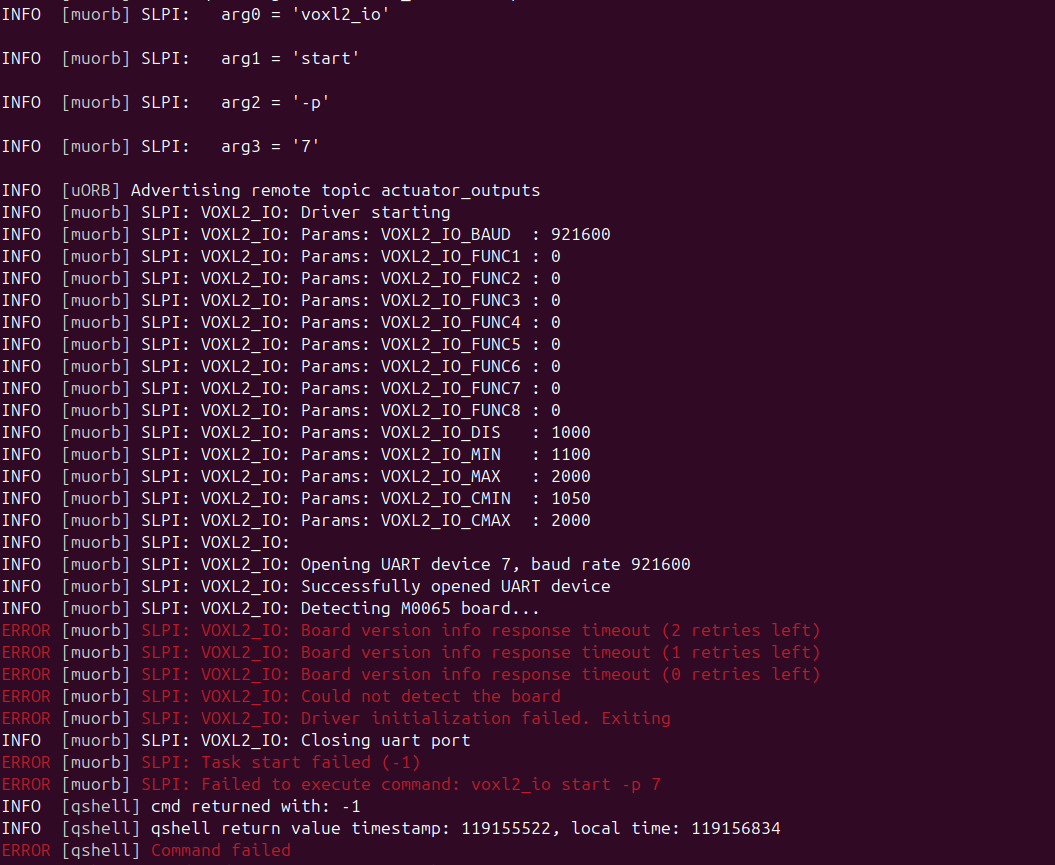
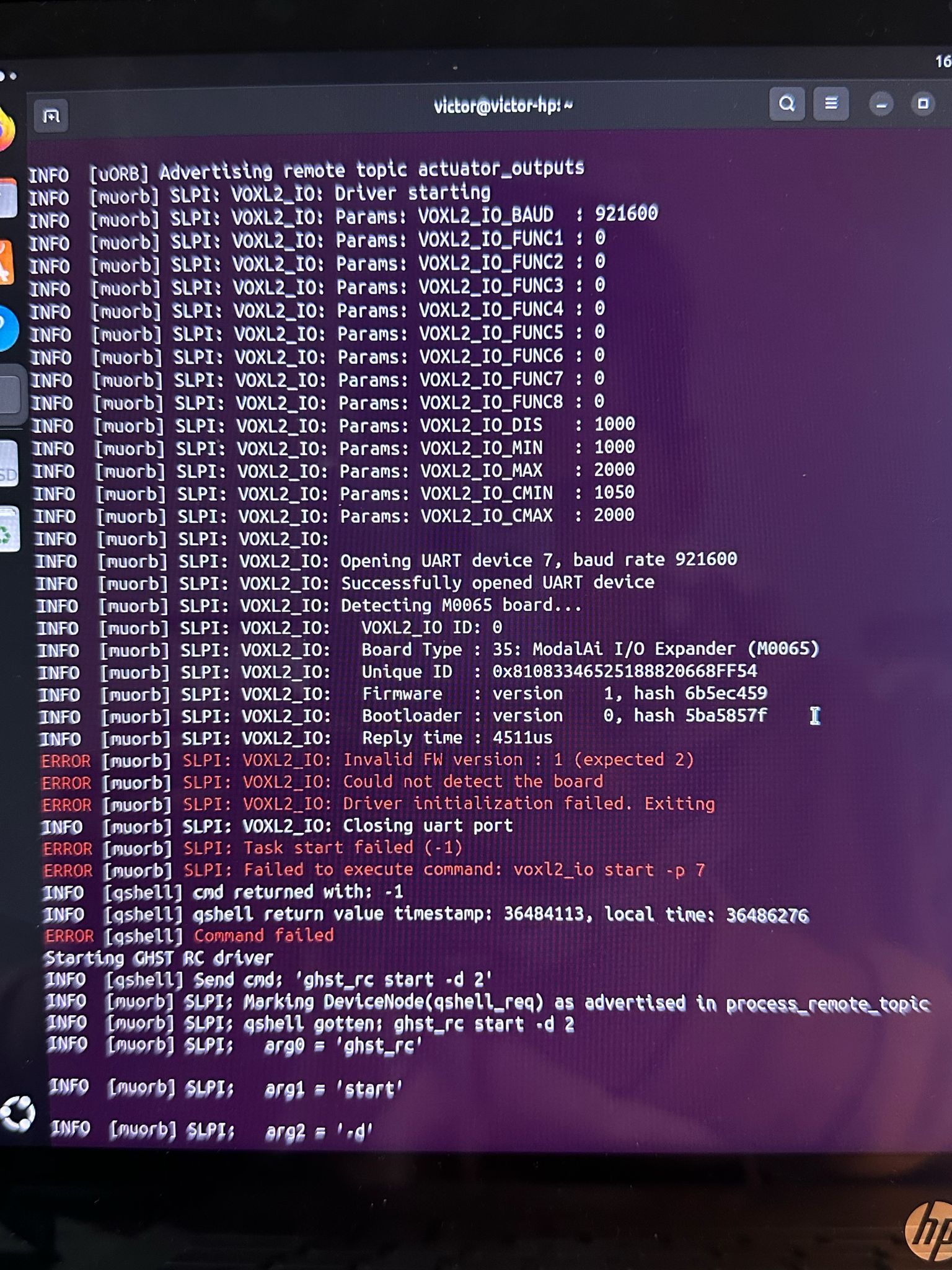
@valvarez UPDATE: I took another IOBoard and connected it to see what happened. To my surprise, it has shown something different. After updating it, I get the same thing as with the other one. The firmware that im using is voxl2_io_firmware_m0065_v1_35_58c82813.bin from https://developer.modalai.com/asset/7
-
@valvarez UPDATE: I took another IOBoard and connected it to see what happened. To my surprise, it has shown something different. After updating it, I get the same thing as with the other one. The firmware that im using is voxl2_io_firmware_m0065_v1_35_58c82813.bin from https://developer.modalai.com/asset/7
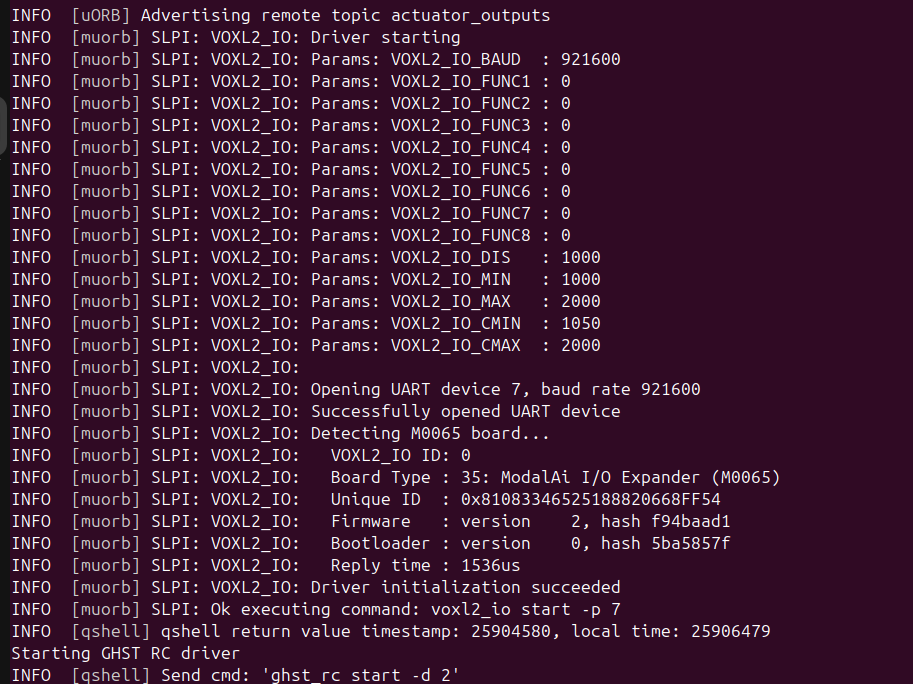
@valvarez UPDATE 2: With that firmware is working: https://gitlab.com/voxl-public/voxl-sdk/utilities/voxl2-io/-/blob/master/voxl2-io-tools/firmware/modalai_m0065_firmware_v0_2_RC1_f94baad1.bin
-
@valvarez UPDATE 2: With that firmware is working: https://gitlab.com/voxl-public/voxl-sdk/utilities/voxl2-io/-/blob/master/voxl2-io-tools/firmware/modalai_m0065_firmware_v0_2_RC1_f94baad1.bin
@valvarez , yes, this is the expected correct behavior.
I believe you were initially using older M0065 firmware (version 1) as well as older PX4 build which was working with that version of M0065 (VOXL2 IO board). However that release had some issues that were fixed and you should not use firmware version 1.
The older PX4 version used a different (old) driver for the voxl2-io board, and you can tell that because the debug print was very short and it accepted SW version 1:
SLPI: Detected M0065 protocol version. SW: 1, HW: 35If you see that, it means you are using outdated (buggy) software. The latest (stable) firmware is verion 2 and the corresponding PX4 driver will require that version and print out a lot more information about the board and the VOXL2_IO params.
Alex




Reading along? Create a free ModalAI Forum account to join in.
With an account you can reply, ask your own question, get an email when a ModalAI engineer answers, and mark the reply that solved it. Your place in each thread is saved between visits.
Questions about VOXL, Flight Core, ESCs and ModalAI drones are answered here by the engineers who build them.
Register Login