
Unstablr Baro in Voxl 2 mini
-
Our setup is:
Voxl2 mini running PX4 on DSP
ESC mini
Hires IMX214
Tracking OV7251The Problem:
The drone moves up and down constantly in position mode.Bench Test:
The on-board Baro readings, when observed in PX4-listener, continuously change (couple of meters over 10 seconds)... the baro-reported temperature gradually increases to 50 deg-c and accordingly the pressure readings decrease. The test is done indoors with Voxl2 mini board in open condition (without enclosure), no propellers.Request:
We are obliged if you could share the setup info for adding an external baro (BMP280 or similar) with I2C interface. -
Our setup is:
Voxl2 mini running PX4 on DSP
ESC mini
Hires IMX214
Tracking OV7251The Problem:
The drone moves up and down constantly in position mode.Bench Test:
The on-board Baro readings, when observed in PX4-listener, continuously change (couple of meters over 10 seconds)... the baro-reported temperature gradually increases to 50 deg-c and accordingly the pressure readings decrease. The test is done indoors with Voxl2 mini board in open condition (without enclosure), no propellers.Request:
We are obliged if you could share the setup info for adding an external baro (BMP280 or similar) with I2C interface.@v_v_ramarao We do not sell any external baro hardware so you would have to locate a suitable peripheral from a different source. Then you would have to connect it into VOXL 2 mini. There is no spare i2c port but you could share the magnetometer i2c port on J19 as long as the barometer has a different i2c address than the magnetometer. Then you would have to change your px4 startup script to not start the onboard barometer driver and instead start the external barometer driver.
-
A Alex Kushleyev referenced this topic on
-
@v_v_ramarao We do not sell any external baro hardware so you would have to locate a suitable peripheral from a different source. Then you would have to connect it into VOXL 2 mini. There is no spare i2c port but you could share the magnetometer i2c port on J19 as long as the barometer has a different i2c address than the magnetometer. Then you would have to change your px4 startup script to not start the onboard barometer driver and instead start the external barometer driver.
@Eric-Katzfey We found that the Baro is erratic only when a camera (in this case IMX214) is connected to J7 using M0076 interpose.
If we remove camera (or disable camera server) the problem disappears. You may note that the J7 connector is located in close vicinity of Baro chip.
This behaviour is identical in all the three Voxl 2 mini boards that we have.
This seems to be a h/w or board layout problem. We are obliged if you confirm. -
@Eric-Katzfey We found that the Baro is erratic only when a camera (in this case IMX214) is connected to J7 using M0076 interpose.
If we remove camera (or disable camera server) the problem disappears. You may note that the J7 connector is located in close vicinity of Baro chip.
This behaviour is identical in all the three Voxl 2 mini boards that we have.
This seems to be a h/w or board layout problem. We are obliged if you confirm.@v_v_ramarao , thank you for the details. Let us test it and get back to you soon.
Please note that when the camera is running, the cpu load will be higher and temperature of the board will change, so the issue could still be related to the temperature change.
Alex
-
@v_v_ramarao , thank you for the details. Let us test it and get back to you soon.
Please note that when the camera is running, the cpu load will be higher and temperature of the board will change, so the issue could still be related to the temperature change.
Alex
@Alex-Kushleyev thanks for the quick revert.
The culprit looks like the proximity of baro chip to the power connector (and hence the power tracks beneath).
While we wait for a solution from you for the on-board baro we request you to let us know the steps to add / integrate an external baro (BMP280) on one of the existing I2C ports of Voxl 2 mini board. (We already have a BMP280 based baro with I2C interface, that works on 3.3V / 5V.
Thanks
Rama Rao -
@Alex-Kushleyev thanks for the quick revert.
The culprit looks like the proximity of baro chip to the power connector (and hence the power tracks beneath).
While we wait for a solution from you for the on-board baro we request you to let us know the steps to add / integrate an external baro (BMP280) on one of the existing I2C ports of Voxl 2 mini board. (We already have a BMP280 based baro with I2C interface, that works on 3.3V / 5V.
Thanks
Rama RaoHi @v_v_ramarao,
I have updated the script that i made last week to log and plot barometer data and ran a test on voxl2 mini. I have 3 cameras hooked up:
- J6 IMX214
- J7 IMX412 and AR0144
This is not exactly the same setup as you have (specifically, the IMX214 camera is in another slot), but we can compare the results.
You can copy the script below to voxl2 mini from your PC:
adb push plot_px4_baro.py /home/root/install plotly on voxl2 mini (internet connection required) using:
pip3 install plotly --upgradeThen run the script to collect 1000 samples:
cd /home/root/
python3 plot_px4_baro.py -n 1000
(1)[2288480501.0] P: 102151.375, T: 36.17676
(2)[2288607104.0] P: 102150.70312, T: 36.17943
(3)[2288733681.0] P: 102151.45312, T: 36.17409
(4)[2288860227.0] P: 102151.75, T: 36.17409
(5)[2288986782.0] P: 102149.32812, T: 36.17142
...
The first number is sample count, then timestamp (microseconds), then pressure and temperature.
After you start your script, wait for a few seconds and then start camera server and make sure that you are actually viewing the image from the camera (perhaps using
voxl-portalor just inspecting usingvoxl-inspect-cam hires_coloror something like that. If there are no clients for the camera, not much will be done in camera server, but you can try either way).When the sample count reaches around 800, you can stop the camera server to see the effect of removing the system load and turning off the cameras. When the script is finished, it will generate a file
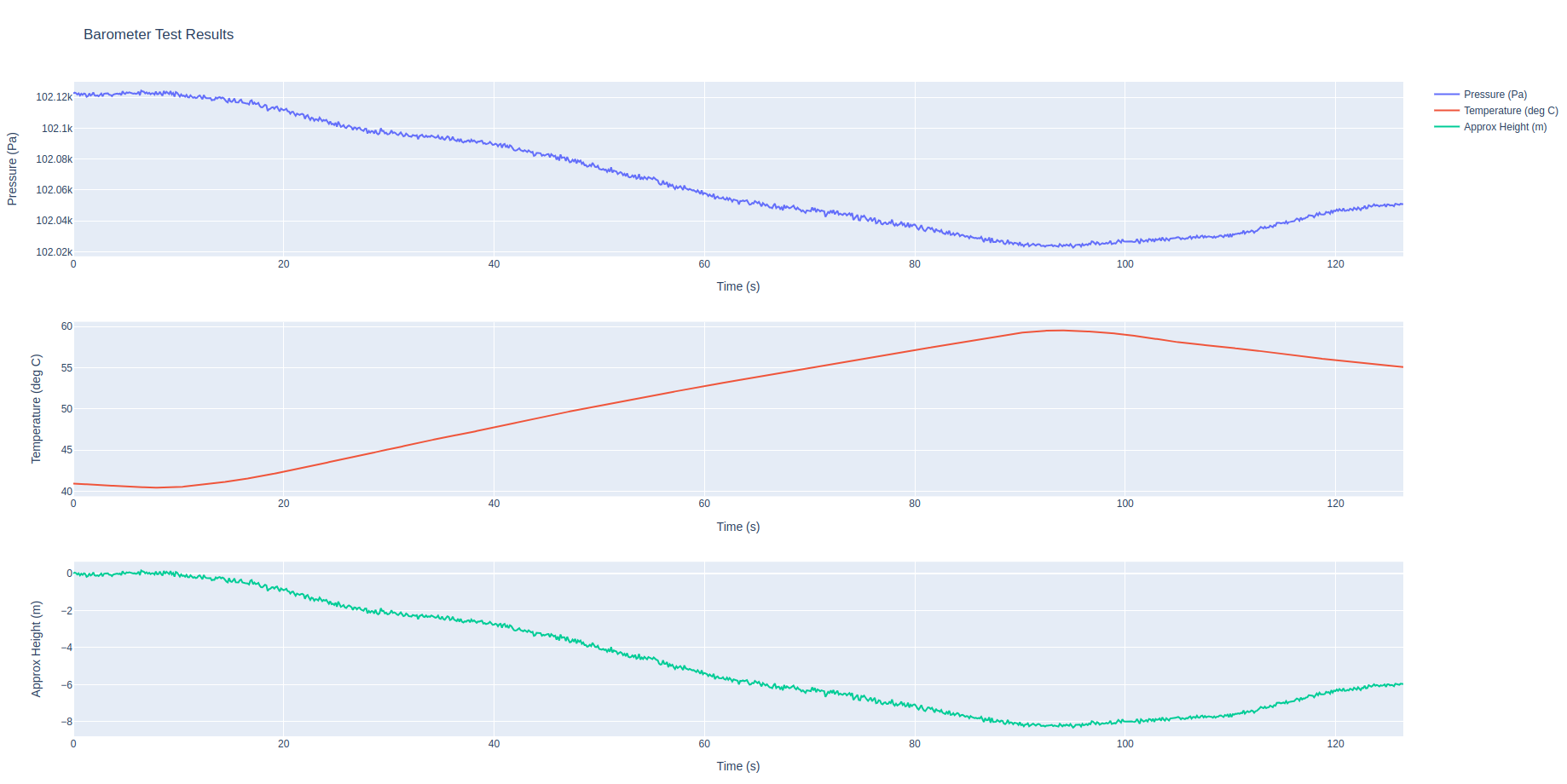
barometer_test_results.htmlwhich you need to copy back to your PC and open in browser :adb pull /home/root/barometer_test_results.htmlI just ran this test and here is the plot. It seems when temperature changed from 40C to 60C, the approximate height change was about 8 meters. This is quite substantial, but i did not see any unusual noise, which could be coming from power supply issues. No change in barometer noise when camera server was turned on and off.
Please try to run the same test and post the resulting plot, if you don't mind. This will help with figuring out the issue. Meanwhile, I will double check if the barometer code in PX4 implements temperature compensation, since 8 meter drift seems too much.
test script (
plot_px4_baro.py) :import subprocess import time import numpy as np import argparse # install plotly using pip3 install plotly --upgrade parser = argparse.ArgumentParser(description='Barometer Test Script') parser.add_argument('-n','--num-samples', type=int, required=False, default=1000) args = parser.parse_args() max_sample_count = args.num_samples def get_px4_baro(): cmd = 'px4-listener sensor_baro' p = subprocess.Popen(cmd, shell=True, stdout=subprocess.PIPE, stderr=subprocess.STDOUT) timestamp = None pressure = None temperature = None for line in p.stdout.readlines(): l=str(line) #print(l) if 'timestamp' in l: ll = l.split(':')[1].split()[0] timestamp = float(ll) if 'pressure' in l: ll = l.split(':')[-1][:-3] pressure = float(ll) if 'temperature' in l: ll = l.split(':')[-1][:-3] temperature = float(ll) retval = p.wait() return (timestamp,pressure,temperature) tlast = 0 ts = [] ps = [] temps = [] sample_count = 0 while (sample_count < max_sample_count): (timestamp, pressure, temperature) = get_px4_baro() #make sure we got new data if timestamp != tlast: sample_count += 1 ts.append(timestamp) ps.append(pressure) temps.append(temperature) print(f'({sample_count})[{timestamp}] P: {pressure}, T: {temperature}') tlast=timestamp time.sleep(0.01) print('Finished collecting data') print('Generating plots..') try: import plotly.graph_objects as go from plotly.subplots import make_subplots except: print('WARNING: In order to plot the results, install the Python "plotly" module: pip3 install plotly --upgrade') sys.exit(0) fig = make_subplots(rows=3, cols=1, start_cell="top-left") ts_plot = np.array(ts) ts_plot -= ts_plot[0] ts_plot *= 0.000001 #convert from us to s # calculate approximate height from start dh = np.array(ps) dh -= dh[0] # subtract the first value dh /= 12.0 # about 12 Pascals per meter at standard pressure and temperature fig.add_trace(go.Scatter(x=ts_plot, y=np.array(ps), name='Pressure (Pa)'), row=1, col=1) fig.add_trace(go.Scatter(x=ts_plot, y=np.array(temps), name='Temperature (deg C)'), row=2, col=1) fig.add_trace(go.Scatter(x=ts_plot, y=dh, name='Approx Height (m)'), row=3, col=1) fig.update_layout(title_text='Barometer Test Results') fig.update_xaxes(title_text='Time (s)',row=1, col=1) fig.update_yaxes(title_text='Pressure (Pa)',row=1, col=1) fig.update_xaxes(title_text='Time (s)',row=2, col=1) fig.update_yaxes(title_text='Temperature (deg C)',row=2, col=1) fig.update_xaxes(title_text='Time (s)',row=3, col=1) fig.update_yaxes(title_text='Approx Height (m)',row=3, col=1) fig.update_xaxes(matches='x') fig.write_html('barometer_test_results.html',include_plotlyjs='cdn') #fig.show() #the figure will not show on VOXL because there is no display / browser print('done') -
Hi @v_v_ramarao,
I have updated the script that i made last week to log and plot barometer data and ran a test on voxl2 mini. I have 3 cameras hooked up:
- J6 IMX214
- J7 IMX412 and AR0144
This is not exactly the same setup as you have (specifically, the IMX214 camera is in another slot), but we can compare the results.
You can copy the script below to voxl2 mini from your PC:
adb push plot_px4_baro.py /home/root/install plotly on voxl2 mini (internet connection required) using:
pip3 install plotly --upgradeThen run the script to collect 1000 samples:
cd /home/root/
python3 plot_px4_baro.py -n 1000
(1)[2288480501.0] P: 102151.375, T: 36.17676
(2)[2288607104.0] P: 102150.70312, T: 36.17943
(3)[2288733681.0] P: 102151.45312, T: 36.17409
(4)[2288860227.0] P: 102151.75, T: 36.17409
(5)[2288986782.0] P: 102149.32812, T: 36.17142
...
The first number is sample count, then timestamp (microseconds), then pressure and temperature.
After you start your script, wait for a few seconds and then start camera server and make sure that you are actually viewing the image from the camera (perhaps using
voxl-portalor just inspecting usingvoxl-inspect-cam hires_coloror something like that. If there are no clients for the camera, not much will be done in camera server, but you can try either way).When the sample count reaches around 800, you can stop the camera server to see the effect of removing the system load and turning off the cameras. When the script is finished, it will generate a file
barometer_test_results.htmlwhich you need to copy back to your PC and open in browser :adb pull /home/root/barometer_test_results.htmlI just ran this test and here is the plot. It seems when temperature changed from 40C to 60C, the approximate height change was about 8 meters. This is quite substantial, but i did not see any unusual noise, which could be coming from power supply issues. No change in barometer noise when camera server was turned on and off.
Please try to run the same test and post the resulting plot, if you don't mind. This will help with figuring out the issue. Meanwhile, I will double check if the barometer code in PX4 implements temperature compensation, since 8 meter drift seems too much.
test script (
plot_px4_baro.py) :import subprocess import time import numpy as np import argparse # install plotly using pip3 install plotly --upgrade parser = argparse.ArgumentParser(description='Barometer Test Script') parser.add_argument('-n','--num-samples', type=int, required=False, default=1000) args = parser.parse_args() max_sample_count = args.num_samples def get_px4_baro(): cmd = 'px4-listener sensor_baro' p = subprocess.Popen(cmd, shell=True, stdout=subprocess.PIPE, stderr=subprocess.STDOUT) timestamp = None pressure = None temperature = None for line in p.stdout.readlines(): l=str(line) #print(l) if 'timestamp' in l: ll = l.split(':')[1].split()[0] timestamp = float(ll) if 'pressure' in l: ll = l.split(':')[-1][:-3] pressure = float(ll) if 'temperature' in l: ll = l.split(':')[-1][:-3] temperature = float(ll) retval = p.wait() return (timestamp,pressure,temperature) tlast = 0 ts = [] ps = [] temps = [] sample_count = 0 while (sample_count < max_sample_count): (timestamp, pressure, temperature) = get_px4_baro() #make sure we got new data if timestamp != tlast: sample_count += 1 ts.append(timestamp) ps.append(pressure) temps.append(temperature) print(f'({sample_count})[{timestamp}] P: {pressure}, T: {temperature}') tlast=timestamp time.sleep(0.01) print('Finished collecting data') print('Generating plots..') try: import plotly.graph_objects as go from plotly.subplots import make_subplots except: print('WARNING: In order to plot the results, install the Python "plotly" module: pip3 install plotly --upgrade') sys.exit(0) fig = make_subplots(rows=3, cols=1, start_cell="top-left") ts_plot = np.array(ts) ts_plot -= ts_plot[0] ts_plot *= 0.000001 #convert from us to s # calculate approximate height from start dh = np.array(ps) dh -= dh[0] # subtract the first value dh /= 12.0 # about 12 Pascals per meter at standard pressure and temperature fig.add_trace(go.Scatter(x=ts_plot, y=np.array(ps), name='Pressure (Pa)'), row=1, col=1) fig.add_trace(go.Scatter(x=ts_plot, y=np.array(temps), name='Temperature (deg C)'), row=2, col=1) fig.add_trace(go.Scatter(x=ts_plot, y=dh, name='Approx Height (m)'), row=3, col=1) fig.update_layout(title_text='Barometer Test Results') fig.update_xaxes(title_text='Time (s)',row=1, col=1) fig.update_yaxes(title_text='Pressure (Pa)',row=1, col=1) fig.update_xaxes(title_text='Time (s)',row=2, col=1) fig.update_yaxes(title_text='Temperature (deg C)',row=2, col=1) fig.update_xaxes(title_text='Time (s)',row=3, col=1) fig.update_yaxes(title_text='Approx Height (m)',row=3, col=1) fig.update_xaxes(matches='x') fig.write_html('barometer_test_results.html',include_plotlyjs='cdn') #fig.show() #the figure will not show on VOXL because there is no display / browser print('done')@Alex-Kushleyev
Dear Alex Khushlevyev
Thanks for the detailed mail. We shall do the test as suggested by you. Yes, this is the kind of behavior that we too observed although we have not logged the data in a file for plotting.
It is unlikely that in an open bench test the rising CPU temperature can transfer so quickly the heat energy to the baro chip through convection (air). It must be the power tracks beneath the baro chip helping to transfer that heat energy through conduction (copper+FR4). Anyway it is to your PCB design team to confirm this.The immediate solution, for the mini users, I think will be one of the following:
A) implement temp compensation in the code.
B) install an external baro with I2C interface.I once again request you to share the steps to install an external baro (BMP280).
(Talking of PCB layout one more thing needs your immediate attention. On Voxl2 mini with J6 and J7 one has to use your interposer (splitter) board, in which case you can't use that respective main board-mounting hole... It fouls. This is the case with either of the interposer boards, single /dual.. It is road-block to use even a single camera with mini. It is very surprising that the spitter boards are not redesigned yet... A minuscule task to address such a glaring fault, is not undertaken yet)
Thanks
Rama Rao -
@Alex-Kushleyev
Dear Alex Khushlevyev
Thanks for the detailed mail. We shall do the test as suggested by you. Yes, this is the kind of behavior that we too observed although we have not logged the data in a file for plotting.
It is unlikely that in an open bench test the rising CPU temperature can transfer so quickly the heat energy to the baro chip through convection (air). It must be the power tracks beneath the baro chip helping to transfer that heat energy through conduction (copper+FR4). Anyway it is to your PCB design team to confirm this.The immediate solution, for the mini users, I think will be one of the following:
A) implement temp compensation in the code.
B) install an external baro with I2C interface.I once again request you to share the steps to install an external baro (BMP280).
(Talking of PCB layout one more thing needs your immediate attention. On Voxl2 mini with J6 and J7 one has to use your interposer (splitter) board, in which case you can't use that respective main board-mounting hole... It fouls. This is the case with either of the interposer boards, single /dual.. It is road-block to use even a single camera with mini. It is very surprising that the spitter boards are not redesigned yet... A minuscule task to address such a glaring fault, is not undertaken yet)
Thanks
Rama RaoHello @v_v_ramarao ,
We are looking into the temperature calibration of the on-board baro. PX4 has a calibration procedure for sensors, including barometer : https://docs.px4.io/main/en/advanced_config/sensor_thermal_calibration.html . You are welcome to try this on your own if you are able to.
Additionally, we will work on providing instructions for enabling external barometer. I see that you want to try BMP280, which is supported by PX4, so we will try it, as well as external ICP-101111, which is very similar to what is used on VOXL2 / mini right now.
Regarding the mechanical mounting concerns on J6, J7, I will pass your comments to our team.
Thanks for your patience, I will get back to you early next week.
Alex
-
@Alex-Kushleyev
Dear Alex Khushlevyev
Thanks for the detailed mail. We shall do the test as suggested by you. Yes, this is the kind of behavior that we too observed although we have not logged the data in a file for plotting.
It is unlikely that in an open bench test the rising CPU temperature can transfer so quickly the heat energy to the baro chip through convection (air). It must be the power tracks beneath the baro chip helping to transfer that heat energy through conduction (copper+FR4). Anyway it is to your PCB design team to confirm this.The immediate solution, for the mini users, I think will be one of the following:
A) implement temp compensation in the code.
B) install an external baro with I2C interface.I once again request you to share the steps to install an external baro (BMP280).
(Talking of PCB layout one more thing needs your immediate attention. On Voxl2 mini with J6 and J7 one has to use your interposer (splitter) board, in which case you can't use that respective main board-mounting hole... It fouls. This is the case with either of the interposer boards, single /dual.. It is road-block to use even a single camera with mini. It is very surprising that the spitter boards are not redesigned yet... A minuscule task to address such a glaring fault, is not undertaken yet)
Thanks
Rama RaoHi @v_v_ramarao
(Talking of PCB layout one more thing needs your immediate attention. On Voxl2 mini with J6 and J7 one has to use your interposer (splitter) board, in which case you can't use that respective main board-mounting hole... It fouls. This is the case with either of the interposer boards, single /dual.. It is road-block to use even a single camera with mini. It is very surprising that the spitter boards are not redesigned yet... A minuscule task to address such a glaring fault, is not undertaken yet)
Thanks
Rama RaoWe appreciate your comments.
Please understand a few things about our one of our primary business models and goals. We help accelerate customer's time to market with their products, for their use case, by offering hardware and software solutions that let them develop and solidify their architectural needs. Then, when they have what they need functioning, they transition that into their custom final and elegant Industrial Design that meets their product constraints. Most often, this does not include any of our adapters, flexes, or cables. We cannot meet most customer's final goals, so oftentimes we just use what already works to meet those development goals and help you along. This is akin to any EVK/DK you buy now for any MCU, sensor, or auxiliary component when doing proof-of-concept work. In this case, yes, we know the camera splitters and adapters are not ideal for V2 Mini. They were designed for VOXL 2 (full size), not the Mini, but they function and help customers accelerate their plans. This is not an oversight nor a fault.All that being said, VOXL 2 Mini is getting a refresh:
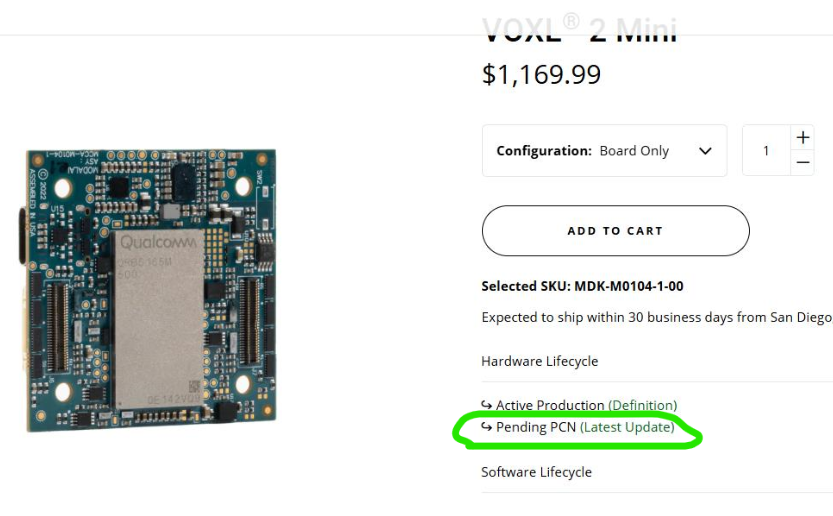
and we do expect volumes to pick up this next year, so we are making more adapters specifically for VOXL 2 Mini.
For example, we already have in our labs and functioning the equivalent to this coax breakout kit but for M0104/M0204: https://www.modalai.com/collections/image-sensors/products/m0173?variant=48528274391344
but we are just not ready to release it yet, even in Beta status.
We also have a single 40-pin + DF56 coax adapter (M0172)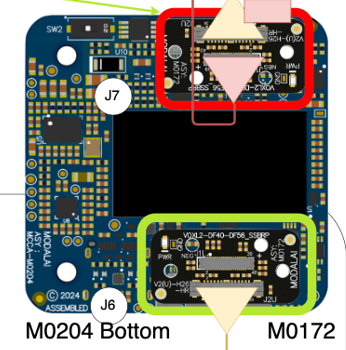 and ones for IR sensors on the horizon for VOXL 2 Mini. However, again, these are not just ready yet but expect to be live in the next couple of quarters.
These may be more suited to some customers applications since they better mate with V2 Mini and the mounting hole support.We appreciate your feedback and let us know if there is anything we can do to help!
Thanks! -
Hi @v_v_ramarao
(Talking of PCB layout one more thing needs your immediate attention. On Voxl2 mini with J6 and J7 one has to use your interposer (splitter) board, in which case you can't use that respective main board-mounting hole... It fouls. This is the case with either of the interposer boards, single /dual.. It is road-block to use even a single camera with mini. It is very surprising that the spitter boards are not redesigned yet... A minuscule task to address such a glaring fault, is not undertaken yet)
Thanks
Rama RaoWe appreciate your comments.
Please understand a few things about our one of our primary business models and goals. We help accelerate customer's time to market with their products, for their use case, by offering hardware and software solutions that let them develop and solidify their architectural needs. Then, when they have what they need functioning, they transition that into their custom final and elegant Industrial Design that meets their product constraints. Most often, this does not include any of our adapters, flexes, or cables. We cannot meet most customer's final goals, so oftentimes we just use what already works to meet those development goals and help you along. This is akin to any EVK/DK you buy now for any MCU, sensor, or auxiliary component when doing proof-of-concept work. In this case, yes, we know the camera splitters and adapters are not ideal for V2 Mini. They were designed for VOXL 2 (full size), not the Mini, but they function and help customers accelerate their plans. This is not an oversight nor a fault.All that being said, VOXL 2 Mini is getting a refresh:
and we do expect volumes to pick up this next year, so we are making more adapters specifically for VOXL 2 Mini.
For example, we already have in our labs and functioning the equivalent to this coax breakout kit but for M0104/M0204: https://www.modalai.com/collections/image-sensors/products/m0173?variant=48528274391344
but we are just not ready to release it yet, even in Beta status.
We also have a single 40-pin + DF56 coax adapter (M0172) and ones for IR sensors on the horizon for VOXL 2 Mini. However, again, these are not just ready yet but expect to be live in the next couple of quarters.
These may be more suited to some customers applications since they better mate with V2 Mini and the mounting hole support.We appreciate your feedback and let us know if there is anything we can do to help!
Thanks!@Vinny
Hi Vinny
Thank you for the detailed info and the company view point. I fully agree with you in so far as Microcontroller Evaluation kits are concerned. I opine that the Voxl2 Mini, with its dense layout and complexity (and also with 30.50 mm mounting-hole pitch, a practice on generic flight controllers) is expected to serve deep in to product development phases, at the least up to proof-of-concept stage (like your Starling / Sentinel). Presently, if one wants to use Voxl2 Mini with even one camera the board is un-mountable and is confined to bench testing... unless and until the user comes out with his/her own adaptor/splitter board.My only submission here is that the state-of-the-art Voxl2 Mini board is qualified to be supplied with a usable camera adaptor / splitter by Modal AI who has gone overboard to supply a ESC-Mini to help speed up the product development. Anyway we are happy with Voxl2 eco system and we will gear up to design a suitable camera adaptor board for Voxl2 Mini.
I once again thank Modal AI team for the excellent support through this forum.
Regards
Rama Rao Valluri -
@Vinny
Hi Vinny
Thank you for the detailed info and the company view point. I fully agree with you in so far as Microcontroller Evaluation kits are concerned. I opine that the Voxl2 Mini, with its dense layout and complexity (and also with 30.50 mm mounting-hole pitch, a practice on generic flight controllers) is expected to serve deep in to product development phases, at the least up to proof-of-concept stage (like your Starling / Sentinel). Presently, if one wants to use Voxl2 Mini with even one camera the board is un-mountable and is confined to bench testing... unless and until the user comes out with his/her own adaptor/splitter board.My only submission here is that the state-of-the-art Voxl2 Mini board is qualified to be supplied with a usable camera adaptor / splitter by Modal AI who has gone overboard to supply a ESC-Mini to help speed up the product development. Anyway we are happy with Voxl2 eco system and we will gear up to design a suitable camera adaptor board for Voxl2 Mini.
I once again thank Modal AI team for the excellent support through this forum.
Regards
Rama Rao ValluriHI @v_v_ramarao
Appreciate your feedback again. Should you wish to design any of your own adapters until ours are released, always reach out and we are happy to do any design reviews for you! It's a service I do as a thanks for your continued support. -
HI @v_v_ramarao
Appreciate your feedback again. Should you wish to design any of your own adapters until ours are released, always reach out and we are happy to do any design reviews for you! It's a service I do as a thanks for your continued support. -
@Vinny
Sure, we shall be in touch during this journey.If you are able to build
px4for voxl yourself (instructions: https://gitlab.com/voxl-public/voxl-sdk/services/voxl-px4) , here is how to enable support for additional barometers. If you unable to build px4 yourself, i think we should be able to add support in modalai's px4 build officially, i will double check with the teamStep 1
Edit https://github.com/modalai/px4-firmware/blob/voxl-dev/boards/modalai/voxl2-slpi/default.px4board
to include:
CONFIG_DRIVERS_BAROMETER_MS5611=y
CONFIG_DRIVERS_BAROMETER_BMP280=y
Please note that BMP388 driver does not build as is, needs a small fix (will fix soon).
Step 2
Edit https://github.com/modalai/px4-firmware/blob/voxl-dev/boards/modalai/voxl2/target/voxl-px4-start#L100 to comment out starting of onboard barometer
#qshell icp101xx start -I -b 5and add one of the following to start the external barometer (
1is the external i2c connector J19)qshell bmp280 start -X -b 1 #or qshell ms5611 start -X -b 1Step 3
build voxl-px4 package, push it to voxl2 / mini, restart px4 and look for px4 console messages during px4 startup to confirm that the external baro was detected:
INFO  [muorb] SLPI: qshell gotten: ms5611 start -X -b 1
INFO  [muorb] SLPI:   arg0 = 'ms5611'
INFO  [muorb] SLPI:   arg1 = 'start'
INFO  [muorb] SLPI:   arg2 = '-X'
INFO  [muorb] SLPI:   arg3 = '-b'
INFO  [muorb] SLPI:   arg4 = '1'
INFO  [muorb] SLPI: *** I2C Device ID 0x3d0009 3997705
INFO  [muorb] SLPI: Set i2c address 0x76, fd 1
INFO  [muorb] SLPI: Set i2c address 0x77, fd 1
INFO  [muorb] SLPI: ms5611 #0 on I2C bus 1
INFO  [muorb] SLPI:  (external)
INFO  [muorb] SLPI:  address 0x76
INFO  [muorb] SLPI:

INFO  [muorb] SLPI: Ok executing command: ms5611 start -X -b 1
Please check the pinout of J19 on voxl2 mini : https://docs.modalai.com/voxl2-mini-connectors/#j19---external-sensors-2x-uart-2x-i2c
Sorry the instructions are a little brief (for now) but i just wanted to post this, as I was able to make the external barometer work.
Still looking into the barometer calibration.
Alex
-
If you are able to build
px4for voxl yourself (instructions: https://gitlab.com/voxl-public/voxl-sdk/services/voxl-px4) , here is how to enable support for additional barometers. If you unable to build px4 yourself, i think we should be able to add support in modalai's px4 build officially, i will double check with the teamStep 1
Edit https://github.com/modalai/px4-firmware/blob/voxl-dev/boards/modalai/voxl2-slpi/default.px4board
to include:
CONFIG_DRIVERS_BAROMETER_MS5611=y
CONFIG_DRIVERS_BAROMETER_BMP280=y
Please note that BMP388 driver does not build as is, needs a small fix (will fix soon).
Step 2
Edit https://github.com/modalai/px4-firmware/blob/voxl-dev/boards/modalai/voxl2/target/voxl-px4-start#L100 to comment out starting of onboard barometer
#qshell icp101xx start -I -b 5and add one of the following to start the external barometer (
1is the external i2c connector J19)qshell bmp280 start -X -b 1 #or qshell ms5611 start -X -b 1Step 3
build voxl-px4 package, push it to voxl2 / mini, restart px4 and look for px4 console messages during px4 startup to confirm that the external baro was detected:
INFO  [muorb] SLPI: qshell gotten: ms5611 start -X -b 1
INFO  [muorb] SLPI:   arg0 = 'ms5611'
INFO  [muorb] SLPI:   arg1 = 'start'
INFO  [muorb] SLPI:   arg2 = '-X'
INFO  [muorb] SLPI:   arg3 = '-b'
INFO  [muorb] SLPI:   arg4 = '1'
INFO  [muorb] SLPI: *** I2C Device ID 0x3d0009 3997705
INFO  [muorb] SLPI: Set i2c address 0x76, fd 1
INFO  [muorb] SLPI: Set i2c address 0x77, fd 1
INFO  [muorb] SLPI: ms5611 #0 on I2C bus 1
INFO  [muorb] SLPI:  (external)
INFO  [muorb] SLPI:  address 0x76
INFO  [muorb] SLPI:

INFO  [muorb] SLPI: Ok executing command: ms5611 start -X -b 1
Please check the pinout of J19 on voxl2 mini : https://docs.modalai.com/voxl2-mini-connectors/#j19---external-sensors-2x-uart-2x-i2c
Sorry the instructions are a little brief (for now) but i just wanted to post this, as I was able to make the external barometer work.
Still looking into the barometer calibration.
Alex
We have added support of the following barometers to voxl-dev branch of px4-firmware repo and you should be able to pick up the change tomorrow in the latest nightly build:
- bmp280
- bmp388
- ms5611
http://voxl-packages.modalai.com/dists/qrb5165/dev/binary-arm64/ (look for
voxl-px4and check build date).the new barometers can be enabled connected to J19 (px4 i2c port 1, so
-b 1) and modifyingvoxl-px4-startscript:qshell bmp280 start -X -b 1 qshell bmp388 start -X -b 1 qshell ms5611 start -X -b 1You should disable the onboard barometer
icp101xx, otherwise there may be a conflict where two barometers are publishing under the same instance (at least when viewed with px4-listener). We will investigate this issue.Alex


Reading along? Create a free ModalAI Forum account to join in.
With an account you can reply, ask your own question, get an email when a ModalAI engineer answers, and mark the reply that solved it. Your place in each thread is saved between visits.
Questions about VOXL, Flight Core, ESCs and ModalAI drones are answered here by the engineers who build them.
Register Login