
Can't run the voxl-emulator docker image
-
I'm trying to run the voxl-emulator docker image to test code intended for the voxl without the voxl.
I downloaded the voxl-emulator V1.7 file from https://developer.modalai.com/asset and ran
"docker load < voxl-emulator_V1.7.tgz" to load the image.
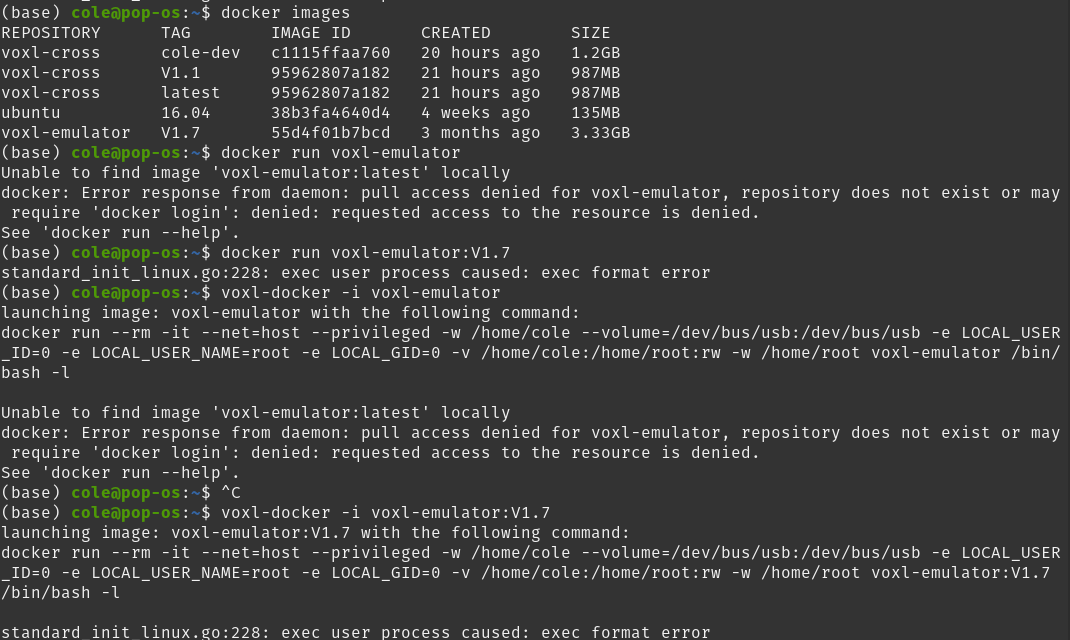
I tried to run it with the following commands but I keep getting the same error. Is anyone able to help me with this? Picture of terminal output is attached below.
-
Hi Cole,
It looks like you need to tag the docker image as latest. Right now docker only lists 1.7 (which is the latest version, but :latest is looking for an actual image with that tag, not just the most recent image. If you run
docker tag 55d4f01b7bcd voxl-emulator:latestthen the voxl-docker command should work. -
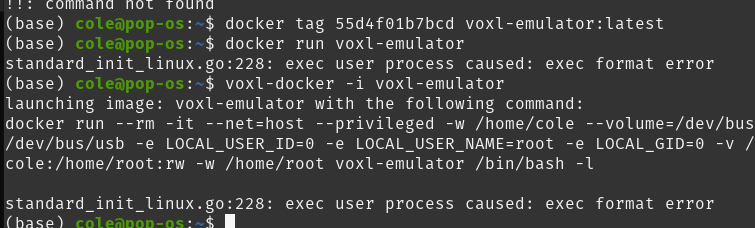
Hi @Alex-Gardner. I ran that command and got the same issue as before. Here is the output:
-
It looks like your machine does not have QEMU support or is missing ARM support on your host machine. Please try instructions here : https://www.stereolabs.com/docs/docker/building-arm-container-on-x86/ (which also show you how to run ARM64 docker images on x86)

Reading along? Create a free ModalAI Forum account to join in.
With an account you can reply, ask your own question, get an email when a ModalAI engineer answers, and mark the reply that solved it. Your place in each thread is saved between visits.
Questions about VOXL, Flight Core, ESCs and ModalAI drones are answered here by the engineers who build them.
Register Login