
IMX412 Autoexposure Compensation
-
@ctitus
You can set up a custom camera configuration#!/bin/bash ################################################################################ # # This file allows setting of custom camera configurations by defining what # sensors are plugged into which port. # # There is no guarantee that any arbitrary configuration will work. Only the # predefined camera configs at https://docs.modalai.com/voxl2-camera-configs/ # are supported. # # each slot can be one of the following sensors: # # pmd-tof # pmd-tof-liow2 # ov7251 # ov7251-combo # ov9782 # ov9782-combo # ar0144 # ar0144-fsin (for use with m0173 and Starling 2 only) # ar0144-fsin-combo (for use with m0173 and Starling 2 only) # imx214 # imx412 # imx412-fpv (low latency mode) # imx678 # # # When using a combo mode pair, you must also add a JX_COMBO_MODE field which # specifies is the pair is to be set up as either a stereo pair ordered # left-right, right-left, or treated as two independent cameras. If you are # using a combo-mode flex but only physically connect one of the two cameras # then select "single" it does not matter which one you connect. # # For example: # J6_LOWER_COMBO_MODE="left-right" # J6_LOWER_COMBO_MODE="right-left" # J6_LOWER_COMBO_MODE="independent" # J6_LOWER_COMBO_MODE="single" # # when running "independent" combo mode, also add a NAME2 field for the second cam # e.g J6_LOWER_NAME2="tracking_rear" # # for all sensors except TOF, you can specify a "rotate" flag to # rotate the image 180 degrees e.g. J6_LOWER_ROTATE="true" or "false" # for stereo pairs (e.g. ov7251 combo or ar0144-slave-strereo) you can specify # "rotate-first-only" or "rotate-second-only" to only rotate one, other wise # when setting the rotate option to "true" both will be rotated. # # # Once configured, this file should live in /data/modalai/custom_camera-config.txt # then run voxl-configure-cameras custom to load it in # # # cp /usr/share/modalai/voxl-camera-server/custom_camera_config.txt /data/modalai/ # # We also suggest changing your /data/modalai/sku.txt file to have a camera # config term "CC" such as MRB-D0005-4-V2-CC ################################################################################ J6_LOWER_SENSOR="" J6_LOWER_NAME="" J6_LOWER_ROTATE="false" J6_UPPER_SENSOR="" J6_UPPER_NAME="" J6_UPPER_ROTATE="false" J7_LOWER_SENSOR="" J7_LOWER_NAME="" J7_LOWER_ROTATE="false" J7_UPPER_SENSOR="" J7_UPPER_NAME="" J7_UPPER_ROTATE="false" J8_LOWER_SENSOR="" J8_LOWER_NAME="" J8_LOWER_ROTATE="false" J8_UPPER_SENSOR="" J8_UPPER_NAME="" J8_UPPER_ROTATE="false" -
@zauberflote1 Thanks, I appreciate it!
voxl-streamer.conf
/**
 * This file contains configuration parameters for voxl-streamer.
 *
 * input-pipe:
 *    This is the MPA pipe to subscribe to. Ideally this is a pipe
 *    with an H264 stream such as the default: hires-stream
 *    However, you can point voxl-streamer to a RAW8 uncompressed stream such as
 *    tracking or qvio_overlay. In this case voxl-streamer will encode the stream
 *    at the bitrate provided in the birtate field.
 *    if input-pipe is already H264 then the bitrate config here is ignored and you
 *    should set the bitrate in voxl-camera-server.conf!!!!!
 *
 * bitrate:
 *    Bitrate to compress raw MPA streams to.
 *    Ignored for H264 streams like hires_stream
 *
 * decimator:
 *    Decimate frames to drop framerate of RAW streams.
 *    Ignored for H264 streams like hires_stream
 *
 * port:
 *    port to serve rtsp stream on, default is 8900
 *
 */
{
	"conf-version":	"1.4",
	"configuration":	"hires",
	"uvc-generic":	{
		"input":	{
			"interface":	"mpa",
			"mpa-camera":	"uvc"
		},
		"output":	{
			"stream":	{
				"rotation":	0,
				"width":	640,
				"height":	480,
				"decimator":	1,
				"bitrate":	1000000
			}
		}
	},
	"uvc-flir-boson":	{
		"input":	{
			"interface":	"mpa",
			"mpa-camera":	"uvc"
		},
		"output":	{
			"stream":	{
				"rotation":	0,
				"width":	640,
				"height":	512,
				"decimator":	2,
				"bitrate":	1000000
			}
		}
	},
	"uvc-flir-lepton":	{
		"input":	{
			"interface":	"mpa",
			"mpa-camera":	"uvc"
		},
		"output":	{
			"stream":	{
				"rotation":	0,
				"width":	160,
				"height":	120,
				"bitrate":	500000
			}
		}
	},
	"hires":	{
		"input":	{
			"interface":	"mpa",
			"mpa-camera":	"hires"
		},
		"output":	{
			"stream":	{
				"rotation":	0,
				"width":	640,
				"height":	480,
				"decimator":	2,
				"bitrate":	1000000
			}
		}
	},
	"hires-logo":	{
		"input":	{
			"interface":	"mpa",
			"mpa-camera":	"hires"
		},
		"output":	{
			"stream":	{
				"rotation":	0,
				"width":	640,
				"height":	480,
				"decimator":	2,
				"bitrate":	1000000
			}
		},
		"overlay":	{
			"location":	"/etc/modalai/modalai.png",
			"offset_x":	-1,
			"offset_y":	-1
		}
	},
	"stereo":	{
		"input":	{
			"interface":	"mpa",
			"mpa-camera":	"stereo"
		},
		"output":	{
			"stream":	{
				"width":	640,
				"height":	960,
				"decimator":	2,
				"bitrate":	1000000
			}
		}
	},
	"stereo-color":	{
		"input":	{
			"interface":	"mpa",
			"mpa-camera":	"stereo_front"
		},
		"output":	{
			"stream":	{
				"width":	1280,
				"height":	800,
				"decimator":	2,
				"bitrate":	1000000
			}
		}
	},
	"tracking":	{
		"input":	{
			"interface":	"mpa",
			"mpa-camera":	"tracking"
		},
		"output":	{
			"stream":	{
				"width":	640,
				"height":	480,
				"decimator":	2,
				"bitrate":	1000000
			}
		}
	},
	"dfs-disparity":	{
		"input":	{
			"interface":	"mpa",
			"mpa-camera":	"dfs_disparity"
		},
		"output":	{
			"stream":	{
				"width":	640,
				"height":	480,
				"decimator":	2,
				"bitrate":	1000000
			}
		}
	},
	"qvio-overlay":	{
		"input":	{
			"interface":	"mpa",
			"mpa-camera":	"qvio_overlay"
		},
		"output":	{
			"stream":	{
				"width":	640,
				"height":	544,
				"decimator":	2,
				"bitrate":	1000000
			}
		}
	},
	"tflite-overlay":	{
		"input":	{
			"interface":	"mpa",
			"mpa-camera":	"tflite"
		},
		"output":	{
			"stream":	{
				"width":	640,
				"height":	480,
				"decimator":	2,
				"bitrate":	1000000
			}
		}
	},
	"hdmi-mpa":	{
		"input":	{
			"interface":	"mpa",
			"mpa-camera":	"v4l2"
		},
		"output":	{
			"stream":	{
				"width":	640,
				"height":	360,
				"decimator":	2,
				"bitrate":	1000000
			}
		}
	},
	"gphoto2-mpa":	{
		"input":	{
			"interface":	"mpa",
			"mpa-camera":	"gphoto2"
		},
		"output":	{
			"stream":	{
				"width":	640,
				"height":	360,
				"decimator":	2,
				"bitrate":	1000000
			}
		}
	},
	"video-test":	{
		"input":	{
			"interface":	"test",
			"frame":	{
				"width":	640,
				"height":	480,
				"format":	"yuv420"
			}
		},
		"output":	{
			"stream":	{
				"rotation":	0,
				"width":	640,
				"height":	480,
				"rate":	30,
				"bitrate":	1000000
			}
		}
	},
	"uvc-video":	{
		"input":	{
			"interface":	"uvc",
			"device":	"/dev/video0"
		},
		"output":	{
			"stream":	{
				"rotation":	0,
				"width":	640,
				"height":	360,
				"rate":	15,
				"bitrate":	1000000
			}
		}
	},
	"input-pipe":	"hires_small_encoded",
	"bitrate":	1000000,
	"rotation":	0,
	"decimator":	1,
	"port":	8900
}
voxl-camera-server.conf
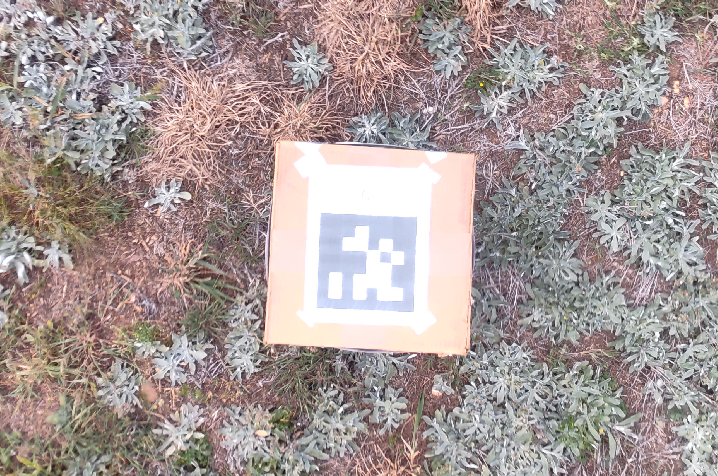
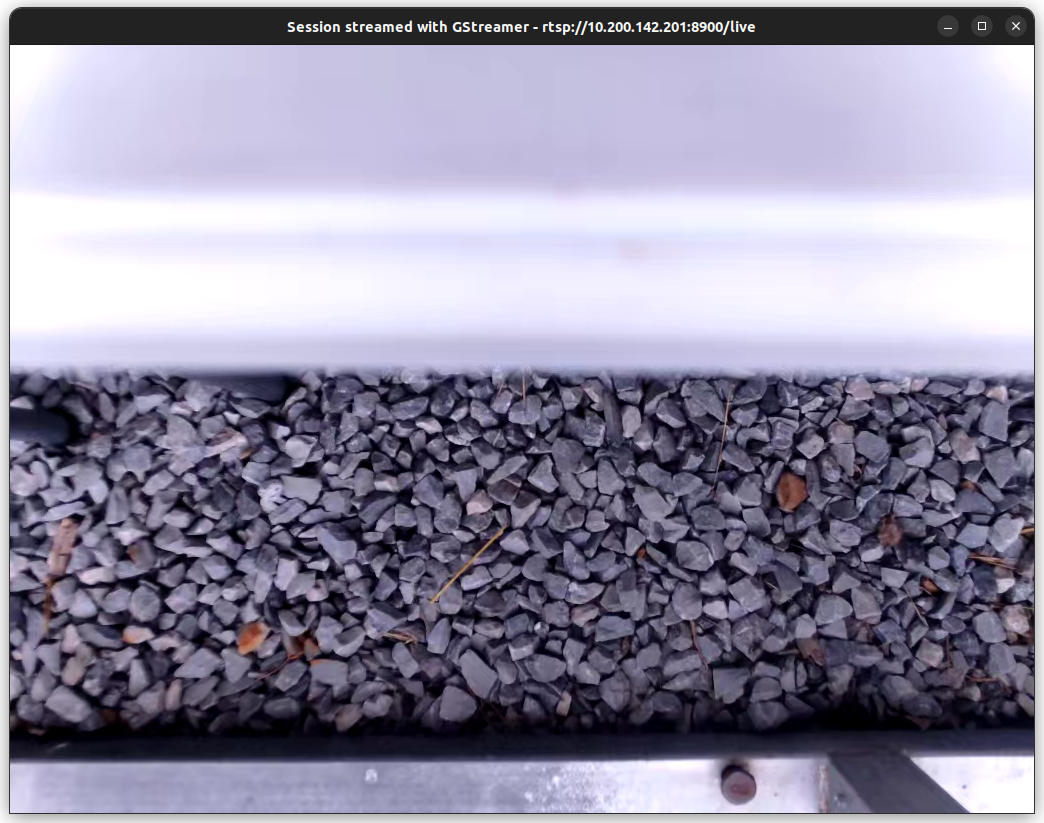
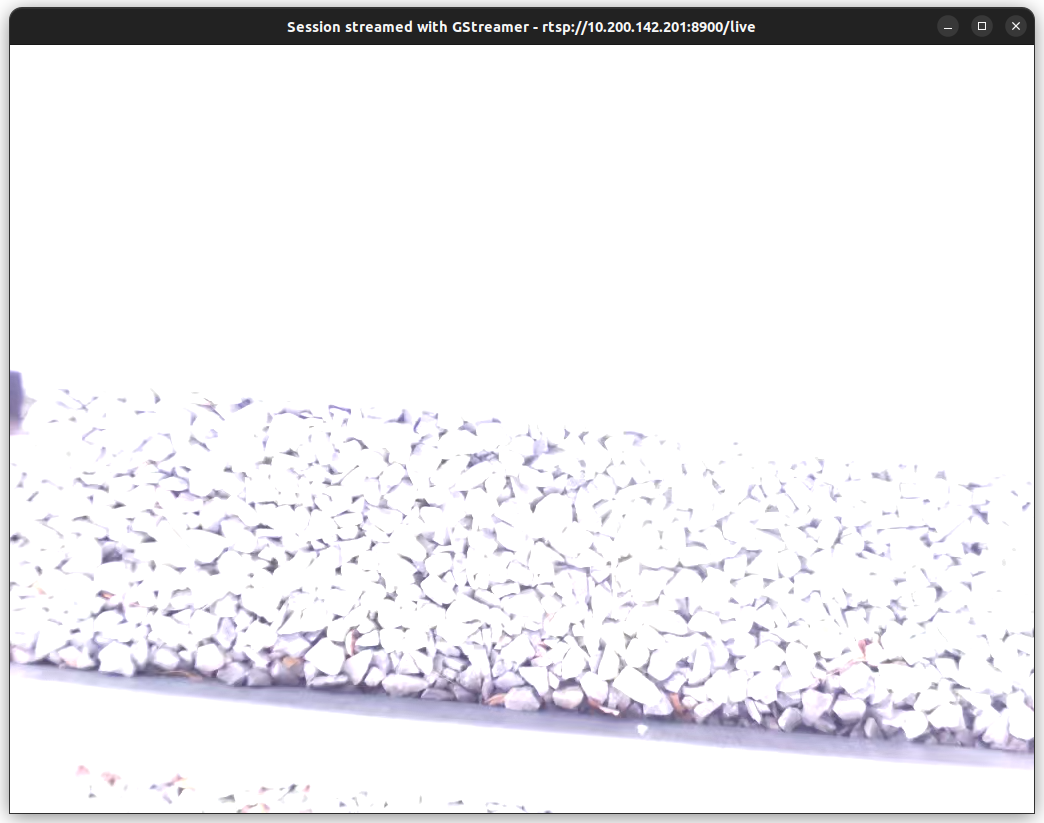
/** * voxl-camera-server Configuration File * * Each camera has configurations for up to 4 HAL3 streams: * - `preview` stream for raw unprocessed images from CV cameras * - `small_video` 720p (ish) h264/h265 compressed for fpv video streaming * - `large_video` 4k (ish) h264/h265 for onboard video recording to disk * - `snapshot` ISP-processed JPG snapshots that get saved to disk * * on QRB5165 platforms (VOXL2 and VOXL2 mini) you can only have 3 of the 4 enabled * * This file is generated from default values by voxl-configure-cameras. * Do not expect arbitrary resolutions to work, the ISP and video compression * pipelines only support very specific resolutions. * * The default video compression mode is cqp or Constant Quantization Parameter * * * */ { "version": 0.1, "fsync_en": false, "fsync_gpio": 109, "cameras": [{ "type": "imx412", "name": "hires", "enabled": true, "camera_id": 0, "fps": 30, "en_preview": false, "preview_width": 640, "preview_height": 480, "en_raw_preview": false, "en_small_video": true, "small_video_width": 1024, "small_video_height": 768, "small_venc_mode": "h265", "small_venc_br_ctrl": "cqp", "small_venc_Qfixed": 30, "small_venc_Qmin": 15, "small_venc_Qmax": 40, "small_venc_nPframes": 9, "small_venc_mbps": 2, "en_large_video": true, "large_video_width": 4056, "large_video_height": 3040, "large_venc_mode": "h265", "large_venc_br_ctrl": "cqp", "large_venc_Qfixed": 38, "large_venc_Qmin": 15, "large_venc_Qmax": 50, "large_venc_nPframes": 29, "large_venc_mbps": 30, "en_snapshot": true, "en_snapshot_width": 4056, "en_snapshot_height": 3040, "exif_focal_length": 3.0999999046325684, "exif_focal_length_in_35mm_format": 17, "exif_fnumber": 1.2400000095367432, "ae_mode": "isp" }] }The isp is too bright and the apriltag is more washed out than I would like, the lme_msv picture was with the ridiculously low exposure times and looks the same regardless of how I change the parameters.
On the same camera with a different drone, I've run the following command to get the image quality I'd like:
gst-launch-1.0 -e qtiqmmfsrc camera=0 autoexposure=1 ae-compensation=-12 ! video/x-raw,format=NV12,width=3840,height=2160,framerate=1/2 ! videoflip method=vertical-flip ! queue ! jpegenc ! multifilesink location="/data/images/img.jpg" max-files=1isp_aerial_apriltag.png vvv
isp.png vvv
lme_msv.png vvv
-
@zauberflote1 I also tried changing the exposure with an old command, but there was no change
voxl-send-command hires_snapshot set_exp_gain 1 1 ; voxl-send-command hires_snapshot snapshot -
@zauberflote1 I also tried changing the exposure with an old command, but there was no change
voxl-send-command hires_snapshot set_exp_gain 1 1 ; voxl-send-command hires_snapshot snapshotIf there's a way to modify the very start of the pipe to set autoexposure=1 and ae-compensation=-12 and then pipe that back into VOXL's pipe architecture, or to maybe turn off any voxl sdk autoexposure and just modify qualcomm's built in parameters, that would work just fine for me, I would just need to know where to look to find where the qualcomm camera parameters are set. Even if it's not a pretty solution, a temporary hardcoded fix I can implement would be just fine for now.
-
If there's a way to modify the very start of the pipe to set autoexposure=1 and ae-compensation=-12 and then pipe that back into VOXL's pipe architecture, or to maybe turn off any voxl sdk autoexposure and just modify qualcomm's built in parameters, that would work just fine for me, I would just need to know where to look to find where the qualcomm camera parameters are set. Even if it's not a pretty solution, a temporary hardcoded fix I can implement would be just fine for now.
@ctitus We don't know exactly how to do what you are looking for
We run libmodal-exposure on the computer vision cameras. That's an example of how to run your own exposure control. You could write your own for your use case if that's interesting to you.
There's a chance the parameter you are trying to set is the following:
ANDROID_CONTROL_AE_EXPOSURE_COMPENSATIONIf so, you could try to set it in a similar way to this line of code here: https://gitlab.com/voxl-public/voxl-sdk/services/voxl-camera-server/-/blob/master/src/hal3_camera_mgr.cpp?ref_type=heads#L465
-
@ctitus We don't know exactly how to do what you are looking for
We run libmodal-exposure on the computer vision cameras. That's an example of how to run your own exposure control. You could write your own for your use case if that's interesting to you.
There's a chance the parameter you are trying to set is the following:
ANDROID_CONTROL_AE_EXPOSURE_COMPENSATIONIf so, you could try to set it in a similar way to this line of code here: https://gitlab.com/voxl-public/voxl-sdk/services/voxl-camera-server/-/blob/master/src/hal3_camera_mgr.cpp?ref_type=heads#L465
Dear All,
In order to use modalai exposure algorithm
lme_msv, you have to enable the preview stream, because the algorithm uses the YUV that is generated for the preview stream.If you are using
ispauto exposure (which is built-in Qualcomm's algorithm), you do not need to enable the preview stream.Please paste the latest
voxl-camera-server.confthat you are testing, I will test it usinglme_msvand suggest any corrections if I find something wrong.Alex
-
Dear All,
In order to use modalai exposure algorithm
lme_msv, you have to enable the preview stream, because the algorithm uses the YUV that is generated for the preview stream.If you are using
ispauto exposure (which is built-in Qualcomm's algorithm), you do not need to enable the preview stream.Please paste the latest
voxl-camera-server.confthat you are testing, I will test it usinglme_msvand suggest any corrections if I find something wrong.Alex
@Alex-Kushleyev I was able to get it working with some changes to hal3_camera_mgr.cpp. The short version is I added
int32_t aeExposureCompensation = -12; requestMetadata.update(ANDROID_CONTROL_AE_EXPOSURE_COMPENSATION, &aeExposureCompensation, 1);to the AE_ISP case here in hal3_camera_mgr.cpp and recompiled and deployed the voxl-camera-server following the docs here. I also had a hard time finding the docs for these parameters for some reason so I'll like them here just in case it's useful to others.The slightly longer version is I really added a custom auto exposure mode AE_CUSTOM to lines 169-189 of common_defs.h, and then copied the AE_ISP case, renamed it custom, and added the two lines above to that. With this method, I also had to modify this line and add
if(ae_mode != AE_ISP && ae_mode != AE_CUSTOM){to prevent the exposure and gains from being overwritten. I'd like to add the autoexposure compensation as a parameter to/etc/modalai/voxl-camera-server.confso it's more convenient to change, but it's not urgent.If there's a better way to do any of this, I'd appreciate any feedback, but it is working now. I've attached my
/etc/modalai/voxl-camera-server.confbelow* voxl-camera-server Configuration File * * Each camera has configurations for up to 4 HAL3 streams: * - `preview` stream for raw unprocessed images from CV cameras * - `small_video` 720p (ish) h264/h265 compressed for fpv video streaming * - `large_video` 4k (ish) h264/h265 for onboard video recording to disk * - `snapshot` ISP-processed JPG snapshots that get saved to disk * * on QRB5165 platforms (VOXL2 and VOXL2 mini) you can only have 3 of the 4 enabled * * This file is generated from default values by voxl-configure-cameras. * Do not expect arbitrary resolutions to work, the ISP and video compression * pipelines only support very specific resolutions. * * The default video compression mode is cqp or Constant Quantization Parameter * * * */ { "version": 0.1, "fsync_en": false, "fsync_gpio": 109, "cameras": [{ "type": "imx412", "name": "hires", "enabled": true, "camera_id": 0, "fps": 30, "en_preview": false, "preview_width": 640, "preview_height": 480, "en_raw_preview": false, "en_small_video": true, "small_video_width": 1024, "small_video_height": 768, "small_venc_mode": "h265", "small_venc_br_ctrl": "cqp", "small_venc_Qfixed": 30, "small_venc_Qmin": 15, "small_venc_Qmax": 40, "small_venc_nPframes": 9, "small_venc_mbps": 2, "en_large_video": true, "large_video_width": 4056, "large_video_height": 3040, "large_venc_mode": "h265", "large_venc_br_ctrl": "cqp", "large_venc_Qfixed": 38, "large_venc_Qmin": 15, "large_venc_Qmax": 50, "large_venc_nPframes": 29, "large_venc_mbps": 30, "en_snapshot": true, "en_snapshot_width": 4056, "en_snapshot_height": 3040, "exif_focal_length": 3.0999999046325684, "exif_focal_length_in_35mm_format": 17, "exif_fnumber": 1.2400000095367432, "ae_mode": "custom" }] }``` -
@Alex-Kushleyev I was able to get it working with some changes to hal3_camera_mgr.cpp. The short version is I added
int32_t aeExposureCompensation = -12; requestMetadata.update(ANDROID_CONTROL_AE_EXPOSURE_COMPENSATION, &aeExposureCompensation, 1);to the AE_ISP case here in hal3_camera_mgr.cpp and recompiled and deployed the voxl-camera-server following the docs here. I also had a hard time finding the docs for these parameters for some reason so I'll like them here just in case it's useful to others.The slightly longer version is I really added a custom auto exposure mode AE_CUSTOM to lines 169-189 of common_defs.h, and then copied the AE_ISP case, renamed it custom, and added the two lines above to that. With this method, I also had to modify this line and add
if(ae_mode != AE_ISP && ae_mode != AE_CUSTOM){to prevent the exposure and gains from being overwritten. I'd like to add the autoexposure compensation as a parameter to/etc/modalai/voxl-camera-server.confso it's more convenient to change, but it's not urgent.If there's a better way to do any of this, I'd appreciate any feedback, but it is working now. I've attached my
/etc/modalai/voxl-camera-server.confbelow* voxl-camera-server Configuration File * * Each camera has configurations for up to 4 HAL3 streams: * - `preview` stream for raw unprocessed images from CV cameras * - `small_video` 720p (ish) h264/h265 compressed for fpv video streaming * - `large_video` 4k (ish) h264/h265 for onboard video recording to disk * - `snapshot` ISP-processed JPG snapshots that get saved to disk * * on QRB5165 platforms (VOXL2 and VOXL2 mini) you can only have 3 of the 4 enabled * * This file is generated from default values by voxl-configure-cameras. * Do not expect arbitrary resolutions to work, the ISP and video compression * pipelines only support very specific resolutions. * * The default video compression mode is cqp or Constant Quantization Parameter * * * */ { "version": 0.1, "fsync_en": false, "fsync_gpio": 109, "cameras": [{ "type": "imx412", "name": "hires", "enabled": true, "camera_id": 0, "fps": 30, "en_preview": false, "preview_width": 640, "preview_height": 480, "en_raw_preview": false, "en_small_video": true, "small_video_width": 1024, "small_video_height": 768, "small_venc_mode": "h265", "small_venc_br_ctrl": "cqp", "small_venc_Qfixed": 30, "small_venc_Qmin": 15, "small_venc_Qmax": 40, "small_venc_nPframes": 9, "small_venc_mbps": 2, "en_large_video": true, "large_video_width": 4056, "large_video_height": 3040, "large_venc_mode": "h265", "large_venc_br_ctrl": "cqp", "large_venc_Qfixed": 38, "large_venc_Qmin": 15, "large_venc_Qmax": 50, "large_venc_nPframes": 29, "large_venc_mbps": 30, "en_snapshot": true, "en_snapshot_width": 4056, "en_snapshot_height": 3040, "exif_focal_length": 3.0999999046325684, "exif_focal_length_in_35mm_format": 17, "exif_fnumber": 1.2400000095367432, "ae_mode": "custom" }] }``` -
@Alex-Kushleyev I was able to get it working with some changes to hal3_camera_mgr.cpp. The short version is I added
int32_t aeExposureCompensation = -12; requestMetadata.update(ANDROID_CONTROL_AE_EXPOSURE_COMPENSATION, &aeExposureCompensation, 1);to the AE_ISP case here in hal3_camera_mgr.cpp and recompiled and deployed the voxl-camera-server following the docs here. I also had a hard time finding the docs for these parameters for some reason so I'll like them here just in case it's useful to others.The slightly longer version is I really added a custom auto exposure mode AE_CUSTOM to lines 169-189 of common_defs.h, and then copied the AE_ISP case, renamed it custom, and added the two lines above to that. With this method, I also had to modify this line and add
if(ae_mode != AE_ISP && ae_mode != AE_CUSTOM){to prevent the exposure and gains from being overwritten. I'd like to add the autoexposure compensation as a parameter to/etc/modalai/voxl-camera-server.confso it's more convenient to change, but it's not urgent.If there's a better way to do any of this, I'd appreciate any feedback, but it is working now. I've attached my
/etc/modalai/voxl-camera-server.confbelow* voxl-camera-server Configuration File * * Each camera has configurations for up to 4 HAL3 streams: * - `preview` stream for raw unprocessed images from CV cameras * - `small_video` 720p (ish) h264/h265 compressed for fpv video streaming * - `large_video` 4k (ish) h264/h265 for onboard video recording to disk * - `snapshot` ISP-processed JPG snapshots that get saved to disk * * on QRB5165 platforms (VOXL2 and VOXL2 mini) you can only have 3 of the 4 enabled * * This file is generated from default values by voxl-configure-cameras. * Do not expect arbitrary resolutions to work, the ISP and video compression * pipelines only support very specific resolutions. * * The default video compression mode is cqp or Constant Quantization Parameter * * * */ { "version": 0.1, "fsync_en": false, "fsync_gpio": 109, "cameras": [{ "type": "imx412", "name": "hires", "enabled": true, "camera_id": 0, "fps": 30, "en_preview": false, "preview_width": 640, "preview_height": 480, "en_raw_preview": false, "en_small_video": true, "small_video_width": 1024, "small_video_height": 768, "small_venc_mode": "h265", "small_venc_br_ctrl": "cqp", "small_venc_Qfixed": 30, "small_venc_Qmin": 15, "small_venc_Qmax": 40, "small_venc_nPframes": 9, "small_venc_mbps": 2, "en_large_video": true, "large_video_width": 4056, "large_video_height": 3040, "large_venc_mode": "h265", "large_venc_br_ctrl": "cqp", "large_venc_Qfixed": 38, "large_venc_Qmin": 15, "large_venc_Qmax": 50, "large_venc_nPframes": 29, "large_venc_mbps": 30, "en_snapshot": true, "en_snapshot_width": 4056, "en_snapshot_height": 3040, "exif_focal_length": 3.0999999046325684, "exif_focal_length_in_35mm_format": 17, "exif_fnumber": 1.2400000095367432, "ae_mode": "custom" }] }```@ctitus , thanks for sharing!
I understand what change you made, will take a look and talk to the team whether we want to incorporate.. will keep you posted.
Alex
-
@ctitus , thanks for sharing!
I understand what change you made, will take a look and talk to the team whether we want to incorporate.. will keep you posted.
Alex
@ctitus ,
I have implemented this change on a branch here : https://gitlab.com/voxl-public/voxl-sdk/services/voxl-camera-server/-/commit/591f5683c7e2123c31aaa18af6a87e0c3820bd22 , it seems to be working.
I did not add any custom AE mode, since this parameter only applies to the ISP-based auto exposure.
Based on your experience, do you see any issues with this approach? It is working fine in initial testing. Perhaps your application is a bit different and you need the custom AE selection.
Alex



Reading along? Create a free ModalAI Forum account to join in.
With an account you can reply, ask your own question, get an email when a ModalAI engineer answers, and mark the reply that solved it. Your place in each thread is saved between visits.
Questions about VOXL, Flight Core, ESCs and ModalAI drones are answered here by the engineers who build them.
Register Login