
The Spektrum Cannot be binded, and QGroundcontrol “Detected 0 radio channels. To operate PX4 you need at least 5 channels”
-
Hello,I am using a Spektrum DX6i(the Modulation is DSM2, and there are 6 channels ), After configuring the IP address in the conf file and connecting to the m500 over QGroundControl, the QGroundcontrol says “Detected 0 radio channels. To operate PX4 you need at least 5 channels”. Does anyone know anything about this issue?
-
Sounds like you have the MAVLink over IP connection working from VOXL to GGC.
The RC radio is a different 'band', some info here: https://docs.modalai.com/flight-core-radios/
Basically you'll want to have a joystick transmitter and you 'bind' it (e.g. pair) together and can use it for RC control (manual flying, testing, etc.)
-
Yes. You are right. There is connection between the VOXL and QGroundControl, Since in my QGroundControl I can see some IMU data of my quadcopter. But I also want to bind the spektrum RC radio transimitter and spektrum receiver, so I follow those step(RC radio setup) in your official website.!
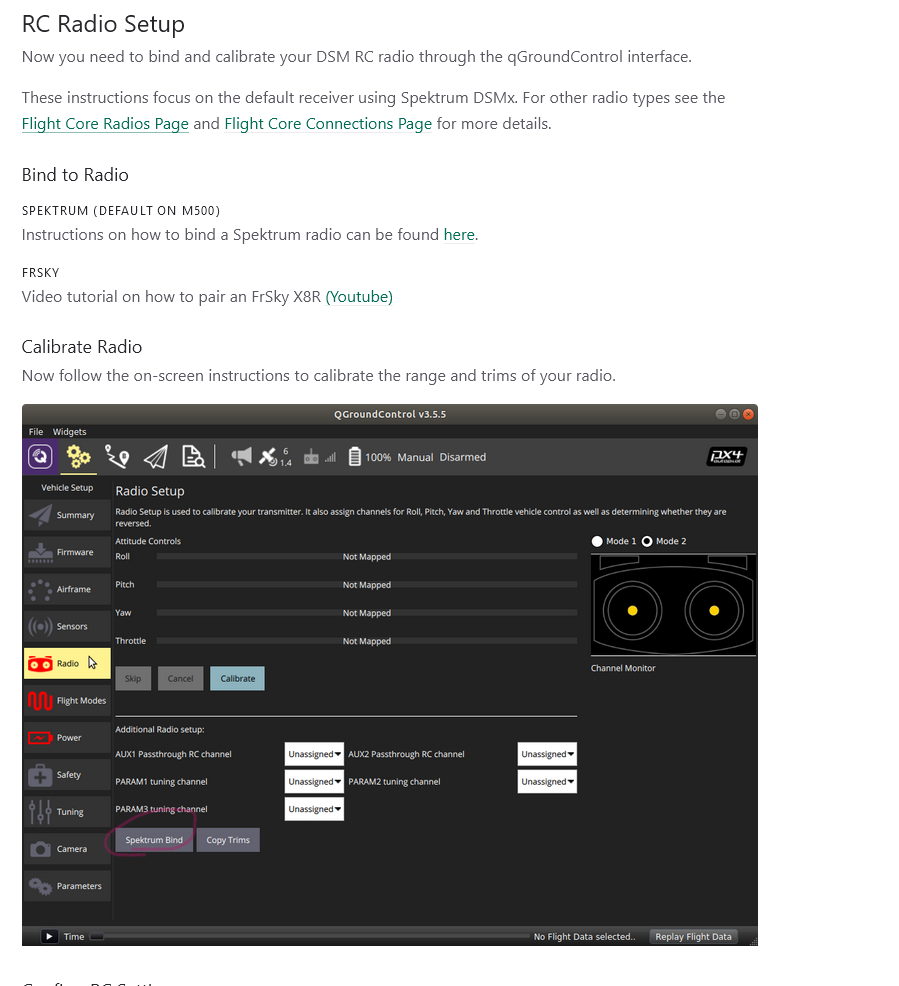
I tried to click the spektrum Bind and the QGroundControl will say "Detected 0 radio channels. To operate PX4 you need at least 5 channels", so what should I do to bind my spektrum RC radio transimitter and spektrum receiver?
-
Yes. You are right. There is connection between the VOXL and QGroundControl, Since in my QGroundControl I can see some IMU data of my quadcopter. But I also want to bind the spektrum RC radio transimitter and spektrum receiver, so I follow those step(RC radio setup) in your official website.!
I tried to click the spektrum Bind and the QGroundControl will say "Detected 0 radio channels. To operate PX4 you need at least 5 channels", so what should I do to bind my spektrum RC radio transimitter and spektrum receiver?
Can you look at the receiver after pressing the button? Does it begin to flash an orange LED quickly?
-
Also, what transmitter make and model are you using?
-
Can you look at the receiver after pressing the button? Does it begin to flash an orange LED quickly?
@modaltb Sorry, I made a mistake. You are right, once I press the 'spektrum bind' button, the orange LED on receiver starts to flash. This actually means my receiver is already in the binding mode. But when I click the 'calibrate' button, the Qgroundcontrol will say “Detected 0 radio channels. To operate PX4 you need at least 5 channels”. The transmitter that I am using is Spektrum DX6i, do I need to setup something in my transmitter?
-
@modaltb Sorry, I made a mistake. You are right, once I press the 'spektrum bind' button, the orange LED on receiver starts to flash. This actually means my receiver is already in the binding mode. But when I click the 'calibrate' button, the Qgroundcontrol will say “Detected 0 radio channels. To operate PX4 you need at least 5 channels”. The transmitter that I am using is Spektrum DX6i, do I need to setup something in my transmitter?
@DarkKnightCH
I normally see this if I don’t reset the PX4 FW after binding. Did you try to power cycle the vehicle? -
Also yes there's a binding procedure to connect the transmitter to the receiver. Normally you have to hold a button down whilst powering on the transmitter until you hear a beep or see the receiver go solid.
-
Also yes there's a binding procedure to connect the transmitter to the receiver. Normally you have to hold a button down whilst powering on the transmitter until you hear a beep or see the receiver go solid.
@modaltb Thank you so much. I followed your instruction and then reboot the quadcopter, then it works. But there is a new issue: When I calibrate the radio, the radio channels for roll, yaw and throttle looks good, but for pitch angle, it shows 'not mapped'. I checked Qgroundcontrol: 'Vehicle Setup->Parameter->Radio Calibration', RC_MAP_ROLL is channel1, the RC_MAP_PITCH is channel2, RC_MAP_THROTTLE is channel3 and RC_MAP_YAW is channel4.
Do you know what's wrong about the pitch radio channel mapping?
-
Hi @DarkKnightCH ,
It's likely something you can setup in your transmitter, or perhaps reset the transmitter to default state. What make and model do you have?

Reading along? Create a free ModalAI Forum account to join in.
With an account you can reply, ask your own question, get an email when a ModalAI engineer answers, and mark the reply that solved it. Your place in each thread is saved between visits.
Questions about VOXL, Flight Core, ESCs and ModalAI drones are answered here by the engineers who build them.
Register Login