
Can you power VOXL2 from the ModalAI 6s ESC?
-
@Matthew-Wellner
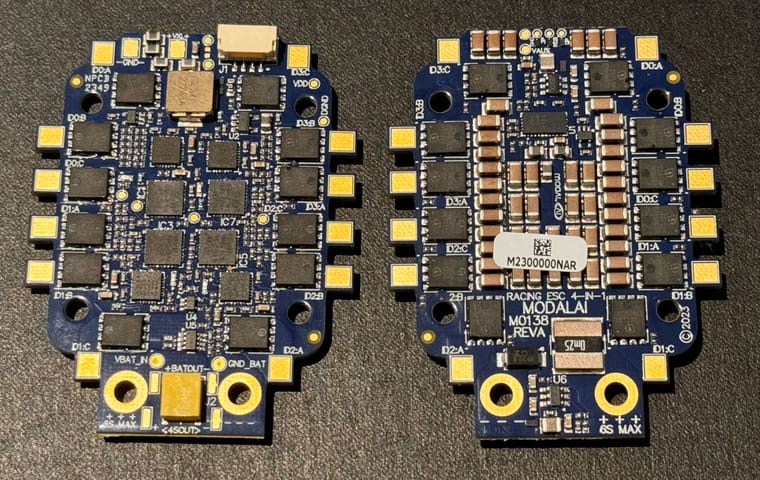
Voxl-esc script errors out because the board is not recognized. Strange, i thought sdk 1.1.2 had the m0134-6 board supported. I will need to check or you can get latest voxl-esc from the repo like i mentioned (dev branch). Make sure to stop px4 before you use the esc tools directly (not using voxl-esc wrapper). To stop px4, run systemctl stop voxl-px4Here is a preview of our new 6S ESC. Some preliminary Specs. Please treat them as unofficial specs and results, we will be publishing official specs in our document very soon.
- Power input : 3S-6S
- Power Output
- 5V @6A for VOXL2 (or 3.8V @6A for VOXL2 mini, as a variant)
- 16.8V regulated @500mA (targetted for optional VTX or other accessories)
- AUX 3.3V / 5.0V @ 500mA
- always ON payload power connector (4A rated connector, battery voltage)
- Current measurement : Total up to 200A
- Maximum sustained current per channel: TBD, around 40-50A, dependent on air flow cooling
- dedicated onboard temperature sensors (top and bottom)
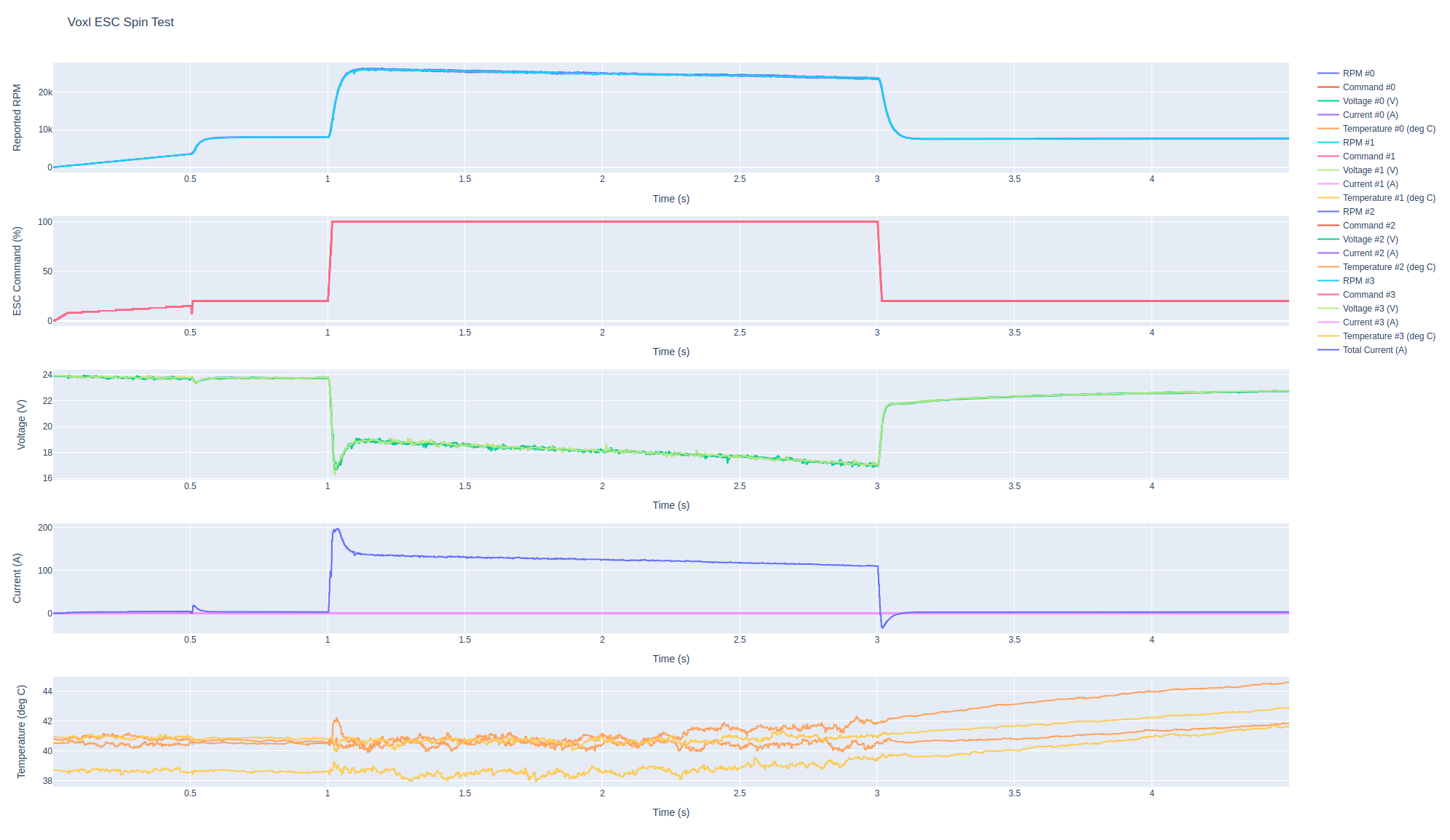
Some preview of test results:
- using Xing2 2207 1855kV motors with 5.1x4.1x3 blades
- 6S 1350mAh Lumenier Extreme battery
- step all 4 motors from 20% power to 100% power and hold for 2 seconds
- Transient current spike saturates 200A sensor, estimated 300A+
- steady state current 140-110A (gets lower as battery votlage drops)
- this is a very extreme use case which even the battery could not sustain very long. A 1350mAh battery will completely discharge in about 50 seconds at 100A constant load (in theory). In practice much sooner
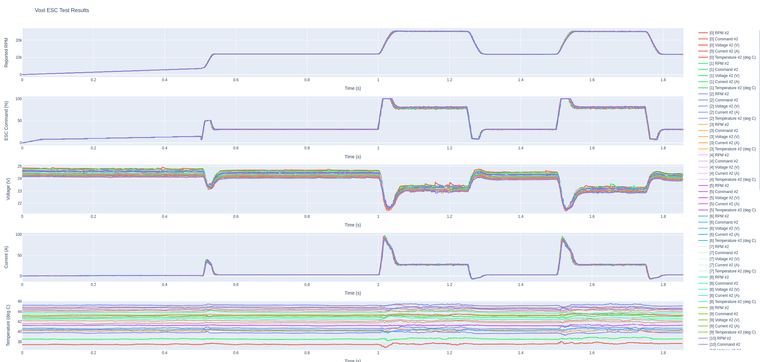
Some RPM step tests using the same set up, single motor:
- step test between 12k and 25k rpm
- 20 runs plotted on top of each other to check for consistent performance
- RPM tracking works well under dropping voltage conditions
-
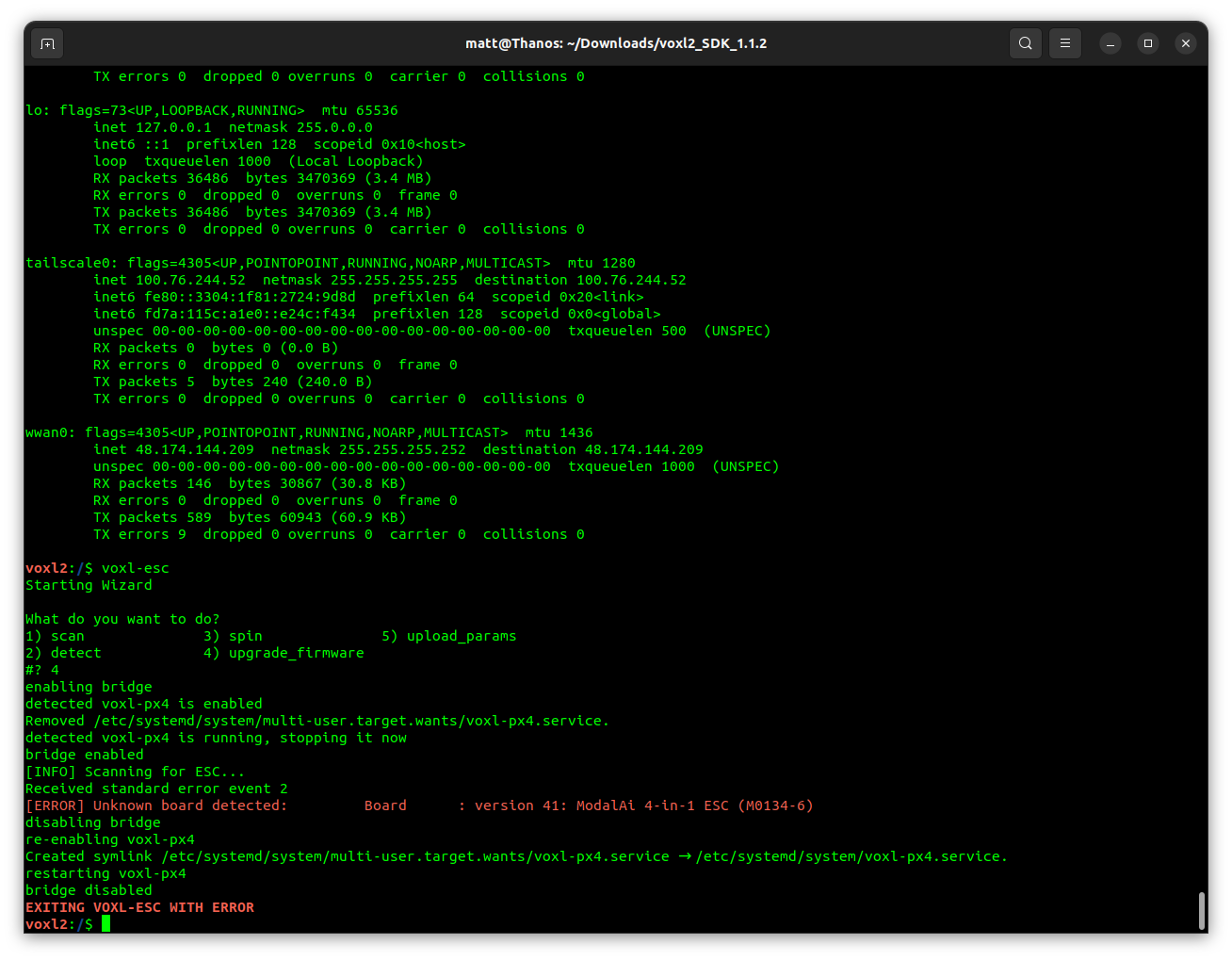
Sorry to bother you again - I tried to do an update / upgrade from the command line using the voxl-esc in the new SDK and I get an error. There really isn't any info as to why, but I was hoping you can help me figure it out.
I also am unable to set the ESC and battery monitor to anything. I am using the 4 in 1 ESC and the current sensor that came with the VOXL2.
Thanks!
Matt@Matthew-Wellner , i figured out why your voxl-esc script was not working. The wrapper script was missing support for M0134-6, so even though the underlying python scripts were able to recognize the board, the wrapper script did not. I made a fix here:
You could just make that change manually in your
/usr/bin/voxl-escwrapper and get the firmware upgraded.In order to get battery voltage and current, you need to enable the voxl power monitor driver (voxlpm), it should be present in all the voxl-based px4 configs except for the one that is using the mini ESC (which has the VOXL power regulator built into the ESC)
-
A Alex Kushleyev referenced this topic on
-
Here is a preview of our new 6S ESC. Some preliminary Specs. Please treat them as unofficial specs and results, we will be publishing official specs in our document very soon.
- Power input : 3S-6S
- Power Output
- 5V @6A for VOXL2 (or 3.8V @6A for VOXL2 mini, as a variant)
- 16.8V regulated @500mA (targetted for optional VTX or other accessories)
- AUX 3.3V / 5.0V @ 500mA
- always ON payload power connector (4A rated connector, battery voltage)
- Current measurement : Total up to 200A
- Maximum sustained current per channel: TBD, around 40-50A, dependent on air flow cooling
- dedicated onboard temperature sensors (top and bottom)
Some preview of test results:
- using Xing2 2207 1855kV motors with 5.1x4.1x3 blades
- 6S 1350mAh Lumenier Extreme battery
- step all 4 motors from 20% power to 100% power and hold for 2 seconds
- Transient current spike saturates 200A sensor, estimated 300A+
- steady state current 140-110A (gets lower as battery votlage drops)
- this is a very extreme use case which even the battery could not sustain very long. A 1350mAh battery will completely discharge in about 50 seconds at 100A constant load (in theory). In practice much sooner
Some RPM step tests using the same set up, single motor:
- step test between 12k and 25k rpm
- 20 runs plotted on top of each other to check for consistent performance
- RPM tracking works well under dropping voltage conditions
This looks great! Our flights will be much longer at a much lower current draw with larger props.
-
@Matthew-Wellner , i figured out why your voxl-esc script was not working. The wrapper script was missing support for M0134-6, so even though the underlying python scripts were able to recognize the board, the wrapper script did not. I made a fix here:
You could just make that change manually in your
/usr/bin/voxl-escwrapper and get the firmware upgraded.In order to get battery voltage and current, you need to enable the voxl power monitor driver (voxlpm), it should be present in all the voxl-based px4 configs except for the one that is using the mini ESC (which has the VOXL power regulator built into the ESC)
I think I got it working. One other question - Do I need to set anything in the params if I am using a TBS crossfire nano receiver? The docs seem to suggest that I just need to hook it up and put it in Mavlink mode for it to work, but I don't see any activity through px4-listener.
Thanks again!
-
I think I got it working. One other question - Do I need to set anything in the params if I am using a TBS crossfire nano receiver? The docs seem to suggest that I just need to hook it up and put it in Mavlink mode for it to work, but I don't see any activity through px4-listener.
Thanks again!
Just to double check... I wired the connector: Rx (VOXL)<->Tx (XFire) and Tx (VOXL) <->Rx (XFire) like you'd normally hookup a UART. This is expected, right?
-
Just to double check... I wired the connector: Rx (VOXL)<->Tx (XFire) and Tx (VOXL) <->Rx (XFire) like you'd normally hookup a UART. This is expected, right?
@Matthew-Wellner , does this help regarding hooking up the receiver? https://docs.modalai.com/voxl2-rc-configs/ (voxl2) and https://docs.modalai.com/voxl2-mini-rc-configs/#crsf (voxl2 mini)
Regarding PX4 config, if you look at voxl-px4.conf, it should have something like this:
# RC: # Tell PX4 which RC transmitter to use. # Use EXTERNAL when getting RC control from external Mavlink messages (e.g Via QGC) # Options include: [SPEKTRUM, CRSF_MAV, CRSF_RAW, M0065_SBUS, EXTERNAL, FAKE_RC_INPUT] RC=CRSF_RAW -
@Matthew-Wellner , does this help regarding hooking up the receiver? https://docs.modalai.com/voxl2-rc-configs/ (voxl2) and https://docs.modalai.com/voxl2-mini-rc-configs/#crsf (voxl2 mini)
Regarding PX4 config, if you look at voxl-px4.conf, it should have something like this:
# RC: # Tell PX4 which RC transmitter to use. # Use EXTERNAL when getting RC control from external Mavlink messages (e.g Via QGC) # Options include: [SPEKTRUM, CRSF_MAV, CRSF_RAW, M0065_SBUS, EXTERNAL, FAKE_RC_INPUT] RC=CRSF_RAWI seem to have everything configured correctly at this point. Is there anything special that I need to configure the ESC? The ESC spin check works from the command line, but when I try and arm from QGC I get an error that says "ESC failure detected".
Thanks again for the help!
Matt -
I seem to have everything configured correctly at this point. Is there anything special that I need to configure the ESC? The ESC spin check works from the command line, but when I try and arm from QGC I get an error that says "ESC failure detected".
Thanks again for the help!
MattDouble check baud rate in esc params and px4 param for modalai esc baud rate - they have to match
-
Double check baud rate in esc params and px4 param for modalai esc baud rate - they have to match
-
Yeah hmm.
Please double check voxl-px4.conf should have:
ESC=VOXL_ESC
POWER_MANAGER=VOXLPM
also check output of:
px4-listener esc_statusIs the ESC blinking blue LEDs while PX4 is running? it should.
You can try stop / start voxl-esc driver:
px4-qshell voxl_esc stop
px4-qshell voxl_esc start
P.S. the baud rate is 250000 (250K)
-
Yeah hmm.
Please double check voxl-px4.conf should have:
ESC=VOXL_ESC
POWER_MANAGER=VOXLPM
also check output of:
px4-listener esc_statusIs the ESC blinking blue LEDs while PX4 is running? it should.
You can try stop / start voxl-esc driver:
px4-qshell voxl_esc stop
px4-qshell voxl_esc start
P.S. the baud rate is 250000 (250K)
I got it working!
Two quick additional questions:
- I'm not getting RC RSSI data in QGC even though I am getting it via px4-listener input_rc. Do I need to configure any parameters in QGC to enable this?
- I tried to do an ESC calibration via the scripts in /usr/share/modalai/voxl-esc-tools/ and I just get a bunch of errors. I disabled the bridge via voxl-esc disable_bridge, but I still get errors running the python scripts directly.
- I'm not getting RC RSSI data in QGC even though I am getting it via px4-listener input_rc. Do I need to configure any parameters in QGC to enable this?
-
I got it working!
Two quick additional questions:
- I'm not getting RC RSSI data in QGC even though I am getting it via px4-listener input_rc. Do I need to configure any parameters in QGC to enable this?
- I tried to do an ESC calibration via the scripts in /usr/share/modalai/voxl-esc-tools/ and I just get a bunch of errors. I disabled the bridge via voxl-esc disable_bridge, but I still get errors running the python scripts directly.
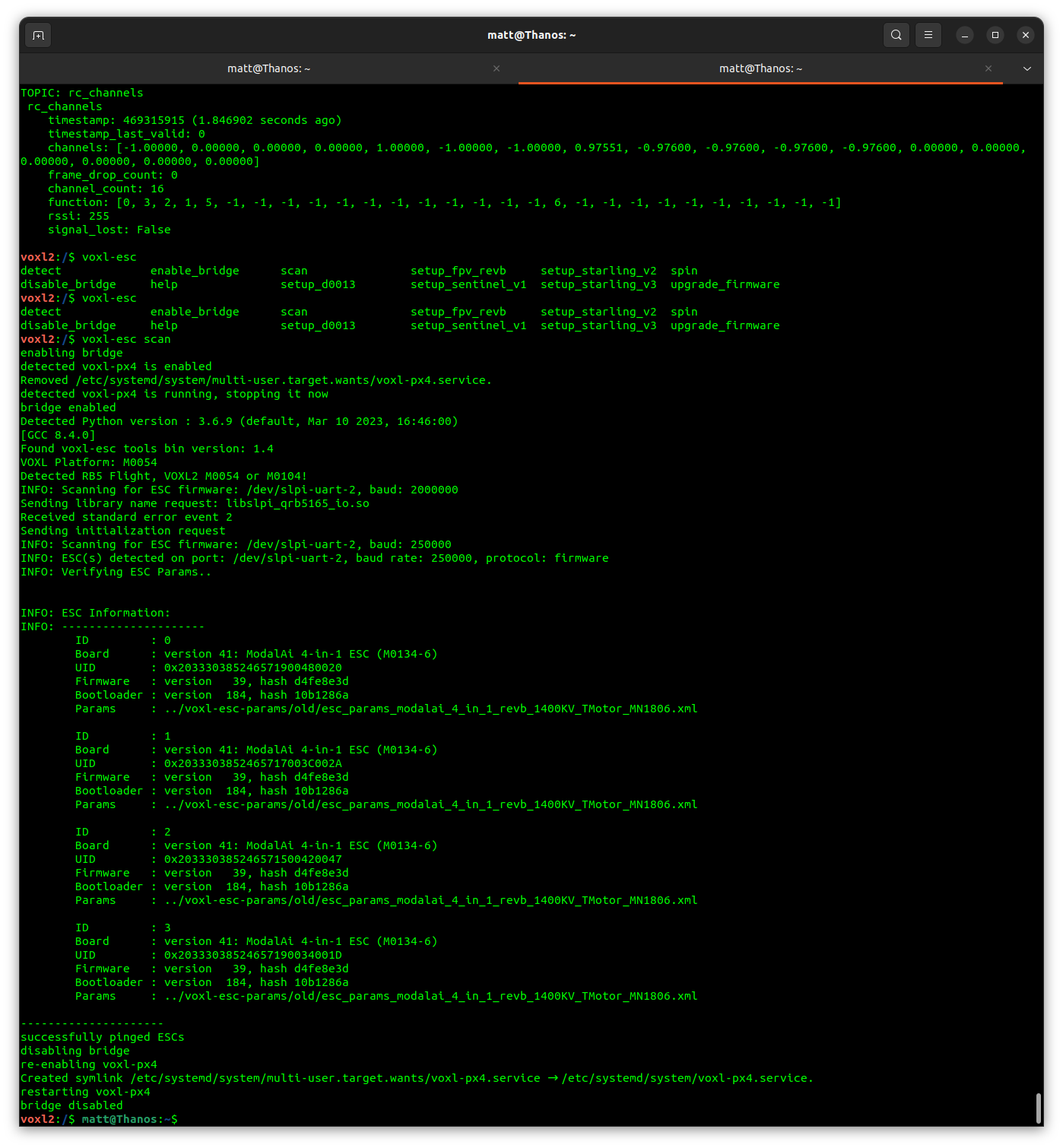
It probably due to voxl-px4, if you just run the voxl-esc, it will stop voxl-px4 however if you are running python scripts directly it does not.
I would try stopping voxl-px4 as below, check and then run voxl-esc scripts and see if I still get the same issueYou can check if px4 is running:
systemctl is-active voxl-px4stop px4:
systemctl stop voxl-px4Just in case if this is of any help as I had similar issue and above resolved it.
- I'm not getting RC RSSI data in QGC even though I am getting it via px4-listener input_rc. Do I need to configure any parameters in QGC to enable this?
-
It probably due to voxl-px4, if you just run the voxl-esc, it will stop voxl-px4 however if you are running python scripts directly it does not.
I would try stopping voxl-px4 as below, check and then run voxl-esc scripts and see if I still get the same issueYou can check if px4 is running:
systemctl is-active voxl-px4stop px4:
systemctl stop voxl-px4Just in case if this is of any help as I had similar issue and above resolved it.
@Vin , you are correct.
"enabling" the bridge via
voxl-escwrapper script simply stops px4, effectively doingsystemctl stop voxl-px4and "disabling" the bridge will re-enable px4. So @Matthew-Wellner got it backwards.However, it is sufficient to just use
systemctl stop voxl-px4before usingvoxl-esc python scriptsdirectly. then re-start px4 withsystemctl start voxl-px4. Note that there is a difference betweensystemctl disableandsystemctl stop- thedisableoption disables auto start on boot, but does not stop it right away.stopwill actually stop it right now but will not affect autostart.I am not sure about RC RSSI data, it's beyond my area of expertise. Perhaps open another question on the forum regarding RC, so other devs can pick it up.
-
@Vin , you are correct.
"enabling" the bridge via
voxl-escwrapper script simply stops px4, effectively doingsystemctl stop voxl-px4and "disabling" the bridge will re-enable px4. So @Matthew-Wellner got it backwards.However, it is sufficient to just use
systemctl stop voxl-px4before usingvoxl-esc python scriptsdirectly. then re-start px4 withsystemctl start voxl-px4. Note that there is a difference betweensystemctl disableandsystemctl stop- thedisableoption disables auto start on boot, but does not stop it right away.stopwill actually stop it right now but will not affect autostart.I am not sure about RC RSSI data, it's beyond my area of expertise. Perhaps open another question on the forum regarding RC, so other devs can pick it up.
@Matthew-Wellner , just for a quick sanity check, can you share what motor / props you are using with M0134-6? i just want to confirm that the ESC will be able to support the motor/prop combination.
-
@Matthew-Wellner , just for a quick sanity check, can you share what motor / props you are using with M0134-6? i just want to confirm that the ESC will be able to support the motor/prop combination.
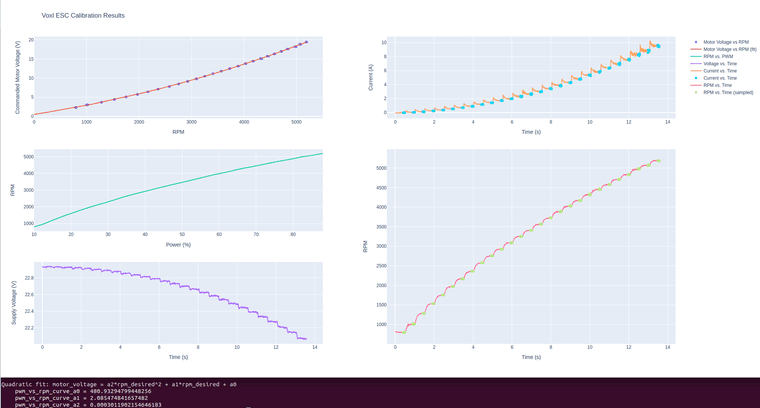
Just FYI, if you are running the esc calibration on VOXL2, which does not have a display attached, you cannot view the calibration plot right away. If you run the calibration procedure on a linux pc (while attached to ESC using serial to usb adapter), the plot will show up in browser. However, I recently added automatic saving of the figure to disk, it is done here : https://gitlab.com/voxl-public/voxl-sdk/utilities/voxl-esc/-/blob/dev/voxl-esc-tools/voxl-esc-calibrate.py?ref_type=heads#L275 , so after the calibration procedure is finished, you should be able to see
calibration_results.htmlwhich you can pull from voxl2 and view in any browser (internet connection is needed because it will download the javascript library for plotting).Also, don't forget if you are using M0134-6 with 6S battery, install the additional capacitor that was provided with the ESC, without it 6S voltage may cause excessive noise in the ESC and poor performance.
For example, I recently calibrated a motor and here is what the results should look like. I am writing up some better instructions for calibration (with examples, so here is a quick preview).
- first plot (top left) is the commaded voltage vs RPM, that is the average voltage supplied to the motor in order to achieve each RPM. You can see that curve has a nice smooth shape with slight quadratic (non-linear) upward trend
- plot on top right shows current draw vs time, it should be roughly quadratic because as the average voltage applied to the (loaded) motor increases, the current will increase quadratically.
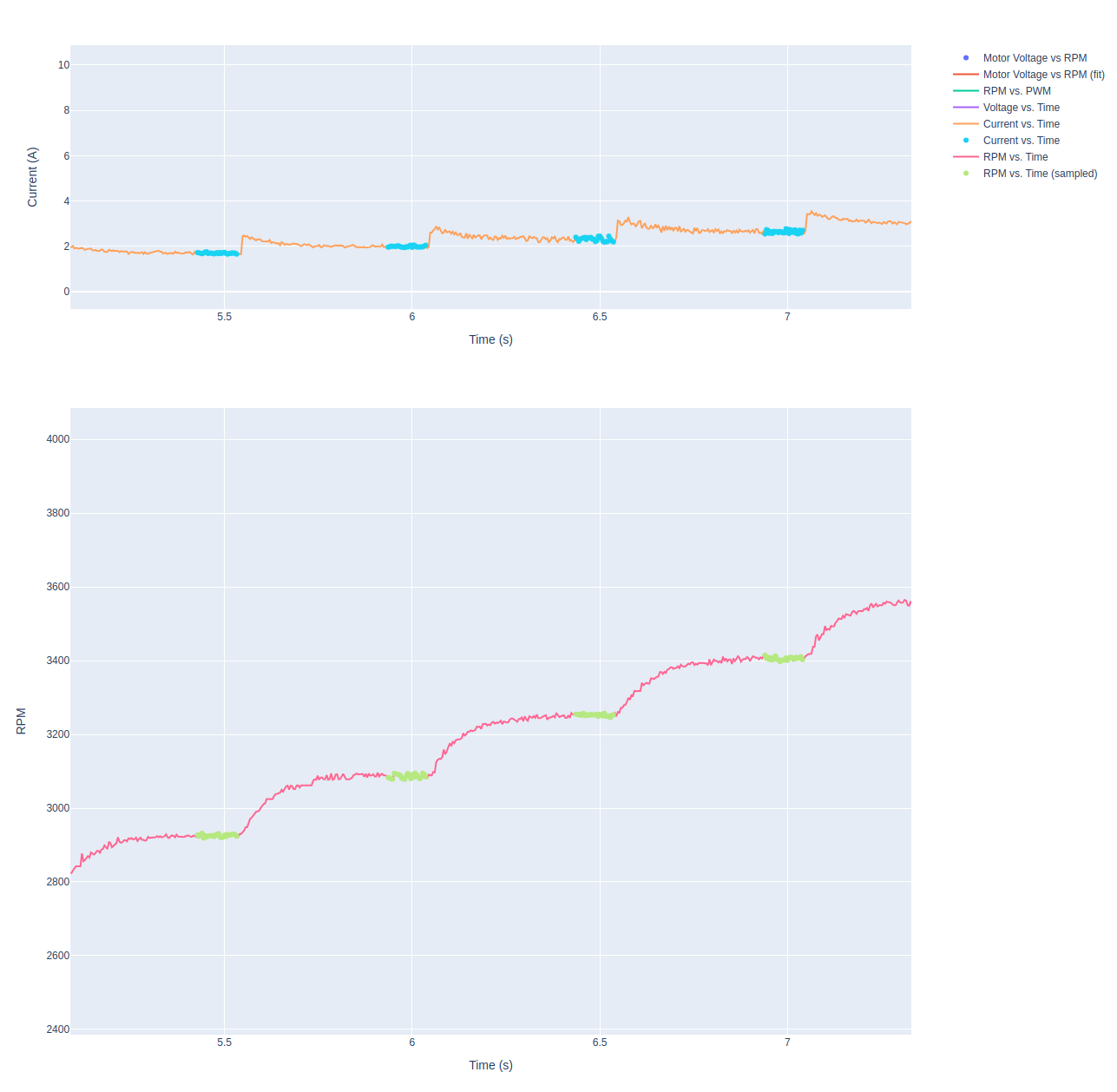
- Bottom right plot shows the rpm response vs time. The green samples are the samples that were used for calibration (as opposed to red samples showing all the data). This is showing that the samples were used were taken after the RPM has settled after a transition.
- you can also use the plot of
currentandrpm vs timeto check if the ESC is behaving normally (plots look similar to the examples) or there are some sudden jumps up or down
zoomed in:
-
@Matthew-Wellner , just for a quick sanity check, can you share what motor / props you are using with M0134-6? i just want to confirm that the ESC will be able to support the motor/prop combination.
Sorry for the delay - I am using SunnySky / TMotor 4004 @400kv with TMotor MS1101 props (11").
-
It probably due to voxl-px4, if you just run the voxl-esc, it will stop voxl-px4 however if you are running python scripts directly it does not.
I would try stopping voxl-px4 as below, check and then run voxl-esc scripts and see if I still get the same issueYou can check if px4 is running:
systemctl is-active voxl-px4stop px4:
systemctl stop voxl-px4Just in case if this is of any help as I had similar issue and above resolved it.
-
Sorry for the delay - I am using SunnySky / TMotor 4004 @400kv with TMotor MS1101 props (11").
@Matthew-Wellner , you probably want to take a look at this post. I recently posted new firmware, params example and instructions how to make sure your low kv motor operates properly:
https://forum.modalai.com/topic/2902/kde-4012xf-motors-with-16-in-props/10#
I will tag you there
I did an example tuning / testing of Tmotor MN4006 380kV with 15in prop which could be similar to your application, so it should definitely be relevant and going through the testing you will ensure that there will be no de-syncs
-
Thanks, but voxl-px4 is running. I am getting GPS, battery voltage and the rest of the telemetry in QGC as expected. I'm just not getting anything for the receiver even though I can read it from the command line.
Matt
@Matthew-Wellner, if you still cannot figure out the RC receiver you should make another post in the forum regarding the receiver, so that this thread does not get too confusing

I can't help you there, but other devs should be able to
-
@Matthew-Wellner, if you still cannot figure out the RC receiver you should make another post in the forum regarding the receiver, so that this thread does not get too confusing
I can't help you there, but other devs should be able to

Reading along? Create a free ModalAI Forum account to join in.
With an account you can reply, ask your own question, get an email when a ModalAI engineer answers, and mark the reply that solved it. Your place in each thread is saved between visits.
Questions about VOXL, Flight Core, ESCs and ModalAI drones are answered here by the engineers who build them.
Register Login