
Attempting to get the motors spinning with no luck
-
Hello, I'll keep it simple. I'm just attempting to get the motors spinning at this point. Here is what I have and what I'm seeing.
Hardware:
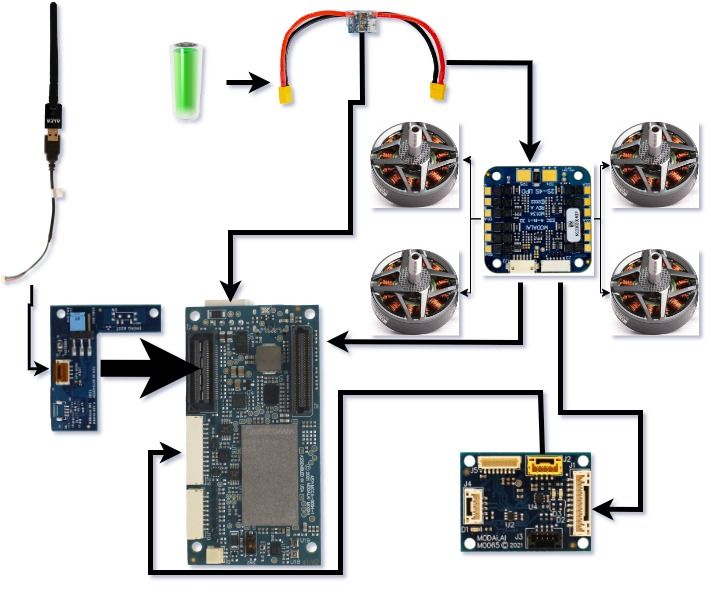
As you can see from the wiring this is my component list
- Voxl2
- 4in1 ESC
- Expander Board
- Power Module
- USB Expansion
- USB adapter for Wifi antenna
- Four T-Motor F90 motors
Software:
- QGroundControl Version 4.3
- Voxl
- System-image 1.7.1
- Kernel 4.19.125
- hw version m0054
- voxl-suite 1.1.0
- Packages
- voxl-px4 1.14.0-2.0.55
If you need any other version information, let me know and I'll update the OP.
I believe I have the VOXL2 configured for proper communication. If I run voxl-inspect-services, the following services are active.
- voxl-cpu-monitor Enabled Running
- voxl-imu-server Enabled Running
- voxl-mavlink-server Enabled Running
- voxl-portal Enabled Running
- voxl-px4 Enabled Running
- voxl-softap Enabled Running
- voxl-vision-hub Enabled Running
- voxl-wait-for-fs Enabled Running
When I run voxl-inspect-mavlink mavlink_to_gcs I see heartbeat and other informations update rates.
QGroundControl:
- Airframe - Quadrotor x
- Vehicle - Generic Quadcopter
- Firmware v. - 1.14.0
- CustomerFW ver. - 2.0.55
- Sensors:
* Gryo - Check
* Accelerometer - Check
* Level Horizon - Check
* Compas - Failed: No Mags found - Actuators Setup
* Configuration - VOXL ESC
I've worked through the Voxl Dev Bootcamp. I've also used the following links for reference.
Modalai: Using VOXL ESCs with PX4
PXF: Modalai VOXL 2Any help would be much appreciated.
-
Hello, I'll keep it simple. I'm just attempting to get the motors spinning at this point. Here is what I have and what I'm seeing.
Hardware:
As you can see from the wiring this is my component list
- Voxl2
- 4in1 ESC
- Expander Board
- Power Module
- USB Expansion
- USB adapter for Wifi antenna
- Four T-Motor F90 motors
Software:
- QGroundControl Version 4.3
- Voxl
- System-image 1.7.1
- Kernel 4.19.125
- hw version m0054
- voxl-suite 1.1.0
- Packages
- voxl-px4 1.14.0-2.0.55
If you need any other version information, let me know and I'll update the OP.
I believe I have the VOXL2 configured for proper communication. If I run voxl-inspect-services, the following services are active.
- voxl-cpu-monitor Enabled Running
- voxl-imu-server Enabled Running
- voxl-mavlink-server Enabled Running
- voxl-portal Enabled Running
- voxl-px4 Enabled Running
- voxl-softap Enabled Running
- voxl-vision-hub Enabled Running
- voxl-wait-for-fs Enabled Running
When I run voxl-inspect-mavlink mavlink_to_gcs I see heartbeat and other informations update rates.
QGroundControl:
- Airframe - Quadrotor x
- Vehicle - Generic Quadcopter
- Firmware v. - 1.14.0
- CustomerFW ver. - 2.0.55
- Sensors:
* Gryo - Check
* Accelerometer - Check
* Level Horizon - Check
* Compas - Failed: No Mags found - Actuators Setup
* Configuration - VOXL ESC
I've worked through the Voxl Dev Bootcamp. I've also used the following links for reference.
Modalai: Using VOXL ESCs with PX4
PXF: Modalai VOXL 2Any help would be much appreciated.
@mascenzi , with ModalAI ESC you don't need the M0065 expander. You need to connect the ESC J2 (6-pin Hirose connector) to VOXL2 J18 (4-pin JST GH) using MCBL-00029 : https://www.modalai.com/collections/cables-1/products/mcbl-00029 . Communication between ESC and Voxl2 will happen using UART.
-
@mascenzi , with ModalAI ESC you don't need the M0065 expander. You need to connect the ESC J2 (6-pin Hirose connector) to VOXL2 J18 (4-pin JST GH) using MCBL-00029 : https://www.modalai.com/collections/cables-1/products/mcbl-00029 . Communication between ESC and Voxl2 will happen using UART.
@Alex-Kushleyev thank you so much for reaching out with support. I had to tear down the voxl2 setup and build out a pixhawk unit so I could complete thrust testing for our initial frame design. I will get the voxl2 model back up and running and test out your configuration. I actually don't think we have that cable. I'll have to put in order in for it. I'll post back with verification once I have the result.

Reading along? Create a free ModalAI Forum account to join in.
With an account you can reply, ask your own question, get an email when a ModalAI engineer answers, and mark the reply that solved it. Your place in each thread is saved between visits.
Questions about VOXL, Flight Core, ESCs and ModalAI drones are answered here by the engineers who build them.
Register Login