
Using the Microhard add-on for only usb dongle
-
Hello,
I'm having issues bringing up usb devices connected to the microhard add-on that is sitting on a voxl2. It appears that the 3 green LED's are lit indicating USB and 5v power. However I do not currently have a microhard module so there is no CPU light from what I can tell. I have already tried resetting to slave config but this doesn't seem to do anything when pressing in the cfg button.I have attached an alfa networks wifi dongle and plan to plugin a realsense camera.
To be clear I don't intend on using micro hard radios atm, just need some spare usb connectivity.
Thanks,
Andrew
-
Hello,
I'm having issues bringing up usb devices connected to the microhard add-on that is sitting on a voxl2. It appears that the 3 green LED's are lit indicating USB and 5v power. However I do not currently have a microhard module so there is no CPU light from what I can tell. I have already tried resetting to slave config but this doesn't seem to do anything when pressing in the cfg button.I have attached an alfa networks wifi dongle and plan to plugin a realsense camera.
To be clear I don't intend on using micro hard radios atm, just need some spare usb connectivity.
Thanks,
Andrew
HI @brahim
It should not be a problem to use our 5G and Microhard boards as USB hub expansions only (w/o modem or MH radio).
Can you please post a pic of your setup? Many details are not included in your post that a simple picture might help us to resolve.
Thanks! -
HI @brahim
It should not be a problem to use our 5G and Microhard boards as USB hub expansions only (w/o modem or MH radio).
Can you please post a pic of your setup? Many details are not included in your post that a simple picture might help us to resolve.
Thanks!@Vinny sorry I probably should have been more descriptive. The setup is just the microhard hat sitting on the voxl2. The alfa networks is connected via the modalai 4-pin jst gh to the micorhard hat. I also tried the 4-pin jst gh to usb-c connecting to an ubuntu host and nothing came up under "lsusb"
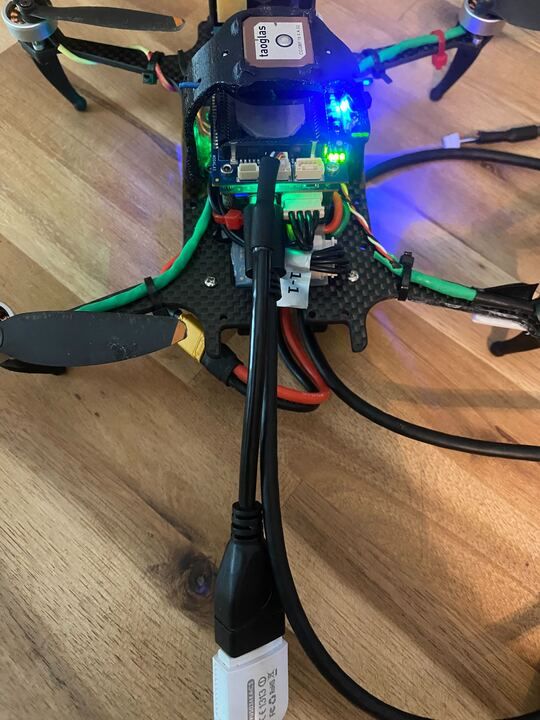
-
@Vinny sorry I probably should have been more descriptive. The setup is just the microhard hat sitting on the voxl2. The alfa networks is connected via the modalai 4-pin jst gh to the micorhard hat. I also tried the 4-pin jst gh to usb-c connecting to an ubuntu host and nothing came up under "lsusb"
Thanks @brahim for the photo.
I can clearly see the M0048 board 5V LEDs and both Port LEDS ON, indicating the Hub has enumerated with the VOXL 2 host, meaning it should appear in lsusb.
The only HW concern we typically have with M0048 and VOXL 2 is this topic noted here, but because you have standoffs installed, that prevents shorting risks: https://docs.modalai.com/expansion-design-guide/#j3j5-expansion

So, I think it's safe to hand this over to someone in the Software team to respond.
@tom is our plug-in board expert!!
He may ask if you've tried a different cable to the Alfa Network dongle, so if you can dig up another one somewhere, that may help isolate the issue you are seeing.Thanks!
-
Thanks @brahim for the photo.
I can clearly see the M0048 board 5V LEDs and both Port LEDS ON, indicating the Hub has enumerated with the VOXL 2 host, meaning it should appear in lsusb.
The only HW concern we typically have with M0048 and VOXL 2 is this topic noted here, but because you have standoffs installed, that prevents shorting risks: https://docs.modalai.com/expansion-design-guide/#j3j5-expansion
So, I think it's safe to hand this over to someone in the Software team to respond.
@tom is our plug-in board expert!!
He may ask if you've tried a different cable to the Alfa Network dongle, so if you can dig up another one somewhere, that may help isolate the issue you are seeing.Thanks!
@brahim , Tom is on vacation for the holidays, so please be patient with us during this break.
Most of our team is taking some much needed time off to spend with family.In the meantime, I'd go through the usual trial and error of different hardware, cables, and USB ports to see if things improve for you. Also check all connectors and cables are secure and pin-1 aligned.
Thanks!

Reading along? Create a free ModalAI Forum account to join in.
With an account you can reply, ask your own question, get an email when a ModalAI engineer answers, and mark the reply that solved it. Your place in each thread is saved between visits.
Questions about VOXL, Flight Core, ESCs and ModalAI drones are answered here by the engineers who build them.
Register Login