
VOXL ESC V1 or V2
-
Hello,
I received a UAV (not from ModalAI) with a voxl2 and voxl esc. Having some troubles with the ESC until I realized there is not a blue flashing light that I can see.
On our bench VOXL ESCs (v2) there is a blue light that blinks. Did the V1 VOXL esc not have a blue blinking light.
Am trying to deduce the issue I am seeing. Thank you! -
Hello,
I received a UAV (not from ModalAI) with a voxl2 and voxl esc. Having some troubles with the ESC until I realized there is not a blue flashing light that I can see.
On our bench VOXL ESCs (v2) there is a blue light that blinks. Did the V1 VOXL esc not have a blue blinking light.
Am trying to deduce the issue I am seeing. Thank you!Hi @wilkinsaf
Sorry we let this one slip by....
Our ESC history is a bit confusing, but all of them I can assure you have the Blue Indicator LEDs per MCU channel.Our "V1" and "Rev B" are the images you normally see on the website:
"V1" has the large copper bars on the surface visible and was known as M0027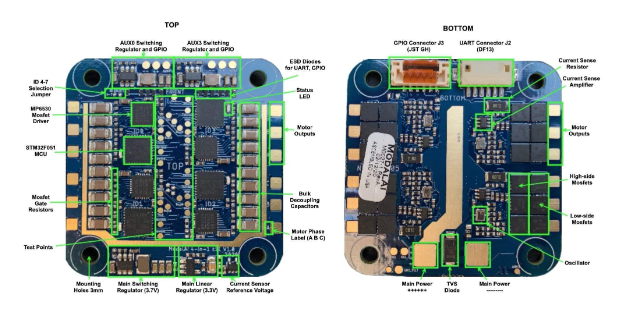
"Rev B" is a V1 ESC, but has some slight improvements and has no visible copper. This is M0049 (note the "RevB silkscreen comment on the PCB):
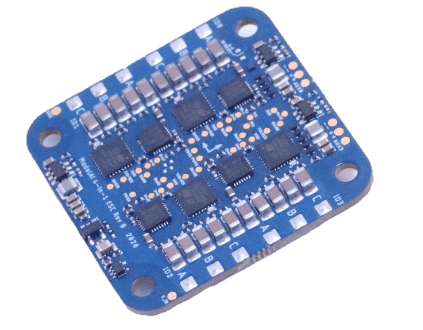
"V2" ESCs use a new and improved routing scheme and are otherwise compatible with V1 ESCs but we have abilities to disable regenerative breaking, and are trying out a 6S version too with this design (will be a variant of M0134).
This is the M0117 and M0134 you see on the drop-down since M0027 and M0049 are now effectively obsolete (we cannot build them anymore, but they are still functional and supported the same). We also designed them to be mechanically similar to M0049 for a "drop-in" use case (marginally thicker PCB on them due to added layers).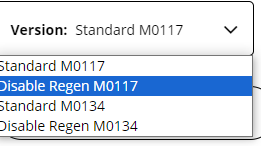
And they are clearly labeled in silkscreen as M0117 and M0134 as shown:
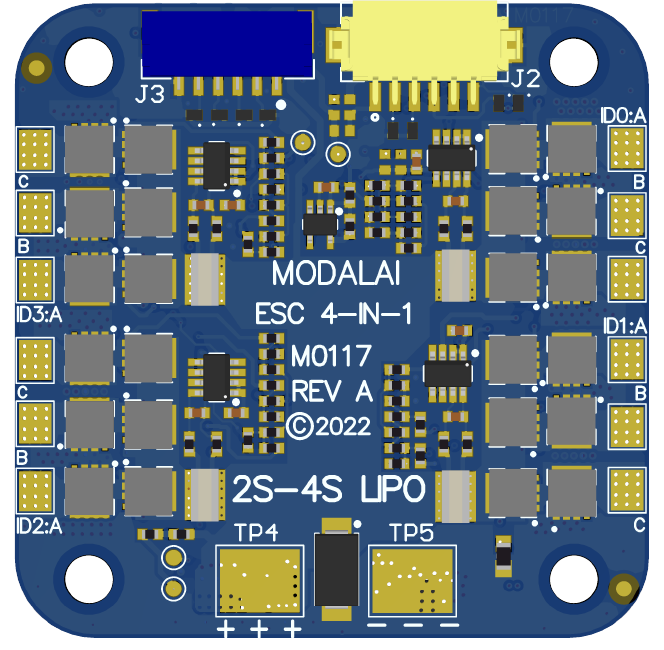
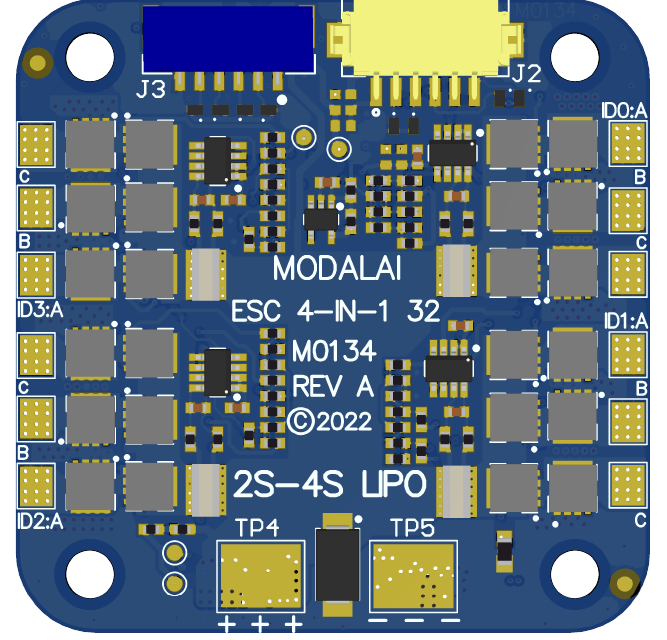
The only difference between M0117 and M0134 is the MCU package we could source (which limits some advanced features of M0117, but is not a huge deal for most).
Hope this explains things and helps you debug.
98 times out of 100, it's ESC params that need updating when there are issues. -
Hi @wilkinsaf
Sorry we let this one slip by....
Our ESC history is a bit confusing, but all of them I can assure you have the Blue Indicator LEDs per MCU channel.Our "V1" and "Rev B" are the images you normally see on the website:
"V1" has the large copper bars on the surface visible and was known as M0027
"Rev B" is a V1 ESC, but has some slight improvements and has no visible copper. This is M0049 (note the "RevB silkscreen comment on the PCB):
"V2" ESCs use a new and improved routing scheme and are otherwise compatible with V1 ESCs but we have abilities to disable regenerative breaking, and are trying out a 6S version too with this design (will be a variant of M0134).
This is the M0117 and M0134 you see on the drop-down since M0027 and M0049 are now effectively obsolete (we cannot build them anymore, but they are still functional and supported the same). We also designed them to be mechanically similar to M0049 for a "drop-in" use case (marginally thicker PCB on them due to added layers).
And they are clearly labeled in silkscreen as M0117 and M0134 as shown:
The only difference between M0117 and M0134 is the MCU package we could source (which limits some advanced features of M0117, but is not a huge deal for most).
Hope this explains things and helps you debug.
98 times out of 100, it's ESC params that need updating when there are issues. -
@wilkinsaf , M0027 was never shipped to any customers, as it was a test version of the ESC. So there should only be M0049, M0117, M0134 and M0129 (mini) ESCs out there. Like Vinny said, all of those ESCs have a blue status LED for each MCU.
If your ESC has a larger rectangular shape (as opposed to a square), it could be a really old ESC (Atmel-based, not STM32-based), which we do not really support any more. I hope this helps!
Alex



Reading along? Create a free ModalAI Forum account to join in.
With an account you can reply, ask your own question, get an email when a ModalAI engineer answers, and mark the reply that solved it. Your place in each thread is saved between visits.
Questions about VOXL, Flight Core, ESCs and ModalAI drones are answered here by the engineers who build them.
Register Login