Skip to content
  • Categories
  • Recent
  • Tags
  • Popular
  • Users
  • Groups
Collapse
Brand Logo

ModalAI Forum

R

robertociuch

@robertociuch
Contributor
Unfollow Follow
About
Posts
15
Topics
4
Shares
0
Groups
1
Followers
0
Following
0

Posts

Recent Best Controversial

  • Voxl2 camera RAW
    R robertociuch

    @Alex-Kushleyev

    We need to take snapshot with the best possible image quality, without compression if possible.
    It would be nice if we can save the single frames of the hires (few snapshots) in YUV NV12, which is the native format for the software we are using

    thanks

    Ask your questions right here!

  • Voxl2 camera RAW
    R robertociuch

    @Alex-Kushleyev
    We updated the voxl-camera-server to the last release, now setting the snapshot quality to 100 we get a bigger file, but it is still compressed.
    I read on a different topic that you already saw something about this

    thank you

    Ask your questions right here!

  • Voxl2 camera RAW
    R robertociuch

    Hi everyone,

    is there a way to take some raw snapshot from the HiRes camera (IMX412 w microcoax wires)?
    I see that the file created by "voxl-send-command hires_large_color snapshot" is pretty small (less then 800KB)
    The preview on the voxl portal seems even better compared to the jpg image

    thank you in advance!

    Ask your questions right here!

  • Voxl 2 Hires camera settings
    R robertociuch

    @Alex-Kushleyev

    I set the "ae_mode" to "off" and it works!

    thank you

    Ask your questions right here!

  • Voxl 2 Hires camera settings
    R robertociuch

    @Alex-Kushleyev

    I tried
    voxl-send-command hires_small_color set_exp_gain 5.0 200

    i receive the message "Successfully sent command to /run/mpa/hires_small_color/control" but I don't see any difference, in the voxl portal it continues to say "exposure: 26.916ms, gain: 800"

    Ask your questions right here!

  • Voxl 2 Hires camera settings
    R robertociuch

    Hi,
    I'm working with an IMX412 on voxl 2, is there a way to manually set camera parameters like exposure time and gain? in my application I use an onboard light and the drone will always fly indoor in the same conditions, so I prefer to work with fixed parameters instead of letting the auto exposure do its things

    Thank you in advance

    Ask your questions right here!

  • IMX412-Flip
    R robertociuch

    @Alex-Kushleyev , one more question;

    I'm using two AR0144 cameras as a stereo setup. Should I use the "combo driver" to synchronize them?
    I remember that about a year ago I had an issue with a different setup where the cameras weren't perfectly synchronized, and the images were captured with a slight time offset.
    In this case, how should I set the IDs in the camera server, and what connections should I use to ensure they work correctly?

    Ask your questions right here!

  • IMX412-Flip
    R robertociuch

    @Alex-Kushleyev

    Hi Alex, it works fine

    thank you very much!

    Ask your questions right here!

  • IMX412-Flip
    R robertociuch

    Hi everyone,

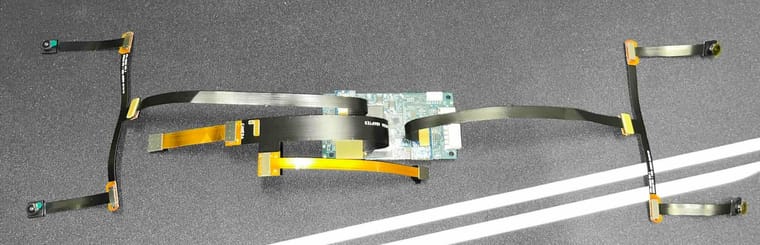
    I'm working with a VOXL2 setup using the microcoax adapter (MDK-M0173-1-00), and I have three AR0144 and IMX412 cameras connected. (same connection used on starling2, without ToF sensor - image attached)

    I need to flip the IMX412 camera image upside down, but I haven't found a way to do this via the voxl-camera-server.conf file. In the past, I've managed this using the "imx412-flip" drivers found under /usr/share/modalai/chi-cdk, but the problem is that my IMX412 camera is assigned to ID 1, and there is no driver for that ID

    Is there a way to solve this problem?

    Thanks in advance for any help
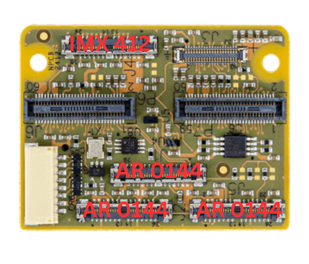
    Untitled design.png

    Ask your questions right here!

  • Stereo cameras not working with 14.5cm extension cable
    R robertociuch

    @Alex-Kushleyev

    I tried with only one M0036 extension cable and it works, but as I connect the second pair of cameras with one more M0036 extension it starts to have some issues, the camera server sometimes starts but most of the times it doesn't, if it does I get a mixed preview of the cameras in the voxl portal, for example I want to see a preview of one pair of stereo and instead of seeing left and right cameras I see one of the front and one of the rear, and then it crashes,
    I already tried to replace the extensions, the cameras and even the voxl with brand new pieces but that configuration doesn't work, the only way is to use the shorter extension cables M0074 on one of the stereo pair (or both), with that extension I never got any type of problem.
    I am using the SDK 1.3.0
    The camera preset I am using is the 11 (sentinel)
    The camera server detects all the cameras, if I disable one of the two stereo pairs it seem to work

    Ask your questions right here!

  • Stereo cameras not working with 14.5cm extension cable
    R robertociuch

    Hi @Alex-Kushleyev ,
    I use a configuration like the photo below, I still need to test the IMX412 hi-res with a custom extension cable,
    do you think it would be better to lower the bitrate also for that camera?

    Screenshot 2024-07-22 alle 21.14.36.jpg

    Ask your questions right here!

  • Stereo cameras not working with 14.5cm extension cable
    R robertociuch

    @Vinny
    I am using the Sentinel configuration:
    stereo front - Omnivision OV7251
    stereo rear - Omnivision OV7251
    tracking - Omnivision OV7251
    hi-res - Sony IMX214 (eventually I will use the IMX412, but I still need to try it)

    Ask your questions right here!

  • Stereo cameras not working with 14.5cm extension cable
    R robertociuch

    @Vinny @Gary-Holmgren
    I'm running into the same problem, unfortunally using the longer extension cables the camera server fail to start,
    I have read the article about MIPI CSI protocols, is it possible to lower the speed to use the cameras with the longer extension cable? In case how can I do it?
    thank you!

    Ask your questions right here!

  • Hires camera settings
    R robertociuch

    @Alex-Kushleyev

    Hi Alex, you're right, I am using IMX214 as hires camera,
    If I set off the ae mode I should control the gain and shutterspeed in some way;
    If I set the ae mode on (ips or lme_msv) I would need to set the min and max gain, min and max shutterspeed, the desired msv and some parameters to control the speed of the adaptation

    is this possible?

    thank you so much

    Support Request Format for Best Results

  • Hires camera settings
    R robertociuch

    I'm using a Voxl2 with different 6 cameras connected: stereo front, stereo rear, tracking and hires (sentinel configuration);
    generally, trough "voxl-camera-server.config" I can change the cameras settings like name, ID, resolution, fps, exposure/autoexposure settings;
    I need to adjust some exposure settings on the hires camera (ov9782) , but on that .config file I don't find exposure settings for that specific camera while they are present for other cameras, I already tryed to copy and paste the parameters from the other cameras but it seems that on the hires they don't do anything, the only parameter that works, is "ae_mode", if I change it from "isp" to "lme_msv" I see some difference, but I don't have any control over that

    Support Request Format for Best Results
  • Login

  • Don't have an account? Register

  • Login or register to search.
  • First post
    Last post
0
  • Categories
  • Recent
  • Tags
  • Popular
  • Users
  • Groups