
@Alex-Kushleyev alright, thanks for the help!
D
Dronodev
@Dronodev
Posts
-
AR0144 Camera capacitor came off -
AR0144 Camera capacitor came offHi everyone,
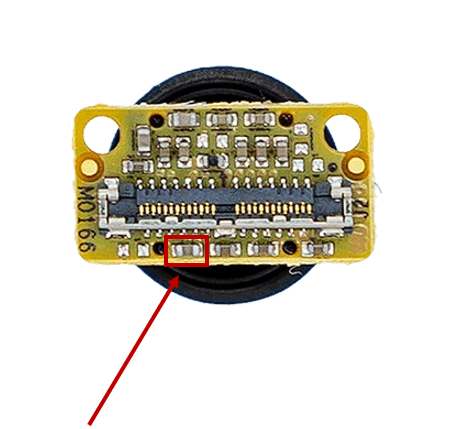
On one of our AR0144 tracking cameras (M0166), a small component (what appears to be a capacitor) has come off the board. I’m wondering whether it’s still safe to operate the camera in this condition, or if this is a critical component that could affect functionality or reliability.
The image below shows the component that detached from the camera:
Thanks for the help!
-
No ov_overlay in portalalright, thanks for your help!
-
No ov_overlay in portalUnfortunately i don't have the raw feed button. This is what my vio tab looks like:
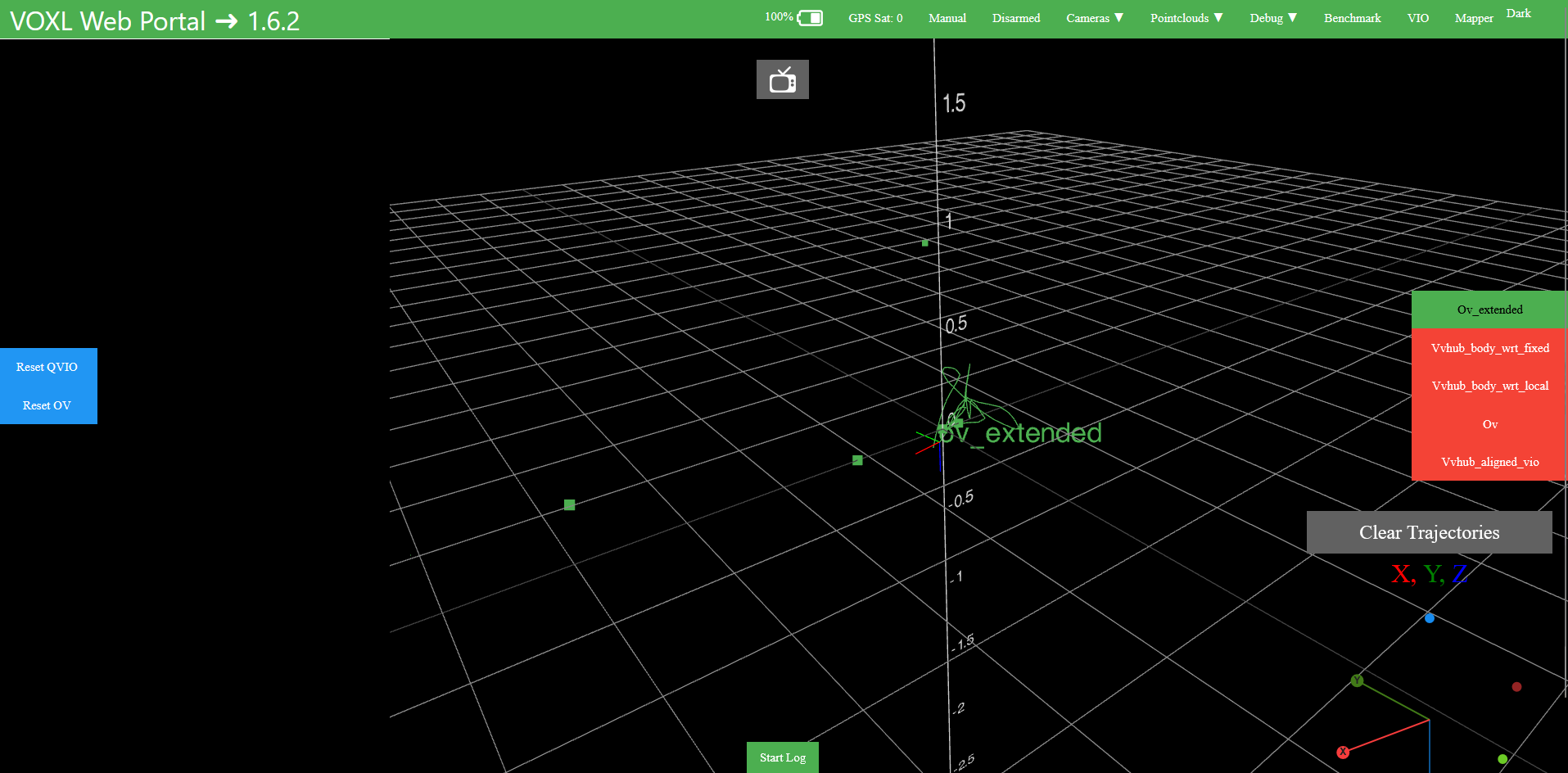
When I try clicking on the little tv-icon at the top, nothing happens.
To be sure I configured everything correctly here is my config:
system-image: 1.8.06-M0054-14.1a-perf
kernel: #1 SMP PREEMPT Wed Oct 22 04:13:18 UTC 2025 4.19.125
mach.var: 1.0.1
SKU: MRB-D0014-4-V1-C27-T0-M28-X0
voxl-suite: 1.6.2Is 1.6.2 the newest SDK ?
I donwloaded the SDK from here: https://developer.modalai.com/asset/eula-download/188 -
No ov_overlay in portal@zauberflote1 I updated my system to the latest SDK 1.6.2 but unfortunately when I am in the VIO tab in voxl-portal, nothing happens when I click on the little tv-icon. Is there anything I need to configure to display the camera overlay?
-
No ov_overlay in portalHi everyone,
we managed to get OpenVINS running on our setup (similar to a Starling C27). In the VOXL Portal, under the VIO tab, the trajectories and motion estimates look good so far, so OpenVINS itself seems to be working correctly.
However, we can’t find the ov_overlay in the Camera tab to visualize the tracked features from the tracking cameras. According to the documentation
(https://docs.modalai.com/voxl-open-vins-server), there should be an ov_overlay available in the camera view, but it doesn’t appear for us.Has anyone encountered this issue before or knows what might be missing or misconfigured on our side?
Thanks a lot for your help!
-
VOXL2 WiFi SoftAP issues (M0141 + AWUS036EACS)Update:
I bought an Alfa Networks AWUS036ACS and it worked out of the box with the M0151 board
-
VOXL2 WiFi SoftAP issues (M0141 + AWUS036EACS)Update:
I did some further testing and noticed a somewhat inconsistent but repeatable pattern related to SKU reconfiguration and power cycles.
After reconfiguring the SKU (MRB-D0014-4-V1-C27-T0-M22-X0) and then power cycling the VOXL2, the SoftAP network is broadcast as expected. After a second power cycle, the network is still being broadcast. However, after a third power cycle, the network disappears again and is only restored after reconfiguring the SKU once more.
In addition to that, client connectivity is inconsistent. In some cases I’m able to connect to the WiFi network from my PC without issues, while in other cases the connection attempt starts but eventually fails. -
VOXL2 WiFi SoftAP issues (M0141 + AWUS036EACS)Hi ModalAI team,
we’re currently struggling to get WiFi running reliably on our VOXL2 and were hoping someone here might have some insight.
We initially tried using the M0151 adapter, but since we couldn’t establish a stable WiFi connection, we switched to an M0141 adapter with an Alfa Networks AWUS036EACS USB WiFi dongle. Our setup is otherwise identical to the Starling 2 configuration.
What we’re seeing right now:
-
The USB WiFi dongle is consistently detected (lsusb shows it, wlan0 is created).
-
After boot, however, no SoftAP network is broadcast in most cases.
-
Sometimes, after reconfiguring WiFi using voxl-wifi in SoftAP mode, the network comes up and we are able to connect successfully.
-
After a full power cycle (disconnecting and reconnecting power), the SoftAP is usually gone again, even though the dongle is still detected.
Reconfiguring WiFi or restarting services occasionally brings it back, but the behavior is not deterministic.
If anyone has seen similar behavior, has recommendations for debugging, we’d really appreciate the input. @Vinny @Alex-Kushleyev
System image: 1.8.06-M0054-14.1a-perf
voxl-suite: 1.6.0Thanks in advance!
-
-
Coordinate system in AR0144 Tracking Camera@Alex-Kushleyev Thanks for the help !
-
M0187 and M0188 3D Models@leandro I found M0188 here: https://docs.modalai.com/M0188/#3d-drawings
-
No WiFi connection M0151 + USB 3.0 + Alfa Networks DongleI did some additional testing and was able to narrow things down a bit. After reconfiguring the WiFi as a SoftAP using voxl-wifi and then rebooting the VOXL, the network now shows up consistently again. So the broadcast issue seems to be resolved for the moment. However, the core problem remains: I still can’t actually connect to the AP — the connection attempt starts, prompts for the password, and then fails just like before.
If anyone has ideas on what else I could check or has seen similar behavior with this setup, I’d really appreciate the help.
-
Coordinate system in AR0144 Tracking CameraHi guys,
I have a quick question regarding the coordinate frame orientation of the AR0144 tracking camera. As far as I understand it, the camera coordinate system is defined such that the z-axis points out of the lens, the x-axis to the right and the y-axis downward when looking through the camera.
What I am currently unsure about is the originally intended orientation of the tracking camera frame itself. I created a small sketch showing the two possible orientations I could think of. Which one is the correct one, the left or the right figure?
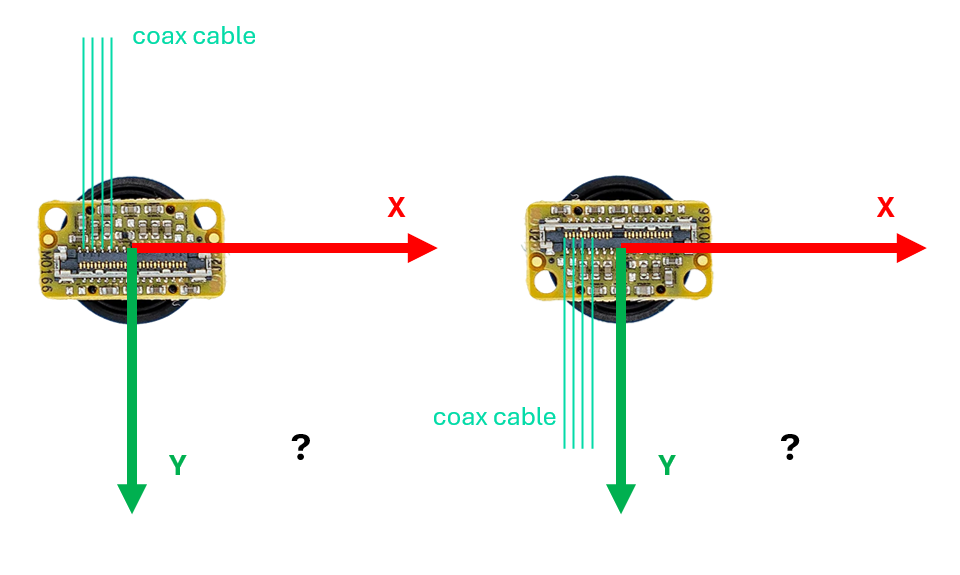
Additionally, I was wondering whether en_rotate in the voxl-camera-server.conf modifies the camera extrinsics, i.e. whether it applies a rotation to the underlying camera coordinate frame such that the extrinsics would need to be configured accordingly (for example upside down), or if it purely affects the image stream orientation without altering the extrinsic calibration at all.
Thanks a lot in advance!
-
No WiFi connection M0151 + USB 3.0 + Alfa Networks DongleHi everyone,
I am experiencing persistent WiFi issues with my VOXL 2 using the M0151 USB3/UART Expansion Adapter and the Alfa Network AWUS036EACS dongle I bought in the WiFi add-on kit. When I initially used this setup with an older SDK version (likely around 1.0), the WiFi in SoftAP mode was working reliably and I was able to connect to the network without any problems. After upgrading to SDK 1.5, these issues already started to appear, and the same behavior is still present after upgrading further to SDK 1.6.
In SDK 1.6, the SoftAP SSID is still being broadcast and visible, but my laptop is unable to connect — the connection attempt starts, asks for the password, and then eventually fails. Station mode is also non-functional, as no external networks are found. After a power cycle, the WiFi network disappears entirely. When reflashing SDK 1.6, the same pattern repeats: the SSID appears again, the connection fails, and after the next reboot it vanishes. The dongle is correctly detected via lsusb at all times, and voxl-my-ip still shows the expected default IP. I configured the modem as type 28 (M0151 with AWUS036EACS), and also tested other modem configurations without success. In dmesg I frequently see repeated messages such as “wlan0: link is not ready” and “wlan0: link becomes ready”. At this point I am unsure whether this is caused by a driver regression in newer SDKs, a USB 3.0 compatibility issue with the AWUS036EACS, or a networking stack/configuration problem. Has anyone encountered similar behavior or can provide guidance? Any hints would be highly appreciated.
(I also noticed that the WiFi add-on kit consisting of the M0151 adapter and the AWUS036EACS dongle is no longer available in the shop, which made me wonder if this setup is still officially supported.)
Thanks in advance!
-
VOXL FPV ESC Current sensing@Vinny Yes, thank you very much!
-
VOXL FPV ESC Current sensingHi guys,
I’m planning to use a VOXL FPV ESC and was wondering whether the current sensor detects not only the current drawn by the motors but also the current drawn from the payload connector J2.
Does the payload current get sensed as well?Thanks in advance!
-
PWM for gimbal using FPV ESCAnd is it possible to connect the i/o expander board (M0065) to the VOXL 2 WiFi Add-on board (MDK-M0141-1-01) to achieve a pwm output ?
-
PWM for gimbal using FPV ESCDear ModalAI Team,
We are currently trying to control a Caddx GM1 gimbal via PWM using our RC transmitter (TBS Tango 2 with Crossfire). As our flight controller, we are using the VOXL2 running PX4.
We read that it might be possible to generate a PWM signal using the 4-in-1 FPV ESC, which can be controlled via an RC input—could you confirm if this is correct? If not, what alternative options are available for generating a PWM signal?
We are planning to use the ModalAI ESC via UART, as well as the Crossfire Nano RX and a UART-to-USB adapter, which leaves us with no available interface for connecting the VOXL I/O board—would that be accurate?
We are aware that this topic has been discussed in various forum threads, but unfortunately we haven't been able to find a clear solution that fits our setup.
Thank you very much in advance for your help! -
VIO in dark environments@Alex-Kushleyev Thank you very much!