
MPA to ROS2 can be found here: https://gitlab.com/voxl-public/voxl-sdk/utilities/voxl-mpa-to-ros2
B
brahim
@brahim
Posts
-
ROS2 foxy not working on the voxl. -
ROS2 foxy not working on the voxl.Hello @jbiscan21
I have not been able to reproduce this.
What is your camera config? I am guessing the mpa to ros2 node is bridging both camera and IMU?
-
Getting mavsdk server running on voxl2@binu-abraham I do not believe modalai has images on docker hub or any other docker repo. The gitlab repo has all of the Dockerfiles though.
-
Getting mavsdk server running on voxl2@binu-abraham you can do an scp of the get_docker.sh script here on to the voxl2 and then run it.
Most of the voxl suite packages assume you have an adb connection.
As for building the docker image over ssh, I would just clone down voxl-docker-mavsdk on to the voxl2 itself, change directory to voxl-docker-mavsdk, and then just run the following command:
docker build . -t mavsdk --network=hostThis should build an ubuntu focal image with mavsdk + all dependencies as well as the takeoff and land example
-
Voxl-Mavcam-Manager Multiple RTSP Stream Setup@ejohnson you are correct on both accounts.
There needs to be a unique component ID for each camera stream. And yes, each camera stream needs it's own pipe opened, since running all the threads in the same pipe will result in one pipe blocking the rest (and the mavlink streams will not work for the other camera instances)
There is already a compid variable within the context struct, so I just need to implement that in the main.c for loop. Will also need to add a unique "mavlink_from_gcs" pipe channel for each stream instance in the context struct as well. I can push these changes upstream
-
Support Photo/Video Capture via RC Switch@JP-Drone said in Support Photo/Video Capture via RC Switch:
MAV_CMD_IMAGE_START_CAPTURE
How are you handling the mavlink camera protocol exchange within voxl-px4? I know that there is the ability to forward commands to the GCS if using mission commands (but not manually flipping an RC switch).
Alternatively when using a joystick you can map a button to image capture: https://docs.px4.io/v1.15/en/camera/mavlink_v2_camera.html#manual-controllers
Currently the mavcam manager fully implements the camera protocol to send the ack for the incoming mavlink commands. It also handles the capture and video stream status (satisfies the mavlink camera protocol).
My only issue with implementing this is that the upstream voxl-px4 will not be camera protocol compliant and thus we are bypassing the entire protocol just to get camera image capture from the autopilot instead of the GCS (which also implements the same camera protocol). If you have a way to implement the protocol (even a stripped down version of it) please send a link so I can look at the code.
-
Voxl-mapper importing external generated tsdf and esdf files issueI am trying to import an external tsdf and esdf from a realsense lidar into voxl-mapper. I am looking at the code and only see the mesh is not used in loading a saved map, but just tsdf and esdf. The error I get is the following, which causes voxl-mapper to freeze.
Client requested load map.
full file name: /data/voxl-mapper/officetest/esdf
full file name: /data/voxl-mapper/officetest/tsdf
Version number mismatch! This needs to be handled...
Updating mesh
I grepped for the error statement but came up with no results, so I am not sure where in the stack the error is coming from. Any help is appreciated (edited)
-
Setting up Voxl2 MicroDDS Communication with PX4Make sure these variables are set on the voxl2 and external pc:
ROS_DOMAIN_ID = 0
ROS_LOCALHOST_ONLY = 0You can check if multicast is enabled on both sides with this command (assuming external pc is linux):
ifconfig | grep -i multicastThis should show multicast enabled for the interface (wifi or ethernet) connected to the external pc via network.
-
voxl-microdds-agent and px4_msgs offboard compatibility issue.@jonathankampia, the way that voxl-microdds-agent works is that it wraps around the XRCE microdds agent binary from e-prosima, and bridges the px4 microdds topics to the DDS global data space (e.g. ROS2 topics).
The voxl-microdds-agent runs irrespective of any serialized message definitions, so it is just the transport. Probably not the issue, but if you still feel strongly that the agent is the issue, there are ways to test that.
Most likely, the mismatch is between px4_msgs and the voxl-px4 version. In that case serialized message definitions DO matter, and the mismatch could cause issues, but usually this is caught when the dds agent service runs (it will report errors you can view via systemctl status).
What sdk version are you using on the voxl2? You could checkout the submodule px4_msgs version that voxl-mpa-to-ros2 uses.
It would be difficult to troubleshoot without the actual offboard code to test, maybe post a snippet of your code?
For an offboard example using trajectory setpoints, you can also try this one which has been referenced a lot in the PX4 community
-
ros2 run voxl_mpa_to_ros2 voxl_mpa_to_ros2_node stopped by ros2 bag record /hires_small_encoded@tahawaru please pull down the latest dev branch: https://gitlab.com/voxl-public/voxl-sdk/utilities/voxl-mpa-to-ros2/-/tree/dev?ref_type=heads
You can rebuild with the dev branch and see if you can both ros2 topic echo and rosbag record the encoded images. Please be aware that you will need to manually decode the images somehow on the receiving end (your application) as there isn't a built-in way in ros2/rviz to decode.
-
Issue with ROS2 set-up, Deserialization of UORB Topics@tahawaru there are a few intermediate steps to get ros2 offboard control:
-
disable offboard_mode (set to false) in voxl-vision-hub.conf line 237:
"offboard_mode": "false" -
Ensure voxl-microdds-agent is running. You can check by running
systemctl status voxl-microdds-agent -
Once these steps are complete, and you have the ros2 offboard fig 8 running, you should be able to echo the offboard control mode info either in an adb shell or mavlink console:
In adb you can use the command
px4-listener offboard_control_modewhich should return thisoffboard_control_mode timestamp: 314055050 (0.031338 seconds ago) position: True velocity: False acceleration: False attitude: False body_rate: False actuator: False- A way to verify the figure 8 ros2 node is sending setpoints to px4 is to echo trajectory setpoints:
ros2 topic echo /fmu/in/trajectory_setpoint - When you kill the ros2 offboard node, you can echo that offboard mode status again and the timestamp should go stale and no longer update.
-
-
Trouble in running the mavros_test Project (simple-example)Manual mode is not really representative of the ability to switch into offboard mode and send setpoints. You will need to be able to arm in position or hold mode first. If you do not have an rc controller then try to arm in hold mode. If you are not able to arm in either mode, then there is a preflight check fail somewhere that needs to be addressed first.
-
ROS2 ToF topic not showing proper dataPlease verify the PC data in rviz2. What you see in rviz2 should look exactly alike to what is shown in voxal portal for tof_pc. Note that the point step size is 12. See this guide for more info on pointcloud data message data
Point cloud data will look very different from image data, since the data field is constructed very different from BGR image formats.
I have replicated these results in a starling2 as well, with voxl-mpa-to-ros2 dev branch:
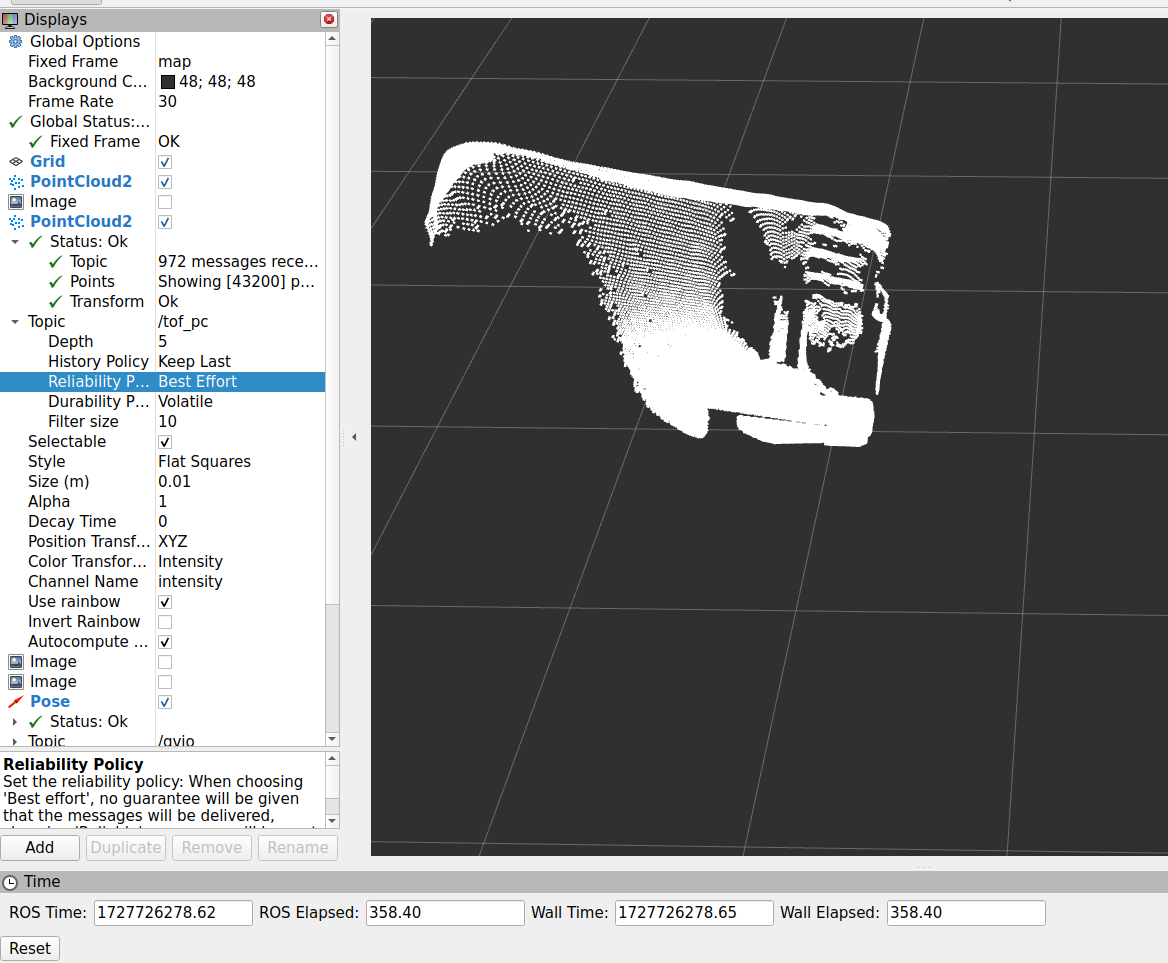
Note that you may need to spin up a static transform to see the pointcloud data in ROS:
ros2 run tf2_ros static_transform_publisher 0 0 0 0 0 0 map world -
Trouble in running the mavros_test Project (simple-example)@Captain-7th Are you able to arm and fly in position mode? According to the mavros state you are connected and the printout shows that the arming command is sent to the vehicle while in offboard, but it is possible there is a preflight check that is failing?
-
VOXL camera server hires large & small frames in HAL3 PerCameraMgrIn the PerCameraMgr class, there is a function that process a single camera capture result (frame?) and prints the timestamp (meta.timestamp_ns).
We are attempting to compare the frame timestamp with the system time, which we have been able to do successfully, however it only looks like the camera frame is from hires small?
How can we distinguish between hires large and small in the hal3 camera manager code? We just need to compare timestamps but need to confirm if the metadata printed is from hires large or small, or both
Download VERBOSE: Frame Timestamp: 1708331612528 Sys Timestamp: 1708373675076 Diff Timestamp: 42062548 VERBOSE: Gain: 54 VERBOSE: Exposure: 270328 VERBOSE: Received result from HAl3 for frame number 0 VERBOSE: Received 1 buffers from camera hires, partial result:0 VERBOSE: Received output buffer 0 from camera hires VERBOSE: finished sending request for frame 5 for camera hires VERBOSE: returning from SendOneCaptureRequest for frame 6 for camera hires VERBOSE: hires procesing new buffer VERBOSE: Camera: hires processing small vid frame VERBOSE: added request for small video stream VERBOSE: Sending request for frame 6 for camera hires for 1 streams VERBOSE: Received result from HAl3 for frame number 4 VERBOSE: Received 0 buffers from camera hires, partial result:1 VERBOSE: Received result from HAl3 for frame number 1 VERBOSE: Received 0 buffers from camera hires, partial result:2 VERBOSE: Received metadata for frame 1 from camera hires VERBOSE: Frame Timestamp: 1708398182893 Sys Timestamp: 1708435426587 Diff Timestamp: 37243694 VERBOSE: Gain: 54 VERBOSE: Exposure: 270328 VERBOSE: Received result from HAl3 for frame number 0 VERBOSE: Received 0 buffers from camera tof, partial result:2 VERBOSE: Received metadata for frame 0 from camera tof VERBOSE: Frame Timestamp: 1708453167425 Sys Timestamp: 1708454078149 Diff Timestamp: 910724 VERBOSE: Gain: 0 VERBOSE: Exposure: 0 VERBOSE: Received result from HAl3 for frame number 1 VERBOSE: Received 1 buffers from camera hires, partial result:0 VERBOSE: Received output buffer 1 from camera hires VERBOSE: finished sending request for frame 6 for camera hires VERBOSE: returning from SendOneCaptureRequest for frame 7 for camera hires VERBOSE: added request for small video stream -
Neopixel GPIO control on VOXL2 SPI portI am looking to integrate a neopixel (WS2815) on the VOXL2, but was concerned that the SPI gpio can not be re-purposed for general purpose GPIO. There is a voxl2 linux guide that shows a gpi-mod kernel driver so there is concern that we would not be able to access the GPIO to faciliate the neopixel driver signal in user space (like how RPI.GPIO python library works on a raspberry pi)
-
Trouble in running the mavros_test Project (simple-example)@Captain-7th Can you do a rostopic echo of
/mavros/stateYou should be able to see info printed if the autopilot is connected or disconnected.
-
Modalai OpenVINS with cvp feature tracker flyaways (camera redundancy)We are extensively testing camera failure cases on OpenVINS using the cvp/VFT instead of the default 'vins' tracker.
The big issue for is is that there are some flyaways still occuring in nominal conditions even when using 2-camera tracking (non-stereo). More importantly there doesn't seem to be true redundancy if one camera fails. It makes sense in a stereo configuration if one camera fails and tracking no longer works, but in the cvp multi-camera (front and downward) setup, shouldn't the other camera still track features and hold position?
Is there a timeline for when VFT will be stable, and is it actively being worked for a stable release in the near future?
One thing that helped with qvio feature tracking was the ability to use voxl-logger, but this functionality doesn't exist yet for openvins, hence using the voxl portal vio page to see when tracking fails
What hardware are you using? Starling v1 with upgraded motors
What version of software are you using? See below
How have you configured the software? See below
Do you have any logs? No logs, but vio page showing a flyaway in nominal conditions: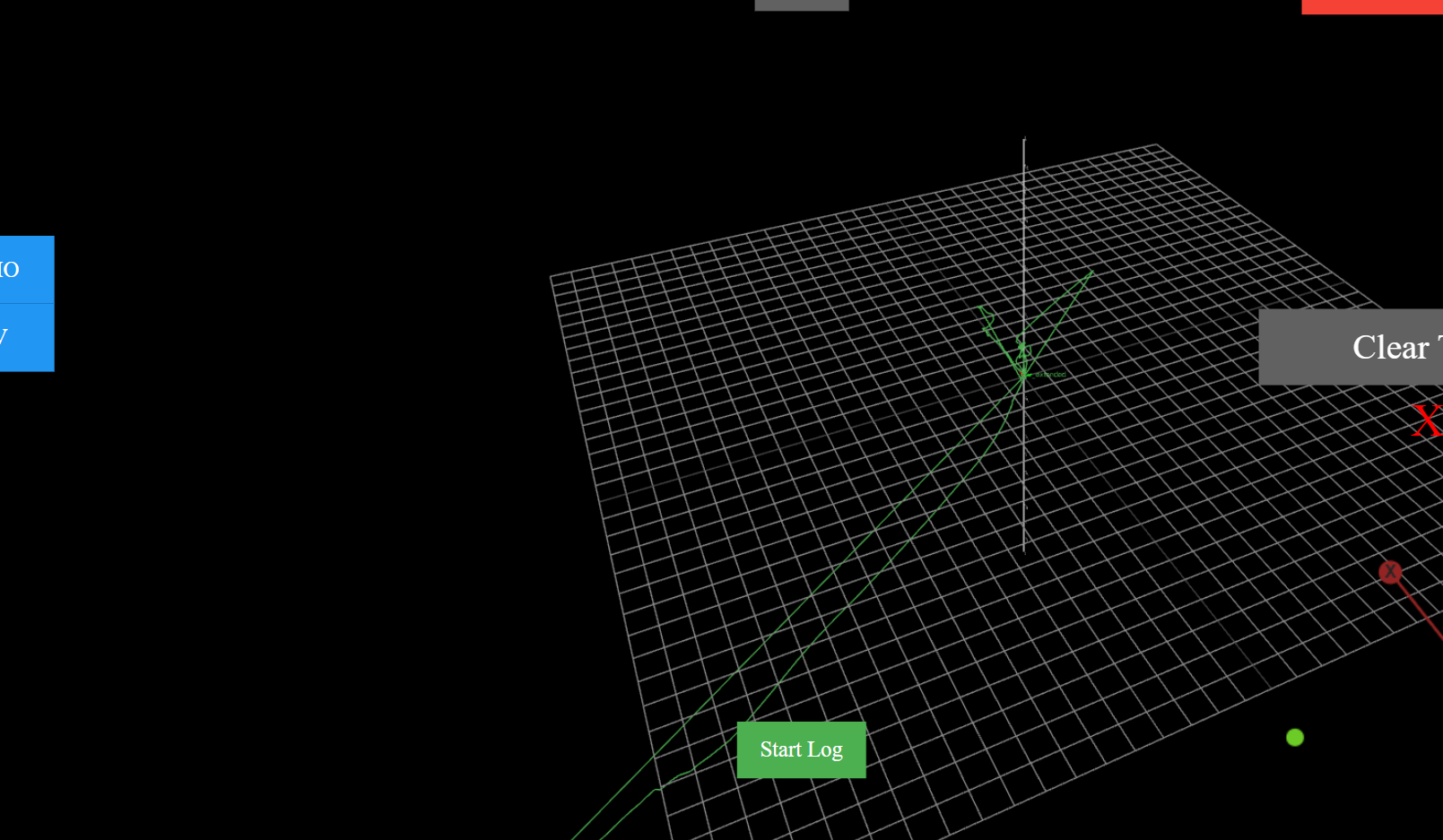
Can you share pictures of your setup? Front and down camera (front and down are ar0144 on my colleague's setup, but i have an ov7251 front and ar0144 down
Have you looked at the source code? Yes, looked at voxl-feature-tracker on gitlab and there are some apparent bugs in the software or it is not finished-------------------------------------------------------------------------------- hw platform: M0054 mach.var: 1.0.0 -------------------------------------------------------------------------------- voxl-suite: 1.2.0}, { "enable": true, "group_name": "tracking_FDR", "output_pipe": "tracking_feats", "overlay_pipe": "tracking_feat_overlay", "group_cams": [{ "enable": true, "input_pipe": "tracking_front", "tracker_type": "cvp", "num_features": 30 }, { "enable": true, "input_pipe": "tracking_down", "tracker_type": "cvp", "num_features": 30 }, { "enable": false, "input_pipe": "tracking_rear", "tracker_type": "cvp", "num_features": 30 }] }, { -
voxl-docker-mavsdk-python build issues@Alexander-Saunders can you try the following patch to the Dockerfile?
I noticed that the mavsdk 3rd party package updated their header files to include a filesystem header that is incompatible with standard cpp libraries on ubuntu 18.04, hence switching the dockerfile to focal instead of bionic. You can save the text in a *.patch file (e.g. "filesystem.patch") and then run
git apply filesystem.patchAlternatively just switch the docker base image from "bionic" to "focal"
diff --git a/Dockerfile b/Dockerfile index c38a5c7..08e668b 100644 --- a/Dockerfile +++ b/Dockerfile @@ -1,4 +1,4 @@ -FROM arm64v8/ubuntu:bionic +FROM arm64v8/ubuntu:focal WORKDIR /home @@ -8,7 +8,7 @@ RUN wget -O - https://apt.kitware.com/keys/kitware-archive-latest.asc 2>/dev/nul RUN apt-add-repository 'deb https://apt.kitware.com/ubuntu/ bionic main' RUN apt-get update RUN apt-get install -y cmake build-essential colordiff git doxygen -y -RUN apt-get install -y python3 python3-pip -y +RUN apt-get install -y python3 python3-pip -y RUN apt-get install -y git libxml2-dev libxslt-dev curl RUN git clone https://github.com/mavlink/MAVSDK.git -
voxl-docker-mavsdk-python build issues@Alexander-Saunders I am testing a fix for this issue as we speak. I've sourced the problem to a Mavsdk dependency that had a recent upstream change which is causing issues on the voxl2 build image script.