
Pre-arm check failed
-
Hi team,
I got a weird issue. The drone was stuck at pre-arm check, and couldn’t be able to arm again. Before this, I have no issue with the pre-arm check. Actually, I tried to modify a couple of parameters that are related to flight speed and SDlog profile. Then, the pre-arm check seems to be failed.I tried to reset the parameters to default, but the pre-arm check still failed. I uploaded 3 logs to the px4 view showing from boot to shutdown, but I couldn’t figure it out what happened. So, can you please help me to double-check if anything is wrong?
- GPS enabled: https://review.px4.io/plot_app?log=9b04b3c9-3a7b-4720-b806-3ac3b152f32a
- VIO enabled: https://review.px4.io/plot_app?log=5426a714-c588-4f0a-9122-b510f12a06b6
- GPS enabled and trying to take-off: https://review.px4.io/plot_app?log=da3bea81-5f2b-47b1-aa74-c198acb54a08
I am using
1.11.3-0.2.3and QGC 4.1.4 on MacBook pro 2021.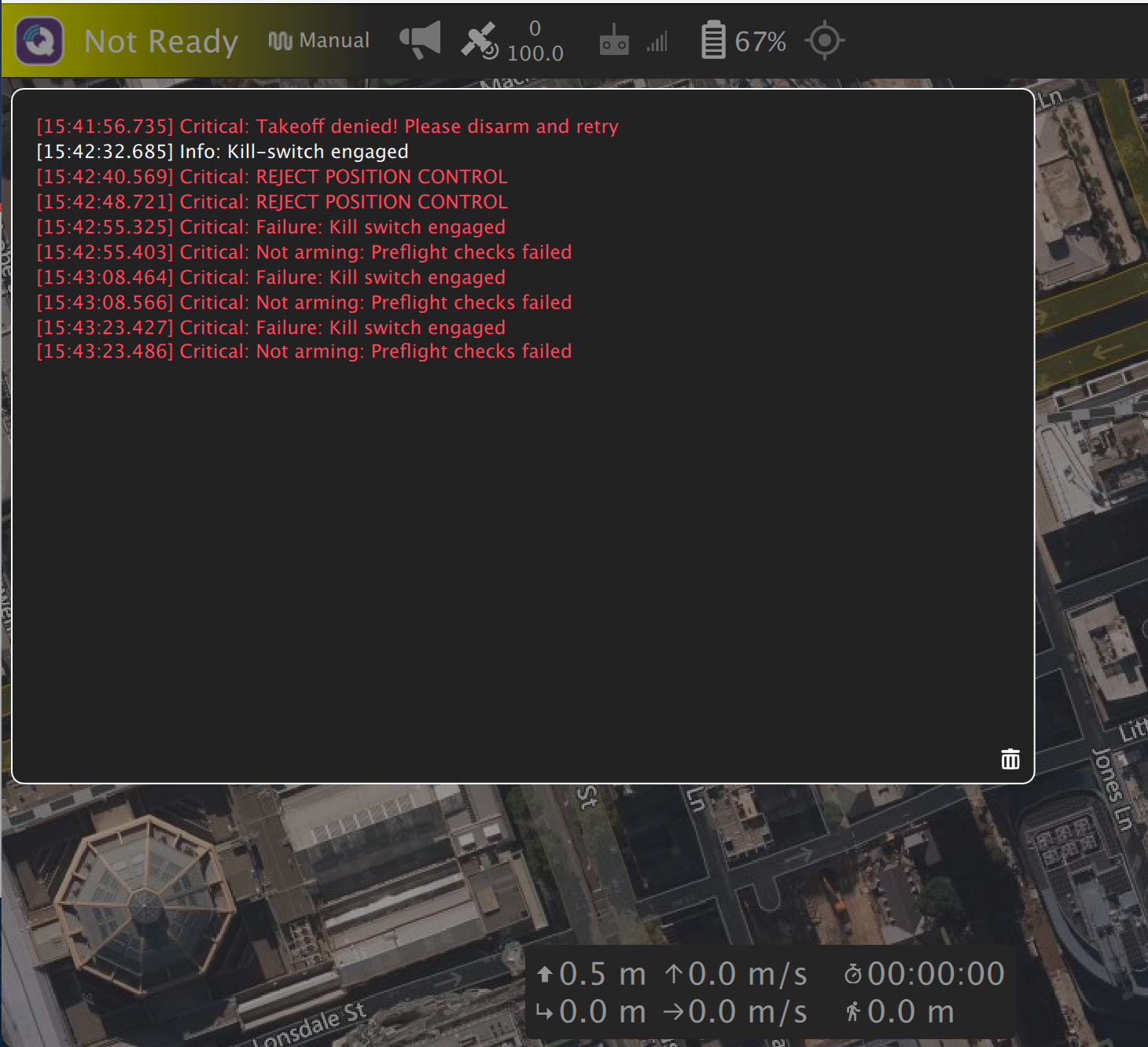
-
Hi,
It looks like the issue is that the kill switch is engaged on your radio.
-
Hi,
It looks like the issue is that the kill switch is engaged on your radio.
@Alex-Gardner Thanks for the reminder. I was confused about the kill switch this time, and I thought I should already open it
 .
.After checking, I will get "Arming denied press safety switch first" if I open it. Actually, I thought it was kill switch engaged. So, I am wondering where I should press the safety switch? I didn't get this notice before.
-
Hi,
It looks like the issue is that the kill switch is engaged on your radio.
@Alex-Gardner I thought the "SWITCH" button on the GPS module was the safety switch, but it didn't work after pressing it (no response for all time). So, what's the actual usage of this button?
After checking, I found people were trying to set the
CBRK_IO_SAFETYto be 22027 to release the safety switch instead of pressing any buttons. It does work for me! But, I am confused what's the risk of setting this parameter?Honestly, I never set it before, I am wondering why do I have to set it to release the safety switch this time? I am thinking about what parameters I changed to trigger the safety switch locked?
-
Hi,
It looks like the issue is that the kill switch is engaged on your radio.
@Alex-Gardner From the PX4 link:
https://docs.px4.io/v1.12/en/advanced_config/prearm_arm_disarm.htmlIt claims the default safety check should be:
COM_PREARM_MODE=1 (safety switch)andCBRK_IO_SAFETY=0 (I/O safety circuit breaker disabled). It saysCBRK_IO_SAFETY=0meaning IO safety disabled, but why the parameter profile page shows thatCBRK_IO_SAFETY=22027will disable IO safety? I am quite confused about it.
https://docs.px4.io/v1.12/en/advanced_config/parameter_reference.html -
Hi @yu-zhang ,
Short answer: we don't use that button/switch, and 22027 disables the FW from requiring it (as far as I know).
As we use a 6-pin JST connector for our GPS connector, and don't route the actual switch/button line from the mast down to the board, there's no way for that to actual work with the 6-pin version.
Our firmware by default sets that 22027 value to make it so we don't need to press the button (since the wire doesn't actually route, you'd need the 10 pin GSP to do that...).
If someone needs to use this feature, the pin is exposed here instead: https://docs.modalai.com/voxl-flight-datasheet-connectors/#j1011---i2c2-safety-button-input
-
Hi @yu-zhang ,
Short answer: we don't use that button/switch, and 22027 disables the FW from requiring it (as far as I know).
As we use a 6-pin JST connector for our GPS connector, and don't route the actual switch/button line from the mast down to the board, there's no way for that to actual work with the 6-pin version.
Our firmware by default sets that 22027 value to make it so we don't need to press the button (since the wire doesn't actually route, you'd need the 10 pin GSP to do that...).
If someone needs to use this feature, the pin is exposed here instead: https://docs.modalai.com/voxl-flight-datasheet-connectors/#j1011---i2c2-safety-button-input
@modaltb I see. It's good to know the story

If 22027 is the default one, it will be all right.
To be honest, I didn't touch the
CBRK_IO_SAFETYbefore, and it's a bit weird why it was automatically modified for some reason.Actually, I was trying to refresh a re-compiled
1.11.3-0.2.3with my modification (increasing GPS log rate). So, I guess it might reset the value to 0 by PX4 default.Anyways, thanks so much!


Reading along? Create a free ModalAI Forum account to join in.
With an account you can reply, ask your own question, get an email when a ModalAI engineer answers, and mark the reply that solved it. Your place in each thread is saved between visits.
Questions about VOXL, Flight Core, ESCs and ModalAI drones are answered here by the engineers who build them.
Register Login