Skip to content
  • Categories
  • Recent
  • Tags
  • Popular
  • Users
  • Groups
Collapse
Brand Logo

ModalAI Forum

  1. ModalAI Support Forum
  2. General Questions
  3. Unable to enter position flight mode and connect QGC with wifi

Unable to enter position flight mode and connect QGC with wifi

Scheduled Pinned Locked Moved Unsolved General Questions
4 Posts 2 Posters 874 Views
  • Oldest to Newest
  • Newest to Oldest
  • Most Votes
Reply
  • Reply as topic
Log in to reply
This topic has been deleted. Only users with topic management privileges can see it.
  • Nathan NiN Offline
    Nathan NiN Offline
    Nathan Ni
    wrote on last edited by
    #1

    Unable to enter position flight mode,and only see "z" value in Mavlink inspector and (x&y are zero).
    And we can’t connect QGC with wifi, we use telemetry to connect QGC.
    thanks for help!

    1 Reply Last reply
    0
    • Nathan NiN Offline
      Nathan NiN Offline
      Nathan Ni
      wrote on last edited by
      #2

      Sometimes we were able to connect to the ground station when it was first connected to the power supply and were able to go into position mode. But after about a few minutes the connection is lost

      1 Reply Last reply
      0
      • Nathan NiN Offline
        Nathan NiN Offline
        Nathan Ni
        wrote on last edited by Nathan Ni
        #3

        9eee67d3-432c-4a1a-b024-40a6da1e57e3-image.png

        f41499cd-7b20-4b20-979e-e7e695a6d614-image.png

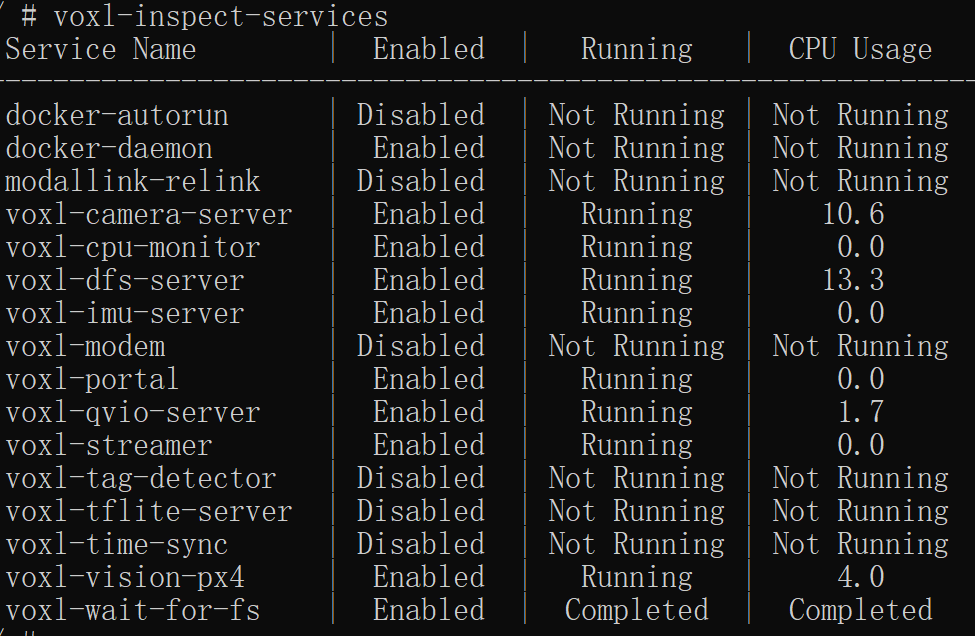
        With the voxl-inspect-qvio command, state flashes rapidly in both Okey and Fail states

        1 Reply Last reply
        0
        • Adrian HidalgoA Offline
          Adrian HidalgoA Offline
          Adrian Hidalgo
          ModalAI Team
          wrote on last edited by
          #4

          @Nathan-Ni,
          What setup do you have? M500, Flight-Deck? What version of software are you on?

          It seems like vio isn't starting up hence the 0,0 in x & y. You can try:

          systemctl restart voxl-qvio-server
          

          You can also try:

          systemctl restart voxl-vision-px4
          

          If those don't reset qvio then a power-cycle is the best bet to reset it.
          The error code is mentioning low features. Is there enough lighting and feature for the cameras to see?

          If you haven't already checked out our setup guide: https://docs.modalai.com/voxl-m500-getting-started/#confirm-connection-with-qgroundcontrol
          What method are you using to connect to QGC?

          1 Reply Last reply
          0

          Reading along? Create a free ModalAI Forum account to join in.

          With an account you can reply, ask your own question, get an email when a ModalAI engineer answers, and mark the reply that solved it. Your place in each thread is saved between visits.

          Questions about VOXL, Flight Core, ESCs and ModalAI drones are answered here by the engineers who build them.

          Register Login
          Reply
          • Reply as topic
          Log in to reply
          • Oldest to Newest
          • Newest to Oldest
          • Most Votes


          ModalAI
          Categories Recent Tags ModalAI.com Docs
          © 2026 ModalAI® · Accelerating autonomy for smaller, smarter, safer drones · Powered by NodeBB
          • Login

          • Don't have an account? Register

          • Login or register to search.
          • First post
            Last post
          0
          • Categories
          • Recent
          • Tags
          • Popular
          • Users
          • Groups