Skip to content
  • Categories
  • Recent
  • Tags
  • Popular
  • Users
  • Groups
Collapse
Brand Logo

ModalAI Forum

  1. ModalAI Support Forum
  2. VOXL Dev Drones
  3. Qualcomm Flight RB5 5G Drone
  4. How to set up a static IP in RB5

How to set up a static IP in RB5

Scheduled Pinned Locked Moved Qualcomm Flight RB5 5G Drone
17 Posts 4 Posters 3.6k Views 3 Watching
  • Oldest to Newest
  • Newest to Oldest
  • Most Votes
Reply
  • Reply as topic
Log in to reply
This topic has been deleted. Only users with topic management privileges can see it.
  • RobertoR Offline
    RobertoR Offline
    Roberto
    wrote on last edited by
    #1

    I would like to set a static IP.
    I thought that maybe in UBUNTU you could set it as follows:

    sudo vi /etc/dhcpcd.conf
    

    I tried with the WiFi network wlan0 and set an IP compatible with my network: 192.168.178.201

    # on the server to actually work
    option rapid_commit
    
    # A list of options to request from the DHCP server
    option domain_name_servers, domain_name, domain_search, host_name
    option classless_static_routes
    # Most distributions have NTP support.
    option ntp_servers
    # Respect the network MTU. This is applied to DHCP routes.
    option interface_mtu
    
    # A ServerID is required by RFC2131.
    require dhcp_server_identifier
    
    # Generate Stable Private IPv6 Addresses instead of hardware based ones
    slaac private
    
    # ==== Test of static IP configuration: ======
    interface wlan0
    static ip_address=192.168.178.201/24
    static routers=192.168.178.1
    static domain_name_servers=8.8.8.8
    

    But when I turn RB5 off and on again sometimes it works with right static IP 192.168.178.201 and sometimes with a random IP, I don't know what I did wrong. Could you please help me?
    Robert

    Roberto Calvi

    1 Reply Last reply
    0
    • tomT Offline
      tomT Offline
      tom
      admin
      wrote on last edited by
      #2

      @Roberto There is a bug with the QCOM SOM where the wlan0 interface's MAC address isn't static, which affects using static IPs in ways that usually work on other hardware. We have an open ticket with QCOM to fix this issue. One thing to try is: https://www.howtogeek.com/118337/stupid-geek-tricks-change-your-ip-address-from-the-command-line-in-linux/

      The solution may require creating a custom startup script.

      RobertoR 1 Reply Last reply
      0
      • tomT tom

        @Roberto There is a bug with the QCOM SOM where the wlan0 interface's MAC address isn't static, which affects using static IPs in ways that usually work on other hardware. We have an open ticket with QCOM to fix this issue. One thing to try is: https://www.howtogeek.com/118337/stupid-geek-tricks-change-your-ip-address-from-the-command-line-in-linux/

        The solution may require creating a custom startup script.

        RobertoR Offline
        RobertoR Offline
        Roberto
        wrote on last edited by Roberto
        #3

        @tom Thank you
        But perhaps i did something wrong creating a script:

        vi /etc/sudoers.d/mystatic-ip.sh
        

        Content of mystatic-ip.sh file:

        #!/bin/bash
        sudo ifconfig wlan0 192.168.178.201 netmask 255.255.255.0
        sudo route add default gw 192.168.178.1 wlan0
        

        Then i created a service:

        vi /etc/systemd/system/mystatic-ip.service
        

        Content of mystatic-ip.service file:

        [Unit]
        Description=My static IP
        
        [Service]
        ExecStart=/etc/sudoers.D/mystatic-ip.sh start
        
        [Install]
        WantedBy=multi-user.target
        

        To enable this service when startup I did:

        systemctl enable mystatic-ip
        

        I don't know what I did wrong. Could you please help me?
        Robert

        Roberto Calvi

        1 Reply Last reply
        0
        • tomT Offline
          tomT Offline
          tom
          admin
          wrote on last edited by
          #4

          @Roberto When you run the script manually outside of the service file does it work?

          RobertoR 1 Reply Last reply
          0
          • tomT tom

            @Roberto When you run the script manually outside of the service file does it work?

            RobertoR Offline
            RobertoR Offline
            Roberto
            wrote on last edited by
            #5

            @tom
            Thank you for reply, yes If I run:

            sudo ifconfig wlan0 192.168.178.201 netmask 255.255.255.0
            sudo route add default gw 192.168.178.1 wlan0
            

            works, but if I restart RB5 the script does not do his work, perhaps a chmod is needed?

            Roberto Calvi

            Eric KatzfeyE 1 Reply Last reply
            0
            • RobertoR Roberto

              @tom
              Thank you for reply, yes If I run:

              sudo ifconfig wlan0 192.168.178.201 netmask 255.255.255.0
              sudo route add default gw 192.168.178.1 wlan0
              

              works, but if I restart RB5 the script does not do his work, perhaps a chmod is needed?

              Eric KatzfeyE Offline
              Eric KatzfeyE Offline
              Eric Katzfey
              ModalAI Team
              wrote on last edited by
              #6

              @Roberto It's probably a timing thing. Your service file doesn't have any dependencies so it gets run immediately on startup. Then a different service comes along and changes everything. Ideally you specify the service that is doing that as a dependency so you know yours will run after it. Just to debug you could add a big sleep before the commands and see if that solves the issue.

              RobertoR 1 Reply Last reply
              0
              • Eric KatzfeyE Eric Katzfey

                @Roberto It's probably a timing thing. Your service file doesn't have any dependencies so it gets run immediately on startup. Then a different service comes along and changes everything. Ideally you specify the service that is doing that as a dependency so you know yours will run after it. Just to debug you could add a big sleep before the commands and see if that solves the issue.

                RobertoR Offline
                RobertoR Offline
                Roberto
                wrote on last edited by
                #7

                @Eric-Katzfey
                Thank you for help, what would you suggest? Perhaps a delay in the script or something similar?
                how do you suggest to do the startup log? and how could this sequence be organized correctly?
                Do you have a RB5 to test? Thank you for any help

                Roberto Calvi

                1 Reply Last reply
                0
                • tomT Offline
                  tomT Offline
                  tom
                  admin
                  wrote on last edited by
                  #8

                  @Roberto The "dumb" way to do it is to just put a sleep at the start of mystatic-ip.sh and gradually decrease the length to find the quickest sleep that works.

                  Otherwise you'd have to reference another service in an "After" section to tell the service to start after the stated one

                  Example:

                  [Unit]
                  Description=My static IP
                  After=wlan_daemon.service 
                  

                  I know on VOXL wlan_daemon.service can be referenced, not positive whether it is on RB5 as well

                  RobertoR 2 Replies Last reply
                  0
                  • tomT tom

                    @Roberto The "dumb" way to do it is to just put a sleep at the start of mystatic-ip.sh and gradually decrease the length to find the quickest sleep that works.

                    Otherwise you'd have to reference another service in an "After" section to tell the service to start after the stated one

                    Example:

                    [Unit]
                    Description=My static IP
                    After=wlan_daemon.service 
                    

                    I know on VOXL wlan_daemon.service can be referenced, not positive whether it is on RB5 as well

                    RobertoR Offline
                    RobertoR Offline
                    Roberto
                    wrote on last edited by Roberto
                    #9

                    RESOLVED: Thanks to @Eric-Katzfey & @tom

                    1. First create a script:
                    vi /etc/sudoers.d/mystatic-ip.sh
                    

                    Content of mystatic-ip.sh script:

                    #!/bin/bash
                    sudo ifconfig wlan0 192.168.178.201 netmask 255.255.255.0
                    sudo route add default gw 192.168.178.1 wlan0
                    
                    1. Create a service:
                    vi /etc/systemd/system/mystatic-ip.service
                    

                    Content of mystatic-ip.service file (that starts after wlan daemon):

                    [Unit]
                    Description=My static IP
                    After=wlan_daemon.service
                    
                    [Service]
                    ExecStart=/etc/sudoers.d/mystatic-ip.sh start
                    
                    [Install]
                    WantedBy=multi-user.target
                    

                    To enable this service when the RB5 boots:

                    systemctl enable mystatic-ip
                    

                    Reboot and you will have a static IP!

                    Roberto Calvi

                    RobertoR 1 Reply Last reply
                    0
                    • RobertoR Roberto

                      RESOLVED: Thanks to @Eric-Katzfey & @tom

                      1. First create a script:
                      vi /etc/sudoers.d/mystatic-ip.sh
                      

                      Content of mystatic-ip.sh script:

                      #!/bin/bash
                      sudo ifconfig wlan0 192.168.178.201 netmask 255.255.255.0
                      sudo route add default gw 192.168.178.1 wlan0
                      
                      1. Create a service:
                      vi /etc/systemd/system/mystatic-ip.service
                      

                      Content of mystatic-ip.service file (that starts after wlan daemon):

                      [Unit]
                      Description=My static IP
                      After=wlan_daemon.service
                      
                      [Service]
                      ExecStart=/etc/sudoers.d/mystatic-ip.sh start
                      
                      [Install]
                      WantedBy=multi-user.target
                      

                      To enable this service when the RB5 boots:

                      systemctl enable mystatic-ip
                      

                      Reboot and you will have a static IP!

                      RobertoR Offline
                      RobertoR Offline
                      Roberto
                      wrote on last edited by Roberto
                      #10

                      NOT RESOLVED 😖 @Eric-Katzfey & @tom

                      Works on Reboot but not if I turn RB5 OFF wait a wile and afterwards I turn it ON

                      Sometimes work and sometimes doesn't

                      Somebody could please help me?

                      Roberto Calvi

                      1 Reply Last reply
                      0
                      • tomT tom

                        @Roberto The "dumb" way to do it is to just put a sleep at the start of mystatic-ip.sh and gradually decrease the length to find the quickest sleep that works.

                        Otherwise you'd have to reference another service in an "After" section to tell the service to start after the stated one

                        Example:

                        [Unit]
                        Description=My static IP
                        After=wlan_daemon.service 
                        

                        I know on VOXL wlan_daemon.service can be referenced, not positive whether it is on RB5 as well

                        RobertoR Offline
                        RobertoR Offline
                        Roberto
                        wrote on last edited by
                        #11

                        @tom & @Eric-Katzfey

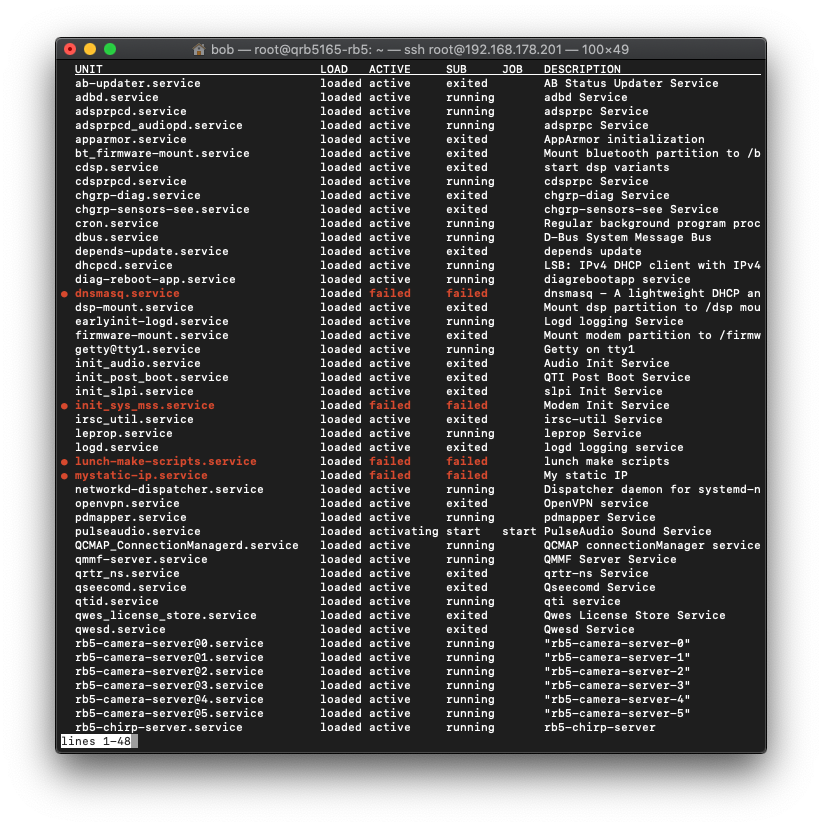
                        List of services: (command to show active services)

                        systemctl list-units --type=service
                        

                        Screenshot 2022-03-10 alle 17.56.18.png

                        Some services are down like:
                        ● dnsmasq.service loaded failed failed dnsmasq - A lightweight DHCP and caching DNS server
                        ● lunch-make-scripts.service loaded failed failed lunch make scripts
                        ● mystatic-ip.service loaded failed failed My static IP

                        Somebody could please help me?

                        Roberto Calvi

                        Eric KatzfeyE 1 Reply Last reply
                        0
                        • RobertoR Roberto

                          @tom & @Eric-Katzfey

                          List of services: (command to show active services)

                          systemctl list-units --type=service
                          

                          Screenshot 2022-03-10 alle 17.56.18.png

                          Some services are down like:
                          ● dnsmasq.service loaded failed failed dnsmasq - A lightweight DHCP and caching DNS server
                          ● lunch-make-scripts.service loaded failed failed lunch make scripts
                          ● mystatic-ip.service loaded failed failed My static IP

                          Somebody could please help me?

                          Eric KatzfeyE Offline
                          Eric KatzfeyE Offline
                          Eric Katzfey
                          ModalAI Team
                          wrote on last edited by
                          #12

                          @Roberto We will take a look and see if we can put together a solution over the next few days.

                          1 Reply Last reply
                          0
                          • tomT Offline
                            tomT Offline
                            tom
                            admin
                            wrote on last edited by
                            #13

                            @Roberto This combo consistently works for me:

                            sh-4.4# cat /usr/bin/rb5-wifi-static-ip.sh 
                            #!/bin/bash
                            
                            # wait for wlan0 to get it's initial IP from router
                            rb5-net-check wlan0 192.168
                            
                            # set new IP
                            sudo ifconfig wlan0 192.168.1.150 netmask 255.255.255.0
                            sudo route add default gw 192.168.1.1 wlan0
                            
                            sh-4.4# cat /etc/systemd/system/rb5-wifi-static-ip.service 
                            [Unit]
                            Description=WLAN0 Static IP Service
                            After=wlan_daemon.service
                            
                            [Service]
                            ExecStart=/usr/bin/rb5-wifi-static-ip.sh
                            
                            [Install]
                            WantedBy=multi-user.target
                            

                            Basically adding the rb5-net-check call which waits for wlan0 to get an initial valid IP before proceeding.

                            1 Reply Last reply
                            0
                            • tomT Offline
                              tomT Offline
                              tom
                              admin
                              wrote on last edited by
                              #14

                              @Roberto Or a slightly cleaner solution would be to keep your same script and just have the service depend on the rb5-net-check.service that is already enabled by default if you're running PX4:

                              sh-4.4# cat /etc/systemd/system/rb5-wifi-static-ip.service 
                              [Unit]
                              Description=WLAN0 Static IP Service
                              After=rb5-net-check.service
                              
                              [Service]
                              ExecStart=/usr/bin/rb5-wifi-static-ip.sh
                              
                              [Install]
                              WantedBy=multi-user.target
                              
                              RobertoR 1 Reply Last reply
                              0
                              • tomT tom

                                @Roberto Or a slightly cleaner solution would be to keep your same script and just have the service depend on the rb5-net-check.service that is already enabled by default if you're running PX4:

                                sh-4.4# cat /etc/systemd/system/rb5-wifi-static-ip.service 
                                [Unit]
                                Description=WLAN0 Static IP Service
                                After=rb5-net-check.service
                                
                                [Service]
                                ExecStart=/usr/bin/rb5-wifi-static-ip.sh
                                
                                [Install]
                                WantedBy=multi-user.target
                                
                                RobertoR Offline
                                RobertoR Offline
                                Roberto
                                wrote on last edited by Roberto
                                #15

                                FINALLY SOLVED: Thanks to @tom
                                (added chmod and complete procedure for other users)

                                1. First create a script:
                                vi /usr/bin/rb5-wifi-static-ip.sh 
                                

                                Content of rb5-wifi-static-ip.sh script (with sample IP):

                                #!/bin/bash
                                
                                rb5_net='192.168'
                                drone_IP='192.168.178.201'
                                router_IP='192.168.178.1'
                                netmask_IP='255.255.255.0'
                                network_interface='wlan0'
                                
                                # wait for wlan to get it's initial IP from router
                                rb5-net-check $network_interface $rb5_net
                                
                                # set new IP
                                sudo ifconfig $network_interface $drone_IP netmask $netmask_IP
                                sudo route add default gw $router_IP $network_interface
                                
                                1. Give permission to script (if not, will give you message "Permission denied"):
                                chmod u+x /usr/bin/rb5-wifi-static-ip.sh
                                
                                1. Create a service:
                                vi /etc/systemd/system/rb5-wifi-static-ip.service
                                

                                Content of rb5-wifi-static-ip.service file:

                                [Unit]
                                Description=WLAN0 Static IP Service
                                After=wlan_daemon.service
                                
                                [Service]
                                ExecStart=/usr/bin/rb5-wifi-static-ip.sh
                                
                                [Install]
                                WantedBy=multi-user.target
                                
                                1. Enable this service when RB5 boots:
                                systemctl enable rb5-wifi-static-ip.service
                                

                                Restart RB5 and you will have a static IP!

                                Roberto Calvi

                                1 Reply Last reply
                                0
                                • tomT Offline
                                  tomT Offline
                                  tom
                                  admin
                                  wrote on last edited by
                                  #16

                                  @Roberto Thanks for your patience with this, I will make sure this script / service makes it into our next SDK release as well.

                                  1 Reply Last reply
                                  0
                                  • M Offline
                                    M Offline
                                    mrawding
                                    wrote on last edited by
                                    #17

                                    If anyone else is interested - I found a way to enable static ip's for ethernet and wlan interfaces.

                                    You'll need to install a file like below under /etc/systemd/systetem/ and run the following commands:

                                    systemctl enable ipconfig.service
                                    systemctl disable dhcpcd.service
                                    
                                    [Unit]
                                    Description=A description for your custom service goes here
                                    Requires=systemd-networkd.service
                                    After=systemd-networkd-wait-online.service
                                    
                                    [Service]
                                    Type=simple
                                    ExecStartPre=/bin/sleep 10
                                    ExecStart=/bin/systemctl restart systemd-networkd.service
                                    
                                    
                                    [Install]
                                    WantedBy=multi-user.target
                                    

                                    You'll also need to add this file under /etc/systemd/network/wlan0.network

                                    [Match]
                                    Name=wlan0
                                    
                                    [Network]
                                    Address=192.168.0.169/24
                                    #DHCP=yes
                                    

                                    Simply installing this service will allow most routers to keep the rb5 address the same when assigning IPs for a lease. Just comment #Address and uncomment DHCP to use dhcp.

                                    You will also need to make sure to add the gatway to the routing table:

                                    route add default gw $router_IP $network_interface

                                    this is best to be configured as a oneshot service where the service has the field Requires=ipconfig.service

                                    1 Reply Last reply
                                    0

                                    Hello! It looks like you're interested in this conversation, but you don't have an account yet.

                                    Getting fed up of having to scroll through the same posts each visit? When you register for an account, you'll always come back to exactly where you were before, and choose to be notified of new replies (either via email, or push notification). You'll also be able to save bookmarks and upvote posts to show your appreciation to other community members.

                                    With your input, this post could be even better 💗

                                    Register Login
                                    Reply
                                    • Reply as topic
                                    Log in to reply
                                    • Oldest to Newest
                                    • Newest to Oldest
                                    • Most Votes


                                    ModalAI
                                    Categories Recent Tags ModalAI.com Docs
                                    © 2026 ModalAI® · Accelerating autonomy for smaller, smarter, safer drones · Powered by NodeBB
                                    • Login

                                    • Don't have an account? Register

                                    • Login or register to search.
                                    • First post
                                      Last post
                                    0
                                    • Categories
                                    • Recent
                                    • Tags
                                    • Popular
                                    • Users
                                    • Groups

