
Modal starling2 downward camera
-
I noticed that the tracking_down camera has an undocumented 90 degree rotation, where the image x is aligned with drone x(-x to be precise) even though the extrinsics only calls out a 180 yaw in the extrinsics.conf? Is this an erroneous extrinsics conf file or is this some standard drone convention I'm not aware of? Thanks!
-
I noticed that the tracking_down camera has an undocumented 90 degree rotation, where the image x is aligned with drone x(-x to be precise) even though the extrinsics only calls out a 180 yaw in the extrinsics.conf? Is this an erroneous extrinsics conf file or is this some standard drone convention I'm not aware of? Thanks!
I believe the extrinsics file is correct. Here is an extrinsics file for Starling 2 (which can support up to 3 tracking cameras, depending on configuration). https://gitlab.com/voxl-public/voxl-sdk/utilities/voxl-mpa-tools/-/blob/master/misc_files/usr/share/modalai/extrinsic_configs/D0014_Starling_2.conf
tracking_downis the camera we want and the extrinsics are:"parent": "imu_apps", "child": "tracking_down", "T_child_wrt_parent": [-0.08825, -0.0045, 0.0269], "RPY_parent_to_child": [0, 0, 180]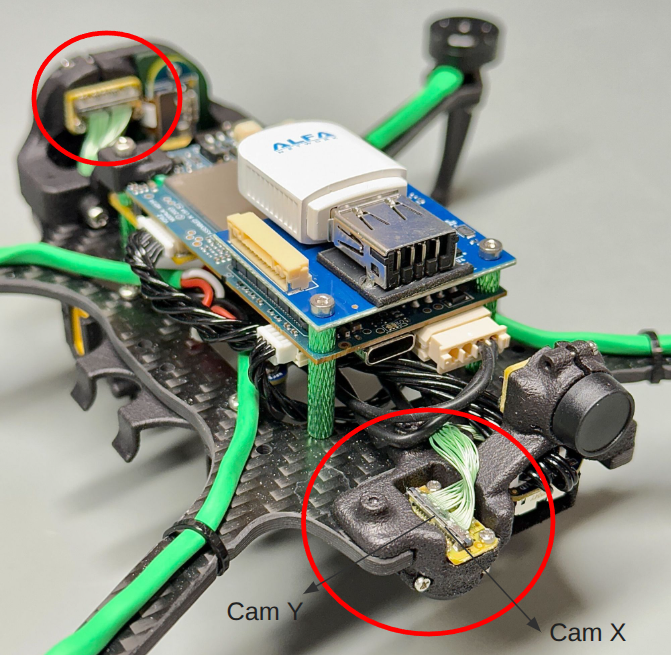
I have labeled the camera X and Y axes on the down-facing rear camera and the rotation matches up with 180 degree yaw with respect to the drone's body axes (X=forward, Y=right, Z= down)
Please note something that may add to the confusion. The front facing tracking camera is technically upside down (using our standard convention that i labeled for the down-facing camera), however we rotate the image 180 degrees in the camera itself during image read-out, so that the image looks right side up without any software work. This 180 degree rotation is selected in
voxl-camera-server.confwith a rotation parameter, which instructsvoxl-camera-serverto set a special register in the camera to reverse the image readout. This is why you will seetracking_frontandhirescameras having the same rotation extrinsics, while thetracking_frontcamera is physically upside down.Some more info about our extrinsics and conventions : https://docs.modalai.com/configure-extrinsics/
Alex


Reading along? Create a free ModalAI Forum account to join in.
With an account you can reply, ask your own question, get an email when a ModalAI engineer answers, and mark the reply that solved it. Your place in each thread is saved between visits.
Questions about VOXL, Flight Core, ESCs and ModalAI drones are answered here by the engineers who build them.
Register Login