
ELRS BetaFPV receiver bricked when updating SDK on Starling 2
-
Hello,
I recently updated my Starling 2 from SDK 1.5.0 to 1.6.3. At the end I got the following error message:
FAILED TO EXECUTE the following steps: voxl-elrs configure.
My receiver is the BetaFPV ELRS 900 v1.1 II, 915 MHz.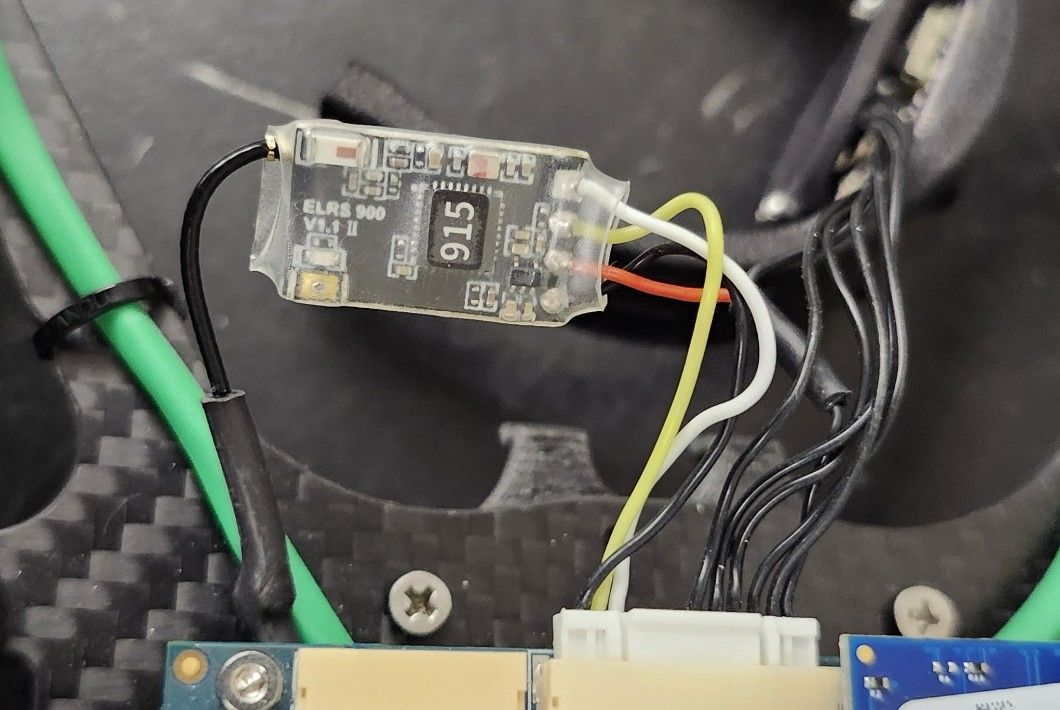 I connected the ELRS receiver to a FTDI USB interface and tried to configure it by the following ways:
- using ExpressLRS configurator tool
- using ModalAI ExpressLRS configuration tool
- Power off the drone completely
. Hold down the receiver's boot button, Power on the drone while holding the button
. Keep holding for 1 second after power on, then release
. Run the following command:
python3 -m esptool --port /dev/slpi-uart-7 --chip ESP8266
--baud 115200 --before no_reset --after soft_reset
write_flash 0x00 /usr/share/modalai/voxl-elrs/firmware/3.5.3.21/BETAFPV_900_RX_via_UART/BETAFPV_900_RX-3.5.3.21-20251205.bin
None of these options worked. It is not possible to connect to the receiver - it seems dead.
QUESTIONS: - is the BetaFPV ELRS 900 v1.1 II, 915 MHz, no longer supported in the latest versions of the VOXL SDK ??
- If the answer is yes, which is the latest version of the SDK that I can use without bricking my receiver ?
- I tried to purchase a new receiver chip from the ModalAI store, but is not available. Where could I get one ?
Please let me know at your earliest convenience. Thanks.
-
Hello,
I recently updated my Starling 2 from SDK 1.5.0 to 1.6.3. At the end I got the following error message:
FAILED TO EXECUTE the following steps: voxl-elrs configure.
My receiver is the BetaFPV ELRS 900 v1.1 II, 915 MHz. I connected the ELRS receiver to a FTDI USB interface and tried to configure it by the following ways:- using ExpressLRS configurator tool
- using ModalAI ExpressLRS configuration tool
- Power off the drone completely
. Hold down the receiver's boot button, Power on the drone while holding the button
. Keep holding for 1 second after power on, then release
. Run the following command:
python3 -m esptool --port /dev/slpi-uart-7 --chip ESP8266
--baud 115200 --before no_reset --after soft_reset
write_flash 0x00 /usr/share/modalai/voxl-elrs/firmware/3.5.3.21/BETAFPV_900_RX_via_UART/BETAFPV_900_RX-3.5.3.21-20251205.bin
None of these options worked. It is not possible to connect to the receiver - it seems dead.
QUESTIONS: - is the BetaFPV ELRS 900 v1.1 II, 915 MHz, no longer supported in the latest versions of the VOXL SDK ??
- If the answer is yes, which is the latest version of the SDK that I can use without bricking my receiver ?
- I tried to purchase a new receiver chip from the ModalAI store, but is not available. Where could I get one ?
Please let me know at your earliest convenience. Thanks.
@Hector-Gutierrez hey I've been able to recover almost all of these betafpv receivers. Is the blue led still active or has it gone completely black? Holding the button on power up should force it into bootloader mode with a solid blue light which is a good first step.
-
@Hector-Gutierrez hey I've been able to recover almost all of these betafpv receivers. Is the blue led still active or has it gone completely black? Holding the button on power up should force it into bootloader mode with a solid blue light which is a good first step.
@Ben-Linne : The blue LED is stuck on solid blue as soon as you provide power. The receiver seems stuck on bootloader mode. I've followed several methods available to re-flash the receiver, but communication is not possible. It seems the receiver is dead.
Question: is this behavior expected (betaFPV receiver unable to communicate) when upgrading the SDK to 1.6.0 or 1.6.3 ? Is this receiver still supported by the new versions of the SDK ? Let me know - Thanks. -
@Ben-Linne : The blue LED is stuck on solid blue as soon as you provide power. The receiver seems stuck on bootloader mode. I've followed several methods available to re-flash the receiver, but communication is not possible. It seems the receiver is dead.
Question: is this behavior expected (betaFPV receiver unable to communicate) when upgrading the SDK to 1.6.0 or 1.6.3 ? Is this receiver still supported by the new versions of the SDK ? Let me know - Thanks.It should always be supported, there's instances where an update fails and you'll need to re-enter bootloader mode to fix it.
bootloader mode should be recoverable from the drone. Here's some tips to try and recover it.this may take a few attempts until you get it right
try these steps to see if it will atleast communicate in bootloader mode. sometimes the esptool can take a minute to respond
- voxl-configure-px4 disable
- Turn off drone
- Hold down the receiver's boot button, Power on the drone while holding the button
- Keep holding for 1-2 second after power on, then release
- receiver led should be solid blue (after following these steps it should be in bootloader mode)
- run this command to check if receiver is alive: "python3 -m esptool --port /dev/slpi-uart-7 --chip ESP8266 --baud 115200 --before no_reset chip_id"
- If that works then proceed with update.
- "python3 -m esptool --port /dev/slpi-uart-7 --chip ESP8266
--baud 115200 --before no_reset --after soft_reset
write_flash 0x00 /usr/share/modalai/voxl-elrs/firmware/3.5.3.21/BETAFPV_900_RX_via_UART/BETAFPV_900_RX-3.5.3.21-20251205.bin"
-
It should always be supported, there's instances where an update fails and you'll need to re-enter bootloader mode to fix it.
bootloader mode should be recoverable from the drone. Here's some tips to try and recover it.this may take a few attempts until you get it right
try these steps to see if it will atleast communicate in bootloader mode. sometimes the esptool can take a minute to respond
- voxl-configure-px4 disable
- Turn off drone
- Hold down the receiver's boot button, Power on the drone while holding the button
- Keep holding for 1-2 second after power on, then release
- receiver led should be solid blue (after following these steps it should be in bootloader mode)
- run this command to check if receiver is alive: "python3 -m esptool --port /dev/slpi-uart-7 --chip ESP8266 --baud 115200 --before no_reset chip_id"
- If that works then proceed with update.
- "python3 -m esptool --port /dev/slpi-uart-7 --chip ESP8266
--baud 115200 --before no_reset --after soft_reset
write_flash 0x00 /usr/share/modalai/voxl-elrs/firmware/3.5.3.21/BETAFPV_900_RX_via_UART/BETAFPV_900_RX-3.5.3.21-20251205.bin"
before running esptool ensure px4 is disabled with "systemctl status voxl-px4"
if it's still running try disabling it again and rebooting.
It must be disabled from boot for esptool to work.
Then after the update is successful you can re-nable px4 and rebootOnce the update is complete the receiver led should start blinking and the voxl-elrs ping command should respond
-
before running esptool ensure px4 is disabled with "systemctl status voxl-px4"
if it's still running try disabling it again and rebooting.
It must be disabled from boot for esptool to work.
Then after the update is successful you can re-nable px4 and rebootOnce the update is complete the receiver led should start blinking and the voxl-elrs ping command should respond
@Ben-Linne : Thanks for the excellent instructions. Worked perfectly first shot. betaFPV is back to normal and binds to the radio controller ! Best regards, Hector


Reading along? Create a free ModalAI Forum account to join in.
With an account you can reply, ask your own question, get an email when a ModalAI engineer answers, and mark the reply that solved it. Your place in each thread is saved between visits.
Questions about VOXL, Flight Core, ESCs and ModalAI drones are answered here by the engineers who build them.
Register Login