Skip to content
  • Categories
  • Recent
  • Tags
  • Popular
  • Users
  • Groups
Collapse
Brand Logo

ModalAI Forum

  1. ModalAI Support Forum
  2. Ask your questions right here!
  3. Microhard pDDL Carrier stopped working

Microhard pDDL Carrier stopped working

Scheduled Pinned Locked Moved Ask your questions right here!
10 Posts 2 Posters 609 Views 2 Watching
  • Oldest to Newest
  • Newest to Oldest
  • Most Votes
Reply
  • Reply as topic
Log in to reply
This topic has been deleted. Only users with topic management privileges can see it.
  • G Offline
    G Offline
    gerard
    wrote on last edited by
    #1

    I have two Microhard pDDL Carrier USB Dongle (MDK-M0048-2-01), both set up the same way but one has stopped working during initial setup.

    It was lighting up with all the LEDs on the board but after powering on and off it now only shows the 5v LED.

    VinnyV 1 Reply Last reply
    0
    • G gerard

      I have two Microhard pDDL Carrier USB Dongle (MDK-M0048-2-01), both set up the same way but one has stopped working during initial setup.

      It was lighting up with all the LEDs on the board but after powering on and off it now only shows the 5v LED.

      VinnyV Offline
      VinnyV Offline
      Vinny
      ModalAI Team
      wrote on last edited by
      #2

      Hi @gerard
      Can you share a photo of the setup, ideally with the working unit next to the problematic one?

      A couple of possible causes come to mind, but we'd need a bit more information to narrow it down:

      The modem module may not be fully seated in the socket. These modules can be difficult to install correctly, and if the thermal pad underneath shifted or lifted slightly during installation, it can prevent proper seating.
      The socket may be cracked. It's fairly easy to damage the socket during module removal, especially with Microhard modules, which can lead to intermittent electrical connections.

      A side-by-side photo of the good and bad units would be very helpful for troubleshooting.
      Thanks!

      G 1 Reply Last reply
      0
      • VinnyV Vinny

        Hi @gerard
        Can you share a photo of the setup, ideally with the working unit next to the problematic one?

        A couple of possible causes come to mind, but we'd need a bit more information to narrow it down:

        The modem module may not be fully seated in the socket. These modules can be difficult to install correctly, and if the thermal pad underneath shifted or lifted slightly during installation, it can prevent proper seating.
        The socket may be cracked. It's fairly easy to damage the socket during module removal, especially with Microhard modules, which can lead to intermittent electrical connections.

        A side-by-side photo of the good and bad units would be very helpful for troubleshooting.
        Thanks!

        G Offline
        G Offline
        gerard
        wrote on last edited by
        #3

        @Vinny I have already tried swapping the boards over between the setups and have removed and reinstalled the modules with care to inspect for damage but have found none.

        Both are just being bench tested with a 5v supply.

        Without the module installed, would only the 5v led light up anyway? It seems like a the board needs a factory reset as nothing changed with the setup apart from a power cycle.

        VinnyV 1 Reply Last reply
        0
        • G gerard

          @Vinny I have already tried swapping the boards over between the setups and have removed and reinstalled the modules with care to inspect for damage but have found none.

          Both are just being bench tested with a 5v supply.

          Without the module installed, would only the 5v led light up anyway? It seems like a the board needs a factory reset as nothing changed with the setup apart from a power cycle.

          VinnyV Offline
          VinnyV Offline
          Vinny
          ModalAI Team
          wrote on last edited by
          #4

          Hi @gerard
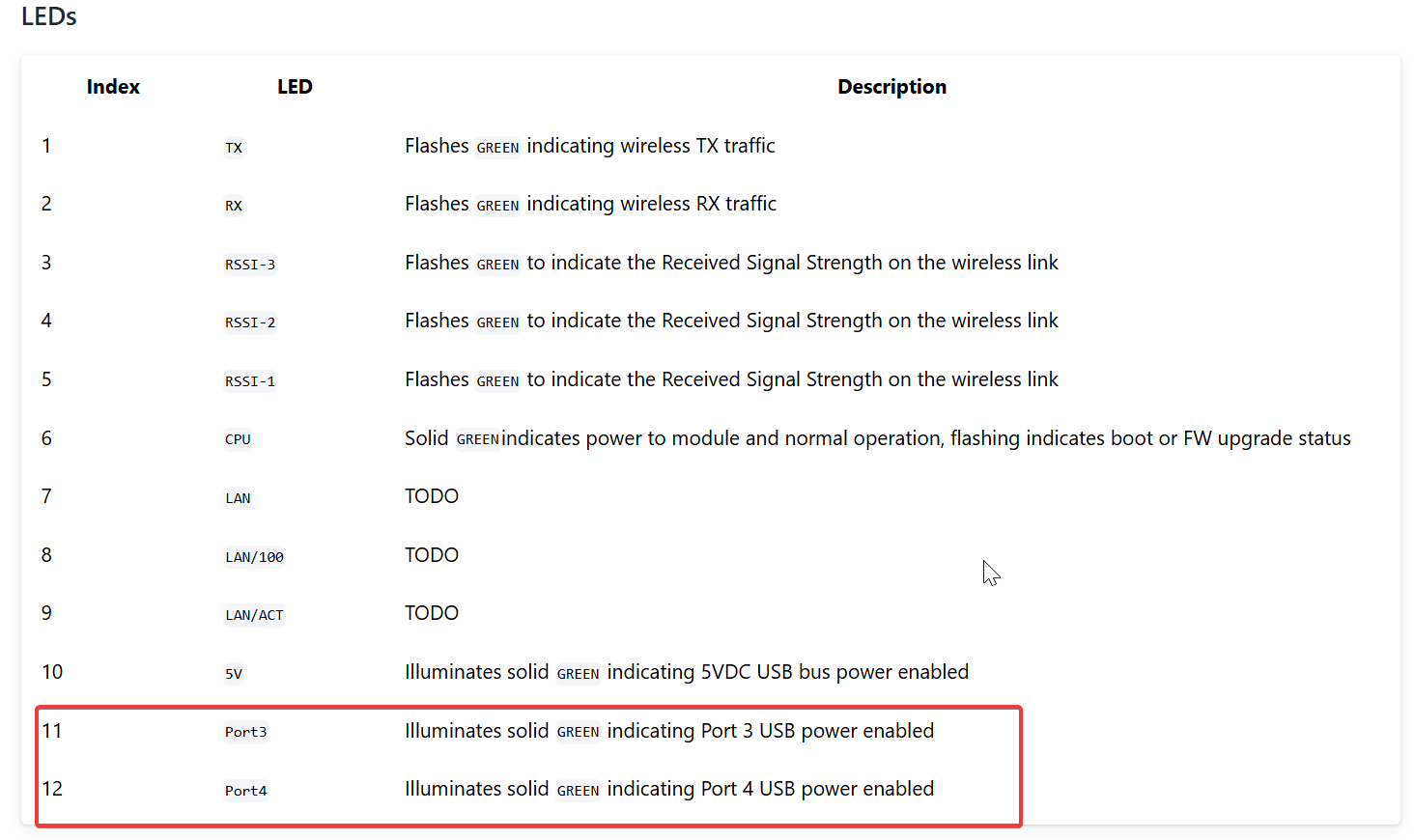
          Do you not get these LEDs either?
          https://docs.modalai.com/microhard-usb-carrier/
          7bc35bb8-c446-4e2f-b42e-5082bc84dbb9-image.png
          Without a Microhard module installed, the 5V LED and the USB Hub LEDs should all still illuminate.
          When the MH is properly configured, then you should start to see the other Activity and RSSI/Status LEDS. Those not appearing indicate the module is not configured, not seated, or in error.
          Images will help.
          Thanks!

          1 Reply Last reply
          0
          • G Offline
            G Offline
            gerard
            wrote last edited by
            #5

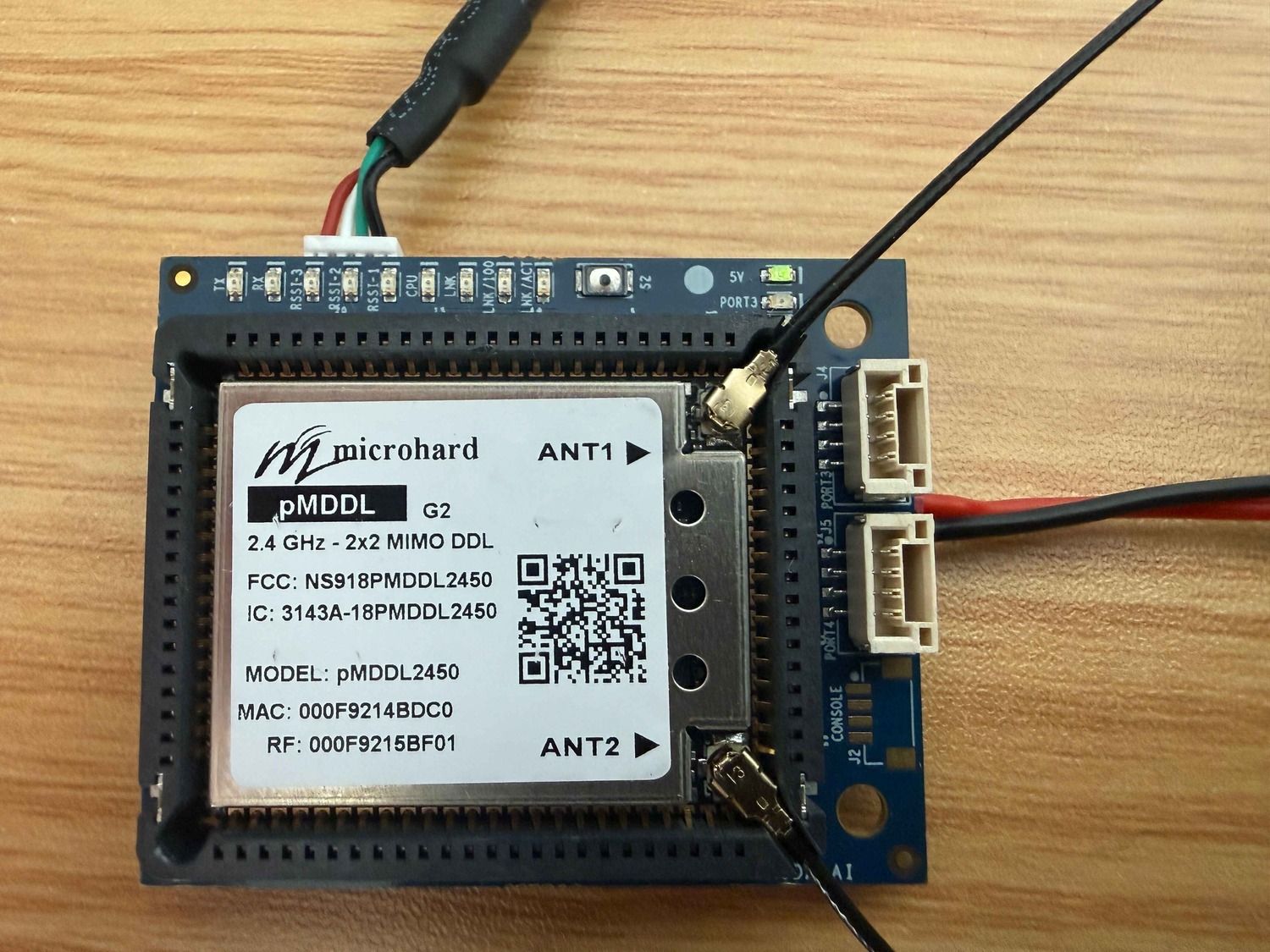
            IMG_2112 (1) (1).jpg
            IMG_2114 (1) (1).jpg

            as you can see it has power as shown by the 5v LED but no other leds now light up?

            G 1 Reply Last reply
            0
            • G gerard

              IMG_2112 (1) (1).jpg
              IMG_2114 (1) (1).jpg

              as you can see it has power as shown by the 5v LED but no other leds now light up?

              G Offline
              G Offline
              gerard
              wrote last edited by
              #6

              @Vinny any update?

              VinnyV 1 Reply Last reply
              0
              • G gerard

                @Vinny any update?

                VinnyV Offline
                VinnyV Offline
                Vinny
                ModalAI Team
                wrote last edited by
                #7

                Hi @gerard
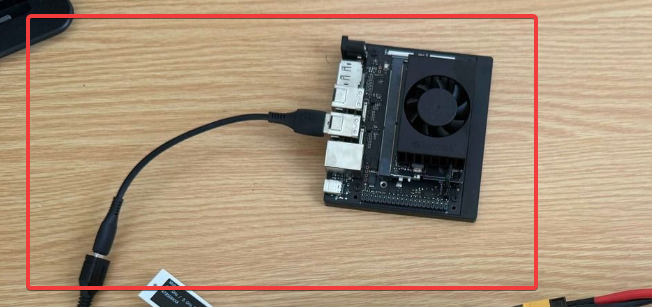
                Your RPi needs power.
                The USB on the Microhard Dongle is a Device/Peripheral Port, needs to connect to a Host PC/SBC.
                I do not see any power input to your RPi device.
                3335fb8f-8a33-4175-a31c-64962ca6bc73-image.png
                That can explain your behavior.

                G 1 Reply Last reply
                0
                • VinnyV Vinny

                  Hi @gerard
                  Your RPi needs power.
                  The USB on the Microhard Dongle is a Device/Peripheral Port, needs to connect to a Host PC/SBC.
                  I do not see any power input to your RPi device.
                  3335fb8f-8a33-4175-a31c-64962ca6bc73-image.png
                  That can explain your behavior.

                  G Offline
                  G Offline
                  gerard
                  wrote last edited by
                  #8

                  @Vinny no the same still happens when the jeston computer is powered up.

                  VinnyV 1 Reply Last reply
                  0
                  • G gerard

                    @Vinny no the same still happens when the jeston computer is powered up.

                    VinnyV Offline
                    VinnyV Offline
                    Vinny
                    ModalAI Team
                    wrote last edited by
                    #9

                    Hi @gerard
                    I asked my team for some extra assistance on the SW side, but if you suspect HW failure, we can diagnose with an RMA if you want to pursue that route.
                    If you had this working at one point, then it did not, it's most likely either a really bad SW change, or the HW got damaged.

                    https://www.modalai.com/pages/rma

                    If you want to wait and see if our SW team has any guidance first before doing an RMA, that is your call.

                    VinnyV 1 Reply Last reply
                    0
                    • VinnyV Vinny

                      Hi @gerard
                      I asked my team for some extra assistance on the SW side, but if you suspect HW failure, we can diagnose with an RMA if you want to pursue that route.
                      If you had this working at one point, then it did not, it's most likely either a really bad SW change, or the HW got damaged.

                      https://www.modalai.com/pages/rma

                      If you want to wait and see if our SW team has any guidance first before doing an RMA, that is your call.

                      VinnyV Offline
                      VinnyV Offline
                      Vinny
                      ModalAI Team
                      wrote last edited by Vinny
                      #10

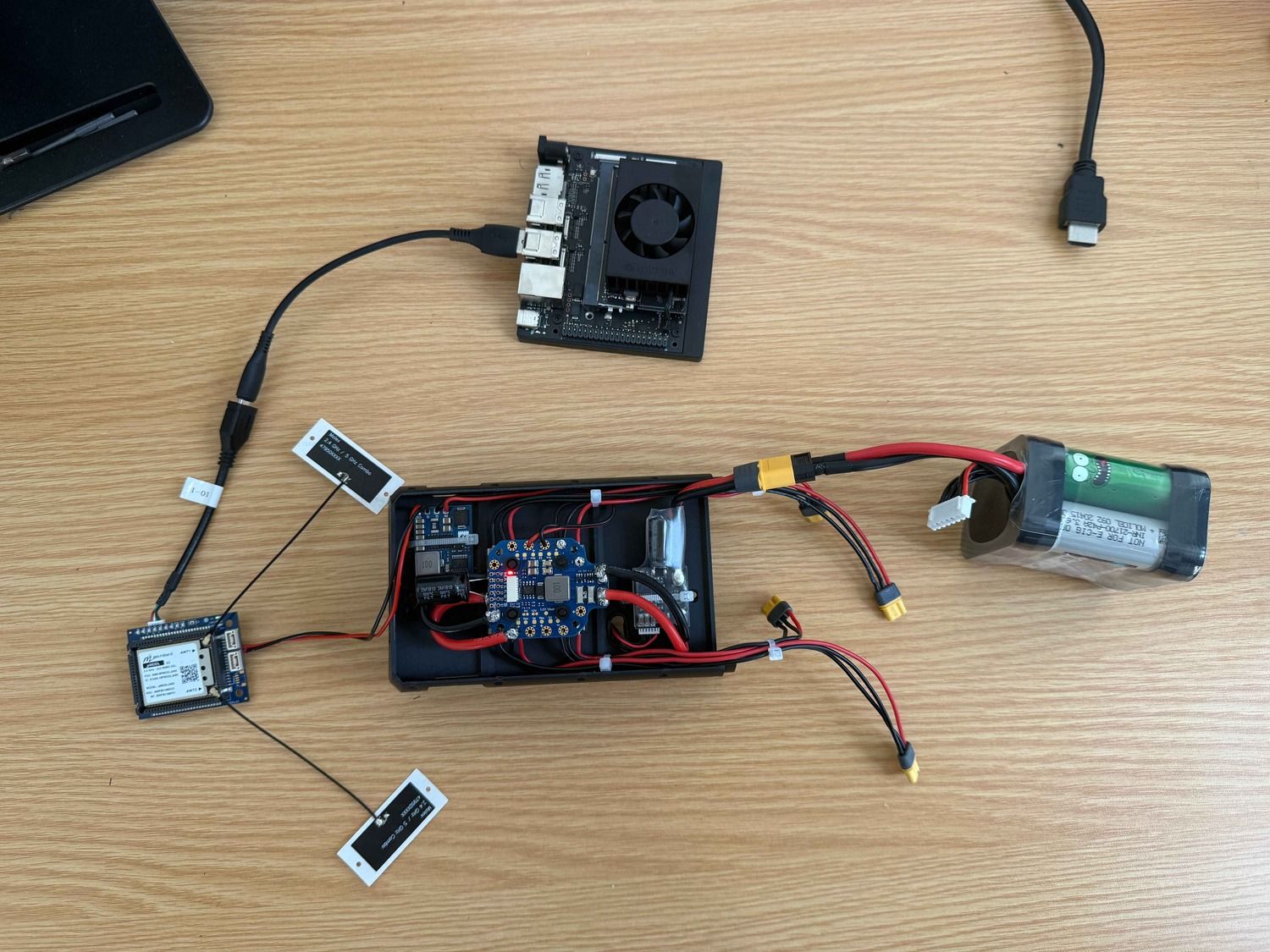
                      @gerard I also just remembered we had a stint of bad MCBL-00010's a few months ago...
                      We have since cleared that up, but there is no telling how long ago you may have ordered that cable...
                      Please see this thread for guidance and if you do think your MCBL-00010 is at fault, we will replace your M0048, just reference both threads in your RMA (this one and this one -->) https://forum.modalai.com/topic/4632/flight-core-2-firmware-update-through-qgc?_=1781284416780

                      1 Reply Last reply
                      0

                      Hello! It looks like you're interested in this conversation, but you don't have an account yet.

                      Getting fed up of having to scroll through the same posts each visit? When you register for an account, you'll always come back to exactly where you were before, and choose to be notified of new replies (either via email, or push notification). You'll also be able to save bookmarks and upvote posts to show your appreciation to other community members.

                      With your input, this post could be even better 💗

                      Register Login
                      Reply
                      • Reply as topic
                      Log in to reply
                      • Oldest to Newest
                      • Newest to Oldest
                      • Most Votes


                      ModalAI
                      Categories Recent Tags ModalAI.com Docs
                      © 2026 ModalAI® · Accelerating autonomy for smaller, smarter, safer drones · Powered by NodeBB
                      • Login

                      • Don't have an account? Register

                      • Login or register to search.
                      • First post
                        Last post
                      0
                      • Categories
                      • Recent
                      • Tags
                      • Popular
                      • Users
                      • Groups