
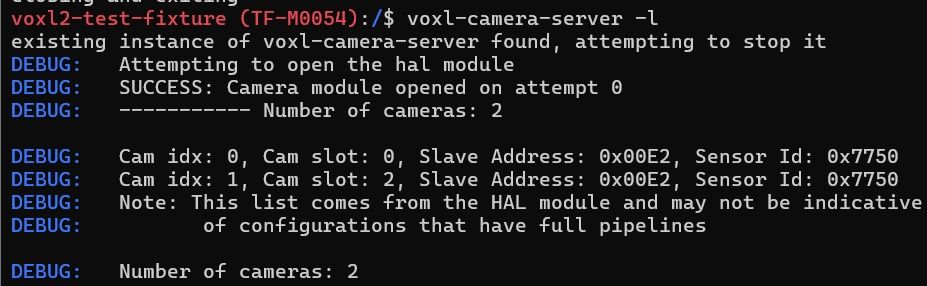
On the Voxl2, the M0135 only recognizes the cameras on the JL connector, but not on the JU connector.
-
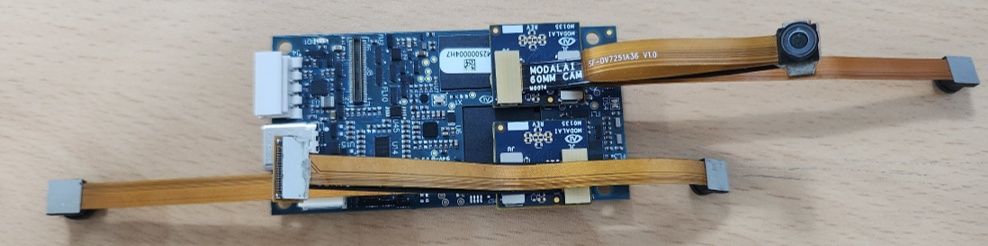
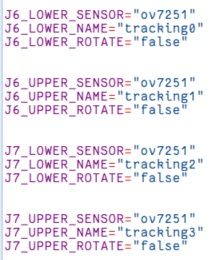
I am trying to connect four OV7251 cameras to the Voxl2 using the M0135.
I connected them to J6 and J7, but the cameras are only recognized on the JL connector.
I would like to know what the problem is and how to resolve it.
- I have cross-tested the cameras and cables and confirmed that they are functioning correctly.
-
I am trying to connect four OV7251 cameras to the Voxl2 using the M0135.
I connected them to J6 and J7, but the cameras are only recognized on the JL connector.
I would like to know what the problem is and how to resolve it.
- I have cross-tested the cameras and cables and confirmed that they are functioning correctly.
@zaimin78 , I am sorry for the long delay, we somehow missed this post.
Can you please let me know which kernel variant you are using? (you can check it using
voxl-versionand look atmach.var.There is no good way of making this configuration work, because the default function of J6U is actually disabled by default in favor for using a stereo camera setup, as shown here : https://docs.modalai.com/voxl2-camera-configs/#c-10-front-stereo-only-ov7251 . So the kernel variant that is compatible with the M0135 / M0076 interposers, cannot be used for any camera in J6U camera slot (slot 1).
However, the J7U and J7L should work. The way to make the 4th camera work is to use either M0135 or M0076 to connect it to J8L (slot 4) instead of J6U.
I am not sure why your J7U (slot 3) did not work -- can you try connecting without extension cables?
Alex
-
Thank you for your reply.
After upgrading the Voxl2 SDK, two cameras were recognized on the J7.
For now, I have successfully recognized four cameras using the ov7251 via the J6, J7, and J8.
If the J6 recognizes only one camera, does that mean the J8 will also only recognize one camera?
I want to have Voxl2 recognize all four ov7251 cameras and one Boson camera. So, that is a total of five cameras connected.
Is it currently impossible to connect five cameras with Voxl2?
I would like to know if there is a way to make this possible.
Thank you in advance for your answer.
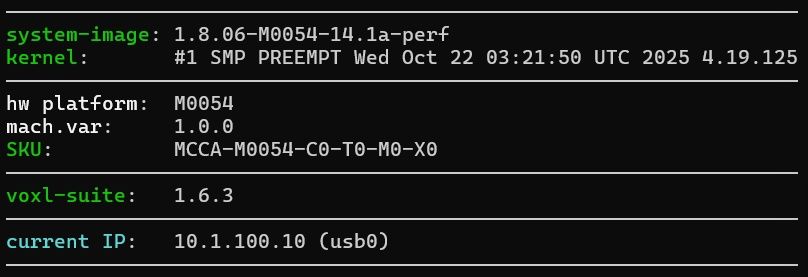
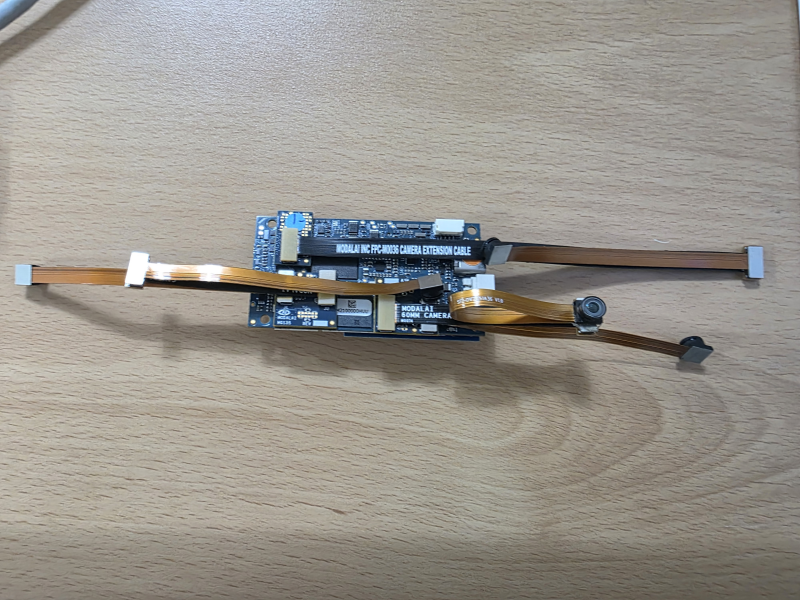
Current test configuration / 4 cameras recognized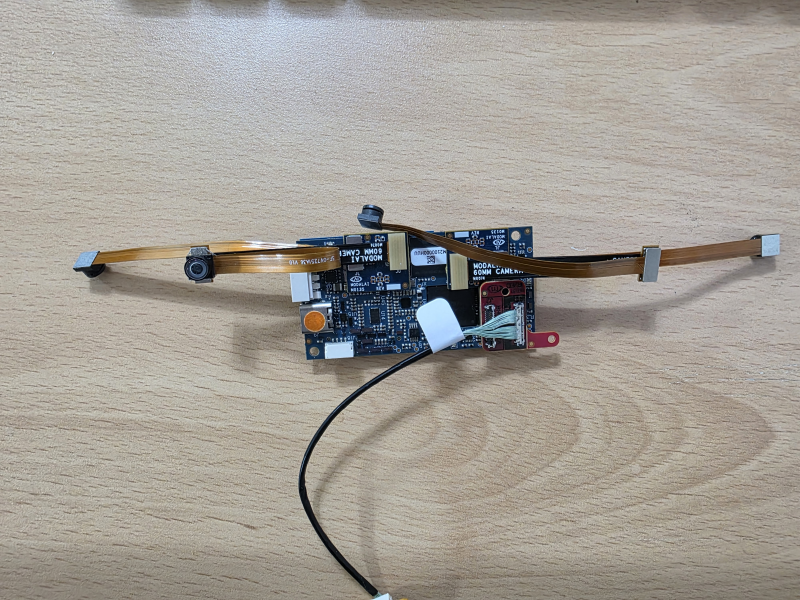
Configuration I want to recognize in the future / 4 ov7251s, 1 Boson+ -
Hello @zaimin78 ,
Without any changes, you can have 1 Boson and 3 ov7251 only. I would suggest connecting Boson to J8, so that the mounting tab on the M0181 aligns withe the VOXL2 mounting hole. So you would have:
- J6L : slot 0, cci bus 0 : ov7251
- J7L : slot 2, cci bus 2 : ov7251
- J7U : slot 3, cci bus 3 : ov7251
- J8L : slot 4, cci bus 1 : Boson
In order to connect the 4th ov7251 (it would go to J6U, via M0135), you would need a device tree change in the kernel (need a different kernel).
Also I need to double check to see if any other signal routing changes would need to be made (on M0135).. Let me get back to you soon.
Alex
-
Thank you for your reply.
I understand the connection slots.
In that case, as I mentioned earlier, is it impossible to connect four OV7251 cameras and one Boson camera to the Voxl2?
I am also looking for a camera with a field of view of 166 degrees or more for the Voxl2.
The only option I found was the OV7251.
I want to connect four wide-angle cameras and one Boson camera.
Do you have any camera recommendations?
-
We understand that the standard configuration supports only four OV7251 tracking cameras.
However, our intended setup is:
- 4× OV7251 (Tracking)
- 1× Boson+ via the VOXL2 MIPI Boson Adapter (M0162/M0181)
Could you clarify which of the following is the actual limitation?
- Qualcomm CSI hardware resources
- Qualcomm ISP resources
- voxl-camera-server / camera configuration software
- Power budget
If the limitation is software only, is it possible to create a custom camera configuration supporting this setup?
-
Hi @zaimin78 ,
First let me answer your questions about OV7251. The are two issues that need to be resolved in order to use the 4th ov7251:
- re-build the Voxl2 Kernel so that the port J6 is set up for two independent cameras in J6L and J6U instead of only supporting a single camera in J6L or a "combo" sync'ed cameras (via a stereo flex). A combo mode (in the ISP) works by using one 4-lane CSI interface to receive data from two 1-lane cameras. The default Kernel configuration is set up this way and basically the hardware mapping (which is configured in software) does not work for an independent camera in J6L. This change is relatively easy, I would need to re-build the kernel and test.
- second issue to check is to make sure that the IO pins used for camera control (power on/off), etc does not conflict with the other cameras. ports J6U and J8U have some common pins that could make the cameras in those ports interfere. However, in the current set up, you would not have any cameras in J8U, so the issue may not be present.
I am going to check the second issue first before doing the work to re-build the kernel with updated Device Tree (wit the camera IO and CSI mappings).
Now, regarding other options.. Have you looked into our AR0144 cameras (part number M0166): https://www.modalai.com/products/msu-m0166 . It has a diagonal FOV of about 160 degrees, as stated in our camera module spec sheet. This is the primary camera type we use now for VIO applications (monochrome, global shutter). Note that these cameras do not use flex cables like the EOL camera ov7251. We are now using uCoax type of camera cables and it also means that you would need to use a different interposer to connect the cameras to voxl2. Specifically, you would use M0173 camera front end. Several users have asked about connecting 4 AR0144 cameras this way, please check the forum for the discussion.
- https://forum.modalai.com/topic/4491/ar0144-rgb-output-on-voxl2/
- https://forum.modalai.com/topic/5233/ar0144-on-voxl2-j8-or-alternative-4x-ar0144-config
- (there is actually another option, if you don't need a hi-res camera plugged into M0173), all 4 AR0144 can be plugged into M0173, but the i2c slave id would still need to be changed for one of the AR0144 via a resistor swap.
So if you wanted to switch to the AR0144 cameras, you would most likely have to use
- M0173 camera front end (which uses voxl2 J6 and J7) with 4 AR0144 cameras plugged in (one with i2c id change)
- the Boson would be plugged in to voxl2 J8 via M0181
Please let me know which route you would like to explore.
Alex
-
Also, please keep in mind that the OV7251 cameras have been EOL for a while and are not recommended for a new design (actually it looks like we have no stock at the moment). It seems that you already have the cameras, so we can certainly give this a try.
-
Hi Alex,
Thank you very much for your detailed explanation. It was very helpful, and I really appreciate you taking the time to investigate this.
We understand that the OV7251 camera has reached EOL, and we are also aware of the AR0144 solution. We are planning to evaluate the AR0144 cameras in the future.
However, for our current project, we need to reproduce our existing system using the hardware that we already have. Therefore, our immediate goal is to implement the following configuration:
* 4 × OV7251 cameras
* 1 × Boson+ connected through the M0181 VOXL2 MIPI Boson Adapter on J8
This configuration is very important for our current project, so we would like to continue with the OV7251 cameras for now.Once you verify the kernel/device tree changes, do you expect 4 independent OV7251 cameras plus one Boson (via M0181 on J8) to run simultaneously under voxl-camera-server?
Thank you again for your support. We really appreciate your help, and we look forward to hearing your results.
Best regards,
-
Thanks for your patience, I will try to test this today.
-
It looks like I got this working. I modified the kernel to do the following
- not use the combo mode for J6L and allow using J6U as independent camera
- GPIO109 is used as a shared reset for cameras in slot 1 and 3 (because that's how the signal routing works on VOXL2 + M0135), so the kernel knows that this reset pin is shared
- this setup is not set up for camera sync - all cameras are running independently
- I have not tested any cameras in J8U, it may not work - but it should be possible to enable it, just need to test it.
You will need to update the kernel on your voxl2:
- https://storage.googleapis.com/modalai_public/temp/quad_ov7251_boson/qti-ubuntu-robotics-image-m0054-boot-quad-ov7251.img
- this kernel is based off the kernel that ships with SDK 1.6.3
- you can test it before overwriting the current kernel: https://docs.modalai.com/voxl2-kernel-build-guide/#test -- you should do to reduce the chance of bricking your VOXL2 (just in case)
HW Configuration:
- VOXL2
- four OV7251 plugged in to J6L. J6U, J7L, J7U via two M0135 adapters without any mods
- boson320 plugged into J8L via M0194 (you can use M0181 also)
- there are no shared CCI buses between the ov7251 cameras - slots 0-3 use CCI 0-3 respectively, so no CCI slave address conflicts
SW configuration
- appropriate sensormodules placed into
/usr/lib/camera/-- you can get them from/usr/share/modalai/chi-cdk/ov7251and../bosonfolders:
com.qti.sensormodule.ov7251_0.bin com.qti.sensormodule.ov7251_1.bin com.qti.sensormodule.ov7251_2.bin com.qti.sensormodule.ov7251_3.bin com.qti.sensormodule.boson_4.bin- use provided
voxl-camera-server.conf: https://storage.googleapis.com/modalai_public/temp/quad_ov7251_boson/voxl-camera-server-quad-ov7251-boson.conf- may need to modify your Boson resolution from
320x256to640x512if you you have Boson640
- may need to modify your Boson resolution from
Testing
- after you have all the cameras connected, boot using the test kernel
- test to see if all cameras are detected:
voxl-camera-server -l ... DEBUG: Cam idx: 0, Cam slot: 0, Slave Address: 0x00E2, Sensor Id: 0x7750 DEBUG: Cam idx: 1, Cam slot: 1, Slave Address: 0x00E2, Sensor Id: 0x7750 DEBUG: Cam idx: 2, Cam slot: 2, Slave Address: 0x00E2, Sensor Id: 0x7750 DEBUG: Cam idx: 3, Cam slot: 3, Slave Address: 0x00E2, Sensor Id: 0x7750 DEBUG: Cam idx: 4, Cam slot: 4, Slave Address: 0x00D4, Sensor Id: 0x00FF ...- start voxl-camera-server
- inspect sterams:
voxl-inspect-cam ov7251_0 ov7251_1 ov7251_2 ov7251_3 boson

Please give it a shot and let me know if it works!
Alex

Reading along? Create a free ModalAI Forum account to join in.
With an account you can reply, ask your own question, get an email when a ModalAI engineer answers, and mark the reply that solved it. Your place in each thread is saved between visits.
Questions about VOXL, Flight Core, ESCs and ModalAI drones are answered here by the engineers who build them.
Register Login