
VOXL Mini ESC - AUX Power Output
-
Hello! The datasheet says the Aux power output: "3.3V or 5.0V @ 500mA (default 3.3V, SW-controlled)"
I'd like to change it from 3.3V to 5.0V. I checked the m0129 params here, but I didn't see a setting for it. Does it require a different firmware? How can I change it?
Appologies if I missed something in the documents on how to change it.
Thank you!
Martin.
-
Hello! The datasheet says the Aux power output: "3.3V or 5.0V @ 500mA (default 3.3V, SW-controlled)"
I'd like to change it from 3.3V to 5.0V. I checked the m0129 params here, but I didn't see a setting for it. Does it require a different firmware? How can I change it?
Appologies if I missed something in the documents on how to change it.
Thank you!
Martin.
Hi @Martin-Lukac
It's shown here:
https://docs.modalai.com/voxl-mini-esc-datasheet/#gpio
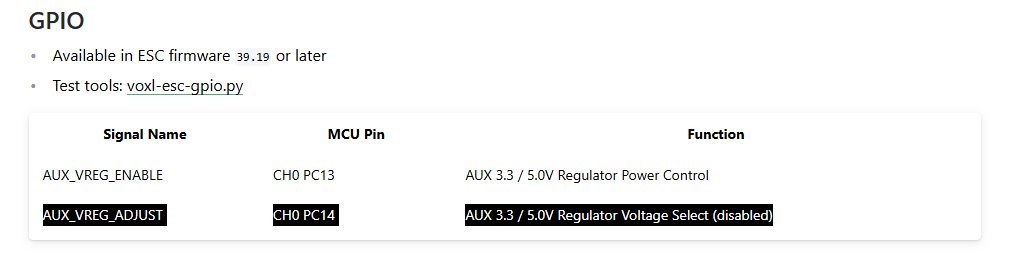
Hope this helps!!
-
Hi @Martin-Lukac
It's shown here:
https://docs.modalai.com/voxl-mini-esc-datasheet/#gpio
Hope this helps!!
@Vinny Thank you!
I'm having trouble figuring out the command based off the informatino.
I tried the command with --id 14 --val 1 ... and also --val 0, but neither make the output 5V.
I'm connecting directly to the ESC via a USB to Serial adapter and the command finds the board and is able to send the command.
The board-detect script outputs:
INFO: Scanning for ESC firmware: /dev/ttyUSB0, baud: 2000000
INFO: ESC(s) detected on port: /dev/ttyUSB0, baud rate: 2000000
INFO: Detected protocol: firmware
INFO: Additional Information:
INFO: ---------------------
ESC detected: ModalAi 4-in-1 ESC (M0129-6)
ESC detected: ModalAi 4-in-1 ESC (M0129-6)
ESC detected: ModalAi 4-in-1 ESC (M0129-6)
ESC detected: ModalAi 4-in-1 ESC (M0129-6)
Thanks again!
M.
-
@Vinny Thank you!
I'm having trouble figuring out the command based off the informatino.
I tried the command with --id 14 --val 1 ... and also --val 0, but neither make the output 5V.
I'm connecting directly to the ESC via a USB to Serial adapter and the command finds the board and is able to send the command.
The board-detect script outputs:
INFO: Scanning for ESC firmware: /dev/ttyUSB0, baud: 2000000
INFO: ESC(s) detected on port: /dev/ttyUSB0, baud rate: 2000000
INFO: Detected protocol: firmware
INFO: Additional Information:
INFO: ---------------------
ESC detected: ModalAi 4-in-1 ESC (M0129-6)
ESC detected: ModalAi 4-in-1 ESC (M0129-6)
ESC detected: ModalAi 4-in-1 ESC (M0129-6)
ESC detected: ModalAi 4-in-1 ESC (M0129-6)
Thanks again!
M.
-
@Martin-Lukac
Let's ask @Alex-Kushleyev
Yes, we have the capability on the M0129 ESC to enable 5V AUX output instead of 3.3V. The reason why this has not been exposed to the users is to avoid a situation where a user has a 3.3V device plugged in, but the ESC outputs 5.0V.
Just to clarify your needs - do you need the output to be always 5V and for it to turn on as soon as the ESC boots up? or do you want to turn it on using GPIO (off or on 5V)?
We have two options, which we have been going back and forth internally:
- add a new ESC config param to specify the VAUX voltage (off, 3.3V, 5.0V) and whether it should be on after ESC starts up (the defaults would be 3.3V and ON after power up).
- enable gpio control of the pin that actually controls the VAUX setting (3.3V or 5.0V), so that users can change the output voltage via UART commands
- this seems not practical, since if you have a device that's plugged in, it could get 3.3V first until you enable 5.0V output.
Since it is unlikely that someone would need to switch between 3.3V and 5.0V while the ESC is ON, we will probably go with the first option - add a param for voltage after start-up and still allow to tun the regulator on/off.
Please let me know your thoughts.
Alex
-
Yes, we have the capability on the M0129 ESC to enable 5V AUX output instead of 3.3V. The reason why this has not been exposed to the users is to avoid a situation where a user has a 3.3V device plugged in, but the ESC outputs 5.0V.
Just to clarify your needs - do you need the output to be always 5V and for it to turn on as soon as the ESC boots up? or do you want to turn it on using GPIO (off or on 5V)?
We have two options, which we have been going back and forth internally:
- add a new ESC config param to specify the VAUX voltage (off, 3.3V, 5.0V) and whether it should be on after ESC starts up (the defaults would be 3.3V and ON after power up).
- enable gpio control of the pin that actually controls the VAUX setting (3.3V or 5.0V), so that users can change the output voltage via UART commands
- this seems not practical, since if you have a device that's plugged in, it could get 3.3V first until you enable 5.0V output.
Since it is unlikely that someone would need to switch between 3.3V and 5.0V while the ESC is ON, we will probably go with the first option - add a param for voltage after start-up and still allow to tun the regulator on/off.
Please let me know your thoughts.
Alex
Thanks for the response!
We are looking to have always 5.0V as soon as it boots up -- so a permanent setting that is remembered between power cycles/boots. I think the first option, having a ESC config param, works for us.
Thanks!
Martin.
-
Thanks for the response!
We are looking to have always 5.0V as soon as it boots up -- so a permanent setting that is remembered between power cycles/boots. I think the first option, having a ESC config param, works for us.
Thanks!
Martin.
Thanks for the feedback. We can work on adding a param. Meanwhile, for your testing, I will send firmware (based off the latest version), which will just set the VAUX to 5.0V all the time.
Alex
-
Thanks for the feedback. We can work on adding a param. Meanwhile, for your testing, I will send firmware (based off the latest version), which will just set the VAUX to 5.0V all the time.
Alex
Here are the links to the test firmware:
After you update, you should see the following version after running
voxl-esc-scan.py(except yours will be M0129-6). The firmware version will be39.23and this version will be reserved only for this test firmware:INFO: ESC Information: INFO: --------------------- ID : 0 Board : version 40: ModalAi 4-in-1 ESC (M0129-3) UID : 0x2039333557555304003F0029 Firmware : version 39.23, hash 30c088dc Bootloader : version 184, hash 10bf24c8 ...In case you need help updating ESC firmware: https://docs.modalai.com/voxl-escs/faq/#q-how-do-i-update-esc-firmware
We won't officially release this firmware version in order to avoid the aforementioned risk of turning on 5.0V by just installing a firmware update, however we will work on enabling this in the ESC params.
Also, just as a reminder, please be careful soldering to the AUX test points, use high quality flexible cables, and use strain relief to avoid lifting the pads.
Alex



Reading along? Create a free ModalAI Forum account to join in.
With an account you can reply, ask your own question, get an email when a ModalAI engineer answers, and mark the reply that solved it. Your place in each thread is saved between visits.
Questions about VOXL, Flight Core, ESCs and ModalAI drones are answered here by the engineers who build them.
Register Login