
Updating ESC firmware but no build.sh file
-
@JackHammer , the instruction do not specify that
build.shis needed for this project.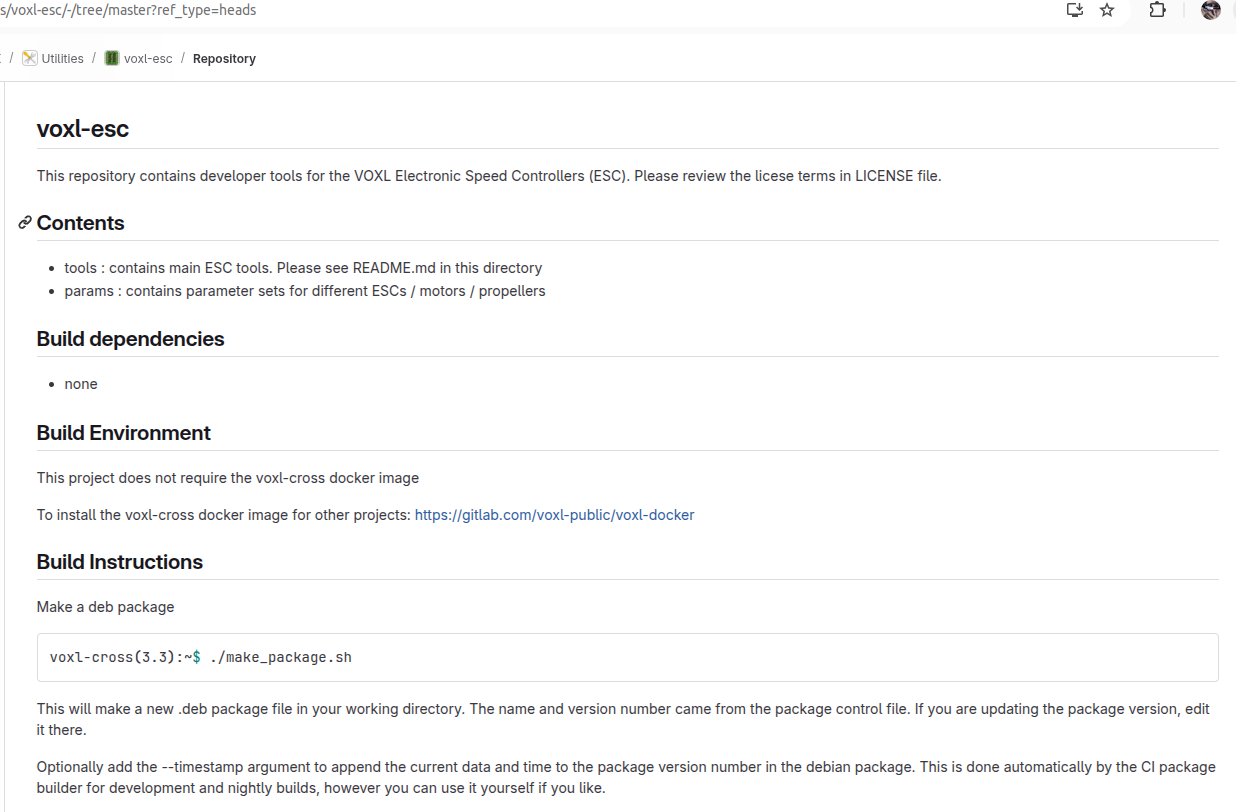
@Alex-Kushleyev In the first few lines of the make_package.sh, it states that you must run build.sh first to build the binaries.

-
@Alex-Kushleyev In the first few lines of the make_package.sh, it states that you must run build.sh first to build the binaries.
@JackHammer , I see. thanks for clarifying. This is a copy / paste error. In this project, you don't need to build anything.
Alex
-
@JackHammer , I see. thanks for clarifying. This is a copy / paste error. In this project, you don't need to build anything.
Alex
@Alex-Kushleyev Okay cool, thanks for letting me know. The instructions from that readme file state you dont need the voxl-cross image, but then the following instructions appear to use it. Do these instructions change at all when I am running through wsl? I am getting some error and I just want to be sure to cover my bases
-
@Alex-Kushleyev Okay cool, thanks for letting me know. The instructions from that readme file state you dont need the voxl-cross image, but then the following instructions appear to use it. Do these instructions change at all when I am running through wsl? I am getting some error and I just want to be sure to cover my bases
@JackHammer , it should just work out of the box:
voxl-esc$ ./make_package.sh
Package Name:  voxl-esc
version Number:  1.5.4
[sudo] password for *******:
starting building Debian Package
dpkg-deb: building package 'voxl-esc' in 'voxl-esc_1.5.4_arm64.deb'.
DONE
Note that
sudoinside the script is not required, but it is there for historical reasons..Alex
-
@JackHammer , it should just work out of the box:
voxl-esc$ ./make_package.sh
Package Name:  voxl-esc
version Number:  1.5.4
[sudo] password for *******:
starting building Debian Package
dpkg-deb: building package 'voxl-esc' in 'voxl-esc_1.5.4_arm64.deb'.
DONE
Note that
sudoinside the script is not required, but it is there for historical reasons..Alex
@Alex-Kushleyev Gotcha, it appears to start up an then right after the starting building line I get:
dpkg-deb: error: maintainer script 'postinst' has bad permissions 744 (must be >=0555 and <=0775)
-
@JackHammer , it should just work out of the box:
voxl-esc$ ./make_package.sh
Package Name:  voxl-esc
version Number:  1.5.4
[sudo] password for *******:
starting building Debian Package
dpkg-deb: building package 'voxl-esc' in 'voxl-esc_1.5.4_arm64.deb'.
DONE
Note that
sudoinside the script is not required, but it is there for historical reasons..Alex
@Alex-Kushleyev Got it working out of a docker container. I did have another question though. Do I need to remove anything off the voxl board (old voxl-esc package) before pushing this one over ssh?
-
@Alex-Kushleyev Got it working out of a docker container. I did have another question though. Do I need to remove anything off the voxl board (old voxl-esc package) before pushing this one over ssh?
That error is weird, since 555 <= 744 <= 755. I think there is some issue with the leading 0 in the perms... Have not seen that before.
You should not have to remove the old
voxl-escpackage, all the files in the package will be overwritten.I am assuming you are just making a custom version of the package? If not, you can always get the latest package from : http://voxl-packages.modalai.com/dists/qrb5165/dev/binary-arm64/
Alex
-
That error is weird, since 555 <= 744 <= 755. I think there is some issue with the leading 0 in the perms... Have not seen that before.
You should not have to remove the old
voxl-escpackage, all the files in the package will be overwritten.I am assuming you are just making a custom version of the package? If not, you can always get the latest package from : http://voxl-packages.modalai.com/dists/qrb5165/dev/binary-arm64/
Alex
@Alex-Kushleyev No actually I was just trying to rebuild the latest version as support for the recent ESC I recieved was added just 2 months ago, and until I build and moved the package, I was unable to see it. Didnt realize that it was just online for me to download, thank you for that link.
The reason I got a new esc is because one of my coworkers crashed the drone and now the motors skip when we try to run voxl-esc spin . 3 of the motors are "iffy" and will skip a few times and sometimes spin normally while one of the motors just works fine. We received the new ESC, installed it, updated the voxl-esc package, and the odd behavior persists. We havent updated the parameters yet.
We are wondering how do we get the correct parameters for our motor setup into the options for the drone? We can see 6 different options and none match our 2203 1500KV motors. They are black and there is an option that says black-motors but that feels incorrect?
Please advise.
-
@Alex-Kushleyev No actually I was just trying to rebuild the latest version as support for the recent ESC I recieved was added just 2 months ago, and until I build and moved the package, I was unable to see it. Didnt realize that it was just online for me to download, thank you for that link.
The reason I got a new esc is because one of my coworkers crashed the drone and now the motors skip when we try to run voxl-esc spin . 3 of the motors are "iffy" and will skip a few times and sometimes spin normally while one of the motors just works fine. We received the new ESC, installed it, updated the voxl-esc package, and the odd behavior persists. We havent updated the parameters yet.
We are wondering how do we get the correct parameters for our motor setup into the options for the drone? We can see 6 different options and none match our 2203 1500KV motors. They are black and there is an option that says black-motors but that feels incorrect?
Please advise.
@JackHammer , can you please tell me which drone you have an post a picture of the motor just in case? I can point you to the correct parameters for your motor.
Alex
-
@JackHammer , can you please tell me which drone you have an post a picture of the motor just in case? I can point you to the correct parameters for your motor.
Alex
@Alex-Kushleyev We are running the starling 2 max drone with the 2203.5 KV1500 motors. The body is black with a gold/brass colored rim around the top edge of the rotor. I am not sure that I am able to take and post photos from inside the work place.
-
@Alex-Kushleyev We are running the starling 2 max drone with the 2203.5 KV1500 motors. The body is black with a gold/brass colored rim around the top edge of the rotor. I am not sure that I am able to take and post photos from inside the work place.
@JackHammer no problem.
This should be the esc param file for the Starling 2 Max motor : https://gitlab.com/voxl-public/voxl-sdk/utilities/voxl-esc/-/blob/dev/voxl-esc-params/D0012_Starling_MAX/esc_params_m0129_f2203_5_1500kv_7x3.7x3.xml
The param file should also be present in
/usr/share/modalai/voxl-esc-paramsDo you know how to update the esc parameters?
systemctl stop voxl-px4
cd /usr/share/modalai/voxl-esc-tools
./voxl-esc-updload-params.py -p <full path to params file>
After updating the params, you can run a "power ramp test", as shown here : https://gitlab.com/voxl-public/voxl-sdk/utilities/voxl-esc/-/blob/dev/voxl-esc-tools/doc/low_kv_motor_tuning.md?ref_type=heads#power-ramp-test . Use id=255 to spin all motors (and you can limit power to 80%)
./voxl-esc-spin.py --id 255 --power 80 --ramp-time 3.0 --timeout 3.5 --enable-plot 1 --cmd-rate 250Since you can't display the plot on voxl2, a plot will be saved as html, which you get download from voxl2 and view in a browser.
You can do it without propellers (for safety). If all the motors are working properly, the four rpms will be very close to the same as the power ramps (within 100-200 rpm). Otherwise, you may have a bad motor that was damaged during the crash.
https://www.modalai.com/products/starling-2-max-replacement-parts?variant=49704826896688
Alex

Reading along? Create a free ModalAI Forum account to join in.
With an account you can reply, ask your own question, get an email when a ModalAI engineer answers, and mark the reply that solved it. Your place in each thread is saved between visits.
Questions about VOXL, Flight Core, ESCs and ModalAI drones are answered here by the engineers who build them.
Register Login