
Dual FLIR Lepton thermal cameras with VOXL2 Mini and Sparrow
-
I have the 2 Leptons connected according to the image+pinout in this page but I have not found any guidance on software changes to enable use of the second Lepton (e.g., changes to /etc/modalai/voxl-lepton-server.conf). Does the Lepton Server support 2 cameras? I see the shutter of the second Lepton cycling for FFC at the same time as the first Lepton so it appears to be operating properly. Running the Lepton server only shows the first camera's config loaded and executed.
-
So far we've updated https://gitlab.com/voxl-public/system-image-build/meta-voxl2-bsp/-/blob/qrb5165-ubun1.0-14.1a/recipes-kernel/linux-msm/files/dts/m0104/m0104-modalai-qupv3.dtsi and added an alias back to https://gitlab.com/voxl-public/system-image-build/meta-voxl2-bsp/-/blob/qrb5165-ubun1.0-14.1a/recipes-kernel/linux-msm/files/dts/m0104/m0104-kona.dtsi as described below and rebuilt the kernel. We see spidev14.0 but only get "Waiting for first frame" message when trying to run voxl-lepton-server from SPI device 14.
Any ideas? So far we're completely stuck.
/* M0104 - J10 - GPIO 40-44 */ &qupv3_se14_spi { status = "ok"; spidev@0 { compatible = "spidev"; reg = <0>; spi-max-frequency = <50000000>; }; }; /* M0104 - J10 JST connector */ &qupv3_se14_2uart { status = "disabled"; };spi14 = &qupv3_se14_spi; -
So far we've updated https://gitlab.com/voxl-public/system-image-build/meta-voxl2-bsp/-/blob/qrb5165-ubun1.0-14.1a/recipes-kernel/linux-msm/files/dts/m0104/m0104-modalai-qupv3.dtsi and added an alias back to https://gitlab.com/voxl-public/system-image-build/meta-voxl2-bsp/-/blob/qrb5165-ubun1.0-14.1a/recipes-kernel/linux-msm/files/dts/m0104/m0104-kona.dtsi as described below and rebuilt the kernel. We see spidev14.0 but only get "Waiting for first frame" message when trying to run voxl-lepton-server from SPI device 14.
Any ideas? So far we're completely stuck.
/* M0104 - J10 - GPIO 40-44 */ &qupv3_se14_spi { status = "ok"; spidev@0 { compatible = "spidev"; reg = <0>; spi-max-frequency = <50000000>; }; }; /* M0104 - J10 JST connector */ &qupv3_se14_2uart { status = "disabled"; };spi14 = &qupv3_se14_spi;Any ideas @Vinny or @Alex-Kushleyev ? This is unfortunately a pretty big blocker for us.
/dev/spidev14.0 exists but isn't working. Regardless of whether we have the lepton plugged or unplugged from J5 on the m0188, voxl-lepton-server(and even dd) just hangs when we try to read from spi 14.0. And this is after we set 67 high (voxl-gpio -w 67 1). See below for dd outputs from spidev0.0 compared to spidev14.0.
Lepton unplugged
voxl2-mini:/$ dd if=/dev/spidev0.0 bs=164 count=1 | hexdump -C
1+0 records in
1+0 records out
164 bytes copied, 0.00235198 s, 69.7 kB/s
00000000 00 00 00 00 00 00 00 00 00 00 00 00 00 00 00 00 |................|
*
000000a4Lepton plugged into m0188 J10
voxl2-mini:/$ dd if=/dev/spidev0.0 bs=164 count=1 | hexdump -C
1+0 records in
1+0 records out
164 bytes copied, 0.00223693 s, 73.3 kB/s
00000000 07 ff ff ff 80 00 00 00 00 00 00 00 00 00 00 00 |................|
00000010 00 00 00 00 00 00 00 00 00 00 00 00 00 00 05 e6 |................|
00000020 a7 42 38 4c 4e 04 00 01 00 00 00 00 00 00 00 00 |.B8LN...........|
00000030 00 00 00 00 00 00 00 00 00 00 00 00 00 00 00 00 |................|
*
000000a4Lepton unplugged
voxl2-mini:/$ dd if=/dev/spidev14.0 bs=164 count=1 | hexdump -C
(Just hangs)Lepton plugged into m0188 J5
voxl2-mini:/$ dd if=/dev/spidev14.0 bs=164 count=1 | hexdump -C
(Just hangs) -
Any ideas @Vinny or @Alex-Kushleyev ? This is unfortunately a pretty big blocker for us.
/dev/spidev14.0 exists but isn't working. Regardless of whether we have the lepton plugged or unplugged from J5 on the m0188, voxl-lepton-server(and even dd) just hangs when we try to read from spi 14.0. And this is after we set 67 high (voxl-gpio -w 67 1). See below for dd outputs from spidev0.0 compared to spidev14.0.
Lepton unplugged
voxl2-mini:/$ dd if=/dev/spidev0.0 bs=164 count=1 | hexdump -C
1+0 records in
1+0 records out
164 bytes copied, 0.00235198 s, 69.7 kB/s
00000000 00 00 00 00 00 00 00 00 00 00 00 00 00 00 00 00 |................|
*
000000a4Lepton plugged into m0188 J10
voxl2-mini:/$ dd if=/dev/spidev0.0 bs=164 count=1 | hexdump -C
1+0 records in
1+0 records out
164 bytes copied, 0.00223693 s, 73.3 kB/s
00000000 07 ff ff ff 80 00 00 00 00 00 00 00 00 00 00 00 |................|
00000010 00 00 00 00 00 00 00 00 00 00 00 00 00 00 05 e6 |................|
00000020 a7 42 38 4c 4e 04 00 01 00 00 00 00 00 00 00 00 |.B8LN...........|
00000030 00 00 00 00 00 00 00 00 00 00 00 00 00 00 00 00 |................|
*
000000a4Lepton unplugged
voxl2-mini:/$ dd if=/dev/spidev14.0 bs=164 count=1 | hexdump -C
(Just hangs)Lepton plugged into m0188 J5
voxl2-mini:/$ dd if=/dev/spidev14.0 bs=164 count=1 | hexdump -C
(Just hangs)Ok looks like it was partially a TrustZone issue. I'm now using the .mbn from sdk 1.0.0 and I can at least read from spidev14.0. But still no dice to actually get the camera to read actual data.
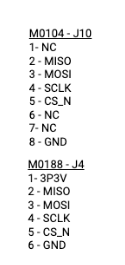
This is the correct pinout from the M0104 J10 to the M0188 J4, yes?
What I'm getting now:
voxl2-mini:/$ dd if=/dev/spidev14.0 bs=164 count=1 | hexdump -C
1+0 records in
1+0 records out
164 bytes copied, 0.0010337 s, 159 kB/s
00000000 00 00 00 00 00 00 00 00 00 00 00 00 00 00 00 00 |................|
*
000000a4 -
Ok looks like it was partially a TrustZone issue. I'm now using the .mbn from sdk 1.0.0 and I can at least read from spidev14.0. But still no dice to actually get the camera to read actual data.
This is the correct pinout from the M0104 J10 to the M0188 J4, yes?
What I'm getting now:
voxl2-mini:/$ dd if=/dev/spidev14.0 bs=164 count=1 | hexdump -C
1+0 records in
1+0 records out
164 bytes copied, 0.0010337 s, 159 kB/s
00000000 00 00 00 00 00 00 00 00 00 00 00 00 00 00 00 00 |................|
*
000000a4No new progress in the last few days. Do you have any idea what the issue might be @Alex-Kushleyev ?
Reading along? Create a free ModalAI Forum account to join in.
With an account you can reply, ask your own question, get an email when a ModalAI engineer answers, and mark the reply that solved it. Your place in each thread is saved between visits.
Questions about VOXL, Flight Core, ESCs and ModalAI drones are answered here by the engineers who build them.
Register Login