
VOXL2 HITL Sim with Gazebo in Docker - VTOL frame support
-
good afternoon,
I am working on enabling a standard vtol simulation in gazebo using voxl2 and a px4 docker provided by modalai. I am on Ubuntu 22.04. A few issues have come up and I wonder if they are caused by voxl or px4. I assume it is voxl, but I wanted to verify.
In short, when attempting transition I get "vehicle did not respond to command MAV_CMD_DO_VTOL_TRANSITION." I wonder if anyone has had this problem before.
Why i suspect voxl and not px4 is because it seems like docker is hard coded for quad frames. For instance, to be able to run docker for a vtol frame I had to modify "run_gazebo.bash" script. Specifically, loading "worlds/hitl_standard_vtol.world". Also, I had to modify .sdf file for standard_vtol_hitl frame to change serial device to ttyUSB0. Moreover, when I selected "standard_vtol_HITL"in QGroundControl-> Airframe, the mavlink inspector was showing Heartbeat -> type = 2 (quadcopter). I manually adjusted that by changing MAV_TYPE = 22 (VTOL with separate fixed rotors for hover and cruise flight), however, my vehicle still won't transition.
Another suspicious point is that none of the VTOL parameters (VT_*) are showing and standard vtol frame is not getting any airspeed data (as far as I understand, there is no pitot tube model).
Thus I was wondering:
- does voxl2 supports standard_vtol_hitl simulation ?
- am I missing any steps to enable transition in my vehicle?
here is some of the flight logs:
- https://logs.px4.io/plot_app?log=3f05d334-5adb-43de-a62c-5054da1f913d
- https://logs.px4.io/plot_app?log=0f9c3c8b-f67f-404d-be26-538bfb37ffdc
- https://logs.px4.io/plot_app?log=14d3c6a4-3168-4bef-a989-9414fa19c5bf
log breakdown: uploaded mission, took off, refused to proceed to transition after takeoff, tried forcing transition, refused to transition, forced to land
Note: i am also having an issue with baro and mag timing out, so that may show up in the logs. if anyone knows how to solve that - help would be appreciated, but that is not a main point of concern right now
@garret We have not tried anything but quadcopter and I'm not aware of anyone else trying anything other than quadcopter.
-
@garret We have not tried anything but quadcopter and I'm not aware of anyone else trying anything other than quadcopter.
@Eric-Katzfey thank you for clarifying. can you let me know if the px4 firmware on voxl2 has been modified to only accommodate quads or is it still the original firmware and should in theory be able to fly VTOL?
-
@Eric-Katzfey thank you for clarifying. can you let me know if the px4 firmware on voxl2 has been modified to only accommodate quads or is it still the original firmware and should in theory be able to fly VTOL?
-
@garret to clarify a little: were there any adjustments to px4 firmware on voxl2 that could result in absence of a bunch of VTOL parameters that are important for transition and/or fixed wing flight modes?
@garret I have no idea what is necessary for VTOL but I would guess that there are probably some missing modules that you would need for that. You would need to do a custom build to bring in whatever is missing.
-
@garret I have no idea what is necessary for VTOL but I would guess that there are probably some missing modules that you would need for that. You would need to do a custom build to bring in whatever is missing.
@Eric-Katzfey I have started working in this direction. My current attempt is to edit default.px4board file from here: https://github.com/modalai/px4-firmware/blob/v1.14.0-2.0.94-dev/boards/modalai/voxl2/default.px4board. I am using this px4 version because it is the one currently on my voxl2. If you think there is a better alternative, please let me know.
I have started trying to build a firmware file but keep running into errors. Some related to incorrect versions of compilers or libraries like enum.
I was trying to find step by step firmware update instructions here: https://gitlab.com/voxl-public/voxl-sdk/services/voxl-px4 and here https://docs.modalai.com/. First link appears to be about the voxl2 itself, which I do not want to edit, just the px4 running on it. The second only had firmware updates for voxl2io and flight core. As far as I was able to understand, those were not what I needed. Neither of the links had required libraries and compiler versions that I was able to find. ( I am running aarch64-linux-gnu-gcc and aarch64-linux-gnu-g++ version 11.4.0 at the moment)
Is there a place with proper step by step guidelines on how to do custom px4 built for voxl2 ? If not, could you please point me out in the right direction ? At least maybe a place with all the right libraries and compilers. I have never done this kind of work before, so it is just Gemini and I, but that can only take one so far
-
@Eric-Katzfey I have started working in this direction. My current attempt is to edit default.px4board file from here: https://github.com/modalai/px4-firmware/blob/v1.14.0-2.0.94-dev/boards/modalai/voxl2/default.px4board. I am using this px4 version because it is the one currently on my voxl2. If you think there is a better alternative, please let me know.
I have started trying to build a firmware file but keep running into errors. Some related to incorrect versions of compilers or libraries like enum.
I was trying to find step by step firmware update instructions here: https://gitlab.com/voxl-public/voxl-sdk/services/voxl-px4 and here https://docs.modalai.com/. First link appears to be about the voxl2 itself, which I do not want to edit, just the px4 running on it. The second only had firmware updates for voxl2io and flight core. As far as I was able to understand, those were not what I needed. Neither of the links had required libraries and compiler versions that I was able to find. ( I am running aarch64-linux-gnu-gcc and aarch64-linux-gnu-g++ version 11.4.0 at the moment)
Is there a place with proper step by step guidelines on how to do custom px4 built for voxl2 ? If not, could you please point me out in the right direction ? At least maybe a place with all the right libraries and compilers. I have never done this kind of work before, so it is just Gemini and I, but that can only take one so far
@garret This is the documentation you need: https://docs.modalai.com/voxl-px4-dev-build-guide/. As part of that this readme: https://gitlab.com/voxl-public/rb5-flight/rb5-flight-px4-build-docker/-/blob/master/README.md?ref_type=heads has details on how to setup the build environment.
-
@garret This is the documentation you need: https://docs.modalai.com/voxl-px4-dev-build-guide/. As part of that this readme: https://gitlab.com/voxl-public/rb5-flight/rb5-flight-px4-build-docker/-/blob/master/README.md?ref_type=heads has details on how to setup the build environment.
@Eric-Katzfey thank you for providing the instructions. I wanted to follow up because I have run into issues with installing Hexagonsdk4.x version 4.1.0.4. When i try installing hexagon SDK through QualcommSoftwareCenter I end up having an error:
[Info] : Config File Present

[Info] : Step 1 of 7: Checking environment

[Info] : Step 2 of 7: Checking previous version [Info] : Step 3 of 7: Checking dependencies

[Info] : Step 4 of 7: Preparing system

[Info] : Step 5 of 7: Extracting files

[Info] : Step 6 of 7: Configuring system

[Error] : Post-install step failed. Please reach out to the owner of Hexagon SDK 4.x for more assistance.

[Error] : Log File Location: file:///var/tmp/qcom/qik/logs/qiktool.20250627.46.log

Error while running command
From the instructions, it was my understanding that I should install Hexagon on my system before making it into a .tar file and placing this .tar file into local copy of the rb5-flight-px4-build-docker. Could you please sanity check my understanding and possibly point to the source of error? i am running on the following system:
Distributor ID: Ubuntu Description: Ubuntu 22.04.5 LTS Release: 22.04 Codename: jammy -
@Eric-Katzfey thank you for providing the instructions. I wanted to follow up because I have run into issues with installing Hexagonsdk4.x version 4.1.0.4. When i try installing hexagon SDK through QualcommSoftwareCenter I end up having an error:
[Info] : Config File Present

[Info] : Step 1 of 7: Checking environment

[Info] : Step 2 of 7: Checking previous version [Info] : Step 3 of 7: Checking dependencies

[Info] : Step 4 of 7: Preparing system

[Info] : Step 5 of 7: Extracting files

[Info] : Step 6 of 7: Configuring system

[Error] : Post-install step failed. Please reach out to the owner of Hexagon SDK 4.x for more assistance.

[Error] : Log File Location: file:///var/tmp/qcom/qik/logs/qiktool.20250627.46.log

Error while running command
From the instructions, it was my understanding that I should install Hexagon on my system before making it into a .tar file and placing this .tar file into local copy of the rb5-flight-px4-build-docker. Could you please sanity check my understanding and possibly point to the source of error? i am running on the following system:
Distributor ID: Ubuntu Description: Ubuntu 22.04.5 LTS Release: 22.04 Codename: jammy@garret As long as you see it has extracted all of the files that should be all that you need.
-
@garret As long as you see it has extracted all of the files that should be all that you need.
@Eric-Katzfey thank you for bearing with me, I have moved on to building the project, but running into some issues related to Hexagon SDK.
root@7508b7b53f9a:/usr/local/workspace# ./build.sh
*** Starting build ***

Setting up the Hexagon SDK environment locally
HEXAGON_SDK_ROOT is : /home/4.1.0.4
Setting up the QAIC binary for the platform
make: Entering directory '/home/4.1.0.4/ipc/fastrpc/qaic'
make: 'bin/qaic' is up to date.
make: Leaving directory '/home/4.1.0.4/ipc/fastrpc/qaic'
Could not find Androd ndk at /home/4.1.0.4/tools/android-ndk-r19c

Please refer to /home/4.1.0.4/docs/tools/setup.html for installing the missed components

*** Starting dependencies build ***
-- The C compiler identification is GNU 7.5.0
-- The CXX compiler identification is GNU 9.4.0
-- Check for working C compiler: /home/4.1.0.4/tools/linaro64/bin/aarch64-linux-gnu-gcc
-- Check for working C compiler: /home/4.1.0.4/tools/linaro64/bin/aarch64-linux-gnu-gcc -- works
-- Detecting C compiler ABI info
-- Detecting C compiler ABI info - done
-- Detecting C compile features
-- Detecting C compile features - done
-- Check for working CXX compiler: /usr/bin/c++
-- Check for working CXX compiler: /usr/bin/c++ -- works
-- Detecting CXX compiler ABI info
-- Detecting CXX compiler ABI info - done
-- Detecting CXX compile features
-- Detecting CXX compile features - done
-- Configuring done
-- Generating done
-- Build files have been written to: /usr/local/workspace/px4-firmware/boards/modalai/voxl2/libfc-sensor-api/build
Scanning dependencies of target fc_sensor
[ 50%] Building C object CMakeFiles/fc_sensor.dir/src/fc_sensor_stub.c.o
[100%] Linking C shared library libfc_sensor.so
[100%] Built target fc_sensor
*** End of dependencies build ***
*** Starting apps processor build ***
-- PX4 version: v1.14.0-2.0.94-dev (1.14.0)
-- Found PythonInterp: /usr/bin/python3 (found suitable version "3.8.10", minimum required is "3")
-- PX4 config file: /usr/local/workspace/px4-firmware/boards/modalai/voxl2/default.px4board
-- PLATFORM posix
-- LINUX_TARGET y
-- TOOLCHAIN aarch64-linux-gnu
-- ROMFSROOT px4fmu_common
-- ROOTFSDIR /data/px4
-- PX4 config: modalai_voxl2_default
-- PX4 platform: posix
-- PX4 lockstep: disabled
-- The CXX compiler identification is GNU 7.5.0
-- The C compiler identification is GNU 7.5.0
-- The ASM compiler identification is GNU
-- Found assembler: /home/4.1.0.4/tools/linaro64/bin/aarch64-linux-gnu-gcc
-- Check for working CXX compiler: /home/4.1.0.4/tools/linaro64/bin/aarch64-linux-gnu-g++
-- Check for working CXX compiler: /home/4.1.0.4/tools/linaro64/bin/aarch64-linux-gnu-g++ -- works
-- Detecting CXX compiler ABI info
-- Detecting CXX compiler ABI info - done
-- Detecting CXX compile features
-- Detecting CXX compile features - done
-- Check for working C compiler: /home/4.1.0.4/tools/linaro64/bin/aarch64-linux-gnu-gcc
-- Check for working C compiler: /home/4.1.0.4/tools/linaro64/bin/aarch64-linux-gnu-gcc -- works
-- Detecting C compiler ABI info
-- Detecting C compiler ABI info - done
-- Detecting C compile features
-- Detecting C compile features - done
-- cmake build type: RelWithDebInfo
-- ccache enabled (export CCACHE_DISABLE=1 to disable)
-- Skipping pwm file path /usr/local/workspace/px4-firmware/src/drivers/linux_pwm_out/module.yaml for VOXL2
-- Skipping pwm file path /usr/local/workspace/px4-firmware/src/drivers/pca9685_pwm_out/module.yaml for VOXL2
-- Skipping pwm file path /usr/local/workspace/px4-firmware/src/drivers/pwm_out/module.yaml for VOXL2
-- Skipping pwm file path /usr/local/workspace/px4-firmware/src/modules/simulation/pwm_out_sim/module_hil.yaml for VOXL2
-- Skipping pwm file path /usr/local/workspace/px4-firmware/src/modules/simulation/pwm_out_sim/module_sim.yaml for VOXL2
-- ROMFS: ROMFS/px4fmu_common
Architecture:  amd64
==> CPACK_INSTALL_PREFIX = @DEB_INSTALL_PREFIX@
-- Configuring done
-- Generating done
-- Build files have been written to: /usr/local/workspace/px4-firmware/build/modalai_voxl2_default
[0/568] git submodule src/modules/microdds_client/Micro-XRCE-DDS-Client
[4/568] git submodule src/drivers/gps/devices
[8/568] git submodule src/modules/mavlink/mavlink
[68/568] Performing configure step for 'libmicroxrceddsclient_project'
-- libmicroxrceddsclient_project configure command succeeded.  See also /usr/local/workspace/px4-firmware/build/modalai_voxl2_default/src/modules/microdds_client/src/libmicroxrceddsclient_project-stamp/libmicroxrceddsclient_project-configure-*.log
[449/568] Performing build step for 'libmicroxrceddsclient_project'
-- libmicroxrceddsclient_project build command succeeded.  See also /usr/local/workspace/px4-firmware/build/modalai_voxl2_default/src/modules/microdds_client/src/libmicroxrceddsclient_project-stamp/libmicroxrceddsclient_project-build-*.log
[453/568] Performing install step for 'libmicroxrceddsclient_project'
-- libmicroxrceddsclient_project install command succeeded.  See also /usr/local/workspace/px4-firmware/build/modalai_voxl2_default/src/modules/microdds_client/src/libmicroxrceddsclient_project-stamp/libmicroxrceddsclient_project-install-*.log
[568/568] Linking CXX executable bin/px4

/* Auto Magically Generated file */
/* Do not edit! */
#pragma once

#define PX4_GIT_VERSION_STR "5e6a8c257371b6c45e55662daac5fe9fbd08040b"
#define PX4_GIT_VERSION_BINARY 0x5e6a8c257371b6c4
#define PX4_GIT_TAG_STR "v1.14.0-2.0.94-dev-dirty"
#define PX4_GIT_BRANCH_NAME ""

#define PX4_GIT_OEM_VERSION_STR  ""

#define PX4_GIT_TAG_OR_BRANCH_NAME "v1.14.0-2.0.94-dev-dirty" // special variable: git tag, release or master branch

#define MAVLINK_LIB_GIT_VERSION_STR  "3ee5382d0c96134b0e1c250d8c2d54bfed0166fa"
#define MAVLINK_LIB_GIT_VERSION_BINARY 0x3ee5382d0c96134b

#define NUTTX_GIT_VERSION_STR  "3f77354c0dc88793a47ff3b57595195ab45f7ba9"
#define NUTTX_GIT_VERSION_BINARY 0x3f77354c0dc88793
#define NUTTX_GIT_TAG_STR  "v11.0.0"
*** End of apps processor build ***
*** Starting qurt slpi build ***
-- PX4 version: v1.14.0-2.0.94-dev (1.14.0)
-- Found PythonInterp: /usr/bin/python3 (found suitable version "3.8.10", minimum required is "3")
-- PX4 config file: /usr/local/workspace/px4-firmware/boards/modalai/voxl2-slpi/default.px4board
-- PLATFORM qurt
-- TOOLCHAIN qurt
-- ROMFSROOT px4fmu_common
-- PX4 config: modalai_voxl2-slpi_default
-- PX4 platform: qurt
-- The CXX compiler identification is Clang 10.0.0
-- The C compiler identification is Clang 10.0.0
-- The ASM compiler identification is unknown
-- Found assembler: /home/4.1.0.4/tools/HEXAGON_Tools/8.4.05/Tools/bin/hexagon-clang
-- Check for working CXX compiler: /home/4.1.0.4/tools/HEXAGON_Tools/8.4.05/Tools/bin/hexagon-clang++
-- Check for working CXX compiler: /home/4.1.0.4/tools/HEXAGON_Tools/8.4.05/Tools/bin/hexagon-clang++ -- broken
CMake Error at /usr/share/cmake-3.16/Modules/CMakeTestCXXCompiler.cmake:53 (message):
  The C++ compiler

    "/home/4.1.0.4/tools/HEXAGON_Tools/8.4.05/Tools/bin/hexagon-clang++"

  is not able to compile a simple test program.

  It fails with the following output:

    Change Dir: /usr/local/workspace/px4-firmware/build/modalai_voxl2-slpi_default/CMakeFiles/CMakeTmp

    Run Build Command(s):/usr/bin/ninja cmTC_f8c54 && [1/2] Building CXX object CMakeFiles/cmTC_f8c54.dir/testCXXCompiler.cxx.o
    [2/2] Linking CXX executable cmTC_f8c54
    FAILED: cmTC_f8c54
    : && /home/4.1.0.4/tools/HEXAGON_Tools/8.4.05/Tools/bin/hexagon-clang++  -Wno-inconsistent-missing-override -DCONFIG_WCHAR_BUILTIN -D__CUSTOM_FILE_IO__ -mv66 -G0 -O3   -Wno-inconsistent-missing-override -DCONFIG_WCHAR_BUILTIN -D__CUSTOM_FILE_IO__ -mv66 -G0 -O3  -Wno-inconsistent-missing-override -DCONFIG_WCHAR_BUILTIN -D__CUSTOM_FILE_IO__ -mv66 -G0 -O3 -Wno-inconsistent-missing-override -DCONFIG_WCHAR_BUILTIN -D__CUSTOM_FILE_IO__ -mv66 -G0 -O3  -mv66 -mG0lib -G0 -fpic -shared -Wl,-Bsymbolic -Wl,--wrap=malloc -Wl,--wrap=calloc -Wl,--wrap=free -Wl,--wrap=realloc -Wl,--wrap=memalign -Wl,--wrap=__stack_chk_fail -Wl,/home/4.1.0.4/tools/HEXAGON_Tools/8.4.05/Tools/target/hexagon/lib/v66/G0/pic/libc++.a -lc -mv66 -mG0lib -G0 -fpic -shared -Wl,-Bsymbolic -Wl,--wrap=malloc -Wl,--wrap=calloc -Wl,--wrap=free -Wl,--wrap=realloc -Wl,--wrap=memalign -Wl,--wrap=__stack_chk_fail -Wl,/home/4.1.0.4/tools/HEXAGON_Tools/8.4.05/Tools/target/hexagon/lib/v66/G0/pic/libc++.a -lc CMakeFiles/cmTC_f8c54.dir/testCXXCompiler.cxx.o  -o cmTC_f8c54   && :
    hexagon-clang++: error: unable to execute command: Executable "hexagon-link" doesn't exist!
    hexagon-clang++: error: hexagon-link command failed with exit code 1 (use -v to see invocation)
    ninja: build stopped: subcommand failed.


  CMake will not be able to correctly generate this project.
Call Stack (most recent call first):
  CMakeLists.txt:219 (project)


-- Configuring incomplete, errors occurred!
See also "/usr/local/workspace/px4-firmware/build/modalai_voxl2-slpi_default/CMakeFiles/CMakeOutput.log".
See also "/usr/local/workspace/px4-firmware/build/modalai_voxl2-slpi_default/CMakeFiles/CMakeError.log".
Error: /usr/local/workspace/px4-firmware/build/modalai_voxl2-slpi_default is not a directory
make: *** [Makefile:232: modalai_voxl2-slpi] Error 1
cat: build/modalai_voxl2-slpi_default/src/lib/version/build_git_version.h: No such file or directory
*** End of qurt slpi build ***
/usr/local/workspace
User ID is 1000
Group ID is 1000
*** End of build ***
When downloading I have selected the androidNDK.

I then noticed that Hexagon sdk has the ability to download missing components. I tried using instructions provided in
/home/4.1.0.4/docs/tools/setup.htmlto download missing components. To be specific, I tried this command:$HEXAGON_SDK_ROOT/tools/hexagon_ide/jre/bin/java -jar $HEXAGON_SDK_ROOT/utils/scripts/depDl.jar -c <key> -t $HEXAGON_SDK_ROOTwith the <key> = fullndk. This failed.
When i tried checking out the directory of the java executable being called - the executable was not there. I wonder if this is a problem that occurred because of the installation issue. If you have dealt with missing necessary androidNDK during build, your advice on how to mitigate the issue would be highly appreciated.
Also, there seem to be an
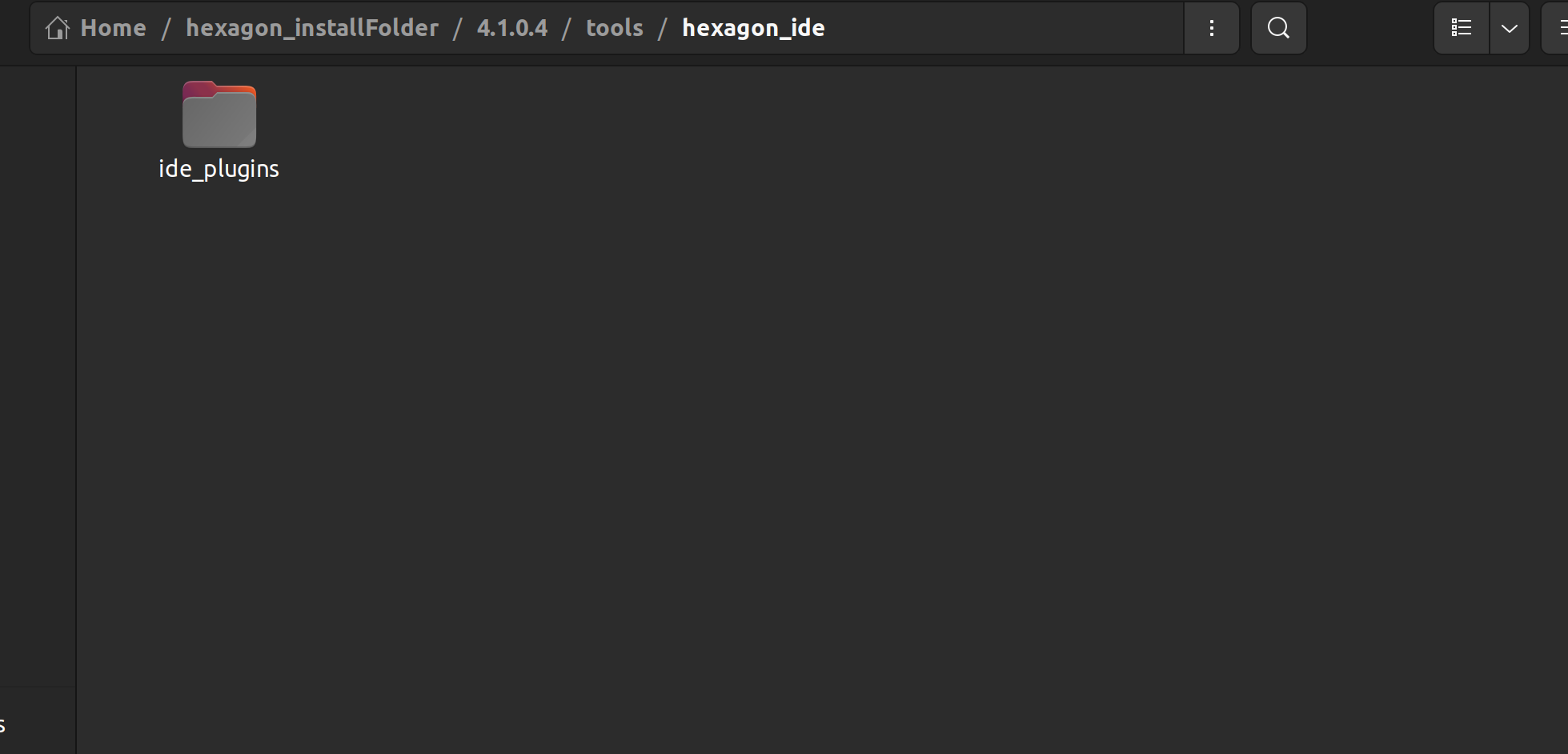
Error: /usr/local/workspace/px4-firmware/build/modalai_voxl2-slpi_default is not a directorydirectory missing. Indeed, during the build it creates /usr/local/workspace/px4-firmware/build/modalai_voxl2_default directory. Is that a bug or is it also because of the sdk installation issues?PS: Some screenshots of my hexagonsdk directory with alleged java executable:
-
@Eric-Katzfey thank you for bearing with me, I have moved on to building the project, but running into some issues related to Hexagon SDK.
root@7508b7b53f9a:/usr/local/workspace# ./build.sh
*** Starting build ***

Setting up the Hexagon SDK environment locally
HEXAGON_SDK_ROOT is : /home/4.1.0.4
Setting up the QAIC binary for the platform
make: Entering directory '/home/4.1.0.4/ipc/fastrpc/qaic'
make: 'bin/qaic' is up to date.
make: Leaving directory '/home/4.1.0.4/ipc/fastrpc/qaic'
Could not find Androd ndk at /home/4.1.0.4/tools/android-ndk-r19c

Please refer to /home/4.1.0.4/docs/tools/setup.html for installing the missed components

*** Starting dependencies build ***
-- The C compiler identification is GNU 7.5.0
-- The CXX compiler identification is GNU 9.4.0
-- Check for working C compiler: /home/4.1.0.4/tools/linaro64/bin/aarch64-linux-gnu-gcc
-- Check for working C compiler: /home/4.1.0.4/tools/linaro64/bin/aarch64-linux-gnu-gcc -- works
-- Detecting C compiler ABI info
-- Detecting C compiler ABI info - done
-- Detecting C compile features
-- Detecting C compile features - done
-- Check for working CXX compiler: /usr/bin/c++
-- Check for working CXX compiler: /usr/bin/c++ -- works
-- Detecting CXX compiler ABI info
-- Detecting CXX compiler ABI info - done
-- Detecting CXX compile features
-- Detecting CXX compile features - done
-- Configuring done
-- Generating done
-- Build files have been written to: /usr/local/workspace/px4-firmware/boards/modalai/voxl2/libfc-sensor-api/build
Scanning dependencies of target fc_sensor
[ 50%] Building C object CMakeFiles/fc_sensor.dir/src/fc_sensor_stub.c.o
[100%] Linking C shared library libfc_sensor.so
[100%] Built target fc_sensor
*** End of dependencies build ***
*** Starting apps processor build ***
-- PX4 version: v1.14.0-2.0.94-dev (1.14.0)
-- Found PythonInterp: /usr/bin/python3 (found suitable version "3.8.10", minimum required is "3")
-- PX4 config file: /usr/local/workspace/px4-firmware/boards/modalai/voxl2/default.px4board
-- PLATFORM posix
-- LINUX_TARGET y
-- TOOLCHAIN aarch64-linux-gnu
-- ROMFSROOT px4fmu_common
-- ROOTFSDIR /data/px4
-- PX4 config: modalai_voxl2_default
-- PX4 platform: posix
-- PX4 lockstep: disabled
-- The CXX compiler identification is GNU 7.5.0
-- The C compiler identification is GNU 7.5.0
-- The ASM compiler identification is GNU
-- Found assembler: /home/4.1.0.4/tools/linaro64/bin/aarch64-linux-gnu-gcc
-- Check for working CXX compiler: /home/4.1.0.4/tools/linaro64/bin/aarch64-linux-gnu-g++
-- Check for working CXX compiler: /home/4.1.0.4/tools/linaro64/bin/aarch64-linux-gnu-g++ -- works
-- Detecting CXX compiler ABI info
-- Detecting CXX compiler ABI info - done
-- Detecting CXX compile features
-- Detecting CXX compile features - done
-- Check for working C compiler: /home/4.1.0.4/tools/linaro64/bin/aarch64-linux-gnu-gcc
-- Check for working C compiler: /home/4.1.0.4/tools/linaro64/bin/aarch64-linux-gnu-gcc -- works
-- Detecting C compiler ABI info
-- Detecting C compiler ABI info - done
-- Detecting C compile features
-- Detecting C compile features - done
-- cmake build type: RelWithDebInfo
-- ccache enabled (export CCACHE_DISABLE=1 to disable)
-- Skipping pwm file path /usr/local/workspace/px4-firmware/src/drivers/linux_pwm_out/module.yaml for VOXL2
-- Skipping pwm file path /usr/local/workspace/px4-firmware/src/drivers/pca9685_pwm_out/module.yaml for VOXL2
-- Skipping pwm file path /usr/local/workspace/px4-firmware/src/drivers/pwm_out/module.yaml for VOXL2
-- Skipping pwm file path /usr/local/workspace/px4-firmware/src/modules/simulation/pwm_out_sim/module_hil.yaml for VOXL2
-- Skipping pwm file path /usr/local/workspace/px4-firmware/src/modules/simulation/pwm_out_sim/module_sim.yaml for VOXL2
-- ROMFS: ROMFS/px4fmu_common
Architecture:  amd64
==> CPACK_INSTALL_PREFIX = @DEB_INSTALL_PREFIX@
-- Configuring done
-- Generating done
-- Build files have been written to: /usr/local/workspace/px4-firmware/build/modalai_voxl2_default
[0/568] git submodule src/modules/microdds_client/Micro-XRCE-DDS-Client
[4/568] git submodule src/drivers/gps/devices
[8/568] git submodule src/modules/mavlink/mavlink
[68/568] Performing configure step for 'libmicroxrceddsclient_project'
-- libmicroxrceddsclient_project configure command succeeded.  See also /usr/local/workspace/px4-firmware/build/modalai_voxl2_default/src/modules/microdds_client/src/libmicroxrceddsclient_project-stamp/libmicroxrceddsclient_project-configure-*.log
[449/568] Performing build step for 'libmicroxrceddsclient_project'
-- libmicroxrceddsclient_project build command succeeded.  See also /usr/local/workspace/px4-firmware/build/modalai_voxl2_default/src/modules/microdds_client/src/libmicroxrceddsclient_project-stamp/libmicroxrceddsclient_project-build-*.log
[453/568] Performing install step for 'libmicroxrceddsclient_project'
-- libmicroxrceddsclient_project install command succeeded.  See also /usr/local/workspace/px4-firmware/build/modalai_voxl2_default/src/modules/microdds_client/src/libmicroxrceddsclient_project-stamp/libmicroxrceddsclient_project-install-*.log
[568/568] Linking CXX executable bin/px4

/* Auto Magically Generated file */
/* Do not edit! */
#pragma once

#define PX4_GIT_VERSION_STR "5e6a8c257371b6c45e55662daac5fe9fbd08040b"
#define PX4_GIT_VERSION_BINARY 0x5e6a8c257371b6c4
#define PX4_GIT_TAG_STR "v1.14.0-2.0.94-dev-dirty"
#define PX4_GIT_BRANCH_NAME ""

#define PX4_GIT_OEM_VERSION_STR  ""

#define PX4_GIT_TAG_OR_BRANCH_NAME "v1.14.0-2.0.94-dev-dirty" // special variable: git tag, release or master branch

#define MAVLINK_LIB_GIT_VERSION_STR  "3ee5382d0c96134b0e1c250d8c2d54bfed0166fa"
#define MAVLINK_LIB_GIT_VERSION_BINARY 0x3ee5382d0c96134b

#define NUTTX_GIT_VERSION_STR  "3f77354c0dc88793a47ff3b57595195ab45f7ba9"
#define NUTTX_GIT_VERSION_BINARY 0x3f77354c0dc88793
#define NUTTX_GIT_TAG_STR  "v11.0.0"
*** End of apps processor build ***
*** Starting qurt slpi build ***
-- PX4 version: v1.14.0-2.0.94-dev (1.14.0)
-- Found PythonInterp: /usr/bin/python3 (found suitable version "3.8.10", minimum required is "3")
-- PX4 config file: /usr/local/workspace/px4-firmware/boards/modalai/voxl2-slpi/default.px4board
-- PLATFORM qurt
-- TOOLCHAIN qurt
-- ROMFSROOT px4fmu_common
-- PX4 config: modalai_voxl2-slpi_default
-- PX4 platform: qurt
-- The CXX compiler identification is Clang 10.0.0
-- The C compiler identification is Clang 10.0.0
-- The ASM compiler identification is unknown
-- Found assembler: /home/4.1.0.4/tools/HEXAGON_Tools/8.4.05/Tools/bin/hexagon-clang
-- Check for working CXX compiler: /home/4.1.0.4/tools/HEXAGON_Tools/8.4.05/Tools/bin/hexagon-clang++
-- Check for working CXX compiler: /home/4.1.0.4/tools/HEXAGON_Tools/8.4.05/Tools/bin/hexagon-clang++ -- broken
CMake Error at /usr/share/cmake-3.16/Modules/CMakeTestCXXCompiler.cmake:53 (message):
  The C++ compiler

    "/home/4.1.0.4/tools/HEXAGON_Tools/8.4.05/Tools/bin/hexagon-clang++"

  is not able to compile a simple test program.

  It fails with the following output:

    Change Dir: /usr/local/workspace/px4-firmware/build/modalai_voxl2-slpi_default/CMakeFiles/CMakeTmp

    Run Build Command(s):/usr/bin/ninja cmTC_f8c54 && [1/2] Building CXX object CMakeFiles/cmTC_f8c54.dir/testCXXCompiler.cxx.o
    [2/2] Linking CXX executable cmTC_f8c54
    FAILED: cmTC_f8c54
    : && /home/4.1.0.4/tools/HEXAGON_Tools/8.4.05/Tools/bin/hexagon-clang++  -Wno-inconsistent-missing-override -DCONFIG_WCHAR_BUILTIN -D__CUSTOM_FILE_IO__ -mv66 -G0 -O3   -Wno-inconsistent-missing-override -DCONFIG_WCHAR_BUILTIN -D__CUSTOM_FILE_IO__ -mv66 -G0 -O3  -Wno-inconsistent-missing-override -DCONFIG_WCHAR_BUILTIN -D__CUSTOM_FILE_IO__ -mv66 -G0 -O3 -Wno-inconsistent-missing-override -DCONFIG_WCHAR_BUILTIN -D__CUSTOM_FILE_IO__ -mv66 -G0 -O3  -mv66 -mG0lib -G0 -fpic -shared -Wl,-Bsymbolic -Wl,--wrap=malloc -Wl,--wrap=calloc -Wl,--wrap=free -Wl,--wrap=realloc -Wl,--wrap=memalign -Wl,--wrap=__stack_chk_fail -Wl,/home/4.1.0.4/tools/HEXAGON_Tools/8.4.05/Tools/target/hexagon/lib/v66/G0/pic/libc++.a -lc -mv66 -mG0lib -G0 -fpic -shared -Wl,-Bsymbolic -Wl,--wrap=malloc -Wl,--wrap=calloc -Wl,--wrap=free -Wl,--wrap=realloc -Wl,--wrap=memalign -Wl,--wrap=__stack_chk_fail -Wl,/home/4.1.0.4/tools/HEXAGON_Tools/8.4.05/Tools/target/hexagon/lib/v66/G0/pic/libc++.a -lc CMakeFiles/cmTC_f8c54.dir/testCXXCompiler.cxx.o  -o cmTC_f8c54   && :
    hexagon-clang++: error: unable to execute command: Executable "hexagon-link" doesn't exist!
    hexagon-clang++: error: hexagon-link command failed with exit code 1 (use -v to see invocation)
    ninja: build stopped: subcommand failed.


  CMake will not be able to correctly generate this project.
Call Stack (most recent call first):
  CMakeLists.txt:219 (project)


-- Configuring incomplete, errors occurred!
See also "/usr/local/workspace/px4-firmware/build/modalai_voxl2-slpi_default/CMakeFiles/CMakeOutput.log".
See also "/usr/local/workspace/px4-firmware/build/modalai_voxl2-slpi_default/CMakeFiles/CMakeError.log".
Error: /usr/local/workspace/px4-firmware/build/modalai_voxl2-slpi_default is not a directory
make: *** [Makefile:232: modalai_voxl2-slpi] Error 1
cat: build/modalai_voxl2-slpi_default/src/lib/version/build_git_version.h: No such file or directory
*** End of qurt slpi build ***
/usr/local/workspace
User ID is 1000
Group ID is 1000
*** End of build ***
When downloading I have selected the androidNDK.
I then noticed that Hexagon sdk has the ability to download missing components. I tried using instructions provided in
/home/4.1.0.4/docs/tools/setup.htmlto download missing components. To be specific, I tried this command:$HEXAGON_SDK_ROOT/tools/hexagon_ide/jre/bin/java -jar $HEXAGON_SDK_ROOT/utils/scripts/depDl.jar -c <key> -t $HEXAGON_SDK_ROOTwith the <key> = fullndk. This failed.
When i tried checking out the directory of the java executable being called - the executable was not there. I wonder if this is a problem that occurred because of the installation issue. If you have dealt with missing necessary androidNDK during build, your advice on how to mitigate the issue would be highly appreciated.
Also, there seem to be an
Error: /usr/local/workspace/px4-firmware/build/modalai_voxl2-slpi_default is not a directorydirectory missing. Indeed, during the build it creates /usr/local/workspace/px4-firmware/build/modalai_voxl2_default directory. Is that a bug or is it also because of the sdk installation issues?PS: Some screenshots of my hexagonsdk directory with alleged java executable:
@garret an update from me, I was able to get android NDK, but the slpi build keeps failing due to the following:
*** Starting qurt slpi build ***
-- PX4 version: v1.14.0-2.0.94-dev (1.14.0)
-- Found PythonInterp: /usr/bin/python3 (found suitable version "3.8.10", minimum required is "3")
-- PX4 config file: /usr/local/workspace/px4-firmware/boards/modalai/voxl2-slpi/default.px4board
-- PLATFORM qurt
-- TOOLCHAIN qurt
-- ROMFSROOT px4fmu_common
-- PX4 config: modalai_voxl2-slpi_default
-- PX4 platform: qurt
-- The CXX compiler identification is Clang 10.0.0
-- The C compiler identification is Clang 10.0.0
-- The ASM compiler identification is unknown
-- Found assembler: /home/4.1.0.4/tools/HEXAGON_Tools/8.4.05/Tools/bin/hexagon-clang
-- Check for working CXX compiler: /home/4.1.0.4/tools/HEXAGON_Tools/8.4.05/Tools/bin/hexagon-clang++
-- Check for working CXX compiler: /home/4.1.0.4/tools/HEXAGON_Tools/8.4.05/Tools/bin/hexagon-clang++ -- broken
CMake Error at /usr/share/cmake-3.16/Modules/CMakeTestCXXCompiler.cmake:53 (message):
  The C++ compiler

    "/home/4.1.0.4/tools/HEXAGON_Tools/8.4.05/Tools/bin/hexagon-clang++"

  is not able to compile a simple test program.

  It fails with the following output:

    Change Dir: /usr/local/workspace/px4-firmware/build/modalai_voxl2-slpi_default/CMakeFiles/CMakeTmp

    Run Build Command(s):/usr/bin/ninja cmTC_d49a0 && [1/2] Building CXX object CMakeFiles/cmTC_d49a0.dir/testCXXCompiler.cxx.o
    [2/2] Linking CXX executable cmTC_d49a0
    FAILED: cmTC_d49a0
    : && /home/4.1.0.4/tools/HEXAGON_Tools/8.4.05/Tools/bin/hexagon-clang++  -Wno-inconsistent-missing-override -DCONFIG_WCHAR_BUILTIN -D__CUSTOM_FILE_IO__ -mv66 -G0 -O3   -Wno-inconsistent-missing-override -DCONFIG_WCHAR_BUILTIN -D__CUSTOM_FILE_IO__ -mv66 -G0 -O3  -Wno-inconsistent-missing-override -DCONFIG_WCHAR_BUILTIN -D__CUSTOM_FILE_IO__ -mv66 -G0 -O3 -Wno-inconsistent-missing-override -DCONFIG_WCHAR_BUILTIN -D__CUSTOM_FILE_IO__ -mv66 -G0 -O3  -mv66 -mG0lib -G0 -fpic -shared -Wl,-Bsymbolic -Wl,--wrap=malloc -Wl,--wrap=calloc -Wl,--wrap=free -Wl,--wrap=realloc -Wl,--wrap=memalign -Wl,--wrap=__stack_chk_fail -Wl,/home/4.1.0.4/tools/HEXAGON_Tools/8.4.05/Tools/target/hexagon/lib/v66/G0/pic/libc++.a -lc -mv66 -mG0lib -G0 -fpic -shared -Wl,-Bsymbolic -Wl,--wrap=malloc -Wl,--wrap=calloc -Wl,--wrap=free -Wl,--wrap=realloc -Wl,--wrap=memalign -Wl,--wrap=__stack_chk_fail -Wl,/home/4.1.0.4/tools/HEXAGON_Tools/8.4.05/Tools/target/hexagon/lib/v66/G0/pic/libc++.a -lc CMakeFiles/cmTC_d49a0.dir/testCXXCompiler.cxx.o  -o cmTC_d49a0   && :
    hexagon-clang++: error: unable to execute command: Executable "hexagon-link" doesn't exist!
    hexagon-clang++: error: hexagon-link command failed with exit code 1 (use -v to see invocation)
    ninja: build stopped: subcommand failed.


  CMake will not be able to correctly generate this project.
Call Stack (most recent call first):
  CMakeLists.txt:219 (project)


-- Configuring incomplete, errors occurred!
See also "/usr/local/workspace/px4-firmware/build/modalai_voxl2-slpi_default/CMakeFiles/CMakeOutput.log".
See also "/usr/local/workspace/px4-firmware/build/modalai_voxl2-slpi_default/CMakeFiles/CMakeError.log".
Error: /usr/local/workspace/px4-firmware/build/modalai_voxl2-slpi_default is not a directory
make: *** [Makefile:232: modalai_voxl2-slpi] Error 1
cat: build/modalai_voxl2-slpi_default/src/lib/version/build_git_version.h: No such file or directory
*** End of qurt slpi build ***
/usr/local/workspace
User ID is 1000
Group ID is 1000
*** End of build ***
not sure why, because
hexagon-linkis in the same place ashexagon-clang++, so it should be able to find it as far as I understand.Any help would be appreciated
-
@garret an update from me, I was able to get android NDK, but the slpi build keeps failing due to the following:
*** Starting qurt slpi build ***
-- PX4 version: v1.14.0-2.0.94-dev (1.14.0)
-- Found PythonInterp: /usr/bin/python3 (found suitable version "3.8.10", minimum required is "3")
-- PX4 config file: /usr/local/workspace/px4-firmware/boards/modalai/voxl2-slpi/default.px4board
-- PLATFORM qurt
-- TOOLCHAIN qurt
-- ROMFSROOT px4fmu_common
-- PX4 config: modalai_voxl2-slpi_default
-- PX4 platform: qurt
-- The CXX compiler identification is Clang 10.0.0
-- The C compiler identification is Clang 10.0.0
-- The ASM compiler identification is unknown
-- Found assembler: /home/4.1.0.4/tools/HEXAGON_Tools/8.4.05/Tools/bin/hexagon-clang
-- Check for working CXX compiler: /home/4.1.0.4/tools/HEXAGON_Tools/8.4.05/Tools/bin/hexagon-clang++
-- Check for working CXX compiler: /home/4.1.0.4/tools/HEXAGON_Tools/8.4.05/Tools/bin/hexagon-clang++ -- broken
CMake Error at /usr/share/cmake-3.16/Modules/CMakeTestCXXCompiler.cmake:53 (message):
  The C++ compiler

    "/home/4.1.0.4/tools/HEXAGON_Tools/8.4.05/Tools/bin/hexagon-clang++"

  is not able to compile a simple test program.

  It fails with the following output:

    Change Dir: /usr/local/workspace/px4-firmware/build/modalai_voxl2-slpi_default/CMakeFiles/CMakeTmp

    Run Build Command(s):/usr/bin/ninja cmTC_d49a0 && [1/2] Building CXX object CMakeFiles/cmTC_d49a0.dir/testCXXCompiler.cxx.o
    [2/2] Linking CXX executable cmTC_d49a0
    FAILED: cmTC_d49a0
    : && /home/4.1.0.4/tools/HEXAGON_Tools/8.4.05/Tools/bin/hexagon-clang++  -Wno-inconsistent-missing-override -DCONFIG_WCHAR_BUILTIN -D__CUSTOM_FILE_IO__ -mv66 -G0 -O3   -Wno-inconsistent-missing-override -DCONFIG_WCHAR_BUILTIN -D__CUSTOM_FILE_IO__ -mv66 -G0 -O3  -Wno-inconsistent-missing-override -DCONFIG_WCHAR_BUILTIN -D__CUSTOM_FILE_IO__ -mv66 -G0 -O3 -Wno-inconsistent-missing-override -DCONFIG_WCHAR_BUILTIN -D__CUSTOM_FILE_IO__ -mv66 -G0 -O3  -mv66 -mG0lib -G0 -fpic -shared -Wl,-Bsymbolic -Wl,--wrap=malloc -Wl,--wrap=calloc -Wl,--wrap=free -Wl,--wrap=realloc -Wl,--wrap=memalign -Wl,--wrap=__stack_chk_fail -Wl,/home/4.1.0.4/tools/HEXAGON_Tools/8.4.05/Tools/target/hexagon/lib/v66/G0/pic/libc++.a -lc -mv66 -mG0lib -G0 -fpic -shared -Wl,-Bsymbolic -Wl,--wrap=malloc -Wl,--wrap=calloc -Wl,--wrap=free -Wl,--wrap=realloc -Wl,--wrap=memalign -Wl,--wrap=__stack_chk_fail -Wl,/home/4.1.0.4/tools/HEXAGON_Tools/8.4.05/Tools/target/hexagon/lib/v66/G0/pic/libc++.a -lc CMakeFiles/cmTC_d49a0.dir/testCXXCompiler.cxx.o  -o cmTC_d49a0   && :
    hexagon-clang++: error: unable to execute command: Executable "hexagon-link" doesn't exist!
    hexagon-clang++: error: hexagon-link command failed with exit code 1 (use -v to see invocation)
    ninja: build stopped: subcommand failed.


  CMake will not be able to correctly generate this project.
Call Stack (most recent call first):
  CMakeLists.txt:219 (project)


-- Configuring incomplete, errors occurred!
See also "/usr/local/workspace/px4-firmware/build/modalai_voxl2-slpi_default/CMakeFiles/CMakeOutput.log".
See also "/usr/local/workspace/px4-firmware/build/modalai_voxl2-slpi_default/CMakeFiles/CMakeError.log".
Error: /usr/local/workspace/px4-firmware/build/modalai_voxl2-slpi_default is not a directory
make: *** [Makefile:232: modalai_voxl2-slpi] Error 1
cat: build/modalai_voxl2-slpi_default/src/lib/version/build_git_version.h: No such file or directory
*** End of qurt slpi build ***
/usr/local/workspace
User ID is 1000
Group ID is 1000
*** End of build ***
not sure why, because
hexagon-linkis in the same place ashexagon-clang++, so it should be able to find it as far as I understand.Any help would be appreciated
@garret I have not seen these errors before. You shouldn't have needed the separate step of getting the Android NDK. I notice that you are preparing this on Ubuntu 22.04. The instructions state that it is only supported on Ubuntu 20.04.
-
@garret I have not seen these errors before. You shouldn't have needed the separate step of getting the Android NDK. I notice that you are preparing this on Ubuntu 22.04. The instructions state that it is only supported on Ubuntu 20.04.
@Eric-Katzfey i thought this meant that the firmware building environment running inside the container would be running Ubuntu 20.04. Since docker CE instructions from here: https://docs.docker.com/install/linux/docker-ce/ubuntu/ mention needing at least ubuntu 22.04, I was working on machine with that version.
Am I supposed to follow these instructions(https://gitlab.com/voxl-public/rb5-flight/rb5-flight-px4-build-docker/-/tree/master?ref_type=heads) on a host machine with Ubuntu 20.04, or inside the voxl-cross container? Very lost on this one so would appreciate a more detailed overview of the building process.
My exact steps so far:
-
completed the voxl development bootcamps from here: https://docs.modalai.com/voxl-developer-bootcamp/. Got voxl-docker and voxl-cross
-
downloaded hexagon sdk and followed the instructions from here on my host machine running Ubuntu 22.04: https://gitlab.com/voxl-public/rb5-flight/rb5-flight-px4-build-docker/-/tree/master?ref_type=heads. Had installation errors here, as described in this comment from above
"@garret said in VOXL2 HITL Sim with Gazebo in Docker - VTOL frame support:" -
next, based on this commend from the post above:
@Eric-Katzfey said in VOXL2 HITL Sim with Gazebo in Docker - VTOL frame support:
As long as you see it has extracted all of the files that should be all that you need.
I ignored installation issues and just "Tared up" the SDK. I put resulting tar file in the same directory as the base docker image.
- next, from my machine I used /.build.sh to build rb5-flight-px4-build-docker image
- next, used ./run-docker.sh to access inside of the rb5-flight-px4-build-docker image
- did the ./clean.sh and then ./build.sh from inside the rb5-flight-px4-build-docker, which resulted in the errors described in the previous 2 posts
-
-
G garret referenced this topic on
-
@Eric-Katzfey i thought this meant that the firmware building environment running inside the container would be running Ubuntu 20.04. Since docker CE instructions from here: https://docs.docker.com/install/linux/docker-ce/ubuntu/ mention needing at least ubuntu 22.04, I was working on machine with that version.
Am I supposed to follow these instructions(https://gitlab.com/voxl-public/rb5-flight/rb5-flight-px4-build-docker/-/tree/master?ref_type=heads) on a host machine with Ubuntu 20.04, or inside the voxl-cross container? Very lost on this one so would appreciate a more detailed overview of the building process.
My exact steps so far:
-
completed the voxl development bootcamps from here: https://docs.modalai.com/voxl-developer-bootcamp/. Got voxl-docker and voxl-cross
-
downloaded hexagon sdk and followed the instructions from here on my host machine running Ubuntu 22.04: https://gitlab.com/voxl-public/rb5-flight/rb5-flight-px4-build-docker/-/tree/master?ref_type=heads. Had installation errors here, as described in this comment from above
"@garret said in VOXL2 HITL Sim with Gazebo in Docker - VTOL frame support:" -
next, based on this commend from the post above:
@Eric-Katzfey said in VOXL2 HITL Sim with Gazebo in Docker - VTOL frame support:
As long as you see it has extracted all of the files that should be all that you need.
I ignored installation issues and just "Tared up" the SDK. I put resulting tar file in the same directory as the base docker image.
- next, from my machine I used /.build.sh to build rb5-flight-px4-build-docker image
- next, used ./run-docker.sh to access inside of the rb5-flight-px4-build-docker image
- did the ./clean.sh and then ./build.sh from inside the rb5-flight-px4-build-docker, which resulted in the errors described in the previous 2 posts
@garret figured it out, it was a permissions issue in the image, see:
https://forum.modalai.com/topic/4160/unable-to-build-px4-using-rb5-flight-px4-build-docker?_=1751391805229 -
-
@garret figured it out, it was a permissions issue in the image, see:
https://forum.modalai.com/topic/4160/unable-to-build-px4-using-rb5-flight-px4-build-docker?_=1751391805229@garret Oh, nice! Glad it's working now!

Reading along? Create a free ModalAI Forum account to join in.
With an account you can reply, ask your own question, get an email when a ModalAI engineer answers, and mark the reply that solved it. Your place in each thread is saved between visits.
Questions about VOXL, Flight Core, ESCs and ModalAI drones are answered here by the engineers who build them.
Register Login