
Connecting Motion Capture Data to VOXL (No Postion Estimate)
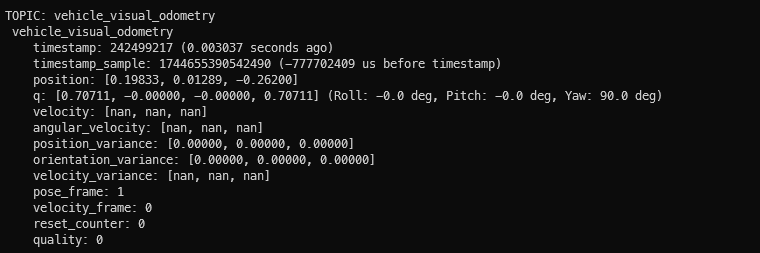
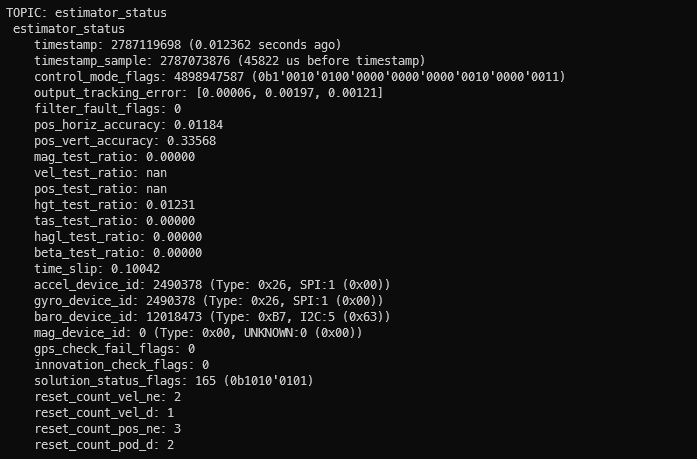
-
@Eric-Katzfey I don't think that there's anything that should be interfering with MAVROS, though I'm not familiar enough with the VOXL services to know if there's one I need to be worried about. I've attached a screen capture of "voxl-inspect-services" along with the voxl-vision-hub.conf, voxl-px4.conf, voxl-mavlink-server.conf files in case you spot anything that's amiss with them.
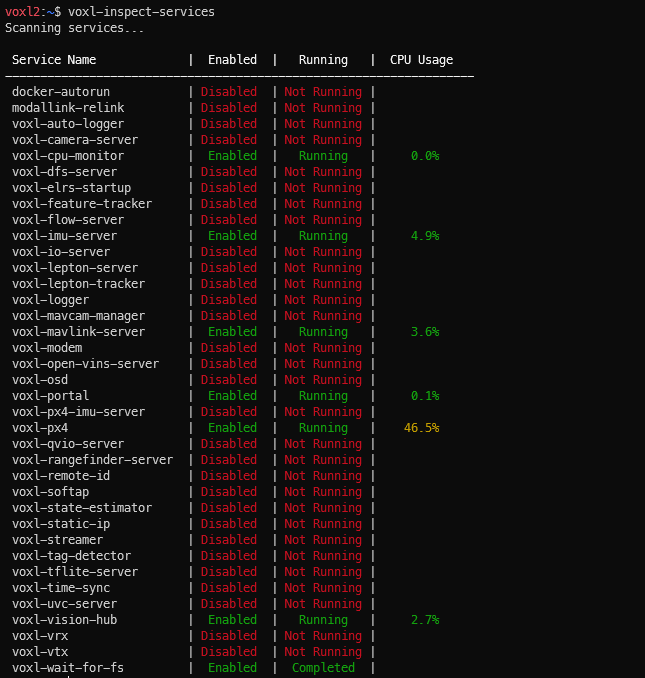
voxl-vision-hub.conf:
{
	"config_file_version":	1,
	"en_localhost_mavlink_udp":	true,
	"localhost_udp_port_number":	14551,
	"en_vio":	false,
	"vio_pipe":	"qvio",
	"secondary_vio_pipe":	"ov",
	"vfc_vio_pipe":	"ov",
	"en_reset_vio_if_initialized_inverted":	true,
	"vio_warmup_s":	3,
	"send_odom_while_failed":	true,
	"horizon_cal_tolerance":	0.5,
	"en_hitl":	false,
	"offboard_mode":	"off",
	"follow_tag_id":	0,
	"figure_eight_move_home":	true,
	"robot_radius":	0.300000011920929,
	"collision_sampling_dt":	0.1,
	"max_lookahead_distance":	1,
	"backtrack_seconds":	60,
	"backtrack_rc_chan":	8,
	"backtrack_rc_thresh":	1500,
	"wps_move_home":	true,
	"wps_stride":	0,
	"wps_timeout":	0,
	"wps_damp":	1,
	"en_tag_fixed_frame":	false,
	"fixed_frame_filter_len":	5,
	"en_transform_mavlink_pos_setpoints_from_fixed_frame":	false,
	"vfc_rate":	100,
	"vfc_rc_chan_min":	980,
	"vfc_rc_chan_max":	2020,
	"vfc_thrust_ch":	3,
	"vfc_roll_ch":	1,
	"vfc_pitch_ch":	2,
	"vfc_yaw_ch":	4,
	"vfc_submode_ch":	6,
	"vfc_alt_mode_rc_min":	0,
	"vfc_alt_mode_rc_max":	0,
	"vfc_flow_mode_rc_min":	0,
	"vfc_flow_mode_rc_max":	0,
	"vfc_hybrid_flow_mode_rc_min":	0,
	"vfc_hybrid_flow_mode_rc_max":	0,
	"vfc_position_mode_rc_min":	0,
	"vfc_position_mode_rc_max":	2100,
	"vfc_traj_mode_rc_min":	0,
	"vfc_traj_mode_rc_max":	0,
	"vfc_yaw_deadband":	30,
	"vfc_vxy_deadband":	50,
	"vfc_vz_deadband":	150,
	"vfc_min_thrust":	0,
	"vfc_max_thrust":	0.800000011920929,
	"vfc_tilt_max":	0.43599998950958252,
	"vfc_yaw_rate_max":	3,
	"vfc_thrust_hover":	0.5,
	"vfc_vz_max":	1,
	"vfc_kp_z":	5.2899999618530273,
	"vfc_kd_z":	5.9800000190734863,
	"vfc_vxy_max":	3,
	"vfc_kp_xy":	0.63999998569488525,
	"vfc_kd_xy":	2.559999942779541,
	"vfc_kp_z_vio":	5.2899999618530273,
	"vfc_kd_z_vio":	5.9800000190734863,
	"vfc_kp_xy_vio":	3.2400000095367432,
	"vfc_kd_xy_vio":	3.9600000381469727,
	"vfc_w_filt_xy_vio":	10,
	"vfc_vel_ff_factor_vio":	0.899999976158142,
	"vfc_xy_acc_limit_vio":	2.5,
	"vfc_max_z_delta":	3,
	"vfc_att_transition_time":	0.5,
	"vfc_stick_move_threshold":	30,
	"vfc_flow_transition_time":	1,
	"vfc_q_min":	10,
	"vfc_points_min":	7,
	"vfc_en_submode_announcement":	1,
	"vfc_disable_fallback":	false,
	"vfc_traj_csv":	"/data/voxl-vision-hub/traj.csv",
	"en_voa":	true,
	"voa_upper_bound_m":	-0.15000000596046448,
	"voa_lower_bound_m":	0.15000000596046448,
	"voa_voa_memory_s":	1,
	"voa_max_pc_per_fusion":	100,
	"voa_pie_max_dist_m":	20,
	"voa_pie_min_dist_m":	0.25,
	"voa_pie_under_trim_m":	1,
	"voa_pie_threshold":	3,
	"voa_send_rate_hz":	20,
	"voa_pie_slices":	36,
	"voa_pie_bin_depth_m":	0.15000000596046448,
	"voa_inputs":	[{
			"enabled":	true,
			"type":	"point_cloud",
			"input_pipe":	"dfs_point_cloud",
			"frame":	"stereo_l",
			"max_depth":	8,
			"min_depth":	0.300000011920929,
			"cell_size":	0.079999998211860657,
			"threshold":	4,
			"x_fov_deg":	68,
			"y_fov_deg":	56,
			"conf_cutoff":	0
		}, {
			"enabled":	true,
			"type":	"point_cloud",
			"input_pipe":	"stereo_front_pc",
			"frame":	"stereo_front_l",
			"max_depth":	8,
			"min_depth":	0.300000011920929,
			"cell_size":	0.079999998211860657,
			"threshold":	4,
			"x_fov_deg":	68,
			"y_fov_deg":	56,
			"conf_cutoff":	0
		}, {
			"enabled":	true,
			"type":	"point_cloud",
			"input_pipe":	"stereo_rear_pc",
			"frame":	"stereo_rear_l",
			"max_depth":	8,
			"min_depth":	0.300000011920929,
			"cell_size":	0.079999998211860657,
			"threshold":	4,
			"x_fov_deg":	68,
			"y_fov_deg":	56,
			"conf_cutoff":	0
		}, {
			"enabled":	true,
			"type":	"tof",
			"input_pipe":	"tof",
			"frame":	"tof",
			"max_depth":	6,
			"min_depth":	0.15000000596046448,
			"cell_size":	0.079999998211860657,
			"threshold":	3,
			"x_fov_deg":	106.5,
			"y_fov_deg":	85.0999984741211,
			"conf_cutoff":	125
		}, {
			"enabled":	true,
			"type":	"rangefinder",
			"input_pipe":	"rangefinders",
			"frame":	"body",
			"max_depth":	8,
			"min_depth":	0.300000011920929,
			"cell_size":	0.079999998211860657,
			"threshold":	4,
			"x_fov_deg":	68,
			"y_fov_deg":	56,
			"conf_cutoff":	0
		}]
}
voxl-px4.conf
AIRFRAME=MULTICOPTER
GPS=NONE
RC=M0065_SBUS
ESC=VOXL2_IO_PWM_ESC
POWER_MANAGER=VOXLPM
AIRSPEED_SENSOR=NONE
DISTANCE_SENSOR=NONE
OSD=DISABLE
DAEMON_MODE=ENABLE
SENSOR_CAL=ACTUAL
ARTIFACT_MODE=DISABLE
EXTRA_STEPS=()
voxl-mavlink-server.conf
{ "primary_static_gcs_ip": "192.168.8.10", "secondary_static_gcs_ip": "192.168.8.11", "onboard_port_to_autopilot": 14556, "onboard_port_from_autopilot": 14557, "gcs_port_to_autopilot": 14558, "gcs_port_from_autopilot": 14559, "en_external_uart_ap": false, "autopilot_uart_bus": 1, "autopilot_uart_baudrate": 921600, "autopilot_mission_delay_start": -1, "autopilot_mission_delay_sound": false, "autopilot_mission_notif_dur": 0.1, "en_external_ap_timesync": 1, "en_external_ap_heartbeat": 1, "udp_mtu": 0, "gcs_timeout_s": 4.5 }@Andrew-Jue I think there are a couple of issues. One is the timestamp issue. You can see here that px4 tries to align the timestamps with timesync information: https://github.com/modalai/px4-firmware/blob/2bbaa6875fedff9c9bc8282a35c4cbb5612046ea/src/modules/mavlink/mavlink_receiver.cpp#L1251. The next issue is that ekf2 doesn't deal with the mocap odometry directly, it relies on the local position estimator module to process that and that module is not included in our build.
-
@Andrew-Jue I think there are a couple of issues. One is the timestamp issue. You can see here that px4 tries to align the timestamps with timesync information: https://github.com/modalai/px4-firmware/blob/2bbaa6875fedff9c9bc8282a35c4cbb5612046ea/src/modules/mavlink/mavlink_receiver.cpp#L1251. The next issue is that ekf2 doesn't deal with the mocap odometry directly, it relies on the local position estimator module to process that and that module is not included in our build.
@Eric-Katzfey So I see that the firmware is supposed to apply the estimated offset to the timestamp to make sure that the timestamps align. Is there a way to change or correct the timesync system if it isn't correct (as seems to be the case here)? Or at least check the timesync status?
And regarding the mocap position estimate, is the local position estimator module you are referring to this LPE estimator referred to in the PX4 documentation or is it a different module specifically for EKF2? I'm just trying to get an understanding of what is going on, especially since it seems like in the documentation from PX4, there's a choice to either use the LPE or EKF2 with slightly different parameters and workflows for each.
Regardless, what method would you recommend for getting mocap position data sent to PX4? Is there a service in VOXL that we could try to route the position data through from ROS that would work better?
-
@Eric-Katzfey So I see that the firmware is supposed to apply the estimated offset to the timestamp to make sure that the timestamps align. Is there a way to change or correct the timesync system if it isn't correct (as seems to be the case here)? Or at least check the timesync status?
And regarding the mocap position estimate, is the local position estimator module you are referring to this LPE estimator referred to in the PX4 documentation or is it a different module specifically for EKF2? I'm just trying to get an understanding of what is going on, especially since it seems like in the documentation from PX4, there's a choice to either use the LPE or EKF2 with slightly different parameters and workflows for each.
Regardless, what method would you recommend for getting mocap position data sent to PX4? Is there a service in VOXL that we could try to route the position data through from ROS that would work better?
@Andrew-Jue Unfortunately, we have never tried anything with a mocap system. I was just tracing through the code to try to see what kind of issues there might be. You can see how our voxl-mavlink-server application handles the timesync protocol here: https://gitlab.com/voxl-public/voxl-sdk/services/voxl-mavlink-server/-/blob/master/src/mavlink_services.c?ref_type=heads#L48
-
@Andrew-Jue Unfortunately, we have never tried anything with a mocap system. I was just tracing through the code to try to see what kind of issues there might be. You can see how our voxl-mavlink-server application handles the timesync protocol here: https://gitlab.com/voxl-public/voxl-sdk/services/voxl-mavlink-server/-/blob/master/src/mavlink_services.c?ref_type=heads#L48
@Eric-Katzfey I did some more troubleshooting on my own, and I think I've tracked the problem down to voxl-mavlink-server. If I disable voxl-mavlink-server using "systemctl stop voxl-mavlink-server" and start mavros pointing to the UDP ports that voxl-mavlink-server connects to (14556/14557), then I get properly timestamped messages. Looking at the estimator status (px4-listener estimator_status), EKF2 is happily accepting the mocap data.
Running voxl-mavlink-server directly in the terminal with the "-t" parameter to debug timesync protocol handling, it seems like voxl-mavlink-server is intercepting the timesync messages that mavros is trying to send to PX4. This results in MAVROS not being able to estimate the offset to the PX4 clock and stamp it's messages correctly.
I've tried running voxl-vision-hub and voxl-mavlink-server directly in terminal with debug print statements to see what is going on, and it seems like there's an issue with the timesync requests coming from the onboard pipe as opposed to the autopilot. I've attached some samples below:
Standard Timesync request from autopilot
from APob  ID: 111
to APob    ID: 111
timesync: now-ts1 =-2360.9ms
to APob    ID: 111
sending our own ts request at 8420226379035
from APob  ID: 111
ap ms ahead of voxl:     2361.1ms
Timesync request from MAVROS
onboard  pipe  ID: 111 compid: 240
to APob    ID: 111
from APob  ID: 111
unknown timesync request ts1 = 1744850282998741263 tc1 = 8422617042000 last_voxl_time_sent = 8420226379035
There's no final response sending the timesync message (ID:111) back through the onboard pipe to MAVROS.
Looking at voxl-vision-hub and filtering out for just timesync messages
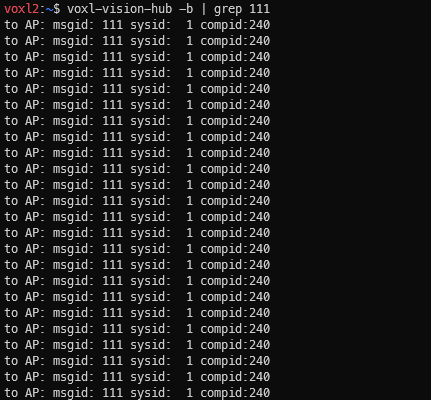
There's only messages to the autopilot, but none coming back. I think that's why our MAVROS timestamps are off; it is not syncing with PX4 correctly.Can you help me figure out how to get the MAVROS timesync requests sent properly so that MAVROS receives the server-side response?
-
@Eric-Katzfey I did some more troubleshooting on my own, and I think I've tracked the problem down to voxl-mavlink-server. If I disable voxl-mavlink-server using "systemctl stop voxl-mavlink-server" and start mavros pointing to the UDP ports that voxl-mavlink-server connects to (14556/14557), then I get properly timestamped messages. Looking at the estimator status (px4-listener estimator_status), EKF2 is happily accepting the mocap data.
Running voxl-mavlink-server directly in the terminal with the "-t" parameter to debug timesync protocol handling, it seems like voxl-mavlink-server is intercepting the timesync messages that mavros is trying to send to PX4. This results in MAVROS not being able to estimate the offset to the PX4 clock and stamp it's messages correctly.
I've tried running voxl-vision-hub and voxl-mavlink-server directly in terminal with debug print statements to see what is going on, and it seems like there's an issue with the timesync requests coming from the onboard pipe as opposed to the autopilot. I've attached some samples below:
Standard Timesync request from autopilot
from APob  ID: 111
to APob    ID: 111
timesync: now-ts1 =-2360.9ms
to APob    ID: 111
sending our own ts request at 8420226379035
from APob  ID: 111
ap ms ahead of voxl:     2361.1ms
Timesync request from MAVROS
onboard  pipe  ID: 111 compid: 240
to APob    ID: 111
from APob  ID: 111
unknown timesync request ts1 = 1744850282998741263 tc1 = 8422617042000 last_voxl_time_sent = 8420226379035
There's no final response sending the timesync message (ID:111) back through the onboard pipe to MAVROS.
Looking at voxl-vision-hub and filtering out for just timesync messages
There's only messages to the autopilot, but none coming back. I think that's why our MAVROS timestamps are off; it is not syncing with PX4 correctly.Can you help me figure out how to get the MAVROS timesync requests sent properly so that MAVROS receives the server-side response?
@Andrew-Jue I'll take a look. Have you seen this page? https://docs.modalai.com/mavlink/ Can you try leaving voxl-mavlink-server running and try to connect to port 14550 as a "GCS" and see if that helps?
-
@Eric-Katzfey I did some more troubleshooting on my own, and I think I've tracked the problem down to voxl-mavlink-server. If I disable voxl-mavlink-server using "systemctl stop voxl-mavlink-server" and start mavros pointing to the UDP ports that voxl-mavlink-server connects to (14556/14557), then I get properly timestamped messages. Looking at the estimator status (px4-listener estimator_status), EKF2 is happily accepting the mocap data.
Running voxl-mavlink-server directly in the terminal with the "-t" parameter to debug timesync protocol handling, it seems like voxl-mavlink-server is intercepting the timesync messages that mavros is trying to send to PX4. This results in MAVROS not being able to estimate the offset to the PX4 clock and stamp it's messages correctly.
I've tried running voxl-vision-hub and voxl-mavlink-server directly in terminal with debug print statements to see what is going on, and it seems like there's an issue with the timesync requests coming from the onboard pipe as opposed to the autopilot. I've attached some samples below:
Standard Timesync request from autopilot
from APob  ID: 111
to APob    ID: 111
timesync: now-ts1 =-2360.9ms
to APob    ID: 111
sending our own ts request at 8420226379035
from APob  ID: 111
ap ms ahead of voxl:     2361.1ms
Timesync request from MAVROS
onboard  pipe  ID: 111 compid: 240
to APob    ID: 111
from APob  ID: 111
unknown timesync request ts1 = 1744850282998741263 tc1 = 8422617042000 last_voxl_time_sent = 8420226379035
There's no final response sending the timesync message (ID:111) back through the onboard pipe to MAVROS.
Looking at voxl-vision-hub and filtering out for just timesync messages
There's only messages to the autopilot, but none coming back. I think that's why our MAVROS timestamps are off; it is not syncing with PX4 correctly.Can you help me figure out how to get the MAVROS timesync requests sent properly so that MAVROS receives the server-side response?
@Andrew-Jue Do you need voxl-vision-hub? If you aren't using VIO, obstacle detection, or offboard mode then you can disable it. And try setting en_external_ap_timesync in voxl-mavlink-server.conf to false. I think that will prevent it from intercepting those timesync messages. This is just for the onboard connection. If you use GCS connection then I think there is no intercepting of timesync messages to worry about.
-
@Andrew-Jue Do you need voxl-vision-hub? If you aren't using VIO, obstacle detection, or offboard mode then you can disable it. And try setting en_external_ap_timesync in voxl-mavlink-server.conf to false. I think that will prevent it from intercepting those timesync messages. This is just for the onboard connection. If you use GCS connection then I think there is no intercepting of timesync messages to worry about.
@Eric-Katzfey Thank you for the help! Setting en_external_ap_timesync in voxl-mavlink-server.conf to false allows the timesync messages to go through. I didn't need to disable voxl-vision-hub in order to get the timestamp messages.
For future reference, what does the should the fcu_url be to connect from the onboard (Linux side) to the PX4 through the GCS connection? Or is it possible at all? I get errors saying that the address is already in use whenever I'm trying to use port 14550 from the onboard computer. Things work fine running mavros from a different computer or by keeping voxl-vision-hub active.
-
@Eric-Katzfey Thank you for the help! Setting en_external_ap_timesync in voxl-mavlink-server.conf to false allows the timesync messages to go through. I didn't need to disable voxl-vision-hub in order to get the timestamp messages.
For future reference, what does the should the fcu_url be to connect from the onboard (Linux side) to the PX4 through the GCS connection? Or is it possible at all? I get errors saying that the address is already in use whenever I'm trying to use port 14550 from the onboard computer. Things work fine running mavros from a different computer or by keeping voxl-vision-hub active.
@Andrew-Jue You can use any port you like but you are connecting to port 14550 as a GCS. So you can''t use 14550 or else you'll get the port already in use error.
-
@Andrew-Jue You can use any port you like but you are connecting to port 14550 as a GCS. So you can''t use 14550 or else you'll get the port already in use error.
@Eric-Katzfey Okay, thanks again for all your help!
-
@Eric-Katzfey Okay, thanks again for all your help!
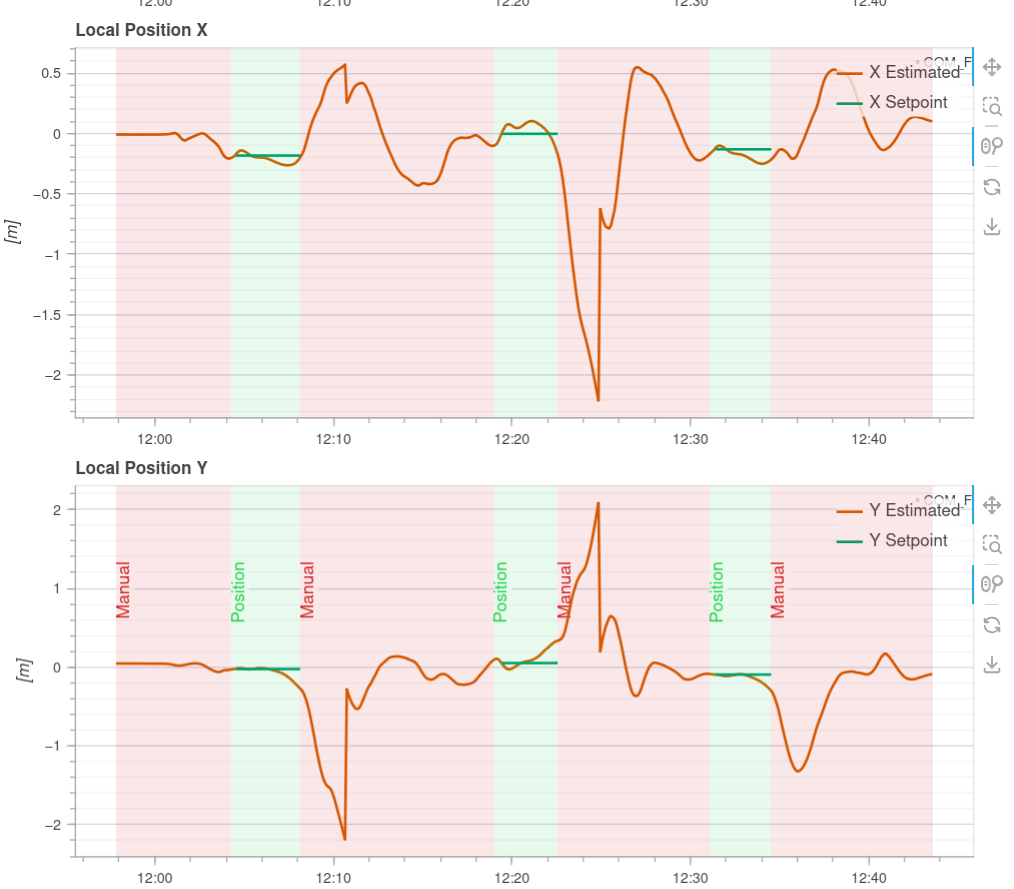
@Andrew-Jue Hi! Could you share how you managed to get your VOXL2 working with motion capture? Did you also use Starling 2 or just a VOXL2 on another platform? It looks like I ran into the same problems as you while trying to get my Starling 2 (also using VOXL2) to position hold with an Optitrack setup
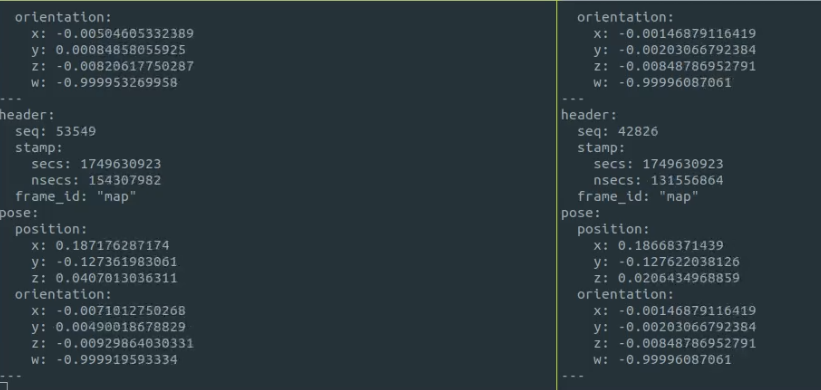
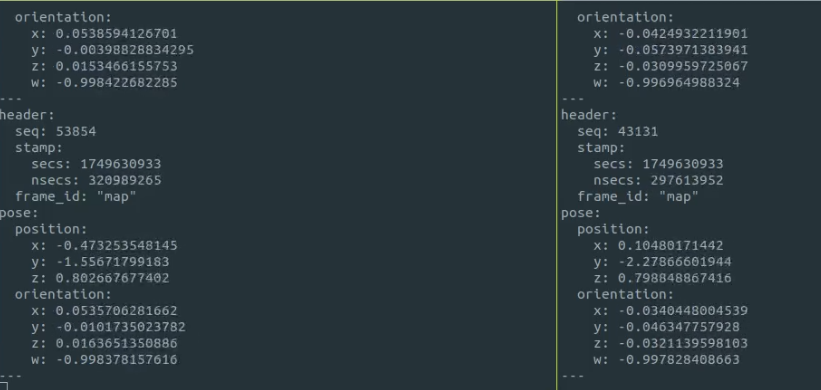
I tried following your troubleshooting steps and replicating your params exactly, and while it seems like it can be toggled into position hold, it doesn't hold its position at all. It just kinda flies off away as soon as I switch it into position hold. I did a screen recording of the outputs of /mavros/vision_pose/pose and /mavros/local_position/pose during flight and noticed that the values for these topics diverges and converges seemingly randomly
Before flight (Left: /mavros/vision_pose/pose, Right: /mavros/local_position/pose)
During pos hold (Left: /mavros/vision_pose/pose, Right: /mavros/local_position/pose)
I reviewed the flight logs and it does look like something is commanding it to move away from its position for some reason.
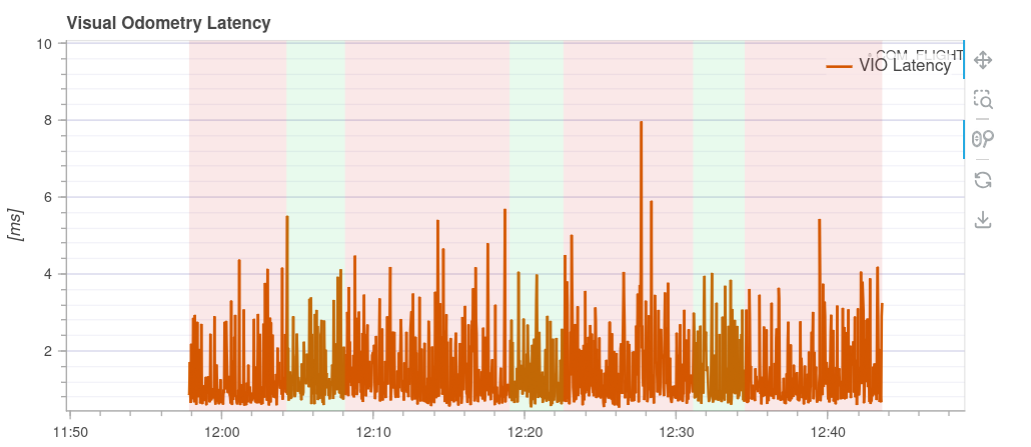
My theory is that the usb wifi on the Starling2 might be introducing some latency that is causing it to fly erratically, although the visual odometry latency seems fine (I think)
Do you have any hints as to what the problem might be?
These are the changes I made to switch the Starling 2 to receive data from the Optitrack system:
- In /etc/modalai/voxl-vision-hub.conf, changed en_vio to false
{ "config_file_version": 1, "en_localhost_mavlink_udp": true, "localhost_udp_port_number": 14551, "en_vio": false, "vio_pipe": "qvio", "secondary_vio_pipe": "ov", "vfc_vio_pipe": "ov", "en_reset_vio_if_initialized_inverted": true, "vio_warmup_s": 3, "send_odom_while_failed": true, "horizon_cal_tolerance": 0.5, "en_hitl": false, "offboard_mode": "off", "follow_tag_id": 0, "figure_eight_move_home": true, "robot_radius": 0.300000011920929, "collision_sampling_dt": 0.1, "max_lookahead_distance": 1, "backtrack_seconds": 60, "backtrack_rc_chan": 8, "backtrack_rc_thresh": 1500, "wps_move_home": true, "wps_stride": 0, "wps_timeout": 0, "wps_damp": 1, "wps_vfc_mission": true, "en_tag_fixed_frame": false, "fixed_frame_filter_len": 5, "en_transform_mavlink_pos_setpoints_from_fixed_frame": false, "vfc_rate": 100, "vfc_rc_chan_min": 980, "vfc_rc_chan_max": 2020, "vfc_thrust_ch": 3, "vfc_roll_ch": 1, "vfc_pitch_ch": 2, "vfc_yaw_ch": 4, "vfc_submode_ch": 6, "vfc_alt_mode_rc_min": 0, "vfc_alt_mode_rc_max": 0, "vfc_flow_mode_rc_min": 0, "vfc_flow_mode_rc_max": 0, "vfc_hybrid_flow_mode_rc_min": 0, "vfc_hybrid_flow_mode_rc_max": 0, "vfc_position_mode_rc_min": 0, "vfc_position_mode_rc_max": 2100, "vfc_traj_mode_rc_min": 0, "vfc_traj_mode_rc_max": 0, "vfc_yaw_deadband": 30, "vfc_vxy_deadband": 50, "vfc_vz_deadband": 150, "vfc_min_thrust": 0, "vfc_max_thrust": 0.800000011920929, "vfc_tilt_max": 0.43599998950958252, "vfc_yaw_rate_max": 3, "vfc_thrust_hover": 0.5, "vfc_vz_max": 1, "vfc_kp_z": 5.2899999618530273, "vfc_kd_z": 5.9800000190734863, "vfc_vxy_max": 3, "vfc_kp_xy": 0.63999998569488525, "vfc_kd_xy": 2.559999942779541, "vfc_kp_z_vio": 5.2899999618530273, "vfc_kd_z_vio": 5.9800000190734863, "vfc_kp_xy_vio": 3.2400000095367432, "vfc_kd_xy_vio": 3.9600000381469727, "vfc_w_filt_xy_vio": 10, "vfc_vel_ff_factor_vio": 0.899999976158142, "vfc_xy_acc_limit_vio": 2.5, "vfc_max_z_delta": 3, "vfc_att_transition_time": 0.5, "vfc_stick_move_threshold": 30, "vfc_flow_transition_time": 1, "vfc_q_min": 10, "vfc_points_min": 7, "vfc_en_submode_announcement": 1, "vfc_disable_fallback": false, "vfc_traj_csv": "/data/voxl-vision-hub/traj.csv", "en_voa": true, "voa_upper_bound_m": -0.15000000596046448, "voa_lower_bound_m": 0.15000000596046448, "voa_voa_memory_s": 1, "voa_max_pc_per_fusion": 100, "voa_pie_max_dist_m": 20, "voa_pie_min_dist_m": 0.25, "voa_pie_under_trim_m": 1, "voa_pie_threshold": 3, "voa_send_rate_hz": 20, "voa_pie_slices": 36, "voa_pie_bin_depth_m": 0.15000000596046448, "voa_inputs": [{ "enabled": true, "type": "point_cloud", "input_pipe": "dfs_point_cloud", "frame": "stereo_l", "max_depth": 8, "min_depth": 0.300000011920929, "cell_size": 0.079999998211860657, "threshold": 4, "x_fov_deg": 68, "y_fov_deg": 56, "conf_cutoff": 0 }, { "enabled": true, "type": "point_cloud", "input_pipe": "stereo_front_pc", "frame": "stereo_front_l", "max_depth": 8, "min_depth": 0.300000011920929, "cell_size": 0.079999998211860657, "threshold": 4, "x_fov_deg": 68, "y_fov_deg": 56, "conf_cutoff": 0 }, { "enabled": true, "type": "point_cloud", "input_pipe": "stereo_rear_pc", "frame": "stereo_rear_l", "max_depth": 8, "min_depth": 0.300000011920929, "cell_size": 0.079999998211860657, "threshold": 4, "x_fov_deg": 68, "y_fov_deg": 56, "conf_cutoff": 0 }, { "enabled": true, "type": "tof", "input_pipe": "tof", "frame": "tof", "max_depth": 6, "min_depth": 0.15000000596046448, "cell_size": 0.079999998211860657, "threshold": 3, "x_fov_deg": 106.5, "y_fov_deg": 85.0999984741211, "conf_cutoff": 125 }, { "enabled": true, "type": "rangefinder", "input_pipe": "rangefinders", "frame": "body", "max_depth": 8, "min_depth": 0.300000011920929, "cell_size": 0.079999998211860657, "threshold": 4, "x_fov_deg": 68, "y_fov_deg": 56, "conf_cutoff": 0 }] }- In /etc/modalai/voxl-mavlink-server.conf, changed en_external_ap_timesync to 0
{ "primary_static_gcs_ip": "192.168.8.10", "secondary_static_gcs_ip": "192.168.8.11", "onboard_port_to_autopilot": 14556, "onboard_port_from_autopilot": 14557, "gcs_port_to_autopilot": 14558, "gcs_port_from_autopilot": 14559, "en_external_uart_ap": false, "autopilot_uart_bus": 1, "autopilot_uart_baudrate": 921600, "autopilot_mission_delay_start": -1, "autopilot_mission_delay_sound": false, "autopilot_mission_notif_dur": 0.1, "en_external_ap_timesync": 0, "en_external_ap_heartbeat": 1, "udp_mtu": 0, "gcs_timeout_s": 4.5 }- In vrpn launch file, remapped vrpn_client_node to mavros/vision_pose/pose with 30Hz update frequency
- Disabled QVIO and ovins
- Changed PX4 params: EKF2_EV_CTRL to 11, EKF2_EV_QMIN to 0
voxl2:/$ px4-param show ekf2_ev* Symbols: x = used, + = saved, * = unsaved x EKF2_EVA_NOISE [292,568] : 0.1000 x EKF2_EVP_GATE [293,569] : 5.0000 x EKF2_EVP_NOISE [294,570] : 0.1000 x EKF2_EVV_GATE [295,571] : 3.0000 x EKF2_EVV_NOISE [296,572] : 0.1000 x + EKF2_EV_CTRL [297,573] : 11 x EKF2_EV_DELAY [298,574] : 0.0000 x EKF2_EV_HGT_TO [299,575] : 5000 x EKF2_EV_NOISE_MD [300,576] : 0 x EKF2_EV_POS_TO [301,577] : 1000 x EKF2_EV_POS_X [302,578] : 0.0000 x EKF2_EV_POS_Y [303,579] : 0.0000 x EKF2_EV_POS_Z [304,580] : 0.0000 x EKF2_EV_QMIN [305,581] : 0 829/2162 parameters used.- Launched mavros with ModalAI's mavros launch script


Reading along? Create a free ModalAI Forum account to join in.
With an account you can reply, ask your own question, get an email when a ModalAI engineer answers, and mark the reply that solved it. Your place in each thread is saved between visits.
Questions about VOXL, Flight Core, ESCs and ModalAI drones are answered here by the engineers who build them.
Register Login