Skip to content
  • Categories
  • Recent
  • Tags
  • Popular
  • Users
  • Groups
Collapse
Brand Logo

ModalAI Forum

  1. ModalAI Support Forum
  2. Development Drones
  3. Not connecting to QGC after flashing the Rb5

Not connecting to QGC after flashing the Rb5

Scheduled Pinned Locked Moved Unsolved Development Drones
rb5
4 Posts 2 Posters 1.3k Views 1 Watching
  • Oldest to Newest
  • Newest to Oldest
  • Most Votes
Reply
  • Reply as topic
Log in to reply
This topic has been deleted. Only users with topic management privileges can see it.
  • T Offline
    T Offline
    tahawaru
    Regular
    wrote on last edited by
    #1

    Hi,

    I have the following 5G rb5
    system-image: 1.7.1-M0052-14.1a-perf-nightly-20231025
    kernel: #1 SMP PREEMPT Thu Oct 26 05:24:02 UTC 2023 4.19.125

    hw version: M0052

    voxl-suite: 1.1.2

    current IP: wlan0: 192.168.1.37

    After flashing and setting up the IP address, I can ssh in the drone but I cannot connect to the drone to the QGC.

    The port setting is 14550.

    Any help on this?

    Best wishes,
    T 1 Reply Last reply
    0
    • T tahawaru

      Hi,

      I have the following 5G rb5
      system-image: 1.7.1-M0052-14.1a-perf-nightly-20231025
      kernel: #1 SMP PREEMPT Thu Oct 26 05:24:02 UTC 2023 4.19.125

      hw version: M0052

      voxl-suite: 1.1.2

      current IP: wlan0: 192.168.1.37

      After flashing and setting up the IP address, I can ssh in the drone but I cannot connect to the drone to the QGC.

      The port setting is 14550.

      Any help on this?

      Best wishes,

      T Offline
      T Offline
      tahawaru
      Regular
      wrote on last edited by
      #2

      @tahawaru

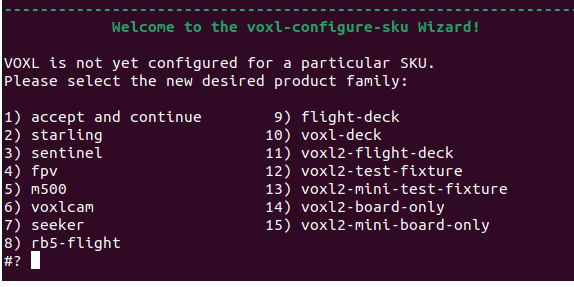
      And in the flashing process, which number should be chosen from this list:
      6794f36b-5f2d-4cb5-8a63-250d605190d4-image.png

      tomT 1 Reply Last reply
      0
      • T tahawaru

        @tahawaru

        And in the flashing process, which number should be chosen from this list:
        6794f36b-5f2d-4cb5-8a63-250d605190d4-image.png

        tomT Offline
        tomT Offline
        tom
        admin
        wrote on last edited by
        #3

        @tahawaru You should select 8 for rb5-flight

        T 1 Reply Last reply
        0
        • tomT tom

          @tahawaru You should select 8 for rb5-flight

          T Offline
          T Offline
          tahawaru
          Regular
          wrote on last edited by
          #4

          @tom

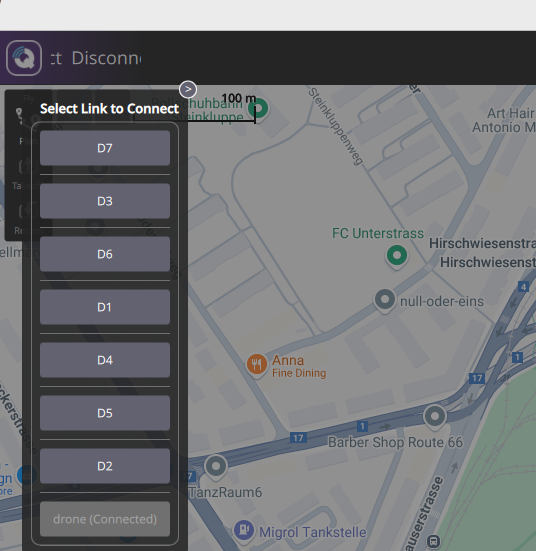
          After flashing, I cannot connect to the QGC.

          After setting up the IP address, I try to connect via UDP using the IP and port 14550, this is what I get
          e032a3a6-32d8-4b3f-9f56-dba442f9aaa4-image.png

          drone(connected) is the one not connecting to QGC.

          1 Reply Last reply
          0

          Reading along? Create a free ModalAI Forum account to join in.

          With an account you can reply, ask your own question, get an email when a ModalAI engineer answers, and mark the reply that solved it. Your place in each thread is saved between visits.

          Questions about VOXL, Flight Core, ESCs and ModalAI drones are answered here by the engineers who build them.

          Register Login
          Reply
          • Reply as topic
          Log in to reply
          • Oldest to Newest
          • Newest to Oldest
          • Most Votes


          ModalAI
          Categories Recent Tags ModalAI.com Docs
          © 2026 ModalAI® · Accelerating autonomy for smaller, smarter, safer drones · Powered by NodeBB
          • Login

          • Don't have an account? Register

          • Login or register to search.
          • First post
            Last post
          0
          • Categories
          • Recent
          • Tags
          • Popular
          • Users
          • Groups