
GCS Primary IP when in Station Mode
-
Hey all,
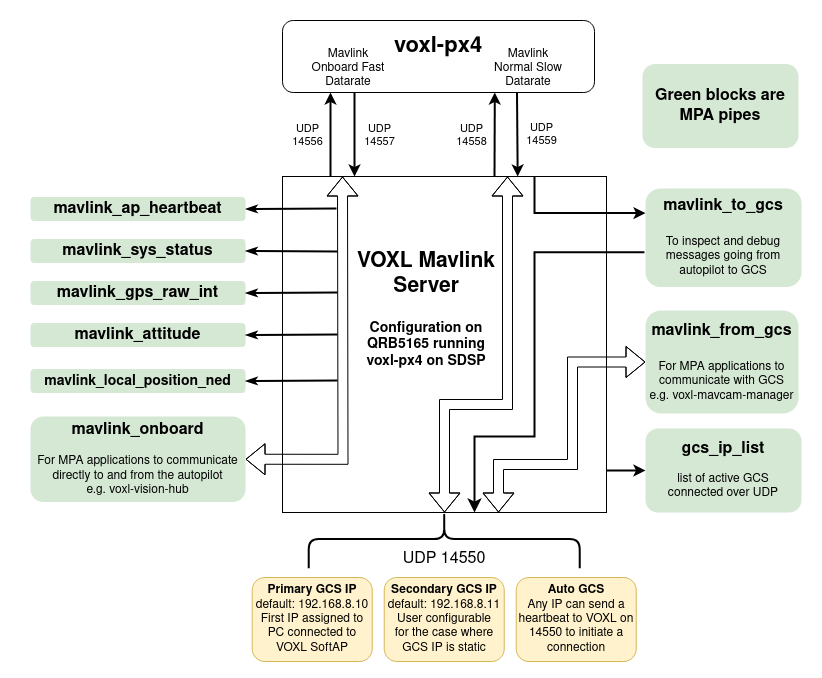
I am trying to find the primary GCS IP when the wifi is set to station mode. As per this diagram it is usually
192.168.8.10when insoftapmode and I am able to see the traffic viasudo tcpdump -n -i any udp port 14550However, when I setup the drone in
stationmode I do not see any traffic over 14550 and cannot find which IP address to send mavlink messages over. The instructions for connecting to QGC over 4G/5G do not clarify how the GCS IP address is specified in the case where both GCS and drone are connected to the same network.Obviously I can find the drones ip via
ifconfigthanks for the help,
GriffinP.S. running
grep -r "192.168.8.10" .consistently crashes the drone -
Hey all,
I am trying to find the primary GCS IP when the wifi is set to station mode. As per this diagram it is usually
192.168.8.10when insoftapmode and I am able to see the traffic viasudo tcpdump -n -i any udp port 14550However, when I setup the drone in
stationmode I do not see any traffic over 14550 and cannot find which IP address to send mavlink messages over. The instructions for connecting to QGC over 4G/5G do not clarify how the GCS IP address is specified in the case where both GCS and drone are connected to the same network.Obviously I can find the drones ip via
ifconfigthanks for the help,
GriffinP.S. running
grep -r "192.168.8.10" .consistently crashes the drone -
@griffin It should just be the IP of your PC on the network. How to find the IP varies on your OS
@tom thanks, that helped me get the drone and GCS connected over wifi!
Turns out I was slightly confused about exactly what was happening when I specified the mavlink connection ip.Getting everything to talk correctly required editing
/etc/modalai/voxl-mavlink-server.confs.t. theprimary_static_gcs_ipwas my PC's address. Is there any way to automate this process so that I don't have to continually ssh into the drone to update the IP? Obviously the nuclear option is to assign everything fixed IP addresses.Sorry for my lack of networking knowledge and thanks for the help,
Griffin -
@tom thanks, that helped me get the drone and GCS connected over wifi!
Turns out I was slightly confused about exactly what was happening when I specified the mavlink connection ip.Getting everything to talk correctly required editing
/etc/modalai/voxl-mavlink-server.confs.t. theprimary_static_gcs_ipwas my PC's address. Is there any way to automate this process so that I don't have to continually ssh into the drone to update the IP? Obviously the nuclear option is to assign everything fixed IP addresses.Sorry for my lack of networking knowledge and thanks for the help,
Griffin

Reading along? Create a free ModalAI Forum account to join in.
With an account you can reply, ask your own question, get an email when a ModalAI engineer answers, and mark the reply that solved it. Your place in each thread is saved between visits.
Questions about VOXL, Flight Core, ESCs and ModalAI drones are answered here by the engineers who build them.
Register Login