Skip to content
  • Categories
  • Recent
  • Tags
  • Popular
  • Users
  • Groups
Collapse
Brand Logo

ModalAI Forum

  1. ModalAI Support Forum
  2. Ask your questions right here!
  3. VOXL2 SDK Flash Not Working

VOXL2 SDK Flash Not Working

Scheduled Pinned Locked Moved Ask your questions right here!
18 Posts 2 Posters 2.1k Views 1 Watching
  • Oldest to Newest
  • Newest to Oldest
  • Most Votes
Reply
  • Reply as topic
Log in to reply
This topic has been deleted. Only users with topic management privileges can see it.
  • C ctitus

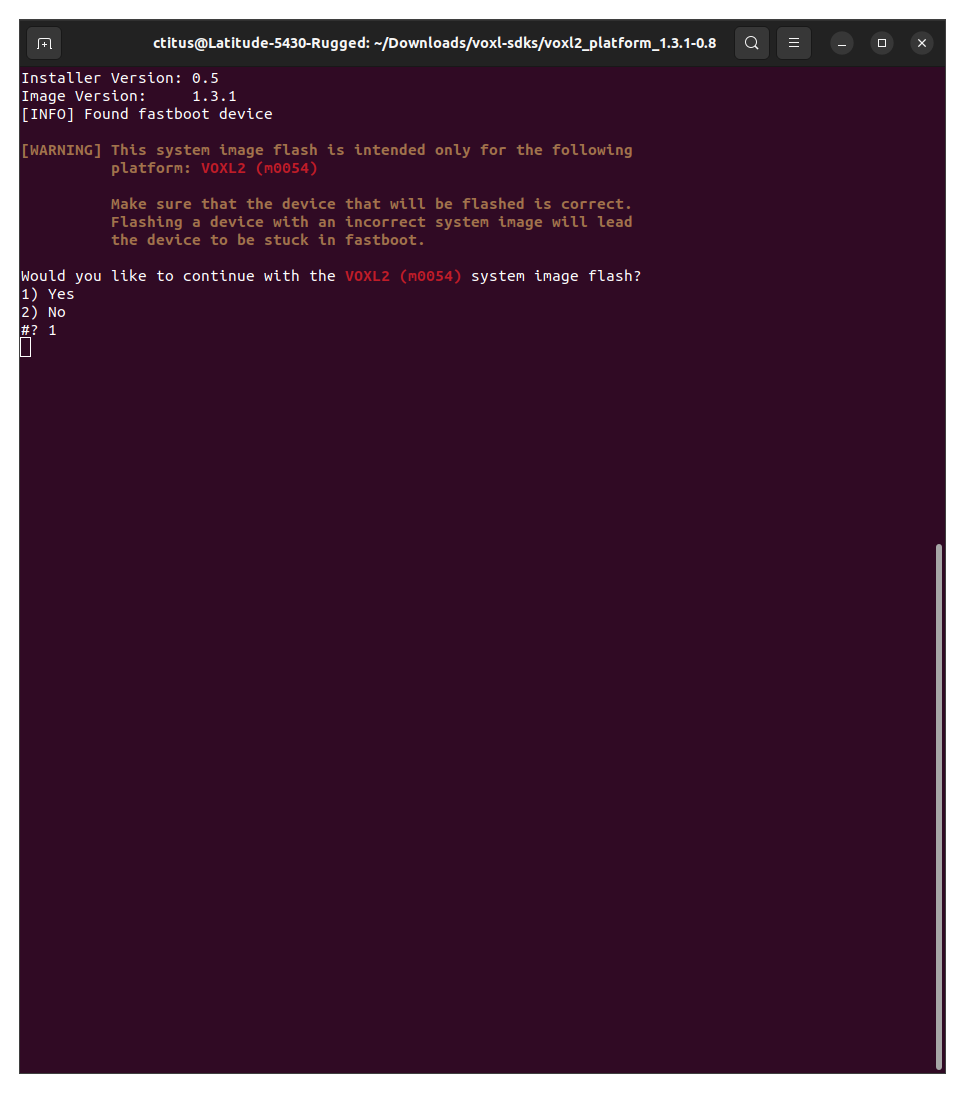
    @tom I'm not closely related to the people developing that code, I'm just trying to run it. I believe that there was a change to the modal pipe architecture that the code I need to run relies on. What confuses me is that I had no issues rolling back that far on my other VOXL2's, it just the two we bought more recently seem not to work with the install.sh script.

    tomT Offline
    tomT Offline
    tom
    admin
    wrote on last edited by
    #4

    @ctitus I would try forcing the voxl2 into fastboot before flashing and seeing if that resolves the issue.

    Link Preview Image
    VOXL 2/VOXL2 Mini System Image

    ModalAI technical documentation for VOXL and VOXL 2 Companion Computers for PX4 and ArduPilot Obstacle Avoidance and GPS-denied navigation, assembled in the USA

    favicon

    ModalAI Technical Docs (docs.modalai.com)

    C 1 Reply Last reply
    0
    • tomT tom

      @ctitus I would try forcing the voxl2 into fastboot before flashing and seeing if that resolves the issue.

      Link Preview Image
      VOXL 2/VOXL2 Mini System Image

      ModalAI technical documentation for VOXL and VOXL 2 Companion Computers for PX4 and ArduPilot Obstacle Avoidance and GPS-denied navigation, assembled in the USA

      favicon

      ModalAI Technical Docs (docs.modalai.com)

      C Offline
      C Offline
      ctitus
      Contributor
      wrote on last edited by
      #5

      @tom Thanks for the suggestion, but it doesn't seem to work.

      33f031a7-d142-4b76-a2e1-c5127acc03b0-image.png

      tomT 1 Reply Last reply
      0
      • C ctitus

        @tom Thanks for the suggestion, but it doesn't seem to work.

        33f031a7-d142-4b76-a2e1-c5127acc03b0-image.png

        tomT Offline
        tomT Offline
        tom
        admin
        wrote on last edited by
        #6

        @ctitus What do you see with lsusb? Wondering if the board is being detected at all

        C 1 Reply Last reply
        0
        • tomT tom

          @ctitus What do you see with lsusb? Wondering if the board is being detected at all

          C Offline
          C Offline
          ctitus
          Contributor
          wrote on last edited by
          #7

          @tom It shows up correctly for everything. I'm wondering if there's something about by laptop specifically that's causing it not to work? Are there error messages or logs anywhere I can look at?

          Fastboot: Bus 004 Device 037: ID 18d1:d00d Google Inc. Xiaomi Mi/Redmi 2 (fastboot)
          ADB: Bus 004 Device 038: ID 05c6:901d Qualcomm, Inc. KONA-QRD _SN:9E0034D1

          C 1 Reply Last reply
          0
          • C ctitus

            @tom It shows up correctly for everything. I'm wondering if there's something about by laptop specifically that's causing it not to work? Are there error messages or logs anywhere I can look at?

            Fastboot: Bus 004 Device 037: ID 18d1:d00d Google Inc. Xiaomi Mi/Redmi 2 (fastboot)
            ADB: Bus 004 Device 038: ID 05c6:901d Qualcomm, Inc. KONA-QRD _SN:9E0034D1

            C Offline
            C Offline
            ctitus
            Contributor
            wrote on last edited by
            #8

            @ctitus I've been trying more sdk's and it seems like none of them will flash properly, but there's no error or anything thrown, just nothing happens.

            tomT 1 Reply Last reply
            0
            • C ctitus

              @ctitus I've been trying more sdk's and it seems like none of them will flash properly, but there's no error or anything thrown, just nothing happens.

              tomT Offline
              tomT Offline
              tom
              admin
              wrote on last edited by
              #9

              @ctitus Do those two devices show up in lsusb simultaneously?

              Does anything show up with adb devices or fastboot devices?

              C 1 Reply Last reply
              0
              • tomT tom

                @ctitus Do those two devices show up in lsusb simultaneously?

                Does anything show up with adb devices or fastboot devices?

                C Offline
                C Offline
                ctitus
                Contributor
                wrote on last edited by
                #10

                @tom No, it's only ever 1 at a time. I was able to get my hands on a new fresh linux machine, and after installing the packages I needed (and using the same files I copy and pasted from my original laptop), I was successfully able to factory reset and roll back the sdk and system image without issue. I'm gonna do a bit of digging but I have a feeling I was just missing some packages and it wasn't alerting me of it on my original laptop.

                tomT 1 Reply Last reply
                0
                • C ctitus

                  @tom No, it's only ever 1 at a time. I was able to get my hands on a new fresh linux machine, and after installing the packages I needed (and using the same files I copy and pasted from my original laptop), I was successfully able to factory reset and roll back the sdk and system image without issue. I'm gonna do a bit of digging but I have a feeling I was just missing some packages and it wasn't alerting me of it on my original laptop.

                  tomT Offline
                  tomT Offline
                  tom
                  admin
                  wrote on last edited by
                  #11

                  @ctitus Interesting, I would also check to make sure your user on that machine has the required permissions, here's an example of the groups that my user is part of for ref:
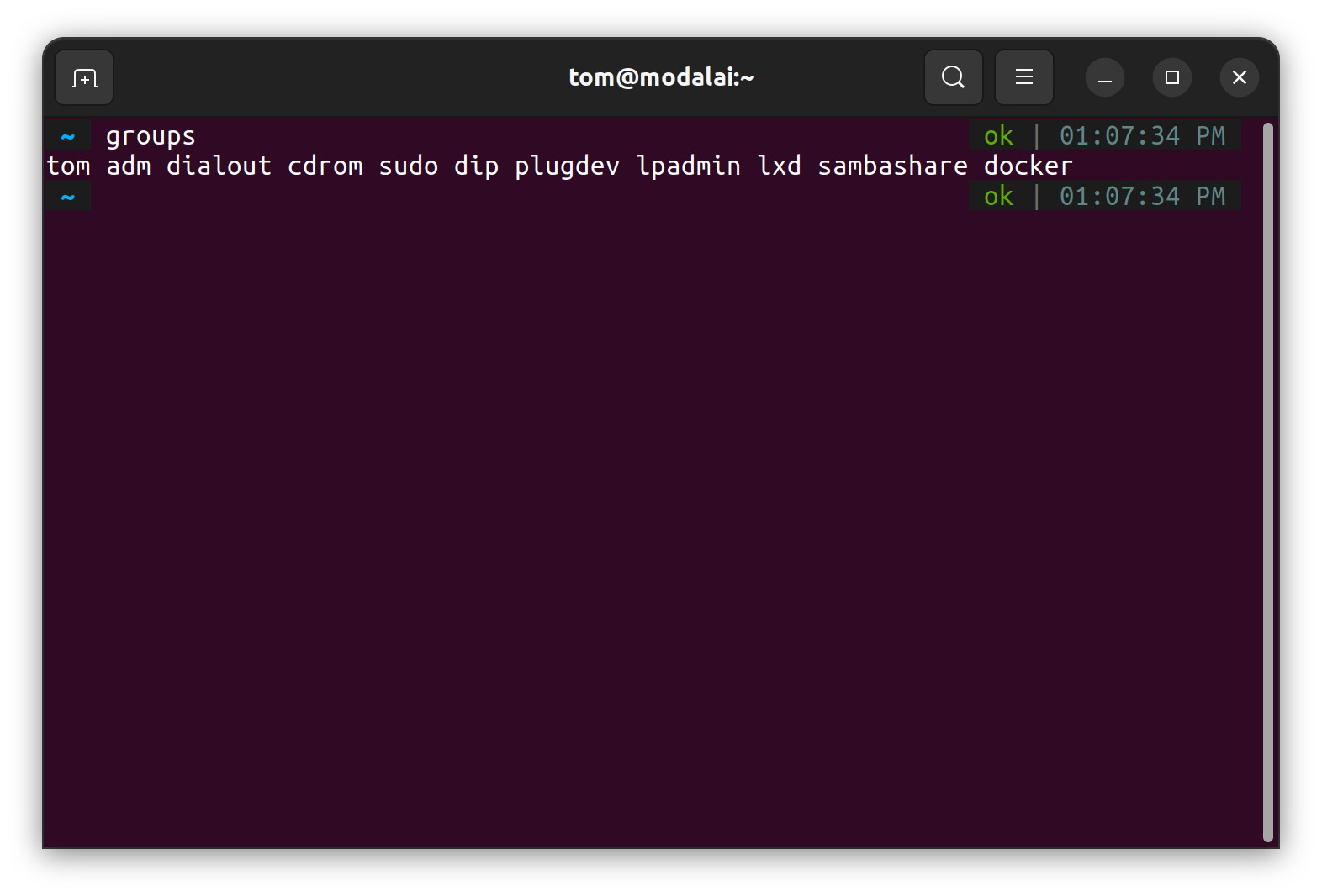
                  04b0655f-b9fe-4e90-84cc-cbd636550fe8-image.png

                  C 1 Reply Last reply
                  0
                  • tomT tom

                    @ctitus Interesting, I would also check to make sure your user on that machine has the required permissions, here's an example of the groups that my user is part of for ref:

                    04b0655f-b9fe-4e90-84cc-cbd636550fe8-image.png

                    C Offline
                    C Offline
                    ctitus
                    Contributor
                    wrote on last edited by
                    #12

                    @tom So I did some digging and found where it hangs. Line 391 of voxl2_1.3.1-0.8/system-image/flash-system-image.sh: local output="$( fastboot getvar "partition-size:${partition}" 2>&1 )" specifically executing fastboot getvar "partition-size:modalai_conf". For some reason, my original laptop shows "< waiting for any device >" while the laptop that worked returned "partition-size:modalai_conf: 0x4000000". I double checked that the voxl shows up as fastboot with lsusb on both laptops

                    C 1 Reply Last reply
                    0
                    • C ctitus

                      @tom So I did some digging and found where it hangs. Line 391 of voxl2_1.3.1-0.8/system-image/flash-system-image.sh: local output="$( fastboot getvar "partition-size:${partition}" 2>&1 )" specifically executing fastboot getvar "partition-size:modalai_conf". For some reason, my original laptop shows "< waiting for any device >" while the laptop that worked returned "partition-size:modalai_conf: 0x4000000". I double checked that the voxl shows up as fastboot with lsusb on both laptops

                      C Offline
                      C Offline
                      ctitus
                      Contributor
                      wrote on last edited by
                      #13

                      @ctitus Messing aroudn a bit more, sudo fastboot getvar "partition-size:modalai_conf" works

                      1 Reply Last reply
                      0
                      • C Offline
                        C Offline
                        ctitus
                        Contributor
                        wrote on last edited by
                        #14

                        And running sudo ./install.sh worked and successfully installed the SDK and system image

                        tomT 1 Reply Last reply
                        0
                        • C ctitus

                          And running sudo ./install.sh worked and successfully installed the SDK and system image

                          tomT Offline
                          tomT Offline
                          tom
                          admin
                          wrote on last edited by
                          #15

                          @ctitus Thanks for this info, it is very helpful. What OS are you running on the PC that it isn't working?

                          C 1 Reply Last reply
                          0
                          • tomT tom

                            @ctitus Thanks for this info, it is very helpful. What OS are you running on the PC that it isn't working?

                            C Offline
                            C Offline
                            ctitus
                            Contributor
                            wrote on last edited by
                            #16

                            @tom Both are linux ubuntu 22.04 LTS. My current laptop I've been using for a while and likely have some weird issue in my user setup or configuration, the new laptop was dual booted as linux for the first time 2 hours ago and the first thing it did was factory reset the voxl and run install.sh (and install the missing dependencies that install.sh alerted me to) which worked just fine without needing sudo. I'm not sure what I could've done to my laptop to have this issue, but any advice would be greatly appreciated

                            tomT 1 Reply Last reply
                            0
                            • C ctitus

                              @tom Both are linux ubuntu 22.04 LTS. My current laptop I've been using for a while and likely have some weird issue in my user setup or configuration, the new laptop was dual booted as linux for the first time 2 hours ago and the first thing it did was factory reset the voxl and run install.sh (and install the missing dependencies that install.sh alerted me to) which worked just fine without needing sudo. I'm not sure what I could've done to my laptop to have this issue, but any advice would be greatly appreciated

                              tomT Offline
                              tomT Offline
                              tom
                              admin
                              wrote on last edited by
                              #17

                              @ctitus I would check the groups that your user is part of that I posted above. Maybe also compare the versions of adb and fastboot between the two machines.

                              C 1 Reply Last reply
                              0
                              • tomT tom

                                @ctitus I would check the groups that your user is part of that I posted above. Maybe also compare the versions of adb and fastboot between the two machines.

                                C Offline
                                C Offline
                                ctitus
                                Contributor
                                wrote on last edited by
                                #18

                                @tom it looks like the groups are the same between machines (and yours except I'm not in docker), and the versions of adb, fastboot, and all android packages are the same. I was looking online and some people say it may be related to or solved by udev (https://askubuntu.com/questions/705537/no-permissions-fastboot-fastboot-and-adb-not-working) but I'm not sure I have more more time to troubleshoot this, and I didn't touch anything with udev on the working machine. Hopefully I'll be able to circle back to this eventually, but thank's for your help with everything!

                                1 Reply Last reply
                                0

                                Hello! It looks like you're interested in this conversation, but you don't have an account yet.

                                Getting fed up of having to scroll through the same posts each visit? When you register for an account, you'll always come back to exactly where you were before, and choose to be notified of new replies (either via email, or push notification). You'll also be able to save bookmarks and upvote posts to show your appreciation to other community members.

                                With your input, this post could be even better 💗

                                Register Login
                                Reply
                                • Reply as topic
                                Log in to reply
                                • Oldest to Newest
                                • Newest to Oldest
                                • Most Votes


                                ModalAI
                                Categories Recent Tags ModalAI.com Docs
                                © 2026 ModalAI® · Accelerating autonomy for smaller, smarter, safer drones · Powered by NodeBB
                                • Login

                                • Login or register to search.
                                • First post
                                  Last post
                                0
                                • Categories
                                • Recent
                                • Tags
                                • Popular
                                • Users
                                • Groups