
Calibration for VOXL SDK 1.1.3
-
I did upgrade the RB5 Flight with VOXL SDK Platform 1.1.3.
When I try to calibrate the IMU, it happend:rb5:/$ voxl-check-calibration
Calibration File Status:
Missing /data/px4/param/parameters_mag.calrb5:/$ voxl-calibrate-imu
ERROR: in json_read_file, config file is empty or unreadableERROR: Malformed calibration file: /data/modalai/voxl-imu-server.cal
Please make a new calibration file with voxl-calibrate-imuERROR: Neither IMU pipe appear to be open
Make sure the voxl-imu-server service is running and try againand
voxl-imu-server | Enabled | Not Running
After calibration with QGroundControl, I realized that the orientation was wrong, I do not exactly which orientation is, it was mentioned in this link https://docs.modalai.com/px4-calibrate-sensors/ is:
When you click on the Compass or Accelerometer calibration buttons, QGroundControl rightly asks you to confirm the board orientation. If using the PX4 master branch or the ModalAI build 1.10 then use ROTATION_NONE. The default orientation in the parameters file you uploaded before takes this into account. NOTE: the 1.10 release from PX4 for Flight Core is not recommended as there have been fixes including a orientation change.
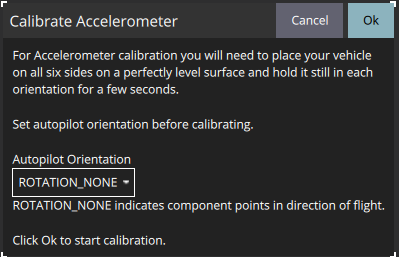
QGroundControl showed that,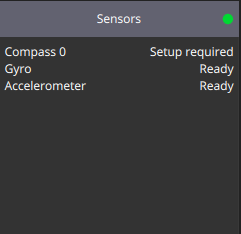
what should I need to do for the first flight.
Thank all! -
I did upgrade the RB5 Flight with VOXL SDK Platform 1.1.3.
When I try to calibrate the IMU, it happend:rb5:/$ voxl-check-calibration
Calibration File Status:
Missing /data/px4/param/parameters_mag.calrb5:/$ voxl-calibrate-imu
ERROR: in json_read_file, config file is empty or unreadableERROR: Malformed calibration file: /data/modalai/voxl-imu-server.cal
Please make a new calibration file with voxl-calibrate-imuERROR: Neither IMU pipe appear to be open
Make sure the voxl-imu-server service is running and try againand
voxl-imu-server | Enabled | Not Running
After calibration with QGroundControl, I realized that the orientation was wrong, I do not exactly which orientation is, it was mentioned in this link https://docs.modalai.com/px4-calibrate-sensors/ is:
When you click on the Compass or Accelerometer calibration buttons, QGroundControl rightly asks you to confirm the board orientation. If using the PX4 master branch or the ModalAI build 1.10 then use ROTATION_NONE. The default orientation in the parameters file you uploaded before takes this into account. NOTE: the 1.10 release from PX4 for Flight Core is not recommended as there have been fixes including a orientation change.
QGroundControl showed that,
what should I need to do for the first flight.
Thank all!@Phi-Nguyen The magnetometer rotation is specified directly with the magnetometer driver so you don't need to set it with that parameter. The
/usr/bin/voxl-px4-startstartup script will attempt to launch the magnetometer driver with the-R 10option to specify the rotation. -
@Phi-Nguyen The magnetometer rotation is specified directly with the magnetometer driver so you don't need to set it with that parameter. The
/usr/bin/voxl-px4-startstartup script will attempt to launch the magnetometer driver with the-R 10option to specify the rotation.@Eric-Katzfey So you probably just need to do the magnetometer calibration procedure to be ready for flight.


Reading along? Create a free ModalAI Forum account to join in.
With an account you can reply, ask your own question, get an email when a ModalAI engineer answers, and mark the reply that solved it. Your place in each thread is saved between visits.
Questions about VOXL, Flight Core, ESCs and ModalAI drones are answered here by the engineers who build them.
Register Login