Skip to content
  • Categories
  • Recent
  • Tags
  • Popular
  • Users
  • Groups
Collapse
Brand Logo

ModalAI Forum

  1. ModalAI Support Forum
  2. ESCs
  3. Motor issues when running ESC calibration

Motor issues when running ESC calibration

Scheduled Pinned Locked Moved ESCs
108 Posts 3 Posters 61.4k Views 1 Watching
  • Oldest to Newest
  • Newest to Oldest
  • Most Votes
Reply
  • Reply as topic
Log in to reply
This topic has been deleted. Only users with topic management privileges can see it.
  • Alex KushleyevA Alex Kushleyev

    The change was pretty easy, i enabled the board current to be used as ESC current for the calibration plot purposes. the change is on dev branch of voxl-esc : (commit) . so you can use that latest code for testing.

    rdjarvisR Offline
    rdjarvisR Offline
    rdjarvis
    Regular
    wrote on last edited by
    #21

    @Alex-Kushleyev wonderful, thank you, as always!

    We will get to this as soon as we can for testing. Looking forward to the results.

    RDJ

    Alex KushleyevA 1 Reply Last reply
    0
    • rdjarvisR rdjarvis

      @Alex-Kushleyev wonderful, thank you, as always!

      We will get to this as soon as we can for testing. Looking forward to the results.

      RDJ

      Alex KushleyevA Offline
      Alex KushleyevA Offline
      Alex Kushleyev
      ModalAI Team
      wrote on last edited by Alex Kushleyev
      #22

      @rdjarvis, i found the correct motor 2850kV and just wanted to double check your propeller selection. 3in 3052 seems too small for this motor. Can you please confirm? Tmotor provides test data for 4in and 5in props for this motor : https://store.tmotor.com/product/f2203_5-fpv-motor.html . edit: they do also provide data for 3in (but 5 blade prop) - believe your propeller is tri-blade?

      Either way is fine, just let me know and I will run the tests. I can start with the same params you did and see if i can reproduce the issue using FPV ESC. I have a 3076 propeller (tri-blade) which i can use for testing, which will be more aggressive than 3052 (i don't think i have 3052 available to test). I also have 3030.

      Alex

      rdjarvisR 1 Reply Last reply
      0
      • Alex KushleyevA Alex Kushleyev

        @rdjarvis, i found the correct motor 2850kV and just wanted to double check your propeller selection. 3in 3052 seems too small for this motor. Can you please confirm? Tmotor provides test data for 4in and 5in props for this motor : https://store.tmotor.com/product/f2203_5-fpv-motor.html . edit: they do also provide data for 3in (but 5 blade prop) - believe your propeller is tri-blade?

        Either way is fine, just let me know and I will run the tests. I can start with the same params you did and see if i can reproduce the issue using FPV ESC. I have a 3076 propeller (tri-blade) which i can use for testing, which will be more aggressive than 3052 (i don't think i have 3052 available to test). I also have 3030.

        Alex

        rdjarvisR Offline
        rdjarvisR Offline
        rdjarvis
        Regular
        wrote on last edited by
        #23

        @Alex-Kushleyev thanks for digging up the motor.

        The 3in tri-blade prop works well with this motor, for our use case. We have more aggressively pitched props as well. Please test and send those params! That would be great. This will eliminate tons of trouble shooting.

        Thank you,
        RDJ

        Alex KushleyevA 1 Reply Last reply
        0
        • rdjarvisR rdjarvis

          @Alex-Kushleyev thanks for digging up the motor.

          The 3in tri-blade prop works well with this motor, for our use case. We have more aggressively pitched props as well. Please test and send those params! That would be great. This will eliminate tons of trouble shooting.

          Thank you,
          RDJ

          Alex KushleyevA Offline
          Alex KushleyevA Offline
          Alex Kushleyev
          ModalAI Team
          wrote on last edited by
          #24

          @rdjarvis , I loaded the same params that you were testing and I was able to reproduce the issue.

          The issue is that the old spin-up procedure is not working well for this particular motor and the ESC incorrectly synchronized with the motor phases (de-sync), resulting in incorrect motor control and motor overheating.

          We recommend using our new sinusoidal spin-up procedure which is a lot more reliable.

          I will make a new parameter file for the Tmotor 2850kV motor with a 3076 propeller and share with you as well as resulting plots for your reference.

          Alex

          rdjarvisR 1 Reply Last reply
          0
          • Alex KushleyevA Alex Kushleyev

            @rdjarvis , I loaded the same params that you were testing and I was able to reproduce the issue.

            The issue is that the old spin-up procedure is not working well for this particular motor and the ESC incorrectly synchronized with the motor phases (de-sync), resulting in incorrect motor control and motor overheating.

            We recommend using our new sinusoidal spin-up procedure which is a lot more reliable.

            I will make a new parameter file for the Tmotor 2850kV motor with a 3076 propeller and share with you as well as resulting plots for your reference.

            Alex

            rdjarvisR Offline
            rdjarvisR Offline
            rdjarvis
            Regular
            wrote on last edited by
            #25

            @Alex-Kushleyev Wonderful! Thank you for the hard work! Im happy you were able to reproduce. As you see, the motor heats up very early on the calibration cycle.

            We are ready to test as soon as you can send those params!

            Thank you,
            RDJ

            Alex KushleyevA 1 Reply Last reply
            0
            • rdjarvisR rdjarvis

              @Alex-Kushleyev Wonderful! Thank you for the hard work! Im happy you were able to reproduce. As you see, the motor heats up very early on the calibration cycle.

              We are ready to test as soon as you can send those params!

              Thank you,
              RDJ

              Alex KushleyevA Offline
              Alex KushleyevA Offline
              Alex Kushleyev
              ModalAI Team
              wrote on last edited by
              #26

              @rdjarvis ,

              I have added the parameter file (here) . I used your exact motor and 3076 tri-blade propeller.

              If you have slightly different propeller, all you should have to do is just run the calibration procedure (please use voxl-esc tools from main branch) , update the a0,a1,a2 params and upload the new esc param file to the ESC.

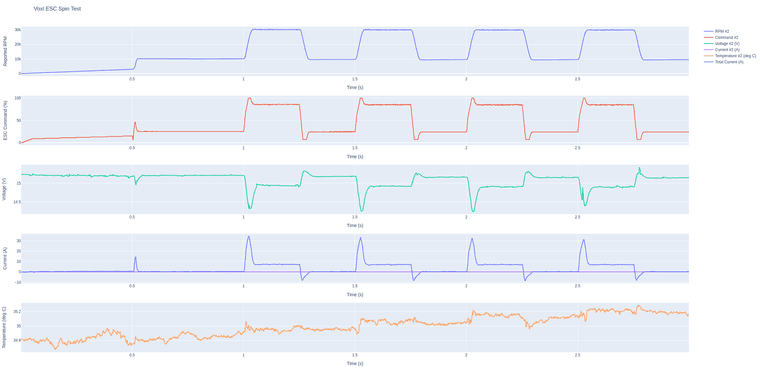
              I think this should perform pretty well, i did some aggressive testing (rpm step from 10k to 30k rpm), using the following command, and the results are very smooth. You can use this test and start with a lower step amplitude and make sure that works well and then increase the step size as you gain confidence. you should see smooth results like this, if you see any unusual spikes, let me know and send a plot.

              #only test this with battery (not power supply) due to regenerative spikes
              ./voxl-esc-spin-step.py --id 2 --rpm 10000 --step-amplitude 20000 --timeout 3 --enable-plot 1 --cmd-rate 2000
              

              1dc58609-7890-4a4d-a5fd-de9438bdb4c3-image.png

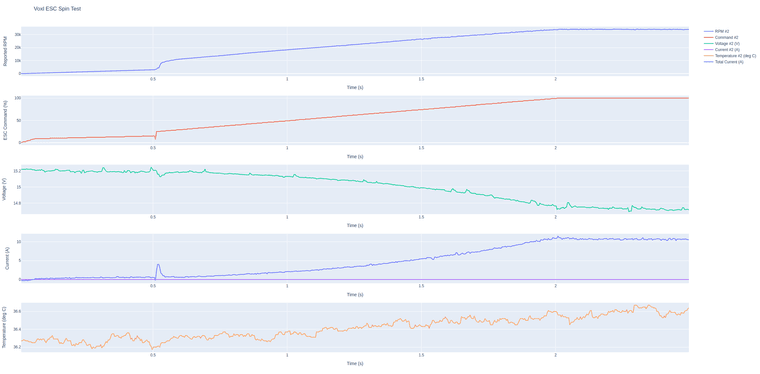
              Please upload this param file, and run the calibration, you can also do the ramp test to 100% using

              ./voxl-esc-spin.py --id 2 --power 100 --ramp-time 2.0 --timeout 2.5 --enable-plot 1 --cmd-rate 250
              

              Produces the following results on my setup (very smooth):
              9cdd2adb-0da7-426a-913e-74961c8af3b1-image.png

              You can update your max rpm based on this result, but beware that max rpm is a function of voltage.

              rdjarvisR Alexander SaundersA 2 Replies Last reply
              0
              • Alex KushleyevA Alex Kushleyev

                @rdjarvis ,

                I have added the parameter file (here) . I used your exact motor and 3076 tri-blade propeller.

                If you have slightly different propeller, all you should have to do is just run the calibration procedure (please use voxl-esc tools from main branch) , update the a0,a1,a2 params and upload the new esc param file to the ESC.

                I think this should perform pretty well, i did some aggressive testing (rpm step from 10k to 30k rpm), using the following command, and the results are very smooth. You can use this test and start with a lower step amplitude and make sure that works well and then increase the step size as you gain confidence. you should see smooth results like this, if you see any unusual spikes, let me know and send a plot.

                #only test this with battery (not power supply) due to regenerative spikes
                ./voxl-esc-spin-step.py --id 2 --rpm 10000 --step-amplitude 20000 --timeout 3 --enable-plot 1 --cmd-rate 2000
                

                1dc58609-7890-4a4d-a5fd-de9438bdb4c3-image.png

                Please upload this param file, and run the calibration, you can also do the ramp test to 100% using

                ./voxl-esc-spin.py --id 2 --power 100 --ramp-time 2.0 --timeout 2.5 --enable-plot 1 --cmd-rate 250
                

                Produces the following results on my setup (very smooth):
                9cdd2adb-0da7-426a-913e-74961c8af3b1-image.png

                You can update your max rpm based on this result, but beware that max rpm is a function of voltage.

                rdjarvisR Offline
                rdjarvisR Offline
                rdjarvis
                Regular
                wrote on last edited by
                #27

                @Alex-Kushleyev We will test soon and get back to you.

                As always, thank you for all the help!!

                RDJ

                1 Reply Last reply
                1
                • Alex KushleyevA Alex Kushleyev

                  @rdjarvis ,

                  I have added the parameter file (here) . I used your exact motor and 3076 tri-blade propeller.

                  If you have slightly different propeller, all you should have to do is just run the calibration procedure (please use voxl-esc tools from main branch) , update the a0,a1,a2 params and upload the new esc param file to the ESC.

                  I think this should perform pretty well, i did some aggressive testing (rpm step from 10k to 30k rpm), using the following command, and the results are very smooth. You can use this test and start with a lower step amplitude and make sure that works well and then increase the step size as you gain confidence. you should see smooth results like this, if you see any unusual spikes, let me know and send a plot.

                  #only test this with battery (not power supply) due to regenerative spikes
                  ./voxl-esc-spin-step.py --id 2 --rpm 10000 --step-amplitude 20000 --timeout 3 --enable-plot 1 --cmd-rate 2000
                  

                  1dc58609-7890-4a4d-a5fd-de9438bdb4c3-image.png

                  Please upload this param file, and run the calibration, you can also do the ramp test to 100% using

                  ./voxl-esc-spin.py --id 2 --power 100 --ramp-time 2.0 --timeout 2.5 --enable-plot 1 --cmd-rate 250
                  

                  Produces the following results on my setup (very smooth):
                  9cdd2adb-0da7-426a-913e-74961c8af3b1-image.png

                  You can update your max rpm based on this result, but beware that max rpm is a function of voltage.

                  Alexander SaundersA Offline
                  Alexander SaundersA Offline
                  Alexander Saunders
                  Contributor
                  wrote on last edited by
                  #28

                  @Alex-Kushleyev

                  We ran the calibration script and failing to see where/which directory the html file is being stored. Could you point me to the location?

                  Alex KushleyevA 1 Reply Last reply
                  0
                  • blueB blue referenced this topic on
                  • Alexander SaundersA Alexander Saunders

                    @Alex-Kushleyev

                    We ran the calibration script and failing to see where/which directory the html file is being stored. Could you point me to the location?

                    Alex KushleyevA Offline
                    Alex KushleyevA Offline
                    Alex Kushleyev
                    ModalAI Team
                    wrote on last edited by
                    #29

                    @Alexander-Saunders , the file should be saved in the same directory where you are running the calibration script from (current directory). here is the line of code in the calibration script, which saves the figure right before trying to plot it in a browser.

                    Alex KushleyevA 1 Reply Last reply
                    0
                    • Alex KushleyevA Alex Kushleyev

                      @Alexander-Saunders , the file should be saved in the same directory where you are running the calibration script from (current directory). here is the line of code in the calibration script, which saves the figure right before trying to plot it in a browser.

                      Alex KushleyevA Offline
                      Alex KushleyevA Offline
                      Alex Kushleyev
                      ModalAI Team
                      wrote on last edited by
                      #30

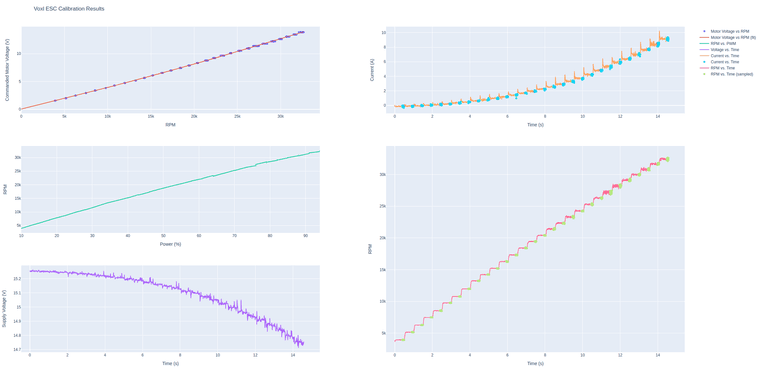
                      here is the calibration result i got with my setup (and the a0, a1, a2 params are already in the xml file i linked before):
                      1d3b2a05-695e-4aa3-8a95-7cb3242644d9-image.png

                      rdjarvisR 1 Reply Last reply
                      0
                      • Alex KushleyevA Alex Kushleyev

                        here is the calibration result i got with my setup (and the a0, a1, a2 params are already in the xml file i linked before):

                        1d3b2a05-695e-4aa3-8a95-7cb3242644d9-image.png

                        rdjarvisR Offline
                        rdjarvisR Offline
                        rdjarvis
                        Regular
                        wrote on last edited by
                        #31

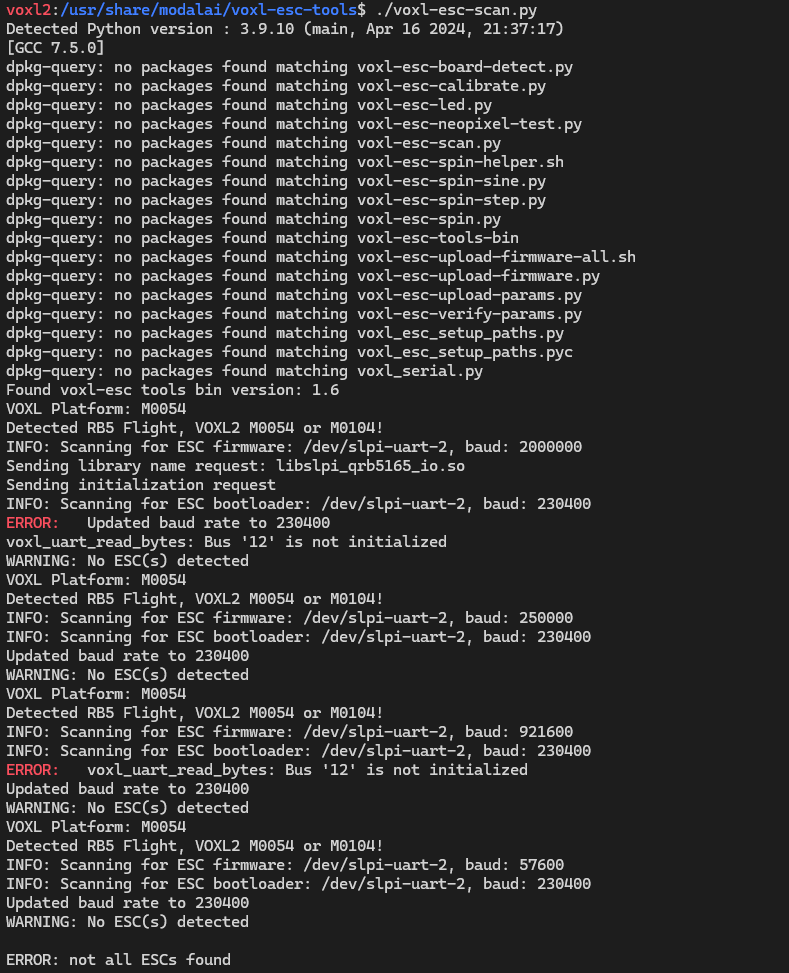
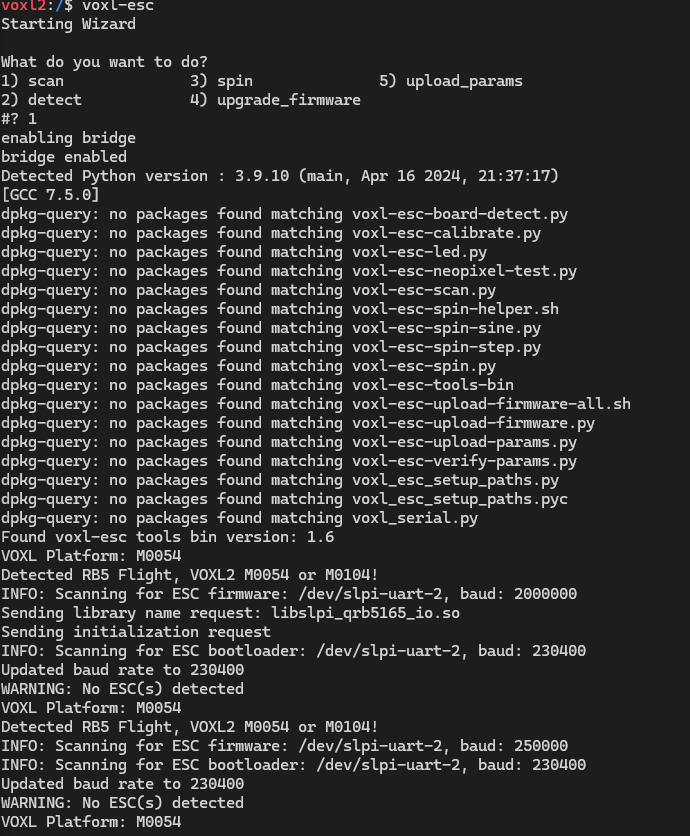
                        @Alex-Kushleyev after uploading the new params you sent the ESC no longer communicates with the VOXL2.

                        The ESC board is no longer recognized by VOXL2. All hardware is set up properly.
                        Screenshot 2024-04-17 110112.png

                        voxl_uart_read_byte bus 12 is not initiated

                        Please point us in the right direction.

                        Alex KushleyevA 1 Reply Last reply
                        1
                        • rdjarvisR rdjarvis

                          @Alex-Kushleyev after uploading the new params you sent the ESC no longer communicates with the VOXL2.

                          The ESC board is no longer recognized by VOXL2. All hardware is set up properly.
                          Screenshot 2024-04-17 110112.png

                          voxl_uart_read_byte bus 12 is not initiated

                          Please point us in the right direction.

                          Alex KushleyevA Offline
                          Alex KushleyevA Offline
                          Alex Kushleyev
                          ModalAI Team
                          wrote on last edited by
                          #32

                          @rdjarvis , the latest params switched baud rate from 250k to 2mbit, but that should not be an issue. You should make sure voxl esc param in px4 is 20000000.

                          Please try voxl-esc python tools directly and make sure px4 is disabled when you run them (instead of running the voxl-esc wrapper like you did).

                          Sometimes stopping px4 gets the dsp in a weird state, in which case you can disable px4 from autostart, reboot and then do a voxl-esc-scan.py

                          rdjarvisR Alexander SaundersA 2 Replies Last reply
                          0
                          • Alex KushleyevA Alex Kushleyev

                            @rdjarvis , the latest params switched baud rate from 250k to 2mbit, but that should not be an issue. You should make sure voxl esc param in px4 is 20000000.

                            Please try voxl-esc python tools directly and make sure px4 is disabled when you run them (instead of running the voxl-esc wrapper like you did).

                            Sometimes stopping px4 gets the dsp in a weird state, in which case you can disable px4 from autostart, reboot and then do a voxl-esc-scan.py

                            rdjarvisR Offline
                            rdjarvisR Offline
                            rdjarvis
                            Regular
                            wrote on last edited by
                            #33

                            @Alex-Kushleyev Copy all, we will try. Thank you.

                            1 Reply Last reply
                            2
                            • Alex KushleyevA Alex Kushleyev

                              @rdjarvis , the latest params switched baud rate from 250k to 2mbit, but that should not be an issue. You should make sure voxl esc param in px4 is 20000000.

                              Please try voxl-esc python tools directly and make sure px4 is disabled when you run them (instead of running the voxl-esc wrapper like you did).

                              Sometimes stopping px4 gets the dsp in a weird state, in which case you can disable px4 from autostart, reboot and then do a voxl-esc-scan.py

                              Alexander SaundersA Offline
                              Alexander SaundersA Offline
                              Alexander Saunders
                              Contributor
                              wrote on last edited by
                              #34

                              @Alex-Kushleyev

                              For the esc tools, we were running the commands from /usr/share/modalai/voxl-esc-tools. To clarify, for the baud rate changes, do you want 2,000,000 or 20,000,000. We will try the tools again and confirm px4 is stopped via systemctl stop voxl-px4.

                              Alex KushleyevA 1 Reply Last reply
                              1
                              • Alexander SaundersA Alexander Saunders

                                @Alex-Kushleyev

                                For the esc tools, we were running the commands from /usr/share/modalai/voxl-esc-tools. To clarify, for the baud rate changes, do you want 2,000,000 or 20,000,000. We will try the tools again and confirm px4 is stopped via systemctl stop voxl-px4.

                                Alex KushleyevA Offline
                                Alex KushleyevA Offline
                                Alex Kushleyev
                                ModalAI Team
                                wrote on last edited by
                                #35

                                @Alexander-Saunders, my bad too many zeros. 2,000,000 (2Mbit)

                                Alex KushleyevA Alexander SaundersA 2 Replies Last reply
                                0
                                • Alex KushleyevA Alex Kushleyev

                                  @Alexander-Saunders, my bad too many zeros. 2,000,000 (2Mbit)

                                  Alex KushleyevA Offline
                                  Alex KushleyevA Offline
                                  Alex Kushleyev
                                  ModalAI Team
                                  wrote on last edited by Alex Kushleyev
                                  #36

                                  The screen shot in earlier post today shows running “voxl-esc” which is a wrapper for the python tools, sometimes it is easier just to use python tools directly, but make sure they are latest version. the version in /usr/share/modalai is probably not latest. Normally you dont need to update the tools but if something is not working as expected, it is good to try the latest.

                                  rdjarvisR 1 Reply Last reply
                                  0
                                  • Alex KushleyevA Alex Kushleyev

                                    The screen shot in earlier post today shows running “voxl-esc” which is a wrapper for the python tools, sometimes it is easier just to use python tools directly, but make sure they are latest version. the version in /usr/share/modalai is probably not latest. Normally you dont need to update the tools but if something is not working as expected, it is good to try the latest.

                                    rdjarvisR Offline
                                    rdjarvisR Offline
                                    rdjarvis
                                    Regular
                                    wrote on last edited by
                                    #37

                                    @Alex-Kushleyev Screenshot 2024-04-17 113251.png

                                    We verified PX4 was not running.

                                    systemctl stop voxl-px4

                                    1 Reply Last reply
                                    2
                                    • Alex KushleyevA Alex Kushleyev

                                      @Alexander-Saunders, my bad too many zeros. 2,000,000 (2Mbit)

                                      Alexander SaundersA Offline
                                      Alexander SaundersA Offline
                                      Alexander Saunders
                                      Contributor
                                      wrote on last edited by
                                      #38

                                      @Alex-Kushleyev

                                      No worries. We also verified if the issue was with the particular param file and ran the command to upload a different one. No luck with that and we still receive the same error (Bus 12, ESC not detected, etc)

                                      Alex KushleyevA 1 Reply Last reply
                                      1
                                      • Alexander SaundersA Alexander Saunders

                                        @Alex-Kushleyev

                                        No worries. We also verified if the issue was with the particular param file and ran the command to upload a different one. No luck with that and we still receive the same error (Bus 12, ESC not detected, etc)

                                        Alex KushleyevA Offline
                                        Alex KushleyevA Offline
                                        Alex Kushleyev
                                        ModalAI Team
                                        wrote on last edited by
                                        #39

                                        @Alexander-Saunders

                                        Can you please try voxl-esc tools from dev branch on github? Instead of /usr/share/modalai/voxl-esc-tools

                                        Alex KushleyevA 1 Reply Last reply
                                        0
                                        • Alex KushleyevA Alex Kushleyev

                                          @Alexander-Saunders

                                          Can you please try voxl-esc tools from dev branch on github? Instead of /usr/share/modalai/voxl-esc-tools

                                          Alex KushleyevA Offline
                                          Alex KushleyevA Offline
                                          Alex Kushleyev
                                          ModalAI Team
                                          wrote on last edited by
                                          #40

                                          Also, which SDK are you using? i am surprised to see this issue.

                                          Also, can you please double check the ESC bootup sequence:

                                          • apply power
                                          • 4 blue leds flash quickly for 1 second, then turn off
                                          • 4 blue leds blink twice
                                          • motor makes a quick chirp (three tones based on the latest params that provided)

                                          rdjarvisR Alex KushleyevA 2 Replies Last reply
                                          0

                                          Hello! It looks like you're interested in this conversation, but you don't have an account yet.

                                          Getting fed up of having to scroll through the same posts each visit? When you register for an account, you'll always come back to exactly where you were before, and choose to be notified of new replies (either via email, or push notification). You'll also be able to save bookmarks and upvote posts to show your appreciation to other community members.

                                          With your input, this post could be even better 💗

                                          Register Login
                                          Reply
                                          • Reply as topic
                                          Log in to reply
                                          • Oldest to Newest
                                          • Newest to Oldest
                                          • Most Votes


                                          ModalAI
                                          Categories Recent Tags ModalAI.com Docs
                                          © 2026 ModalAI® · Accelerating autonomy for smaller, smarter, safer drones · Powered by NodeBB
                                          • Login

                                          • Login or register to search.
                                          • First post
                                            Last post
                                          0
                                          • Categories
                                          • Recent
                                          • Tags
                                          • Popular
                                          • Users
                                          • Groups