Skip to content
  • Categories
  • Recent
  • Tags
  • Popular
  • Users
  • Groups
Collapse
Brand Logo

ModalAI Forum

  1. ModalAI Support Forum
  2. VOXL Compute & Autopilot
  3. VOXL 2
  4. Unable to run my own offboard node in starling 2

Unable to run my own offboard node in starling 2
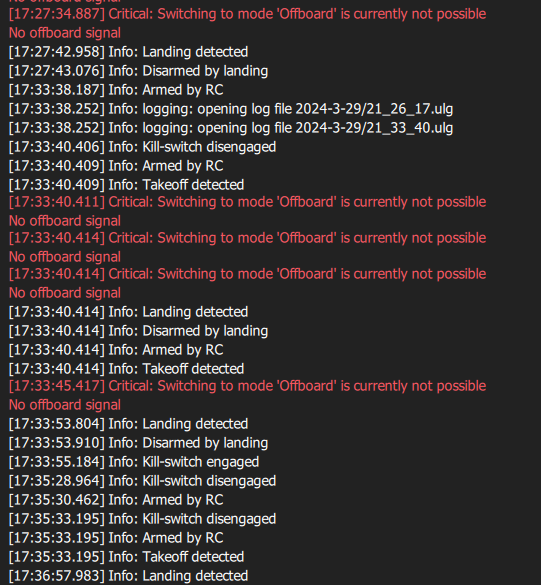
Scheduled Pinned Locked Moved VOXL 2
2 Posts 2 Posters 569 Views 1 Watching
  • Oldest to Newest
  • Newest to Oldest
  • Most Votes
Reply
  • Reply as topic
Log in to reply
This topic has been deleted. Only users with topic management privileges can see it.
  • Jonathan DavisJ Offline
    Jonathan DavisJ Offline
    Jonathan Davis
    wrote on last edited by
    #1

    I am using ros melodic and mavros to run my offboard node. It should fly in a square trajectory, but it stays still.

    When I try to run my offboard program, it instead runs the figure 8 which it should not because my own node is already running.

    Using the voxl-vision-hub wizard I tried to set it to offboard modes 1,2, & 3 and neither worked. In mode 1 it did the figure 8 trajectory. In mode 3 px4 didn't let me switch into offboard mode. In mode 2 it just stayed there.

    Here's my launch file:
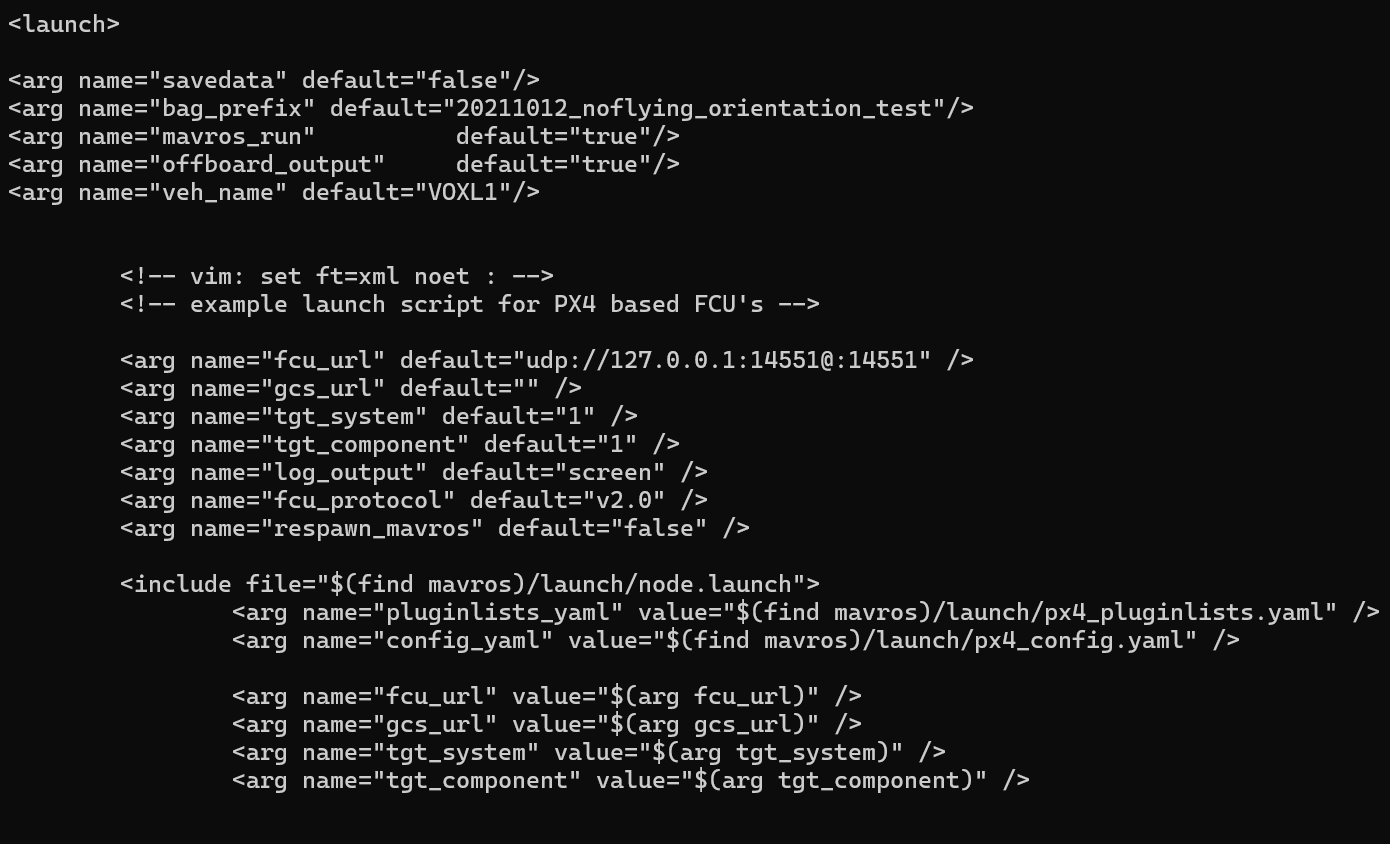
    Screenshot 2024-03-29 175148.png

    This is my voxl-vision-hub.conf file:

    {
            "config_file_version":  1,
            "en_localhost_mavlink_udp":     false,
            "localhost_udp_port_number":    14551,
            "en_vio":       true,
            "vio_pipe":     "qvio",
            "secondary_vio_pipe":   "ov",
            "en_reset_vio_if_initialized_inverted": true,
            "vio_warmup_s": 3,
            "send_odom_while_failed":       true,
            "horizon_cal_tolerance":        0.5,
            "offboard_mode":        "trajectory",
            "follow_tag_id":        0,
            "figure_eight_move_home":       true,
            "robot_radius": 0.300000011920929,
            "collision_sampling_dt":        0.1,
            "max_lookahead_distance":       1,
            "en_tag_fixed_frame":   false,
            "fixed_frame_filter_len":       5,
            "en_transform_mavlink_pos_setpoints_from_fixed_frame":  false,
            "en_voa":       true,
            "voa_upper_bound_m":    -0.15000000596046448,
            "voa_lower_bound_m":    0.15000000596046448,
            "voa_voa_memory_s":     1,
            "voa_max_pc_per_fusion":        100,
            "voa_pie_max_dist_m":   20,
            "voa_pie_min_dist_m":   0.25,
            "voa_pie_under_trim_m": 1,
            "voa_pie_threshold":    3,
            "voa_send_rate_hz":     20,
            "voa_pie_slices":       36,
            "voa_pie_bin_depth_m":  0.15000000596046448,
            "voa_inputs":   [{
                            "enabled":      true,
                            "type": "point_cloud",
                            "input_pipe":   "dfs_point_cloud",
                            "frame":        "stereo_l",
                            "max_depth":    8,
                            "min_depth":    0.300000011920929,
                            "cell_size":    0.079999998211860657,
                            "threshold":    4,
                            "x_fov_deg":    68,
                            "y_fov_deg":    56,
                            "conf_cutoff":  0
                    }, {
                            "enabled":      true,
                            "type": "point_cloud",
                            "input_pipe":   "stereo_front_pc",
                            "frame":        "stereo_front_l",
                            "max_depth":    8,
                            "min_depth":    0.300000011920929,
                            "cell_size":    0.079999998211860657,
                            "threshold":    4,
                            "x_fov_deg":    68,
                            "y_fov_deg":    56,
                            "conf_cutoff":  0
                    }, {
                            "enabled":      true,
                            "type": "point_cloud",
                            "input_pipe":   "stereo_rear_pc",
                            "frame":        "stereo_rear_l",
                            "max_depth":    8,
                            "min_depth":    0.300000011920929,
                            "cell_size":    0.079999998211860657,
                            "threshold":    4,
                            "x_fov_deg":    68,
                            "y_fov_deg":    56,
                            "conf_cutoff":  0
                    }, {
                            "enabled":      true,
                            "type": "tof",
                            "input_pipe":   "tof",
                            "frame":        "tof",
                            "max_depth":    6,
                            "min_depth":    0.15000000596046448,
                            "cell_size":    0.079999998211860657,
                            "threshold":    3,
                            "x_fov_deg":    106.5,
                            "y_fov_deg":    85.0999984741211,
                            "conf_cutoff":  125
                    }, {![Screenshot 2024-03-29 175846.png](/assets/uploads/files/1711749611983-screenshot-2024-03-29-175846.png) 

                            "enabled":      true,
                            "type": "rangefinder",
                            "input_pipe":   "rangefinders",
                            "frame":        "body",
                            "max_depth":    8,
                            "min_depth":    0.300000011920929,
                            "cell_size":    0.079999998211860657,
                            "threshold":    4,
                            "x_fov_deg":    68,
                            "y_fov_deg":    56,
                            "conf_cutoff":  0
                    }]
    }
    

    Here is the part of my QGC log where it fails to move to offboard mode:
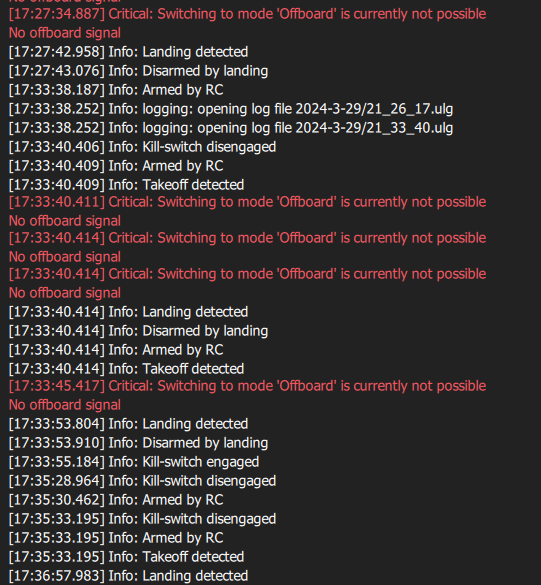
    Screenshot 2024-03-29 175846.png

    k

    ModeratorM 1 Reply Last reply
    1
    • Jonathan DavisJ Jonathan Davis

      I am using ros melodic and mavros to run my offboard node. It should fly in a square trajectory, but it stays still.

      When I try to run my offboard program, it instead runs the figure 8 which it should not because my own node is already running.

      Using the voxl-vision-hub wizard I tried to set it to offboard modes 1,2, & 3 and neither worked. In mode 1 it did the figure 8 trajectory. In mode 3 px4 didn't let me switch into offboard mode. In mode 2 it just stayed there.

      Here's my launch file:
      Screenshot 2024-03-29 175148.png

      This is my voxl-vision-hub.conf file:

      {
              "config_file_version":  1,
              "en_localhost_mavlink_udp":     false,
              "localhost_udp_port_number":    14551,
              "en_vio":       true,
              "vio_pipe":     "qvio",
              "secondary_vio_pipe":   "ov",
              "en_reset_vio_if_initialized_inverted": true,
              "vio_warmup_s": 3,
              "send_odom_while_failed":       true,
              "horizon_cal_tolerance":        0.5,
              "offboard_mode":        "trajectory",
              "follow_tag_id":        0,
              "figure_eight_move_home":       true,
              "robot_radius": 0.300000011920929,
              "collision_sampling_dt":        0.1,
              "max_lookahead_distance":       1,
              "en_tag_fixed_frame":   false,
              "fixed_frame_filter_len":       5,
              "en_transform_mavlink_pos_setpoints_from_fixed_frame":  false,
              "en_voa":       true,
              "voa_upper_bound_m":    -0.15000000596046448,
              "voa_lower_bound_m":    0.15000000596046448,
              "voa_voa_memory_s":     1,
              "voa_max_pc_per_fusion":        100,
              "voa_pie_max_dist_m":   20,
              "voa_pie_min_dist_m":   0.25,
              "voa_pie_under_trim_m": 1,
              "voa_pie_threshold":    3,
              "voa_send_rate_hz":     20,
              "voa_pie_slices":       36,
              "voa_pie_bin_depth_m":  0.15000000596046448,
              "voa_inputs":   [{
                              "enabled":      true,
                              "type": "point_cloud",
                              "input_pipe":   "dfs_point_cloud",
                              "frame":        "stereo_l",
                              "max_depth":    8,
                              "min_depth":    0.300000011920929,
                              "cell_size":    0.079999998211860657,
                              "threshold":    4,
                              "x_fov_deg":    68,
                              "y_fov_deg":    56,
                              "conf_cutoff":  0
                      }, {
                              "enabled":      true,
                              "type": "point_cloud",
                              "input_pipe":   "stereo_front_pc",
                              "frame":        "stereo_front_l",
                              "max_depth":    8,
                              "min_depth":    0.300000011920929,
                              "cell_size":    0.079999998211860657,
                              "threshold":    4,
                              "x_fov_deg":    68,
                              "y_fov_deg":    56,
                              "conf_cutoff":  0
                      }, {
                              "enabled":      true,
                              "type": "point_cloud",
                              "input_pipe":   "stereo_rear_pc",
                              "frame":        "stereo_rear_l",
                              "max_depth":    8,
                              "min_depth":    0.300000011920929,
                              "cell_size":    0.079999998211860657,
                              "threshold":    4,
                              "x_fov_deg":    68,
                              "y_fov_deg":    56,
                              "conf_cutoff":  0
                      }, {
                              "enabled":      true,
                              "type": "tof",
                              "input_pipe":   "tof",
                              "frame":        "tof",
                              "max_depth":    6,
                              "min_depth":    0.15000000596046448,
                              "cell_size":    0.079999998211860657,
                              "threshold":    3,
                              "x_fov_deg":    106.5,
                              "y_fov_deg":    85.0999984741211,
                              "conf_cutoff":  125
                      }, {![Screenshot 2024-03-29 175846.png](/assets/uploads/files/1711749611983-screenshot-2024-03-29-175846.png) 

                              "enabled":      true,
                              "type": "rangefinder",
                              "input_pipe":   "rangefinders",
                              "frame":        "body",
                              "max_depth":    8,
                              "min_depth":    0.300000011920929,
                              "cell_size":    0.079999998211860657,
                              "threshold":    4,
                              "x_fov_deg":    68,
                              "y_fov_deg":    56,
                              "conf_cutoff":  0
                      }]
      }
      

      Here is the part of my QGC log where it fails to move to offboard mode:
      Screenshot 2024-03-29 175846.png

      k

      ModeratorM Offline
      ModeratorM Offline
      Moderator
      ModalAI Team
      wrote on last edited by
      #2

      @Jonathan-Davis said in Unable to run my own offboard node in starling 2:

      offboard_mode

      Check:
      https://docs.modalai.com/mavros/#configure-voxl-vision-hub-localhost

      offboard_mode - set to “off”. When offboard_mode is on, this enables voxl-vision-hub to command the drone to move, which we don’t want (we only want MAVROS to be sending movement commands)

      1 Reply Last reply
      0

      Hello! It looks like you're interested in this conversation, but you don't have an account yet.

      Getting fed up of having to scroll through the same posts each visit? When you register for an account, you'll always come back to exactly where you were before, and choose to be notified of new replies (either via email, or push notification). You'll also be able to save bookmarks and upvote posts to show your appreciation to other community members.

      With your input, this post could be even better 💗

      Register Login
      Reply
      • Reply as topic
      Log in to reply
      • Oldest to Newest
      • Newest to Oldest
      • Most Votes


      ModalAI
      Categories Recent Tags ModalAI.com Docs
      © 2026 ModalAI® · Accelerating autonomy for smaller, smarter, safer drones · Powered by NodeBB
      • Login

      • Don't have an account? Register

      • Login or register to search.
      • First post
        Last post
      0
      • Categories
      • Recent
      • Tags
      • Popular
      • Users
      • Groups