
Unable to run my own offboard node in starling 2
-
I am using ros melodic and mavros to run my offboard node. It should fly in a square trajectory, but it stays still.
When I try to run my offboard program, it instead runs the figure 8 which it should not because my own node is already running.
Using the voxl-vision-hub wizard I tried to set it to offboard modes 1,2, & 3 and neither worked. In mode 1 it did the figure 8 trajectory. In mode 3 px4 didn't let me switch into offboard mode. In mode 2 it just stayed there.
Here's my launch file:
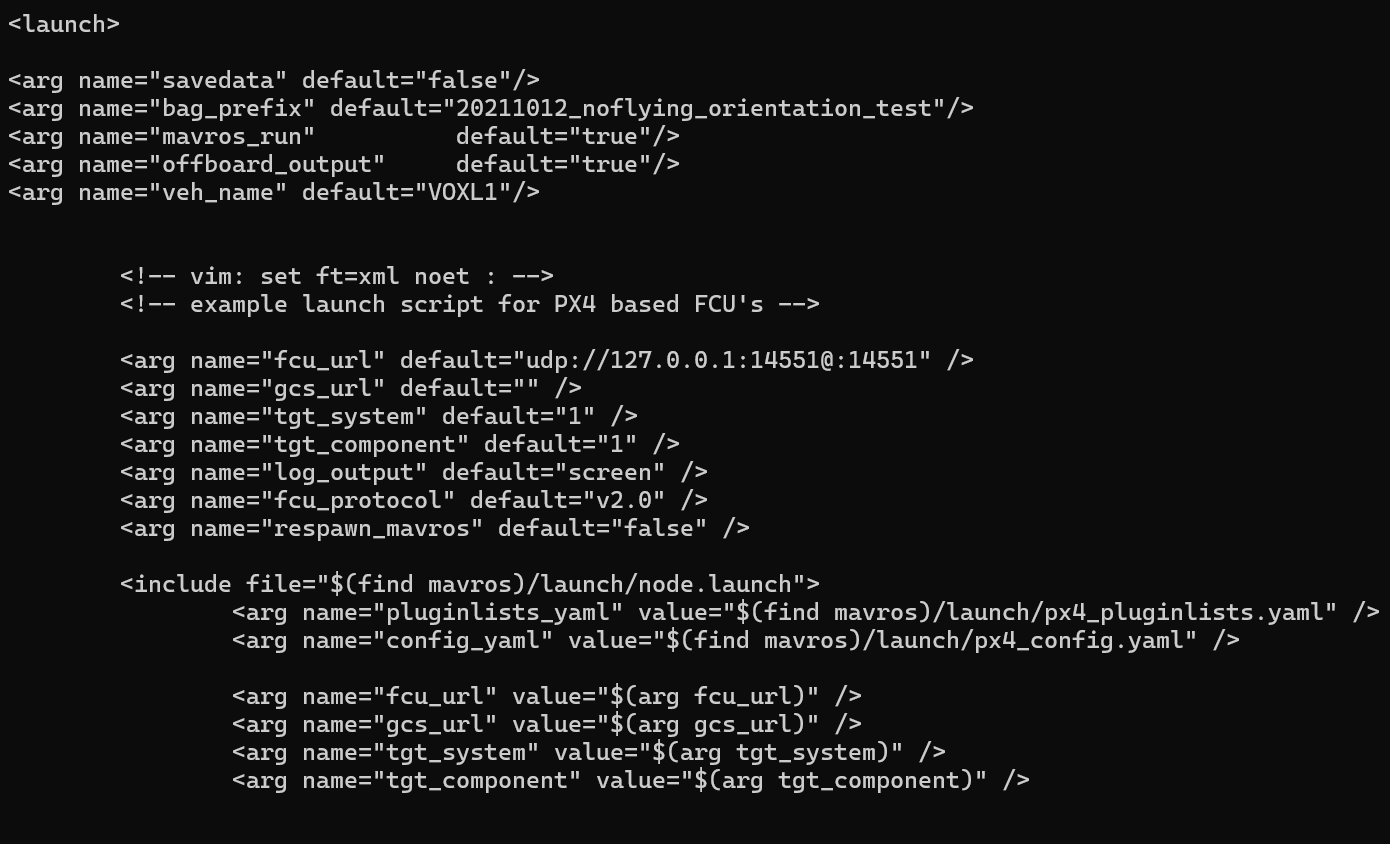
This is my voxl-vision-hub.conf file:
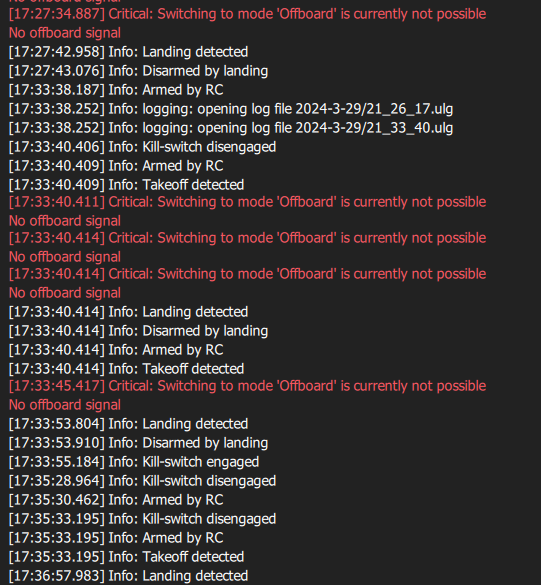
{ "config_file_version": 1, "en_localhost_mavlink_udp": false, "localhost_udp_port_number": 14551, "en_vio": true, "vio_pipe": "qvio", "secondary_vio_pipe": "ov", "en_reset_vio_if_initialized_inverted": true, "vio_warmup_s": 3, "send_odom_while_failed": true, "horizon_cal_tolerance": 0.5, "offboard_mode": "trajectory", "follow_tag_id": 0, "figure_eight_move_home": true, "robot_radius": 0.300000011920929, "collision_sampling_dt": 0.1, "max_lookahead_distance": 1, "en_tag_fixed_frame": false, "fixed_frame_filter_len": 5, "en_transform_mavlink_pos_setpoints_from_fixed_frame": false, "en_voa": true, "voa_upper_bound_m": -0.15000000596046448, "voa_lower_bound_m": 0.15000000596046448, "voa_voa_memory_s": 1, "voa_max_pc_per_fusion": 100, "voa_pie_max_dist_m": 20, "voa_pie_min_dist_m": 0.25, "voa_pie_under_trim_m": 1, "voa_pie_threshold": 3, "voa_send_rate_hz": 20, "voa_pie_slices": 36, "voa_pie_bin_depth_m": 0.15000000596046448, "voa_inputs": [{ "enabled": true, "type": "point_cloud", "input_pipe": "dfs_point_cloud", "frame": "stereo_l", "max_depth": 8, "min_depth": 0.300000011920929, "cell_size": 0.079999998211860657, "threshold": 4, "x_fov_deg": 68, "y_fov_deg": 56, "conf_cutoff": 0 }, { "enabled": true, "type": "point_cloud", "input_pipe": "stereo_front_pc", "frame": "stereo_front_l", "max_depth": 8, "min_depth": 0.300000011920929, "cell_size": 0.079999998211860657, "threshold": 4, "x_fov_deg": 68, "y_fov_deg": 56, "conf_cutoff": 0 }, { "enabled": true, "type": "point_cloud", "input_pipe": "stereo_rear_pc", "frame": "stereo_rear_l", "max_depth": 8, "min_depth": 0.300000011920929, "cell_size": 0.079999998211860657, "threshold": 4, "x_fov_deg": 68, "y_fov_deg": 56, "conf_cutoff": 0 }, { "enabled": true, "type": "tof", "input_pipe": "tof", "frame": "tof", "max_depth": 6, "min_depth": 0.15000000596046448, "cell_size": 0.079999998211860657, "threshold": 3, "x_fov_deg": 106.5, "y_fov_deg": 85.0999984741211, "conf_cutoff": 125 }, { "enabled": true, "type": "rangefinder", "input_pipe": "rangefinders", "frame": "body", "max_depth": 8, "min_depth": 0.300000011920929, "cell_size": 0.079999998211860657, "threshold": 4, "x_fov_deg": 68, "y_fov_deg": 56, "conf_cutoff": 0 }] }Here is the part of my QGC log where it fails to move to offboard mode:
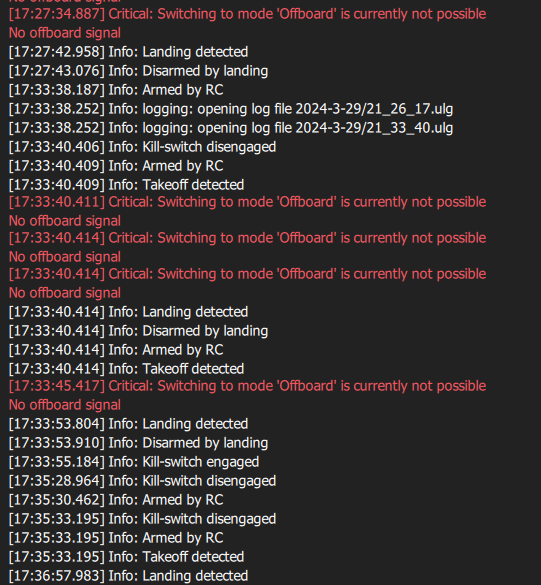
k
-
I am using ros melodic and mavros to run my offboard node. It should fly in a square trajectory, but it stays still.
When I try to run my offboard program, it instead runs the figure 8 which it should not because my own node is already running.
Using the voxl-vision-hub wizard I tried to set it to offboard modes 1,2, & 3 and neither worked. In mode 1 it did the figure 8 trajectory. In mode 3 px4 didn't let me switch into offboard mode. In mode 2 it just stayed there.
Here's my launch file:
This is my voxl-vision-hub.conf file:
{ "config_file_version": 1, "en_localhost_mavlink_udp": false, "localhost_udp_port_number": 14551, "en_vio": true, "vio_pipe": "qvio", "secondary_vio_pipe": "ov", "en_reset_vio_if_initialized_inverted": true, "vio_warmup_s": 3, "send_odom_while_failed": true, "horizon_cal_tolerance": 0.5, "offboard_mode": "trajectory", "follow_tag_id": 0, "figure_eight_move_home": true, "robot_radius": 0.300000011920929, "collision_sampling_dt": 0.1, "max_lookahead_distance": 1, "en_tag_fixed_frame": false, "fixed_frame_filter_len": 5, "en_transform_mavlink_pos_setpoints_from_fixed_frame": false, "en_voa": true, "voa_upper_bound_m": -0.15000000596046448, "voa_lower_bound_m": 0.15000000596046448, "voa_voa_memory_s": 1, "voa_max_pc_per_fusion": 100, "voa_pie_max_dist_m": 20, "voa_pie_min_dist_m": 0.25, "voa_pie_under_trim_m": 1, "voa_pie_threshold": 3, "voa_send_rate_hz": 20, "voa_pie_slices": 36, "voa_pie_bin_depth_m": 0.15000000596046448, "voa_inputs": [{ "enabled": true, "type": "point_cloud", "input_pipe": "dfs_point_cloud", "frame": "stereo_l", "max_depth": 8, "min_depth": 0.300000011920929, "cell_size": 0.079999998211860657, "threshold": 4, "x_fov_deg": 68, "y_fov_deg": 56, "conf_cutoff": 0 }, { "enabled": true, "type": "point_cloud", "input_pipe": "stereo_front_pc", "frame": "stereo_front_l", "max_depth": 8, "min_depth": 0.300000011920929, "cell_size": 0.079999998211860657, "threshold": 4, "x_fov_deg": 68, "y_fov_deg": 56, "conf_cutoff": 0 }, { "enabled": true, "type": "point_cloud", "input_pipe": "stereo_rear_pc", "frame": "stereo_rear_l", "max_depth": 8, "min_depth": 0.300000011920929, "cell_size": 0.079999998211860657, "threshold": 4, "x_fov_deg": 68, "y_fov_deg": 56, "conf_cutoff": 0 }, { "enabled": true, "type": "tof", "input_pipe": "tof", "frame": "tof", "max_depth": 6, "min_depth": 0.15000000596046448, "cell_size": 0.079999998211860657, "threshold": 3, "x_fov_deg": 106.5, "y_fov_deg": 85.0999984741211, "conf_cutoff": 125 }, { "enabled": true, "type": "rangefinder", "input_pipe": "rangefinders", "frame": "body", "max_depth": 8, "min_depth": 0.300000011920929, "cell_size": 0.079999998211860657, "threshold": 4, "x_fov_deg": 68, "y_fov_deg": 56, "conf_cutoff": 0 }] }Here is the part of my QGC log where it fails to move to offboard mode:
k
@Jonathan-Davis said in Unable to run my own offboard node in starling 2:
offboard_mode
Check:
https://docs.modalai.com/mavros/#configure-voxl-vision-hub-localhostoffboard_mode - set to “off”. When offboard_mode is on, this enables voxl-vision-hub to command the drone to move, which we don’t want (we only want MAVROS to be sending movement commands)


Reading along? Create a free ModalAI Forum account to join in.
With an account you can reply, ask your own question, get an email when a ModalAI engineer answers, and mark the reply that solved it. Your place in each thread is saved between visits.
Questions about VOXL, Flight Core, ESCs and ModalAI drones are answered here by the engineers who build them.
Register Login