
Seeking Reference Code for MPA Integration with RTSP Video Streams for TFLite Server
-
Hmm. When i tested with a local rtsp stream generated on the same voxl2, the video capture started immediately. The freezing would occur in the python client side sometime after i got a bunch of frames (when using voxl-streamer to produce the rtsp stream). When the freezing happened, it looked like voxl-streamer dropped the client connection for some reason. I will test with a local ip cam that is producing rtsp today.
It seems gstreamer rtsp receiving end may not be running correctly on your end. How about i share with you updated native opencv package with python bindings and you could try running this natively on voxl2 without your environment? This whay you can test what I am testing.
@Alex-Kushleyev
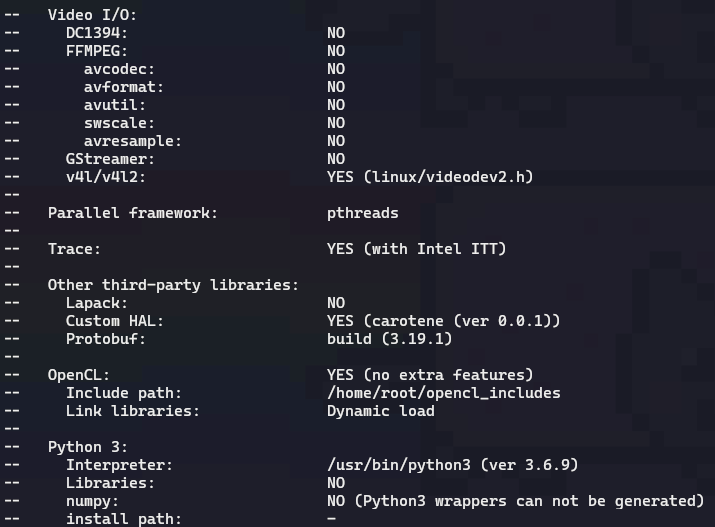
Sharing opencv package would be great, and I also want to share how I built opencv that supports gstreamer. I looked into this issue and followed instructions here, and made sure I saw the followings information to get gstreamer working with opencv by calling cv2.getBuildInformation() :Video I/O: DC1394: NO FFMPEG: YES avcodec: YES (57.107.100) avformat: YES (57.83.100) avutil: YES (55.78.100) swscale: YES (4.8.100) avresample: NO GStreamer: YES (1.14.5) v4l/v4l2: YES (linux/videodev2.h)I was using conda for virtual environment and run opencv with python 3.10 (3.9 and 3.8 are also tested), and my opencv version is 4.9.0.80.
-
@Alex-Kushleyev
Sharing opencv package would be great, and I also want to share how I built opencv that supports gstreamer. I looked into this issue and followed instructions here, and made sure I saw the followings information to get gstreamer working with opencv by calling cv2.getBuildInformation() :Video I/O: DC1394: NO FFMPEG: YES avcodec: YES (57.107.100) avformat: YES (57.83.100) avutil: YES (55.78.100) swscale: YES (4.8.100) avresample: NO GStreamer: YES (1.14.5) v4l/v4l2: YES (linux/videodev2.h)I was using conda for virtual environment and run opencv with python 3.10 (3.9 and 3.8 are also tested), and my opencv version is 4.9.0.80.
@Ethan-Wu , I uploaded the opencv deb here : https://storage.googleapis.com/modalai_public/temp/voxl2-misc-packages/voxl-opencv_4.5.5-3_arm64.deb
it was built using this branch of voxl-opencv project : https://gitlab.com/voxl-public/voxl-sdk/third-party/voxl-opencv/-/tree/add-python3-bindings/
You can just install that deb to overwrite your existing opencv installation and try the python scripts for rtsp natively on voxl2
By the way, how do you get gstreamer to output that debug info? does it automatically print it if there is an issue?
-
@Ethan-Wu , I uploaded the opencv deb here : https://storage.googleapis.com/modalai_public/temp/voxl2-misc-packages/voxl-opencv_4.5.5-3_arm64.deb
it was built using this branch of voxl-opencv project : https://gitlab.com/voxl-public/voxl-sdk/third-party/voxl-opencv/-/tree/add-python3-bindings/
You can just install that deb to overwrite your existing opencv installation and try the python scripts for rtsp natively on voxl2
By the way, how do you get gstreamer to output that debug info? does it automatically print it if there is an issue?
@Alex-Kushleyev You can set the environment variable GST_DEBUG to the number that fits the debug level you prefer. I made it 2 so that I can see warning and error output from gst-launch-1.0, here's the reference documentation : https://gstreamer.freedesktop.org/documentation/tutorials/basic/debugging-tools.html?gi-language=c
-
@Ethan-Wu , I uploaded the opencv deb here : https://storage.googleapis.com/modalai_public/temp/voxl2-misc-packages/voxl-opencv_4.5.5-3_arm64.deb
it was built using this branch of voxl-opencv project : https://gitlab.com/voxl-public/voxl-sdk/third-party/voxl-opencv/-/tree/add-python3-bindings/
You can just install that deb to overwrite your existing opencv installation and try the python scripts for rtsp natively on voxl2
By the way, how do you get gstreamer to output that debug info? does it automatically print it if there is an issue?
@Alex-Kushleyev
Hi,
Do I just need to upload it to voxl and dpkg -i opencv.deb so that it will overwrite my opencv-python? I did so and failed to start the steam as expected.Also, I searched for some other replacement for opencv and got the code below :
import gi
gi.require_version('Gst', '1.0')
from gi.repository import Gst, GObject, GLib
import numpy as np
import time
import cv2
import sys

# Initialize GStreamer
Gst.init(None)

# Define the RTSP stream URL
stream_url = 'rtsp://192.168.0.201:554/live0'

# Create a GStreamer pipeline
pipeline = Gst.parse_launch(f"rtspsrc location={stream_url} latency=0 ! rtph264depay ! h264parse ! avdec_h264 ! videoconvert ! appsink")

# Start the pipeline
pipeline.set_state(Gst.State.PLAYING)

# Main loop to read frames from pipeline and publish them to MPA
frame_cntr = 0
while True:
    # Retrieve a frame from the pipeline
    sample = pipeline.get_by_name('appsink0').emit('pull-sample')
    buffer = sample.get_buffer()
    result, info = buffer.map(Gst.MapFlags.READ)
    if result:
        # Convert the frame to numpy array
        data = np.ndarray((info.size,), dtype=np.uint8, buffer=info.data)
        frame = np.reshape(data, (640, 720, 3))
        # Increment frame counter
        frame_cntr += 1
        sys.stdout.write("\r")
        sys.stdout.write(f'got frame {frame_cntr} with dims {frame.shape}')
        sys.stdout.flush()
        # Publish the frame to MPA
        cv2.imshow("frame", frame)
    else:
        print("Error mapping buffer")
    # Delay for a short period to control frame rate
    if cv2.waitKey(30) == ord('q'):
        break


cv2.destroyAllWindows()
# Stop the pipeline
pipeline.set_state(Gst.State.NULL)
And I saw image like this:
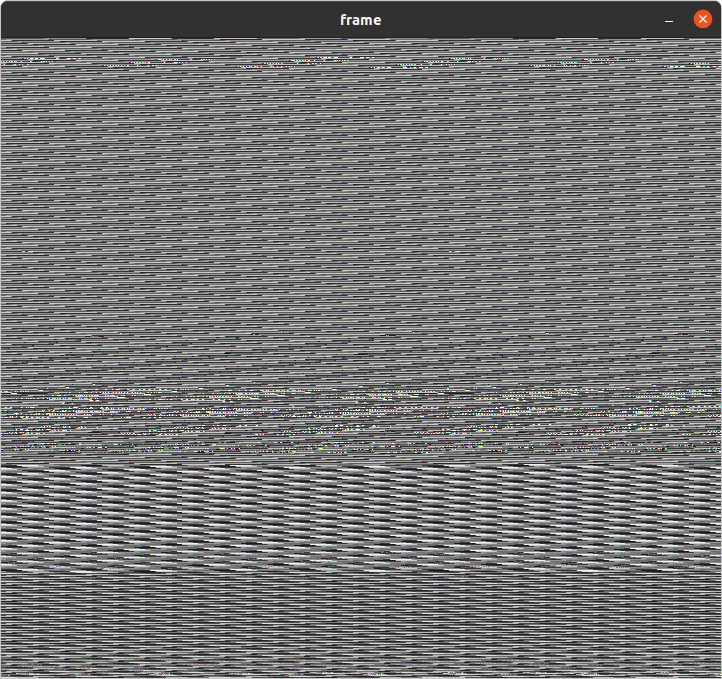
Which looks like a decode error, and I will look into it next week.
-
@Alex-Kushleyev
Hi,
Do I just need to upload it to voxl and dpkg -i opencv.deb so that it will overwrite my opencv-python? I did so and failed to start the steam as expected.Also, I searched for some other replacement for opencv and got the code below :
import gi
gi.require_version('Gst', '1.0')
from gi.repository import Gst, GObject, GLib
import numpy as np
import time
import cv2
import sys

# Initialize GStreamer
Gst.init(None)

# Define the RTSP stream URL
stream_url = 'rtsp://192.168.0.201:554/live0'

# Create a GStreamer pipeline
pipeline = Gst.parse_launch(f"rtspsrc location={stream_url} latency=0 ! rtph264depay ! h264parse ! avdec_h264 ! videoconvert ! appsink")

# Start the pipeline
pipeline.set_state(Gst.State.PLAYING)

# Main loop to read frames from pipeline and publish them to MPA
frame_cntr = 0
while True:
    # Retrieve a frame from the pipeline
    sample = pipeline.get_by_name('appsink0').emit('pull-sample')
    buffer = sample.get_buffer()
    result, info = buffer.map(Gst.MapFlags.READ)
    if result:
        # Convert the frame to numpy array
        data = np.ndarray((info.size,), dtype=np.uint8, buffer=info.data)
        frame = np.reshape(data, (640, 720, 3))
        # Increment frame counter
        frame_cntr += 1
        sys.stdout.write("\r")
        sys.stdout.write(f'got frame {frame_cntr} with dims {frame.shape}')
        sys.stdout.flush()
        # Publish the frame to MPA
        cv2.imshow("frame", frame)
    else:
        print("Error mapping buffer")
    # Delay for a short period to control frame rate
    if cv2.waitKey(30) == ord('q'):
        break


cv2.destroyAllWindows()
# Stop the pipeline
pipeline.set_state(Gst.State.NULL)
And I saw image like this:
Which looks like a decode error, and I will look into it next week.
@Ethan-Wu , yes the installation of opencv .deb should be done use
dpkg -i <package.deb>.When you installed the newer version of Gstreamer, did you overwrite the existing one or did the new version go into another location?
it seems the new version of Gstreamer is not functioning correctly.
You should be able to test the gstreamer using command line pipeline like this (without python) and just dump the frames to stdout:
gst-launch-1.0 rtspsrc location=rtsp://127.0.0.1:8900/live latency=0 ! queue ! rtph264depay ! h264parse ! avdec_h264 ! videoconvert ! filesink location=/dev/stdoutIf that is not working, then you may want to reflash VOXL2 back to original state, i am not sure how to recover the original gstreamer.
-
@Ethan-Wu , yes the installation of opencv .deb should be done use
dpkg -i <package.deb>.When you installed the newer version of Gstreamer, did you overwrite the existing one or did the new version go into another location?
it seems the new version of Gstreamer is not functioning correctly.
You should be able to test the gstreamer using command line pipeline like this (without python) and just dump the frames to stdout:
gst-launch-1.0 rtspsrc location=rtsp://127.0.0.1:8900/live latency=0 ! queue ! rtph264depay ! h264parse ! avdec_h264 ! videoconvert ! filesink location=/dev/stdoutIf that is not working, then you may want to reflash VOXL2 back to original state, i am not sure how to recover the original gstreamer.
@Alex-Kushleyev
Hi, thank you for your assistance over the past few days. I am now able to successfully stream videos from Trip to Voxl and QGC using the code I provided earlier, combined with pympa. The decoding issue I mentioned occurred because the video streamed from Trip2 was in YUV420 format, but I reshaped the data in RGB format.As for the original method using OpenCV + GStreamer, I am still unsure where the problem lies. It could be a decoding issue or an installation problem with OpenCV and GStreamer. Additionally, there were many unexpected situations related to GStreamer during the research process that have not yet been resolved. If I manage to identify the source of the problem, I will provide further information.
-
@Alex-Kushleyev
Hi, thank you for your assistance over the past few days. I am now able to successfully stream videos from Trip to Voxl and QGC using the code I provided earlier, combined with pympa. The decoding issue I mentioned occurred because the video streamed from Trip2 was in YUV420 format, but I reshaped the data in RGB format.As for the original method using OpenCV + GStreamer, I am still unsure where the problem lies. It could be a decoding issue or an installation problem with OpenCV and GStreamer. Additionally, there were many unexpected situations related to GStreamer during the research process that have not yet been resolved. If I manage to identify the source of the problem, I will provide further information.
@Ethan-Wu , thanks for the update! I am glad you got it working. The best way to diagnose the gstreamer issue would be to re-install VOXL2 SDK and see if the original gstreamer has any issues. As I mentioned, in my testing, i have not seen your errors, and i was able to receive and decode streams, the only issue i saw was the stream sometimes stops, depending on the rtsp source. This must be a gstreamer run-time / pipeline configuration issue , i suspect that something just times out and connection is dropped. If i find how to resolve it, will follow up here.
-
A Aaky referenced this topic on
-
A Aaky referenced this topic on
-
@Ethan-Wu , I uploaded the opencv deb here : https://storage.googleapis.com/modalai_public/temp/voxl2-misc-packages/voxl-opencv_4.5.5-3_arm64.deb
it was built using this branch of voxl-opencv project : https://gitlab.com/voxl-public/voxl-sdk/third-party/voxl-opencv/-/tree/add-python3-bindings/
You can just install that deb to overwrite your existing opencv installation and try the python scripts for rtsp natively on voxl2
By the way, how do you get gstreamer to output that debug info? does it automatically print it if there is an issue?
@Alex-Kushleyev said in Seeking Reference Code for MPA Integration with RTSP Video Streams for TFLite Server:
@Ethan-Wu , I uploaded the opencv deb here : https://storage.googleapis.com/modalai_public/temp/voxl2-misc-packages/voxl-opencv_4.5.5-3_arm64.deb
it was built using this branch of voxl-opencv project : https://gitlab.com/voxl-public/voxl-sdk/third-party/voxl-opencv/-/tree/add-python3-bindings/
You can just install that deb to overwrite your existing opencv installation and try the python scripts for rtsp natively on voxl2
By the way, how do you get gstreamer to output that debug info? does it automatically print it if there is an issue?
@Alex-Kushleyev I see the add-python3-bindings has new commit.
could u rebuilt the deb? I cant build the package with gstreamer.
Thanks!
-
@Alex-Kushleyev said in Seeking Reference Code for MPA Integration with RTSP Video Streams for TFLite Server:
@Ethan-Wu , I uploaded the opencv deb here : https://storage.googleapis.com/modalai_public/temp/voxl2-misc-packages/voxl-opencv_4.5.5-3_arm64.deb
it was built using this branch of voxl-opencv project : https://gitlab.com/voxl-public/voxl-sdk/third-party/voxl-opencv/-/tree/add-python3-bindings/
You can just install that deb to overwrite your existing opencv installation and try the python scripts for rtsp natively on voxl2
By the way, how do you get gstreamer to output that debug info? does it automatically print it if there is an issue?
@Alex-Kushleyev I see the add-python3-bindings has new commit.
could u rebuilt the deb? I cant build the package with gstreamer.
Thanks!
@anghung , sure, I can re-build it. I will talk to the team about making this updated opencv build included into main SDK.
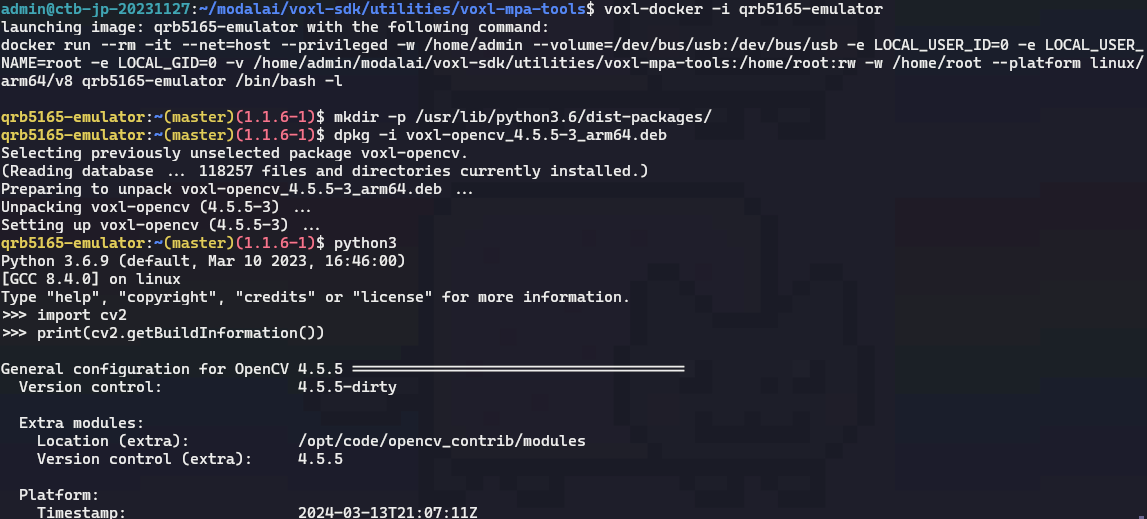
Meanwhile, the only change was creating the directory, so you can just manually do this before installing the current deb (from the link above) on voxl2:
mkdir -p /usr/lib/python3.6/dist-packages/ -
@anghung , sure, I can re-build it. I will talk to the team about making this updated opencv build included into main SDK.
Meanwhile, the only change was creating the directory, so you can just manually do this before installing the current deb (from the link above) on voxl2:
mkdir -p /usr/lib/python3.6/dist-packages/@Alex-Kushleyev
yes, this is same as i install that package.
-
@anghung , sure, I can re-build it. I will talk to the team about making this updated opencv build included into main SDK.
Meanwhile, the only change was creating the directory, so you can just manually do this before installing the current deb (from the link above) on voxl2:
mkdir -p /usr/lib/python3.6/dist-packages/For the original topic, integrate RTSP stream for tflite server.
I found that the problem is the sample code u provide, in metadata, format is RGB.
However, in tflite, https://gitlab.com/voxl-public/voxl-sdk/services/voxl-tflite-server/-/blob/master/src/inference_helper.cpp?ref_type=heads#L305 it only handle NV12 NV21 YUV422 RAW8.
Thus, i need to make the RTSP stream NV12, than tflie can take the rest of the job.
! ... ! ... ! videoconvert ! video/x-raw,format=NV12 ! appsinkAre there proper way to handle such format problem? Because NV12 got into tflite, it still need to resize to RGB format.
Thanks!
-
For the original topic, integrate RTSP stream for tflite server.
I found that the problem is the sample code u provide, in metadata, format is RGB.
However, in tflite, https://gitlab.com/voxl-public/voxl-sdk/services/voxl-tflite-server/-/blob/master/src/inference_helper.cpp?ref_type=heads#L305 it only handle NV12 NV21 YUV422 RAW8.
Thus, i need to make the RTSP stream NV12, than tflie can take the rest of the job.
! ... ! ... ! videoconvert ! video/x-raw,format=NV12 ! appsinkAre there proper way to handle such format problem? Because NV12 got into tflite, it still need to resize to RGB format.
Thanks!
This post is deleted! -
@anghung , sure, I can re-build it. I will talk to the team about making this updated opencv build included into main SDK.
Meanwhile, the only change was creating the directory, so you can just manually do this before installing the current deb (from the link above) on voxl2:
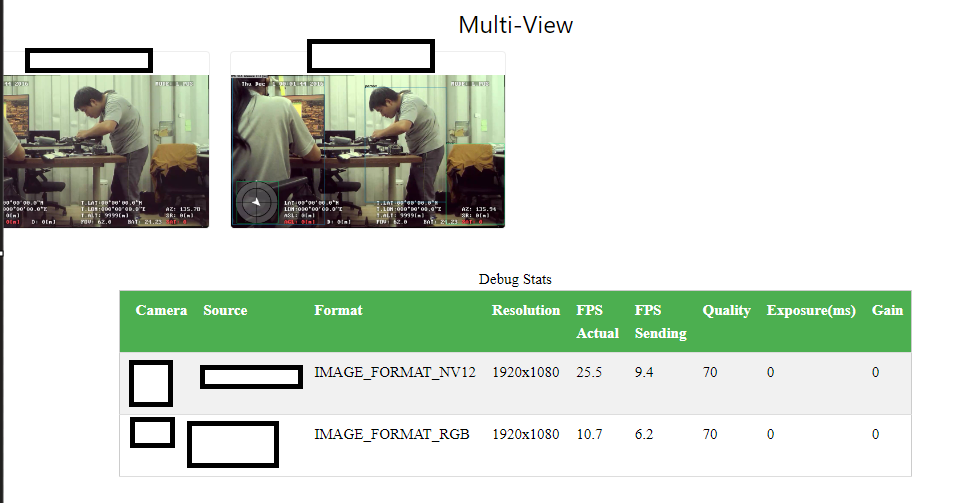
mkdir -p /usr/lib/python3.6/dist-packages/Hi, I try to use HW based decoder with HW resize.
I also try SW decoding, cv2.VideoCapture(stream,cv2.CAP_GSTREAMER) doesn't workout.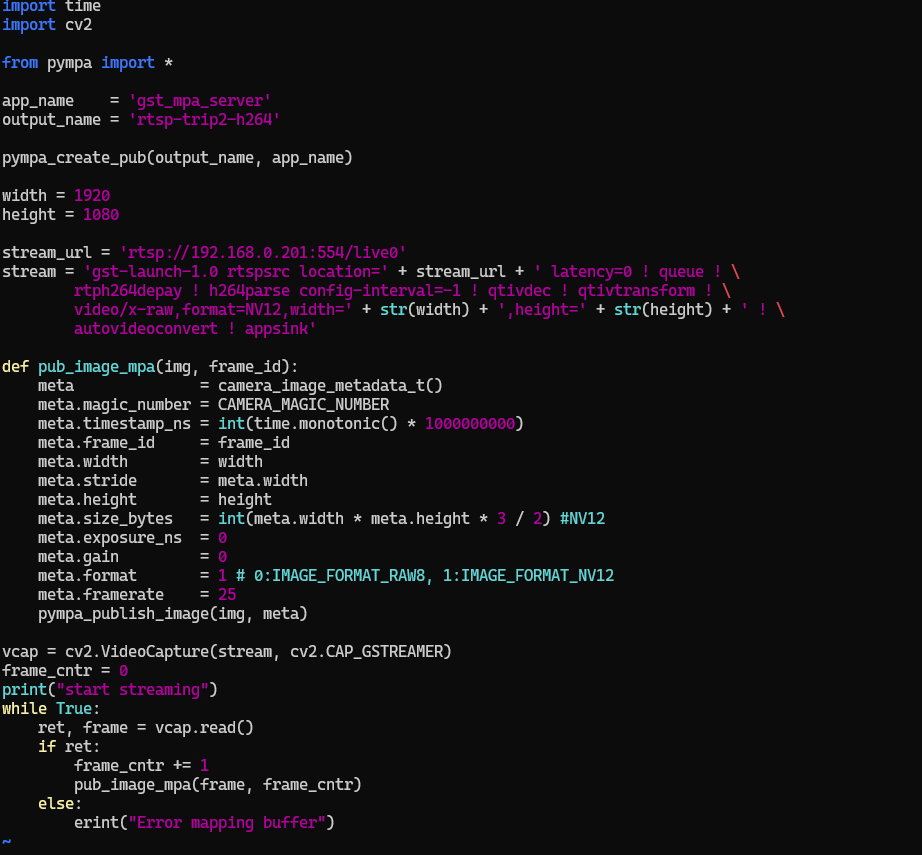
But in protal, it cannot show anything.
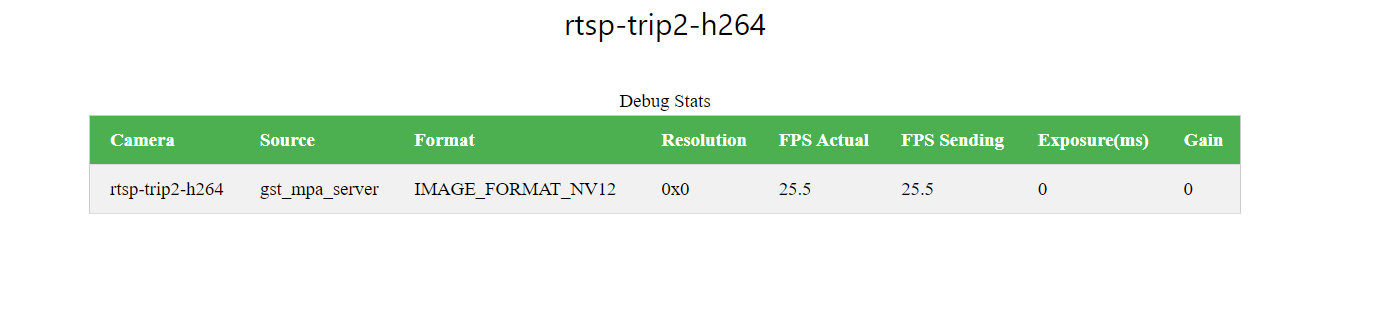
The following is using gi to launch gstreamer and upscale 720 to 1080.
-
Hi, I try to use HW based decoder with HW resize.
I also try SW decoding, cv2.VideoCapture(stream,cv2.CAP_GSTREAMER) doesn't workout.But in protal, it cannot show anything.
The following is using gi to launch gstreamer and upscale 720 to 1080.
@anghung , I believe the issue is with telling
appsinkthe correct format that you need.Looking at opencv source code (https://github.com/opencv/opencv/blob/4.x/modules/videoio/src/cap_gstreamer.cpp#L1000), you can see the supported formats.
Please try inserting
! video/x-raw, format=NV12 !betweenautovideoconvertandappsink.Let me know if that works!
Edit: it seems you may have already tried it, if so, did it work? I could not understand the exact problem - do you need both NV12 and RGB?
Alex
-
@anghung , I believe the issue is with telling
appsinkthe correct format that you need.Looking at opencv source code (https://github.com/opencv/opencv/blob/4.x/modules/videoio/src/cap_gstreamer.cpp#L1000), you can see the supported formats.
Please try inserting
! video/x-raw, format=NV12 !betweenautovideoconvertandappsink.Let me know if that works!
Edit: it seems you may have already tried it, if so, did it work? I could not understand the exact problem - do you need both NV12 and RGB?
Alex
The code in voxl-tflite-server inference-helper, it only handle NV12 YUV422 NV21 and RAW8.
But when rtsp got in to opencv frame, original it is BGR format, than I use video/x-raw,format=NV12 videoconvert. So the tflite-server can handle the mpa.
However in tflite-server, the NV12 will be convert to RGB.
Is there something that can make this process more efficient?
Thanks!
-
The code in voxl-tflite-server inference-helper, it only handle NV12 YUV422 NV21 and RAW8.
But when rtsp got in to opencv frame, original it is BGR format, than I use video/x-raw,format=NV12 videoconvert. So the tflite-server can handle the mpa.
However in tflite-server, the NV12 will be convert to RGB.
Is there something that can make this process more efficient?
Thanks!
@anghung, if you would like to try, you can add a handler for RGB type image here : https://gitlab.com/voxl-public/voxl-sdk/services/voxl-tflite-server/-/blob/master/src/inference_helper.cpp?ref_type=heads#L282 and publish RGB from the python script. It should be simple enough to try it, based on other examples of using YUV and RAW8 images in the same file.
However, then you will be sending more data via MPA (RGB is 3 bytes per pixel, YUV is 1.5 bytes per pixel). Sending more data via MPA should be more efficient than doing unnecessary conversions between YUV and RGB. So, if you can get the video capture to return RGB (not BGR), you could publish the RGB from the python script and use it directly with modified
inference_helper.cpp.Alex
-
@anghung, if you would like to try, you can add a handler for RGB type image here : https://gitlab.com/voxl-public/voxl-sdk/services/voxl-tflite-server/-/blob/master/src/inference_helper.cpp?ref_type=heads#L282 and publish RGB from the python script. It should be simple enough to try it, based on other examples of using YUV and RAW8 images in the same file.
However, then you will be sending more data via MPA (RGB is 3 bytes per pixel, YUV is 1.5 bytes per pixel). Sending more data via MPA should be more efficient than doing unnecessary conversions between YUV and RGB. So, if you can get the video capture to return RGB (not BGR), you could publish the RGB from the python script and use it directly with modified
inference_helper.cpp.Alex
Okay, I would try that.
Also I'm thinking about implement rtsp to mpa in cpp.
Is there some guidance?
Thanks!
-
Okay, I would try that.
Also I'm thinking about implement rtsp to mpa in cpp.
Is there some guidance?
Thanks!
@anghung , you want to implement rtsp directly in cpp, you don't need mpa. You can still use opencv to receive the rtsp stream . You should be able to use
cv::VideoCaptureclass to get the rtsp frames decoded into your cpp application, just like you did in the python example. Then, you can use opencv to change the format of the image, if needed, or just request the correct format using the gstreamer pipeline when you create theVideoCaptureinstance. Finally, use the resulting image for processing.You can start by modifying the
voxl-tflite-serverto subscribe to the rtsp stream (as an option, instead of mpa) or just make your new application based onvoxl-tflite-server. This would be a nice feature, if you get it working and would like to contribute it back
Alex
-
@anghung , you want to implement rtsp directly in cpp, you don't need mpa. You can still use opencv to receive the rtsp stream . You should be able to use
cv::VideoCaptureclass to get the rtsp frames decoded into your cpp application, just like you did in the python example. Then, you can use opencv to change the format of the image, if needed, or just request the correct format using the gstreamer pipeline when you create theVideoCaptureinstance. Finally, use the resulting image for processing.You can start by modifying the
voxl-tflite-serverto subscribe to the rtsp stream (as an option, instead of mpa) or just make your new application based onvoxl-tflite-server. This would be a nice feature, if you get it working and would like to contribute it backAlex
Of course, I have been use
cv::VideoCapturein my laptop for testing.Because I am on a business trip, so I asked a colleague to make modifications in
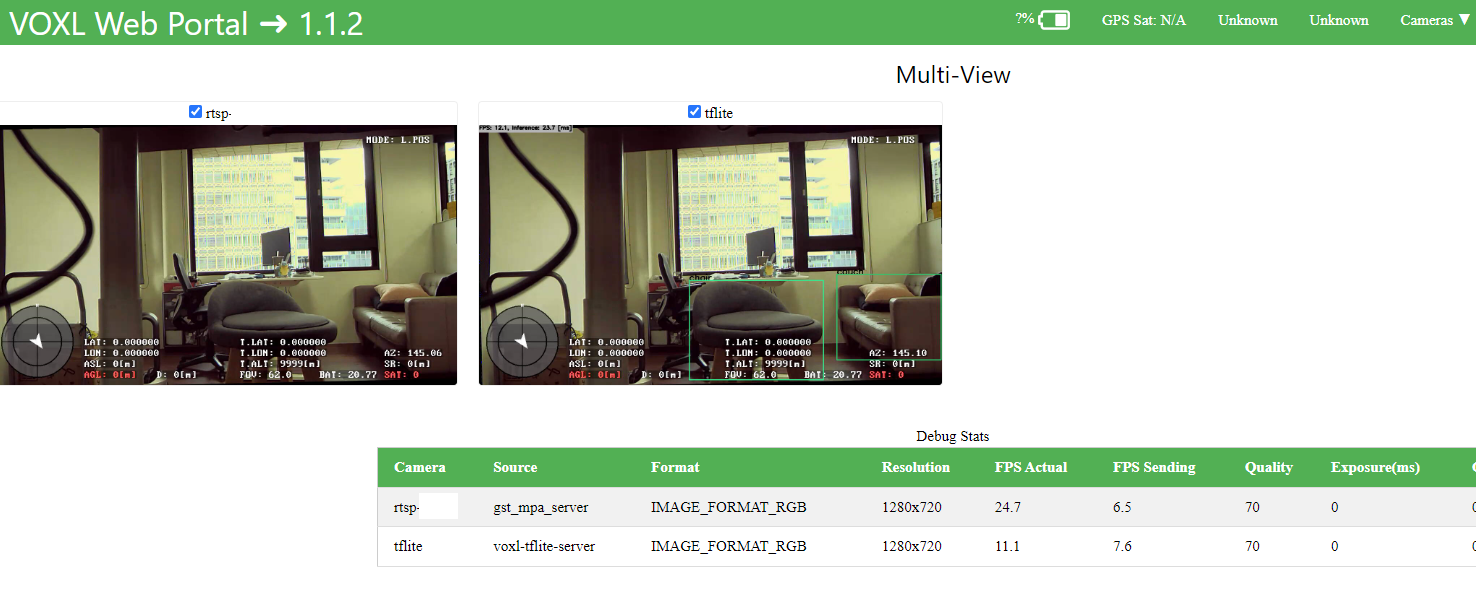
voxl-tflite-serverand conduct some tests. However, the results did not match our expectations.As you mention, this function https://gitlab.com/voxl-public/voxl-sdk/services/voxl-tflite-server/-/blob/master/src/inference_helper.cpp?ref_type=heads#L282 should be able to handle RGB format directly. So we just add another condition in
switchto prevent the functionreturn false.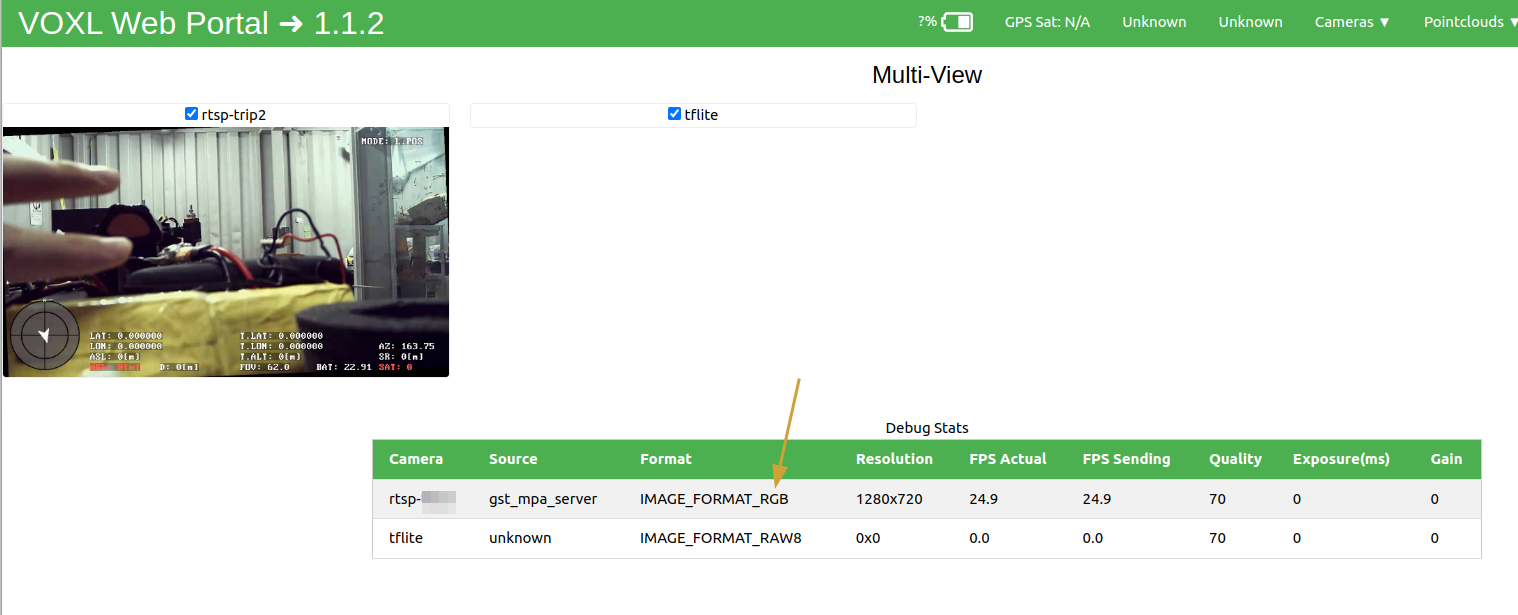
We send RGB format to MPA and the video is fine in Portal, but tflite cant handle it properly. The journal message show that the tflite service restart repearly.
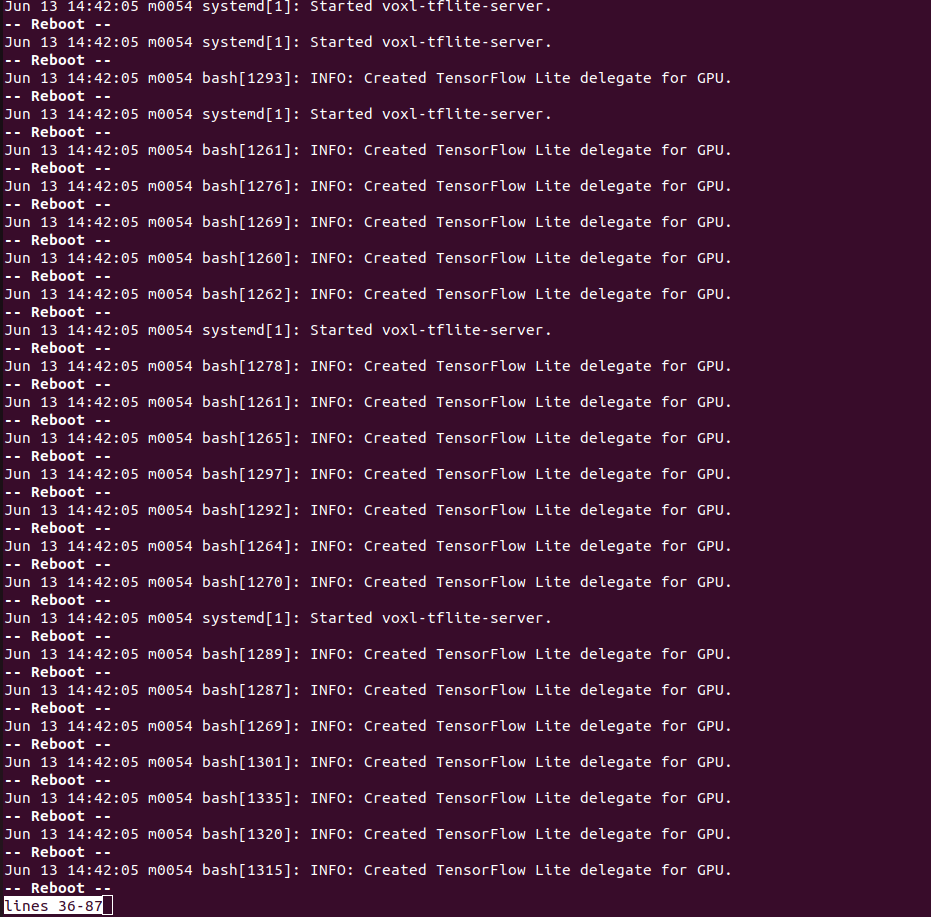
The new
voxl-tflite-serverwe built can handle NV12 correctly as the old one, regarding this situation, what methods should be used to provide more detailed information?We are happy to contribute our successfully tested code. However, we have a limited number of VOXL2 boards available for development, as some are currently in the R&A process. We have already planned to purchase more VOXL2 boards to meet our development needs.
Thanks.
-
@anghung , you want to implement rtsp directly in cpp, you don't need mpa. You can still use opencv to receive the rtsp stream . You should be able to use
cv::VideoCaptureclass to get the rtsp frames decoded into your cpp application, just like you did in the python example. Then, you can use opencv to change the format of the image, if needed, or just request the correct format using the gstreamer pipeline when you create theVideoCaptureinstance. Finally, use the resulting image for processing.You can start by modifying the
voxl-tflite-serverto subscribe to the rtsp stream (as an option, instead of mpa) or just make your new application based onvoxl-tflite-server. This would be a nice feature, if you get it working and would like to contribute it backAlex
-
R ravi referenced this topic on


Reading along? Create a free ModalAI Forum account to join in.
With an account you can reply, ask your own question, get an email when a ModalAI engineer answers, and mark the reply that solved it. Your place in each thread is saved between visits.
Questions about VOXL, Flight Core, ESCs and ModalAI drones are answered here by the engineers who build them.
Register Login