
VOXL2 Mini flip camera orientation
-
@Moderator
At some point the camera orientation for the voxl2 mini flipped from:
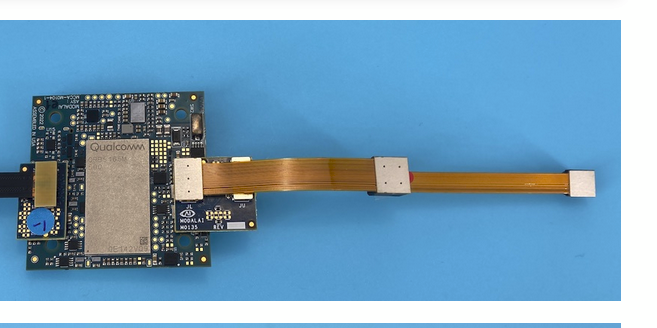
To: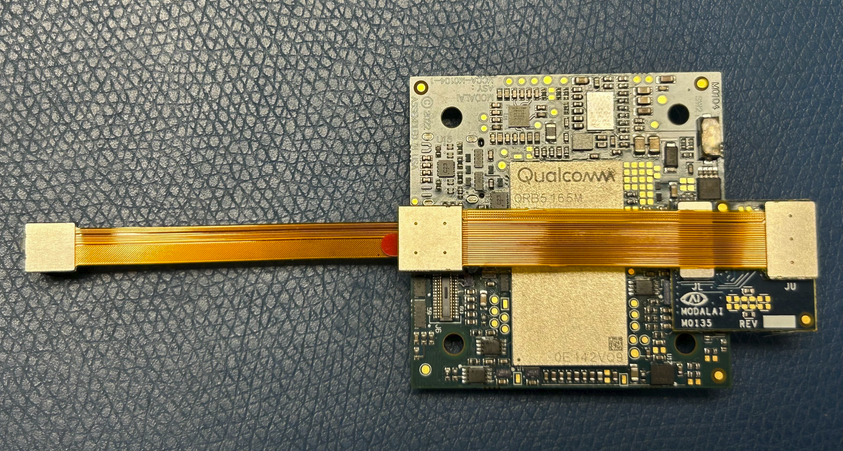
Is there any way to go back to the original orientation? It makes camera mounting much easier.
Thanks!
-
@Moderator
At some point the camera orientation for the voxl2 mini flipped from:
To:Is there any way to go back to the original orientation? It makes camera mounting much easier.
Thanks!
it looks like now you are using M0135 adapter to connect the cameras to J7. Currently OV7251 is connected to J7L (camera slot 2) and IMX214 hires camera is connected to J7U (camera slot 3). If you look in
/usr/lib/camera, you will probably find there:com.qti.sensormodule.ov7251_2.bincom.qti.sensormodule.imx214_3.bin- (2 and 3 correspond to slot numbers).
So, to switch it back (move OV7251 to J7U / camera slot 3 and IMX214 to J7L / camera slot 2), you need to do the following:
- with VOXL2 mini powered off, connect the cameras into new configuration
- power on the board
- remove the two sensormodule files from
/usr/lib/camera - copy the sensormodule files with correct slot IDs from
/usr/share/modalai/chi-cdkto/usr/lib/cameracp /usr/share/modalai/chi-cdk/ov7251/com.qti.sensormodule.ov7251_3.bin /usr/lib/camera/cp /usr/share/modalai/chi-cdk/imx214/com.qti.sensormodule.imx214_2.bin /usr/lib/camera/
- do a quick test using
voxl-camera-server -lto make sure which cameras are detected and which camera ID they have - you may need to update the camera IDs in
/etc/modalai/voxl-camera-server.confsince you just swapped the cameras - the camera with lowest slot ID should have camera ID 0
I think that's all - please try and let me know if you have any issues
-
it looks like now you are using M0135 adapter to connect the cameras to J7. Currently OV7251 is connected to J7L (camera slot 2) and IMX214 hires camera is connected to J7U (camera slot 3). If you look in
/usr/lib/camera, you will probably find there:com.qti.sensormodule.ov7251_2.bincom.qti.sensormodule.imx214_3.bin- (2 and 3 correspond to slot numbers).
So, to switch it back (move OV7251 to J7U / camera slot 3 and IMX214 to J7L / camera slot 2), you need to do the following:
- with VOXL2 mini powered off, connect the cameras into new configuration
- power on the board
- remove the two sensormodule files from
/usr/lib/camera - copy the sensormodule files with correct slot IDs from
/usr/share/modalai/chi-cdkto/usr/lib/cameracp /usr/share/modalai/chi-cdk/ov7251/com.qti.sensormodule.ov7251_3.bin /usr/lib/camera/cp /usr/share/modalai/chi-cdk/imx214/com.qti.sensormodule.imx214_2.bin /usr/lib/camera/
- do a quick test using
voxl-camera-server -lto make sure which cameras are detected and which camera ID they have - you may need to update the camera IDs in
/etc/modalai/voxl-camera-server.confsince you just swapped the cameras - the camera with lowest slot ID should have camera ID 0
I think that's all - please try and let me know if you have any issues
@Alex-Kushleyev Hey Alex, that worked for that fix. Additionally I attempted to put the same cameras on J6 in the orientation with the OV7251 on the M0135 Upper and the IMX214 on the M0135 Lower.
My understanding is that I should put the com.qti.sensormodule.ov7251_1.bin and com.qti.sensormodule.imx214_0.bin into the /usr/lib/camera folder (and delete the non-used ones).
When I run voxl-camera-server -l this only shows the tracking camera. Plugging the board back into J7 again shows both cameras when switching back to imx214_2 and ov7251_3 drivers.
Am I making a bad assumption here?
Additionally I notice that the IMX214 doesn't have drivers for _1 and _5, but does have a driver for _3. Why is this? We aren't quite sure what orientation will work best for our vehicle layout so we were hoping to be able to use all 4 configurations of double camera mounted on m0135 boards with J6 and J7.
Thanks,
Luca
-
@Alex-Kushleyev Hey Alex, that worked for that fix. Additionally I attempted to put the same cameras on J6 in the orientation with the OV7251 on the M0135 Upper and the IMX214 on the M0135 Lower.
My understanding is that I should put the com.qti.sensormodule.ov7251_1.bin and com.qti.sensormodule.imx214_0.bin into the /usr/lib/camera folder (and delete the non-used ones).
When I run voxl-camera-server -l this only shows the tracking camera. Plugging the board back into J7 again shows both cameras when switching back to imx214_2 and ov7251_3 drivers.
Am I making a bad assumption here?
Additionally I notice that the IMX214 doesn't have drivers for _1 and _5, but does have a driver for _3. Why is this? We aren't quite sure what orientation will work best for our vehicle layout so we were hoping to be able to use all 4 configurations of double camera mounted on m0135 boards with J6 and J7.
Thanks,
Luca
@Moderator
Another update because this is confusing me. If I have the cameras plugged in with ov7251_1.bin and imx214_0.bin if I run voxl-camera-server -l immediately after power on it detects 2 cameras.voxl2-mini:~$ voxl-camera-server -l existing instance of voxl-camera-server found, attempting to stop it DEBUG: Attempting to open the hal module DEBUG: SUCCESS: Camera module opened on attempt 0 DEBUG: ----------- Number of cameras: 2 DEBUG: Cam idx: 0, Cam slot: 0, Slave Address: 0x0020, Sensor Id: 0x0214 DEBUG: Cam idx: 1, Cam slot: 1, Slave Address: 0x00E2, Sensor Id: 0x7750 DEBUG: Note: This list comes from the HAL module and may not be indicative DEBUG: of configurations that have full pipelines DEBUG: Number of cameras: 2 ==================================== Stats for camera: 0 ANDROID_SCALER_AVAILABLE_RAW_SIZES: These are likely supported by the sensor 4208 x 3120 3840 x 2160 1920 x 1080 1920 x 1080 ANDROID_SCALER_AVAILABLE_STREAM_CONFIGURATIONS: These are NOT necessarily supported by the sensor 4208 x 3120 HAL_PIXEL_FORMAT_YCbCr_420_888 4208 x 3120 HAL_PIXEL_FORMAT_BLOB 4160 x 3120 HAL_PIXEL_FORMAT_YCbCr_420_888 4160 x 3120 HAL_PIXEL_FORMAT_BLOB 4096 x 2304 HAL_PIXEL_FORMAT_YCbCr_420_888 4096 x 2304 HAL_PIXEL_FORMAT_BLOB 4096 x 2160 HAL_PIXEL_FORMAT_YCbCr_420_888 4096 x 2160 HAL_PIXEL_FORMAT_BLOB 4056 x 3040 HAL_PIXEL_FORMAT_YCbCr_420_888 4056 x 3040 HAL_PIXEL_FORMAT_BLOB 4000 x 3000 HAL_PIXEL_FORMAT_YCbCr_420_888 4000 x 3000 HAL_PIXEL_FORMAT_BLOB 3840 x 2160 HAL_PIXEL_FORMAT_YCbCr_420_888 3840 x 2160 HAL_PIXEL_FORMAT_BLOB 3264 x 2448 HAL_PIXEL_FORMAT_YCbCr_420_888 3264 x 2448 HAL_PIXEL_FORMAT_BLOB 3200 x 2400 HAL_PIXEL_FORMAT_YCbCr_420_888 3200 x 2400 HAL_PIXEL_FORMAT_BLOB 2976 x 2976 HAL_PIXEL_FORMAT_YCbCr_420_888 2976 x 2976 HAL_PIXEL_FORMAT_BLOB 2688 x 1512 HAL_PIXEL_FORMAT_YCbCr_420_888 2688 x 1512 HAL_PIXEL_FORMAT_BLOB 2592 x 1944 HAL_PIXEL_FORMAT_YCbCr_420_888 2592 x 1944 HAL_PIXEL_FORMAT_BLOB 2048 x 1536 HAL_PIXEL_FORMAT_YCbCr_420_888 2048 x 1536 HAL_PIXEL_FORMAT_BLOB 1920 x 1440 HAL_PIXEL_FORMAT_YCbCr_420_888 1920 x 1440 HAL_PIXEL_FORMAT_BLOB 1928 x 1208 HAL_PIXEL_FORMAT_YCbCr_420_888 1928 x 1208 HAL_PIXEL_FORMAT_BLOB 1920 x 1080 HAL_PIXEL_FORMAT_YCbCr_420_888 1920 x 1080 HAL_PIXEL_FORMAT_BLOB 1600 x 1200 HAL_PIXEL_FORMAT_YCbCr_420_888 1600 x 1200 HAL_PIXEL_FORMAT_BLOB 1440 x 1080 HAL_PIXEL_FORMAT_YCbCr_420_888 1440 x 1080 HAL_PIXEL_FORMAT_BLOB 1280 x 960 HAL_PIXEL_FORMAT_YCbCr_420_888 1280 x 960 HAL_PIXEL_FORMAT_BLOB 1280 x 800 HAL_PIXEL_FORMAT_YCbCr_420_888 1280 x 800 HAL_PIXEL_FORMAT_BLOB 1280 x 768 HAL_PIXEL_FORMAT_YCbCr_420_888 1280 x 768 HAL_PIXEL_FORMAT_BLOB 1280 x 720 HAL_PIXEL_FORMAT_YCbCr_420_888 1280 x 720 HAL_PIXEL_FORMAT_BLOB 1080 x 1080 HAL_PIXEL_FORMAT_YCbCr_420_888 1080 x 1080 HAL_PIXEL_FORMAT_BLOB 1024 x 738 HAL_PIXEL_FORMAT_YCbCr_420_888 1024 x 738 HAL_PIXEL_FORMAT_BLOB 1024 x 768 HAL_PIXEL_FORMAT_YCbCr_420_888 1024 x 768 HAL_PIXEL_FORMAT_BLOB 864 x 480 HAL_PIXEL_FORMAT_YCbCr_420_888 864 x 480 HAL_PIXEL_FORMAT_BLOB 800 x 600 HAL_PIXEL_FORMAT_YCbCr_420_888 800 x 600 HAL_PIXEL_FORMAT_BLOB 800 x 480 HAL_PIXEL_FORMAT_YCbCr_420_888 800 x 480 HAL_PIXEL_FORMAT_BLOB 720 x 1280 HAL_PIXEL_FORMAT_YCbCr_420_888 720 x 1280 HAL_PIXEL_FORMAT_BLOB 720 x 480 HAL_PIXEL_FORMAT_YCbCr_420_888 720 x 480 HAL_PIXEL_FORMAT_BLOB 640 x 480 HAL_PIXEL_FORMAT_YCbCr_420_888 640 x 480 HAL_PIXEL_FORMAT_BLOB 640 x 400 HAL_PIXEL_FORMAT_YCbCr_420_888 640 x 400 HAL_PIXEL_FORMAT_BLOB 640 x 360 HAL_PIXEL_FORMAT_YCbCr_420_888 640 x 360 HAL_PIXEL_FORMAT_BLOB 352 x 288 HAL_PIXEL_FORMAT_YCbCr_420_888 352 x 288 HAL_PIXEL_FORMAT_BLOB 320 x 240 HAL_PIXEL_FORMAT_YCbCr_420_888 320 x 240 HAL_PIXEL_FORMAT_BLOB 240 x 320 HAL_PIXEL_FORMAT_YCbCr_420_888 240 x 320 HAL_PIXEL_FORMAT_BLOB 176 x 144 HAL_PIXEL_FORMAT_YCbCr_420_888 176 x 144 HAL_PIXEL_FORMAT_BLOB 4208 x 3120 HAL_PIXEL_FORMAT_RAW10 4208 x 3120 HAL_PIXEL_FORMAT_RAW12 4208 x 3120 HAL_PIXEL_FORMAT_RAW16 4208 x 3120 HAL_PIXEL_FORMAT_RAW_OPAQUE ANDROID_SENSOR_INFO_SENSITIVITY_RANGE min = 54 max = 431 ANDROID_SENSOR_MAX_ANALOG_SENSITIVITY 431 ANDROID_SENSOR_INFO_EXPOSURE_TIME_RANGE min = 10449ns max = 683714540ns ==================================== Stats for camera: 1 ANDROID_SCALER_AVAILABLE_RAW_SIZES: These are likely supported by the sensor 640 x 480 640 x 480 640 x 480 ANDROID_SCALER_AVAILABLE_STREAM_CONFIGURATIONS: These are NOT necessarily supported by the sensor 640 x 480 HAL_PIXEL_FORMAT_YCbCr_420_888 640 x 480 HAL_PIXEL_FORMAT_BLOB 640 x 400 HAL_PIXEL_FORMAT_YCbCr_420_888 640 x 400 HAL_PIXEL_FORMAT_BLOB 640 x 360 HAL_PIXEL_FORMAT_YCbCr_420_888 640 x 360 HAL_PIXEL_FORMAT_BLOB 352 x 288 HAL_PIXEL_FORMAT_YCbCr_420_888 352 x 288 HAL_PIXEL_FORMAT_BLOB 320 x 240 HAL_PIXEL_FORMAT_YCbCr_420_888 320 x 240 HAL_PIXEL_FORMAT_BLOB 240 x 320 HAL_PIXEL_FORMAT_YCbCr_420_888 240 x 320 HAL_PIXEL_FORMAT_BLOB 176 x 144 HAL_PIXEL_FORMAT_YCbCr_420_888 176 x 144 HAL_PIXEL_FORMAT_BLOB 640 x 480 HAL_PIXEL_FORMAT_RAW10 640 x 480 HAL_PIXEL_FORMAT_RAW12 640 x 480 HAL_PIXEL_FORMAT_RAW16 640 x 480 HAL_PIXEL_FORMAT_RAW_OPAQUE ANDROID_SENSOR_INFO_SENSITIVITY_RANGE min = 54 max = 3451 ANDROID_SENSOR_MAX_ANALOG_SENSITIVITY 3451 ANDROID_SENSOR_INFO_EXPOSURE_TIME_RANGE min = 0ns max = 1266732525ns ==================================== Number of cameras detected: 2 ====================================If I instead run voxl-inspect-cam -a it shows that tracking is working, but hires is not.
|   hires_large_color |
| hires_large_encoded |
|    hires_large_grey |
|   hires_small_color |
| hires_small_encoded |
|    hires_small_grey |
|      hires_snapshot |
|        qvio_overlay |  368640 |  640 |  576 |  5.00 |   64 |      694 |     25.3  | 29.5 |   87.0 | RAW8
|            tracking |  307200 |  640 |  480 |  5.00 |   64 |      694 |     11.8  | 30.0 |   73.7 | RAW8
My camera server config is below:
 * voxl-camera-server Configuration File
 *
 * Each camera has configurations for up to 4 HAL3 streams:
 *    - `preview` stream for raw unprocessed images from CV cameras
 *    - `small_video` 720p (ish) h264/h265 compressed for fpv video streaming
 *    - `large_video` 4k (ish) h264/h265 for onboard video recording to disk
 *    - `snapshot` ISP-processed JPG snapshots that get saved to disk
 *
 * on QRB5165 platforms (VOXL2 and VOXL2 mini) you can only have 3 of the 4 enabled
 *
 * This file is generated from default values by voxl-configure-cameras.
 * Do not expect arbitrary resolutions to work, the ISP and video compression
 * pipelines only support very specific resolutions.
 *
 * The default video compression mode is cqp or Constant Quantization Parameter
 *
 *
 *
 */
{
        "version":      0.1,
        "cameras":      [{
                        "type": "imx214",
                        "name": "hires",
                        "enabled":      true,
                        "camera_id":    0,
                        "fps":  30,
                        "en_preview":   false,
                        "preview_width":        640,
                        "preview_height":       480,
                        "en_raw_preview":       false,
                        "en_small_video":       true,
                        "small_video_width":    1024,
                        "small_video_height":   768,
                        "small_venc_mode":      "h265",
                        "small_venc_br_ctrl":   "cqp",
                        "small_venc_Qfixed":    30,
                        "small_venc_Qmin":      15,
                        "small_venc_Qmax":      40,
                        "small_venc_nPframes":  9,
                        "small_venc_mbps":      2,
                        "en_large_video":       true,
                        "large_video_width":    4208,
                        "large_video_height":   3120,
                        "large_venc_mode":      "h265",
                        "large_venc_br_ctrl":   "cqp",
                        "large_venc_Qfixed":    38,
                        "large_venc_Qmin":      15,
                        "large_venc_Qmax":      50,
                        "large_venc_nPframes":  29,
                        "large_venc_mbps":      30,
                        "en_snapshot":  true,
                        "en_snapshot_width":    4208,
                        "en_snapshot_height":   3120,
                        "ae_mode":      "isp"
                },
                {
                        "type": "ov7251",
                        "name": "tracking",
                        "enabled":      true,
                        "camera_id":    1,
                        "fps":  30,
                        "en_rotate":    false,
                        "en_preview":   true,
                        "preview_width":        640,
                        "preview_height":       480,
                        "en_raw_preview":       true,
                        "ae_mode":      "lme_msv",
                        "ae_desired_msv":       60,
                        "exposure_min_us":      20,
                        "exposure_max_us":      33000,
                        "gain_min":     54,
                        "gain_max":     8000,
                        "exposure_soft_min_us": 5000,
                        "ae_filter_alpha":      0.600000023841858,
                        "ae_ignore_fraction":   0.20000000298023224,
                        "ae_slope":     0.05000000074505806,
                        "ae_exposure_period":   1,
                        "ae_gain_period":       1
                }]
}
It appears as if something happens when the stream is accessed. If I run voxl-camera-server and then kill it voxl-camera-server -l will still show 2 cameras, but if I instead run voxl-camera-server and then in another window run voxl-inspect-cam -a the original window will no longer respond to ctrl-C. If I force kill i with kill -9 proccess_num then run voxl-camera-server -l it now shows 1 camera until I reboot.
Any ideas?
-
@Moderator
Another update because this is confusing me. If I have the cameras plugged in with ov7251_1.bin and imx214_0.bin if I run voxl-camera-server -l immediately after power on it detects 2 cameras.voxl2-mini:~$ voxl-camera-server -l existing instance of voxl-camera-server found, attempting to stop it DEBUG: Attempting to open the hal module DEBUG: SUCCESS: Camera module opened on attempt 0 DEBUG: ----------- Number of cameras: 2 DEBUG: Cam idx: 0, Cam slot: 0, Slave Address: 0x0020, Sensor Id: 0x0214 DEBUG: Cam idx: 1, Cam slot: 1, Slave Address: 0x00E2, Sensor Id: 0x7750 DEBUG: Note: This list comes from the HAL module and may not be indicative DEBUG: of configurations that have full pipelines DEBUG: Number of cameras: 2 ==================================== Stats for camera: 0 ANDROID_SCALER_AVAILABLE_RAW_SIZES: These are likely supported by the sensor 4208 x 3120 3840 x 2160 1920 x 1080 1920 x 1080 ANDROID_SCALER_AVAILABLE_STREAM_CONFIGURATIONS: These are NOT necessarily supported by the sensor 4208 x 3120 HAL_PIXEL_FORMAT_YCbCr_420_888 4208 x 3120 HAL_PIXEL_FORMAT_BLOB 4160 x 3120 HAL_PIXEL_FORMAT_YCbCr_420_888 4160 x 3120 HAL_PIXEL_FORMAT_BLOB 4096 x 2304 HAL_PIXEL_FORMAT_YCbCr_420_888 4096 x 2304 HAL_PIXEL_FORMAT_BLOB 4096 x 2160 HAL_PIXEL_FORMAT_YCbCr_420_888 4096 x 2160 HAL_PIXEL_FORMAT_BLOB 4056 x 3040 HAL_PIXEL_FORMAT_YCbCr_420_888 4056 x 3040 HAL_PIXEL_FORMAT_BLOB 4000 x 3000 HAL_PIXEL_FORMAT_YCbCr_420_888 4000 x 3000 HAL_PIXEL_FORMAT_BLOB 3840 x 2160 HAL_PIXEL_FORMAT_YCbCr_420_888 3840 x 2160 HAL_PIXEL_FORMAT_BLOB 3264 x 2448 HAL_PIXEL_FORMAT_YCbCr_420_888 3264 x 2448 HAL_PIXEL_FORMAT_BLOB 3200 x 2400 HAL_PIXEL_FORMAT_YCbCr_420_888 3200 x 2400 HAL_PIXEL_FORMAT_BLOB 2976 x 2976 HAL_PIXEL_FORMAT_YCbCr_420_888 2976 x 2976 HAL_PIXEL_FORMAT_BLOB 2688 x 1512 HAL_PIXEL_FORMAT_YCbCr_420_888 2688 x 1512 HAL_PIXEL_FORMAT_BLOB 2592 x 1944 HAL_PIXEL_FORMAT_YCbCr_420_888 2592 x 1944 HAL_PIXEL_FORMAT_BLOB 2048 x 1536 HAL_PIXEL_FORMAT_YCbCr_420_888 2048 x 1536 HAL_PIXEL_FORMAT_BLOB 1920 x 1440 HAL_PIXEL_FORMAT_YCbCr_420_888 1920 x 1440 HAL_PIXEL_FORMAT_BLOB 1928 x 1208 HAL_PIXEL_FORMAT_YCbCr_420_888 1928 x 1208 HAL_PIXEL_FORMAT_BLOB 1920 x 1080 HAL_PIXEL_FORMAT_YCbCr_420_888 1920 x 1080 HAL_PIXEL_FORMAT_BLOB 1600 x 1200 HAL_PIXEL_FORMAT_YCbCr_420_888 1600 x 1200 HAL_PIXEL_FORMAT_BLOB 1440 x 1080 HAL_PIXEL_FORMAT_YCbCr_420_888 1440 x 1080 HAL_PIXEL_FORMAT_BLOB 1280 x 960 HAL_PIXEL_FORMAT_YCbCr_420_888 1280 x 960 HAL_PIXEL_FORMAT_BLOB 1280 x 800 HAL_PIXEL_FORMAT_YCbCr_420_888 1280 x 800 HAL_PIXEL_FORMAT_BLOB 1280 x 768 HAL_PIXEL_FORMAT_YCbCr_420_888 1280 x 768 HAL_PIXEL_FORMAT_BLOB 1280 x 720 HAL_PIXEL_FORMAT_YCbCr_420_888 1280 x 720 HAL_PIXEL_FORMAT_BLOB 1080 x 1080 HAL_PIXEL_FORMAT_YCbCr_420_888 1080 x 1080 HAL_PIXEL_FORMAT_BLOB 1024 x 738 HAL_PIXEL_FORMAT_YCbCr_420_888 1024 x 738 HAL_PIXEL_FORMAT_BLOB 1024 x 768 HAL_PIXEL_FORMAT_YCbCr_420_888 1024 x 768 HAL_PIXEL_FORMAT_BLOB 864 x 480 HAL_PIXEL_FORMAT_YCbCr_420_888 864 x 480 HAL_PIXEL_FORMAT_BLOB 800 x 600 HAL_PIXEL_FORMAT_YCbCr_420_888 800 x 600 HAL_PIXEL_FORMAT_BLOB 800 x 480 HAL_PIXEL_FORMAT_YCbCr_420_888 800 x 480 HAL_PIXEL_FORMAT_BLOB 720 x 1280 HAL_PIXEL_FORMAT_YCbCr_420_888 720 x 1280 HAL_PIXEL_FORMAT_BLOB 720 x 480 HAL_PIXEL_FORMAT_YCbCr_420_888 720 x 480 HAL_PIXEL_FORMAT_BLOB 640 x 480 HAL_PIXEL_FORMAT_YCbCr_420_888 640 x 480 HAL_PIXEL_FORMAT_BLOB 640 x 400 HAL_PIXEL_FORMAT_YCbCr_420_888 640 x 400 HAL_PIXEL_FORMAT_BLOB 640 x 360 HAL_PIXEL_FORMAT_YCbCr_420_888 640 x 360 HAL_PIXEL_FORMAT_BLOB 352 x 288 HAL_PIXEL_FORMAT_YCbCr_420_888 352 x 288 HAL_PIXEL_FORMAT_BLOB 320 x 240 HAL_PIXEL_FORMAT_YCbCr_420_888 320 x 240 HAL_PIXEL_FORMAT_BLOB 240 x 320 HAL_PIXEL_FORMAT_YCbCr_420_888 240 x 320 HAL_PIXEL_FORMAT_BLOB 176 x 144 HAL_PIXEL_FORMAT_YCbCr_420_888 176 x 144 HAL_PIXEL_FORMAT_BLOB 4208 x 3120 HAL_PIXEL_FORMAT_RAW10 4208 x 3120 HAL_PIXEL_FORMAT_RAW12 4208 x 3120 HAL_PIXEL_FORMAT_RAW16 4208 x 3120 HAL_PIXEL_FORMAT_RAW_OPAQUE ANDROID_SENSOR_INFO_SENSITIVITY_RANGE min = 54 max = 431 ANDROID_SENSOR_MAX_ANALOG_SENSITIVITY 431 ANDROID_SENSOR_INFO_EXPOSURE_TIME_RANGE min = 10449ns max = 683714540ns ==================================== Stats for camera: 1 ANDROID_SCALER_AVAILABLE_RAW_SIZES: These are likely supported by the sensor 640 x 480 640 x 480 640 x 480 ANDROID_SCALER_AVAILABLE_STREAM_CONFIGURATIONS: These are NOT necessarily supported by the sensor 640 x 480 HAL_PIXEL_FORMAT_YCbCr_420_888 640 x 480 HAL_PIXEL_FORMAT_BLOB 640 x 400 HAL_PIXEL_FORMAT_YCbCr_420_888 640 x 400 HAL_PIXEL_FORMAT_BLOB 640 x 360 HAL_PIXEL_FORMAT_YCbCr_420_888 640 x 360 HAL_PIXEL_FORMAT_BLOB 352 x 288 HAL_PIXEL_FORMAT_YCbCr_420_888 352 x 288 HAL_PIXEL_FORMAT_BLOB 320 x 240 HAL_PIXEL_FORMAT_YCbCr_420_888 320 x 240 HAL_PIXEL_FORMAT_BLOB 240 x 320 HAL_PIXEL_FORMAT_YCbCr_420_888 240 x 320 HAL_PIXEL_FORMAT_BLOB 176 x 144 HAL_PIXEL_FORMAT_YCbCr_420_888 176 x 144 HAL_PIXEL_FORMAT_BLOB 640 x 480 HAL_PIXEL_FORMAT_RAW10 640 x 480 HAL_PIXEL_FORMAT_RAW12 640 x 480 HAL_PIXEL_FORMAT_RAW16 640 x 480 HAL_PIXEL_FORMAT_RAW_OPAQUE ANDROID_SENSOR_INFO_SENSITIVITY_RANGE min = 54 max = 3451 ANDROID_SENSOR_MAX_ANALOG_SENSITIVITY 3451 ANDROID_SENSOR_INFO_EXPOSURE_TIME_RANGE min = 0ns max = 1266732525ns ==================================== Number of cameras detected: 2 ====================================If I instead run voxl-inspect-cam -a it shows that tracking is working, but hires is not.
|   hires_large_color |
| hires_large_encoded |
|    hires_large_grey |
|   hires_small_color |
| hires_small_encoded |
|    hires_small_grey |
|      hires_snapshot |
|        qvio_overlay |  368640 |  640 |  576 |  5.00 |   64 |      694 |     25.3  | 29.5 |   87.0 | RAW8
|            tracking |  307200 |  640 |  480 |  5.00 |   64 |      694 |     11.8  | 30.0 |   73.7 | RAW8
My camera server config is below:
 * voxl-camera-server Configuration File
 *
 * Each camera has configurations for up to 4 HAL3 streams:
 *    - `preview` stream for raw unprocessed images from CV cameras
 *    - `small_video` 720p (ish) h264/h265 compressed for fpv video streaming
 *    - `large_video` 4k (ish) h264/h265 for onboard video recording to disk
 *    - `snapshot` ISP-processed JPG snapshots that get saved to disk
 *
 * on QRB5165 platforms (VOXL2 and VOXL2 mini) you can only have 3 of the 4 enabled
 *
 * This file is generated from default values by voxl-configure-cameras.
 * Do not expect arbitrary resolutions to work, the ISP and video compression
 * pipelines only support very specific resolutions.
 *
 * The default video compression mode is cqp or Constant Quantization Parameter
 *
 *
 *
 */
{
        "version":      0.1,
        "cameras":      [{
                        "type": "imx214",
                        "name": "hires",
                        "enabled":      true,
                        "camera_id":    0,
                        "fps":  30,
                        "en_preview":   false,
                        "preview_width":        640,
                        "preview_height":       480,
                        "en_raw_preview":       false,
                        "en_small_video":       true,
                        "small_video_width":    1024,
                        "small_video_height":   768,
                        "small_venc_mode":      "h265",
                        "small_venc_br_ctrl":   "cqp",
                        "small_venc_Qfixed":    30,
                        "small_venc_Qmin":      15,
                        "small_venc_Qmax":      40,
                        "small_venc_nPframes":  9,
                        "small_venc_mbps":      2,
                        "en_large_video":       true,
                        "large_video_width":    4208,
                        "large_video_height":   3120,
                        "large_venc_mode":      "h265",
                        "large_venc_br_ctrl":   "cqp",
                        "large_venc_Qfixed":    38,
                        "large_venc_Qmin":      15,
                        "large_venc_Qmax":      50,
                        "large_venc_nPframes":  29,
                        "large_venc_mbps":      30,
                        "en_snapshot":  true,
                        "en_snapshot_width":    4208,
                        "en_snapshot_height":   3120,
                        "ae_mode":      "isp"
                },
                {
                        "type": "ov7251",
                        "name": "tracking",
                        "enabled":      true,
                        "camera_id":    1,
                        "fps":  30,
                        "en_rotate":    false,
                        "en_preview":   true,
                        "preview_width":        640,
                        "preview_height":       480,
                        "en_raw_preview":       true,
                        "ae_mode":      "lme_msv",
                        "ae_desired_msv":       60,
                        "exposure_min_us":      20,
                        "exposure_max_us":      33000,
                        "gain_min":     54,
                        "gain_max":     8000,
                        "exposure_soft_min_us": 5000,
                        "ae_filter_alpha":      0.600000023841858,
                        "ae_ignore_fraction":   0.20000000298023224,
                        "ae_slope":     0.05000000074505806,
                        "ae_exposure_period":   1,
                        "ae_gain_period":       1
                }]
}
It appears as if something happens when the stream is accessed. If I run voxl-camera-server and then kill it voxl-camera-server -l will still show 2 cameras, but if I instead run voxl-camera-server and then in another window run voxl-inspect-cam -a the original window will no longer respond to ctrl-C. If I force kill i with kill -9 proccess_num then run voxl-camera-server -l it now shows 1 camera until I reboot.
Any ideas?
@LucaVertiq , OK so if you use J7, you can stream the both cameras fine, but only the issue with hanging happens if you switch to J6?
The reason why not all sensormodules were built for IMX214 (like _1 and _5) is actually because currently on VOXL2 (not mini), the slots 1 and 5 do not support a hires camera (those camera ports are prioritized for a stereo pair use case). However, if you need to test IMX214 in slot 1, it is not an issue, i can build it for you.
Let me try out the ov7251 tracking and IMX214 configuration on J6 (both connection options) and I will let you know if I run into any stability issues.
Alex
-
@LucaVertiq , OK so if you use J7, you can stream the both cameras fine, but only the issue with hanging happens if you switch to J6?
The reason why not all sensormodules were built for IMX214 (like _1 and _5) is actually because currently on VOXL2 (not mini), the slots 1 and 5 do not support a hires camera (those camera ports are prioritized for a stereo pair use case). However, if you need to test IMX214 in slot 1, it is not an issue, i can build it for you.
Let me try out the ov7251 tracking and IMX214 configuration on J6 (both connection options) and I will let you know if I run into any stability issues.
Alex
@Alex-Kushleyev Thanks for taking a look. I think we won't need a driver for the imx214 on port 1, as I want the camera cables to extend outwards from the board instead of lying across the board regardless of whether we have them on J6 or J7. I've done some more testing and remain stuck with this error so if you find anything please let me know! I may try reflashing to 1.1.2 as a clean slate, but I want to make sure I have all of the settings I've changed and drivers I've built saved if they aren't in the /data/ directiory
-
@Alex-Kushleyev Thanks for taking a look. I think we won't need a driver for the imx214 on port 1, as I want the camera cables to extend outwards from the board instead of lying across the board regardless of whether we have them on J6 or J7. I've done some more testing and remain stuck with this error so if you find anything please let me know! I may try reflashing to 1.1.2 as a clean slate, but I want to make sure I have all of the settings I've changed and drivers I've built saved if they aren't in the /data/ directiory
@LucaVertiq , i was able to reproduce your issue. I am using sdk 1.1.1 - on voxl2 mini the imx214 camera only works in slot 3, does not work in slots 0,1,2. This is not expected, we will look into it.
-
@LucaVertiq , i was able to reproduce your issue. I am using sdk 1.1.1 - on voxl2 mini the imx214 camera only works in slot 3, does not work in slots 0,1,2. This is not expected, we will look into it.
@Alex-Kushleyev Oh! I'm glad I wasn't misunderstanding how it should work. Thanks for taking the time to check it out. I was actually able to get it to work in both slots 2 and 3, just not 0 (and of course not 1 because I don't have the driver).
-
@Alex-Kushleyev Oh! I'm glad I wasn't misunderstanding how it should work. Thanks for taking the time to check it out. I was actually able to get it to work in both slots 2 and 3, just not 0 (and of course not 1 because I don't have the driver).
@LucaVertiq , we were able to get IMX214 working on all for slots (0,1,2,3), it requires a kernel update. I will check if it is simply available in a newer SDK or otherwise we will share it. Additionally, I will provide the driver for slot 1.
Should have an update tomorrow..
-
@LucaVertiq , we were able to get IMX214 working on all for slots (0,1,2,3), it requires a kernel update. I will check if it is simply available in a newer SDK or otherwise we will share it. Additionally, I will provide the driver for slot 1.
Should have an update tomorrow..
@Alex-Kushleyev Glad that you were able to get that working. I think I tried updating to SDK 1.2.X and was having issues with getting the camera server working, but I think I may just need to wipe. All of these things would be super useful! I'll be out for the next week, so no rush, but it's very good to know that there's a fix.
-
@Alex-Kushleyev Glad that you were able to get that working. I think I tried updating to SDK 1.2.X and was having issues with getting the camera server working, but I think I may just need to wipe. All of these things would be super useful! I'll be out for the next week, so no rush, but it's very good to know that there's a fix.
Here is the latest VOXL2 mini nightly SDK : https://storage.cloud.google.com/platform-nightlies/voxl2-mini/voxl2-mini_SDK_nightly_20240415.tar.gz
I just tested by using SDK 1.1.1 as a base and booting using the kernel from the nightly:
adb reboot bootloader
fastboot boot qti-ubuntu-robotics-image-m0104-1-boot.img
IMX214 works on all 4 ports. I think you have an option of using this approach or just installing the full nightly. I am not 100% that the latest kernel is fully compatible with everything in SDK 1.1.1, so that is a bit of a risk, so using nightly is a back up option if you wanted to try the SDK 1.1.1 and something did not work as expected with the latest kernel.
If you install the full nightly, use
M0054-1board variant for the voxl2 mini.Also here are links for the imx214 sensormodule for slot 1 (regular and flip):
https://storage.googleapis.com/modalai_public/temp/voxl2-misc-packages/com.qti.sensormodule.imx214_1.bin
https://storage.googleapis.com/modalai_public/temp/voxl2-misc-packages/com.qti.sensormodule.imx214_flip_1.bin


Reading along? Create a free ModalAI Forum account to join in.
With an account you can reply, ask your own question, get an email when a ModalAI engineer answers, and mark the reply that solved it. Your place in each thread is saved between visits.
Questions about VOXL, Flight Core, ESCs and ModalAI drones are answered here by the engineers who build them.
Register Login