Skip to content
  • Categories
  • Recent
  • Tags
  • Popular
  • Users
  • Groups
Collapse
Brand Logo

ModalAI Forum

  1. ModalAI Support Forum
  2. Ask your questions right here!
  3. Need help simulating .tflite yolo models on my linux machine.

Need help simulating .tflite yolo models on my linux machine.

Scheduled Pinned Locked Moved Ask your questions right here!
57 Posts 2 Posters 22.8k Views 1 Watching
  • Oldest to Newest
  • Newest to Oldest
  • Most Votes
Reply
  • Reply as topic
Log in to reply
This topic has been deleted. Only users with topic management privileges can see it.
  • ? A Former User

    @Ajay-Bidyarthy

    So it would certainly be best to have a device with you as we don't currently officially support the ability to run voxl-tflite-server locally or within a Docker container, for example. You could potentially find a way to make this work but it certainly isn't something that I've tested.

    Now you can still create .tflite models on your computer and you can still use them for inference locally, there are some guides on Google's TFLite documentation for how to do this. But inside of voxl-tflite-server we do some pre/post processing steps on the data which you would ultimately need to emulate to get a good idea of prediction metrics. This local inference, however, won't be useful for determining things like operational framerates for the model. For that, you'll definitely need a device to see how much the GPU/NPU can hardware accelerate the model you've created.

    Hope this helps, happy to answer any more questions you may have!

    Thomas Patton

    Ajay BidyarthyA Offline
    Ajay BidyarthyA Offline
    Ajay Bidyarthy
    Contributor
    wrote on last edited by
    #5

    @thomas
    Thank you for providing the necessary details. Once I acquire the device/chip for testing, I would appreciate it if you could also provide me with a comprehensive guide detailing the steps required to simulate and test TensorFlow Lite models in the VOXL environment. I have the tflite files ready with me.
    Thanks

    ? 1 Reply Last reply
    0
    • Ajay BidyarthyA Ajay Bidyarthy

      @thomas
      Thank you for providing the necessary details. Once I acquire the device/chip for testing, I would appreciate it if you could also provide me with a comprehensive guide detailing the steps required to simulate and test TensorFlow Lite models in the VOXL environment. I have the tflite files ready with me.
      Thanks

      ? Offline
      ? Offline
      A Former User
      wrote on last edited by
      #6

      @Ajay-Bidyarthy

      We have a documentation page on how to do that here, give that a read and then we can talk about next steps!

      Thomas Patton

      Ajay BidyarthyA 1 Reply Last reply
      0
      • ? A Former User

        @Ajay-Bidyarthy

        We have a documentation page on how to do that here, give that a read and then we can talk about next steps!

        Thomas Patton

        Ajay BidyarthyA Offline
        Ajay BidyarthyA Offline
        Ajay Bidyarthy
        Contributor
        wrote on last edited by
        #7

        @thomas
        Hi thomas,
        Hope you're doing well,
        So I have recieved my VOXL chip, and have followed the steps to setup, install and test my chip on my Macbook. I am able to launch voxl-docker image successfully as well using voxl-docker -i voxl-cross

        But am completely lost as to how to launch and run my .tflite models from here onwards. Would appreciate if you can guide me through the same.

        Thanks

        ? 1 Reply Last reply
        0
        • Ajay BidyarthyA Ajay Bidyarthy

          @thomas
          Hi thomas,
          Hope you're doing well,
          So I have recieved my VOXL chip, and have followed the steps to setup, install and test my chip on my Macbook. I am able to launch voxl-docker image successfully as well using voxl-docker -i voxl-cross

          But am completely lost as to how to launch and run my .tflite models from here onwards. Would appreciate if you can guide me through the same.

          Thanks

          ? Offline
          ? Offline
          A Former User
          wrote on last edited by
          #8

          @Ajay-Bidyarthy

          Take a look at our developer bootcamp, you don't have to do the whole thing but it will get you used to interfacing with VOXL. Then when you feel ready check out the TFLite Server docs, these detail how to load your custom .tflite models onto VOXL.

          Thanks,

          Thomas

          1 Reply Last reply
          0
          • Ajay BidyarthyA Offline
            Ajay BidyarthyA Offline
            Ajay Bidyarthy
            Contributor
            wrote on last edited by
            #9

            @thomas
            thanks for the above docs . So I have gone through the docs extensively but still dont find the instructions to deploy my custom tflite models on the VOXL2 mini chip. If possible can you please help me with the same. I would greatly appricate it

            ? 1 Reply Last reply
            0
            • Ajay BidyarthyA Ajay Bidyarthy

              @thomas
              thanks for the above docs . So I have gone through the docs extensively but still dont find the instructions to deploy my custom tflite models on the VOXL2 mini chip. If possible can you please help me with the same. I would greatly appricate it

              ? Offline
              ? Offline
              A Former User
              wrote on last edited by
              #10

              @Ajay-Bidyarthy

              Here's the docs section on custom models, give it a try and let me know how I can help.

              Link Preview Image
              Deep Learning

              ModalAI technical documentation for VOXL and VOXL 2 Companion Computers for PX4 and ArduPilot Obstacle Avoidance and GPS-denied navigation, assembled in the USA

              favicon

              ModalAI Technical Docs (docs.modalai.com)

              Thomas

              Ajay BidyarthyA 1 Reply Last reply
              0
              • ? A Former User

                @Ajay-Bidyarthy

                Here's the docs section on custom models, give it a try and let me know how I can help.

                Link Preview Image
                Deep Learning

                ModalAI technical documentation for VOXL and VOXL 2 Companion Computers for PX4 and ArduPilot Obstacle Avoidance and GPS-denied navigation, assembled in the USA

                favicon

                ModalAI Technical Docs (docs.modalai.com)

                Thomas

                Ajay BidyarthyA Offline
                Ajay BidyarthyA Offline
                Ajay Bidyarthy
                Contributor
                wrote on last edited by
                #11

                @thomas
                Thanks for this,
                If you dont mind can we connect personally for few minutes? Also I wanted to ask that will we be able to simulate and benhcmark the yolo models without having camera sensor attached to the chip? If needed is there any way to test it using my macbook's camera?

                Regards

                ? 1 Reply Last reply
                0
                • Ajay BidyarthyA Ajay Bidyarthy

                  @thomas
                  Thanks for this,
                  If you dont mind can we connect personally for few minutes? Also I wanted to ask that will we be able to simulate and benhcmark the yolo models without having camera sensor attached to the chip? If needed is there any way to test it using my macbook's camera?

                  Regards

                  ? Offline
                  ? Offline
                  A Former User
                  wrote on last edited by
                  #12

                  @Ajay-Bidyarthy

                  You actually may be able to benchmark voxl-tflite-server without an image sensor attached. The way we do this is with a tool called voxl-logger which lets us fully capture the inputs from the all the pipes over a given time period. If you had a log created by voxl-logger, you could then use voxl-replay to replay the log and then measure the performance of voxl-tflite-server over that interval. It would be much easier to simply use you VOXL with an image sensor though. If you want to go down the logger path, though, I can try to get a log together for you that you can replay. You definitely cannot test it with your Macbook camera.

                  Thanks,
                  Thomas

                  1 Reply Last reply
                  0
                  • Ajay BidyarthyA Offline
                    Ajay BidyarthyA Offline
                    Ajay Bidyarthy
                    Contributor
                    wrote on last edited by
                    #13

                    @thomas
                    Yes, thanks fro this,
                    I would appreicate if you can share the voxl-logger tool usage. Because right now when I just launch the tflite server by doing the configuration with my custom tflite model. it just says

                    =================================================================
                    skip_n_frames: 0

                    model: /usr/bin/dnn/yolov8n_model.tflite

                    input_pipe: /run/mpa/tracking/

                    delegate: gpu

                    allow_multiple: false

                    output_pipe_prefix: mobilenet

                    existing instance of voxl-tflite-server found, attempting to stop it
                    WARNING: Unknown model type provided! Defaulting post-process to object detection.
                    INFO: Created TensorFlow Lite delegate for GPU.
                    INFO: Initialized OpenCL-based API.
                    INFO: Created 1 GPU delegate kernels.

                    ------VOXL TFLite Server------

                    Camera processing thread is now locked to the following cores: 4 5 6

                    And nothing afterwards. so i believe its running but I actually want to see the numbers. or the benchmark performances of the model. How do I do that.

                    Thanks a lot again,
                    Bhavya

                    ? 1 Reply Last reply
                    0
                    • Ajay BidyarthyA Ajay Bidyarthy

                      @thomas
                      Yes, thanks fro this,
                      I would appreicate if you can share the voxl-logger tool usage. Because right now when I just launch the tflite server by doing the configuration with my custom tflite model. it just says

                      =================================================================
                      skip_n_frames: 0

                      model: /usr/bin/dnn/yolov8n_model.tflite

                      input_pipe: /run/mpa/tracking/

                      delegate: gpu

                      allow_multiple: false

                      output_pipe_prefix: mobilenet

                      existing instance of voxl-tflite-server found, attempting to stop it
                      WARNING: Unknown model type provided! Defaulting post-process to object detection.
                      INFO: Created TensorFlow Lite delegate for GPU.
                      INFO: Initialized OpenCL-based API.
                      INFO: Created 1 GPU delegate kernels.

                      ------VOXL TFLite Server------

                      Camera processing thread is now locked to the following cores: 4 5 6

                      And nothing afterwards. so i believe its running but I actually want to see the numbers. or the benchmark performances of the model. How do I do that.

                      Thanks a lot again,
                      Bhavya

                      ? Offline
                      ? Offline
                      A Former User
                      wrote on last edited by
                      #14

                      @Ajay-Bidyarthy

                      With all services on VOXL you should always run with the -h option if you're curious for more information on ways to use the service. In the case of voxl-tflite-server, we have both debug and timing options that can be specified to see printed outputs or timing benchmarks respectively.

                      Thomas

                      Ajay BidyarthyA 1 Reply Last reply
                      0
                      • ? A Former User

                        @Ajay-Bidyarthy

                        With all services on VOXL you should always run with the -h option if you're curious for more information on ways to use the service. In the case of voxl-tflite-server, we have both debug and timing options that can be specified to see printed outputs or timing benchmarks respectively.

                        Thomas

                        Ajay BidyarthyA Offline
                        Ajay BidyarthyA Offline
                        Ajay Bidyarthy
                        Contributor
                        wrote on last edited by
                        #15

                        @thomas
                        Hi thomas,
                        Okay, so I actually did do those steps. And using that info I got to know that to benchmark the model I need to run

                        voxl-tflite-server

                        and then in another terminal I did:

                        voxl-logger -i imu1 -s 5000 --note "primary imu test"

                        but then i get this error:
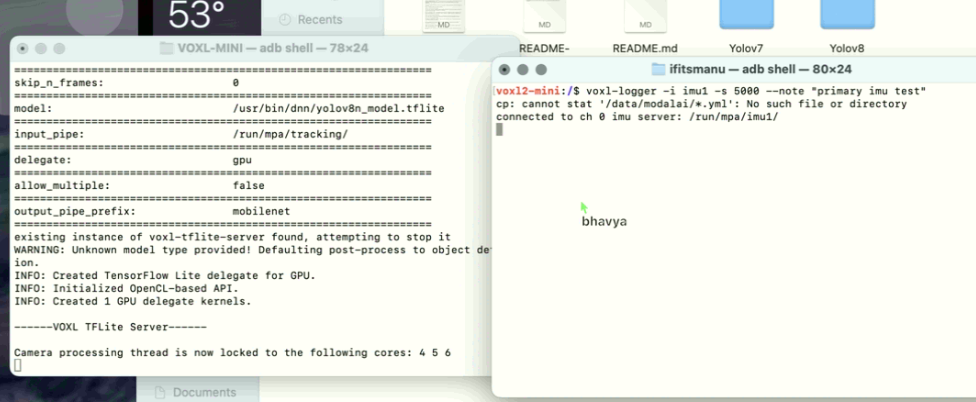
                        d37108ef-5790-4783-bdab-339cbfc23b77-image.png

                        ? 1 Reply Last reply
                        0
                        • Ajay BidyarthyA Ajay Bidyarthy

                          @thomas
                          Hi thomas,
                          Okay, so I actually did do those steps. And using that info I got to know that to benchmark the model I need to run

                          voxl-tflite-server

                          and then in another terminal I did:

                          voxl-logger -i imu1 -s 5000 --note "primary imu test"

                          but then i get this error:
                          d37108ef-5790-4783-bdab-339cbfc23b77-image.png

                          ? Offline
                          ? Offline
                          A Former User
                          wrote on last edited by
                          #16

                          @Ajay-Bidyarthy

                          Really strange that you don't have the /data/modalai/ dir as that's where we store the sku.txt and other important info. Maybe try calibrating the IMU?

                          Link Preview Image
                          Calibrate IMU

                          ModalAI technical documentation for VOXL and VOXL 2 Companion Computers for PX4 and ArduPilot Obstacle Avoidance and GPS-denied navigation, assembled in the USA

                          favicon

                          ModalAI Technical Docs (docs.modalai.com)

                          Thomas

                          Ajay BidyarthyA 1 Reply Last reply
                          0
                          • ? A Former User

                            @Ajay-Bidyarthy

                            Really strange that you don't have the /data/modalai/ dir as that's where we store the sku.txt and other important info. Maybe try calibrating the IMU?

                            Link Preview Image
                            Calibrate IMU

                            ModalAI technical documentation for VOXL and VOXL 2 Companion Computers for PX4 and ArduPilot Obstacle Avoidance and GPS-denied navigation, assembled in the USA

                            favicon

                            ModalAI Technical Docs (docs.modalai.com)

                            Thomas

                            Ajay BidyarthyA Offline
                            Ajay BidyarthyA Offline
                            Ajay Bidyarthy
                            Contributor
                            wrote on last edited by
                            #17

                            @thomas
                            Yes, so we have the directory present, but it only has the sku.txt file there. I think its because of some .yml file being missing we get error. So what should we do to load that file successfully in the dir

                            ? 1 Reply Last reply
                            0
                            • Ajay BidyarthyA Ajay Bidyarthy

                              @thomas
                              Yes, so we have the directory present, but it only has the sku.txt file there. I think its because of some .yml file being missing we get error. So what should we do to load that file successfully in the dir

                              ? Offline
                              ? Offline
                              A Former User
                              wrote on last edited by
                              #18

                              @Ajay-Bidyarthy

                              Try the IMU calibration steps I linked above.

                              Thomas

                              Ajay BidyarthyA 1 Reply Last reply
                              0
                              • ? A Former User

                                @Ajay-Bidyarthy

                                Try the IMU calibration steps I linked above.

                                Thomas

                                Ajay BidyarthyA Offline
                                Ajay BidyarthyA Offline
                                Ajay Bidyarthy
                                Contributor
                                wrote on last edited by
                                #19

                                @thomas
                                Hi thomas,
                                So I did try calibrating the imu sensor using voxl-calibrate-imu. But I still dont see the .yml file in the data/modalai directory.
                                So I'll just share the brief overview on what steps I followed to get to the current point:

                                1. I connected VOXL (with only the default sensors, I did not attach any sensor seperately) to my computer.
                                2. I created a deb package to deploy to VOXL by loading my custom tflite files in the misc_files/usr/bin/dnn directory of the voxl-tflite-server with correspodning changs in the voxl-configure-tflite file present in the scripts/ qrb5165 folder. And then following the build and deploy commands to deploy the package to voxl
                                3. I then did adb shell to load into my VOXL and do see all the tflite files present there. I then ran voxl-configure-tflite command to load my custom tflite model.
                                4. Following that I simply executed voxl-tflite-server command
                                5. In another similar terminal I then tried benchmarking by doing voxl-logger command as shown and am now getting the error.
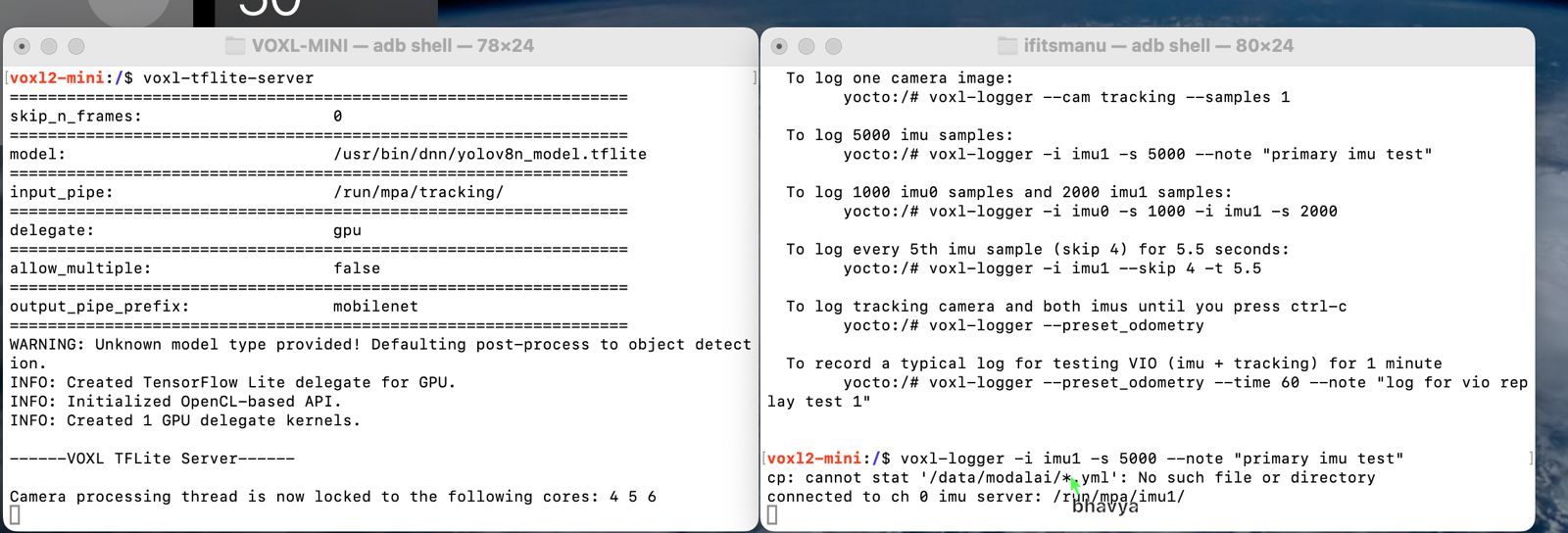
                                  876ad166-0ed6-40d5-8d86-6f61b06e991e-screen1.jpeg file:///home/bhavya/Downloads/screen1.jpeg
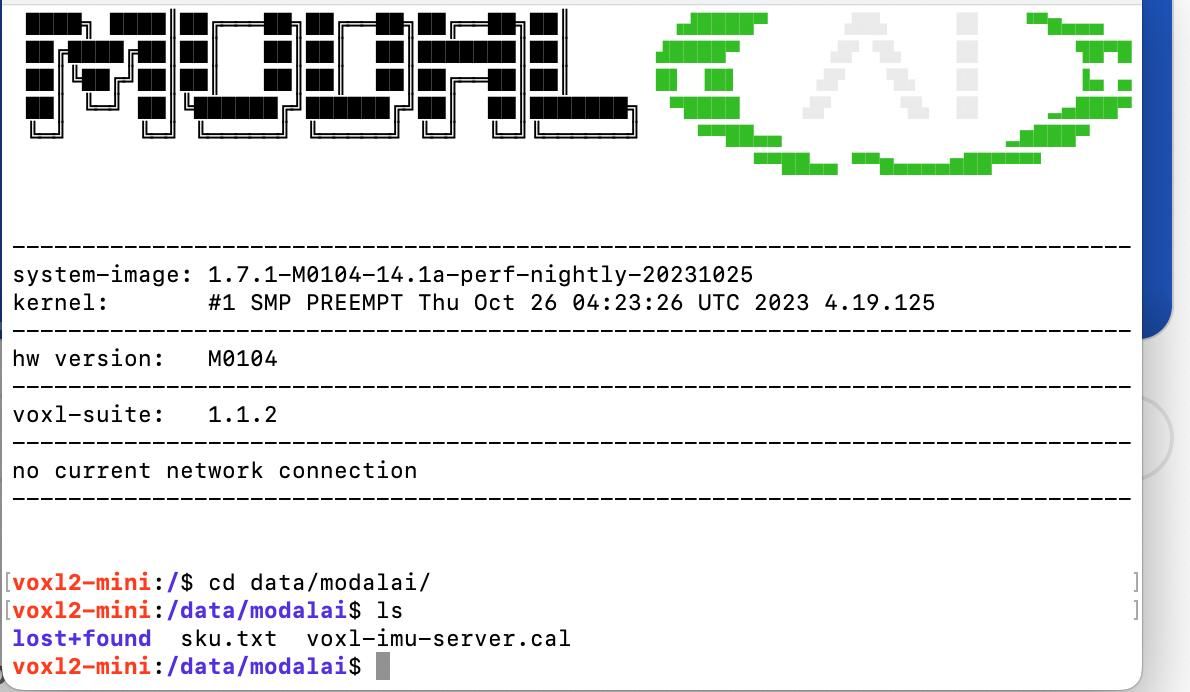
                                0060900e-6d63-41bf-8c56-85a0d5f00bb2-screen2.jpeg file:///home/bhavya/Downloads/screen2.jpeg

                                Thanks

                                ? 1 Reply Last reply
                                0
                                • Ajay BidyarthyA Ajay Bidyarthy

                                  @thomas
                                  Hi thomas,
                                  So I did try calibrating the imu sensor using voxl-calibrate-imu. But I still dont see the .yml file in the data/modalai directory.
                                  So I'll just share the brief overview on what steps I followed to get to the current point:

                                  1. I connected VOXL (with only the default sensors, I did not attach any sensor seperately) to my computer.
                                  2. I created a deb package to deploy to VOXL by loading my custom tflite files in the misc_files/usr/bin/dnn directory of the voxl-tflite-server with correspodning changs in the voxl-configure-tflite file present in the scripts/ qrb5165 folder. And then following the build and deploy commands to deploy the package to voxl
                                  3. I then did adb shell to load into my VOXL and do see all the tflite files present there. I then ran voxl-configure-tflite command to load my custom tflite model.
                                  4. Following that I simply executed voxl-tflite-server command
                                  5. In another similar terminal I then tried benchmarking by doing voxl-logger command as shown and am now getting the error.
                                    876ad166-0ed6-40d5-8d86-6f61b06e991e-screen1.jpeg file:///home/bhavya/Downloads/screen1.jpeg

                                  0060900e-6d63-41bf-8c56-85a0d5f00bb2-screen2.jpeg file:///home/bhavya/Downloads/screen2.jpeg

                                  Thanks

                                  ? Offline
                                  ? Offline
                                  A Former User
                                  wrote on last edited by
                                  #20

                                  @Ajay-Bidyarthy

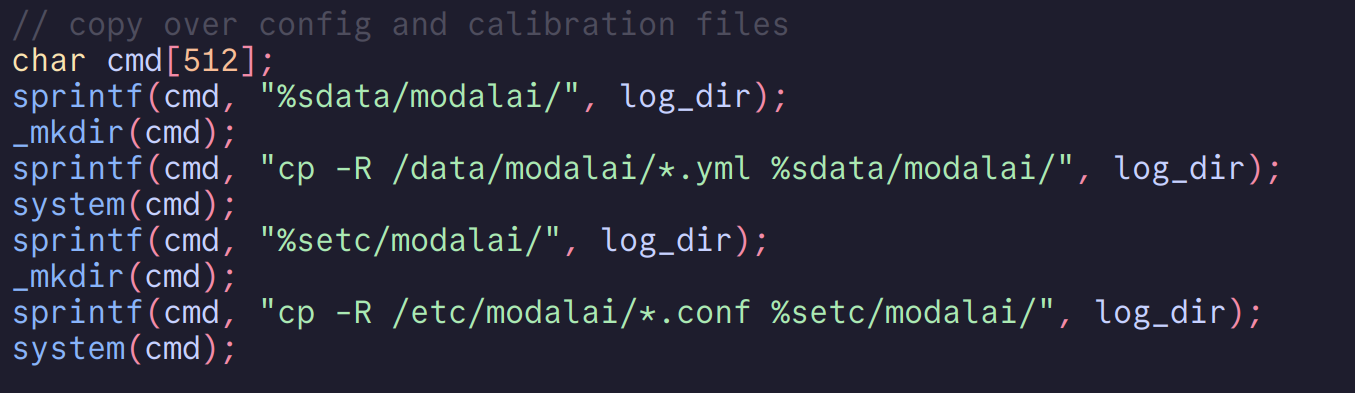
                                  Okay yeah I think I figured it out. Take a look at these lines from the voxl-logger code:

                                  17498768-d79e-438f-94f5-3424651307ba-image.png

                                  You can see that voxl-logger is just trying to copy over anything that matches *.yml . So while I work on a fix for this, could you just do inside your VOXL touch /data/modalai/something.yml. ? This should remove that error.

                                  Keep me posted,
                                  Thomas

                                  Ajay BidyarthyA 2 Replies Last reply
                                  0
                                  • ? A Former User

                                    @Ajay-Bidyarthy

                                    Okay yeah I think I figured it out. Take a look at these lines from the voxl-logger code:

                                    17498768-d79e-438f-94f5-3424651307ba-image.png

                                    You can see that voxl-logger is just trying to copy over anything that matches *.yml . So while I work on a fix for this, could you just do inside your VOXL touch /data/modalai/something.yml. ? This should remove that error.

                                    Keep me posted,
                                    Thomas

                                    Ajay BidyarthyA Offline
                                    Ajay BidyarthyA Offline
                                    Ajay Bidyarthy
                                    Contributor
                                    wrote on last edited by
                                    #21

                                    @thomas
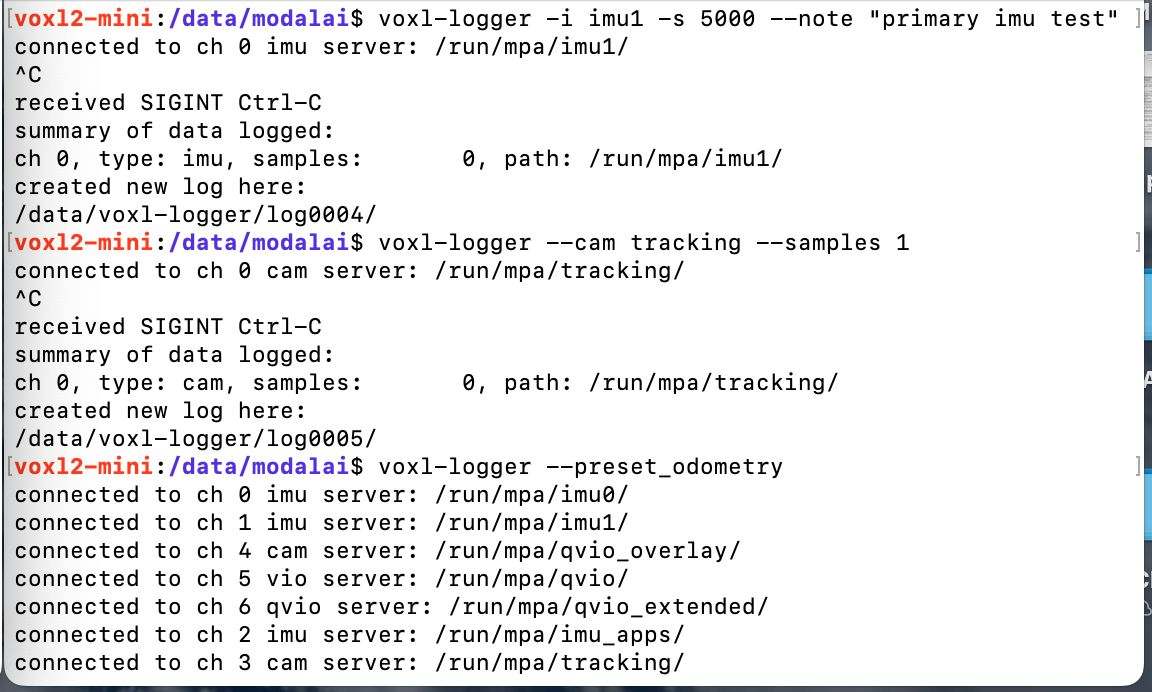
                                    I attempted to use the voxl-logger by creating an empty something.yml file in the directory and executing the command. Despite encountering no errors during the execution, I did not receive any output beyond the line "connected to imu 0 sensor." My goal is to obtain benchmarking output similar to the tables shown in the ModalAI documentation: Benchmarks Documentation.

                                    Could you kindly assist with this issue? I believe it would be more efficient if we could schedule a time for a discussion when you are available. This would allow us to address any questions or concerns promptly without the need for multiple back-and-forth messages.

                                    Thank you for your time and assistance.
                                    b15a6593-d906-4dfb-b72f-2cbe02ea7f0b-image.png

                                    1 Reply Last reply
                                    0
                                    • ? A Former User

                                      @Ajay-Bidyarthy

                                      Okay yeah I think I figured it out. Take a look at these lines from the voxl-logger code:

                                      17498768-d79e-438f-94f5-3424651307ba-image.png

                                      You can see that voxl-logger is just trying to copy over anything that matches *.yml . So while I work on a fix for this, could you just do inside your VOXL touch /data/modalai/something.yml. ? This should remove that error.

                                      Keep me posted,
                                      Thomas

                                      Ajay BidyarthyA Offline
                                      Ajay BidyarthyA Offline
                                      Ajay Bidyarthy
                                      Contributor
                                      wrote on last edited by
                                      #22

                                      @thomas
                                      Hi thomas,
                                      Did you get a chance to check this issue? I am trying to benchmark the my models but I dont see any output or number I could use to summarize my benchmark or something.

                                      ? 1 Reply Last reply
                                      0
                                      • Ajay BidyarthyA Ajay Bidyarthy

                                        @thomas
                                        Hi thomas,
                                        Did you get a chance to check this issue? I am trying to benchmark the my models but I dont see any output or number I could use to summarize my benchmark or something.

                                        ? Offline
                                        ? Offline
                                        A Former User
                                        wrote on last edited by
                                        #23

                                        @Ajay-Bidyarthy

                                        Yeah so when you run voxl-logger with -s 5000 you're running it for that many samples and it isn't going to have any printouts. I'm not sure what tables you're talking about with respect to the benchmarks documentation, maybe you could give me a link?

                                        If you just want to collect a voxl-logger log, your commands above should work fine. You can see that it's creating logs in the /data/voxl-logger/ directory which you can replay with the voxl-logger command.

                                        I help with the forum in addition to my work and so I don't have time for calls. If you're interested in setting up a bigger support effort, you can send an email to sales@modalai.com .

                                        Hope this helps!

                                        Thomas

                                        Ajay BidyarthyA 1 Reply Last reply
                                        0
                                        • ? A Former User

                                          @Ajay-Bidyarthy

                                          Yeah so when you run voxl-logger with -s 5000 you're running it for that many samples and it isn't going to have any printouts. I'm not sure what tables you're talking about with respect to the benchmarks documentation, maybe you could give me a link?

                                          If you just want to collect a voxl-logger log, your commands above should work fine. You can see that it's creating logs in the /data/voxl-logger/ directory which you can replay with the voxl-logger command.

                                          I help with the forum in addition to my work and so I don't have time for calls. If you're interested in setting up a bigger support effort, you can send an email to sales@modalai.com .

                                          Hope this helps!

                                          Thomas

                                          Ajay BidyarthyA Offline
                                          Ajay BidyarthyA Offline
                                          Ajay Bidyarthy
                                          Contributor
                                          wrote on last edited by
                                          #24

                                          @thomas
                                          Hi thomas,
                                          Yes, so the table I'm referring to is under the benchmark section here: https://docs.modalai.com/voxl-tflite-server-0_9/#benchmarks
                                          So the thing is when I run the voxl-looger with -s 5000 I also expect the code to run for that many samples and output some log, but as you see from my screenshot, it just outputs ... ' samples: 0'

                                          And no worries thomas, I do appreciate your time and help here 🙂

                                          Regards

                                          ? 1 Reply Last reply
                                          0

                                          Hello! It looks like you're interested in this conversation, but you don't have an account yet.

                                          Getting fed up of having to scroll through the same posts each visit? When you register for an account, you'll always come back to exactly where you were before, and choose to be notified of new replies (either via email, or push notification). You'll also be able to save bookmarks and upvote posts to show your appreciation to other community members.

                                          With your input, this post could be even better 💗

                                          Register Login
                                          Reply
                                          • Reply as topic
                                          Log in to reply
                                          • Oldest to Newest
                                          • Newest to Oldest
                                          • Most Votes


                                          ModalAI
                                          Categories Recent Tags ModalAI.com Docs
                                          © 2026 ModalAI® · Accelerating autonomy for smaller, smarter, safer drones · Powered by NodeBB
                                          • Login

                                          • Don't have an account? Register

                                          • Login or register to search.
                                          • First post
                                            Last post
                                          0
                                          • Categories
                                          • Recent
                                          • Tags
                                          • Popular
                                          • Users
                                          • Groups