
Supporting Tattu Pro Battery via UAVCAN Integration
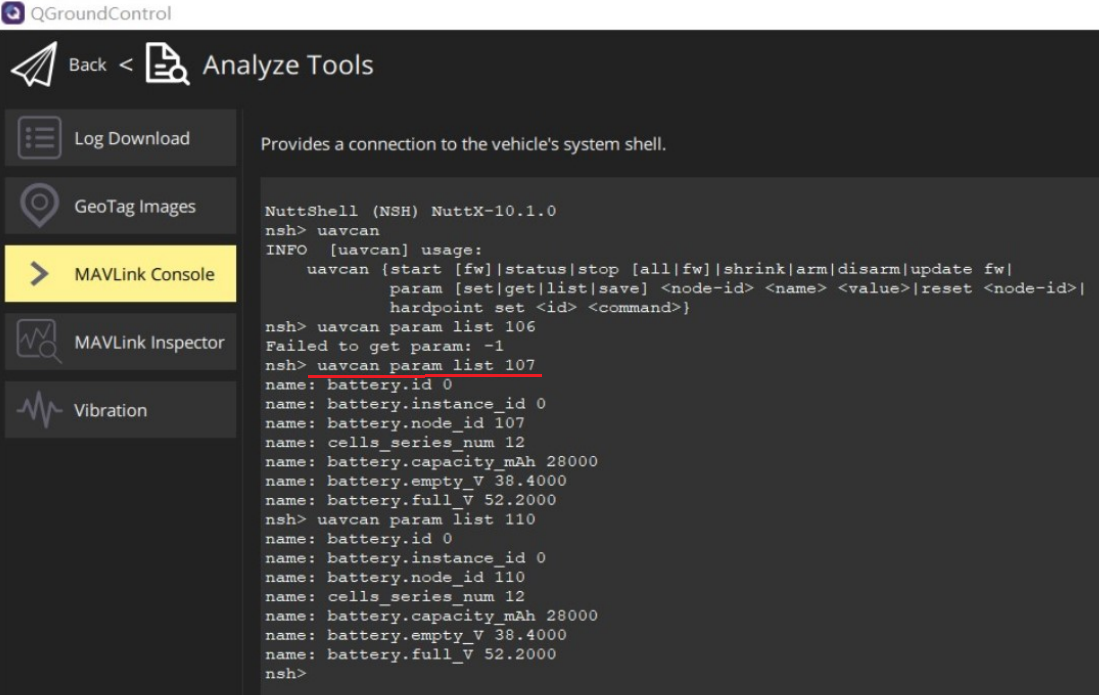
-
We do not have any experience with that product. Have you asked on the PX4 forums?
-
@Moderator , I've observed a mention on the provided web address that states, "CAN “Silent” pin (STBY) is controlled by STM32 PD15 pin (default pulled-LOW in hardware)", does this imply that I need to set PD15 to a high level to enable the CAN bus? If so, could you please provide instructions on configuring PD15 on FCv2? Thank you.
https://docs.modalai.com/flight-core-v2-datasheets-connectors/
-
@Moderator , I've observed a mention on the provided web address that states, "CAN “Silent” pin (STBY) is controlled by STM32 PD15 pin (default pulled-LOW in hardware)", does this imply that I need to set PD15 to a high level to enable the CAN bus? If so, could you please provide instructions on configuring PD15 on FCv2? Thank you.
https://docs.modalai.com/flight-core-v2-datasheets-connectors/
@Moderator , I mistakenly connected the PC USB port to FCv2 J8 (CAN bus) instead of J3. Could this potentially cause damage to the board? Currently, QGC cannot establish a connection to FCv2 through the serial port, and the PC fails to recognize any ttyUSBx port. Interestingly, I am still able to use STLink to connect to FCv2 via J2. When I connect J3 to the PC, the LED initially blinks green for a few seconds and then switches to green and white intermittently. Despite this, the USB port is not recognized by the PC. I would appreciate your assistance in troubleshooting this issue. Thank you.
-
@Moderator , I mistakenly connected the PC USB port to FCv2 J8 (CAN bus) instead of J3. Could this potentially cause damage to the board? Currently, QGC cannot establish a connection to FCv2 through the serial port, and the PC fails to recognize any ttyUSBx port. Interestingly, I am still able to use STLink to connect to FCv2 via J2. When I connect J3 to the PC, the LED initially blinks green for a few seconds and then switches to green and white intermittently. Despite this, the USB port is not recognized by the PC. I would appreciate your assistance in troubleshooting this issue. Thank you.
@Moderator , Here is the PX4 system console log. Could you please assist in examining why the J3 USB connector is not functioning? Thank you.
[boot] Rev 0x0 : Ver 0x3 V230 [boot] Fault Log info File No 4 Length 3177 flags:0x01 state:1 [boot] Fault Log is Armed sercon: Registering CDC/ACM serial driver sercon: Successfully registered the CDC/ACM serial driver ERROR [PX4_MTD] failed to initialize mtd driver ERROR [PX4_MTD] mtd failure[hardfault_log] Fault Log is Armed : -5 bus 2 address 0 class 1 HW arch: MODALAI_FC_V2 HW type: V230 HW version: 0x00000003 HW revision: 0x00000000 FW git-hash: 259b3c097773507e581e2930093e4958f7726381 FW version: Release 1.13.2 (17629951) FW git-branch: modalai-1.13.2 OS: NuttX OS version: Release 11.0.0 (184549631) OS git-hash: 91bece51afbe7da9db12e3695cdbb4f4bba4bc83 Build datetime: Dec 8 2023 23:35:12 Build uri: localhost Build variant: default Toolchain: GNU GCC, 9.3.1 20200408 (release) PX4GUID: 0006000000003333363031315105003a001c MCU: STM32H7[4|5]xxx, rev. V INFO [param] selected parameter default file /fs/microsd/params INFO [param] importing from '/fs/microsd/params' INFO [parameters] BSON document size 1752 bytes, decoded 1752 bytes (INT32:40, FLOAT:46) INFO [param] selected parameter backup file /fs/microsd/parameters_backup.bson Board architecture defaults: /etc/init.d/rc.board_arch_defaults Board defaults: /etc/init.d/rc.board_defaults nsh: tone_alarm: command not found INFO [dataman] data manager file '/fs/microsd/dataman' size is 62560 bytes Loading airframe: /etc/init.d/airframes/4015_holybro_s500 INFO [uavcan] Node ID 1, bitrate 1000000 Board sensors: /etc/init.d/rc.board_sensors INFO [voxlpm] Failed to init voxlpm type: 0 on bus: 3, but will try again periodically. voxlpm #0 on I2C bus 3 (external) address 0x44 WARN [SPI_I2C] Already running on bus 3 WARN [SPI_I2C] voxlpm: no instance started (no device on bus?) icm42688p #0 on SPI bus 1 rotation 12 icm42688p #1 on SPI bus 2 rotation 12 icp20100 #0 on I2C bus 4 (external) address 0x63 INFO [init] Mixer: /etc/mixers/quad_x.main.mix on /dev/uavcan/esc INFO [init] setting PWM_AUX_OUT none ekf2 [670:237] Starting Main GPS on /dev/ttyS0 Starting MAVLink on /dev/ttyS6 INFO [mavlink] mode: Onboard, data rate: 46080 B/s on /dev/ttyS6 @ 921600B WARN [mavlink] stream SCALED_PRESSURE not found ERROR [mavlink] configure_streams_to_default() failed Addons script: /fs/microsd/etc/extras.txt nsh: BMP388: command not found INFO [logger] logger started (mode=all) NuttShell (NSH) NuttX-11.0.0 -
@Moderator , Here is the PX4 system console log. Could you please assist in examining why the J3 USB connector is not functioning? Thank you.
[boot] Rev 0x0 : Ver 0x3 V230 [boot] Fault Log info File No 4 Length 3177 flags:0x01 state:1 [boot] Fault Log is Armed sercon: Registering CDC/ACM serial driver sercon: Successfully registered the CDC/ACM serial driver ERROR [PX4_MTD] failed to initialize mtd driver ERROR [PX4_MTD] mtd failure[hardfault_log] Fault Log is Armed : -5 bus 2 address 0 class 1 HW arch: MODALAI_FC_V2 HW type: V230 HW version: 0x00000003 HW revision: 0x00000000 FW git-hash: 259b3c097773507e581e2930093e4958f7726381 FW version: Release 1.13.2 (17629951) FW git-branch: modalai-1.13.2 OS: NuttX OS version: Release 11.0.0 (184549631) OS git-hash: 91bece51afbe7da9db12e3695cdbb4f4bba4bc83 Build datetime: Dec 8 2023 23:35:12 Build uri: localhost Build variant: default Toolchain: GNU GCC, 9.3.1 20200408 (release) PX4GUID: 0006000000003333363031315105003a001c MCU: STM32H7[4|5]xxx, rev. V INFO [param] selected parameter default file /fs/microsd/params INFO [param] importing from '/fs/microsd/params' INFO [parameters] BSON document size 1752 bytes, decoded 1752 bytes (INT32:40, FLOAT:46) INFO [param] selected parameter backup file /fs/microsd/parameters_backup.bson Board architecture defaults: /etc/init.d/rc.board_arch_defaults Board defaults: /etc/init.d/rc.board_defaults nsh: tone_alarm: command not found INFO [dataman] data manager file '/fs/microsd/dataman' size is 62560 bytes Loading airframe: /etc/init.d/airframes/4015_holybro_s500 INFO [uavcan] Node ID 1, bitrate 1000000 Board sensors: /etc/init.d/rc.board_sensors INFO [voxlpm] Failed to init voxlpm type: 0 on bus: 3, but will try again periodically. voxlpm #0 on I2C bus 3 (external) address 0x44 WARN [SPI_I2C] Already running on bus 3 WARN [SPI_I2C] voxlpm: no instance started (no device on bus?) icm42688p #0 on SPI bus 1 rotation 12 icm42688p #1 on SPI bus 2 rotation 12 icp20100 #0 on I2C bus 4 (external) address 0x63 INFO [init] Mixer: /etc/mixers/quad_x.main.mix on /dev/uavcan/esc INFO [init] setting PWM_AUX_OUT none ekf2 [670:237] Starting Main GPS on /dev/ttyS0 Starting MAVLink on /dev/ttyS6 INFO [mavlink] mode: Onboard, data rate: 46080 B/s on /dev/ttyS6 @ 921600B WARN [mavlink] stream SCALED_PRESSURE not found ERROR [mavlink] configure_streams_to_default() failed Addons script: /fs/microsd/etc/extras.txt nsh: BMP388: command not found INFO [logger] logger started (mode=all) NuttShell (NSH) NuttX-11.0.0@Moderator , the board is currently operational somehow. I made adjustments to the code, setting PD15 to a high level and modifying the parameters of UAVCAN_SUB_BAT to 1 and UAVCAN_ENABLE to 2 or 3, following the guidelines on this page (https://docs.px4.io/v1.12/zh/uavcan/pomegranate_systems_pm.html). Despite these modifications, I am still unable to retrieve battery information. I will also explore the PX4 forum for potential solutions. However, if you have additional suggestions, please feel free to share. Thank you.
diff --git a/boards/modalai/fc-v2/src/board_config.h b/boards/modalai/fc-v2/src/board_config.h
index 987f692b22..e7a7c83ef7 100644
--- a/boards/modalai/fc-v2/src/board_config.h
+++ b/boards/modalai/fc-v2/src/board_config.h
@@ -213,6 +213,7 @@
 /* Spare GPIO */

 #define CAN1_SILENT                       /* PD15 */  (GPIO_OUTPUT|GPIO_PUSHPULL|GPIO_SPEED_2MHz|GPIO_OUTPUT_CLEAR|GPIO_PORTD|GPIO_PIN15)
+#define CAN1_SILENT_PULL_HIGH()  px4_arch_gpiowrite(CAN1_SILENT, 1)

 /* For primary/backup signaling with VOXL, 2 pins on J4 are exposed */
 // GPIO_VOXL_STATUS_OUT/ GPIO_VOXL_STATUS_IN are for v1 Spare MSS Communications Interface and J4 tests
diff --git a/boards/modalai/fc-v2/src/init.c b/boards/modalai/fc-v2/src/init.c
index dbc6ec4637..55ad6aab6c 100644
--- a/boards/modalai/fc-v2/src/init.c
+++ b/boards/modalai/fc-v2/src/init.c
@@ -211,6 +211,8 @@ __EXPORT int board_app_initialize(uintptr_t arg)
        /* Power on Interfaces */
        board_spi_reset(10, 0xffff);
        VDD_3V3_SPEKTRUM_POWER_EN(true);
+       CAN1_SILENT_PULL_HIGH();
nsh> uavcan status Pool allocator status: Capacity hard/soft: 500/250 blocks Reserved: 6 blocks Allocated: 6 blocks UAVCAN node status: Internal failures: 0 Transfer errors: 0 RX transfers: 0 TX transfers: 1079 CAN1 status: HW errors: 310 IO errors: 310 RX frames: 2224 TX frames: 1296 ESC outputs: INFO [mixer_module] Param prefix: UAVCAN_EC control latency: 0 events, 0us elapsed, 0.00us avg, min 0us max 0us 0.000us rms Channel Configuration: Channel 0: func: 0, value: 0, failsafe: 65535, disarmed: 65535, min: 1, max: 8191 Channel 1: func: 0, value: 0, failsafe: 65535, disarmed: 65535, min: 1, max: 8191 Channel 2: func: 0, value: 0, failsafe: 65535, disarmed: 65535, min: 1, max: 8191 Channel 3: func: 0, value: 0, failsafe: 65535, disarmed: 65535, min: 1, max: 8191 Channel 4: func: 0, value: 0, failsafe: 65535, disarmed: 65535, min: 1, max: 8191 Channel 5: func: 0, value: 0, failsafe: 65535, disarmed: 65535, min: 1, max: 8191 Channel 6: func: 0, value: 0, failsafe: 65535, disarmed: 65535, min: 1, max: 8191 Channel 7: func: 0, value: 0, failsafe: 65535, disarmed: 65535, min: 1, max: 8191 Servo outputs: INFO [mixer_module] Param prefix: UAVCAN_SV control latency: 0 events, 0us elapsed, 0.00us avg, min 0us max 0us 0.000us rms Channel Configuration: Channel 0: func: 0, value: 0, failsafe: 500, disarmed: 500, min: 0, max: 1000 Channel 1: func: 0, value: 0, failsafe: 500, disarmed: 500, min: 0, max: 1000 Channel 2: func: 0, value: 0, failsafe: 500, disarmed: 500, min: 0, max: 1000 Channel 3: func: 0, value: 0, failsafe: 500, disarmed: 500, min: 0, max: 1000 Channel 4: func: 0, value: 0, failsafe: 500, disarmed: 500, min: 0, max: 1000 Channel 5: func: 0, value: 0, failsafe: 500, disarmed: 500, min: 0, max: 1000 Channel 6: func: 0, value: 0, failsafe: 500, disarmed: 500, min: 0, max: 1000 Channel 7: func: 0, value: 0, failsafe: 500, disarmed: 500, min: 0, max: 1000 Sensor 'battery': name: uavcan_battery Sensor 'mag': name: uavcan_mag Online nodes (Node ID, Health, Mode): uavcan: cycle time: 25877 events, 363400us elapsed, 14.04us avg, min 6us max 587us 24.085us rms uavcan: cycle interval: 25877 events, 2747.60us avg, min 15us max 3734us 716.959us rms -
@Moderator , I mistakenly connected the PC USB port to FCv2 J8 (CAN bus) instead of J3. Could this potentially cause damage to the board? Currently, QGC cannot establish a connection to FCv2 through the serial port, and the PC fails to recognize any ttyUSBx port. Interestingly, I am still able to use STLink to connect to FCv2 via J2. When I connect J3 to the PC, the LED initially blinks green for a few seconds and then switches to green and white intermittently. Despite this, the USB port is not recognized by the PC. I would appreciate your assistance in troubleshooting this issue. Thank you.
@Will said in Supporting Tattu Pro Battery via UAVCAN Integration:
@Moderator , I mistakenly connected the PC USB port to FCv2 J8 (CAN bus) instead of J3. Could this potentially cause damage to the board? . Despite this, the USB port is not recognized by the PC. I would appreciate your assistance in troubleshooting this issue. Thank you.
Hi Will,
I can only speak to the Hardware aspects here....If the PC's USB port is connected to the FCv2 J8 CANBUS port, I think the FCv2 hardware will be OK, but you more than likely may have damaged your PC port.
Here are the effects that I can see:
- 5V from your USB VBUS is shorting out our 5V main supply on FCv2. However, our front-end power mux will block reverse current, and not feed into the power module or the source of the 5V for the FCv2
- That 5V that is shorted to VBUS is sent to a LDO Regulator before powering the STM at 3.3V, so the STM part should be protected as well
- The D+/D- lines of your USB port were likely driven by the CAN XCVR to invalid states, but as long as no actual data was being transmitted, it is likely both D+/D- and CANH/CANL were in "tri-state" mode, avoiding any contention. If the D+/D- were driving out, it is unlikely they can damage the CAN XCVR pins and the shunt resistor across the CAN XCVR will also protect the inputs.
- GND is connected to GND, so nothing was actually shorted to GND, which is good.
So, I am not surprised you still see the FCv2 functioning, but your PC USB port may be dead/damaged and if you encounter any issues, I'd first try swapping PC ports.
Hope that helps!
-
@Will said in Supporting Tattu Pro Battery via UAVCAN Integration:
@Moderator , I mistakenly connected the PC USB port to FCv2 J8 (CAN bus) instead of J3. Could this potentially cause damage to the board? . Despite this, the USB port is not recognized by the PC. I would appreciate your assistance in troubleshooting this issue. Thank you.
Hi Will,
I can only speak to the Hardware aspects here....If the PC's USB port is connected to the FCv2 J8 CANBUS port, I think the FCv2 hardware will be OK, but you more than likely may have damaged your PC port.
Here are the effects that I can see:
- 5V from your USB VBUS is shorting out our 5V main supply on FCv2. However, our front-end power mux will block reverse current, and not feed into the power module or the source of the 5V for the FCv2
- That 5V that is shorted to VBUS is sent to a LDO Regulator before powering the STM at 3.3V, so the STM part should be protected as well
- The D+/D- lines of your USB port were likely driven by the CAN XCVR to invalid states, but as long as no actual data was being transmitted, it is likely both D+/D- and CANH/CANL were in "tri-state" mode, avoiding any contention. If the D+/D- were driving out, it is unlikely they can damage the CAN XCVR pins and the shunt resistor across the CAN XCVR will also protect the inputs.
- GND is connected to GND, so nothing was actually shorted to GND, which is good.
So, I am not surprised you still see the FCv2 functioning, but your PC USB port may be dead/damaged and if you encounter any issues, I'd first try swapping PC ports.
Hope that helps!
@Vinny , I've examined the port on my PC, and surprisingly, it's still functioning properly. Subsequently, I conducted two tests intentionally: one without the battery and the second with the battery. In both tests, I connected the PC's USB port to the FCv2 J8 CANBUS port and probed J8 pin1 (5P0V from the power-in source). Surprisingly, the board successfully booted in both scenarios, as indicated by the console log. This result raises a question: are both methods correct for booting the board?
Additionally, I encountered an issue where I couldn't retrieve information about the 3S battery from i2c bu3, even when connected to the power monitor board. Do I need to enable any other configurations for this? Thanks.
-
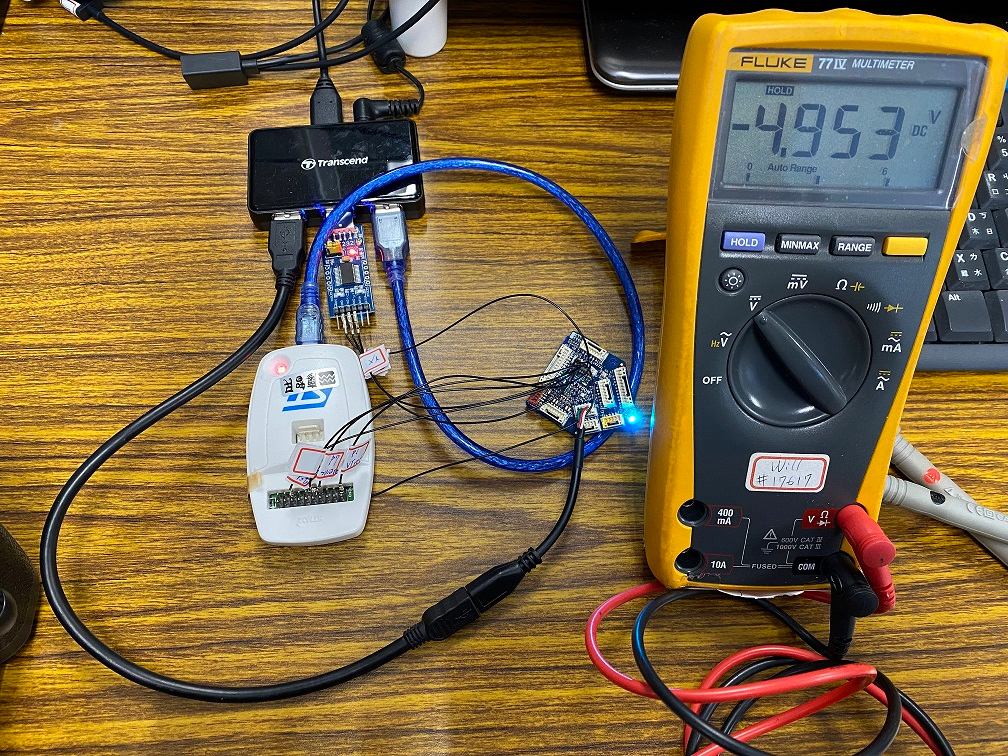
PC's USB port to J8 without battery
-
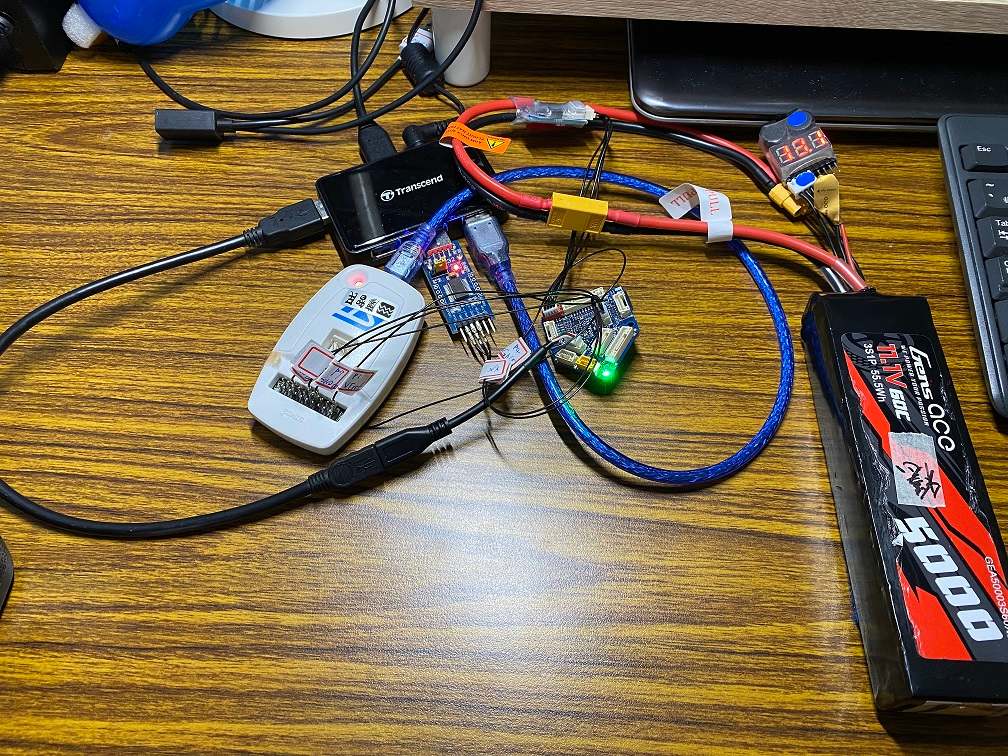
PC's USB port to J8 with battery
-
Booting console log
[boot] Rev 0x0 : Ver 0x3 V2003000 [boot] Fault Log info File No 4 Length 3177 flags:0x01 state:1 [boot] Fault Log is Armed ERROR [PX4_MTD] failed to initialize mtd driver ERROR [PX4_MTD] mtd fail[hardfault_log] Fault Log is Armed ure: -5 bus 2 address 0 class 1 nsh: sysinit: fopen failed: No such file or directory HW arch: MODALAI_FC_V2 HW type: V2003000 HW version: 0x003 HW revision: 0x000 PX4 git-hash: 996e85e9360801dd9ec11b7149a524e38231dcc6 PX4 version: 1.14.0 0 (17694720) Vendor version: 2.0.64 0 (33570816) OS: NuttX OS version: Release 11.0.0 (184549631) OS git-hash: 3f77354c0dc88793a47ff3b57595195ab45f7ba9 Build datetime: Jan 3 2024 15:59:58 Build uri: localhost Build variant: default Toolchain: GNU GCC, 9.3.1 20200408 (release) PX4GUID: 0006000000003333363031315105003a001c MCU: STM32H7[4|5]xxx, rev. V INFO [param] selected parameter default file /fs/microsd/params INFO [param] importing from '/fs/microsd/params' INFO [parameters] BSON document size 1487 bytes, decoded 1487 bytes (INT32:29, FLOAT:44) INFO [param] selected parameter backup file /fs/microsd/parameters_backup.bson Board architecture defaults: /etc/init.d/rc.board_arch_defaults Board defaults: /etc/init.d/rc.board_defaults Loading airframe: /etc/init.d/airframes/4001_quad_x nsh: tone_alarm: command not found INFO [dataman] data manager file '/fs/microsd/dataman' size is 62560 bytes Board sensors: /etc/init.d/rc.board_sensors INFO [voxlpm] Failed to init voxlpm type: 0 on bus: 3, but will try again periodically. voxlpm #0 on I2C bus 3 (external) address 0x44 WARN [SPI_I2C] Already running on bus 3 WARN [SPI_I2C] voxlpm: no instance started (no device on bus?) icm42688p #0 on SPI bus 1 rotation 12 icm42688p #1 on SPI bus 2 rotation 12 icp201xx #0 on I2C bus 4 (external) address 0x63 nsh: icm20948_i2c_passthrough: command not found nsh: battery_status: command not found ekf2 [591:237] Starting MAVLink on /dev/ttyS6 INFO [mavlink] mode: Onboard, data rate: 46080 B/s on /dev/ttyS6 @ 921600B Addons script: /fs/microsd/etc/extras.txt nsh: BMP388: command not found INFO [logger] logger started (mode=all) INFO [uavcan] Node ID 1, bitrate 1000000 NuttShell (NSH) NuttX-11.0.0 nsh> WARN [health_and_arming_checks] Preflight Fail: height estimate not stable WARN [health_and_arming_checks] Preflight Fail: height estimate error WARN [health_and_arming_checks] Preflight Fail: Crash dumps present on SD, vehicle needs service WARN [health_and_arming_checks] Preflight Fail: height estimate not stable WARN [health_and_arming_checks] Preflight Fail: Crash dumps present on SD, vehicle needs service nsh> WARN [health_and_arming_checks] Preflight Fail: Crash dumps present on SD, vehicle needs service- Unable to detect battery from i2c bus 3
nsh> i2cdetect -b 3 Scanning I2C bus: 3 0 1 2 3 4 5 6 7 8 9 a b c d e f 00: -- -- -- -- -- -- -- -- -- -- -- -- -- -- -- -- 10: -- -- -- -- -- -- -- -- -- -- -- -- -- -- -- -- 20: -- -- -- -- -- -- -- -- -- -- -- -- -- -- -- -- 30: -- -- -- -- -- -- -- -- -- -- -- -- -- -- -- -- 40: -- -- -- -- -- -- -- -- -- -- -- -- -- -- -- -- 50: -- -- -- -- -- -- -- -- -- -- -- -- -- -- -- -- 60: -- -- -- -- -- -- -- -- -- -- -- -- -- -- -- -- 70: -- -- -- -- -- -- -- -- -- -- -- -- -- -- -- -- -
@Vinny , I've examined the port on my PC, and surprisingly, it's still functioning properly. Subsequently, I conducted two tests intentionally: one without the battery and the second with the battery. In both tests, I connected the PC's USB port to the FCv2 J8 CANBUS port and probed J8 pin1 (5P0V from the power-in source). Surprisingly, the board successfully booted in both scenarios, as indicated by the console log. This result raises a question: are both methods correct for booting the board?
Additionally, I encountered an issue where I couldn't retrieve information about the 3S battery from i2c bu3, even when connected to the power monitor board. Do I need to enable any other configurations for this? Thanks.
-
PC's USB port to J8 without battery
-
PC's USB port to J8 with battery
-
Booting console log
[boot] Rev 0x0 : Ver 0x3 V2003000 [boot] Fault Log info File No 4 Length 3177 flags:0x01 state:1 [boot] Fault Log is Armed ERROR [PX4_MTD] failed to initialize mtd driver ERROR [PX4_MTD] mtd fail[hardfault_log] Fault Log is Armed ure: -5 bus 2 address 0 class 1 nsh: sysinit: fopen failed: No such file or directory HW arch: MODALAI_FC_V2 HW type: V2003000 HW version: 0x003 HW revision: 0x000 PX4 git-hash: 996e85e9360801dd9ec11b7149a524e38231dcc6 PX4 version: 1.14.0 0 (17694720) Vendor version: 2.0.64 0 (33570816) OS: NuttX OS version: Release 11.0.0 (184549631) OS git-hash: 3f77354c0dc88793a47ff3b57595195ab45f7ba9 Build datetime: Jan 3 2024 15:59:58 Build uri: localhost Build variant: default Toolchain: GNU GCC, 9.3.1 20200408 (release) PX4GUID: 0006000000003333363031315105003a001c MCU: STM32H7[4|5]xxx, rev. V INFO [param] selected parameter default file /fs/microsd/params INFO [param] importing from '/fs/microsd/params' INFO [parameters] BSON document size 1487 bytes, decoded 1487 bytes (INT32:29, FLOAT:44) INFO [param] selected parameter backup file /fs/microsd/parameters_backup.bson Board architecture defaults: /etc/init.d/rc.board_arch_defaults Board defaults: /etc/init.d/rc.board_defaults Loading airframe: /etc/init.d/airframes/4001_quad_x nsh: tone_alarm: command not found INFO [dataman] data manager file '/fs/microsd/dataman' size is 62560 bytes Board sensors: /etc/init.d/rc.board_sensors INFO [voxlpm] Failed to init voxlpm type: 0 on bus: 3, but will try again periodically. voxlpm #0 on I2C bus 3 (external) address 0x44 WARN [SPI_I2C] Already running on bus 3 WARN [SPI_I2C] voxlpm: no instance started (no device on bus?) icm42688p #0 on SPI bus 1 rotation 12 icm42688p #1 on SPI bus 2 rotation 12 icp201xx #0 on I2C bus 4 (external) address 0x63 nsh: icm20948_i2c_passthrough: command not found nsh: battery_status: command not found ekf2 [591:237] Starting MAVLink on /dev/ttyS6 INFO [mavlink] mode: Onboard, data rate: 46080 B/s on /dev/ttyS6 @ 921600B Addons script: /fs/microsd/etc/extras.txt nsh: BMP388: command not found INFO [logger] logger started (mode=all) INFO [uavcan] Node ID 1, bitrate 1000000 NuttShell (NSH) NuttX-11.0.0 nsh> WARN [health_and_arming_checks] Preflight Fail: height estimate not stable WARN [health_and_arming_checks] Preflight Fail: height estimate error WARN [health_and_arming_checks] Preflight Fail: Crash dumps present on SD, vehicle needs service WARN [health_and_arming_checks] Preflight Fail: height estimate not stable WARN [health_and_arming_checks] Preflight Fail: Crash dumps present on SD, vehicle needs service nsh> WARN [health_and_arming_checks] Preflight Fail: Crash dumps present on SD, vehicle needs service- Unable to detect battery from i2c bus 3
nsh> i2cdetect -b 3 Scanning I2C bus: 3 0 1 2 3 4 5 6 7 8 9 a b c d e f 00: -- -- -- -- -- -- -- -- -- -- -- -- -- -- -- -- 10: -- -- -- -- -- -- -- -- -- -- -- -- -- -- -- -- 20: -- -- -- -- -- -- -- -- -- -- -- -- -- -- -- -- 30: -- -- -- -- -- -- -- -- -- -- -- -- -- -- -- -- 40: -- -- -- -- -- -- -- -- -- -- -- -- -- -- -- -- 50: -- -- -- -- -- -- -- -- -- -- -- -- -- -- -- -- 60: -- -- -- -- -- -- -- -- -- -- -- -- -- -- -- -- 70: -- -- -- -- -- -- -- -- -- -- -- -- -- -- -- --@Will said in Supporting Tattu Pro Battery via UAVCAN Integration:
@Vinny , I connected the PC's USB port to the FCv2 J8 CANBUS port and probed J8 pin1 (5P0V from the power-in source). Surprisingly, the board successfully booted in both scenarios, as indicated by the console log. This result raises a question: are both methods correct for booting the board?
Additionally, I encountered an issue where I couldn't retrieve information about the 3S battery from i2c bu3, even when connected to the power monitor board. Do I need to enable any other configurations for this? Thanks.
Please only use the two documented power inputs as shown in our user guides:
https://docs.modalai.com/flight-core-v2-power/
Other modes are at your own risk as you are bypassing safety and protection features by using PTO ports (power tap off) as power inputs.To use the power monitor functions correctly, you must use the power module to provide power to J13 without introducing setup and configuration anomalies.
For additional help with trying to see battery status in QGC I'm not the right person, so feel free to ping again after you are sure you have a correct configuration, or you are welcome to start a new thread or search our forum for similar cases (I know there have been others that have difficulty seeing battery info).
-
-
@Will said in Supporting Tattu Pro Battery via UAVCAN Integration:
@Vinny , I connected the PC's USB port to the FCv2 J8 CANBUS port and probed J8 pin1 (5P0V from the power-in source). Surprisingly, the board successfully booted in both scenarios, as indicated by the console log. This result raises a question: are both methods correct for booting the board?
Additionally, I encountered an issue where I couldn't retrieve information about the 3S battery from i2c bu3, even when connected to the power monitor board. Do I need to enable any other configurations for this? Thanks.
Please only use the two documented power inputs as shown in our user guides:
https://docs.modalai.com/flight-core-v2-power/
Other modes are at your own risk as you are bypassing safety and protection features by using PTO ports (power tap off) as power inputs.To use the power monitor functions correctly, you must use the power module to provide power to J13 without introducing setup and configuration anomalies.
For additional help with trying to see battery status in QGC I'm not the right person, so feel free to ping again after you are sure you have a correct configuration, or you are welcome to start a new thread or search our forum for similar cases (I know there have been others that have difficulty seeing battery info).
@Vinny , Thank you for the information. I acknowledge the potential risks involved. Unfortunately, I've encountered an issue as I am no longer able to establish a connection between FCv2 and GCS through the J3 USB port. However, I can still access the console via J2 and connect GCS through J5, which is sufficient for my needs. I plan to initiate a separate discussion for the power monitor to retrieve battery information. If you have any suggestions on how to read Tattu Pro Battery through J8 CANbus, please share them with me. (here is the post on PX4 forum, https://discuss.px4.io/t/supporting-tattu-pro-battery-via-uavcan-integration/36145) Thanks again.
-
@Vinny , Thank you for the information. I acknowledge the potential risks involved. Unfortunately, I've encountered an issue as I am no longer able to establish a connection between FCv2 and GCS through the J3 USB port. However, I can still access the console via J2 and connect GCS through J5, which is sufficient for my needs. I plan to initiate a separate discussion for the power monitor to retrieve battery information. If you have any suggestions on how to read Tattu Pro Battery through J8 CANbus, please share them with me. (here is the post on PX4 forum, https://discuss.px4.io/t/supporting-tattu-pro-battery-via-uavcan-integration/36145) Thanks again.
@Will Have you considered purchasing another one? They are not expensive, and might be much more worth it than your time lost to fight a non-functional USB on the MCU.
Food for thought...
Sadly, I am not one of the SW experts in our team... just HW.Tag me anytime you have HW related questions!
Thanks!


Reading along? Create a free ModalAI Forum account to join in.
With an account you can reply, ask your own question, get an email when a ModalAI engineer answers, and mark the reply that solved it. Your place in each thread is saved between visits.
Questions about VOXL, Flight Core, ESCs and ModalAI drones are answered here by the engineers who build them.
Register Login