
Cameras only work in certain ports
-
Hello,
I've been testing various camera setups for the Voxl 2 mini and have run into problems with certain cameras not working in certain ports and was hoping I could get some clarification if I am missing a setting or if the cameras just aren't compatible with certain ports.First setup: 2 hires IMX678 cameras plugged into the M0084 dual camera adapter with a M0135 interface board. (SDK 1.0.0)
With this setup I was only able to get the cameras to show up when connected to port J7, but my understanding from this (https://docs.modalai.com/voxl2-mini-image-sensors/#hires) is they should work in either J6 or J7 but when plugged in to J6 they don't show up at all under voxl-camera-server -l.Second setup: 1 OV9782 plugged into M0008 with a M0076 (SDK 1.1.0)
This setup only work with the camera plugged into port J6 and was not recognized plugged into port J7.
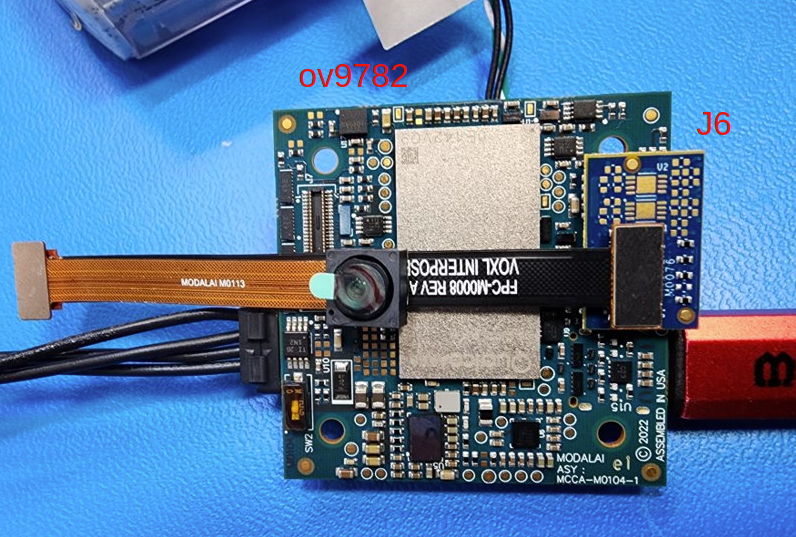
Third setup: 1 tracking OV7251 (M0014) into a M0076 (SDK 1.1.0)
This camera only work in port J7 with 0 cameras recognized on port J6
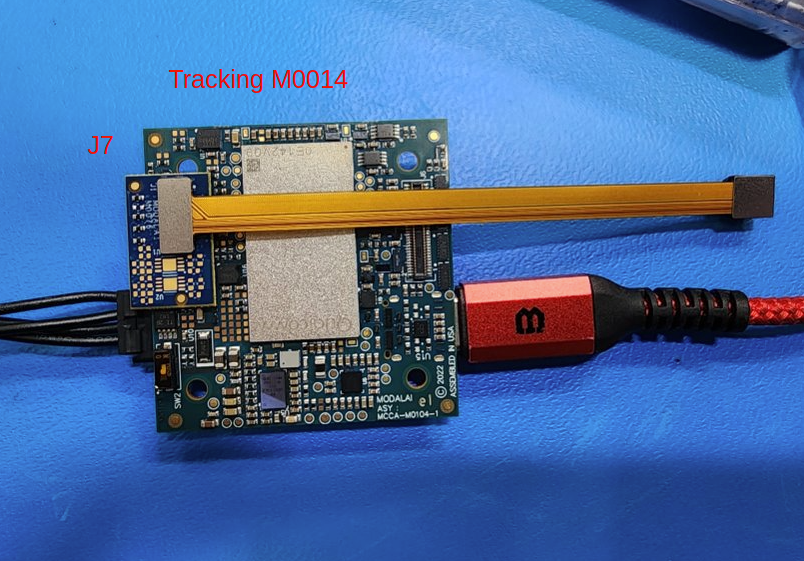
If possible I would like to be able to use either port for the cameras so anything you can point me to or any info is appreciated.
-
Hello,
I've been testing various camera setups for the Voxl 2 mini and have run into problems with certain cameras not working in certain ports and was hoping I could get some clarification if I am missing a setting or if the cameras just aren't compatible with certain ports.First setup: 2 hires IMX678 cameras plugged into the M0084 dual camera adapter with a M0135 interface board. (SDK 1.0.0)
With this setup I was only able to get the cameras to show up when connected to port J7, but my understanding from this (https://docs.modalai.com/voxl2-mini-image-sensors/#hires) is they should work in either J6 or J7 but when plugged in to J6 they don't show up at all under voxl-camera-server -l.Second setup: 1 OV9782 plugged into M0008 with a M0076 (SDK 1.1.0)
This setup only work with the camera plugged into port J6 and was not recognized plugged into port J7.
Third setup: 1 tracking OV7251 (M0014) into a M0076 (SDK 1.1.0)
This camera only work in port J7 with 0 cameras recognized on port J6
If possible I would like to be able to use either port for the cameras so anything you can point me to or any info is appreciated.
@mkriesel Yes, we only support specific configurations. You can see them documented here: https://docs.modalai.com/voxl2-camera-configs/
-
@mkriesel Yes, we only support specific configurations. You can see them documented here: https://docs.modalai.com/voxl2-camera-configs/
@Moderator ok, is this the most up to date list for the voxl2-mini? I'm on SDK 1.1.0 and that page only has up to 1.0.0. Is it possible to have 2 imx678 working off of port J6? I can only get one working on the lower connection but not the one on the upper connection.
-
@Moderator ok, is this the most up to date list for the voxl2-mini? I'm on SDK 1.1.0 and that page only has up to 1.0.0. Is it possible to have 2 imx678 working off of port J6? I can only get one working on the lower connection but not the one on the upper connection.
@Moderator for others who find the question and need an answer.
I believe that @mkriesel managed to resolve the issue when he figured out that driver name needed to be changed depending on which connector he wanted to connect the camera to:
-
com.qti.sensormodule.imx678_0.bin for J6
-
com.qti.sensormodule.imx678_2.bin for J7
This doesn't seem to be mentioned in the documentation, or at least we couldn't find it mentioned.
Cheers,
Brendon. -
-
@Moderator for others who find the question and need an answer.
I believe that @mkriesel managed to resolve the issue when he figured out that driver name needed to be changed depending on which connector he wanted to connect the camera to:
-
com.qti.sensormodule.imx678_0.bin for J6
-
com.qti.sensormodule.imx678_2.bin for J7
This doesn't seem to be mentioned in the documentation, or at least we couldn't find it mentioned.
Cheers,
Brendon.@Brendon , when VOXL2 and VOXL2 mini boot up, the camera framework looks for
sensormodule*.binfiles in/usr/lib/cameradirectory and attempts to detect the cameras based on the camera-specific register information contained in the.binas well as the camera ID parameter contained inside thesensormodule.binto determine which camera port should be used to detect / use the camera. The index at the end ofsensorumodulefile name (_0,_1,_2, etc) is only used to differentiate the files - the camera framework is not actually using that index for camera addressing.The sensormodule bin files primarily contain the camera identification information, the camera mode descriptions, and register settings for each camera mode.
com.qti.sensormodule*.binfiles for the same camera type are not all generated from identical source (but almost), they contain some specific information such as camera ID (which is also contained in the file name itself) and perhaps other information specific to each camera port. However, since just renaming the imx678 driver seems to have worked, let me check if indeed this is a fully supported solution or something might not work as expected.@modaltb FYI
-
-
@Brendon , when VOXL2 and VOXL2 mini boot up, the camera framework looks for
sensormodule*.binfiles in/usr/lib/cameradirectory and attempts to detect the cameras based on the camera-specific register information contained in the.binas well as the camera ID parameter contained inside thesensormodule.binto determine which camera port should be used to detect / use the camera. The index at the end ofsensorumodulefile name (_0,_1,_2, etc) is only used to differentiate the files - the camera framework is not actually using that index for camera addressing.The sensormodule bin files primarily contain the camera identification information, the camera mode descriptions, and register settings for each camera mode.
com.qti.sensormodule*.binfiles for the same camera type are not all generated from identical source (but almost), they contain some specific information such as camera ID (which is also contained in the file name itself) and perhaps other information specific to each camera port. However, since just renaming the imx678 driver seems to have worked, let me check if indeed this is a fully supported solution or something might not work as expected.@modaltb FYI
OK, here is the clarification regarding camera IDs and sensormodule file names and the general process for camera detection on VOXL2 platforms
- all the camera-related drivers are located in
/usr/lib/camera - the index at the end of
sensormodule.binfilename, such as0incom.qti.sensormodule.imx678_0.binis only used to distinguish the files - the actual index at the end is not being used for anything - each
sensormodule.binfile contains acamera_idparameter, which is read by the camera framework after loading the.binfile - the
camera_idis then used by the Kernel to look up the specific port information to be used for communication with the specific camera, including (but not limited to): i2c (cci) bus id, mipi interface id, reset pin and others. This information is mapped to each camera port in the Linux Device Tree. - with the above information (all basically mapped to a single camera ID), the camera framework knows how to turn on the camera, which bus to use for i2c communication and which mipi port to receive the image data from
- after obtaining the port information, the camera framework uses other information in
sensormodule.binto detect the camera (query theWHOAMIregister for camera identification). If the camera is detected, it is considered to be available for the camera framework to use (not much else is happening until you actually open the camera using thevoxl-camera-server, for example). The camera framework also loads the list of available streaming modes which is also contained in thesensormodule.bin - after the camera is queried / identified, it is then powered off
- when
voxl-camera-serveris started, it sees all the cameras that the camera framework already detected and their corresponding resolutions / modes. Based on thevoxl-camera-server.conf, the appropriate cameras are turned on again and set to stream at the desired resolution / fps. - lastly, for each camera type, there is a single
.sodynamic library (for examplecom.qti.sensor.imx678.so) which contains functions for converting desired exposure and gain values into the register values that need to be sent to the camera.
With all of this in mind, renaming a
sensormodule.binshould achieve nothing because the actual id / number at the end of the file is not used for the camera ID parameter, it is only used for differentiating the files.If there is still an outstanding request to connect IMX678 camera to a port that is currently not supported, please let us know, we can generate and test the new sensormodule.bin files and release them (assuming there are no other unexpected issues)
Alex
- all the camera-related drivers are located in


Reading along? Create a free ModalAI Forum account to join in.
With an account you can reply, ask your own question, get an email when a ModalAI engineer answers, and mark the reply that solved it. Your place in each thread is saved between visits.
Questions about VOXL, Flight Core, ESCs and ModalAI drones are answered here by the engineers who build them.
Register Login