
pMDDL2350 USB BUS problem
-
Hi All,
So this is a new one for me. We had the base carrier board plugged into an Nvidia Jetson, this setup was working flawlessly for weeks. A few days ago, we added another USB device to the Jetson and noticed that the MH Carrier board started having connectivity issues. These were ultimately not IP networking issues, but instead the USB BUS itself was complaining of a lack of power as noted in this log snippet:
[459105.042939] usb 1-4.2: new high-speed USB device number 59 using xhci_hcd
[459105.149176] usb 1-4.2: New USB device found, idVendor=1f94, idProduct=3002, bcdDevice= 4.14
[459105.149181] usb 1-4.2: New USB device strings: Mfr=1, Product=2, SerialNumber=3
[459105.149183] usb 1-4.2: Product: pMDDL2350AES256
[459105.149185] usb 1-4.2: Manufacturer: Microhard
[459105.149186] usb 1-4.2: SerialNumber: 1524269
[459105.149430] usb 1-4.2: rejected 1 configuration due to insufficient available bus power
[459105.149433] usb 1-4.2: no configuration chosen from 1 choice
[459106.801097] smsc75xx 1-4.1:1.0 eth0: link up, 100Mbps, full-duplex, lpa 0x4DE1
[459112.404859] smsc75xx 1-4.1:1.0 eth0: link down
[459113.998390] smsc75xx 1-4.1:1.0 eth0: link up, 100Mbps, full-duplex, lpa 0x4DE1
I do want to stress that this problem is persisting through multiple radios and carrier boards and on two different linux computers (the above snippet is actually with a brand new radio and carrier board on another Linux desktop). Since we have never seen this error before, our guess is to look at the external 5V connection as the possible point of failure?
What would be the ideal way to troubleshoot this? As I am writing this I am wondering if my power source for the external 5V is stable.
Thanks,
Jason
-
Hi All,
So this is a new one for me. We had the base carrier board plugged into an Nvidia Jetson, this setup was working flawlessly for weeks. A few days ago, we added another USB device to the Jetson and noticed that the MH Carrier board started having connectivity issues. These were ultimately not IP networking issues, but instead the USB BUS itself was complaining of a lack of power as noted in this log snippet:
[459105.042939] usb 1-4.2: new high-speed USB device number 59 using xhci_hcd
[459105.149176] usb 1-4.2: New USB device found, idVendor=1f94, idProduct=3002, bcdDevice= 4.14
[459105.149181] usb 1-4.2: New USB device strings: Mfr=1, Product=2, SerialNumber=3
[459105.149183] usb 1-4.2: Product: pMDDL2350AES256
[459105.149185] usb 1-4.2: Manufacturer: Microhard
[459105.149186] usb 1-4.2: SerialNumber: 1524269
[459105.149430] usb 1-4.2: rejected 1 configuration due to insufficient available bus power
[459105.149433] usb 1-4.2: no configuration chosen from 1 choice
[459106.801097] smsc75xx 1-4.1:1.0 eth0: link up, 100Mbps, full-duplex, lpa 0x4DE1
[459112.404859] smsc75xx 1-4.1:1.0 eth0: link down
[459113.998390] smsc75xx 1-4.1:1.0 eth0: link up, 100Mbps, full-duplex, lpa 0x4DE1
I do want to stress that this problem is persisting through multiple radios and carrier boards and on two different linux computers (the above snippet is actually with a brand new radio and carrier board on another Linux desktop). Since we have never seen this error before, our guess is to look at the external 5V connection as the possible point of failure?
What would be the ideal way to troubleshoot this? As I am writing this I am wondering if my power source for the external 5V is stable.
Thanks,
Jason
HI @Mastermind
We've seen this before, and it's strictly a USB device reporting bug.
With USB enumeration, hosts report their current capability, and devices report their current demands.
There are utilities in Linux to deep dive into the specifics, I think it's called USBView.
You can run simple command line options to show the extended enumeration settings.
Here is a simple view of one such expansion, where you can see the "MaxPower Needed: 0mA " is because this device is properly set for Self-powered, so it does not need any power from the host.
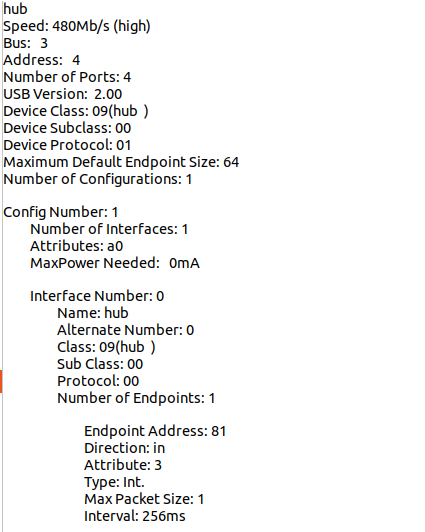
My guess is your Host and our MH board never had any issue (we tell our hub it is self-powered). But now when you add in this new device, it may be reporting it wants a full 500mA, and the host cannot deliver that.
Even if the actual HW is capable, sometimes these SW settings will prevent operation.
We saw it on a few simple Arduino based joysticks. Most of them must just copy->paste USB enumeration code from legacy devices, and they never actually update to either self-powered or the current demand.
The only way we know to fix it is to get updated drivers from the vendor of that device with proper USB reporting. If it is indeed an Arduino or other OpenSource SW device, you will want to dig in to the USB settings portion and make sure those registers are set correct for your HW architecture. -
HI @Mastermind
We've seen this before, and it's strictly a USB device reporting bug.
With USB enumeration, hosts report their current capability, and devices report their current demands.
There are utilities in Linux to deep dive into the specifics, I think it's called USBView.
You can run simple command line options to show the extended enumeration settings.
Here is a simple view of one such expansion, where you can see the "MaxPower Needed: 0mA " is because this device is properly set for Self-powered, so it does not need any power from the host.
My guess is your Host and our MH board never had any issue (we tell our hub it is self-powered). But now when you add in this new device, it may be reporting it wants a full 500mA, and the host cannot deliver that.
Even if the actual HW is capable, sometimes these SW settings will prevent operation.
We saw it on a few simple Arduino based joysticks. Most of them must just copy->paste USB enumeration code from legacy devices, and they never actually update to either self-powered or the current demand.
The only way we know to fix it is to get updated drivers from the vendor of that device with proper USB reporting. If it is indeed an Arduino or other OpenSource SW device, you will want to dig in to the USB settings portion and make sure those registers are set correct for your HW architecture.Here is the link we had for USB Tree Viewer....
https://www.uwe-sieber.de/usbtreeview_e.html -
Here is the link we had for USB Tree Viewer....
https://www.uwe-sieber.de/usbtreeview_e.htmlI found the old example we had (circa ~2021) where we were trying to use a USB joystick, and since it was reporting it needed 500mA (see the right side "MaxPower Needed: 500mA" , it basically claimed all of the system's resources and rejected enumeration from anything else....
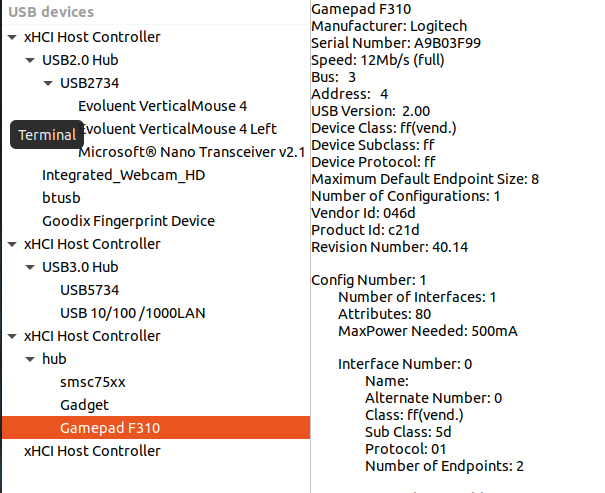
So, this tool is nifty and helpful, we recommend you get it.
It may even have editing features in it to override settings, but I am not sure. I am just HW... but I recall our SW engineer telling me he was able to change settings on the joystick to fix everything. Not sure if he changed it at the joystick or from the host OS side....
In theory, if the power demand is behind the hub (bus 3 here is downstream of the hub), the host OS should not care about it, but sometimes they have these bugs and do care, rejecting enumeration. I suspect this might be your scenario. -
I found the old example we had (circa ~2021) where we were trying to use a USB joystick, and since it was reporting it needed 500mA (see the right side "MaxPower Needed: 500mA" , it basically claimed all of the system's resources and rejected enumeration from anything else....
So, this tool is nifty and helpful, we recommend you get it.
It may even have editing features in it to override settings, but I am not sure. I am just HW... but I recall our SW engineer telling me he was able to change settings on the joystick to fix everything. Not sure if he changed it at the joystick or from the host OS side....
In theory, if the power demand is behind the hub (bus 3 here is downstream of the hub), the host OS should not care about it, but sometimes they have these bugs and do care, rejecting enumeration. I suspect this might be your scenario.@Vinny Thanks! That is very interesting information.
So if I understand correctly, you are saying that when we added the ADS-B SDR radio it somehow changed the USB bus causing it to demand power for each device? My issue is that we removed everything except the ModalAI Carrier Board and still get the error (which we never got previously). Oddly, putting the carrier into another Linux computer produced the same error... this led us to think that the 5VDC wasn't being supplied properly... but now you're saying this might actually just be software. Why would the problem manifest without ANY other USB devices installed except the MH Carrier board?
-
@Vinny Thanks! That is very interesting information.
So if I understand correctly, you are saying that when we added the ADS-B SDR radio it somehow changed the USB bus causing it to demand power for each device? My issue is that we removed everything except the ModalAI Carrier Board and still get the error (which we never got previously). Oddly, putting the carrier into another Linux computer produced the same error... this led us to think that the 5VDC wasn't being supplied properly... but now you're saying this might actually just be software. Why would the problem manifest without ANY other USB devices installed except the MH Carrier board?
Hi @Mastermind
All I know is that the specific error you pointed to has nothing to do with physical power capability.
The specific failure in Linux "Rejected Configuration due to insufficient available bus power" is strictly due to messaging between host OS and USB drivers, and USB devices downstream. We have seen it, and we had Microchip confirm with us that error is a SW element. I am 100% confident on this. USB Tree View will show you exactly which combination of devices is reporting what power so you can start to isolate the issue. In our experience, it has been Linux drivers working with OpenSource USB devices exposing bugs in various Linux USB drivers... they are not all the same or correct.OS's do not measure VBUS. If VBUS has an issue, the Hub will handle it for our design, and power cycle the device if there is a fault. In most designs, maybe the power control device may flag the OS there was an overpower event, but that is not where the current reporting comes from.
Please feel free to measure VBUS, I suspect you will not see any perturbations on there indicating low power (even if it is a competitor's product, I have confidence that is not your issue, especially since our dongles do not source USB VBUS for power ... they have the external 5V supply which you provide). VBUS on our designs is only used as a "detect" function for enumeration.It is possible the linux OS driver for USB enumeration was modified by that device if you installed any device drivers... but I am venturing out of my wheel house... if you can remove any drivers you installed for the SDR radio, and try again, that may help confirm that.
Then, try to add in the SDR radio after enumeration with the MH radio.
All the while, I would get USB Tree View and see what you can observe with the device reporting demands.
Another option I would explore is the configuration of the SDR radio. I wonder if it's possible it is reporting it as a permanently connected device (like an embedded USB device), set for bus powered, and hogging all the resources. Even after you remove it... if it is setup as a permanent connected device, the OS may not be releasing the resources for it. So, uninstalling any drivers may help there.
If you have USB Tree View, you can send the config values (attributes, revision, config, etc reported) to the vendor to ask them to explain the register settings, and if they are correct or not.Hope I am being clear... I'm not the best writer, nor a SW person, but I am very familiar with USB, and we have had this exact issue before, and learned how to fix it.

Reading along? Create a free ModalAI Forum account to join in.
With an account you can reply, ask your own question, get an email when a ModalAI engineer answers, and mark the reply that solved it. Your place in each thread is saved between visits.
Questions about VOXL, Flight Core, ESCs and ModalAI drones are answered here by the engineers who build them.
Register Login