Skip to content
  • Categories
  • Recent
  • Tags
  • Popular
  • Users
  • Groups
Collapse
Brand Logo

ModalAI Forum

  1. ModalAI Support Forum
  2. Autonomy: VIO, Mapping and Navigation
  3. VOXL2 QVIO Pipeline Failing to Run

VOXL2 QVIO Pipeline Failing to Run

Scheduled Pinned Locked Moved Unsolved Autonomy: VIO, Mapping and Navigation
vio
4 Posts 2 Posters 1.0k Views 1 Watching
  • Oldest to Newest
  • Newest to Oldest
  • Most Votes
Reply
  • Reply as topic
Log in to reply
This topic has been deleted. Only users with topic management privileges can see it.
  • Jeremy FrederickJ Offline
    Jeremy FrederickJ Offline
    Jeremy Frederick
    Regular
    wrote on last edited by
    #1

    Working with a VOXL 2 Tracking + Hires, voxl-suite 1.0.0.

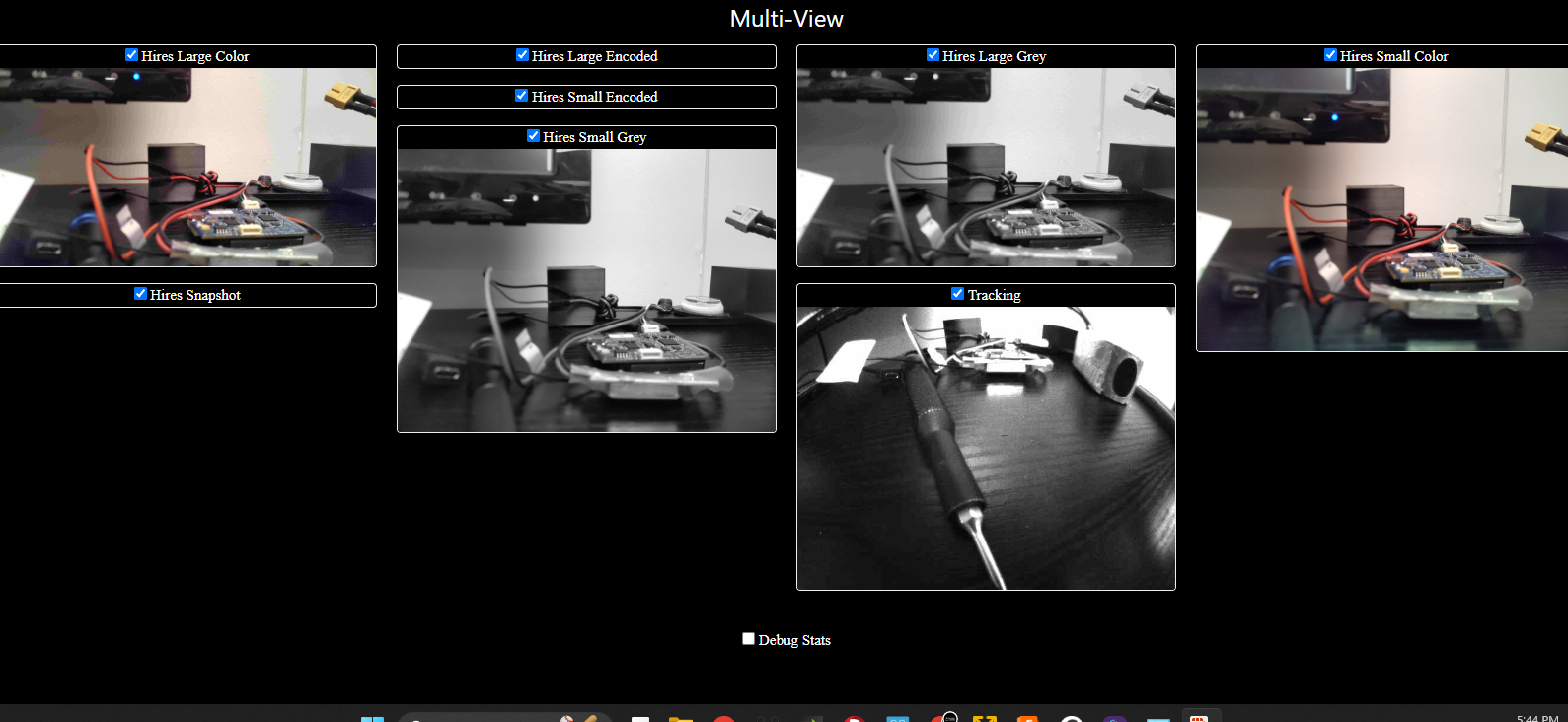
    Our team is having trouble getting the QVIO-server to run, our tracking camera is feeding into the VOXL portal with no issues, and we're able to see all the data from the camera-server. We've set the QVIO configuration to read from the imu_apps as instructed, and we're able to see imu_apps data when using the inspect tool.
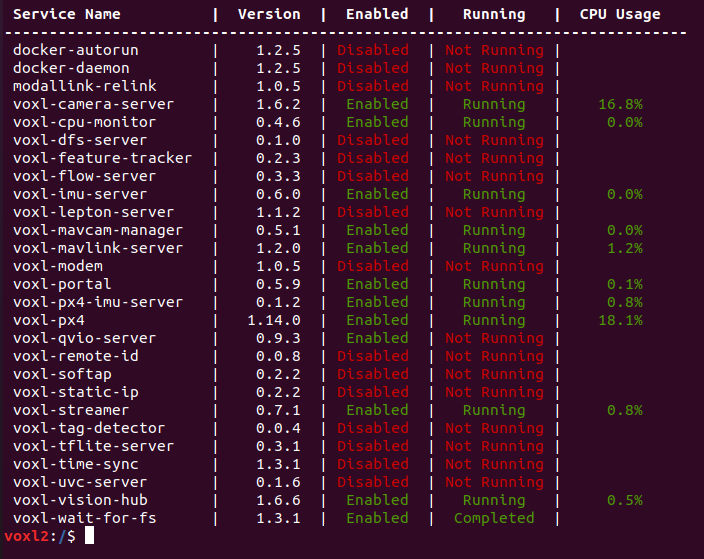
    QVIO_NotRunning.png
    Tracking.png

    Are we missing a prerequisite pipeline? The MPA, SDK, and cameras have all been configured for the VOXL 2.

    Jeremy FrederickJ 1 Reply Last reply
    0
    • Jeremy FrederickJ Jeremy Frederick

      Working with a VOXL 2 Tracking + Hires, voxl-suite 1.0.0.

      Our team is having trouble getting the QVIO-server to run, our tracking camera is feeding into the VOXL portal with no issues, and we're able to see all the data from the camera-server. We've set the QVIO configuration to read from the imu_apps as instructed, and we're able to see imu_apps data when using the inspect tool.

      QVIO_NotRunning.png
      Tracking.png

      Are we missing a prerequisite pipeline? The MPA, SDK, and cameras have all been configured for the VOXL 2.

      Jeremy FrederickJ Offline
      Jeremy FrederickJ Offline
      Jeremy Frederick
      Regular
      wrote on last edited by
      #2

      @Jeremy-Frederick

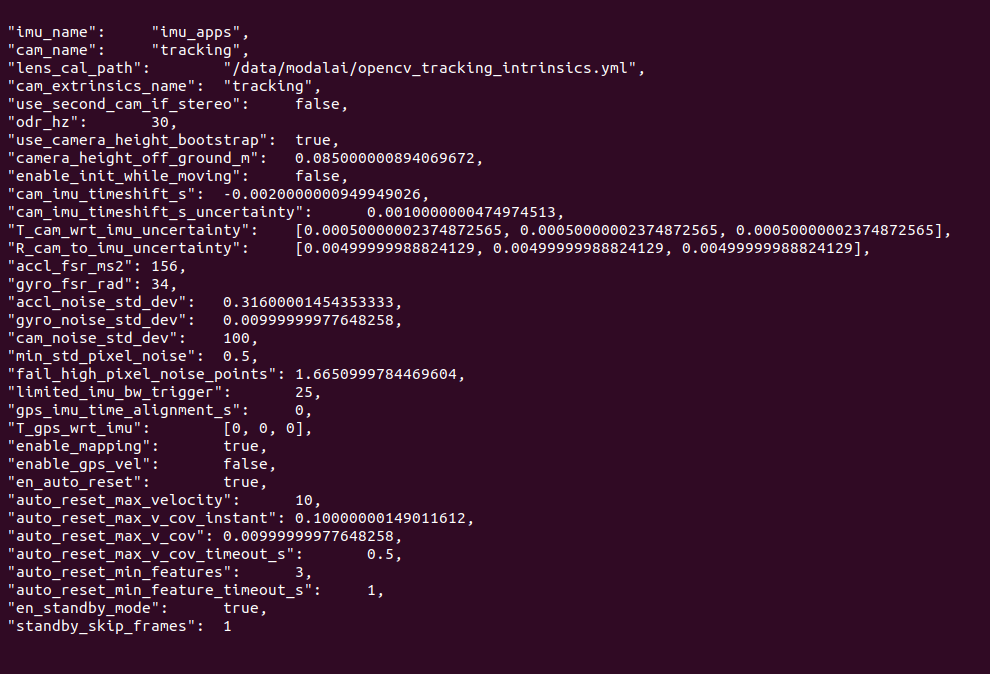
      CONFFile.png

      Here is our voxl-qvio-server.conf file for reference

      tomT 1 Reply Last reply
      0
      • Jeremy FrederickJ Jeremy Frederick

        @Jeremy-Frederick

        CONFFile.png

        Here is our voxl-qvio-server.conf file for reference

        tomT Offline
        tomT Offline
        tom
        admin
        wrote on last edited by
        #3

        @Jeremy-Frederick What do you see with systemctl status voxl-qvio-server or journalctl -u voxl-qvio-server for the full log

        Jeremy FrederickJ 1 Reply Last reply
        0
        • tomT tom

          @Jeremy-Frederick What do you see with systemctl status voxl-qvio-server or journalctl -u voxl-qvio-server for the full log

          Jeremy FrederickJ Offline
          Jeremy FrederickJ Offline
          Jeremy Frederick
          Regular
          wrote on last edited by
          #4

          @tom SOLVED, thanks Tom, that command line prompt showed me that I needed to voxl-configure-extrinsics. Thank you!

          1 Reply Last reply
          1

          Reading along? Create a free ModalAI Forum account to join in.

          With an account you can reply, ask your own question, get an email when a ModalAI engineer answers, and mark the reply that solved it. Your place in each thread is saved between visits.

          Questions about VOXL, Flight Core, ESCs and ModalAI drones are answered here by the engineers who build them.

          Register Login
          Reply
          • Reply as topic
          Log in to reply
          • Oldest to Newest
          • Newest to Oldest
          • Most Votes


          ModalAI
          Categories Recent Tags ModalAI.com Docs
          © 2026 ModalAI® · Accelerating autonomy for smaller, smarter, safer drones · Powered by NodeBB
          • Login

          • Don't have an account? Register

          • Login or register to search.
          • First post
            Last post
          0
          • Categories
          • Recent
          • Tags
          • Popular
          • Users
          • Groups