
RB5 System Clock Issues
-
Hello,
We've noticed that on our RB5, the system clock seems very unstable, even with chrony disabled and internet off.
We have captured system clock vs steady (monotonic) clock, and plotted the difference in time.
For the RB5, it appears that that a bias is randomly introduced, almost as if something is trying and failing to synchronize the system clock.
See the following plots, showing the issue on RB5 vs m500.

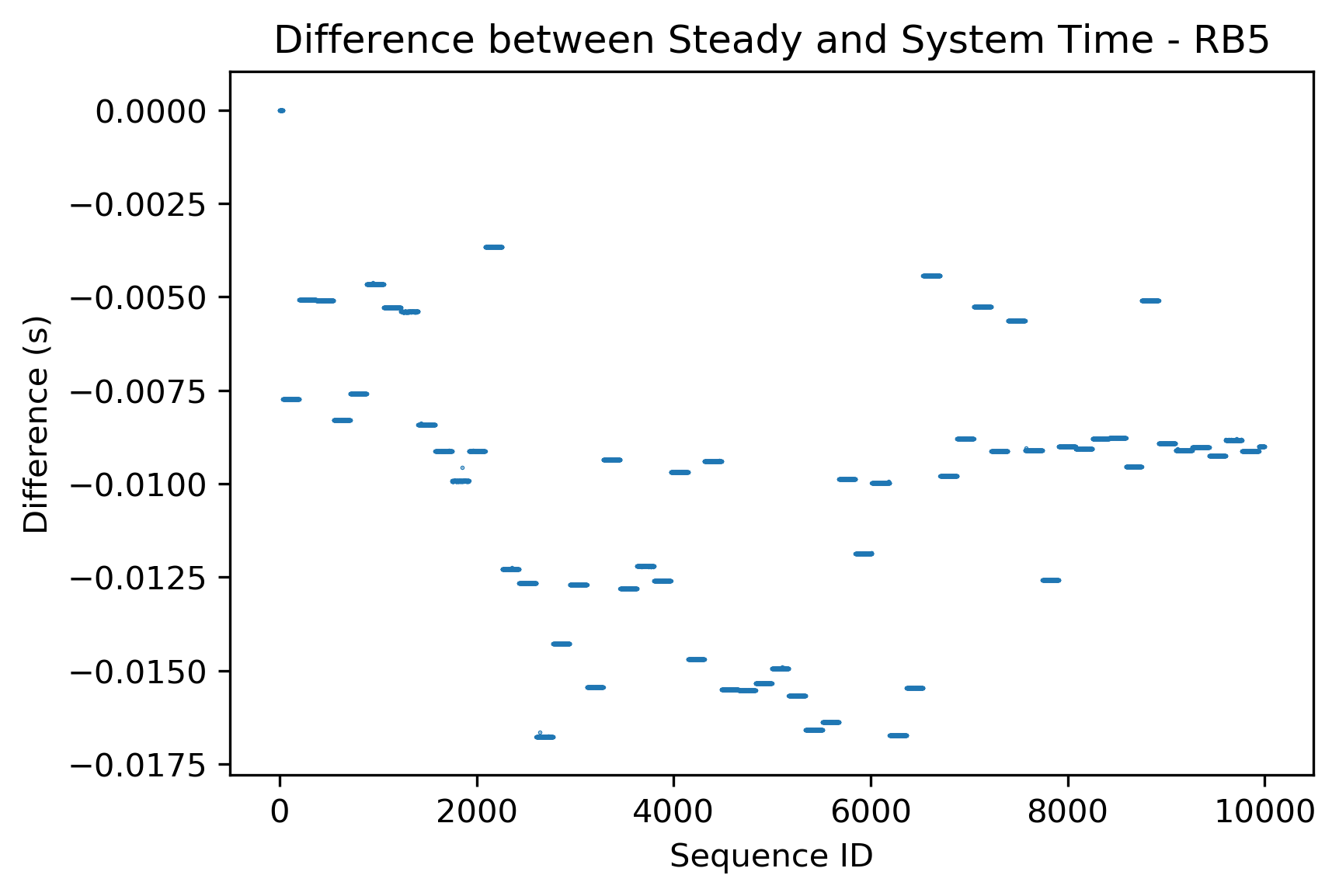
This issue makes the system clock unusable. How can we resolve this issue for the RB5? This causes big problems when using ROS, because ROS uses the system clock for timing.
Using SDK 0.9.5 on RB5, see this post for additional system information: https://forum.modalai.com/post/11990
Here is a script you can use to reproduce these issues:
#include <iomanip>
#include <fstream>
#include <chrono>
#include <iostream>
#include <thread>

int main(int argc, char **argv)
{
    // Create file to record clock stamps
    std::ofstream filestream;
    filestream.open("clocks_log.csv");
    if (!filestream.is_open()) {
        std::cerr << "Could not open log file" << std::endl;
        return 1;
    }

    // Write CSV headers to the file
    filestream << "chrono_system_clock,chrono_steady_clock\n";

    // Record stamps to 9 decimal places
    filestream << std::fixed << std::setprecision(9);

    // Define variables for storing time
    std::chrono::steady_clock::time_point steady_stamp;
    std::chrono::system_clock::time_point system_stamp;

    // Capture start time for both clocks
    const std::chrono::steady_clock::time_point steady_start = std::chrono::steady_clock::now();
    const std::chrono::system_clock::time_point system_start = std::chrono::system_clock::now();

    for (int i=0; i < 60000; ++i)
    {
        // Capture time stamps for both clocks
        steady_stamp = std::chrono::steady_clock::now();
        system_stamp = std::chrono::system_clock::now();

        // Capture change in time since start (in seconds)
        auto steady_seconds = std::chrono::duration<double>(steady_stamp - steady_start).count();
        auto system_seconds = std::chrono::duration<double>(system_stamp - system_start).count();

        filestream << system_seconds  << "," << steady_seconds << "\n";

        // Note that this is not an expected stamp dt
        std::this_thread::sleep_for(std::chrono::microseconds(1000));
    }

    // Close the file
    filestream.close();

    return 0;
};
You can then run this python script to visualize the data:
import pandas as pd


df = pd.read_csv('clocks_log.csv', dtype=np.float64)

# Plot the differences in each time series versus chrono steady
plt.title("Difference between Steady and System Time")
plt.scatter(df.index, df['chrono_system_clock'] - df['chrono_steady_clock'], 0.1)
plt.ylabel('Difference (s)')
plt.xlabel('Sequence ID')
plt.show()
Again, no issues for us when testing on our own PCs or on the m500, but significant issues on the RB5.
-
E eric referenced this topic on
-
Hello,
We've noticed that on our RB5, the system clock seems very unstable, even with chrony disabled and internet off.
We have captured system clock vs steady (monotonic) clock, and plotted the difference in time.
For the RB5, it appears that that a bias is randomly introduced, almost as if something is trying and failing to synchronize the system clock.
See the following plots, showing the issue on RB5 vs m500.
This issue makes the system clock unusable. How can we resolve this issue for the RB5? This causes big problems when using ROS, because ROS uses the system clock for timing.
Using SDK 0.9.5 on RB5, see this post for additional system information: https://forum.modalai.com/post/11990
Here is a script you can use to reproduce these issues:
#include <iomanip>
#include <fstream>
#include <chrono>
#include <iostream>
#include <thread>

int main(int argc, char **argv)
{
    // Create file to record clock stamps
    std::ofstream filestream;
    filestream.open("clocks_log.csv");
    if (!filestream.is_open()) {
        std::cerr << "Could not open log file" << std::endl;
        return 1;
    }

    // Write CSV headers to the file
    filestream << "chrono_system_clock,chrono_steady_clock\n";

    // Record stamps to 9 decimal places
    filestream << std::fixed << std::setprecision(9);

    // Define variables for storing time
    std::chrono::steady_clock::time_point steady_stamp;
    std::chrono::system_clock::time_point system_stamp;

    // Capture start time for both clocks
    const std::chrono::steady_clock::time_point steady_start = std::chrono::steady_clock::now();
    const std::chrono::system_clock::time_point system_start = std::chrono::system_clock::now();

    for (int i=0; i < 60000; ++i)
    {
        // Capture time stamps for both clocks
        steady_stamp = std::chrono::steady_clock::now();
        system_stamp = std::chrono::system_clock::now();

        // Capture change in time since start (in seconds)
        auto steady_seconds = std::chrono::duration<double>(steady_stamp - steady_start).count();
        auto system_seconds = std::chrono::duration<double>(system_stamp - system_start).count();

        filestream << system_seconds  << "," << steady_seconds << "\n";

        // Note that this is not an expected stamp dt
        std::this_thread::sleep_for(std::chrono::microseconds(1000));
    }

    // Close the file
    filestream.close();

    return 0;
};
You can then run this python script to visualize the data:
import pandas as pd


df = pd.read_csv('clocks_log.csv', dtype=np.float64)

# Plot the differences in each time series versus chrono steady
plt.title("Difference between Steady and System Time")
plt.scatter(df.index, df['chrono_system_clock'] - df['chrono_steady_clock'], 0.1)
plt.ylabel('Difference (s)')
plt.xlabel('Sequence ID')
plt.show()
Again, no issues for us when testing on our own PCs or on the m500, but significant issues on the RB5.
@Moderator, has anyone been able to replicate this issue? Is this there a known solution to this?
-
@Moderator, has anyone been able to replicate this issue? Is this there a known solution to this?
@Moderator, we've observed that when we kill voxl-px4-imu-server, the timing discrepancy disappears. We of course need this to be running to get IMU data, but this process at least seems to be related to the issue.
-
@Moderator, we've observed that when we kill voxl-px4-imu-server, the timing discrepancy disappears. We of course need this to be running to get IMU data, but this process at least seems to be related to the issue.
FWIW, we are not seeing this issue on the VOXL2 flightdeck (which does not use voxl-px4-imu-server)
@Moderator Is there someone else I should tag for this issue if you are unable to provide support?
Reading along? Create a free ModalAI Forum account to join in.
With an account you can reply, ask your own question, get an email when a ModalAI engineer answers, and mark the reply that solved it. Your place in each thread is saved between visits.
Questions about VOXL, Flight Core, ESCs and ModalAI drones are answered here by the engineers who build them.
Register Login