Skip to content
  • Categories
  • Recent
  • Tags
  • Popular
  • Users
  • Groups
Collapse
Brand Logo

ModalAI Forum

  1. ModalAI Support Forum
  2. Ask your questions right here!
  3. RC Missing parameters on Sentinel

RC Missing parameters on Sentinel

Scheduled Pinned Locked Moved Ask your questions right here!
9 Posts 2 Posters 1.6k Views 1 Watching
  • Oldest to Newest
  • Newest to Oldest
  • Most Votes
Reply
  • Reply as topic
Log in to reply
This topic has been deleted. Only users with topic management privileges can see it.
  • M Offline
    M Offline
    martygp95
    Contributor
    wrote on last edited by
    #1

    Hi, I just updated one Sentinel to the latest image available (VOXL2 SDK 1.0.0, released in July 12). The flashing was succesful and the Sentinel was assigned with a proper SKU number (MRB-D0006-4-V1-C4).
    I tried after to bind the RC (Spektrum Dx6e) using the command qrb5165-bind -s inside the drone terminal; the binding was successful (receiver light goes in constant orange). But when I try to assign the channels to the switches in QGrounControl, this pop-up appears (sometimes with more parameters):

    e4e6edd1-8b3f-48ca-9f1d-eac17d373b93-image.png

    I can see the raw data from mavlink changing values as I move the toggles in the RC, but it seems that even though I assing for example, the Kill Switch into one of the proper channels, the QGroundControl does not notify that the KillSwitch is Engaged or Disengaged. For the previous voxl-version, the platform 0.9.5, I was able to bind the RC and none of this pop-ups where happening. Would appreciate any feedback! Thanks

    1 Reply Last reply
    0
    • M Offline
      M Offline
      martygp95
      Contributor
      wrote on last edited by
      #2

      Hi again, could it be that QGroundControl still does not support this new version? otherwise I cannot perform a manual flight as I cannot configure the RC parameters

      Eric KatzfeyE 1 Reply Last reply
      0
      • M martygp95

        Hi again, could it be that QGroundControl still does not support this new version? otherwise I cannot perform a manual flight as I cannot configure the RC parameters

        Eric KatzfeyE Online
        Eric KatzfeyE Online
        Eric Katzfey
        ModalAI Team
        wrote on last edited by
        #3

        @martygp95 What version of QGC are you using? You shouldn't be seeing those messages. What communication method are you using for QGC? Perhaps it is having trouble sending the parameter list over the link on QGC startup?

        M 1 Reply Last reply
        0
        • Eric KatzfeyE Eric Katzfey

          @martygp95 What version of QGC are you using? You shouldn't be seeing those messages. What communication method are you using for QGC? Perhaps it is having trouble sending the parameter list over the link on QGC startup?

          M Offline
          M Offline
          martygp95
          Contributor
          wrote on last edited by martygp95
          #4

          @Eric-Katzfey Could be, I am using this config to connect to the Sentinel (IP is 192.168.1.75)
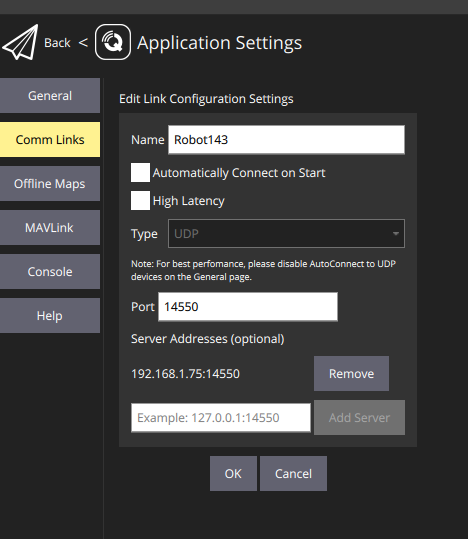
          b2e25b85-308f-432e-ac1c-582f3e20100b-image.png

          Also, the QGroundControl version is 4.2.8:
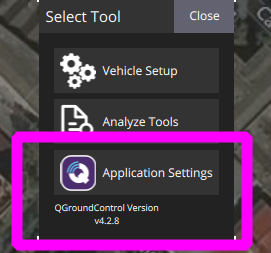
          89a2bba0-86e0-4868-b176-9b6b014893e5-image.png

          I normally used the qgc_ip param to directly connect the drone to QGC in voxl-vision-px4.conf,when the service was there but now with the new version I do not know if that param is still available somewhere.

          Eric KatzfeyE 1 Reply Last reply
          0
          • M martygp95

            @Eric-Katzfey Could be, I am using this config to connect to the Sentinel (IP is 192.168.1.75)
            b2e25b85-308f-432e-ac1c-582f3e20100b-image.png

            Also, the QGroundControl version is 4.2.8:
            89a2bba0-86e0-4868-b176-9b6b014893e5-image.png

            I normally used the qgc_ip param to directly connect the drone to QGC in voxl-vision-px4.conf,when the service was there but now with the new version I do not know if that param is still available somewhere.

            Eric KatzfeyE Online
            Eric KatzfeyE Online
            Eric Katzfey
            ModalAI Team
            wrote on last edited by
            #5

            @martygp95 Your QGC version should be fine. When you start QGC do you see a little green bar at the top of the screen slowly moving from left to right? And then get a warning about not all parameters were received?

            M 1 Reply Last reply
            0
            • Eric KatzfeyE Eric Katzfey

              @martygp95 Your QGC version should be fine. When you start QGC do you see a little green bar at the top of the screen slowly moving from left to right? And then get a warning about not all parameters were received?

              M Offline
              M Offline
              martygp95
              Contributor
              wrote on last edited by
              #6

              @Eric-Katzfey yes I see the Green bar and then It appears the pop-up

              Eric KatzfeyE 1 Reply Last reply
              0
              • M martygp95

                @Eric-Katzfey yes I see the Green bar and then It appears the pop-up

                Eric KatzfeyE Online
                Eric KatzfeyE Online
                Eric Katzfey
                ModalAI Team
                wrote on last edited by
                #7

                @martygp95 This may indicate a very slow or weak wireless link. Are you using WiFi? Perhaps you have a lot of interference?

                Eric KatzfeyE 1 Reply Last reply
                0
                • Eric KatzfeyE Eric Katzfey

                  @martygp95 This may indicate a very slow or weak wireless link. Are you using WiFi? Perhaps you have a lot of interference?

                  Eric KatzfeyE Online
                  Eric KatzfeyE Online
                  Eric Katzfey
                  ModalAI Team
                  wrote on last edited by
                  #8

                  @Eric-Katzfey QGC asks PX4 for a full list of it's parameters on startup. It's a lot of parameters to transfer (over 600!) so if the wireless link isn't strong enough it may time out and not get all of the parameters.

                  M 1 Reply Last reply
                  0
                  • Eric KatzfeyE Eric Katzfey

                    @Eric-Katzfey QGC asks PX4 for a full list of it's parameters on startup. It's a lot of parameters to transfer (over 600!) so if the wireless link isn't strong enough it may time out and not get all of the parameters.

                    M Offline
                    M Offline
                    martygp95
                    Contributor
                    wrote on last edited by
                    #9

                    @Eric-Katzfey okey, tomorrow I will try to set up a local network with a router and I will let you know!

                    1 Reply Last reply
                    0

                    Hello! It looks like you're interested in this conversation, but you don't have an account yet.

                    Getting fed up of having to scroll through the same posts each visit? When you register for an account, you'll always come back to exactly where you were before, and choose to be notified of new replies (either via email, or push notification). You'll also be able to save bookmarks and upvote posts to show your appreciation to other community members.

                    With your input, this post could be even better 💗

                    Register Login
                    Reply
                    • Reply as topic
                    Log in to reply
                    • Oldest to Newest
                    • Newest to Oldest
                    • Most Votes


                    ModalAI
                    Categories Recent Tags ModalAI.com Docs
                    © 2026 ModalAI® · Accelerating autonomy for smaller, smarter, safer drones · Powered by NodeBB
                    • Login

                    • Don't have an account? Register

                    • Login or register to search.
                    • First post
                      Last post
                    0
                    • Categories
                    • Recent
                    • Tags
                    • Popular
                    • Users
                    • Groups