Skip to content
  • Categories
  • Recent
  • Tags
  • Popular
  • Users
  • Groups
Collapse
Brand Logo

ModalAI Forum

  1. ModalAI Support Forum
  2. Ask your questions right here!
  3. Sentinel Drone - Voxel 2 Arived from factory Bricked

Sentinel Drone - Voxel 2 Arived from factory Bricked

Scheduled Pinned Locked Moved Ask your questions right here!
10 Posts 2 Posters 1.4k Views 2 Watching
  • Oldest to Newest
  • Newest to Oldest
  • Most Votes
Reply
  • Reply as topic
Log in to reply
This topic has been deleted. Only users with topic management privileges can see it.
  • J Offline
    J Offline
    jfunk
    wrote on last edited by
    #1

    After reading the quick star guides and getting my lunix machine set up with the android tools I powered up the drone for the first time and device is not available for adb shell or abd devices. I am using a USB A to C cable as suggested and I tried both ubuntu 22.04 and 18.04 with the same results. I can see the qualcomm device under lsusb.

    Also it appears my order was missing a cable. I got the sentinel drone with the 5g modem and the wifi adon but in the wifi kit there was no cable to plug the dongle to the drone, instead I was sent another voxl power module.

    1 Reply Last reply
    0
    • tomT Offline
      tomT Offline
      tom
      admin
      wrote on last edited by
      #2

      @jfunk What exactly do you see with lsusb on your host PC?

      1 Reply Last reply
      0
      • J Offline
        J Offline
        jfunk
        wrote on last edited by jfunk
        #3

        @tom
        for that USB device i see the following
        Bus 002 Device 010: ID 05c6:901d Qualcomm, Inc. KONA-QRD _SN:817893AD

        1 Reply Last reply
        0
        • tomT Offline
          tomT Offline
          tom
          admin
          wrote on last edited by tom
          #4

          @jfunk Great, that's the mode we expect it to be in so it's booting correctly. For example this is my machine:

          > lsusb | grep Qualcomm                              
          Bus 004 Device 033: ID 05c6:901d Qualcomm, Inc. KONA-QRD _SN:FDF5950D
           
          >  adb devices                                              
          List of devices attached
          1639e2d2	device
          

          It seems as though something ADB just isn't recognizing the device correctly.

          The first thing to try would be:

          adb kill-server
          adb start-server
          adb devices
          

          You can also try running sudo adb devices and if it shows up then the udev rules will likely need to be modified, seen here: https://docs.modalai.com/voxl2-system-image/#missing-adb

          1 Reply Last reply
          0
          • J Offline
            J Offline
            jfunk
            wrote on last edited by
            #5

            @tom Ok i figured it out it was an additional problem that just found a solution for my machine. the android tools were installed in a wired state with how we have our mirror and proxys configured. that just got fixed and had to reinstall the android tools and is now behaving.
            Joe@555785-mitll:~$ adb devices
            List of devices attached
            e4aec865 device

            thank you.

            my second question about the usb cable to connect the wifi dongle was that supposed to come with the wifi kit?

            1 Reply Last reply
            0
            • tomT Offline
              tomT Offline
              tom
              admin
              wrote on last edited by tom
              #6

              @jfunk Is this the kit you bought? https://www.modalai.com/products/voxl-2-wifi-add-on-kit?_pos=1&_sid=4c5bc9495&_ss=r

              If so, is this the cable that is missing?: https://docs.modalai.com/cable-datasheets/#mcbl-00041

              It is supposed to include that cable so if it didn't come with your order I can get one sent to you.

              1 Reply Last reply
              0
              • tomT Offline
                tomT Offline
                tom
                admin
                wrote on last edited by
                #7

                @jfunk I found your order, it looks as though you purchased the WiFi add-on for sentinel, meaning the WiFi dongle would be installed on the Sentinel, is it missing from your drone?

                1 Reply Last reply
                0
                • J Offline
                  J Offline
                  jfunk
                  wrote on last edited by
                  #8

                  @tom said in Sentinel Drone - Voxel 2 Arived from factory Bricked:

                  found your order, it looks as though you purchased the WiFi add-on for sentinel, meaning the WiFi dongle would be installed on the Sen

                  I was sent the alpha USB dongle and an extra Voxl Power module taped together. What is supposed to be installed on the drone for the wifi ad-on? from what i can tell from browsing the documentation it is the alpha dongle. but that was shipped still in its box in the case with the drone.

                  1 Reply Last reply
                  0
                  • tomT Offline
                    tomT Offline
                    tom
                    admin
                    wrote on last edited by
                    #9

                    @jfunk I'm in discussion with our operations team regarding your order. Can you post a picture of what you received?

                    1 Reply Last reply
                    0
                    • J Offline
                      J Offline
                      jfunk
                      wrote on last edited by
                      #10

                      @tom Unfortunately it will be a few days before i can get that to you, but what i can do is list off the items i received.

                      I received one sentinel drone with 5g modem and a set of propellers
                      one pelican case
                      4 batteries
                      2 wall power adapters
                      one alpha wireles dongle
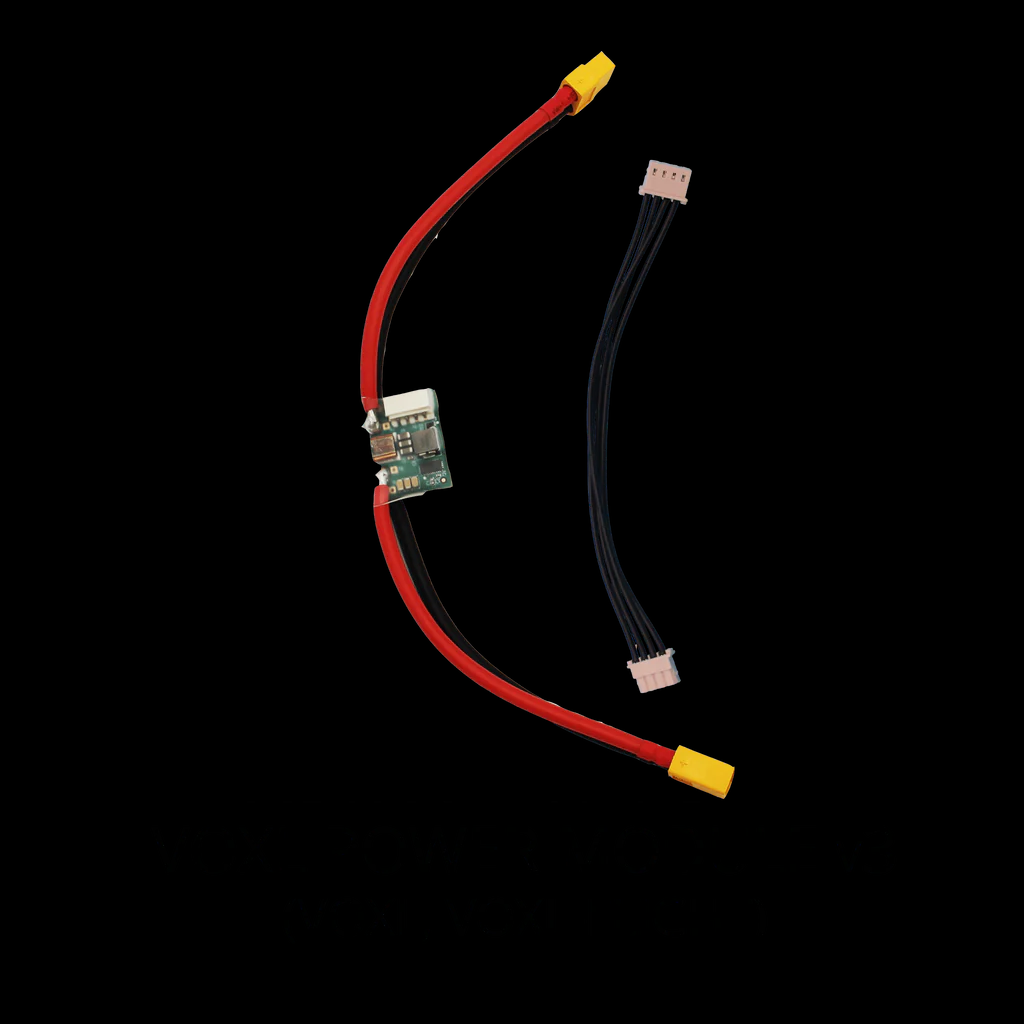
                      one voxl power module as pictured
                      94fd33c4-5068-4aef-be6b-040f4f4c7f58-image.png

                      Note: the power module was taped to the alpha dongle (which was in the alpha box).

                      from looking through the documentation the usb break out for the wifi on the drone with a 5G modem is the 4 pin JST GH for usb2.0 on the modem carrier board itself. it it looks like all i was missing was the cable that plugs into that board and the wifi dongle. i saw a shipping notification so it appears something is on its way. Thank you

                      1 Reply Last reply
                      0

                      Hello! It looks like you're interested in this conversation, but you don't have an account yet.

                      Getting fed up of having to scroll through the same posts each visit? When you register for an account, you'll always come back to exactly where you were before, and choose to be notified of new replies (either via email, or push notification). You'll also be able to save bookmarks and upvote posts to show your appreciation to other community members.

                      With your input, this post could be even better 💗

                      Register Login
                      Reply
                      • Reply as topic
                      Log in to reply
                      • Oldest to Newest
                      • Newest to Oldest
                      • Most Votes


                      ModalAI
                      Categories Recent Tags ModalAI.com Docs
                      © 2026 ModalAI® · Accelerating autonomy for smaller, smarter, safer drones · Powered by NodeBB
                      • Login

                      • Don't have an account? Register

                      • Login or register to search.
                      • First post
                        Last post
                      0
                      • Categories
                      • Recent
                      • Tags
                      • Popular
                      • Users
                      • Groups