
Python package Issue in Docker
-
Hi ModalAI Team,
I am creating Python scripts for ROS and within docker-kinetic on VOXL m500
I have a few questions.
I am installing some python packages such as pandas, opcua etc. I am installing them in roskinetic directory with following command:
python2.7 -m pip install pandas
Some packages were installed and worked just fine but I cannot install pandas. It gives the following error:
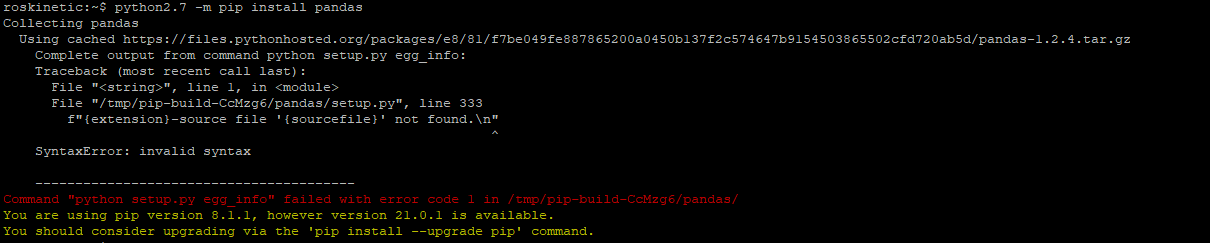
I searched on the internet and it seems like its a problem with Python version.
1) At this point, what would you recommend to fix it?
2) I would like confirm if i am installing to the right place (roskinetic directory in docker)
3) After I power off and on, the Python packages, I installed, goes away and I need to install again. So, Should I run "docker commit" to save? or what am I doing wrong?
I am quite new to the Docker system, I would be so happy to get any help in this topic.
thank you in advance!
Ayberk -
You should build up your Docker images with a Dockerfile and 'docker build'. However, if you make changes in the container that you want to keep then, yes, you can use 'docker commit'. There is a lot of good documentation on the Docker site about all of this.
-
You should build up your Docker images with a Dockerfile and 'docker build'. However, if you make changes in the container that you want to keep then, yes, you can use 'docker commit'. There is a lot of good documentation on the Docker site about all of this.
@Eric-Katzfey Thank you so much for your answer!

Reading along? Create a free ModalAI Forum account to join in.
With an account you can reply, ask your own question, get an email when a ModalAI engineer answers, and mark the reply that solved it. Your place in each thread is saved between visits.
Questions about VOXL, Flight Core, ESCs and ModalAI drones are answered here by the engineers who build them.
Register Login